
Quick verdict
- What it is
- Store information collected; an Apoku editorial summary is not yet published.
- At a glance
-
- Free to download
Categories and search queries
Official categories
- Education
- Utilities
Apoku categories
Key functions
| Function | Availability | Access | Scope | Evidence |
|---|---|---|---|---|
| Free app | Yes | Free | Context-specific | Store published |
Screens
17 store screenshots

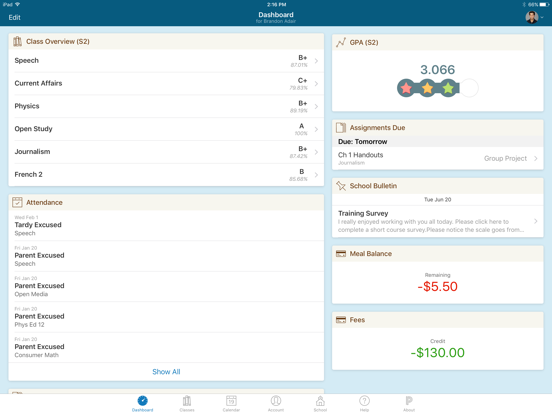

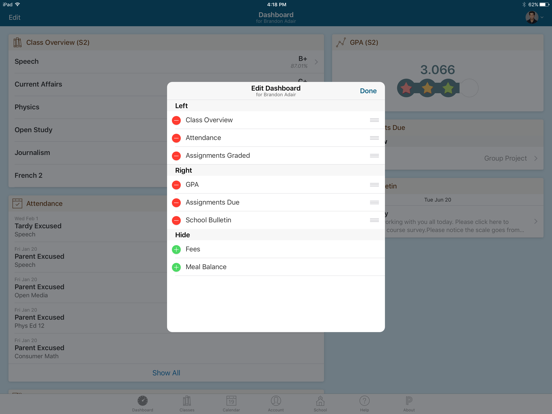
8 store screenshots


Pricing & paywalls
- Free to download
- Free to download
Ratings & reviews
-
5/5Power school
I don’t like the fact they don’t post the grades in a timely manner & my kid is IEP I called cause everyone was saying oh he’s fine then I get an email with a 15 hr notice my kid will fail ELA for the year if an assignment is not fixed over night and we where in NY at a funeral:( bad follow up Very disappointing. ) Great VP & P though if u just talk to them but teachers have hard jobs but why say we are all good 2 weeks before a falling grade ,, not cool I had to pull him from this school before and put him in crazy expensive private school & with 2 tutors to catch up cause up ( 1 lady was 150 an hour ) since they just ignored him in IEP and his almost legally blind ( I had the IEP teacher tell me in front of my young son HE WOULD NEVER HOLD DOWM A JOB AND NEVER COULD GET IN COLLEGE OR TRADE SCHOOL ( I rebuked that out loud asap & held my composure but WOW ) so we pulled him out that school & administrators where in the room that day didn’t say a word , he’s doing great and will probably be a pastor after 400 a week in tutors I’d love to use school tutors but they play on their phones, grade papers, and don’t help so it’s just study hall ) I didn’t believe my older soon so he recorded the entire session she was rude and lazy never got out her chair yeld at kids 2 sit down and SHUT UP while her obese self never moved . she directly told my son infront of the entire IEP meeting that he has great manors and will just sit quietly while the other kids are fussing and getting true help so since he’s kind he is just not tended to / WOW !
3Star1Bird · 29 Sep 2026
-
5/5Great app if teachers would use it!!!
This is a great app but not all teachers use it daily to update grades on assignments Idea San Benito Texas 4th grade teachers don't use because they try to cheat the system (giving students till the last day of a quarter day to submit assignments) on the students that aren't turning in assignments on time and are not on the virtual meetings on time/don't attend which it's like let's hurt the students that are doing their part on attending the meetings and submitting assignments for the students that don't. I've addressed this with the assistant principal and the lame excuses they now are going with changes of submitting grades well when a student attends day-to-day in-person us parents see our child's daily progress same goes with PowerSchool app it allows us, parents, to see our child's daily virtual progress which helps us to see how our child is doing in a daily basis and if we need to intervene and help in an area. I don't believe Idea Public School's head administration invested in this app to misuse taxpayers' money in which teachers/principals are not using the app entirely.
Johanna Lozano · 29 Sep 2026
-
1/5Not a Fan - this app and system causes more problems for parents & students than it solves
Our school system has used PowerSchool for years and the app has gotten progressively more annoying - especially when we get emails or app notifications from the PowerSchool system at midnight saying that an assignment due that day is “missing” - far too late to do anything about the assignment now that it is late. Once we receive a message about some assignment being “missing” we ask our student about only to discover that the work has been submitted but “missing” means not yet graded and PowerSchool has automatically assigned and “E” grade or whatever when the teacher has not yet graded or entered grades for the assignment - so unhelpful and annoying! Additionally when we receive emails or notifications, they often do not specify the class - just that some assignment, identified by the assignment name but _without_ the class name - so then we parents are left searching through the app for the assignment in the classes section of the app to find the assignment that generated the email/notification and then to sort out whether that assignment is just ungraded, actually unfinished, or lost/missing. So incredibly unhelpful! Inevitably at the end of the semester parents and students are badgering teachers to figure out if the “missing” assignments are going to be graded or whether there is still work to do - this a waste of time for teachers, students, and parents.
Mckartha · 29 Sep 2026
-
1/5Glitches and sync problems-not the best app
Edited to Add I also do not understand how a grade will only change 1 point when large grades are put in. Meaning when you have 2 gold grades that are supposed to count for 60% of the final grade get put in but it does not change the final grade at all. For example the overall grade was 85% and then 2 gold grades (which count for 60% of the overall grade) that are A’s 100% are added but the overall grade only increases to a 86%. It makes no sense why 2 A’s for the highest counting grade did not increase the overall grade more?!?! I do not like how the student’s grade will show a number grade and then sometimes change 2 or 3 points when no new graded assignments have been put in to get the calculations. I do not understand why sometimes it changes the number grade when no new assignments or grades have been put in the system. Also the Syncing problems last for days at critical times when the student needs to know what their grade is before deadlines have passed. This is very aggravating for both parent and student. If the student does not know where they stand with their grade or what they made on a grade for days, it makes it impossible to talk to a teacher about a mistake in grades. When deadlines pass for the teacher with the county school system and then nothing can be corrected or changed. All of this makes this app not very helpful during critical times. Glitches need to be fixed!!!!
cbrooke2001 · 29 Sep 2026
-
3/5It’s ok
First of all I wish that it would show you the correct grades for the correct quarter because it kind of makes me out of line sometimes and it stresses me out. But a simple solution is to just go to the schedule and go to the correct quarter and look at the correct quarter to see your correct grades. Second of all the app is very slow. Another simple solution for that is to just turn airplane mode on and then the Apple run smoother but it would be more handy if it worked while you have Internet. I feel this way because sometimes on my phone it does not let me use airplane mode and it would just be more helpful. Third of all it doesn’t show you what assignments you are missing right away. Usually when you go to the schedule and tap on the class you are in it would show you though assignments that you are missing to get your grade up but for me it does not work sometimes because of the whole airplane mode situation. And fourth of all I don’t know why I said the city of the airplane mode because it actually does not work on airplane mode. This app requires Internet and it is being very slow and I have very high quality Internet so that should not be a problem but that is the apps Choice not mine. And fifth of all I kind of wish this was a no Internet app as well because it would just be more helpful but then again if you told any friends and family that this app was a no Internet app then they would try to download it and if your friends and family don’t have Internet and they’re trying to download a no Internet app it is not going to work because the App Store requires Internet so overall this app is a pretty good app but I just wish it would make a little bit of tweaks and if you read this whole thing I hope you have a blessed day
ffgvvufhgfugcugf · 29 Sep 2026
-
1/5
mine does not update. it does not show you if you have a new grade like it may come up as a notification and saying your grade has changed. but when you click on PowerSchool and go in, mine does not show the grades unless I delete PowerSchool and reinstall it and sign back in Even after updating it.
Morgan Elliott · 27 Sep 2026
-
3/5
50% of the time it works 100% of the time
Sacrificial Rook · 27 Sep 2026
-
5/5
Power School is a great app to track your grades Schedule and what time that class is it's very accurate and there are no adds and does not make your phone warmer.
Lorenzo Ram · 27 Sep 2026
-
1/5
it's so broken I can't look at my new schedule nor can I see whenever my grade is updated. It gives me notifications but doesn't let me see anything new like???
Maka Baka · 27 Sep 2026
-
1/5
sucks
Tristan Hamilton · 27 Sep 2026
Privacy & accessibility
Privacy
- Data Linked to You — Product Personalization — User Content — Photos or Videos Developer declared
- Data Linked to You — User Content Developer declared
- Data Not Linked to You — Analytics — Diagnostics — Performance Data Developer declared
- Data Not Linked to You — Analytics — Usage Data — Product Interaction Developer declared
- Data Not Linked to You — Other Purposes — Diagnostics — Crash Data Developer declared
- Data Not Linked to You — Other Purposes — Identifiers — Device ID Developer declared
- Data Not Linked to You — Other Purposes — User Content — Customer Support Developer declared
- Data Not Linked to You — Diagnostics Developer declared
- Data Not Linked to You — Identifiers Developer declared
- Data Not Linked to You — Usage Data Developer declared
- Data Not Linked to You — User Content Developer declared
Accessibility
No accessibility labels collected yet.
Privacy
- Data collected — App functionality — Device or other IDs Developer declared
- Data collected — App functionality — Personal info — User IDs Developer declared
- Data shared — Analytics — App info and performance — Crash logs Developer declared
- Security practices — The developer has committed to follow the Play Families Policy for this app. See the policy — Committed to follow the Play Families Policy Developer declared
- Security practices — The developer doesn’t provide a way for you to request that your data be deleted — Data can’t be deleted Developer declared
- Security practices — Your data is transferred over a secure connection — Data is encrypted in transit Developer declared
Accessibility
No accessibility labels collected yet.
Versions
-
24.11.0
PowerSchool Mobile version 24.11.0.0 is now available for download. Key Update: - Enabled support for push notifications for Messaging Key Fix: - Resolved an issue with SSO and disabled student access
-
24.12.0
PowerSchool Mobile version 24.12.0 is now available for download. Key Update: - New & Enhanced District Code screen Key Fix: - Resolved an issue with SAML authentication
-
25.1.0
Bug fixes
-
25.1.1
PowerSchool Mobile version 25.1.1.0 is now available for download. Key Fix: - Resolved an issue with forms being unavailable
-
25.11.0
PowerSchool Mobile version 25.11.0 is now available for download. Key Update: - Enabled support for MyPowerHub for districts located in Canada - Features disabled by Feature Manager will now be hidden for MyPowerHub districts - Various improvements to performance Key Fix: - Resolved an issue with users experiencing a 500 error - Resolved an issue with users experience an infinite loading screen - Resolved an issue with the student switcher showing the wrong student's data
-
25.11.1
bug fixes and improvements
-
25.1.2
PowerSchool Mobile version 25.1.2 is now available for download. Key enhancements: Improvements to our data sync functionality Key Fixes: Resolved situations that would result in users seeing black screens or infinite loading screens
-
25.12.0
PowerSchool Mobile version 25.12.0.0 is now available for download. Key Updates: - Various improvements to performance - Added support for Resource Links for MyPowerHub customers. Key Fixs: - Resolved an issue with users being silently logged out - Resolved an issue with users seeing a blank screen after logging in - Resolved a crash for iPads on OS 26.1
-
25.1.3
PowerSchool Mobile version 25.1.3 is now available for download. - Minor bug fixes
-
25.4.0
PowerSchool Mobile version 25.4.0 is now available for download. Key Update: - PowerBuddy is now available for Parents & Guardians for MyPowerHub Customers - SafeArrival is now available for MyPowerHub Customers - Added support for additional languages for MyPowerHub customers - Added support for Dual Enrolled Students for MyPowerHub customers Key Fix: - Resolved issue with Forms not loading correctly - Resolved issue with Enter Server Address not working as expected
-
25.5.0
PowerSchool Mobile version 25.5.0 is now available for download. Key Update: - Enabled support for MyPowerHub Feature Manager
-
25.6.0
PowerSchool Mobile version 25.6.0.0 is now available for download. Key Update: - Enabled support for MyPowerHub Payments - Enabled support for MyPowerHub Communication Preferences Key Fix: - Resolved an issue with SIS Plugins not working as expected under Tools
-
25.8.0
PowerSchool Mobile version 25.8.0 is now available for download. Key Update: - Enabled support for the new School Messenger Inbox for MyPowerHub Customers - Enabled support for push notifications for Payments for MyPowerHub Customers Key Fix: - Resolved an issue with SafeArrival showing up for customers who do not own the product
-
25.8.1
PowerSchool Mobile version 25.8.1.0 is now available for download. Key Fix: - Resolved an issue with Fees not loading as expected
-
25.9.0
PowerSchool Mobile version 25.9.0 is now available for download. Key Update: - MyPowerHub users now have the ability to send diagnostic information to the PowerSchool mobile development team when they encounter an issue inside of the mobile application - Improved performance for the Newsfeed MFE
-
26.1.0
PowerSchool Mobile version 26.1.0.0 is now available for download. Key Update: - Fixed an error that was causing users being logged out of the app
-
26.2.0
PowerSchool Mobile version 26.2.0.0 is now available for download. Key Update: - Major improvements to the overall app performance Key Fixes: - Resolved an issue with users unable to download images in Messaging - Resolved an issue with users being unexpectedly logged out of the mobile app
-
26.2.1
PowerSchool Mobile version 26.2.1.0 is now available for download. Key Updates: - Added two additional options when encountering a 500 error. Return to login page and send diagnostic logs.
-
26.3.0
PowerSchool Mobile version 26.3.0.0 is now available for download. Key Fix: - Resolved an issue that resulted in a 500 error - Resolved an issue that resulted in a 403 error
-
26.3.1
PowerSchool Mobile version 26.3.1.0 is now available for download. Key Updates: - Improved the diagnostic logging process - Enabled automatic logging of errors Key Fixes: - Resolved an issue that resulted in a 500 error - Resolved an issue that resulted in a 403 error
-
26.4.0
PowerSchool Mobile version 26.4.0.0 is now available for download. Key Updates: Biometric authentication is now available, allowing users to sign in faster without repeatedly entering a username and password. Enabling biometrics is an individual user choice and is not controlled at the district level.
-
26.4.1
PowerSchool Mobile version 26.4.1.0 is now available for download. Key Updates: - Added support for Calendar push notifications for MyPowerHub customers - Added support for disabling and enabling push notifications for Messaging and Payments for MyPowerHub customers - Additional performance improvements - Added SSO support for PowerSchool SIS Resource Links Key Fixes: - Resolved an issue where Grades were not displaying correctly on Android devices - Resolved an issue with Forms asking users to re-enter their credentials when they opened a Form - Resolved an issue with incorrect data appearing when switching schools with a dual enrolled student
-
26.5.0
PowerSchool Mobile 26.5.0.0 Key Updates: - Added additional performance improvements - Added additional logging to help monitor and troubleshoot performance related concerns Key Fixes: - Resource links now supports SSO for PowerSchool Self-hosted SIS links - Resolved an issue with Forms asking users to re-enter their credentials for Self-hosted customers - Resolved an issue with users not being logged out after a password change - Resolved an issue with Tools not loading for Android devices
-
26.6.0
Key Updates: - Added additional performance improvements - Added an in-app notification when there is a new app update - Added support for Typhoon authentication - Added push notification support for School Messenger Key Fixes: - Resolved an issue that resulted in users unable to log into the mobile app - Resolved a 401 error with Resource Links - Push notification toggles are now correctly hidden if your district does not own that product
-
26.6.1
· 3 Jul 2026
PowerSchool Mobile 26.6.1 Key Fix: - Resolved an issue that resulted in users seeing the SIS home page instead of the mobile app experience
-
26.8.0
· 6 Aug 2026
PowerSchool Mobile 26.8.0 Key Updates: - Updated Resource Links to now preserve language and local settings - Added additional performance improvements Key Fixes: - Opening a Form should no longer prompt the user to re-enter their credentials - Features not available for a district should no longer appear - Resource Links now update more frequently - Resolved an issue that would result in data not loading with a blank blue background
-
26.9.0
· 24 Sep 2026
PowerSchool Mobile version 26.9.0.0 is now available for download. Key Update: - Added additional performance improvements
- 26.9.0 · 22 Sep 2026
Alternatives
- Clever — Same category + similar ratings
- ClassLink LaunchPad — Same category + similar ratings
- Canvas Parent — Same category + similar ratings
- StudentSquare App — Same category + similar ratings
- MSB Parent, USA — Same category + similar ratings
- LINQ Connect — Same category + similar ratings
Availability by market
- US
Data quality & evidence
- Page completeness
- Live store listing
- Last verified
- 29 Sep 2026
- Sources
- App Store, Google Play
- Apoku editorial summary has not been published yet.