
Quick verdict
- What it is
- Store information collected; independent summary not yet available.
- At a glance
-
- $12.99
Categories and search queries
Official categories
- Photo & Video
- Utilities
AppCorpus categories
Key functions
| Function | Availability | Access | Scope | Evidence |
|---|---|---|---|---|
| Family Sharing | Yes | Unknown | App Store | Store published |
Screens
App Store
30 store screenshots

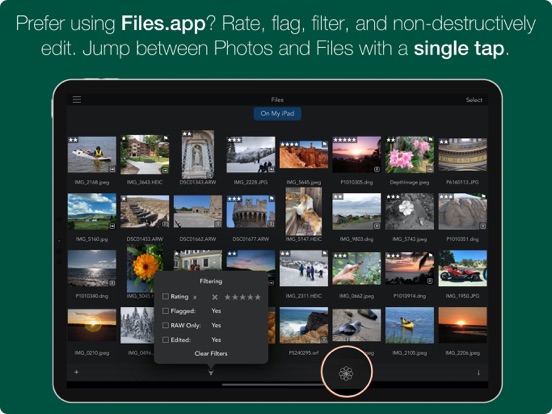

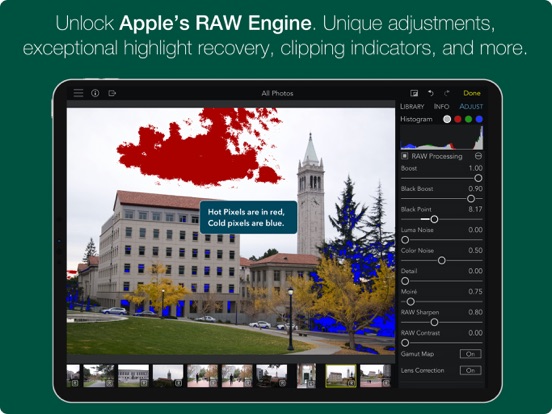
Pricing & paywalls
App Store
- Price: $12.99
Ratings & reviews
App Store
-
5/5An Amazing App to Unleash the Power of ProRAW!
If I had to chose a single app to purchase for my iPhone 12 Pro, this would be it. Apple ProRAW finally allows us to create amazing photos by adjusting shadows, highlights, contrast, saturation, sharpening and much more, while keeping all their smart on-the-fly AI image processing. No more over-sharpened pixelly photos with overblown highlights and all details lost in the dark areas. You can now almost rival a DSRL! The difference with the ProRAW format vs the iPhone JPG is amazing. BUT...how do you process all these ProRAW files? The Photo App in the iPhone is far too limited. This app is the one you MUST get if you use ProRAW: 1. You can create several of your own presets (e.g., maximize dynamic range). Any option you can dream of is there, similar to Photoshop or Lightroom on a PC for RAW files. 2. Then, the powerful filter option allows you to immediately see what you want to process (e.g., filter for RAW files + not yet edited + tagged as favorite). 3. Finally, batch-process all at once! You end up with modified DNG files (non-destructive) and the JPG rendering. Which you can export or easily transfer on your computer. Or post online from your phone. In a couple of seconds, from within your phone. The filter option is amazing and I wish I had that elsewhere. And the app works as intended, no bugs. In short, this is the app that makes ProRAW usable, and it should come with the iPhone, if you care about photos. Which you probably do if you upgrade to the iPhone 12 Pro :)
Nico_iPhone · 6 Aug 2026
-
4/5I like where this is going
I like where this is going and see a lot of potential in it, which is why I purchased the pro tools to support the effort. I like the fact it works as a plug-in to Photos and saves back to that library instead of its own library. I purchased 2TB of iCloud storage and that is how I store and synchronize most of my pictures now. I edit a lot on my iPad Pro now, but would like to hand off and edit on my Mac with the same tools. And as someone who LOVED Aperture, I am glad to see a company that would like to give us that experience again. That said, there are some things I will need to make it my main editor. First, it needs a vignette tool. If it could add an inner glow like some other editors while making a darker edge vignette that would be great. I also need the ability to brush the adjustments in, preferably in layers but at least with multiple spot adjustments. Brush compatibility here with the Apple Pencil would be essential. An example of why this is need is when making shadow adjustments, sometimes a global shadow adjustment will simply not work as usually there are some shadows you want to keep, while others you need to get more detail out of. Anyway keep up the good work and if it gets better I will certainly use it more and promote it.
PatriotUSA · 6 Aug 2026
-
5/5Lot of potential. Good start.
This app has a lot of potential. I am a former Aperture user and really appreciate the control it provides. I recognize it is an early version. 1. When I save, the only choice it gives is to save over the original. I am a travel photographer and often like to create different versions of some shots. Very frustrating when there is no “save as” option. That is essential for me. 2. Will you consider the Addition of a perspective tool? Another tool I find essential as a travel, historic and landscape photographer. An excellent start, but not yet complete enough for my needs. Oh and thanks for allowing the trial (but not save) use of the buyup options. That is a nice touch. Good to support cloud services but don’t get carried away with that. Much of the world still does not have reliable internet and cloud services and sync are not options. I have internet where I live but it is heavily “data capped” preventing any regular use of cloud services. (If I turn on either Apple or Adobe cloud services, my entire monthly data allowance will be consumed in a week or less). Remember that your market is global and not restricted to a few “1rst world countries”. I like what I see in RAW Power, but not there yet for my needs. I will be following your progress. Thanks for creating this app. I’ll be following it in hopes it will evolve to my needs. I still miss Aperture. Nice to see the core tools are back.
David247 · 6 Aug 2026
-
5/5Adjust tools on the left on landscape iPad? Whose idea was this?
EDIT: I complain below about the Adjust tools being on the left, but I did not realize they can be moved to the right if you move the Info panel first (!). This is terrific, even though it's not completely intuitive (it doesn't seem you can move the Adjust panel). This app works great for me now. Thanks guys! Original critique follows, for posterity. I'm an iCloud Photo Library user, and I really like how this app seamlessly integrates with it. I also shoot Pentax and Olympus RAWs, edit on 2017 iPad Pro 12.9, and with this app I don't have to think about importing and exporting like I do with the competitors' apps. I want to use this app simply for how friction-free that experience is. But in landscape mode the Adjust tools are on the left. WHY??? Roughly 90% of the population is right handed. Putting the Adjust tools on the left means 90% of the population has to reach to the other side of the screen, blocking the content they're trying to manipulate. Plus, it's uncomfortable, even when using a Pencil. Bad design decision, guys. Did the devs try this use case? Is the CEO left-handed? Devs, please move the Adjust tools to the right side, or at least make it a user preference setting. If the tools were on the right, I'd pay to unlock. As it is now, editing with this UI is cumbersome. Thank you.
bobdobbs1999 · 6 Aug 2026
-
5/5Real editing tools for the iPhone
I’m a professional photographer and cinematographer and I have been test driving the iPhone X to see if I can create publication quality images with the dual camera. Out of the box, I was hugely disappointed with the file quality—too contrasty, nasty blotchy noise reduction. So I started exploring manual camera apps and discovered Obscura. Just locking down exposure and focus controls made a huge difference, but the raw format option is what got me excited. Enter RAW Power and now I can shoot properly exposed files and optimize them in a raw, lossless workflow, all on the iPhone X. Brief list of awesome features: -True raw, lossless workflow (you can reopen after saving and make adjustments, all the original data is still there.) -True WB temp and tint controls (not one-dimensional warmth) -Separate raw and post tone and sharpness controls. -Four channel RGB curves with blending control. Yes, real curves. -Copy and paste adjustments from one file to another. -Intelligent and intuitive layout/workflow. Things that could be better: -Thin, small caps typography is ugly and not very legible. -Sliders use touch controls only, so hard to fine tune WB tint. Would be smart to have a plus and minus button on either end for incremental steps. - Export vs save options not clearly defined or documented. On balance this is an amazing tool.
paperscenery · 6 Aug 2026
Privacy & accessibility
App Store
Privacy
- Data Not Linked to You — Analytics — Usage Data — Product Interaction Developer declared
- Data Not Linked to You — Usage Data Developer declared
Accessibility
No accessibility labels collected yet.
Versions
App Store
-
3.4.11
(iOS 16) Add Fujifilm X-H2 and X-T5 to supported camera list. https://www.gentlemencoders.com/extended-raw (iOS 14+) Add Olympus SH-3 to supported camera list. Fix bug detecting lens model for automatic lens correction. Fix bug with export and straightened images. Other fixes and improvements.
-
3.4.12
• Add support for Sony A7 R5 (https://www.gentlemencoders.com/extended-raw) • New: Add keywords and description while exporting • Add troubleshooting and support information when using external storage • Fix: two crashes • Fix: externally edited images were exported as unadjusted images • Fix: when rotating screen while in crop, the crop interface became unresponsive. • Add localized help text for unsupported images
-
3.4.13
• (iOS 14+) Add support for OM Digital OM-5, Sony FX30, and Samsung NX500. (https://www.gentlemencoders.com/extended-raw) • (iOS 16+) Add support for Canon R6 II. • Fixes for top crashes. • Larger histogram in portrait orientation on iPads. • Files.app: Fixes for filtering and option to sort by file name (in Settings). • Performance improvements and general fixes.
-
3.4.14
Fix for crash when viewing collections that have been filtered.
-
3.4.15
Fix for thumbnails not appearing in the filmstrip sometimes, and fix another crash with filtered collections.
-
3.4.16
* (iOS 14+) Add support for Panasonic DC-ZS80D, and GoPro Hero 11 Black. (https://www.gentlemencoders.com/extended-raw) * (iOS 16+) Add support for Nikon Z 8 (lossless RAW only). * Fixes for the top three crashes. * Performance improvements and general fixes.
-
3.4.17
• (iOS 14+) Add support for Fujifilm X-S20. • (iOS 16+) Add support for Sony A6700. • Fix for crash when batch exporting 16-bit images. • Fixes for ProRAW rendering and cropping. • Fix for Leica Monochrom cameras sometimes producing low-resolution images. • Add Rec.2020 as a color profile for export. For best results, export at 16-bit. • Performance improvements and general fixes.
-
3.4.19
• Fix two crashes. • Fix incorrect message in dialog.
-
3.4.20
* (iOS 14+) Add support for Fujifilm GFX100 II and Sony A7C II, A7C R, and ZV-E1. (https://www.gentlemencoders.com/extended-raw) * Clipping overlays on iOS 17 / Sonoma sometimes caused the image to appear washed out. * Fix crash on iOS when scrolling through a large number of RAW images. * Export Original to Photo Library dialog would sometimes have the wrong export options. * Performance improvements and general fixes.
-
3.4.21
(iOS 14+) Support for Nikon Z 8 and Z 9 advanced compression modes (HE and HE*). https://www.gentlemencoders.com/extended-raw (iOS 14+) Support for OM-1 Mark II, Fujifilm X100VI and Nikon Z f. Improve quality of HSL adjustment when applying certain types of luminance or saturation changes. Fix crash on iPhone when saving edits to new images (rather than non-destructively). Performance improvements and general fixes.
-
3.4.22
* Add export of XMP Sidecars to use with the new Nitro app. Learn more at https://nitrophoto.app. * Performance improvements and general fixes.
-
3.4.23
* (iOS 16+) Add support for OM Digital TG-7 and Samsung NX-1. href="https://www.gentlemencoders.com/extended-raw * Improve decode quality of Fujifilm GFX 100 II. * Performance improvements and general fixes.
-
3.4.24
* (iOS16+) Add support for Fujifilm X-T50 and GFX100S II. https://www.gentlemencoders.com/extended-raw * (iOS14+) Hasselblad X2D 100C (FFF format), Nikon Z 30, Panasonic G9 Mark II and G100D, and Pentax K1 Mark II. * Performance improvements and general fixes.
-
3.4.25
* Fix important issues rendering non-RAW images. * Fix bugs with the Share extensions. * When showing the Photo Library, display albums in the same order as shown in Photos.
-
3.4.26
* Fix crashes and important bugs. * Improve diagnostics. * (iOS 16+) Add support for Canon R1, Canon R5 Mark II, Panasonic GH7 and Nikon Z 6 III. Camera List: https://www.gentlemencoders.com/extended-raw
-
3.4.27
Fix for crash with iPhones on iOS 18. The shipping version crashes immediately if you go into Edit mode, in portrait screen orientation, on an iPhone running iOS 18.
-
3.4.28
* Fixes for iOS 18 compatibility. * Fix crashes and important bugs. * Improve diagnostics. * (iOS 16+) Add support for Canon R1, Canon R5 Mark II, Panasonic GH7 and Nikon Z 6 III. Camera List: https://www.gentlemencoders.com/extended-raw
-
3.4.29
* (iOS 16+) Support for Fujifilm X-M5, Nikon Z50 II, OM Digital OM-3, Panasonic DC-GX880 and DC-S5D: https://www.gentlemencoders.com/extended-raw * Fix bug with full screen not restoring thumbnails. * Fix a crash with the Batch button. * Various other improvements.
-
3.4.30
* (iOS 16+) Support for Pentax KF, Sony Alpha-1 Mark II, Panasonic S1R Mark II, and Fujifilm GFX100RF: https://www.gentlemencoders.com/extended-raw * Fix bugs with Watermark Font Picker. * Various other improvements.
-
3.5
* (iOS 16+) Improved RAW Decode and Lens Correction for Fujifilm Compressed and Nikon HE/HE* files. * (iOS 16+) Dynamic Range in Fujifilm Compressed is now supported. Note: You may need to reset exposure or curves for any Fujifilm images with Dynamic Range you have previously edited. * (iOS 16+) Olympus OM-5 Mark II, Sony RX1R III, Nikon Z5 Mark II and Z50 Mark II. Tap for camera list: https://www.gentlemencoders.com/extended-raw * (iOS 16+) Support for 14-bit Olympus RAW images. * Fix issue with color shifts sometimes appearing in images edited in the Photo Library. * Improve usability of RAW Processing adjustment. * Fix orientation of OM-3 images. * Various other improvements.
-
3.5.1
* (iOS 16+) Support for Panasonic TZ-99 and Sony ZV-1A. https://www.gentlemencoders.com/extended-raw * Fix bug exporting Fujifilm X-E5 images.
-
3.5.3
* Bug fixes for Nikon and Fujifilm cameras.
-
3.5.4
Localization Fixes.
-
3.5.5
(iOS 16+) Support for Sony A7 V (uncompressed and lossless compressed RAW), Fujifilm M-RAW format and Samsung Lossy Compressed RAW.
-
3.5.6
· 27 Jul 2026
• (iOS 16+) Support for Sony A7 VI (uncompressed and lossless compressed RAW). Camera List: https://www.gentlemencoders.com/extended-raw • Fix bugs with metadata and camera support.
Alternatives
- AI Photo Culling — PhotoPicker — Same category + similar ratings
- ON1 Photo RAW for Mobile — Same category + similar ratings
- Camera M - Pro Manual Camera — Same category + similar ratings
- Photo Manager Pro — Same category + similar ratings
- CameraPixels PRO — Same category + similar ratings
- EXIF Viewer by Fluntro — Same category + similar ratings
Availability by market
- US
Data quality & evidence
- Page completeness
- Live store listing
- Last verified
- 6 Aug 2026
- Sources
- App Store
- Independent summary has not been published yet.