Quick verdict
- What it is
- Store information collected; independent summary not yet available.
- At a glance
-
- Free to download
- In-app purchases
Categories and search queries
Official categories
- Weather
- Utilities
AppCorpus categories
Key functions
| Function | Availability | Access | Scope | Evidence |
|---|---|---|---|---|
| Free app | Yes | Free | — | Store published |
| In-app purchases | Yes | Limited free | — | Store published |
Screens
App Store
23 store screenshots


Pricing & paywalls
App Store
- Premium Features — $5.99
Ratings & reviews
App Store
-
4/5Very good pws app
A very good app to monitor your home weather station. My main need was to be able to monitor from my Apple Watch and it does the trick! The notifications are a plus too. The important part of any product is the customer support and I had a minor problem in the first week and it was solved quickly! The only thing keeping me from giving it a 5th star is I wish the auto update/refresh was more frequent (like 5-10 mins instead of 15-25 mins). That said, I recommend this app! :)
WxThunder · 7 Aug 2026
-
5/5Nothing else comes close
I have tried almost every other pws app out there and nothing even comes close to the functionality and features of this app. The watch and Home Screen widgets/complications are better than anything else I’ve tried. The history and graphs are also excellent. And I very much appreciate that the developer is always working to refine, improve, and streamline the app and add new features. Highly recommend.
Evan 1.0 · 7 Aug 2026
-
5/5Great App!
If you want widgets for your PWS, this is the app for you! I can now see everything going on at my house from one amazing widget that combines everything together, but is also very easy to view. That alone is worth the small cost, in addition to everything else you get. Also I emailed the developer a question and he quickly responded and even tweaked the app based on my feedback.
uefigs139 · 7 Aug 2026
-
5/5Great App for Apple Watch
I was glad to see an app that would provide my personal weather station information to my Apple Watch. The information is displayed creatively and the recent screen displaying current conditions is a great addition. Highly recommended…I already did that to a couple of my friends..and I do recommend it to you too.
Steve in WI · 7 Aug 2026
-
5/5Best App for Apple Watch
For reading data from your personal weather station, I found this app is the easiest to read data and it updates the complications much faster than any of the other apps.
FPD140 · 7 Aug 2026
Privacy & accessibility
App Store
Privacy
- Data Not Linked to You — Analytics — Diagnostics — Other Diagnostic Data Developer declared
- Data Not Linked to You — App Functionality — Diagnostics — Other Diagnostic Data Developer declared
- Data Not Linked to You — Diagnostics Developer declared
Accessibility
No accessibility labels collected yet.
Versions
App Store
-
2.13
Added an option for Weather Underground users to be able to add station IDs manually to address situations where WU does not report a station's location and therefore can't be selected using the station map.
-
2.14
Minor enhancements and bug fixes including the addition of Apple's new app privacy manifest, and correctly restoring wind speed setting for knots when relaunching the app.
-
2.20
Improved background refresh performance and the inclusion of current weather station data (in addition to recent history) for Weather Underground and Davis WeatherLink users. Notifications now use cloud-based syncing to prevent duplicates, and rain alerts are now based on new rainfall amounts between notifications. There’s new automatic 12/24-hour time format support based on your device’s region settings, and the app will also automatically keep track of your graph time range settings between restarts or device upgrades. The visualization for rain in the History feature has also been revised for greater visibility.
-
2.30
This updates fixes an issue with von-default vertical scale units (e.g. Celsius vs. Fahrenheit) not being set correctly when app is launched, and extra blank days being inserted between consecutive months even when the months are fully populated.
-
2.40
An updated user interface uses a tab-style layout so you can swipe left and right to go to any of the app's screens. The app now also has a bottom bar with handy shortcuts. There are a number of other UI enhancements throughout the app including revised options and station-setting screens. This version also has enhanced notification capabilities to let you fine-tune your weather station alerts. For example, you can set different alerts for barometric pressure increases and decreases, or wind speed vs. wind gusts. The notifications also now include your weather station name. Other enhancements include the ability to add Aeris/Xweather stations via stations ID, and the station key entry and initial station setup have been optimized with a focus on first-time users and includes in-context guidance. The Options screen also adds in-context help to explain each of the available options and settings. This version also has some important bug fixes including station key update handling for stations that are already in your station list, corrected rain scale adjustment during active precipitation, and corrected rain accumulation calculation for real-time Davis VantageView Live updates.
-
2.41
Bug fixes for circular rain complication rain amount not matching currently active time range, and some notifications user stale settings. Going to the setting screen will automatically refresh any stale notification values. Changed increment values for wind and wind gust to allow finer adjustment.
-
2.42
Fixed decrement button not working for negative values in the notifications adjustment buttons, added check for valid up/down baro alert values (the settings from the previous major version of the app could cause the values to be outside a reasonable range), added wind gust values to Wind widgets, fixed bug with widget previews not displaying the barometer graph correctly., and fixed bug with some widgets not displaying the weather station name correctly. Fixed bug with configuring the app for Ambient. Also, the app will now remember if the last screen you were on was the main graph screen of the conditions/stats screen and will start on that screen when you re-start the app.
-
2.43
Fixed issue with stats screen not updating after changing display units. Fixed issue with notifications values not being updated correctly when display units are changed. Fixed crashing bug that could occur when trying to display invalid barometer values.
-
2.44
Fixed bug with the stats screen not refreshing to reflect new data in certain situations, fixed typo, and on the Watch, added wind direction to latest conditions.
-
2.45
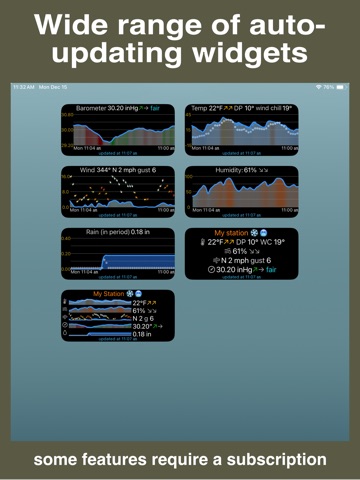
Added a new widget & complication style that shows mini-graphs (e.g. "sparklines") for barometric pressure, temperature, humidity, wind, and rain simultaneously. This new feature is available with the Premium Features subscription. Revised the home screen UI to allow displaying all of the weather graphs simultaneously when the bottom menu area is minimized. This lets you see all of the graphs without having to scroll. Fixed a bug with the History "View selected time" feature that did not update the displayed graph correctly with the currently-selected units. Increased the time window for rain alert triggering to a full 24 hours. Replaced Aeris branding/naming with new Xweather assets.
-
2.50
Added "Rain started" feature to issue alerts when a new period of precipitation has started. Fixed bug that caused wind gust values to not be displayed correctly. Fixed issue that could cause widgets to stop updating in the background until the app was made active. Miscellaneous UI optimizations and internal improvements.
-
2.51
Bug fixes for redundant notifications. Revised corner Watch complications for greater visibility.
-
2.52
Fixed repeating notification issue with rain alerts. The cause of the issue was very difficult to find, hence the delay in the bug fix.
-
2.60
This version lets you access any of the thousands of NOAA/ICAO weather stations across the globe. When using these stations, you can enable an auto-locate mode that will automatically find the station closest to you wherever you are. This can be a convenient option to keep an eye on the weather while traveling. In addition, this version also adds a forecast screen that shows you the forecast from the NOAA/ICAO forecast station closest to the currently selected weather station. These aviation-oriented forecasts can be useful to augment forecasts available from other weather apps. This version also has several bug fixes including an issue with rain alerts.
-
2.61
Decreased minimum OS versions for both iOS and WatchOS to 17.0 and 10.2 respectively.
-
2.62
Fix for a NOAA API change that prevented weather stations from being displayed on the map for selection.
-
2.63
Revised circular widgets for improved usability; miscellaneous bug fixes.
-
2.64
Fixed an issue due to NOAA changing their data access interface that caused NOAA/ICAO station access to become unavailable. This also affected the app’s new forecast feature. Added a new notification feature that alerts you if your station goes offline or stops being able to report data to the selected weather station service provider for more than the specified time interval.
-
2.65
Added support for Davis WeatherLink Console data types. Also moved settings to centralized storage to allow sharing settings between the iPhone and Watch. This will require a one-time adjustment to reset the time scale on the Watch's graphs, and scrolling to your preferred screen on the Watch if you have the "Complication tap opens..." option turned off in the app's settings. Fixed issue with station offline notifications.
-
2.66
Added support for iPad. Fixed big with wind chill/heat index preferences with small rectangular widgets. Added enhancements for ICAO weather stations. Fixed bug with station key warning when there are no stations in the user list yet.
-
2.67
Fixed issue with Watch complications not being updated in the background. Fixed issue with widget and Watch complication previews not being displayed correctly during selection. Fixed issue with some Davis current condition data formats not being recognized.
-
2.68
Fixed issue with the nearest ICAO station occasionally issuing notifications even when the current station is not an ICAO station. Many thanks to the user who caught this and let me know.
-
2.69
Added feature to show wind speed trends in widgets/complications. This version also makes changes to improve the initial use process as well as associated bug fixes.
-
2.70
Fixed bug with location and notification permissions not being reset when the app is uninstalled and then re-installed.
-
2.71
· 25 Mar 2026
Reduced minimum OS requirement to WatchOS 10 to allow continued compatibility with older Watch models.
Alternatives
- PWS Monitor — Same category + similar ratings
- PWS Console - Me.teo — Same category + similar ratings
- Gusty - weather dashboard — Same category + similar ratings
- WhatWeather Weather Station — Same category + similar ratings
- Weather Fusion – PWS — Same category + similar ratings
- WXStation Connect — Same category + similar ratings
Availability by market
- US
Data quality & evidence
- Page completeness
- Live store listing
- Last verified
- 7 Aug 2026
- Sources
- App Store
- Independent summary has not been published yet.