
Quick verdict
- What it is
- Store information collected; an Apoku editorial summary is not yet published.
- At a glance
-
- Free to download
- In-app purchases
Categories and search queries
Official categories
- Productivity
- Business
Apoku categories
Key functions
| Function | Availability | Access | Scope | Evidence |
|---|---|---|---|---|
| Free app | Yes | Free | Context-specific | Store published |
| In-app purchases | Yes | Limited free | Context-specific | Store published |
Screens
App Store
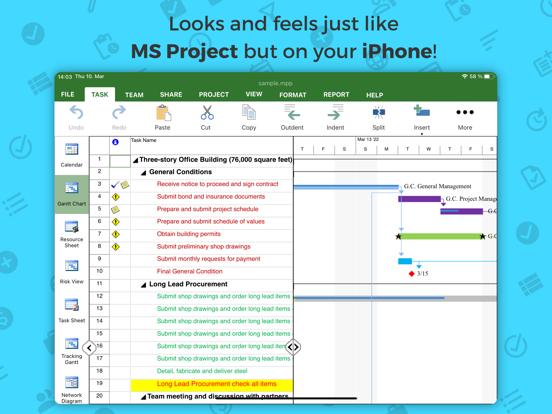
16 store screenshots



Pricing & paywalls
App Store
Shown for US
- Complete Editor
Ratings & reviews
App Store
Shown for US
-
3/5Can’t load local imported files, too expensive
I exported a project from another app in xml format to try here. When I go to import from my device, I have no option to select the folder that has the file. Worse, of all the cloud storage options accessible in the app, I couldn’t get Dropbox or OneDrive to work, and iCloud Drive isn’t an option. No iCloud, on an iPad? Really? $130 per YEAR? No. Half of that as a one-time license purchase maybe, but not as a subscription.
frdmfghtr · 6 Aug 2026
-
3/5Trial Period Functionality
Have way through my tasks list the app suddenly froze.
Unsure of Purchase · 6 Aug 2026
-
5/5Works Great1
I use it on my MacBook and IPad and never have any problems sending it to other PMs (.MPP files) or receiving their files. It just works. Srd
Douglas Sam · 6 Aug 2026
-
1/5Like so many things you can’t figure out how much it costs unless you down load
Sorry it would help if you were straight forward about costs. Instead you have to download to figure that out.
Firstviceroy · 6 Aug 2026
-
4/5Has improved this past year from 1 to 4 stars
On an Ipad Pro M1, latest OS and latest PP365. User Interface has been dramatically improved. Predecessor/successor entries work as expected now. (2fs, 2ss, etc. for dependencies entries). Outdent/Indent (demote/promote) now works nicely (tab and shift tab that you’d use in MS Project can’t be used, but it’s an iPad user interface and the outdent/indent buttons on top work well. All the bugs seen a year ago as the app originally tuned for a Mac Desktop interface didn’t like touch interface of an iPad are gone. Still doesn’t offer Saving a File to icloud, so if you want to save there, you will still have to save to local device (default folder is DOCUMENTS), then use Filer to move the file to the iCloud. All the other industry standard cloud storage environments are available (dropbox, onedrive, etc.). Import and Export from/to MPP works flawlessly now. All the fields expected stay intact. Auto-Save will post the latest version (I have AS set to every 5 minutes) to a subfolder named RECOVERY. This is working nicely now (prior the folder was being created named RECORVERY). Being able to create tasks and subtasks quickly, without being forced to fill out all the additional columns, and then go back to do all that additional work later was buggy a year ago, but is now working nicely. Like I mentioned, a lot of user interface and feature/function improvements for the IOS platform! The Online HELP web site screens now have far more content for IOS/IPAD OS than they did before. Glad to see that! File/Print - this is still buggy. When you select Save to Files, a popup flashes and vanishes. So this still needs work. There is a work around. Instead of Print to PDF, choose Print. That brings up the iPad OS print view. Use two fingers to expand the left column’s page icons and that trick lets you now save as a PDF to a File or other destinations. This is about the only way to get any sort of a GANTT chart printed, but the formatting of the GANTT is a bit messed up. So again, there’s more work needed there. Other Reports though seem to work but certain reports will require a Business License (I still don’t grasp this tiered approach. As an individual PM, i use this so I don’t have to carry around an 5+ pound laptop while traveling. Developer should really just make all the reports and views available to any licensed user (whether individual or business). I don’t have 5 staff and I’d rather pay a SMALL bump to get ALL the reports and functions available rather than leap into a business license model). NOTE to Developers: Most of us using your app are doing so for more freedom via iPad as Individuals. Don’t keep limiting key pieces of reports and graphics to businesses. Most businesses will demand we use SmartSheets or MS Project within company networks and laptops, so you’re not going to see many (or any?) business licenses surface. Stop limiting this and you’ll see more individual licenses and NEW USERS signing up! The Bar, Column, Pie chart capabilities seem to work. Haven’t tried to actually export or print them yet though. Bottom line: If you need to import an MPP, it works. If you need to export an MPP, CSV, etc., it works. So the freedom I now get using this app on my iPad Pro M1 is extremely helpful and worth the license fees (but I still don’t see the justification for Business License bumps). Another glitch: There is no Agile nor Kanban type of capability built into the iPad OS version (this version). So any reference to Agile and Kanban you may read in product description or on web page is solely for the MAC version.
sayvilleguy · 6 Aug 2026
Privacy & accessibility
App Store
Privacy
- Data Not Linked to You — App Functionality — Contact Info — Email Address Developer declared
- Data Not Linked to You — App Functionality — Contact Info — Name Developer declared
- Data Not Linked to You — App Functionality — Contact Info — Other User Contact Info Developer declared
- Data Not Linked to You — App Functionality — Contact Info — Phone Number Developer declared
- Data Not Linked to You — Contact Info Developer declared
Accessibility
No accessibility labels collected yet.
Versions
App Store
-
21.1
• Fix open files from OneDrive for Business not working. • Fix not being able to install the app through device management systems.
-
21.15
• Add the possibility to protect projects for editing • Improve security for OneDrive and Box clouds • Add possibility to open password protected files • Improve the process of adding new team members • Add "Refresh Team Members" functionality inside the app • Improve exporting .mpp files to .xml format • Improve Virtual Project Management Assistant • Multiple Fixes and Enhancements
-
21.16
• Add the possibility to protect projects for editing • Improve security for OneDrive and Box clouds • Add possibility to open password protected files • Improve the process of adding new team members • Add "Refresh Team Members" functionality inside the app • Improve exporting .mpp files to .xml format • Improve Virtual Project Management Assistant • Multiple Fixes and Enhancements
-
21.21
• Add the possibility to save MPP files with a password • Add possibility to open and edit files in Read-Only Mode while the file is open in Exclusive Mode by other users • Multiple UI/UX fixes • Multiple Fixes and Enhancements
-
21.36
• Add the possibility to use Siri Shortcuts to work with MPP Files on iPhone • Improved saving files to Project Online on iPhone • Multiple Fixes and Enhancements
-
21.38
• Add the possibility to use Siri Shortcuts to work with MPP Files on iPhone • Multiple Fixes and Enhancements
-
21.7
• Improve Drive 365 Cloud Storage • Fix issue with OneDrive for Business not working • Fix issue with not being able to install the app through device management systems • Fix issue with UI elements not being visible on Dark mode • Multiple fixes and enhancements
-
22.10
• Enhance opening and saving files to OneDrive • Improve Drive 365 Cloud Storage • Improve the Auto Save Functionality • Multiple UI/UX fixes • Multiple Fixes and Enhancements
-
22.17
• Enhance compatibility with MS Project • Add support for adding a Team Member from the Share dialog on iPad • Enhance overall app performance • Improve clouds’ Project Explorer performance • Multiple UI/UX fixes • Multiple Fixes and Enhancements
-
22.20
• Improve Finish Date Editing • Implement the Project Task Status Method functionality • Add the Share functionality on iPhone app • Implement Scheduled Reports in app • Multiple fixes and enhancements
-
22.28
• Enhance Master Project and Subprojects editing • Add support for opening shared files directly in the app • Implement the Portfolio Info functionality • Multiple UI/UX fixes • Multiple Fixes and Enhancements
-
22.36
• Improve iPad editing in grid • Add support for editing Successors field on iPad • Add support for setting Project Goals for project plans • Enhance reports by adding the Project Status Report • Multiple UI/UX fixes • Multiple Fixes and Enhancements
-
22.37
• Improve iPad editing in grid • Add support for editing Successors field on iPad • Add support for setting Project Goals for project plans • Enhance reports by adding the Project Status Report • Multiple UI/UX fixes • Multiple Fixes and Enhancements
-
22.42
• Add support for external keyboard and mouse on iPad • Improve applying constraints • Multiple UI/UX fixes • Multiple Fixes and Enhancements
-
22.5
• Improve Show Project Status Siri Shortcut on iPhone • Multiple UI/UX fixes • Multiple Fixes and Enhancements
-
23.11
• Enhanced setting Task Dependencies • Multiple UI/UX fixes • Multiple Fixes and Enhancements
-
23.13
• Implement possibility to manage assignments using My Tasks on iPad • Multiple UI/UX fixes • Multiple Fixes and Enhancements
-
23.4
• Multiple UI/UX fixes • Multiple Fixes and Enhancements
-
23.7
• Add support for new Dropbox Authentication Flow • Multiple UI/UX fixes • Multiple Fixes and Enhancements
-
24.10
• Improved Cloud Storage Integration • Multiple UI/UX fixes • Multiple Fixes and Enhancements
-
24.19
• Implement the Tell Me functionality search bar • Implement Wrap Text and Best Fit functionalities • Enhance the Application Layout • Enhance Table customization • Add support for more Gantt Bar Shapes • Multiple UI/UX fixes • Multiple Fixes and Enhancements
-
25.12
• Improved compatibility with iOS 26 • Enhanced Google Drive Picker • Multiple UI/UX fixes • Multiple Fixes and Enhancements
-
25.14
• Improved compatibility with iOS 26 • Enhanced Google Drive Picker • Multiple UI/UX fixes • Multiple Fixes and Enhancements
-
25.7
• Enhanced the Google Drive Picker • Multiple UI/UX fixes • Multiple Fixes and Enhancements
-
26.9
· 4 May 2026
• Enhanced the Google Drive Picker • Multiple UI/UX fixes • Multiple Fixes and Enhancements
Alternatives
- OmniPlan 4 — Same category + similar ratings
- BIM 360 — Same category + similar ratings
- Bluebeam — Same category + similar ratings
Availability by market
- US
Data quality & evidence
- Page completeness
- Live store listing
- Last verified
- 6 Aug 2026
- Sources
- App Store
- Apoku editorial summary has not been published yet.