
PlugShare: Charging Stations
Find and review public EV charging stations
iPhone · iPad
Quick verdict
- What it is
- PlugShare is a map-based app that helps electric vehicle drivers find and review public charging stations. It allows users to filter by plug type, charging speed, and amenities, and also provides features like EV trip planning and charging station reviews.
- Best for
-
- EV drivers
- Tesla owners
- Electric vehicle owners
- At a glance
-
- From $1.24/mo
- Free to download
- In-app purchases
Categories and search queries
Official categories
- Navigation
- Social Networking
Apoku categories
Key functions
| Function | Availability | Access | Scope | Evidence |
|---|---|---|---|---|
| Free app | Yes | Free | Context-specific | Store published |
| In-app purchases | Yes | Limited free | Context-specific | Store published |
| Apple Wallet | Unknown | Unknown | Scope unknown | Store published |
Screens
App Store
26 store screenshots

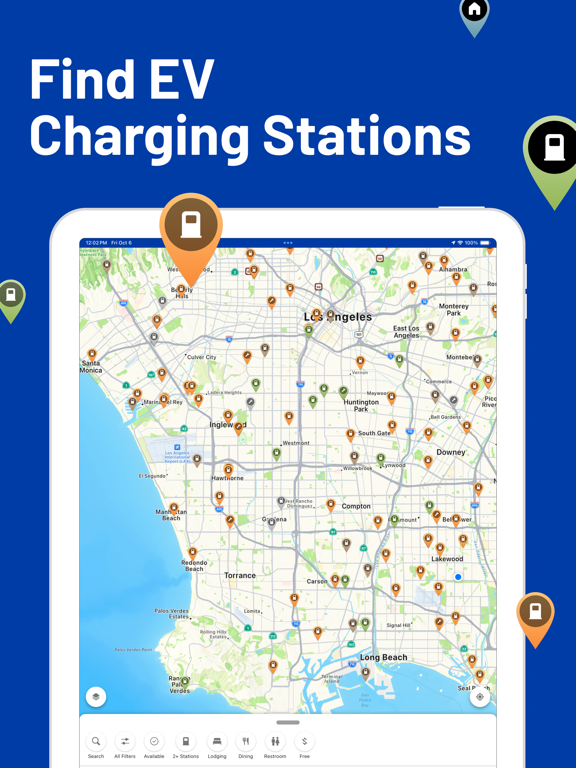


Pricing & paywalls
App Store
- PlugShare Ad-Free (Monthly) — $1.49/month
- PlugShare Ad-Free (Monthly) — $14.99/year ($1.24/mo)
Ratings & reviews
App Store
-
5/5Gave us flexibility and peace of mind planning routes across the country
Last month’s round trip between east coast and Kansas was our first in a new Model Y. In some areas like S Missouri good charging stations are scarce or nonexistent. Nobody wants to end up running out of juice and learn there’s no charging in range ahead-and backtracking is required. We carried cables and converters for all charger types, but never had to use anything but superchargers and lower power (and free) Tesla connections at several motels. Being able to map out entire 1500 mile northern and southern routes, planning for adequate charging and our overnight stops was pretty easy and confidence building. It took only an hour or so the evening before each of our 1500 mile legs. Then we were free to enjoy the drive and scenery with no anxiety. PlugShare is a very nice complement to Tesla’s on board navigation to one’s next charge station.
manyworlds · 29 Sep 2026
-
3/5No user editing ability
Apparently, the ability to edit a charging station’s information has been removed from recent app versions. One of PlugShare’s great strengths WAS its crowd-sourced information by actual charger station users/customers. I tried to update a local station that recently added a Tesla plug, but I cannot find a way to edit. And the app’s Help feature provides inaccurate editing instructions that are apparently no longer available. Update: The developer has informed me that some station owners request that the users be barred from editing their listings. Good to know. I have three suggestions. First, I’d suggest that PlugShare develop a process to enable and encourage these station owners to keep their listings up to date (e.g. “New Tesla connector available at this station.”). If users can’t edit station info, the owners should make darn sure to update their listings to reflect changes in status and features. Second, the app’s Help function should explain that some stations may not be editable by users. (Currently, the Help function doesn’t mention this, and that’s unnecessarily confusing. Third, station listings should clearly indicate whether stations may or may not be edited by users right on the listing (perhaps in place of the edit button?). My rating stands at 3 Stars. PlugShare remains an essential EV app, but its usefulness has declined as a result of these changes.
JoMoGotMojo · 29 Sep 2026
-
3/5This is frustrating!!!
I live in the city of Houston and my apartment won’t let me plug into the wall outlet in my apartment, so I have to drive around the city of Houston when I’m traveling trying to find somewhere to plug my car in and it seems that every day charging stations are either broken, removed, or un accessible. I feel that you all in your pinpoint should reflect whether or or not that particular charging station is actually available to the public i.e. whether or not it’s in a residential apartment complex and it’s available to the public or at a hotel that has a gate or is someone’s business that is not accessible. I feel that your pinpoint should reflect so and it should be clearly stated so that a person running out of charge doesn’t drive around to all these different stations that are accessible. Otherwise it is a great app and very useful for planning trips and knowing where you can find charging stations along the way thank you very much.
Don Kiotti · 29 Sep 2026
-
5/5trip planner needs work
used this for a trip from LA to san fran. i'd say the best way to use plugshare is to open google maps first and figure out in which city you want to make a stop, then go in plugshare and search that city. the trip planner is a good idea but needs work. you can't select multiple stops with the trip planner, and after you input your destination, a hundred chargers populate the map, covering all the names of cities and making it too difficult to figure out where to stop. what it should do is plan the stops for you, based on the distance your car can achieve, charger compatibility with your vehicle, max kw, hours of travel, and likelihood of open chargers upon arrival. but overall, i'm glad i stumbled across this. saw someone mention it on a forum.
BrianErwin · 29 Sep 2026
-
4/5Great planning tool but trip planning allows errors due to including Rivian only chargers
Used this app and the great web site to plan a trip from San Jose CA to Bellingham WA on a Harley-Davidson LiveWire. The elevation display really help assessing where more energy might be used beyond the distance. The plug available ratings have, so far, been correct Thanks for all the hard work on these tools! **** added The Rivian only charges shouldn’t be included until the “Rivian only”, like the “Tesla only”, filter can be added. This makes the trip planner less useful and easy to select a charger that you won’t be allowed to use. If I didn’t triple check and catch this I would have been stuck without an option. On the plus side Rivian owners shouldn’t have any issues I’m still giving PlugShare 3 stars since the app was the best way to confirm the route adjustment. Without the Rivian issues easily 5/5 stars
KnightW · 29 Sep 2026
Privacy & accessibility
App Store
Privacy
- Data Linked to You — Analytics — Diagnostics — Other Diagnostic Data Developer declared
- Data Linked to You — Analytics — Identifiers — Device ID Developer declared
- Data Linked to You — Analytics — Identifiers — User ID Developer declared
- Data Linked to You — Analytics — Location — Precise Location Developer declared
- Data Linked to You — App Functionality — Contact Info — Email Address Developer declared
- Data Linked to You — App Functionality — Diagnostics — Other Diagnostic Data Developer declared
- Data Linked to You — App Functionality — Identifiers — Device ID Developer declared
- Data Linked to You — App Functionality — Identifiers — User ID Developer declared
- Data Linked to You — App Functionality — Location — Precise Location Developer declared
- Data Linked to You — Developer’s Advertising or Marketing — Contact Info — Email Address Developer declared
- Data Linked to You — Developer’s Advertising or Marketing — Identifiers — Device ID Developer declared
- Data Linked to You — Developer’s Advertising or Marketing — Location — Precise Location Developer declared
- Data Linked to You — Product Personalization — Diagnostics — Other Diagnostic Data Developer declared
- Data Linked to You — Product Personalization — Location — Precise Location Developer declared
- Data Linked to You — Third-Party Advertising — Identifiers — Device ID Developer declared
- Data Linked to You — Third-Party Advertising — Location — Precise Location Developer declared
- Data Linked to You — Contact Info Developer declared
- Data Linked to You — Diagnostics Developer declared
- Data Linked to You — Identifiers Developer declared
- Data Linked to You — Location Developer declared
- Data Not Linked to You — Analytics — Usage Data — Product Interaction Developer declared
- Data Not Linked to You — App Functionality — Diagnostics — Crash Data Developer declared
- Data Not Linked to You — App Functionality — Usage Data — Product Interaction Developer declared
- Data Not Linked to You — Third-Party Advertising — Usage Data — Advertising Data Developer declared
- Data Not Linked to You — Diagnostics Developer declared
- Data Not Linked to You — Usage Data Developer declared
- Data Used to Track You — Diagnostics — Other Diagnostic Data Developer declared
- Data Used to Track You — Diagnostics Developer declared
- Data Used to Track You — Identifiers — Device ID Developer declared
- Data Used to Track You — Identifiers Developer declared
Accessibility
No accessibility labels collected yet.
Versions
App Store
-
7.24.0
- We fixed a bug that was preventing surveys from launching after tapping the survey notification - Other minor bug fixes and performance improvements See anything weird? E-mail us at [email protected] and we'll help you out.
-
7.25.0
- Updates to map filters - Fix a bug causing the check in button to incorrectly read "check out" under certain conditions - Fix a bug causing a crash when navigating away from the location detail view - Other minor bug fixes and performance improvements See anything weird? E-mail us at [email protected] and we'll help you out.
-
7.26.0
- Add Can't Find Vehicle button to Manage Vehicles screen - Better description when no Nearby Activity can be found - Improve behavior of Location Detail screen after submitting a Check-In - Improve behavior of Show More buttons on sections of Location Detail screen - Fix issue where Directions to some charger locations resulted in external maps apps navigating to the center of the location's zip code. Now all Directions hand-offs navigate directly to the precise map coordinates - Other improvements and behind-the-scenes tweaks in preparation for even more goodies in future releases
-
7.26.1
- Behind-the-scenes improvements to help ensure your experience is the best possible
-
7.27.0
- Added map filters to make finding charging locations with Covered, Illuminated, and Garage parking easier - Improved the naming of the types of plugs shown when creating a new location - More behind-the-scenes bug fixes and enhancements that will make future PlugShare releases even better
-
7.28.0
A number of small improvements amp up this release! - A fresh new look to the Me screen header, showing your user statistics more prominently - Location Detail screens now show prominent "Coming Soon", "Under Repair", and "Partially Under Repair" tags right up top - Fix issue where your Kilowatt Range filter settings were not being properly saved between sessions - Fix issue where deep links opening the app did not close any open modal screens - Fix broken Messaging buttons in Here Now section of location detail, allowing you to communicate with other drivers currently charging at a location - Fix an issue where sometimes location cards on the Map view were showing incorrect plug information - More under-the-hood improvements that will make future releases and features even better Note: This will be the final release supporting iOS 15 and 16. The next release of PlugShare will require iOS 17 or later.
-
7.28.1
This version fixes an issue with translations of a handful of strings introduced in the 7.28.0 release.
-
7.29.0
- Added a capability for certain fields for a location to be locked from user edits - Added a section to the Me screen that shows the number of times another driver has marked one of your check-ins as helpful - Restored a feature that shows a list of nearby locations when a driver adds a new location in order to help prevent creating duplicate locations - Fixed an issue that sometimes left a lingering progress spinner when the app is opened from a push notification - Various other under-the-hood improvements
-
7.30.0
- Improved the look of other drivers' profile screen - Added the ability to categorize location issue reports - Fixed an issue that could have caused duplicate or missing bookmarks when fetching successive pages of results while driving - Fixed an issue that could have presented a Network Error when loading some location detail screens - Various other under-the-hood improvements
-
7.30.1
- This version fixes a bug regarding how in-app messages are grouped into conversations
-
7.31.0
- New UI refinements to highlight sponsored charging locations - Refined the workflow when reporting problems or inaccuracies for locations - need to select a category of the problem - Modified the Helpful Checkins label when viewing other drivers' profiles - Additional string translations - Cleaned up various things under the hood
-
7.31.1
- New UI refinements to highlight sponsored charging locations - Refined the workflow when reporting problems or inaccuracies for locations - need to select a category of the problem - Modified the Helpful Checkins label when viewing other drivers' profiles - Additional string translations - Cleaned up various things under the hood
-
7.31.2
- Fix ability to send message to other drivers from their check-in and profile
-
7.31.3
- Fix an issue with how drivers' locations are evaluated in certain circumstances
-
7.32.0
- Updated the photo picker used when uploading photos of charging locations - Streamlined support and feedback in the app - Fixed an issue with how some app analytics are recorded when interacting with sponsored locations - Removed social media links from Me screen - Updated a number of things under the hood to ensure a smooth ride with the app
-
7.32.1
- Fixes an issue maintaining sign in state across app launches
-
7.32.2
- Fixes a crash in Trip Planner
-
7.33.0
This release includes a number of fixes under the hood that you won't notice, but also includes some fixes we hope you'll appreciate! - Fixes an issue that sometimes prevented the Sign In button from becoming enabled when using a password manager to enter Email and Password - Improves the display of charging provider logos on the Location Detail screen - Improves placement of the Can't Find My Vehicle button throughout the Vehicle Management screens - Fills in a few missing string translations for our non-English speaking drivers
-
7.33.1
This release fixes a few bugs in the 7.33.0 PlugShare release: - Fixes a crash that sometimes occurs when viewing station and network details from Location detail screen - Fixes a crash that sometimes occurs in Trip Planner when adding a stop near the trip's destination - Fixes a crash that sometimes occurs when updating the badge count on the Me tab
-
7.34.0
We've been charging up some great improvements for you: • Smoother location browsing — location detail screens now have a satisfying bounce as you scroll, thanks to a new sticky header experience. • What Drivers Are Saying — get the full picture before you plug in! We've added summaries of driver reviews, including key highlights and a descriptive overview of what fellow EV drivers think about a location. Rolling out gradually, starting with select US locations for English users. • Stability fix — resolved an issue that could cause a crash when updating your profile. No more unexpected pit stops!
-
7.34.1
We've been charging up some great improvements for you: • Smoother location browsing - location detail screens now have a satisfying bounce as you scroll, thanks to a new sticky header experience. • What Drivers Are Saying - get the full picture before you plug in! We've added summaries of driver reviews, including key highlights and a descriptive overview of what fellow EV drivers think about a location. Rolling out gradually, starting with select US locations for English users. • Stability fix - resolved an issue that could cause a crash when updating your profile. No more unexpected pit stops! • Trip Planner fix - resolved an issue preventing addresses from being selected when planning a trip on iPad
-
7.35.0
- Spot a charging pin that's off the mark? Now you can flag it directly from the location detail screen. Tap to confirm it looks right, or pull up our new reporting screen to let us know exactly where it should be. - This release also fixes the pinch-to-zoom behavior when viewing location photos from the gallery.
-
7.35.1
- Spot a charging pin that's off the mark? Now you can flag it directly from the location detail screen. Tap to confirm it looks right, or pull up our new reporting screen to let us know exactly where it should be. - Pinch-to-zoom behavior improved when viewing location photos from the gallery - This release fixes threading issues that caused some app crashes
-
7.36.0
We've been hard at work keeping things charged up! This release brings a few thoughtful improvements: - Cleaner charging network info: When you add or edit a charging location, some networks are now locked or reviewed by our admin team first. It's our way of keeping location details accurate and trustworthy for everyone. - Easier-to-read Review Summaries: We've bumped up the font size in the new Review Summary sections on Location Detail screens, so the highlights are easier to take in at a glance. - Clearer "Report Summary" button: That little flag icon for reporting an issue with a review summary? It's now a plain "Report Summary" button, so there's no guessing what it does. - Polished alignment: We tidied up a small visual hiccup that occasionally nudged informational tags out of line on Location Detail screens. - Smoother and more stable: We squashed some bugs that could cause crashes during sign-in and in the location photo gallery. Now you can power up worry-free.
-
7.36.1
· 14 Jul 2026
We've been busy fine-tuning things behind the scenes! This maintenance release brings a few small-but-mighty improvements: - Smoother photo uploads: We added some extra behind-the-scenes diagnostics to help us pinpoint and squash any hiccups when you share location photos. The more you upload, the sharper the community picture gets! - Steadier power filters: We made some under-the-hood improvements to the charging power filter so your saved slider settings always stay right where you left them, even as we roll out updates over time. - Tidier station editing: We fixed a small glitch in the Edit Station summary that could pop up when adding a station on certain charging networks. Editing location details is a little more seamless now. Thanks for helping keep the world's EV map accurate and up to date. Happy charging!
-
7.37.0
· 4 Aug 2026
Consider this one a quick top-up: a couple of bugs squashed and a few rough edges smoothed out. Small changes, but they all help us keep charging ahead: • Better vehicle setup: We added some behind-the-scenes improvements to the "add a vehicle" flow so we can better understand how you set up your rides and make that experience even smoother over time. • No more phantom map errors: Panning and zooming quickly could briefly flash an error about retrieving locations, even though your stations were loading just fine a second later. That false alarm is gone. • More reliable surveys: Opening a survey from a notification could occasionally land on a blank screen. We fixed the timing issue behind it, so surveys now load dependably. • Sturdier under the hood: We sharpened our own error reporting so we can spot and squash issues like these faster. Thanks for helping keep the world's EV map accurate and up to date. Happy charging!
-
7.38.0
· 31 Aug 2026
A short stop this time: a few fixes and a little polish, then back on the road. • Stations are back on the CarPlay map: If you started PlugShare from CarPlay without opening it on your phone first, the map would load but come up empty, with no charging stations on it. They're showing up again. • Precision pin placement: Marking a new location? You can now zoom all the way in to drop your pin on the exact stall, instead of somewhere in the parking lot. • Cleaner text throughout: We fixed some spacing that made text look cramped in places around the app. Thanks for helping keep the world's EV map accurate and up to date. Happy charging!
Alternatives
- EVgo - Find a Fast EV Charger — Same category + similar ratings
Availability by market
- US
Data quality & evidence
- Page completeness
- Apoku summary published
- Last verified
- 29 Sep 2026
- Sources
- App Store