
Parcel - Delivery Tracking
Track and manage your deliveries across multiple carriers.
iPhone · iPad
Quick verdict
- What it is
- Parcel is a delivery tracking app that allows users to track packages across 300 delivery services, including UPS, USPS, FedEx, and more. It also features a barcode scanner, Amazon integration, and push notifications.
- Best for
-
- someone who shops online
- someone who receives multiple packages
- At a glance
-
- Free to download
- In-app purchases
Categories and search queries
Official categories
- Shopping
- Utilities
AppCorpus categories
Key functions
| Function | Availability | Access | Scope | Evidence |
|---|---|---|---|---|
| Free app | Yes | Free | — | Store published |
| In-app purchases | Yes | Limited free | — | Store published |
Screens
App Store
22 store screenshots

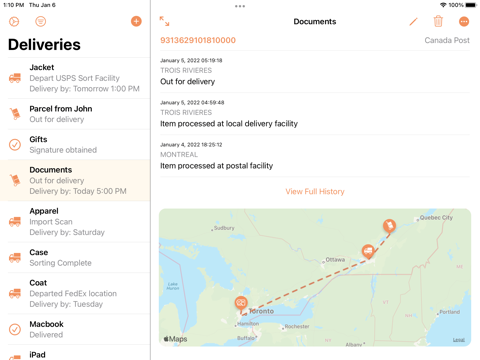

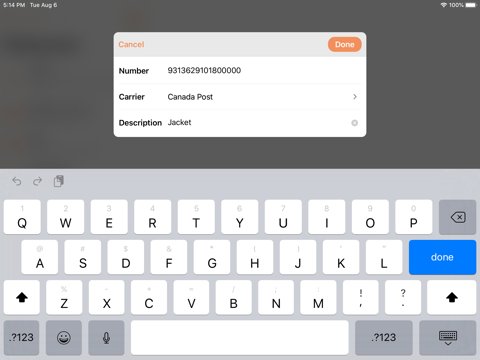
Pricing & paywalls
App Store
- Premium Subscription — $6.99
Ratings & reviews
App Store
-
4/5Great app, missing an essential feature
I have recent switched to Parcel to track deliveries. It’s a great app and I highly recommend it. It does a great job of tracking packages, providing timely notifications, doing everything one would want in a tracking app except one significant thing: it does not allow you to archive your deliveries. You have 2 and only 2 choices; keep deliveries on your screen or delete them. Over the years, using a different tracking app, I have had to rely on archived data several times to address delivery issues. I track important things that I have sent to others (like trade in iPhones) that are often accompanied by deadlines. When recipients claim to not have received my item on time, I’ve had to go back and pull up the archived data to address the claim. If Parcel would add this feature, it would be a 5 star app without question. Without it, it’s still good but that is, for me, a major shortcoming.
Captzag · 30 Aug 2026
-
5/5👍🏾 dev is on top of it ☺️
Developer obviously cares about his product – he responds to everyone, and the app itself seems fine-tuned and elegant. I know that it’s gotta be tough to run a delivery app—there are obviously a lot of variables out of the developer’s control -- so we should all take that into account. The price is really good for the service. 👉🏼 One thing: I don't know if it's technically possible, but I would like to fine-tune the notifications to receive them *only* when a package is delivered (I'm not interested if it's "on its way"). Is this user option possible to implement? I'm being buried in Parcel notifications! Thank you, dev! 🙏 Update: in over a year of using this app, it has not failed me. It's one of the few apps that I can say is 1000% paying for! I still have that quibble about notifications: I don't want ones which say a package is "on its way" – that's just clutter for me. I hope the dev can somehow give users an option to choose which notifications they get, if that's even possible (a response to this suggestion would be fantastic).
Yowzoe · 30 Aug 2026
-
5/5Best free multi-carrier tracking app so far!
Title says it all. From what I’ve seen, Parcel is probably going to be THE best free multi-carrier package tracking app available. I’ve used it for the longest time and it has always been good. With the ability to track multiple packages (I think you must subscribe to track more than like three or so, or something like that) and the app updating your packages status pretty dang soon after it’s updated on the carrier’s main servers. Because I’ve seen some apps that don’t update package statuses until an hour or more after it’s actually updated in the carriers system…. There is ONE other app out there that I used a while ago and it had EVERYTHING, all the bells and whistles and it updated your status in app the very moment that it was updated on the carriers servers. But I can’t remember what the app was…. But regardless, it doesn’t matter so much as I have Parcel here, which is a very VERY good multi carrier tracking app. Get it, seriously, you won’t be disappointed.
ZLAVARUS · 30 Aug 2026
-
5/5What an app should be
I have used this app for years and honestly wouldn't know how to cope without it. It does everything I need a tracking app to do, in a gorgeously simple interface that simply works. I've interacted with the developer a few times over the years (usually when I need to request some obscure new international shipping company be added to the options) and always been impressed with his efficiency, responsiveness, and attention to detail. Power users should note that the number of packages you can track at any one time, with a premium subscription, is fifty. I've gone over that a few times, usually around the holidays, and triggered the automatic message that fifty is the limit. This is apparently a hard limit imposed by conditions beyond the developer's control, and I can live with it. It's just good to know about. Other developers should use this app as an object lesson in how to do it right. 💛
991639810278763 · 30 Aug 2026
-
4/5Almost the perfect app!
This is definitely the best shipment tracking app out there, and I’ve bought them all. It is beautifully designed and runs as smooth as silk. Having it on both iOS and macOS is a plus! A dark mode would be a welcomed addition. It would also be really handy when forwarding emails to Parcel, if it would take the subject line of the email and use it as the title for the delivery. That way, before we send the email, we could type a brief description into the subject line that describes the delivery more accurately to us. I hope the developer keeps the great updates coming. To everyone looking for a reliable tracking app, I highly recommend this one! P.S. I had to come back and add one comment to my review. As I venture around the App Store, I’m absolutely stunned to see the number of people who complain about having to pay for an app. I developed software for more than 20 years, so I know how tedious and time-consuming it is to create and maintain quality software. Seriously people, stop feeling so entitled to get apps for free! What planet exactly are you living on?! Do you expect these people to spend years developing and fine-tuning software, and then give it to you for free?! Do you give your work hours away for free? Do you get your groceries for free? Do you get your car or your house for free? Grow up! For heaven’s sake, this app only costs about half the price of a cup of coffee per year! If you can’t afford to pay for an app, you shouldn’t have a freakin’ phone! Stop whining!
HeresMyTwoCents · 30 Aug 2026
Privacy & accessibility
App Store
Privacy
- Data Linked to You — App Functionality — Contact Info — Email Address Developer declared
- Data Linked to You — App Functionality — Identifiers — User ID Developer declared
- Data Linked to You — App Functionality — Purchases — Purchase History Developer declared
- Data Linked to You — App Functionality — User Content — Other User Content Developer declared
- Data Linked to You — Contact Info Developer declared
- Data Linked to You — Identifiers Developer declared
- Data Linked to You — Purchases Developer declared
- Data Linked to You — User Content Developer declared
Accessibility
- Dark Interface — SUPPORTED Store published
- Larger Text — SUPPORTED Store published
- Voice Control — SUPPORTED Store published
- VoiceOver — SUPPORTED Store published
Versions
App Store
-
7.15.3
Small bug fixes and improvements
-
7.15.5
Added support for Amazon Business accounts
-
7.15.6
Small bug fixes
-
8.0
Liquid Glass Design The app has been completely rebuilt in SwiftUI and now features the new Liquid Glass design style introduced in iOS 26. Amazon Order Summaries with Apple Intelligence A new Amazon Integration setting uses Apple Intelligence to generate shorter, more helpful titles for your deliveries. Summaries now reflect all items in an order, not just the first. This feature requires iOS 26 and must be enabled on all devices linked to Amazon Integration. Updated Carrier Colour Coding The status icons are now colour coded in a different way and when using the app on the iPad or Mac the carrier colour is used for selection background. Enhanced Map View On iPad and Mac, the map now keeps the delivery sidebar open, letting you quickly switch between deliveries. This feature requires iOS 26. Dedicated Search Button In line with iOS 26 design trends, the search button is now always visible on the main screen. In-App Translation Parcel can now translate delivery history from another language when requested. iPad Menu Bar Support The iPad app now includes full menu bar support, just like the Mac version.
-
8.0.1
• Fixed a bug where the day counter font was sometimes too small • Fixed a bug where it was occasionally difficult to tap the new delivery button • When there is a question about a delivery (e.g. request to sign in to Amazon, suggestion to change a carrier), the app will now show last two events instead of three
-
8.1
Improved Sharing Experience When you receive a shared delivery via a Parcel link, you no longer need to manually add it. You can now preview and view its details instantly — particularly useful for Amazon deliveries due to account restrictions. Previews in Spotlight Spotlight search has been enhanced. You can now use the Quick Look extension to preview delivery information directly within Spotlight. Changes to Widgets Parcel widgets now use App Intents for configuration. You may need to readjust your widget settings and/or restart your device to complete the migration. Improved Device Management When managing linked devices in the app settings you can now revoke multiple devices at once. New API for Adding Deliveries We’ve introduced a new API that allows you to add deliveries directly to your account. Documentation is available at web.parcelapp.net.
-
8.2
This update includes several significant under-the-hood optimisations. The app is now more responsive and features improved animations when a currently displayed delivery is updated. A number of small UI issues have also been addressed.
-
8.2.1
Addressed an issue where the day counter was not updating
-
8.2.2
• reduced app binary size • restored pre–Liquid Glass icons for iOS 18
-
8.2.3
Added support for the following carriers: Veho, Jitsu, Dashlink
-
8.2.4
Fixed a bug where the map widget sometimes displayed the delivery travel path incorrectly
-
8.2.5
• bug fixes related to Amazon integration • accessibility improvements
-
8.2.6
Bug fixes related to Amazon integration. In case of any issues with Amazon integration, please contact support in the app settings.
-
8.2.7
• when the app detects a sign in problem with Amazon, it will proactively suggest resetting the integration in the app settings • improved support for Amazon Business accounts In case of any issues with Amazon integration, please contact support in the app settings.
-
8.3
Added Amazon Integration Diagnostic Tool • see your recent Amazon orders and their import status • re-add previously deleted Amazon deliveries • available in the Amazon Integration settings Other Improvements • added support articles in the Help/Support section • added a way for legacy premium users to migrate to subscription to access subscription-only features • improved messages related to carrier limits • groundwork to support displaying carrier logos and legal disclaimers in case if it becomes a requirement from a carrier
-
8.3.1
Added Amazon Integration Diagnostic Tool • see your recent Amazon orders and their import status • re-add previously deleted Amazon deliveries • available in the Amazon Integration settings Other Improvements • added support articles in the Help/Support section • added a way for legacy premium users to migrate to subscription to access subscription-only features • improved messages related to carrier limits • groundwork to support displaying carrier logos and legal disclaimers in case if it becomes a requirement from a carrier
-
8.4
This is one of those updates where you won't see any visible changes, but there's a lot happening under the hood. The improvements are mostly around account management operations.
-
8.4.1
Small bug fixes
-
8.4.2
• improvements related to the map view • small bug fixes
-
8.5
• improved internal logic for deleting deliveries. You should see more reliable results when deleting a delivery with poor network conditions • fixed bug when sometimes changing the postage date (when using the day counter for days after postage) was not working correctly
-
8.5.1
This update resolves a rare issue that could prevent data from loading correctly on first launch.
-
8.6
• improved the internal logic for downloading new deliveries from the app server. This is a substantial change, but you should not notice any difference — except that refreshing in the app may be slightly faster. • when the app widget is used at medium or large size with the colour theme set to "Carrier", the app now applies the relevant carrier colours to each delivery individually. Previously, a single colour was applied to all deliveries in the widget. • the watch app has been significantly updated internally — as with the other changes, you should not notice any difference in behaviour.
-
8.6.2
• improved scanning of FedEx barcodes • bug fixes and improvements
-
8.6.3
Small bug fixes
-
8.6.4
· 16 Jun 2026
Small bug fixes and improvements
Alternatives
- Packages - Track Your Parcels — Same category + similar ratings
- Deliveries Package Tracker — Same category + similar ratings
- AfterShip Package Tracker — Same category + similar ratings
- Package Tracker: Track Parcels — Same category + similar ratings
- 1Track Global Package Tracker — Same category + similar ratings
- My Package Delivery Tracker — Same category + similar ratings
Availability by market
- US
Data quality & evidence
- Page completeness
- Independent summary published
- Last verified
- 30 Aug 2026
- Sources
- App Store