
Quick verdict
- What it is
- Store information collected; independent summary not yet available.
- At a glance
-
- Free to download
Categories and search queries
Official categories
- Education
- Utilities
AppCorpus categories
Key functions
| Function | Availability | Access | Scope | Evidence |
|---|---|---|---|---|
| Free app | Yes | Free | — | Store published |
Screens
App Store
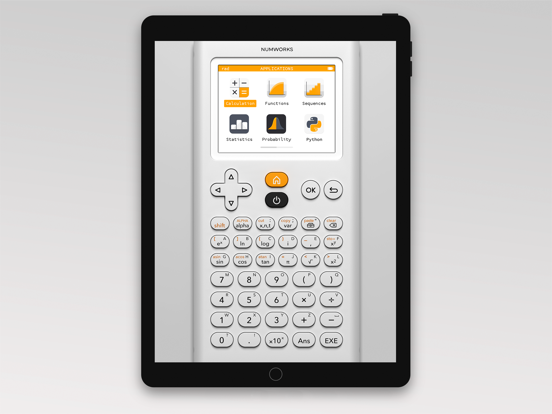
5 store screenshots

Pricing & paywalls
App Store
- Free
Ratings & reviews
App Store
-
4/5Enjoyed it, however…
I have thoroughly enjoyed the consumption of this mathematical device, however there appears to be an error with the preservation of previous calculations that have been submitted into the application. Whenever I attempt to change the angle measurements, or any setting for that matter, the application appears to reset them back to default settings once I’ve halted my use of said application. Please in the near future, discuss the matter of the issue, and work to fix it. In short, the application has an issue with saving the progress. Thank you, I appreciate what you do, and please work to fix this issue. I bid u adieu!
YoungBoy445 · 6 Aug 2026
-
5/5Really useful
I just started using this on my iPad and I love how it docks to the side of the screen with Split View. I really appreciate that it resizes itself to fit in the slimmest split size. I have a Magic Keyboard attached to my iPad and I also like that I can navigate around the calculator with the arrow keys and enter key on my keyboard. THERE IS JUST ONE LITTLE PROBLEM. The calculator seems to have the ability to decide when it does and doesn’t want to take number or letter keystrokes from the keyboard. It might, it might not. This really sort of ruins any chance I had of doing python programming on this calculator using the physical keyboard. I hope this is something that can be easily fixed. It would make this app a whole lot more useful!
Amerist · 6 Aug 2026
-
5/5This Calculator saves you from buying a physical hundred dollar TSI-84!!! TRUST
This literally replicated the TS-84 calculator we use at school, it’s really helpful when I need to do homework at home, and they don’t let us take home the school calculators. I was literally struggling trying to find a website that could help me get a calculator like this because a bunch of apps have complicated dynamics, but this calculator app is so easy and simple. And, it really replicates calculators that you have buy physically that cost hundreds of dollars, but then there’s this app that’s free, and so much cheaper to use. THANK YOU SO MUCH, you literally saved me from failing my assignment, I literally had a mental break down looking for the right calculator website, until i found this.
siramad8374 · 6 Aug 2026
-
5/5Can’t ask more for free!
Yes, this is a great one and is free. And the idea is to give you the look and feel of their $100 worth physical calculators, so it doesn’t utilize space very efficiently, or for that matter, is not ‘touch screen’ - you touch the buttons on the interface. But yes, I would like to request the developer to change the form factor suitable for phone and tablet screens if possible. I would love to buy one, just that I don’t have a use case to buy the $100 worth device. So I am quite happy with what they offered me on ipad.
iMaxi77 · 6 Aug 2026
-
5/5Please fix the layout for iPhone 14 Pro models
This is my first review in the app store, and I just couldn't hold back. This app is so good, it's all I use now for all things calculations and math. The only thing I'd really love for the developers to consider is update the layout a little to better suit the iPhone 14 Pro models (as that's what I'm using). The top part looks a bit distorted, and although it does not interfare with say to day use, I do tend to look over it and wish it looked a little better sometimes. After all, the design of the calculator is really great and I'd love to feel the aesthetics while using it! Please consider this on a future update if possible! And thank you so much for such a great app! I've checked on your website, and I'd love to buy a physical version of this (the real calculator) one myself when I can! Best Regards, Sarker
HackedPotato · 6 Aug 2026
Privacy & accessibility
App Store
Privacy
- Data Not Linked to You — Analytics — Usage Data — Product Interaction Developer declared
- Data Not Linked to You — Usage Data Developer declared
Accessibility
No accessibility labels collected yet.
Versions
App Store
- 10.0.5
-
12.2.0
- It is now possible to plot polar and parametric functions in the Functions application. - Matrix computations are now exact. - It is now possible to define a third sequence in the Sequences application. - The following probability distributions have been added: chi-squared, Student and geometric.
-
12.3.0
- It is now possible to plot polar and parametric functions in the Functions application. - Matrix computations are now exact. - It is now possible to define a third sequence in the Sequences application. - The following probability distributions have been added: chi-squared, Student and geometric.
-
13.1.1
- Additional results in the Calculation application - Units in the Calculation application - New Python modules - Ability to copy and paste a selection
-
13.2.0
- Additional results in the Calculation application - Units in the Calculation application - New Python modules (matplotlib, ion, time) - Ability to copy and paste a selection
-
14.4.0
- Autocompletion in the Python editor - Improvement of Python's turtle and matplotlib modules - Display results on the same line as the entries - New additional results for results containing units
-
15.3.0
New automatic adjustment of the graphing window Added Imperial units New section in the Toolbox for Vectors
-
15.3.5
New automatic adjustment of the graphing window Added Imperial units New section in the Toolbox for Vectors
-
16.3.1
- The Toolbox menu has been reorganized and the browsing history is now indicated in a banner at the top of the Toolbox. - The Navigate menu now allows the graph to be displayed in full screen. - Improvement of the solution search algorithm in the Equations and Functions applications. - Exact resolution of cubic equations in the Equations app.
-
16.4.0
- The Toolbox menu has been reorganized and the browsing history is now indicated in a banner at the top of the Toolbox. - The Navigate menu now allows the graph to be displayed in full screen. - Improvement of the solution search algorithm in the Equations and Functions applications. - Exact resolution of cubic equations in the Equations app.
-
17.2.0
- Plot conics and inequalities - Statistical tests and confidence intervals - Physics and Chemistry constants
-
18.2.2
Financial calculations with simple and compound interest (TVM solver)
-
19.3.0
Manually change the color of a graph New graphs and improvements to the Statistics, Regression and Inference apps List Support
-
19.4.0
Manually change the color of a graph New graphs and improvements to the Statistics, Regression and Inference apps List Support
-
20.2.0
- Plot a list of points in the Grapher - Parametrized form of the solutions for systems of equations - numpy module in Python
-
20.3.0
* Periodic table of elements * Points of interest highlighted in the Grapher app * Cobweb plots * Piecewise functions
-
21.2.1
- Plot a list of points in the Grapher - Parametrized form of the solutions for systems of equations - numpy module in Python
-
21.3.0
- Plot a list of points in the Grapher - Parametrized form of the solutions for systems of equations - numpy module in Python
-
22.2.0
- Polar and algebraic form of complex numbers - Navigation improvement - Performance
-
23.2.1
Plotting derivatives of functions Recognition of the notation f', f'' and f^(n) Value of derivatives - Polar and parametric curves More improvements to the Grapher application Search interval for solving equations Using data in the Inference app
-
24.10.0
6 data tables available in Statistics and Regressions Adjustable step size of the axes in Grapher Recoverable Data After Exam Mode Screen timeout option Intersections for Inequalities in Grapher Better notation for powers of 10 Points of discontinuity displayed in Grapher Sequence app update
-
24.5.0
6 data tables available in Statistics and Regressions Adjustable step size of the axes in Grapher Recoverable Data After Exam Mode Screen timeout option Intersections for Inequalities in Grapher Better notation for powers of 10 Points of discontinuity displayed in Grapher Sequence app update
-
24.8.0
6 data tables available in Statistics and Regressions Adjustable step size of the axes in Grapher Recoverable Data After Exam Mode Screen timeout option Intersections for Inequalities in Grapher Better notation for powers of 10 Points of discontinuity displayed in Grapher Sequence app update 3 707
-
25.2.1
Categorical data Region of intersection of inequalities Approximate fractions in calculations Intersection points for conics and vertical lines One-way ANOVA test Quick access to Degree symbol New notation for defining sequences Calculations app result alignment Auto-zoom algorithm improvements
-
26.3.0
· 30 Jul 2026
Dark mode Magnify option Statistics and Regression accessibility improvements Error messages improvements Rational functions discontinuity detection Points of interest of derivatives Polar grid adapts to the calculator's settings Residuals stored in a List
Alternatives
- Ncalc - Graphing Calculator 84 — Same category + similar ratings
- Taculator 84 Graphing Calc — Same category + similar ratings
- Graphing Calculator X84 — Same category + similar ratings
- Brevet Bac Licence 2026 Nomad — Same category + similar ratings
- Desmos Scientific Calculator — Same category + similar ratings
- Desmos Graphing Calculator — Same category + similar ratings
Availability by market
- US
Data quality & evidence
- Page completeness
- Live store listing
- Last verified
- 6 Aug 2026
- Sources
- App Store
- Independent summary has not been published yet.