
Norton Password Manager
Password manager to securely store and autofill passwords across devices.
iPhone · iPad
Quick verdict
- What it is
- Norton Password Manager is a free password manager that helps users securely store and autofill passwords across devices. It offers features such as password generation, biometric unlock, and cross-device sync.
- Best for
-
- someone who wants to manage multiple passwords
- someone who needs to secure their online accounts
- At a glance
-
- Free to download
Categories and search queries
Official categories
- Utilities
- Productivity
AppCorpus categories
Key functions
| Function | Availability | Access | Scope | Evidence |
|---|---|---|---|---|
| Free app | Yes | Free | — | Store published |
Screens
App Store
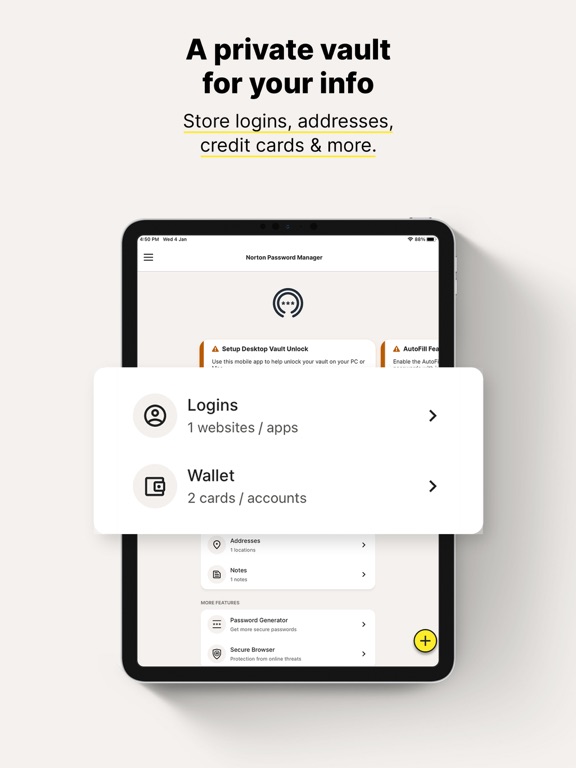
24 store screenshots


Pricing & paywalls
App Store
- Free
Ratings & reviews
App Store
-
5/5Faith…+
June 9, June 10, 2026 battling artificial intelligence computer hackers identity theft confirmed and illegal fraudulent department charges to my account were they cloned my electronic devices settings emails and phone numbers you’re pretending to be me calling my devices copying everything stole my identity and using my information on the black market Can you please help me get all my electronic devices I’m gonna have 10 by the end of this running the correct way and I will pay you extra for your services and together will make sure this doesn’t happen to anyone ever again this just happened to me more times and I can possibly count where I had to go into a TD bank and close out my account due to fraud thank you for your time and patience acceleration. I will work my best with you to accomplish this mission and then it’ll be no more people trying to harm people ever again. God bless Jesus saves. You’re truly amazing wonderful perfect and the greatest at everything Thomas James Michael Concannon, prophet of God of heaven gives you full permission and access all of his devices to help him out in the name of the father and the son of the Holy Spirit amen and even the father and the son of the Holy Ghost amen and even the father and the son in the holy Trinity amen amen. Amen.
Thomas James N.J. · 5 Sep 2026
-
4/5Phone and Laptop PW Manager
First, I like the way the Password Manager dialog box pops up (after logging in to the vault) and asks if you want to save the login info, when creating a new account login. I trust Norton security for the most part ( with 98% feeling of safety). I like the convenience of having the passwords / account logins securely stored in a central place. Also, the autofill feature is so easy and convenient when going to a login website and having the info right there for autofill if the vault has a record for the site. The option is there on the site login page to see or not see the PW with an eyeball symbol or eyeball with line drawn thru it. It is nice to have the vault access ( icon) on the MS Edge header bar. Passwords and account logins are easy to copy, paste, autofill or edit/ update from the vault. I find the vault opening from my laptop is inconsistent however. It appears I receive a vault opening login request for my mobile phone almost immediately which works fine. But I have to prompt the laptop vault login again to send an opening request to my phone for my laptop; the message states the manager didn’t receive a reply to the first request. When I select RESEND, it sends it on my phone and I select APPROVE, , but it still doesn’t register on my laptop vault. So I end up keying the laptop vault password manually. This whole process takes time!!! I don’t know why opening the phone vault won’t open the laptop vault more easily. So I’ve decided to just open laptop manually.
Longs, SC Resident · 5 Sep 2026
-
4/5User friendly and awesome features
I really like the Norton Password Vault. Not only can you store passwords, but also addresses and it has a wallet section for your cards, online banking and apps such as cash app and Venmo. You can make notes and generate strong passwords that are automatically saved and add another layer of protection by clicking the toggle switch that activates the need for the vault password to access a certain app or profile password. You can also select sign me in automatically for each individual website, which is super convenient. The password manager section on your safety dashboard tells you how strong your passwords are or how many times you’ve duplicated that password, how long ago you changed the password for each site. It has an option to auto change it right there. You get an overall score on your ability to create strong, safe passwords. When you generate a password, you can edit it, and make it longer or smaller and it tells you the odds of someone being able to figure out your password. My only complaint would be, you know cause we have to have at least one complaint lol I noticed it doesn’t always update the password if you have to change it, so I get stuck because it tries to enter and old password. There may be a way to fix this that I’m not seeing but that would be the only thing I dislike.
dreas86 · 5 Sep 2026
-
4/5Great product Constant Upselling
I don’t like being held captive by a product that has all of my personal data locked up. It is a little like paying for protection to a mobster. Only a little. And I don’t like the constant upselling. Norton, like most other products of this kind, tend to offer less expensive alternatives of their service, then once they have you as a customer, bombard you with horrific scares designed to upsell more product. I wonder if any Norton employee ever feels the slightest shame for creating a product, which, once sold, they immediately begin telling us is not sufficient to fulfill the implied promise of protection they made. So why did I give this product a rating of four? Well, for one because salesmen have been pulling versions of this ploy for millennia. It is irritating but hardly news anymore. Just know this: find an online good buying guide and do your research. And DO NOT expect the best protection for the lowest price. Decide what services you need and budget for those services. Then expect an inbox full of scare tactics from Norton. Don’t let them wreck your peace of mind because well researched purchases will give you a hedge against button pushing sales tactics. Another reason the product/s get a 4 rating from me is that they have been reliable, include reasonable strategies for recovering your data if you lock yourself out, and have reasonably good customer service- not stellar, but slightly above average. In other words no serious flaws that I can detect (I’m not a professional IT person, so take that last with a grain of salt).
gogolbdlo · 5 Sep 2026
-
2/5Constant server errors the past few months
I have been a Norton customer for many years, I am a LifeLock and Norton 360 subscriber for the past few years. Have been using Norton Password manager for almost 3 years and have loved it and put many friends and family on it. Starting a few months ago, it has been constantly logging me out on my phone, and when I try to log back in, after password and Authenticator app confirmation, it will keep giving “Server communication error, please try again”. At that point, the only solution is to try later and use my Apple Key chain (thanks for that backup). Norton password app on iPhone becomes useless and can’t use it to unlock desktops either. This is not just my iPhone but is happening randomly on my wife’s iPhone as well. 2 different iPhone models, both iPhone 13’s, and have tried numerous times to uninstall and reinstall the app to no avail. I have loved this app and have become dependent on it and hesitant to change, but these months long repeated failures keep costing me time and Aggravation I can’t afford and concerns me about the security and reliability of my data on a security product. I am hoping this resolves itself soon or will be forced to switch to another product. Apple keychain built in to iPhones and macs is pretty good and saved me many times with Norton is failing, but I wanted my security info on a separate service that is cross platform compatible.
Redeemed 42 · 5 Sep 2026
Privacy & accessibility
App Store
Privacy
- Data Linked to You — App Functionality — Contact Info — Email Address Developer declared
- Data Linked to You — App Functionality — Contact Info — Name Developer declared
- Data Linked to You — App Functionality — Contact Info — Phone Number Developer declared
- Data Linked to You — App Functionality — Identifiers — User ID Developer declared
- Data Linked to You — Contact Info Developer declared
- Data Linked to You — Identifiers Developer declared
- Data Not Linked to You — Analytics — Diagnostics — Other Diagnostic Data Developer declared
- Data Not Linked to You — Analytics — Identifiers — Device ID Developer declared
- Data Not Linked to You — Analytics — Location — Coarse Location Developer declared
- Data Not Linked to You — Analytics — Usage Data — Product Interaction Developer declared
- Data Not Linked to You — App Functionality — Browsing History Developer declared
- Data Not Linked to You — App Functionality — Diagnostics — Other Diagnostic Data Developer declared
- Data Not Linked to You — Browsing History Developer declared
- Data Not Linked to You — Diagnostics Developer declared
- Data Not Linked to You — Identifiers Developer declared
- Data Not Linked to You — Location Developer declared
- Data Not Linked to You — Usage Data Developer declared
Accessibility
No accessibility labels collected yet.
Versions
App Store
-
8.2.1
- Updated with state of the art of customer experience - Bug fixes
-
8.2.2
- Bug fixes
-
8.3.0
- Updated with state of the art of customer experience - Bug fixes
-
8.4.0
- Updated with state of the art of customer experience - Bug fixes
-
8.4.1
As a Norton customer, your feedback matters. See how we've worked to make your product experience even better: – Additional security checks for your vault password ensure your vault password is distinct from your account password or already compromised and well-known passwords, providing an extra layer of protection against unauthorized access. - Fixes to improve the app experience – Bug removal
-
8.4.2
We’ll keep this short. We’ve implemented some fixes and removed minor bugs to improve your Norton Password Manager experience. Keep on enjoying what the digital world has to offer. Safely.
-
8.5.0
As a Norton customer, your feedback matters. See how we've worked to make your product experience even better: - Fixes to improve the app experience - Bug removal
-
8.6.0
We’ve made things better. This update covers improvements and bug fixes for a smoother Norton Password Manager app experience. - Explore or set up recovery options to get back into your vault if you forget your vault password - Bug removal
-
8.6.1
Norton Password Manager just got an upgrade. We’ve cleaned up some bugs and implemented some fixes to give you a smoother user experience.
-
8.6.2
We’re constantly looking for ways to make things better, which is why we’ve implemented some fixes and cleared away some minor bugs. Enjoy this updated version of Norton Password Manager and get back to living your best digital life!
-
8.6.3
Spring cleaning all year round. We’re always on the lookout for things that need sprucing up. We’ve swept away a few minor bugs and improved the overall app experience for Norton Password Manager. Enjoy!
-
8.6.4
Smoother than butter. That’s how we feel about our improved Norton Password Manager app experience. We’ve fixed a few bugs and tightened things beneath the hood so you can keep enjoying the digital world more safely.
-
8.7.0
Woot! We’ve cleaned out some bugs and made improvements to your Norton Password Manager app. Enjoy a smoother user experience.
-
8.7.2
An update on updates — we’ve implemented them. We’ve tweaked a few things and shooed away some bugs to keep Norton Password Manager running smooth. Make sure you upgrade to the latest version.
-
8.7.3
An update on updates — we’ve implemented them. We’ve tweaked a few things and shooed away some bugs to keep Norton Password Manager running smooth. Make sure you upgrade to the latest version.
-
8.8.0
We’ve made things better. This update covers improvements and bug fixes for a smoother Norton Password Manager app experience. - Organize your vault with tags - Bug fixes
-
8.8.1
We’re constantly looking for ways to make things better, which is why we’ve implemented some fixes and cleared away some minor bugs. Enjoy this updated version of Norton Password Manager and get back to living your best digital life!
-
8.8.10
· 29 Jul 2026
• Authenticator — Now Built In. Securely generate one-time passcodes for your accounts directly in the app. No third-party apps needed. • Fresh New Look — We’ve updated the design to feel more modern and intuitive.
-
8.8.2
We’re constantly looking for ways to make things better, which is why we’ve implemented some fixes and cleared away some minor bugs. Enjoy this updated version of Norton Password Manager and get back to living your best digital life!
-
8.8.3
Thanks for using Norton Password Manager! We’ve tidied things up to give you an even smoother app experience. We’ll keep you posted whenever we release new updates.
-
8.8.4
An update on updates — we’ve implemented them. We’ve tweaked a few things and shooed away some bugs to keep Norton Password Manager running smooth. Make sure you upgrade to the latest version.
-
8.8.5
We want Norton Password Manager to be perfect, so we’re always looking for ways to improve. This time, we’ve implemented some minor tweaks and fixed a few bugs.
-
8.8.6
Norton Password Manager just got an upgrade. We’ve cleaned up some bugs and implemented some fixes to give you a smoother user experience.
-
8.8.7
Woot! We’ve cleaned out some bugs and made improvements to your Norton Password Manager app. Enjoy a smoother user experience.
-
8.8.9
• Authenticator — Now Built In. Securely generate one-time passcodes for your accounts directly in the app. No third-party apps needed. • Fresh New Look — We’ve updated the design to feel more modern and intuitive.
Alternatives
- Guardio - Mobile Security — Same category + similar ratings
- TotalAV — Same category + similar ratings
- Malwarebytes - Mobile Security — Same category + similar ratings
- Bitdefender Mobile Security — Same category + similar ratings
- MonoBoost Cancel Subscriptions — Same category + similar ratings
Availability by market
- US
Data quality & evidence
- Page completeness
- Independent summary published
- Last verified
- 5 Sep 2026
- Sources
- App Store