
Quick verdict
- What it is
- Store information collected; independent summary not yet available.
- At a glance
-
- From $1.99/mo
- Free to download
- In-app purchases
Categories and search queries
Official categories
- Travel
- Navigation
AppCorpus categories
Key functions
| Function | Availability | Access | Scope | Evidence |
|---|---|---|---|---|
| Family Sharing | Yes | Unknown | App Store | Store published |
| Free app | Yes | Free | — | Store published |
| In-app purchases | Yes | Limited free | — | Store published |
Screens
App Store
21 store screenshots

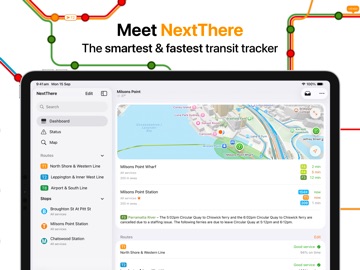

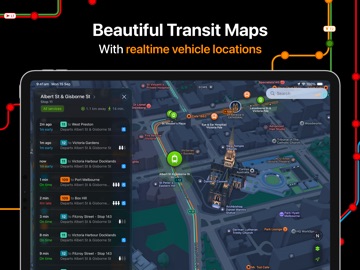
Pricing & paywalls
App Store
- NextThere Pro - Monthly — $1.99/month
- NextThere Pro - Monthly — $12.99/year ($1.08/mo)
- NextThere Pro - Family — $19.99
Ratings & reviews
App Store
-
5/5Love it
Excellent real-time data on buses - incoming and in transit
eonz · 6 Aug 2026
-
3/5Crashing
My app keeps crashing and shows a dashboard screen for 1 second then crashes
Abishans · 6 Aug 2026
-
1/5App has incorrect information
Waiting at the bus stop a few times and the app shows the bus is at my stop and it isn’t there and then I’m late because I have to wait for the next one. Get it right or don’t have the app available!
Annie Houston · 6 Aug 2026
-
1/5Poor reliability
I can’t get this app to show the services close to my home. I know there is service in front of my home, it runs everyday.
EurekaDog · 6 Aug 2026
-
5/5Lovely.
In Newcastle. Very practical well laid out application. Public transport is much easier with it.
µseek · 6 Aug 2026
Privacy & accessibility
App Store
Privacy
- Data Not Linked to You — App Functionality — Diagnostics — Crash Data Developer declared
- Data Not Linked to You — Diagnostics Developer declared
Accessibility
- Dark Interface — SUPPORTED Store published
- Differentiate Without Color Alone — SUPPORTED Store published
- Larger Text — SUPPORTED Store published
- Voice Control — SUPPORTED Store published
- VoiceOver — SUPPORTED Store published
Versions
App Store
-
3.0.10
• Added onboarding for new users • Journey tracker now supports vehicle tracking settings • Fixed a few crashes that could happen in unusual circumstances
-
3.0.11
• Added smooth vehicle animation option • Formation links between trips are no longer hidden behind 'show run numbers' option • Fixed an issue affecting nearest stop watch complications
-
3.0.12
• On time running graphs – get a live snapshot of how your line or operator is going! • Siri Search integration – find your favourite stop or line from search • Set a destination from a trip – select a trip, then long press a stop in the stopping pattern to turn it into a journey • Improved appearance of formation links when not subscribed • Optimised sync between phone and watch apps • Fixed issue updating push notification settings • Fixed a crash that could occur on startup
-
3.0.13
• Christmas buses are back for 2024 (Sydney, Brisbane) • Added on time running charts (Pro) • Dwell times are now shown in stopping patterns • Improved search result ordering • Stop/station info: accessibility icon is now shown next to accessible platforms • Journey tracker: second level precision is now supported • Journey tracker: fixed background transparency bug • Free tier users may now see ads on the dashboard • Fixed subscription update bug, watch app background crash and potential memory leaks
-
3.0.14
• Added support for tracking the Queensland Rail Santa Train • Fixed an issue where widgets may not recognise subscription • Fixed a potential crash while viewing the timetable
-
3.0.15
• Widgets now sync and update more reliably • Metro stations are now ranked higher in search results
-
3.0.16
• Widgets: added two line lock screen widget, added option to remove background colour • On time running history chart height now adjusts depending on how many services are operating • Fixed services requiring booking not showing a warning in NSW
-
3.0.17
• Improved search map performance • Improved error when no upcoming services at a stop • Operators now show on-time running graph on dashboard and status tabs for subcsribers • Pinned journeys can now be swiped to dismiss on the dashboard • Fixed support for short platforms
-
3.0.18
• Improved trip tracking map • Improved search map performance • Fixed an issue loading stops in New Zealand • Fixed an issue rendering on time running charts with large text sizes • Fixed a crash that could happen viewing a stop in the search tab
-
3.0.19
• Dashboard: nearby stops now detect platforms while you're at them • Search: improved rendering of stop clusters on the map • Timetable: departed services are now shaded in to help visually distinguish them • Fixed issue with disruption notification targeting • Fixed dark mode legibility issues in Queensland
-
3.0.20
• Search tab now shows saved journeys and groups platforms • Performance improvements • Fixed a crash that could occur while nearby a saved platform/stand
-
4.0
Welcome to NextThere 4.0: redesigned for Liquid Glass and iOS 26. • Dashboard now helps you find your stop more easily with an interactive map • Search is now a beautiful way to explore transit options across your city • Live Activities are now available to track your journey from the lock screen - just tap Go • Timetables now support filtering by route • Our journey tracker has been rebuilt from the ground up to provide key information you need at every stage of your journey There's are more improvements scattered throughout the app, we hope you love it. If you have feedback please let us know through ... > Settings > Feedback or at [email protected].
-
4.0.1
Welcome to NextThere 4.0: redesigned for Liquid Glass and iOS 26. • Dashboard now helps you find your stop more easily with an interactive map • Search is now a beautiful way to explore transit options across your city • Live Activities are now available to track your journey from the lock screen - just tap Go • Timetables now support filtering by route • Our journey tracker has been rebuilt from the ground up to provide key information you need at every stage of your journey There are more improvements scattered throughout the app. We hope you love it. This 4.0.1 update fixes some minor issues and crashes in our 4.0 release. See our release notes under Settings for more details. If you have feedback please let us know through ... > Settings > Feedback or at [email protected].
-
4.0.10
Just a few bug fixes. Check out our release notes under Settings for the full details.
-
4.0.11
• Improved route map positioning logic • Fixed live vehicle speed not showing while onboard • Fixed widgets missing destination names in some cases • Fixed crash while viewing station information • Fixed stale map data being reused in some cases • Fixed wharf numbers not showing at Circular Quay
-
4.0.2
Welcome to NextThere 4.0: redesigned for Liquid Glass and iOS 26. • Dashboard now helps you find your stop more easily with an interactive map • Search is now a beautiful way to explore transit options across your city • Live Activities are now available to track your journey from the lock screen - just tap Go • Timetables now support filtering by route • Our journey tracker has been rebuilt from the ground up to provide key information you need at every stage of your journey There are more improvements scattered throughout the app. We hope you love it. This 4.0.2 update fixes some minor issues and crashes in our 4.0 release. See our release notes under Settings for more details. If you have feedback please let us know through ... > Settings > Feedback or at [email protected].
-
4.0.3
Welcome to NextThere 4.0: redesigned for Liquid Glass and iOS 26. • Dashboard now helps you find your stop more easily with an interactive map • Search is now a beautiful way to explore transit options across your city • Live Activities are now available to track your journey from the lock screen - just tap Go • Timetables now support filtering by route • Our journey tracker has been rebuilt from the ground up to provide key information you need at every stage of your journey There are more improvements scattered throughout the app. We hope you love it. This 4.0.3 update fixes some minor issues and crashes in our 4.0 release. See our release notes under Settings for more details. If you have feedback please let us know through ... > Settings > Feedback or at [email protected].
-
4.0.4
Welcome to NextThere 4.0: redesigned for Liquid Glass and iOS 26. • Dashboard now helps you find your stop more easily with an interactive map • Search is now a beautiful way to explore transit options across your city • Live Activities are now available to track your journey from the lock screen - just tap Go • Timetables now support filtering by route • Our journey tracker has been rebuilt from the ground up to provide key information you need at every stage of your journey There are more improvements scattered throughout the app. We hope you love it. This 4.0.4 update contains minor enhancements and fixes for our 4.0.3 release. See our release notes under Settings for more details. If you have feedback please let us know through ... > Settings > Feedback or at [email protected].
-
4.0.5
Bug fixes, memory optimisations and stability improvements. Check our release notes under Settings for details.
-
4.0.6
Improvements, bug fixes and stability fixes. Lots of little things, too much to list here! Check our release notes under Settings for details.
-
4.0.7
Christmas is nearly here! Track decorated buses in select cities across Australia with the new Xmas bus tracker! We also included some bug fixes - check our release notes under Settings for details.
-
4.0.8
• Fixed Xmas bus tracker not appearing immediately after update • Fixed blacked out route glyphs on certain OS versions • Improved presentation of previous/next trip links
-
4.0.9
• Fixed live activity causing excessive network requests • Fixed dashboard map losing position while app is closed • Fixed crash viewing vehicle info for a trip • Fixed crash in search after selecting a result
-
4.1.0
Meet NextThere 4.1: Our smartest update yet! We've added 4 new features that'll make catching public transport easier and more predictable. # Departure Analytics At the bottom of every service you'll find a new historic performance chart, showing how that exact service performed when arriving at your exact stop in the past 90 days. If any statistic stands out, for example if a service is cancelled more often than not, or conversely if a service is typically fantastic, we'll show that up the top so you don't miss it. # See every vehicle You can now see every vehicle across your city updating in real-time. Tapping on a vehicle will reveal the route it's operating, and its performance. This makes it easier than ever to quickly see information about the trip you're on, without having to first find the stop you departed from and work backwards. # Status Page We've made the status page hyper-personalised, considering your saved stops and your current location to give you an overview of how nearby routes and operators are performing. And if there's an important alert, we'll make sure you don't miss it by putting it front-and-center. # Vehicle Traces Wondering why your service was delayed? Vehicle traces show you how fast the vehicle was moving on the map, so you can see exactly where it got held up, and where it got back on track. That's not all though, we've also added redesigned the map to make finding stops and routes easier, we've added new vehicle information cards, and you can search for operators from the Status page.
-
4.1.1
· 30 May 2026
Meet NextThere 4.1: Our smartest update yet! We’ve added four big new features to make catching public transport easier and more predictable. # Departure Analytics At the bottom of every service, you’ll now find historic performance. This chart shows how that specific service performed at your exact stop over the past 90 days. If a statistic stands out, like a service being cancelled frequently or consistently arriving on time, it’s highlighted at the top so you don’t miss it. # See Every Vehicle Subscribers can now see every vehicle across your city in real-time in Search. Tapping on a vehicle reveals its route and performance. This makes it easier than ever to quickly access trip information without needing to find your departure stop and work backwards. # Status Reimagined The status page is now redesigned and personalised, taking into account your current location and saved stops. It provides an overview of nearby routes and operators’ performance. Important alerts are prominently displayed to ensure you don’t miss them. # Vehicle Traces Curious about why your service was delayed? Vehicle traces show you the vehicle’s speed on the map, revealing where it was held up and where it resumed its journey. There's lots more to discover. We’ve redesigned our map for easier stop and route finding. New vehicle information cards have been added, and you can now search for operators directly from the status page. We can't wait to hear what you think. # 4.1.1 - Added option to use stop colors rather than route colors in widgets. - Fixed a crash on iOS 16 and earlier when viewing a trip. - Fixed tracked trips without a departure point looking a bit odd. - Fixed vehicle speeds always displaying in km/h, instead of mph or knots where relevant.
Alternatives
- TripView Lite — Same category + similar ratings
- Sydney Transport: Bus & Rail — Same category + similar ratings
- Trip Planner - NSW & Sydney — Same category + similar ratings
- Adelaide Metro Buy & Go — Same category + similar ratings
- TripView — Same category + similar ratings
- Opal Travel — Same category + similar ratings
Availability by market
- US
Data quality & evidence
- Page completeness
- Live store listing
- Last verified
- 6 Aug 2026
- Sources
- App Store
- Independent summary has not been published yet.