
Quick verdict
- What it is
- Store information collected; independent summary not yet available.
- At a glance
-
- Free to download
Categories and search queries
Official categories
- Medical
AppCorpus categories
Key functions
| Function | Availability | Access | Scope | Evidence |
|---|---|---|---|---|
| Free app | Yes | Free | — | Store published |
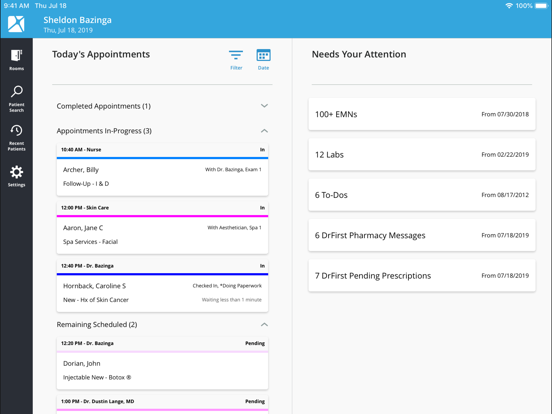
Screens
App Store
5 store screenshots

Pricing & paywalls
App Store
Shown for US
- Free
Ratings & reviews
App Store
Shown for US
-
3/5Underwhelming
A one of the “premier” EMR solutions, and one of the most expensive, Nextech is clunky and disappointing. Huge obvious improvements (FaceID login) are left unaddressed for years while regular updates are rolled out to fix unnoticeable issues. I wonder if these updates are just for show. Clearly they are not prioritizing high yield items (for our practice at least). This is true for the app, and even more true for the desktop software our office uses which is about as cutting edge as WordPerfect, if you can remember that. I am glad to have a way to send in prescriptions electronically by phone. That function was actually outsourced to a third party (drfirst) and works pretty well. I am a physician and former programmer. I use this software daily, know its quirks fairly well after years of use, and it causes me daily pain, although that was also true of Epic and Cerner.
Jack Blather · 6 Aug 2026
-
3/5Needs Face ID and ability to do more on phone and iPad
Seems to have improved since I started using it but there are a few things still lacking. I need to be able to write a note on the iPad or iPhone. It would be nice to have a way to bring the medical history forward or to top of Emns. Needs to be able to alert patient to update the medical history. And why is fingerprint or facial recognition not an option? There is a lot of room for mobile improvement. I need to be able to make appointments from for app when on call. If I can check schedule to fit a patient in, I need to be able to place them in a slot before office opens and fills that slot.
AestheticFNP · 6 Aug 2026
-
1/5Not made for aesthetic surgery
The photo uploaded is terrible. The app itself does not have a robust photo management. We have it setup to work with Rx photo and its a disaster. Photo’s always upload with error if uploaded via camera. Photos taken from the phone and ipad sometimes do not even save. I have used it since 2016 and it was ok the first 2 years and since 2018 it gives me some error every day. Last month I was not able to see any if my patients photos for a full month. There is always and excuse and its escalated a higher tier person who can’t seem to fix it and keeps escalating to yet another higher up person who seem to be as clueless as the person before. Everything you ask the support, the answer is “that feature is a limitation of the platform. “ Do not fall into the low price trap. Don’t get me even started on their RX module m..absolutely bananas🤯😡🤬🤮 I have been looking at some alternatives.
khorasani · 6 Aug 2026
-
3/5Could be so much better, but can send Rx’s remotely
I appreciate that I can send Rx’s from the app, but aside from that and being able to check the schedule, this interface is quite lacking. At the very least, I should be able to schedule appointments. That’s extremely frustrating because I will get caught with the appointment slot I wanted for a patient taken before I get into the office. If that feature gets implemented, this would be 4 stars, maybe even 5.
MishiRN · 6 Aug 2026
-
5/5Fantastic!
The changes to Nextech in the past few months since COVID have been nothing short of amazing. Truly, they have done so many innovative things to allow me to practice from afar and have also improved many other aspects. Their team has continued to ask for input and related their work to the users effectively. Compared to my colleagues who use other systems, Nextech has nailed it while the others didn’t.
dis821 · 6 Aug 2026
Privacy & accessibility
App Store
Privacy
- Data Not Linked to You — Analytics — Usage Data — Product Interaction Developer declared
- Data Not Linked to You — App Functionality — Diagnostics — Crash Data Developer declared
- Data Not Linked to You — App Functionality — Diagnostics — Other Diagnostic Data Developer declared
- Data Not Linked to You — App Functionality — Usage Data — Product Interaction Developer declared
- Data Not Linked to You — Diagnostics Developer declared
- Data Not Linked to You — Usage Data Developer declared
Accessibility
No accessibility labels collected yet.
Versions
App Store
-
2.8.4
• Audit event added for documents or photos viewed on the iPhone or iPad. (Requires iPad 2.8.4 and Select/NexCloud 18.1 or higher) • Audit event added for patient search on iPhone or iPad under Auditing -> Misc. (Requires iPad 2.8.4 and Select/NexCloud 18.1) • Audit event added for labs printed or shared from the iPad/iPhone (Requires iPad 2.8.4 and Select/NexCloud 18.1) • Audit event added for photos or documents printed or shared from the iPad or iPhone. (Requires iPad 2.8.4 and 18.1) • Fixed a memory leak that could sometimes cause white photos.
-
2.8.5
• Audit event added when a user views the Labs Needing Attention (Requires 18.1 and iPad 2.8.5) • Auditing event for Direct Message inbox viewed and marking messages as read, unread and deleted from both the iPad and Desktop. (Requires 18.1 and 2.8.5) • Auditing event added when users view the EMNs Needing Attention area, if the filters are modified, and when To-Dos/Tasks Needing Attention is viewed. (Requires 18.1 and iPad 2.8.5) • Users will be able to delete locally stored photos from the iPad that are no longer needed. (18.1 and iPad 2.8.5)
-
2.8.6
• Fixed memory leaks that would cause white photos for some patients. • For background photo uploads, the user who originally took the photo will be listed, even if another user retried the upload at a later time. • Fixed an issue in the chart re-write that would cause the application to close after selecting items in the visit findings table.
-
2.8.7
• Update to the latest Firebase SDK for privacy manifest. • Updated the iOS API declaration to privacy manifest. • Users will only be able to see their failed photos on a device in Needs Attention. If they select to re-upload all photos, all users photos will be uploaded. Full admins will be able to see all failed photos from all users on that particular device. • Failed photos will attempt to automatically reupload at least 4 times. • Fixed an issue where the shutter button would go missing when rotating the iPad/iPhone. • Fixed an issue where the flash settings weren’t being respected or displayed correctly from the default camera app. • Fixed an issue where the thumbnail view wouldn’t scroll to the most photo automatically on smaller devices.
-
2.8.8
• This update includes minor improvements and performance enhancements
-
2.8.9
• Patient photos will only be loaded once navigating to the photos tab, decreasing the amount of time it takes to load a patients chart. • Thumbnail photos from P+ will now be stored with the first request, reducing the memory load on the soap server and decreasing the time for a patient chart to load. • Fixed an issue that was causing 1012 errors for clients and would kick users off the iPad. Select/NexCloud 12.7 or higher is now required for the iPad app.
-
2.9.0
• Fixed an issue that would cause the application to close after tapping multiple times on the patient dashboard - EMN list, Snapshots on 3d Images, Room Manager Filter, and the Patient photos option when adding photos within an EMN. • Fixed an issue where the search bar within the coding section wasn’t centered, or allow the user to select more than one code without having to close the entire coding modal. • Fixed an issue where users are unable to re-order diagnosis codes, delete diagnosis codes, or favorite diagnosis codes if there wasn’t an ICD-9 code linked. (Select 18.5 and iPad 2.9.0) • Fixed an issue where users were not able to zoom in our out before taking a photo. • Fixed an issue where photos were saved larger than what was presented in the view finder.
-
2.9.1
• Fixed an issue where the filter text would be overlapping on the photos and history tab on the patient dashboard.
-
2.9.2
• This update includes minor improvements and performance enhancements
-
2.9.3
Allergy SNOMED entry causing CCDA reconciliation error Allergy SNOMED reconciliation does not reconcile allergies with SNOMED Codes Drop support for iOS 14 Update Emergency Contact Labels on iPad/iPhone Call GetPaymentOptions once per Login from iPad
-
2.9.4
Address iPad Slowness Enhanced Logging
-
2.9.5
1. Enhanced security 2. Enhanced treatment of emergency contacts for P+ customers. 3. Enhanced treatment of lab note categories. 4. Enhanced stability of downloads when backgrounding the app.
-
2.9.6
EMN Editing on the iPhone.
-
2.9.7
Fixed an issue where users were unable to swipe large items to the right to view the preview of the EMN. When sending a Direct Message, referring physicians will not be listed in Alphabetical order by last name. A search function has also been added for ease.
-
2.9.8
• Additional logging added to nethealth log to include ferry processing time from the iPad. • Fixed an issue where users were able to press and hold the back space in a narrative causing the narrative to have bad date. Holding the back space will no longer prevent the EMN PDF from being generated.
-
3.0.0
• The latest version of NexSpeak -- Speech to text. • Enhanced network requests to ensure faster responses. • Minimum iOS version increased to iOS 16. • Bug fixes.
-
3.0.1
Fixes a bug that occurred with re-imagined charting and follow-up appointments.
-
3.0.2
Updated handling of appointments in room manager and home page.
-
3.0.3
Several CCDA updates.
-
3.0.4
Adds narrative items to CCDA; includes bug fixes and performance updates
-
3.0.5
This version has several enhancements to dta requests. It adds updates for lab requisitions and fixes an issue importing photos from the iPad photo album
-
3.0.6
Addresses an issue where the user was unable to enter a receiving location into lab requisitions
-
3.0.8
This fixes an issue with iOS 26 devices displaying liquid glass
-
3.0.9
Fixes an issue with iOS 26 where swiping caused users to leave a note.
-
3.1.0
· 3 Aug 2026
What's New in This Release: • Now optimized for Liquid Glass – The app now supports Apple's Liquid Glass design language, delivering a more modern, responsive, and visually refined experience. You'll notice smoother interface interactions, enhanced visual depth, and improved consistency with the latest iOS experience. • iOS 17 is now required – This release no longer supports iOS 16. The minimum supported operating system is now iOS 17. As a result, the following devices will no longer be able to install or update to this version of the app: - iPad (5th generation) - iPad Pro 12.9-inch (1st generation) - iPad Pro 9.7-inch (1st generation) • Enhanced app stability – Addressed several crashes affecting app stability, resulting in a more consistent and dependable experience during everyday use (SFC-3358). • Improved EMN appointment linking – Resolved an issue where patients' EMN records opened from the patient dashboard were not automatically linking to that days appointment. • Lab Requisition improvements – Fixed an issue on the Lab Requisition screen where users were unable to clear optional Anatomic Side and Location Qualifier selections after they had been chosen (SFC-3736).
Alternatives
- Galderma GAIN app — Same category + similar ratings
- RxPhoto — Same category + similar ratings
- Nject — Same category + similar ratings
Availability by market
- US
Data quality & evidence
- Page completeness
- Live store listing
- Last verified
- 6 Aug 2026
- Sources
- App Store
- Independent summary has not been published yet.