
Quick verdict
- What it is
- Store information collected; independent summary not yet available.
- At a glance
-
- $3.99
- In-app purchases
Categories and search queries
Official categories
- Navigation
- Photo & Video
AppCorpus categories
Key functions
| Function | Availability | Access | Scope | Evidence |
|---|---|---|---|---|
| In-app purchases | Yes | Limited free | — | Store published |
Screens
App Store
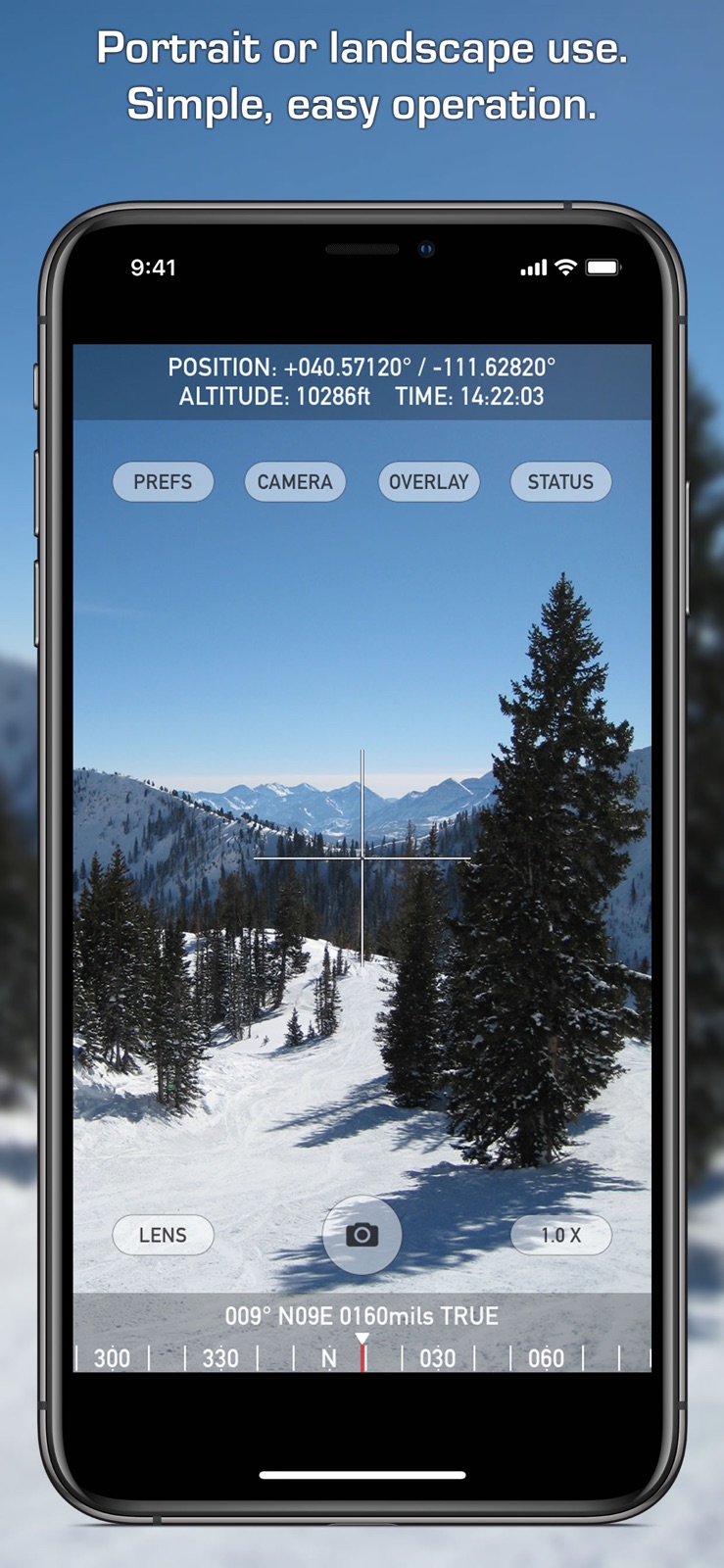
7 store screenshots



Pricing & paywalls
App Store
- Price: $3.99
- In-app purchases
Ratings & reviews
App Store
-
1/5Seriously flawed... major drawbacks left out of description
The description doesn't mention that for every 1 second of video you record, it will require an extra 2-10 seconds (depending on quality & phone model) of "processing" before it saves the video. My experience is, it's always in the longer end of that range. While it's "processing" you can't start recording another video, or use your phone for anything else, it simply becomes a brick for up to 10 times the length of the recorded video. The "processing" is CPU-intensive, and it ran down my battery several times without finishing. But the app hides your battery level indicator, and if you click out of the app for a second to check your battery level... it gives you an error and the "processing" starts again from the beginning. If the "processing" gets interrupted, next time you open the app, it offers to pick up where it left off, but if it gets interrupted a second time, which is frequent because it takes so darn long to "process" even very short videos, that's it, you've lost your video and wasted a bunch of time. You can lower the video quality to shorten the "processing" time, but this makes the timestamp blurrier, and at the lowest quality level, the timestamp is totally unreadable, making the app completely pointless. You can read all of this in the documentation on the developer's website. It's just not here, in the app store description, where you might see it before you spend your money. Lowered to 1 star just for this. Not being able to use my phone for anything for up to 5 minutes after shooting a 30-second video and sometimes even then ultimately losing the video completely, I finally deleted the app. Total waste of $2.99, I deserve a refund.
ShoobyTaylor · 31 Jul 2026
-
5/5UTM Zone Selection / Excellent Developer Response
I live in Arizona and in error selected the standard rather than band format for UTM. The standard format has an N (north) as the alpha character. The banded format has an S (the geographic band) for that character. I wrote Craig, the developer, and he responded in minutes. He let me know about the two formats, and how to select the one that met my needs. Great app and EXCELLENT support.
JPP821 · 31 Jul 2026
-
4/5Great app, wish there were a few more options
Easy to use to make a location-stamped photo. It would be nice to have an option to put GPS accuracy in the stamp and somewhere in the metadata, maybe in the comments field. The ability to omit the mils value from the bearing would make the stamp a bit clearer.
Eel River Kid · 31 Jul 2026
-
5/5It couldn’t be any easier 😃
Great App 👍. Very usual work/personal tool. Provides all the information I need for helping coworkers/friends/family, as it relates to work/play. Try it. You’ll definitely like it 😁
The OPR · 31 Jul 2026
-
1/5Inoperable
After an “update” Nav Camera no longer works with my iPhone 7. It’s unresponsive to touch screen controls and the screen is over sized, won’t switch between landscape and portrait. Update: I received a reply from the developer and in their reply they neither stated what version of this app is compatible with my iPhone 7 nor did they state what version of iOS. Their assumption that I’m running outdated software is laughable, yes I’m running the latest version of iOS ,13.3.1, Apple insures that ! I also ran this app on my iPad(5th gen) with the latest iOS and the results are the same. I will not change my rating due to the developer suggesting that user is the problem! Fix your app!
my cat leo · 31 Jul 2026
Privacy & accessibility
App Store
Privacy
- Data Not Collected Developer declared
Accessibility
No accessibility labels collected yet.
Versions
App Store
- 1.0
-
1.0.1
This is a quick update to fix a graphics freezing problem with iOS 8.2.
-
1.1
Fixed iOS 12 issue with permissions (camera, microphone, photo album, and location) affecting some users. Added new datums to optional datum pack including AUSTRALIAN GEODETIC 1994, COSTA RICA 2005, EUROPEAN TERRESTRIAL REFERENCE SYSTEM 1989, GREEK GEODETIC REFERENCE SYSTEM 1987, HONG KONG 1980, JAPANESE GEODETIC DATUM 2000, and NEW ZEALAND GEODETIC DATUM 2000.
-
1.2
Fix for photo album permissions issue on iOS 13 that was preventing the app from saving photos. Improvement in the quality of overlay graphics for movies. Added support for the new triple camera system on iPhone 11 Pro models. Other iOS 13 tweaks.
-
1.2.1
Fix for iOS 13 issue preventing in-app purchase of Datum Pack.
-
1.2.2
Fix for graphics glitches on some devices with iOS 17.
-
1.2.3
Fix for an issue preventing the app from saving photos for some users on iOS 17.
-
1.3
· 16 Apr 2026
New option to automatically lookup and overlay street address on photos and videos.
Alternatives
- GPS Camera 55. Field Survey — Same category + similar ratings
Availability by market
- US
Data quality & evidence
- Page completeness
- Live store listing
- Last verified
- 31 Jul 2026
- Sources
- App Store
- Independent summary has not been published yet.