
Quick verdict
- What it is
- Store information collected; an Apoku editorial summary is not yet published.
- At a glance
-
- Free to download
- In-app purchases
Categories and search queries
Official categories
- Utilities
- Productivity
Apoku categories
Key functions
| Function | Availability | Access | Scope | Evidence |
|---|---|---|---|---|
| Free app | Yes | Free | Context-specific | Store published |
| In-app purchases | Yes | Limited free | Context-specific | Store published |
| Family Sharing | Unknown | Unknown | Scope unknown | Store published |
Screens
App Store
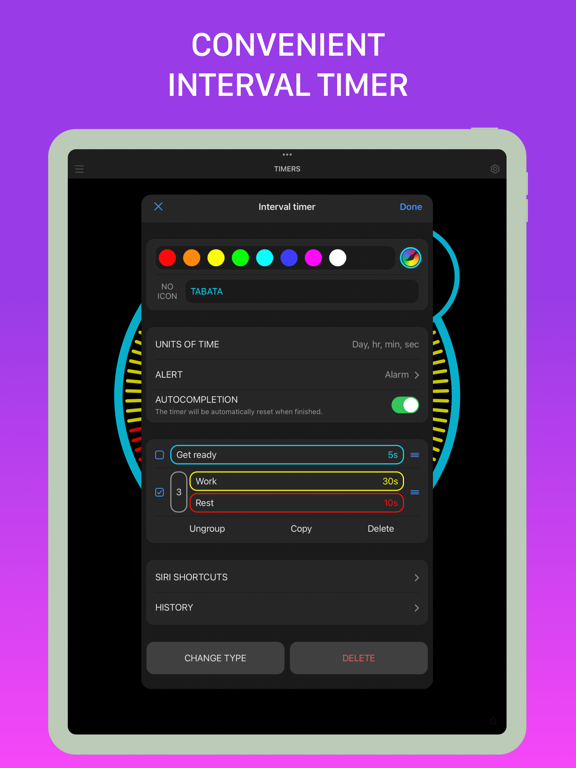
47 store screenshots


Pricing & paywalls
App Store
- MultiTimer Pro — $1.99
- MultiTimer Pro — $7.99
- MultiTimer Pro — $8.99
- MultiTimer Pro — $17.99
Ratings & reviews
App Store
-
5/5Fantastic, in a class of its own
I love this app. It’s exactly what I was looking for. I’m so glad someone made it. I like that you can have multiple boards, I like the commands which are basically macros that start stop or pause the various widgets on any of your boards. The commands work across multiple boards. That’s brilliant. The fact that you couldn’t drag and drop widgets from one word to another is also brilliant. I would pay for an in app purchase of being able to upgrade to being able to have one widget live and show up on multiple boards but have one identity. I would also pay for an in app upgrade it to be able to export my settings to Microsoft excel and then tweak them and then re-import them because that would be so much faster for me than clicking through the GUI. Also, I’d love to be able to share my profile across my Apple devices, so I couldn’t have timers running on my iPad and then pick up my iPhone and have that shared event functionality. Also, if you look at a little game called Mekorama, they get their users to create widgets for them for free. You could do that. You could have people create boards for the trendy diets, exercise programs, or whatever, and then upload them to your user forum and let other users download them and that would add tremendous value to your app. This idea would piggyback on top of the import export in excel format. Or CSV is fine too.
Pasdksa · 5 Oct 2026
-
5/5Best Timer App I’ve Used
I love this app! I’ve used it for studying, for tracking work hours, and goal accountability. I use it just about every day. Some things I hope to see in the future: - the ability to copy boards, so you can quickly make 2 that are slightly different (I often have a set of similar boards going, each with the same “goals” but with slightly different timer values - since each week I have similar things I want to work on each day, but the amount of time I can commit to each item varies by day.) - the ability to track how many times you’ve completed a timer. Maybe this would be a type of timer. The tracked number could show up in the timer itself, or maybe next to it on the board, or on another board (the option I’d personally like the most). Maybe you could edit the number for those instances when you accidentally let the timer run. I can kind of do this right now with the counting timer option, but that’s not automatic, and I find that on my phone the counting timer is a little unwieldy (you have to tap in exactly the right spot). - other than that, I just love the sheer simplicity but multi functionality of this app. Thank you for creating it and making it affordable.
Anna.p.g. · 5 Oct 2026
-
4/5Update: Best in class but still could improve
Update: The developers finally added a crucial missing feature: “adding time to a running timer”. So I’m updating my rating. Hopefully down the road Apple and Third party developers can fix the buggy iPhone-Apple Watch notifications (occasional failed notifications that makes using the Watch app unreliable). Old review: I paid $8 for the “PRO” version 🤥 just to realize it doesn’t even allow you to quick add a minute or two to a running interval, like some free alternatives do. Imagine this, you have assiduously set up a detailed sequence of timers/intervals to push you through your grueling workout (as you can tell the new year still hasn’t lost it’s luster and neither has my blind optimism for this New Year’s resolutions). Pumped and focused you enter the room, cues Rocky’s “The Final Countdown” montage, or Katy Perry’s “Roar”, whatever encapsulates the moment. But, as usual, the world is bent on destroying your New Year’s Resolution, and so the ether sends someone or something to interrupt your zen-like focus, maybe just for a minute or two. Fine fine, no problem, just get back to it, right? Well, now your entire workout is out of sync and something as simple as being able to add a minute or two to a running timer/interval would be an astoundingly simple fix. Sadly, this $8 PRO timer above all other timers has no answer. I mean how would I use this for something like cooking if I can’t even simply add a few minutes to a running countdown to adjust for variation in cooking time? Even a basic analog egg timer can conquer this feat. Tsk Tsk.
Things3Blows · 5 Oct 2026
-
5/5Functional & Flexible
I chose this multi-timer app over others because, although it’s nice to have a simple timer that is extremely easy to use, other apps I tried did not have as many kinds of timers or customizable options. I’m a college student, and I love the timer that has multiple stages because it makes it easy to organize & divide a large chunk of time. For instance, if I wanted to keep track of my laundry, I can set a timer with 30 min for washing, and 1 hour for drying. After the first 30 min is done, the timer will automatically stop and wait for me to start it again, so I can put all my clothes in the dryer. I don’t have to make a new timer or reset the timer. The same applies if I want to spend a certain amount of time studying every day. I don’t always have a 3 hour block of time to work, but I do have hours throughout the day, and the stepped timer accommodates for that & remembers my progress. There are a good variety of timers other than the one I describe, so I think this app really has something for everyone. The interface is easy to use once you poke around, it gives you a tutorial when you first enter the app. And all of this is just the free stuff, I haven’t bought the premium version, although I might if I find I need to.
hanpanlantran · 5 Oct 2026
-
5/5A teacher’s dream!
I have only ever written a review for two other apps, and now this will be my third. This is a phenomenal app and a teacher’s dream. I wish I had known about this during this past school year, but now I am excited to have it ready for next school year. As a special education teacher, I use all manner of timers and counters for data collection. This allows me to house everything - countdown, count up, +/- counter, stopwatch, and more - all in one place. I also have several timers relevant to my personal life. I honestly upgraded to the pro version mainly just to support the developers, this app is that good. So far integration with my Series 6 Apple Watch has been smooth, and that was one of the main draws to this app. Virtually everything I’d need to do in the moment is available on my watch. Syncing between watch and phone has been generally good, an occasionally slight delay but nothing major. I will say that there’s a slight learning curve to this app, so if you’re having trouble with it don’t give up right away. A shame that Apple can’t include something this powerful, intuitive, and well-designed as a native iOS app, but kudos to the developers for creating something so versatile and helpful!
bjrice21ttu · 5 Oct 2026
Privacy & accessibility
App Store
Privacy
- Data Not Linked to You — Analytics — Diagnostics — Crash Data Developer declared
- Data Not Linked to You — Analytics — Identifiers — Device ID Developer declared
- Data Not Linked to You — Analytics — Search History Developer declared
- Data Not Linked to You — Analytics — Usage Data — Product Interaction Developer declared
- Data Not Linked to You — Analytics — User Content — Other User Content Developer declared
- Data Not Linked to You — App Functionality — Identifiers — Device ID Developer declared
- Data Not Linked to You — Developer’s Advertising or Marketing — Identifiers — Device ID Developer declared
- Data Not Linked to You — Diagnostics Developer declared
- Data Not Linked to You — Identifiers Developer declared
- Data Not Linked to You — Search History Developer declared
- Data Not Linked to You — Usage Data Developer declared
- Data Not Linked to You — User Content Developer declared
- Data Used to Track You — Identifiers — Device ID Developer declared
- Data Used to Track You — Identifiers Developer declared
Accessibility
- Dark Interface — SUPPORTED Store published
- Voice Control — SUPPORTED Store published
- VoiceOver — SUPPORTED Store published
Versions
App Store
-
7.0.1
We're always making changes and improvements to MultiTimer. To make sure you don't miss a thing, just keep your Updates turned on. The version includes: [x] Fixed the sync issue between iPhone and Apple Watch. [x] Bug fixes: We’ve squashed several pesky bugs to enhanced your experience and ensure smoother app functionality. ———— Having issues? Please contact us at [email protected]. We’ll do all we can to help restore harmony. And if all is working as it should, please leave us a five-star rating. Every bit of positive feedback makes the world a better place and also makes us happier.
-
7.0.2
We're always making changes and improvements to MultiTimer. To make sure you don't miss a thing, just keep your Updates turned on. The version includes: [x] Fixed some bugs. ———— Having issues? Please contact us at [email protected]. We’ll do all we can to help restore harmony. And if all is working as it should, please leave us a five-star rating. Every bit of positive feedback makes the world a better place and also makes us happier.
-
7.0.3
We're always making changes and improvements to MultiTimer. To make sure you don't miss a thing, just keep your Updates turned on. The version includes: [x] Fixed the back coupling of the Home Screen widget on user actions. ———— Having issues? Please contact us at [email protected]. We’ll do all we can to help restore harmony. And if all is working as it should, please leave us a five-star rating. Every bit of positive feedback makes the world a better place and also makes us happier.
-
7.0.4
We're always making changes and improvements to MultiTimer. To make sure you don't miss a thing, just keep your Updates turned on. The version includes: [x] Fixed some bugs. ———— Having issues? Please contact us at [email protected]. We’ll do all we can to help restore harmony. And if all is working as it should, please leave us a five-star rating. Every bit of positive feedback makes the world a better place and also makes us happier.
-
7.1
We're always making changes and improvements to MultiTimer. To make sure you don't miss a thing, just keep your Updates turned on. The version includes: [*] Updated the color selection form [+] Added Japanese language support [x] Fixed some bugs. ———— Having issues? Please contact us at [email protected]. We’ll do all we can to help restore harmony. And if all is working as it should, please leave us a five-star rating. Every bit of positive feedback makes the world a better place and also makes us happier.
-
7.1.1
We're always making changes and improvements to MultiTimer. To make sure you don't miss a thing, just keep your Updates turned on. The version includes: [x] Fixed bug with AppleWatch. ———— Having issues? Please contact us at [email protected]. We’ll do all we can to help restore harmony. And if all is working as it should, please leave us a five-star rating. Every bit of positive feedback makes the world a better place and also makes us happier.
-
7.2
We're always making changes and improvements to MultiTimer. To make sure you don't miss a thing, just keep your Updates turned on. The version includes: [+] Added the "ADD TIME BUTTONS" setting in the timer settings. [*] Expanded the capabilities of the "Buttons" function. [+] Added a "PRESET TIME" setting for the CountUp timer. [+] Added registration of Stopwatch circles using the volume buttons in the Single view mode. [*] Unified the Interval and Stepped timers into one Interval timer with the "PAUSE BETWEEN INTERVALS" option. [*] Combined Stopwatch and Lap timer into one Stopwatch. [+] Added support for the Polish language. ———— Having issues? Please contact us at [email protected]. We’ll do all we can to help restore harmony. And if all is working as it should, please leave us a five-star rating. Every bit of positive feedback makes the world a better place and also makes us happier.
-
7.2.1
We're always making changes and improvements to MultiTimer. To make sure you don't miss a thing, just keep your Updates turned on. The version includes: [+] Added the "ADD TIME BUTTONS" setting in the timer settings. [*] Expanded the capabilities of the "Buttons" function. [+] Added a "PRESET TIME" setting for the CountUp timer. [+] Added registration of Stopwatch circles using the volume buttons in the Single view mode. [*] Unified the Interval and Stepped timers into one Interval timer with the "PAUSE BETWEEN INTERVALS" option. [*] Combined Stopwatch and Lap timer into one Stopwatch. [+] Added support for the Polish language. [*] Performance improvement. [+] Fixed some bugs. ———— Having issues? Please contact us at [email protected]. We’ll do all we can to help restore harmony. And if all is working as it should, please leave us a five-star rating. Every bit of positive feedback makes the world a better place and also makes us happier.
-
7.2.2
We're always making changes and improvements to MultiTimer. To make sure you don't miss a thing, just keep your Updates turned on. The version includes: [*] Updated the Stopwatch operation - the timer control mechanism for single measurement has been modified similar to the lap timer. [x] Fixed a bug with the Interval timer notifications. ———— Having issues? Please contact us at [email protected]. We’ll do all we can to help restore harmony. And if all is working as it should, please leave us a five-star rating. Every bit of positive feedback makes the world a better place and also makes us happier.
-
7.3
We're always making changes and improvements to MultiTimer. To make sure you don't miss a thing, just keep your Updates turned on. The version includes: [+] Added the ability to configure long-term notifications for the CountUp timer. [x] Fixed some bugs. ———— Having issues? Please contact us at [email protected]. We’ll do all we can to help restore harmony. And if all is working as it should, please leave us a five-star rating. Every bit of positive feedback makes the world a better place and also makes us happier.
-
7.3.1
We're always making changes and improvements to MultiTimer. To make sure you don't miss a thing, just keep your Updates turned on. The version includes: [x] Fixed some bugs. ———— Having issues? Please contact us at [email protected]. We’ll do all we can to help restore harmony. And if all is working as it should, please leave us a five-star rating. Every bit of positive feedback makes the world a better place and also makes us happier.
-
7.3.2
We're always making changes and improvements to MultiTimer. To make sure you don't miss a thing, just keep your Updates turned on. The version includes: [x] Fixed some bugs. ———— Having issues? Please contact us at [email protected]. We’ll do all we can to help restore harmony. And if all is working as it should, please leave us a five-star rating. Every bit of positive feedback makes the world a better place and also makes us happier.
-
7.3.3
- Fixed bug with import.
-
7.4
– Added the ability to restore deleted data: Settings > Deleted Data – Added a selection of additional information displayed on timers: Countdown, Countup, Interval, Quick Countdown, Stopwatch. – Added display of timer notes in notifications. – Added positioning of timers on the flexible board in a grid. – Expanded settings for the badge. – Updated localizations – Fixed some bugs
-
7.4.2
– Updated Japanese localization. – Fixed some bugs.
-
7.4.3
- Fixed a bug with the color of the clock tool
-
7.5
- Added the ability to enter a name for the quick timer when it starts (enabled in optional settings). - Added a note for the countup timer. - Added the ability to select a specific board in the active timers widget. - Added option to disable wait animation. - Added Turkish language support. - Added other improvements and fixes.
-
7.5.1
- Fixed some bugs
-
7.6
- Added countup timer support for LiveActivity. - LiveActivity's appearance has been updated + buttons have been added. - Detailed countup timer history entries now account for time additions and subtractions. - Added a setting to automatically clear the timer history. - Improved XML export/import.
-
7.6.1
- Fixed a Live Activity bug
-
7.6.2
Fixed some bug
-
7.7
- Updated iCloud syncing - Minor interface updates
-
7.7.1
- Fixed an iCloud error - Fixed interface bugs
-
7.7.2
Fixed some bugs in working with iCloud and widgets.
-
7.8
· 6 Aug 2026
- Added the ability to disable the pause between intervals in the Pomodoro timer. - Added the ability to select a container for button actions. - Added the ability to configure timer notifications as alarms.
-
7.9
· 3 Sep 2026
- Added the ability to customize the interval start sound in the interval timer. - Added the ability to create sounds using the "Text to Speech" feature. - Added a Single View screen for Clock. - Added "None" option for Extra info in timers. - Added option to enable disabling Live Activity for each timer. - Added the ability to create system alarms from CountUp timer notifications. - Updated the interval list control in the interval timer. - Updated the order of options in the timer settings.
-
7.9.1
· 29 Sep 2026
- Fixed some bugs
Alternatives
- Repeat Timer: Interval Remind — Same category + similar ratings
- Multi Timer: Countdown — Same category + similar ratings
Availability by market
- US
Data quality & evidence
- Page completeness
- Live store listing
- Last verified
- 5 Oct 2026
- Sources
- App Store
- Apoku editorial summary has not been published yet.