
Quick verdict
- What it is
- Store information collected; independent summary not yet available.
- At a glance
-
- Free to download
- In-app purchases
Categories and search queries
Official categories
- Entertainment
- Photo & Video
AppCorpus categories
Key functions
| Function | Availability | Access | Scope | Evidence |
|---|---|---|---|---|
| Free app | Yes | Free | — | Store published |
| Game controller | Yes | Unknown | App Store | Store published |
| In-app purchases | Yes | Limited free | — | Store published |
Screens
App Store
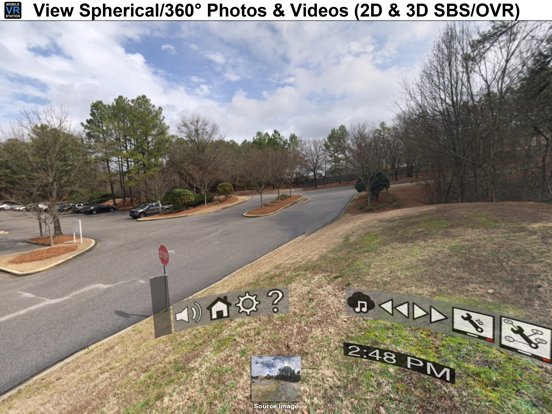
13 store screenshots


Pricing & paywalls
App Store
- Micro Player - Lift Safari Extension Limit — $1.99
- Premium Edition - Remove 5 Minute Limit — $2.99
- Presentation+ — $1.99
- Protected Drives — $1.99
- Ultimate Edition - Everything — $5.99
Ratings & reviews
App Store
-
5/5Absolutely amazing
After going through about 5 different VR players, none of which could accomplish what I needed, this one is the absolute best of the best. Has an insane amount of customization options and the quality of the video playback is awesome. The only tiny issue I have is alignment problems. I do seem to have to tap the screen every few minutes or so to re-center it but I had this problem on every other VR player. The nice things about this one is I can tap anywhere on the screen and bam, realigned again. Just need a headset now with a button that taps the screen without taking out the headset. Either way, amazing job. Keep up the good work. Bought the ultimate version almost immediately.
D3thN1gh7 · 6 Aug 2026
-
5/5Really great!
This is a great way to watch videos in vr! I bought a Google daydream headset from goodwill today, and I was looking for vr apps to use with it, and this is just perfect. One downside though is that the menu in the player can be very glitchy and slow sometimes, but all the settings there can be done just fine in the non-vr menu. I’m going to buy the thing that bypasses the 5 minute limit on videos, and I think it’ll be worth it. Overall, this is a mandatory app for people with headsets that you put your phone into.
LoeHam123 · 6 Aug 2026
-
1/5Move tool bugged since latest update
since latest update the move menu doesn’t move the video where i’m looking anymore. It is always showing the video behind me by default.. if i turn 180degrees and use the move tool it NEVER stays..it always jumps back to 180 behind me.. usually i have to gradually work my way to 180..i move head 90 degrees and use the move tool and hope it sticks which it usually doesnt but if it does then i can move head another 90 degrees to were its where I want to be looking and sometimes takes 5 tries before i can get it to stick to where I’m looking.........major bug. please fix...before this update i never had issue with the move tool.....UPDATE: looks like for move tool to work you have to make sure you look at lower part of the screen, if you look higher it wont recognize it Needs h.265 support
blitzkrieg917 · 6 Aug 2026
-
3/5Pretty good VR player
This is my go to VR player, but it doesn’t come without its drawbacks. There’s no short way to search for and select the video you want to watch making the process of loving for a specific video quite cumbersome. There’s also a glitch that won’t allow you to rewatch any video watched until the end of its playtime. If the video plays out fully the next time you select the video the player will begin just before the ending and the timer to select a different point in the video is just a bit too long to solve the issue. Overall this is a pretty good option, however I would appreciate a couple updates and bug fixes.
Ruckerfly89 · 6 Aug 2026
-
5/5What I would pay to go back to vs 3.2!
Edit 3: Issue FIXED. Without a doubt the best VR player in IOS app store feature wise. Def worth the price. Highly recommend! Edit 2: The developer stated they will look into this minor issue. Edit: any way to get rid of the automatic playback pause if there is buffer? (Streaming). Great app first of all. No question there. However, in trying to fix the buffer problem, it appears another problem was introduced. Now when you hit next to go to the next movie etc when streaming, the playback will often go back and forth between play and pause, and you actually have to hit play sometimes to proceed. Sometimes if you scrub to a further location and there is the slightest buffer, playback switches to “paused”. This did not happen at all with 3.2. Gawd, wish I never upgraded. I stream from my own network drive so no major buffer issues so this play/pause is super annoying.
Leostrong99992222 · 6 Aug 2026
Privacy & accessibility
App Store
Privacy
- Data Not Collected Developer declared
Accessibility
No accessibility labels collected yet.
Versions
App Store
-
2020.10
iOS 14 Fixes: 1. Changed the default motion tracker to the version that actually works with iOS 14! For people upgrading from iOS 13 a helpful button will be on the main screen to make updating easier. 2. Fixed the Send File to app logic. Changes: 1. You can now change the Subtitle Text & Background Color 2. Modified app notices to be more specific about allowing Media & Camera access. 3. Fixed an issue with the credits screen 4. Upgraded to latest UPNP/DLNA libraries
-
2020.11
1. iPhone 12 Fixes for the new screen sizes 2. Added support for SanDisk™ iXpand drives. With it you can stream/transfer movies, photos and subtitles from the external drive. 3. The Stop Button for Videos will no longer pause and return to the start, instead it will just close the movie to save resources.
-
2021.12.0
1. Added more device configurations 2. You can now download files from Dropbox
-
2021.7.0
1. Fixed an issue with the store crashing 2. Updated to a new DLNA library. You can now also favorite UPNP servers, you should favorite your local servers to save time 3. Fixed issues with viewing thumbnails from Kodi 4. Added file options to control the IPD value for local files 5. Added in VR controls to modify the IPD value 6. Added in extra logic, so stopped files will reset their saved position to the start of the file
-
2021.7.1
Fixing an issue with UPNP, it should detect local servers faster now. Just make sure to favorite your server (press the (i) next to it) so it won't have to search for it ever again.
-
2021.8.0
1. Fixed an issue with Plex not showing thumbnails 2. Fixed an issue the DLNA server browser hiding previously found servers if you left and came back
-
2022.12.1
1. Updated "Clear Caches" logic to delete more 2. Phones can now use "Portrait" views, added by user request 3. Added in a new profile option to control the motion tracker rate 4. Additional screens to preview motion tracker changes 5. Updated the startup screen to be more "on brand"
-
2022.12.5
1. Added screen dimensions for iPhone 14 2. Added a new button to adjust the motion rate
-
2022.6.0
1. Updates to bring back controller support. 2. Added support for playing external content via the Files app. A. For example use a lighting to usb adapter to play content from a flash drive.
-
2024.09
· 2 Sep 2024
1. New build, it has been a over a year since an update. 2. Fixed an issue with the Cardboard QR Scanner not working.
-
3.0
Major: 1. Videos display on iOS 10 A. SpriteKit is now 100% removed. B. We're now directly hooking into the video player to grab frames, so its a whole now level of craziness 2. Basic Bluetooth keyboard integration. Please see guide book for specifics and available shortcuts. 3. All existing profiles will switch to CoreMotion without Magnet. This is to get around an iOS 10 head tracking problem. Changes: 1. Mobile VR Station will now show at the top what level you're at. Free, Premium or Ultimate 2. New eye mode "Roll only" 3. New profile option to show/hide Preset icon. Typical clients shouldn't need this, but its included for consistency 4. You can enable 0.5x and 2.x playback speed options in your profile 5. When you restore purchases, you're also given the chance to reset your local purchases. Its useful when something isn't working right. 6. If you had a Protected Drive and reset your purchases, that drive is now inaccessible until you restore that purchase 7. New option in UPNP folder browser to toggle details, every link can show what its made of 8. UPNP logic for inferring file type has been reworked again so rogue DLNA servers that don't appropriately use the "jpeg_tn" token are handled better. If a stream has a non image item, its a video, enough said. 9. Added a built-in profile for View-Master A. if you want your headset included in later releases, drop me a line on Facebook B. Or how about generate a Cardboard QR code, stick it on your headset and let your consumer figure it out, is it too hard to ask? 10. Micro VR Station has a bolder notice when you're using the free version 11. Updates to the store backend code to cleanup a few oddities 12. Live FOV editing 13. Source Browser has a top button to quickly jump back to all available content sources Fixes: 1. QR Camera will now auto-focus 2. More UPNP fixes 3. You can now change the sort order of all local media folders
-
3.1
We're happy to finally bring 3.1 to the public. It includes a few fixes and a loads of enhancements. 1. Keyboard enhancements A. Can be used for Live Adjustments B. Pressing TAB to toggle game-pad mode (Button only actions) C. Pressing ' will simulate game-pad "B" 2. New wizard page for Favorite Playback Type 3. New wizard page for Distortion factor 4. Extra live adjustment for Distortion mesh quality 5. Better 'adjustment' defaults 6. Added watch app (Remote VR Station) A. Swipe controls for personal use B. Visible controls for professional/demonstration use C. Browse content with your watch D. Switch profiles E. Adjust IPD, Playback Position & Volume F. Profile overrides for multiple swipe actions 7. Support for our new *.tour format 8. Support to download and launch a file. Files can be marked as temporary and vanish after use 9. Added Homido V2/Mini headset presets 10. Added Merge VR headset preset 11. Information screens are now flat, not round 12. The app checks for iTunes authorization and will bug you to allow access 13. Fixed a crash bug when an invalid URL was entered into download station 14. Redid exit logic, less leaks 15. New profile option to disable the UI, great for giving presentations with the watch app 16. New option to disable head-tracking and utilize finger tracking 17. Video playback fixes 18. Support to play MP3's 19 UPNP Fixes A. Updated UPNP browsing logic B. Removed "is wifi available" check to make it faster C. Added support for "application/vnd.apple.mpegurl" in UPNP response (plex thing) 20. Added profile option to flip the background or eye position 21. Updated content won't play error message 22. New blue dot cursor 23. New profile option to toggle eye mode by tapping the screen 24. Fixed Micro VR Station crash & updated search logic 25. New screen tap action to Enter Eye Mode If you're having trouble restoring purchases, please try the following. 1.Close the app 2.Open the Settings app 3.Sign out of the App Store, and don’t sign in yet 4.Open Mobile VR Station 5.Open the Store menu item 6.Attempt to restore, you will be prompted to login
-
3.10
1. Fixes for external links not being processed 2. Fixes for Google Drive not authenticating
-
3.11
2019.3 Release Changes 1. Support for the latest iPhone Models 2. Support for A-B playback, just edit your profile to enable the menu icon 3. Support to adjust Fast/Slow playback speeds 4. Removed Google+ Link 5. Updated other links
-
3.12
1. Upgraded libraries 2. iOS 13 Support
-
3.13
1. Dark mode fixes
-
3.14
1. Fixed an issue with Google Drive not working 2. Fixed an iPhone 11 issue with Zoomed views
-
3.2
1. Fixed FOV profile option 2. Fixed Tour issue with icons looking weird 3. Added Action menu, long press on screen to show. 4. You can redefine what a long press does 5. Cleaning the cache also cleans the hidden inbox 6. Google Drive support, stream and download images, videos or zip files 7. Unified Google Drive and Dropbox linking experience 8. Notification menu item on first screen (Allow photo, media and camera access) 9. Link to our sub reddit & google plus group 10. Added convergence option to shift flat screens in and out 11. Plane geometry can be smaller and closer 12. Fixed when you imported a subtitle it didn't copy it's meta data 13. You can edit subtitles and specify the encoding
-
3.3
iOS 11 fixes, More security & Video buffering 1. Changes for IOS 9+: Enabled loading videos while paused. 2. Changes for IOS 10+: Set the default video prefetch buffer to 60 seconds. Should help with streaming. You can modify this value in your profile under advanced. 3. If you purchased drive protection, you can now also lock any root level folder, like Upnp, Dropbox,... 4. Fixes for a recently discovered iOS 11 SceneKit change which modified how hit testing worked.
-
3.4
1. Switched to Dropbox V2 API
-
3.5
1. Fixes for videos switching between play and pause rapidly, or pausing while buffering.
-
3.6
1. More iPhone X fixes 2. The VR menu can be edited in more ways in your profile
-
3.7
1. Fixes for main drive being marked wrong, it's always synced with iTunes. Create a separate drive to not backup media. 2. Added support for 2D & 3D Equi-angular Cubemaps 3. Added new content source for recent remote activity
-
3.8
1. Support for the Occipital Bridge Controller, a three degrees of freedom input device 2. UPNP fixes, the app will now select the first available stream if multiple are available. There is a setting to revert back to the previous behavior. 3. Had to raise the minimal iOS version from iOS 8.1 to iOS 10 to support the new Three Degree of Freedom controllers. 4. New profile option to show fewer notices while in VR 5. New profile option to alter how far forward/rewind goes 6. More screens to configure 3DOF controllers 7. Spanish translations for key features 8. More UPNP icon fixes
-
3.9
1. 50 Additional Profile options to customize how you can interact with a Bluetooth keyboard 2. Changes to limit True Tone 3. Mobile VR Station shows up in the Files app, so it's now easier to copy files into the app from different sources
Alternatives
- VRPlayer : 2D 3D 360° Video — Same category + similar ratings
- VR Tube: 360 & 3D Video — Same category + similar ratings
- Reality Augmented (VR) — Same category + similar ratings
- VRPlayer Pro : 2D 3D 360°Video — Same category + similar ratings
Availability by market
- US
Data quality & evidence
- Page completeness
- Live store listing
- Last verified
- 6 Aug 2026
- Sources
- App Store
- Independent summary has not been published yet.