
Mematic - The Meme Maker
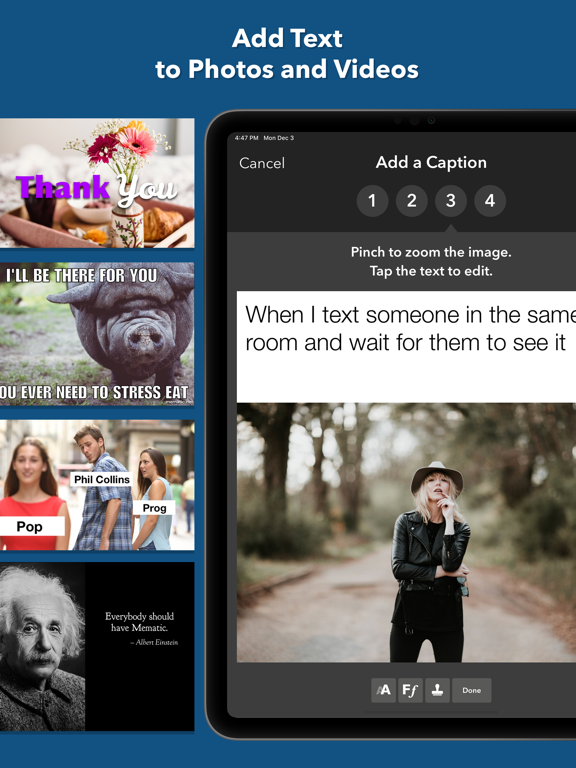
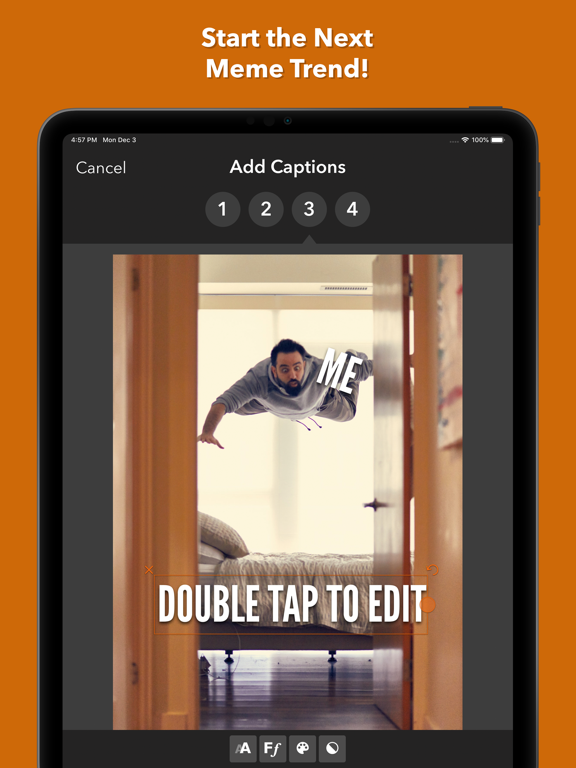
Create and edit memes and photos with various tools and features.
by Trilliarden Entertainment GmbH
iPhone · iPad
Quick verdict
- What it is
- Mematic is a meme maker app that allows users to add captions to photos and videos, create collages, and edit photos. It offers various tools and features, including filters, layouts, and text editing options.
- Best for
-
- someone who wants to create memes
- someone who wants to edit photos
- At a glance
-
- From $1.99/mo
- Free to download
- In-app purchases
Categories and search queries
Official categories
- Graphics & Design
- Photo & Video
AppCorpus categories
Key functions
| Function | Availability | Access | Scope | Evidence |
|---|---|---|---|---|
| Family Sharing | Yes | Unknown | App Store | Store published |
| Free app | Yes | Free | — | Store published |
| In-app purchases | Yes | Limited free | — | Store published |
Screens
App Store
18 store screenshots


Pricing & paywalls
App Store
- Mematic Pro Monthly — $1.99/month
- Mematic Pro Monthly — $4.99/month
- Mematic Pro Monthly — $11.99/year ($0.99/mo)
- Mematic Pro Monthly — $29.99/year ($2.49/mo)
Ratings & reviews
App Store
-
5/5Keeps getting better!!
Update: I bought this app when it came out but now it’s subscription only. I love it so I’m paying but not happy about it. 😠 I love this app! I’ve tried others but they make it too complicated or you have to sign up for a subscription. Theodur, the master magician programmer, who created this app is accessible if you have a question or problem. I’ve never had problems in the ~5 yrs I’ve owned this app. If I have a question, an idea or just want to share something that came out cooler than expected, he emails me back within a day. I’m probably annoying but he says he’s open to any suggestions, ideas on features and wants to hear critiques to make it the best app out there for memes. I appreciate that the creator, Theodur, follows up on questions via email, seems enthusiastic to make the best meme app out there. Plus, it’s so easy 1-2-3-4-share-save!! UPDATE: I am one a of privileged few who is testing the new Beta for an updated version of MEMATIC! First of all, it’s easy to learn the new photo editing tools (same type of tools as my iPhone, but easier to find) Then, pick a meme style (there are 7 templates, 24 collages which are customizable). I like Free Style. Find a photo that’s dying to say something. Use your words. Use tools to edit photo again if you need to. Hit save then share it! Also, there are sized templates for all social media formats. Theodur, you’ve outdone yourself! Bravo on new beta! Love it!
mrsasia · 30 Aug 2026
-
5/5Best Free Version Meme Maker
There’s a handful of decent, meme makers for iOS out there, but I’ve found Mematic to have the best free version available. Of course the Pro version has so many features, the learning curve and your creative limits are the only thing holding you back from finding ways to utilize its sum of features on Pro. But on a competitive basis, the host of features available for free with Mematic allows for everything you’ll ever NEED to pursue a successful career in making people laugh, and that’s not a bad field of study. Let me explain: With Mematic you’ll become healthier, better looking, able to solve complex equations in your head without a slide rule or abacus and gosh darn it, people will like you; men will respect you and women will want to spend their every waking moment in your company. The reviews out here spewing negativity and “it makes you buy it, you can do anything without the Pro version!” are simply false accusations from people that can’t ties their own shoes. Thank goodness for Velcro all you short bus affectionados. The PRI version has so many features you might never use them all but that’s a good 1st World issue to have to deal with. So good luck, have fun, so long and thanks for all the fish!
J (Jay) Bulloch, Esq. · 30 Aug 2026
-
5/5Awesome!!! 😊 😍Plz Read
Overall an amazing app. Definantly the right rating if not should be a bit higher cuz it does have a lot of profanity and some of the things are quite inappropriate and the age I would personally say you should be would be about 15+ . Anyway it's a great app where you can make cool memes and and gifs(not jifs) they even have a whole entire thing of suggestions for memes(which is where most of the inappropriate things come from, but you don't have to use it) and a whole list of stock photos you can use and if you don't want to use that stuff you can use your own photos or videos. They also have a list of tutorial videos for how to use the app down at the bottom. They have a grid you can use to make different types of memes like with several photos but they also have a free style one so you can make your meme how you want. The app has a few in app purchases but very few unlike a lot of other apps. Any the app is great, not for youngings but it's awesome, anyway ty if you read this whole thing I'm sorry it's so long anyway, bye!
Squirtlesquirt12345 · 30 Aug 2026
-
5/5Love it and use it for business as well
The saying goes a picture is worth a thousand words, but it is worth much more than that when, along with some light markups, and captions, it can convey information properly and competently. I use this for fun but lately I have found that using it for business has been the real utility of it. Recently had a painter and electrician I needed to replace some small boxes on the outside of a commercial strip center. A picture of a site plan (with markup arrows) showing locations, then a picture of the current boxes (along with markup circles), and finally a caption explaining it all gave me everything I needed and it made there jobs easier by being able to simply send that picture to whoever was going to take care of it for them at their respective companies. They both independently reached out to thank me for the detailed information. If we tried to accomplish the same thing with phone calls and text messages some info would have been lost and other info would have been required to be repeated in order to complete the job.
Adam7711 · 30 Aug 2026
-
5/5To all you one star raters
Most one star readers say that “it’s not free to make a meme” it’s completely free (btw u don’t get any images from the pro update) idk I could be wrong but anyway if you say it’s to hard it is super easy just select a template then choose a photo then edit text and don’t leave one star reviews if you make it complicated yourself I have made 120 memes in this month without any problems or glitches and plus there’s like 10 or 8 tutorials which BRIEFLY explain everything you need to know so pls check the tutorials before you rate it one star but overall all the glitches have most likely been fixed and I thing either today or yesterday they updated meme templates so there’s lots u can do and I’ve made 1429 memes since I got this app and none of them have been any problems and if ur being a Karen and saying “it won’t save” then press export and then press save and no it is not in the projects section it is in your photos but I hope this was helpful and u change your rating
Nocapstudios · 30 Aug 2026
Privacy & accessibility
App Store
Privacy
- Data Linked to You — Analytics — Purchases — Purchase History Developer declared
- Data Linked to You — Analytics — Usage Data — Product Interaction Developer declared
- Data Linked to You — App Functionality — Diagnostics — Crash Data Developer declared
- Data Linked to You — App Functionality — Diagnostics — Performance Data Developer declared
- Data Linked to You — App Functionality — Identifiers — Device ID Developer declared
- Data Linked to You — App Functionality — Identifiers — User ID Developer declared
- Data Linked to You — App Functionality — Purchases — Purchase History Developer declared
- Data Linked to You — App Functionality — Usage Data — Product Interaction Developer declared
- Data Linked to You — Developer’s Advertising or Marketing — Usage Data — Product Interaction Developer declared
- Data Linked to You — Diagnostics Developer declared
- Data Linked to You — Identifiers Developer declared
- Data Linked to You — Purchases Developer declared
- Data Linked to You — Usage Data Developer declared
- Data Not Linked to You — Analytics — Search History Developer declared
- Data Not Linked to You — App Functionality — Search History Developer declared
- Data Not Linked to You — Search History Developer declared
Accessibility
No accessibility labels collected yet.
Versions
App Store
-
3.4.2
• Fixes a bug where the export for trimmed videos could fail.
-
3.4.3
• Improved error handling
-
3.5
• New Font Library for improved font management • 132 new built-in fonts • Support for custom fonts • Various UI bug fixes
-
3.5.1
• Small performance improvements
-
3.5.2
• Improved recovery after errors that can occur during video export
-
3.6
• Improved color selection • Small UI bug fixes
-
3.6.1
• Small UI improvements • Improved error messages
-
3.6.2
• New eyedropper to pick colors from the canvas • Improved support menu with FAQ
-
3.6.3
• Improved object snapping
-
3.6.4
• Improved performance and stability of video exports • Fixes a bug that could crash the app when the eyedropper is used
-
3.6.5
• New Free Transform option for images and stickers
-
3.6.6
• Various bug fixes and performance improvements • Fixes a bug where the support menu would not be displayed properly
-
3.6.7
• Fixes a UI bug where some menus would be displayed incorrectly on iPads
-
3.7
• Customizable shapes • Improved presentation of example projects • Various bug fixes
-
3.7.1
• Various bug fixes
-
3.7.10
• Fixes a bug where text wouldn't be rendered correctly on some devices
-
3.7.11
· 3 Jun 2026
• Fixes a bug where saving a project can fail.
-
3.7.2
• Fixes a bug where the app could hang while restoring a project
-
3.7.3
• Various bug fixes • Fixes a bug where shapes added to videos would appear at the wrong position after export
-
3.7.4
• Fixes a bug that could cause video export to fail
-
3.7.5
Fixes an issue where the app could become unresponsive when trying to select a video
-
3.7.6
• Small bug fixes
-
3.7.7
• Support for more languages • Various bug fixes
-
3.7.8
• Fixes a bug where buttons in the crop tool didn't work
-
3.7.9
• GIFs are now provided by KLIPY • Various bug fixes
Alternatives
- AI Video Generator - Vidmor — Same category + similar ratings
- Photo eraser - AI retouch — Same category + similar ratings
- Color Identifier・Match Scanner — Same category + similar ratings
- Wand - AI canvas — Same category + similar ratings
- Car Editor & AI Car Designer — Same category + similar ratings
- AI Photo Generator: Remake AI — Same category + similar ratings
Availability by market
- US
Data quality & evidence
- Page completeness
- Independent summary published
- Last verified
- 30 Aug 2026
- Sources
- App Store