
Quick verdict
- What it is
- Store information collected; an Apoku editorial summary is not yet published.
- At a glance
-
- Free to download
- In-app purchases
Categories and search queries
Official categories
- Productivity
- Utilities
Apoku categories
Key functions
| Function | Availability | Access | Scope | Evidence |
|---|---|---|---|---|
| Free app | Yes | Free | Context-specific | Store published |
| In-app purchases | Yes | Limited free | Context-specific | Store published |
Screens
App Store
15 store screenshots

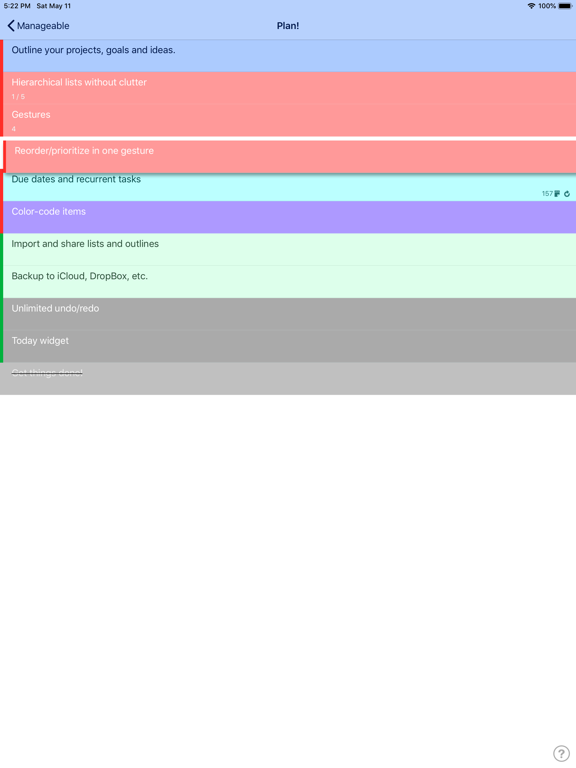

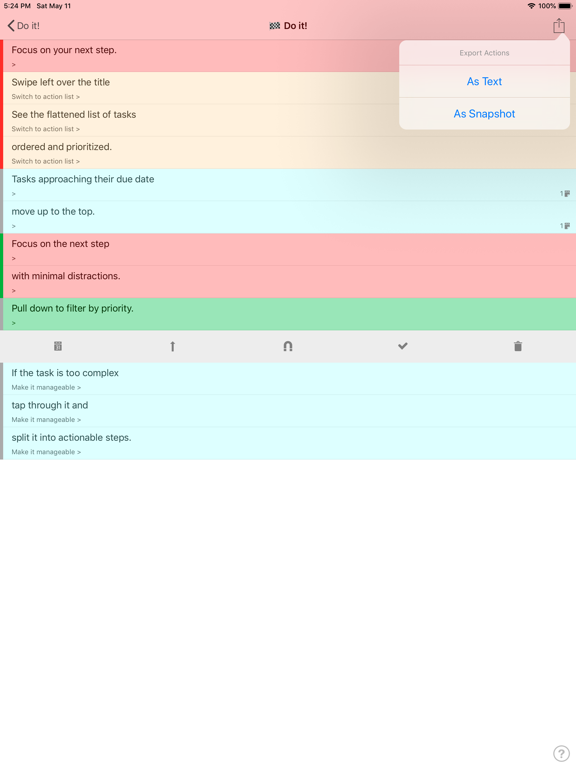
Pricing & paywalls
App Store
Shown for US
- Cloud Sync
Ratings & reviews
App Store
Shown for US
-
4/5App has potential
I love this app! It is simple, straightforward, and efficient. The only reason I give four stars is because I wish you could attach multiple pictures to a task, or even just one! For the price though, I am not complaining, just an idea :) Update: Just being able to attach links, videos, or any other media would provide the user with a more efficient organization of outsourced resources within this app.
Helenita1993 · 6 Aug 2026
-
5/5Gem of a find
Absolutely brilliant. I’ve never had an app this seamless and fast, my first time using it, it excited me so much I was using my feet to hold it up so I could type as fast as possible on my back. One thing only, otherwise it’s literally perfect: A way to reset multiple tasks at once without the sliding gesture? Maybe the parent can be checked and unchecked to reset all the tasks within, I do not know, whatever is easiest! Thank you for making such a wonderful app!
ertuJaz · 6 Aug 2026
-
4/5Has Potential
Nice app. It would be great if marking a parent node as done/undone would mark it’s children as done/undone. And if all children are done, the parent logically would be marked as done. Other additional nice features would be if the counters would roll up (include all child nodes) and if there was a done filter in the task view.
dbaron4 · 6 Aug 2026
-
4/5Great for organizing & working via outlines!
When I’m brainstorming, be it about household chores or starting a business, I always do my best thinking using a nested outline. My favorite app for that has been Outliner Pro, but Manageable would easily over take it with some tweaks and added features (features I’d happily pay for at a reasonable price). What it does best is allow you to drill your complex outlines down to actionable tasks, then when it’s time to get to work, you can view only the actionable tasks. The killer features are the extensive use of multi-touch as opposed to traditional buttons and checkboxes. Seriously, this is quite possibly the best implementation of multi-touch I’ve ever seen in a productivity app since the introduction of Clear. It can take a while to get up to speed, but once you do the simple gestures get you moving quickly. [LPT: be sure to download the example outline that is basically an interactive manual on how to use it.] I have several feature requests/suggestions but only one complaint: the widget should be updated to current design standards; specifically the white gradient background. It looks out of place with up to date widgets and can make reading over a dark wallpaper annoying. Well designed widgets are a great way to make productivity apps like this be more... well, productive. Suggestions to improve existing workflow: 1) Allow completed tasks to be checked off in a quicker fashion that does not require a swipe - I recommend a double tap. Allow the same action to quickly change the task back to incomplete. 2) In the action list, instead of having completed tasks immediately disappear have them stay visible just like is done in the task list: with a line through them. Have them clear the actionable list at the end of the day. This would allow tasks accidentally checked off to easily be returned to incomplete status without having to go find it in the task list. It would also be a nice visual list of the day’s accomplished tasks which can be very rewarding. 3) Automatically check off parent tasks when sub tasks are all completed. Here are the features I would love to see add it to Manageable. The ones with an asterisk are the features it is lacking that if it had I would replace at least three other apps with this one (and gladly pay for via a reasonable IAP) 1) *Cloud storage/backup/sync making it easy to recover your outlines without having to do a full iOS restore. 2) *Cloud storage/sync between multiple devices. 3) *Ability to set due dates and reminders on tasks. 4) Ability to share individual top level outlines and/or sub outlines with other manageable users (this would make delegating tasks awesome for project managers, even families). 5) Mac version (if it synced with app, I’d pay for one). Of course iCloud would provide the most seamless user experience for requests 1 and 2, but using a third-party interface (eg Evernote) would also be a great option especially because a service like that would still give users access to their basic data on other platforms making incompatibility a selling point of the app. It would also give the developer exposure elsewhere (e.g. Evernote list of apps). [Outliner Pro does this quite well with Evernote.] Most of all I suggest KEEP DEVELOPING THIS APP! Its been so long since an update I’m concerned the dev has given up! Whoever designed this UX is brilliant. I would be extremely disappointed if they didn’t continue to follow up on their vision that became Manageable.
DJ Rizzo · 6 Aug 2026
-
5/5Excellent!
There's a lot of to-do lists out there; this one is very nice. It takes a little getting use to, but worth the effort. It's been a while since the last update, please don't abandon!
El.Compe · 6 Aug 2026
Privacy & accessibility
App Store
Privacy
- Data Not Collected Developer declared
Accessibility
No accessibility labels collected yet.
Versions
App Store
- 1.0
-
1.1
With this update we have ... made some animations and transitions clearer; ... fixed bugs; ... and added a small doze of configurability to your touch interactions. For this last bit, head over to the system Settings App and scroll down to Manageable section. There are two new options there. One makes the cursor start right where you touched the task you want to edit, not at the end of the task title. The other one allows you to edit a task with a single tap on the text. If this is your preference, there is no need to tap-and-hold any more! You still can drill down to subtasks with a single tap, just hit anywhere outside the text.
-
1.10
The tasks with a due date already bubble up to the top of the Action list/widget automatically as the date approaches, but what if you want to have a quick glance at the tasks coming up sometime soon? Introducing "Tasks Due" widget. See your tasks with the nearest due dates before they actually become due. Also in this update: - UX improvements; - bugfixes;
-
1.11
- Tasks with long/multiline names are now edited as a multiline text; - Various minor UI improvements; - Added support link to help menu.
-
1.2
- You can now set task due date, which will override task's priority as the task approaches its due date; - You can now set rescheduling interval for recurrent tasks, that makes it easy to reschedule them when completed; - New task cell layout; - Updated shades of grey in colour picker to add black; - Today widget has got a facelift; - New app icon; - Bugfixes and optimisations.
-
1.3
Two new features in this update: 1. Now you can pinch out/in in any screen to switch wrapping of long task names on/off. 2. You can export your Actions either as a text list or as an image. Watch for the export icon in Action screen header! Also minor UI changes and optimisations.
-
1.4
This update brings minor improvements and optimisations like a better date selector, for example. More importantly, the app has been fundamentally re-engineered with a promise of improved stability and future updates.
-
1.5
Notifications are here! You will now get notified of your tasks due and the app icon will show a badge with the number of tasks due. You will be prompted to allow notifications from the app on the first notification. If you have tasks due with past dates and want to see the app badge immediately, you may enable notifications in Settings.
-
1.6
- fixed sensitivity of the long press gesture to distinguish between editing and dragging; - show task paths in navigation/search views; - minor improvements;
-
1.7
Manageable now offers two modern home-screen widgets in various sizes! 1. Favorite Projects widget lists your most recent active projects, i.e. those you last opened in Action view, exactly as you see in the Navigation view. 2. Actions widget is a list of next tasks in the project of your choice. You can have several Actions widgets on your home-screen for different projects.
-
1.8
- added widget intelligence (relevance, widget suggestions, etc.); - improved widget refresh;
-
1.9
- fixed the issue with some tasks not updating in the widget;
-
2.1
This update introduces long-awaited Cloud Sync option, ta-daaa! Cloud Sync is available as an in-app purchase in the new Options screen, which you can access via top-left icon in the root list. As an appreciation of commitment, we want to let our active users to upgrade to Cloud Sync at a minimal price for a couple of weeks. After this short period the Cloud Sync IAP price will go up.
-
2.2
Minor bugfixes and improvements.
-
2.3
- dark mode; - colour palette is now configurable via Settings screen; - the root (default) colour as well as custom palette colours will sync between devices; - numerous minor improvements;
-
2.4
Widget colours and other minor bug fixes.
-
2.5
· 15 Sep 2025
- You can now hide completed tasks in Task lists or show completed tasks in Action lists. These are 2 independent settings that you can access either in the Settings screen or directly from a list view using a two-finger long press. - New "Export Markdown" option for Task lists (2-finger pull-up for export options). - Both Outline and Markdown options in Task export respect "show completed tasks" setting so you can include or exclude completed tasks in your exports. - New option to export Action lists as Markdown text grouped by path.
Alternatives
- Lists - Nested lists & more! — Same category + similar ratings
- MICRO LLM — Same category + similar ratings
- Schichter - Shift calendar — Same category + similar ratings
- Flink - Daily Planner & To-Do — Same category + similar ratings
- Voice Notes: AI Transcribe — Same category + similar ratings
- This Week - Weekly To-Do List — Same category + similar ratings
Availability by market
- US
Data quality & evidence
- Page completeness
- Live store listing
- Last verified
- 6 Aug 2026
- Sources
- App Store
- Apoku editorial summary has not been published yet.