
Quick verdict
- What it is
- Store information collected; independent summary not yet available.
- At a glance
-
- Free to download
- In-app purchases
Categories and search queries
Official categories
- Business
- Photo & Video
AppCorpus categories
Key functions
| Function | Availability | Access | Scope | Evidence |
|---|---|---|---|---|
| Family Sharing | Yes | Unknown | App Store | Store published |
| Free app | Yes | Free | — | Store published |
| In-app purchases | Yes | Limited free | — | Store published |
Screens
App Store
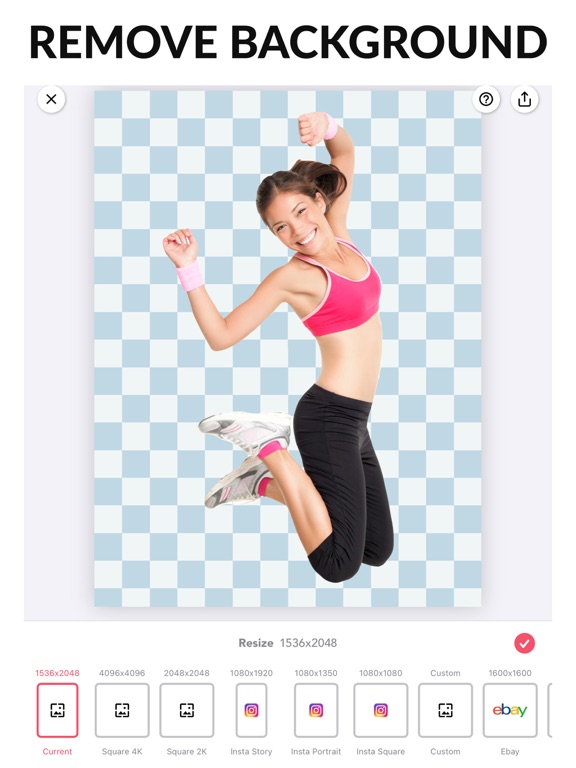
21 store screenshots



Pricing & paywalls
App Store
- Best Background Eraser — $12.99
- Premium — $2.99
- Remove Ads — $9.99
Ratings & reviews
App Store
-
5/5Because of your generosity
Long story short. I use to draw and paint and even started writing a book. Well I’ve suffered with An involuntary muscle movement disorder for years Called Cervical dystonia. There’s so much in between but it is also associated with anxiety depression. There’s no good treatment and the medicine I did go on caused me to lose interested in Art and writing. Happy to say I’m off that medicine but even if I draw now I get hand cramps and I can’t even write for very long. I loved writing because cursive was also an art to me. Through the depressions I was still able to use apps that allow some tools to be used for free without eventually adding a fee. You and other founders of art apps that allow some free tools actually help me and I would guess others also through their depression and brought some comfort. So it’s not only a kind hearted things because people with limited means can use it; this app is also a blessing for people with depression or are going through some ruff times and can’t process their thoughts and feelings. So I want to say thank you so much for the use of your app over the years. God Bless You.
Kelly961 · 5 Sep 2026
-
5/5Insert Review Title Here
I recently found this app, and it’s surprisingly really efficient! I love how close you can zoom in, how you can change the picture’s angle, and adjust the softness of the brush. So far, I’m absolutely enjoying it and have been able to make some really good renders, plenty better than the previous app I was using. My only problem is how easy it is to lose all my progress. They can take a long time to make, so I don’t always do it in one standing. Whenever I exit an app or turn off my device, I always fully close out the app to save battery, but whenever I close out this one (which has happened a lot), all my progress is instantly gone and I have to restart. Aside this, though, I have basically no complaints! I’ll definitely continue using it a lot and strongly recommend it to anyone who regularly makes renders while trying to go for the highest possible quality.
(^O^☆♪/* · 5 Sep 2026
-
5/5Love
I love this app... I need to create png files often for my graphics and this is excellent. However...... There is one thing they HAVE to change.... When I have erased the background of an image, and I have been working on it for a while, with intricate areas, then hit the download button, it shows the two images, both with and without background. The first inclination is always to hit the house icon in the upper right. When you do this, you lose everything you just did. Instead, you need to hit the photo of what you wish to save. I have lost so much of my work by hitting this house icon....only to have to start from the beginning. The least you could do Is have a pop up window and ask if this is what you want to do, as a precaution. Easy..just a simple precaution. Otherwise, this is the best eraser app out there...so Thank You to the developers!!
Artgirlcookies · 5 Sep 2026
-
3/5Satisfied for Technology and Strategy to develop this app
As a expert at graphic design and using different industry standard technology, this app is great, since the option to properly digitize out ‘a field’ or section is what it does best. This is my first review... I felt I need to give this app a thumbs up for their effort to supply the creative industry a tool they can use to build story boards, to communicate a vision across visually. Please keep the PNG option as is don’t Change a thing this feature to export the file is perfect. Specially if your working while your traveling, this helps a lot, I wish there was an option to send larger file by a cloud base service. I am a believer that freedom to express should not condemn designers to a desk but rather experience the aspect of self and expression in the wonderment of everything. Sorry if this review is all words. It’s the feelings I feel of joy and sparkles... Like spongebobs wonderful life, and joy happiness to do what one does best, he loves flipin patties, and spend time out doors... peace. ~Stop the Pain and Wars make just make Love and be Happy.
D-Mac06 · 5 Sep 2026
-
4/5It’s ok
I like it! The auto cut doesn’t cut well though and it didn’t come that useful. That was the main reason I didn’t use it much. I am not patient so if you made the auto cut cut better that would be great! I would also recommend that you add video background eraser because I don’t know how to green screen yet and that would be useful. Also, the green screen would be a good idea because that would give consumers more of a reason to get the app. Plus, it makes MagicEraser unique and different from the other erasers. It still works and I would have used it more if I was more patient. I would also suggest that you make it so the premium ad doesn’t pop up right when you open the app. It can get annoying because I don’t spend money on apps and it looks like the app is basically begging for money. It is a pretty cheap part of the app, making it less useable. But other than my suggestions, the app is great and is still useable.
Karen T. player of this game · 5 Sep 2026
Privacy & accessibility
App Store
Privacy
- Data Not Linked to You — Analytics — Diagnostics — Crash Data Developer declared
- Data Not Linked to You — Analytics — Identifiers — User ID Developer declared
- Data Not Linked to You — Analytics — Location — Coarse Location Developer declared
- Data Not Linked to You — Analytics — Purchases — Purchase History Developer declared
- Data Not Linked to You — Analytics — Usage Data — Advertising Data Developer declared
- Data Not Linked to You — Analytics — Usage Data — Product Interaction Developer declared
- Data Not Linked to You — App Functionality — Purchases — Purchase History Developer declared
- Data Not Linked to You — Third-Party Advertising — Identifiers — User ID Developer declared
- Data Not Linked to You — Third-Party Advertising — Location — Coarse Location Developer declared
- Data Not Linked to You — Third-Party Advertising — Usage Data — Advertising Data Developer declared
- Data Not Linked to You — Diagnostics Developer declared
- Data Not Linked to You — Identifiers Developer declared
- Data Not Linked to You — Location Developer declared
- Data Not Linked to You — Purchases Developer declared
- Data Not Linked to You — Usage Data Developer declared
- Data Used to Track You — Identifiers — User ID Developer declared
- Data Used to Track You — Identifiers Developer declared
- Data Used to Track You — Location — Coarse Location Developer declared
- Data Used to Track You — Location Developer declared
- Data Used to Track You — Purchases — Purchase History Developer declared
- Data Used to Track You — Purchases Developer declared
- Data Used to Track You — Usage Data — Advertising Data Developer declared
- Data Used to Track You — Usage Data — Product Interaction Developer declared
- Data Used to Track You — Usage Data Developer declared
Accessibility
No accessibility labels collected yet.
Versions
App Store
-
2.10.0
• Added support for text - You can now add text, set font, shadow, outline, background and more. Previously: The big 2.0.0 update • Improved high resolution AI erase • New workflow • Multiple layers • Outlines • Better support for shadows and even 3d shadows! • Gradient backgrounds • Built in image editor • Supports dark mode if that's your thing :) • Millions of background images from Unsplash and Pixabay • All new more modern look If you have any issues or suggestions please let me know at [email protected]
-
2.8.0
• Improved handling when loading a PNG image • Fixed interface issue for people with zoomed displays Previously: The big 2.0.0 update • Improved high resolution AI erase • New workflow • Multiple layers • Outlines • Better support for shadows and even 3d shadows! • Gradient backgrounds • Built in image editor • Supports dark mode if that's your thing :) • Millions of background images from Unsplash and Pixabay • All new more modern look If you have any issues or suggestions please let me know at [email protected]
-
2.9.0
• minor UI tweak Previously: The big 2.0.0 update • Improved high resolution AI erase • New workflow • Multiple layers • Outlines • Better support for shadows and even 3d shadows! • Gradient backgrounds • Built in image editor • Supports dark mode if that's your thing :) • Millions of background images from Unsplash and Pixabay • All new more modern look If you have any issues or suggestions please let me know at [email protected]
-
3.0.0
• Added ability to remove objects from a photo. Not just remove background. If you have any issues or suggestions please let me know at [email protected]
-
3.0.1
• Added ability to remove objects from a photo. Not just remove background. If you have any issues or suggestions please let me know at [email protected]
-
3.1.0
• Added alpha adjustment when compositing objects. • Fixed some minor bugs. If you have any issues or suggestions please let me know at [email protected]
-
3.10.0
• Added non full screen support on iPad • Minor bug fixes For feedback or inquiries, reach out to us at [email protected]
-
3.11.0
• Added non full screen support on iPad • Minor bug fixes For feedback or inquiries, reach out to us at [email protected]
-
3.12.0
• Added non full screen support on iPad • Minor bug fixes For feedback or inquiries, reach out to us at [email protected]
-
3.13.0
• Added non full screen support on iPad • Minor bug fixes For feedback or inquiries, reach out to us at [email protected]
-
3.14.0
• New batch tool: process up to 50 photos at a time • Minor bug fixes For feedback or inquiries, reach out to us at [email protected]
-
3.15.0
• New batch tool: process up to 50 photos at a time • Minor bug fixes For feedback or inquiries, reach out to us at [email protected]
-
3.16.0
The new Remove Video BG button on the home screen connects you to Magic Video Eraser, our companion app for videos. Tap it to get started in seconds. • Erase the background from any video • Preview your cut-out live while you edit • Export clean clips, including transparent backgrounds • Place your video inside a photo scene Also in this update: • Smoother drawing and undo in the object eraser • Fixed a rare crash when using the fill tool near image edges • Bug fixes and polish We'd love to hear what you think — leave a review, and if you have feedback or suggestions, email us at [email protected].
-
3.16.1
· 19 Jul 2026
The new Remove Video BG button on the home screen connects you to Magic Video Eraser, our companion app for videos. Tap it to get started in seconds. • Erase the background from any video • Preview your cut-out live while you edit • Export clean clips, including transparent backgrounds • Place your video inside a photo scene Also in this update: • Smoother drawing and undo in the object eraser • Fixed a rare crash when using the fill tool near image edges • Bug fixes and polish We'd love to hear what you think — leave a review, and if you have feedback or suggestions, email us at [email protected].
-
3.17.0
This update brings a tidier Save screen with clearer sharing options, along with bug fixes and other small improvements. We'd love to hear what you think — leave a review, and if you have feedback or suggestions, email us at [email protected].
-
3.18.0
· 3 Sep 2026
Magic Eraser now speaks Ukrainian! Ukrainian speakers get the whole app in their language, from the editor to the settings. Also in this update: • A tidier Save screen with clearer sharing options • Fixed a mistranslated Back button on the Save screen in several languages • Bug fixes and small improvements We'd love to hear what you think — leave a review, and if you have feedback or suggestions, email us at [email protected].
-
3.2.0
• Improved Object Erase. This is really magical :) • Fixed some minor bugs. If you have any issues or suggestions please let me know at [email protected]
-
3.3.0
• Fixed some minor bugs. Previously: • Improved Object Erase. This is really magical :) If you have any issues or suggestions please let me know at [email protected]
-
3.4.0
• Added support for higher resolution images • Resolved various bugs related to image cropping for smoother editing process For any feedback or inquiries, reach out to us at [email protected]
-
3.4.1
• Added support for higher resolution images • Resolved various bugs related to image cropping for smoother editing process For any feedback or inquiries, reach out to us at [email protected]
-
3.4.2
• Improved app stability and performance with bug fixes and optimizations. For feedback or inquiries, reach out to us at [email protected].
-
3.4.3
• Improved app stability and performance with bug fixes and optimizations. For feedback or inquiries, reach out to us at [email protected]
-
3.5.0
• Updated photo picker, you can now select images from your photos, files and camera. Also search for images using Unsplash and Pixabay. • Improved app stability and performance with bug fixes and optimizations. For feedback or inquiries, reach out to us at [email protected]
-
3.6.0
• Improved app stability and performance with bug fixes and optimizations. Previously: • Updated photo picker, you can now select images from your photos, files and camera. Also search for images using Unsplash and Pixabay. For feedback or inquiries, reach out to us at [email protected]
-
3.7.0
• Some user interface tweaks to make your life a little easier. Previously: • Updated photo picker, you can now select images from your photos, files and camera. Also search for images using Unsplash and Pixabay. For feedback or inquiries, reach out to us at [email protected]
-
v3.8.0
• Some user interface tweaks to make your life a little easier. Previously: • Updated photo picker, you can now select images from your photos, files and camera. Also search for images using Unsplash and Pixabay. For feedback or inquiries, reach out to us at [email protected]
-
v3.9.0
• Some user interface tweaks to make your life a little easier. Previously: • Updated photo picker, you can now select images from your photos, files and camera. Also search for images using Unsplash and Pixabay. For feedback or inquiries, reach out to us at [email protected]
Alternatives
- GoDaddy: Websites & Marketing — Same category + similar ratings
- The Image Converter □ — Same category + similar ratings
- QR Code Generator - QRHyper — Same category + similar ratings
- Add Watermark -Batch Process — Same category + similar ratings
- Paper: Sketch, Draw & Create — Same category + similar ratings
- Drawing Pad procreate Sketch — Same category + similar ratings
Availability by market
- US
Data quality & evidence
- Page completeness
- Live store listing
- Last verified
- 5 Sep 2026
- Sources
- App Store
- Independent summary has not been published yet.