
Paper: Sketch, Draw & Create
A sketching app for creating and organizing ideas
iPhone · iPad
Quick verdict
- What it is
- Paper is a sketching app that allows users to create and organize their ideas. It features a gesture-based interface and allows users to sync their journals across devices.
- Best for
-
- someone who likes to sketch
- someone who wants to organize their ideas
- At a glance
-
- Free to download
- In-app purchases
Categories and search queries
Official categories
- Productivity
- Graphics & Design
Apoku categories
Key functions
| Function | Availability | Access | Scope | Evidence |
|---|---|---|---|---|
| Cross-device sync | Yes | Varies by plan | Context-specific |
From listing
|
| Free app | Yes | Free | Context-specific | Store published |
| In-app purchases | Yes | Limited free | Context-specific | Store published |
| Family Sharing | Unknown | Unknown | Scope unknown | Store published |
Screens
App Store
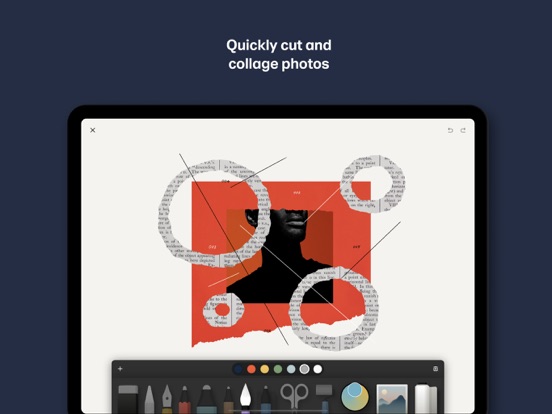
12 store screenshots


Pricing & paywalls
App Store
- Paper Pro — $4.99
- Paper Pro — $7.99
- Paper Pro — $9.99
- Paper Pro — $11.99
- Paper Pro — $69.99
- Paper Pro — $99.99
Ratings & reviews
App Store
-
5/5I like the latest upgrades
I began using paper in 2015 as a tool to refresh my water color skills without wasting so much paper. Result; my water colors are returning to the levels I enjoyed years ago before work interfered with my art, however the nature of digital ink lured me into this new medium. The ability to undo/redo, save and go on knowing that I can return to that point in time to try new combinations and the ability to utilize my art in a variety of modes tiny miniatures to large color water color paper digital prints. In 2016 I think I also fell in love with the 53 stylus. The ability to morph from paint to smudge & blend like charcoal while in blue tooth mode and hold my longtime favorite drawing tool - a carpenters pencil... or so it seems. This latest upgrade, the ability to choose from a variety of brush/tip sizes is just what I’ve needed. I still do some water color, but for portability my iPad Pro and stylus allow me to sketch when the spirit moves me. In fact I sometimes ‘touch up’ colors by importing a photo that been rendered in greys and apply fresh color. One such original from 50 years storage, freshen up in a several different color modes is my best seller. Truly a marvelous tool. Thus far I’ve not tried the Apple Stylus (spendy & doesn’t seem as intuitive to a long time carpenter pencil sketcher) and free trials of other drawing painting apps have not measured up. In sum, this app does what I wanted - allows me to relax, experiment, do over and produce “high quality digital water colors”
Qiao Feng Charlie · 30 Sep 2026
-
5/5Awesome so helpful!
This app has been above and beyond amazing and so many of my friends love it too! I would say there are no problems and it doesn’t feel so overwhelming like in most of the sketching apps I have downloaded because they have so many tools. My favorite part is that is gives a variety of options for starter books and introduces how to use all of the tools the best way possible! I know i said that there was no buts and this is not a complaint the app is already amazing but if it had two more features I would love it even more, the first thing it should add is a feature to lock the drawing or photo in place so that you are unable to zoom in or out! This way is so if you want to focus on one specific part you won’t have to worry about getting distracted and accidentally drawing on the wrong part of the page! The second thing that they should add is oil paint so that if you want to do some abstract art or something else you won’t have to improvise. In conclusion I think that you should definitely download this app and as a person who has, I have used it everyday since.
happy lizard & friend · 30 Sep 2026
-
3/5Useful, needs usability improvements
I have the free version, and it is useful for sketching out concepts when they come to me in the middle of the night in bed so I dont forget by morning. I dont even have a stylus, and I use this on my phone (its tricky, but thats to be expected). I also understand that some features that would be very useful arent free, like changing brush size. With that said, some existing features in the free version need some improvement. First and most critical, it needs the ability to move the canvas around and past the edge of the device screen. It is nearly impossible to draw all the way to the edge of the canvas without zooming all the way in, especially if you have a phone case with a lip around the screen. Second, it doesnt make sense why the notebooks are shown as a centerfold but then rotate 90 degrees into portrait mode when you go to draw. Either make the notebook view portrait pages, or let us draw one image on each side of the notebook. Last, the paintbrush has a nice aesthetic and is by far my most used tool, followed by the pencil, but the way it goes down seems very inconsistent. Sometimes pushing harder or making longer swipes means darker coverage, sometimes it doesnt. It is also inconsistent with how many times you can darken it by layering before it doesnt darken it anymore (it seems to randomly be either 2 or 3). If these things are fixed it would improve the user experience a lot, and get this app a 4 star. I would maybe even give 5 star if the free version also had ability to change brush size.
Xhfeu · 30 Sep 2026
-
3/5Useful App, Ridiculous Premium features
I have been using this app for a few years now and got the Pencil by 53 before I had gotten my iPad Pro + pencil. Originally, the notebooks were listed along the left side (as in Notability) which made them easy to view and select. They now scroll across the screen and only the front-and-center notebook is visible, which makes finding and selecting a notebook difficult. A bigger problem is the subscription. Features that I would consider fairly simple (changing the size of pens, cutting and pasting across notes) are subscription (premium) only features. Several other apps - Notability, GoodNotes, MyScript - are all $10 or less for a one-time purchase and offer similar features. If drawing is your thing, Procreate, Concepts, Sketches, SketchBook, or one of the Adobe apps are all <$20 (or free) and, again, often offer improved features. I mention this for 2 reasons - for one, if I were going to spend money on an app, I would put my money into one of the above apps. With that said, Paper is an elegant app that would be worth $5-10 +/- because it is well designed and seems useful as a place to sketch and organize ideas. Despite its limitations (and my frustrations at what I consider a ridiculous Premium service), I still use it quite frequently.
jmherri · 30 Sep 2026
-
5/5Excellent but there seems to be a new and VERY problematic bug.
I have used paper for many years and I love the application. I use it for note taking, drawing, scheduling, and forming ideas. Recently however (around a few days ago) I have noticed something off. Sometimes when I’m trying to write (whether with the pencil or with my finger) the app seems to randomly undo or delete what I just wrote. Sometimes when it does this it “makes this default” by not allowing me to use the undo arrow in the top right. Sometimes when I glue and paste it has caused me to lose the work I wanted to edit, and this happened today with a college class schedule. I won’t delete the app because I have many ideas, drawings, and notes here, but I’m concerned about using it until this issue, assuming it’s general and not particular to me since my other apps work just fine, is addressed and resolved. I really hope it is fixed soon. Paper is too good of an app to stop using due to a bug. I hope this gets to the Paper team, thank you sincerely.
Vtron/Lazarus · 30 Sep 2026
Privacy & accessibility
App Store
Privacy
- Data Linked to You — Analytics — Identifiers — Device ID Developer declared
- Data Linked to You — Analytics — Identifiers — User ID Developer declared
- Data Linked to You — Analytics — Purchases — Purchase History Developer declared
- Data Linked to You — Analytics — Usage Data — Product Interaction Developer declared
- Data Linked to You — App Functionality — Diagnostics — Crash Data Developer declared
- Data Linked to You — App Functionality — Identifiers — User ID Developer declared
- Data Linked to You — App Functionality — Purchases — Purchase History Developer declared
- Data Linked to You — Diagnostics Developer declared
- Data Linked to You — Identifiers Developer declared
- Data Linked to You — Purchases Developer declared
- Data Linked to You — Usage Data Developer declared
- Data Not Linked to You — App Functionality — Diagnostics — Performance Data Developer declared
- Data Not Linked to You — Diagnostics Developer declared
- Data Used to Track You — Diagnostics — Performance Data Developer declared
- Data Used to Track You — Diagnostics Developer declared
Accessibility
No accessibility labels collected yet.
Versions
App Store
-
5.0.2
This update fixes a few bugs and improves performance. * The selected page for an iCloud journal was reset between launches. Now iCloud journals correctly remember which page was last viewed. * The app launch speed has been improved, especially for large collections of journals. * General stability improvements to prevent intermittent crashes.
-
5.1.0
This update brings new dimensions to the Cut tool. You can now scale and rotate your cut selections in the canvas with simple gestures. This is a surprisingly powerful and highly requested feature. Additionally we’ve fixed a rare bug that resulted in a blank grey screen.
-
5.2.0
This version brings another new feature to Paper's creative toolset: canvas clips. Canvas clips let you save any portion of your drawings to a visual clipboard. Reuse your clips anytime to create a new composition. Like a more powerful version of copy and paste, canvas clips streamline your workflow and speed up your creative explorations. Also in this release: • You can now delete color palettes to keep your color swatches more organized • Bug fixes and performance improvements
-
5.3.0
This version brings some design updates to the canvas and tray, as well as the usual bug fixes and performance improvements.
-
5.3.1
This update fixes a bug in the photo picker. You can now add multiple images at once from your Photos collection (iOS 14+). We’ve also added a curated gallery of starter images to our Pexels integration.
-
5.4.0
This release adds a highly requested feature for Pro users: custom templates. Create your own design for a reusable page background and save it to the library of templates. You can also capture templates from any of the journals you’ve downloaded from the Paper store: • Monthly planner pages • Manuscript paper • Custom grids and ruled lines And don’t forget — you can set any template to be the default for an entire journal. Every new page will start just the way you want it. This release also contains several bug fixes, including: • A fix for navigating to iCloud-only journals from the search dialog • You can once again drag and drop images from other apps into the ‘butterfly view’
-
5.4.1
This release fixes a bug affecting Apple Pencil performance on the 2022 iPad Pro.
-
5.4.2
General performance updates and bug fixes.
-
5.4.3
General performance updates and bug fixes.
-
5.4.4
General performance updates and bug fixes.
-
5.4.5
General performance updates and bug fixes.
-
5.4.6
General performance updates and bug fixes.
-
5.4.7
General performance updates and bug fixes.
-
5.4.8
General performance updates and bug fixes.
-
5.5.0
Bug fixes and performance improvements.
-
5.5.1
Bug fixes and performance improvements.
-
5.5.10
· 10 Dec 2025
Bug fixes and performance improvements.
-
5.5.2
Bug fixes and performance improvements.
-
5.5.3
Bug fixes and performance improvements.
-
5.5.4
Bug fixes and performance improvements.
-
5.5.5
Bug fixes and performance improvements.
-
5.5.6
Bug fixes and performance improvements.
-
5.5.7
Bug fixes and performance improvements.
-
5.5.8
Bug fixes and performance improvements.
-
5.5.9
Bug fixes and performance improvements.
Alternatives
- Penbook: Paper Planner & Notes — Same category + similar ratings
- Kilonotes-Notes & Mark up PDF — Same category + similar ratings
- CollaNote: Notes & PDF Markup — Same category + similar ratings
- Drawing Pad procreate Sketch — Same category + similar ratings
- Freenotes®: AI Notes Taking — Same category + similar ratings
- Element Note — Same category + similar ratings
Availability by market
- US
Data quality & evidence
- Page completeness
- Apoku summary published
- Last verified
- 30 Sep 2026
- Sources
- App Store