
LastPass Password Manager
Password manager to securely store and generate passwords
iPhone · iPad
Quick verdict
- What it is
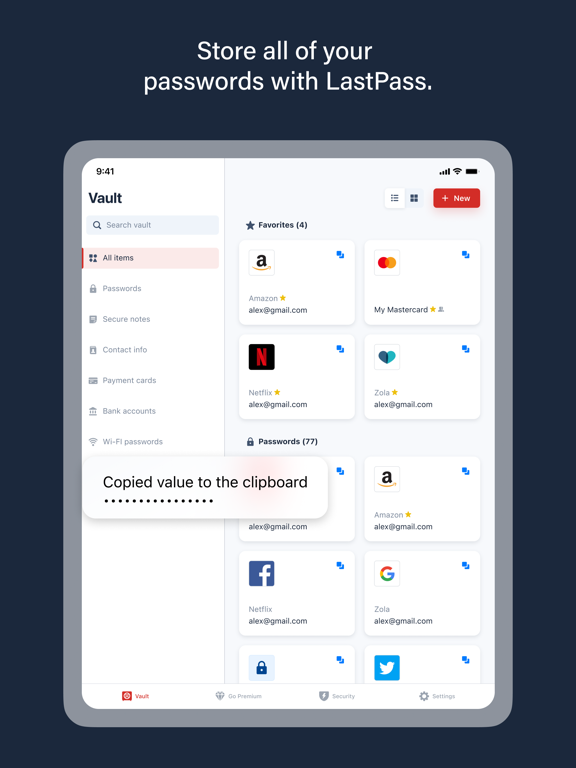
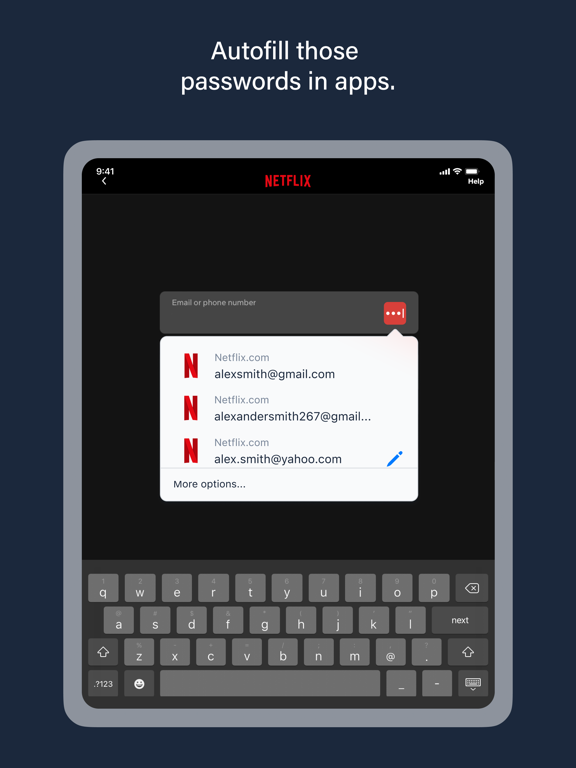
- LastPass is a password manager that securely stores passwords and other account info, autofills logins, and generates strong passwords.
- Best for
-
- someone who wants to securely store passwords
- someone who needs to generate strong passwords
- At a glance
-
- Free to download
- In-app purchases
Categories and search queries
Official categories
- Productivity
- Utilities
AppCorpus categories
Key functions
| Function | Availability | Access | Scope | Evidence |
|---|---|---|---|---|
| Free app | Yes | Free | — | Store published |
| In-app purchases | Yes | Limited free | — | Store published |
Screens
App Store
22 store screenshots


Pricing & paywalls
App Store
- LastPass Premium — $35.99
Ratings & reviews
App Store
-
5/5What would I do without it?!?
So many usernames. So many passwords. How do you remember all of them? Unless you have an eidetic memory, you probably can’t. For those that do, count your lucky stars… you are truly blessed. For the rest of us, who can’t remember where we left our keys half the time, we are fortunate enough to have apps like LastPass (LP) to help us out. Despite the recent hacking of their vault database, I still consider LP to be a secure tool to assist us with one of life’s most irritating tasks - remembering all of those usernames and passwords that we need to do just about anything these days. I think it’s important to note that as long as you have a secure master password the vault hack should cause no issues for you (because it would take hundreds of years to crack a strong/secure password using today’s processing power). Regardless, it is recommended that you change it (this is also a good opportunity to make it even more secure!). The simple truth is, LP has saved me time, energy, and even a little bit of money. For those reasons I consider it one of the best apps out there. Considering I use it on a daily basis, and it never fails, I really couldn’t ask for a better way of storing the plethora of account details I need to navigate life’s security protocols. My only complaint - and depending on who you are this could be a big one - is that we now have to pay for an app that was once entirely free. On the flip side, you do have the family option now, and if paying a nominal amount ensures me and my family have the support we need when we need it, it’s really is a small price to pay for something that is so engrained in our lives.
Goldy121 · 30 Aug 2026
-
3/5A big 3
When is Last Pass gonna straighten out their freaking problem recognizing my phone. It’s not my fault that I have an Apple phone which has security features that puts my phone in different places. But you would think that after verifying with two-step by email that would be enough. But o-no. You have to tell me over and over that you don't recognize my phone.. And today I went around and around in circles with Last Pass. It’s sent me an email to verify me. I clicked on verify and it said thank you. Then at the top it said login. So I clicked on it and logged into my account. Well guess what? It freaking said it didn’t recognize my login. Around and around and around. I bet I spent an hour . And you want me to pay for premium ? Number one , I can’t ever talk to somebody. You make it too hard so that means you’re understaffed. You’re out there to make a big buck. I pay you a premium price and I can’t get help because you never have my problem in the help section. And another thing. You’re so understaffed that you have to get the community to do your work for you. are use LastPass for one thing and one thing only. It’s just a way for me to store my passwords without having to write them down and hide them in my house. I am starting to wonder if there is a better password storage out there better than LastPass as far as getting help. I don’t even think that you have Support tickets anymore because I haven’t been able to find one.
maderthenshit · 30 Aug 2026
-
5/5Life is easier now!
Between my work and my personal websites I have over 250 sites, Log in’s, and passwords to try and remember. Which is virtually impossible for me! So I had been using an Excel spreadsheet to keep track of them all and I just had the spreadsheet password-protected. But we all know Excel passwords are so easy to break but that was the best way for me to keep track of my websites and all the supporting information to access them. When I started looking for a password keeper I contacted my company‘s IT department and asked them what they recommend. They said hands down it would be the LastPass App. And they are absolutely right! I am able to keep everything I need in the app since it also has a notes section where I can keep other supporting information like account numbers, pin numbers, etc. I also like that I can log into LastPass from any one of my devices, launch any of my websites directly from the app, and have it automatically log me in. I am completely satisfied with the ease of use and versatility of this app! I highly recommend it! It is also one of the most secure password keepers on the market as long as you have a good strong password for it. ***Just beware,*** do not ever forget your password to access LastPass. You will not be able to retrieve it nor will LassPass be able to reset it for you.
Fhferiufswduhsgsh · 30 Aug 2026
-
3/5Needs a lot of work
Being generous with 3 stars here. Why? Well, the main purpose here is remembering and autofilling login information. Although it does, but only through the browsers add on extension, which we have to be logged in to use. If you use many browsers: it will log you off when you log into another. Example: switching between chrome and Ms edge. The settings here aren’t effective. I have mine set to remain logged in on all devices. Nop. Doesn’t do that. If I move 3 feet away to my second desk top I need to start logging on again. iPhone app is more like a “bookmarks” directory, as so far it failed to remember and fill in anything. Unless I click on a website direct from the app. Painful. Another thing. That annoying forsaking icon on everything. I do a ton of data entry and this thing is blocking my view of the lines in all forms. I don’t want the form auto fill and clicked that off and makes no difference. If you are online filling a form: you got last pass icon blocking your lines. I paid for this already but I am deleting and losing my money. It’s way too painful. FYI. I also installed the desk top resident app. Have no idea what they have that whatsoever. It does: absolutely not a single thing. As I said. The product has a nice GUI. Easy to use. Only if it works and does what it supposed to do. Sadly. Not.
Piker21 · 30 Aug 2026
-
1/5Bad support, bad security, expensive
LastPass itself is a well developed software. I usually don’t have any problems aside from minor bugs here or there. But, since the LastPass received new investment, they immediately switched to a paid model to use basically any of the service (only one device allowed at a time) and made it expensive to boot. $40 a year for a password manager. I had no choice but to pay for it considering I had just entangled all of my passwords into LastPass, which were now all illegible garbage (good for security, bad for memory). On top of that, having paid for the service for two years now, both years I’ve had issues with my account where it says I’m a “free user” and doesn’t allow me access to my passwords despite paying for premium not even weeks before. Only way to resolve the issue is contact support; which is another thing. The last time I had to do this the agent had no clue of what was happening. They ignored the image of my receipt that I sent multiple times to prove I paid for the service, and then after multiple emails didn’t even understand the issue I was facing anymore. They just closed the case and didn’t solve my issue. Let’s not forget that this service has been DATA BREACHED 2 TIMES IN ONE YEAR. Not just minor breaches, MAJOR SECURITY BREACHES. Putting all LastPass users on edge and their data compromised. This is entirely unacceptable for a service that literally focuses on security. I would think twice about LastPass. It should be your Last consideration, definitely Pass on this one.
Timln123 · 30 Aug 2026
Privacy & accessibility
App Store
Privacy
- Data Linked to You — Analytics — Identifiers — User ID Developer declared
- Data Linked to You — Analytics — Location — Coarse Location Developer declared
- Data Linked to You — Analytics — Usage Data — Product Interaction Developer declared
- Data Linked to You — Analytics — User Content — Customer Support Developer declared
- Data Linked to You — App Functionality — Contact Info — Email Address Developer declared
- Data Linked to You — App Functionality — Identifiers — User ID Developer declared
- Data Linked to You — Developer’s Advertising or Marketing — Contact Info — Email Address Developer declared
- Data Linked to You — Developer’s Advertising or Marketing — Usage Data — Product Interaction Developer declared
- Data Linked to You — Contact Info Developer declared
- Data Linked to You — Identifiers Developer declared
- Data Linked to You — Location Developer declared
- Data Linked to You — Usage Data Developer declared
- Data Linked to You — User Content Developer declared
- Data Not Linked to You — Analytics — Diagnostics — Other Diagnostic Data Developer declared
- Data Not Linked to You — App Functionality — Diagnostics — Crash Data Developer declared
- Data Not Linked to You — Diagnostics Developer declared
Accessibility
No accessibility labels collected yet.
Versions
App Store
-
6.35.0
Support for Passkeys on mobile is now LIVE for all users! The LastPass mobile app now supports saving and using passkeys anywhere they're supported, such as Amazon, Google and others. If you already have LastPass set up for autofill, all you need to do is visit a site that supports passkeys and get started using the future of authentication.
-
6.35.1
Support for Passkeys on mobile is now LIVE for all users! The LastPass mobile app now supports saving and using passkeys anywhere they're supported, such as Amazon, Google and others. If you already have LastPass set up for autofill, all you need to do is visit a site that supports passkeys and get started using the future of authentication.
-
6.36.0
You'll have a more reliable experience thanks to various minor bug fixes.
-
6.37.0
You'll have a more reliable experience thanks to various minor bug fixes.
-
6.38.0
You'll have a more reliable experience thanks to various minor bug fixes.
-
6.39.0
You'll have a more reliable experience thanks to various minor bug fixes.
-
6.40.0
You'll have a more reliable experience thanks to various minor bug fixes.
-
6.40.1
You'll have a more reliable experience thanks to various minor bug fixes.
-
6.41.0
You'll have a more reliable experience thanks to various minor bug fixes.
-
6.42.0
You'll have a more reliable experience thanks to various minor bug fixes.
-
6.43.0
You'll have a more reliable experience thanks to various minor bug fixes.
-
6.44.0
You'll have a more reliable experience thanks to various minor bug fixes.
-
6.45.0
You'll have a more reliable experience thanks to various minor bug fixes.
-
6.46.0
You'll have a more reliable experience thanks to various minor bug fixes.
-
6.47.0
You'll have a more reliable experience thanks to various minor bug fixes.
-
6.48.0
You'll have a more reliable experience thanks to various minor bug fixes.
-
6.49.0
You'll have a more reliable experience thanks to various minor bug fixes.
-
6.49.1
You'll have a more reliable experience thanks to various minor bug fixes.
-
6.50.0
You'll have a more reliable experience thanks to various minor bug fixes.
-
6.51.0
You'll have a more reliable experience thanks to various minor bug fixes.
-
6.52.0
You'll have a more reliable experience thanks to various minor bug fixes.
-
6.53.0
You'll have a more reliable experience thanks to various minor bug fixes.
-
6.54.0
You'll have a more reliable experience thanks to various minor bug fixes.
-
6.55.0
You'll have a more reliable experience thanks to various minor bug fixes.
-
6.56.0
· 27 Jul 2026
You'll have a more reliable experience thanks to various minor bug fixes.
-
6.57.0
· 10 Aug 2026
You'll have a more reliable experience thanks to various minor bug fixes.
Alternatives
- Keeper Password Manager — Same category + similar ratings
- 1Password: Password Manager — Same category + similar ratings
- Dashlane Password Manager — Same category + similar ratings
- Bitwarden Password Manager — Same category + similar ratings
- NordPass: Password Manager — Same category + similar ratings
- Proton Pass - Password Manager — Same category + similar ratings
Availability by market
- US
Data quality & evidence
- Page completeness
- Independent summary published
- Last verified
- 30 Aug 2026
- Sources
- App Store