
Quick verdict
- What it is
- Store information collected; independent summary not yet available.
- At a glance
-
- $8.99
Categories and search queries
Official categories
- Productivity
- Education
AppCorpus categories
Key functions
| Function | Availability | Access | Scope | Evidence |
|---|---|---|---|---|
| Family Sharing | Yes | Unknown | App Store | Store published |
Screens
App Store
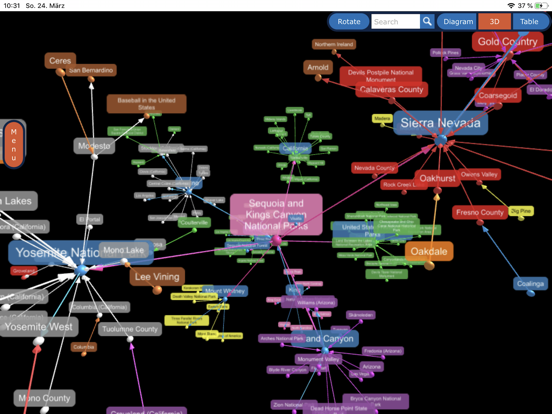
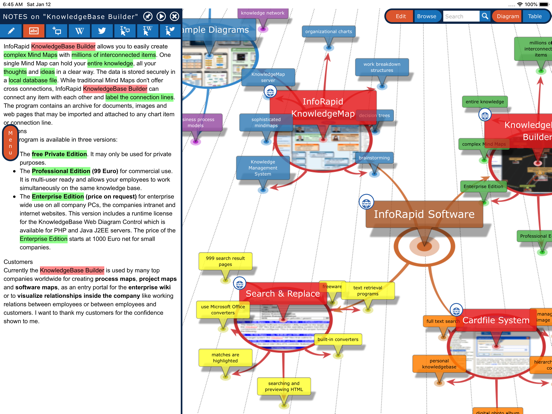
19 store screenshots


Pricing & paywalls
App Store
- Price: $8.99
Ratings & reviews
App Store
-
5/5Great app for graph visualization !
This app has many ways to help visualize complex graphs, including assigning categories to items and relations and filtering the graph by category or assigning color by category. You can also limit how many items are visible at a time either globally or by level from any item you designate as root. Lots of layout options. Graph visualization alone makes makes the app 5 stars for me. Importing graphs via “outline text” is also very useful, but you must carefully study the example to understand how it works. There are LOTS of other features, but some, such as text analysis, don’t always work as expected or lack documentation.
_~_._~_.__~_._ · 7 Aug 2026
-
5/5Best Mapping Ever!!!
I use this to keep track of characters in a book since I can’t remember all of them. It’s amazing how I can enter a character, write a description of them and it connects it to other characters. If your description has another character in it that is recorded it will link it to that other character you entered. This is the only mapping app that lets you write descriptions and notes for each one of them. Try using this for notes for a book you’re reading by entering characters and details of the story.
Chi Chi Ma · 7 Aug 2026
-
5/5❤️ KnowledgeBase Builder!
With recent update, it's now easy to move items around just where I want them. Getting used to the system, it's become my favorite mind-mapping app! Appreciate the many ways to search online (wiki, photos, etc.), url-linking, mutiple views, and many other handy features, making this excellent for inspiration and gaining knowledge. Thanks for making it available for iPad use!
BAR112 · 7 Aug 2026
-
5/5Impressive!
The price point is perfect. Other than mindmapping and visual thinking, I see many uses for this easy-to-use tool: presentation, learning, visual database, timeline, idea development... The deciding feature is the ability to write mathematical expressions. The syntax to do that is easy (but would be nice if it were LaTeX :) I also purchased the OS X version and use the iCloud to work the same file between Mac and iPad. Großartige Software! Gute Arbeit und vielen Dank!
NewHorizon · 7 Aug 2026
-
5/5Thank You
When I first bought the Info-rapid KnowledgeBase Builder, I left a very unfavorable review. Mea Culpa, with a small investment in time, this program is adaptable to a data query, sort, manipulation, relational analysis……. Thank You Mr. Straub
Zcentrist · 7 Aug 2026
Privacy & accessibility
App Store
Privacy
- Data Not Collected Developer declared
Accessibility
No accessibility labels collected yet.
Versions
App Store
-
7.10.2
JSON import/export allows mind maps to be created using LLMs like ChatGPT. Generated JSON files can be easily imported into the app.
-
7.10.4
JSON import/export allows mind maps to be created using LLMs like ChatGPT. Generated JSON files can be easily imported into the app.
-
7.10.5
JSON import/export allows mind maps to be created using LLMs like ChatGPT. Generated JSON files can be easily imported into the app.
-
7.11.1
New: Multi-selection of items is now supported. New: Redesigned UI with a pinnable creation dialog, allowing you to create multiple items in series. New: Added a button to center the diagram with a single click. Improved: Significant enhancements and optimizations for the table view.
-
7.12.1
New: Give your diagrams a personal touch with a selection of high-quality new background patterns. New: You can now use the image assigned to the currently selected root item as the background image. These options can be found under: Format Diagram > Diagram > Background Image.
-
7.13.1
New: Give your diagrams a personal touch with a selection of high-quality new background patterns. New: You can now use the image assigned to the currently selected root item as the background image. These options can be found under: Format Diagram > Diagram > Background Image.
-
7.13.2
New: Give your diagrams a personal touch with a selection of high-quality new background patterns. New: You can now use the image assigned to the currently selected root item as the background image. These options can be found under: Format Diagram > Diagram > Background Image. New: A user manual is now available and can be accessed via the "Help Assistant" menu.
-
7.13.3
New: Give your diagrams a personal touch with a selection of high-quality new background patterns. New: You can now use the image assigned to the currently selected root item as the background image. These options can be found under: Format Diagram > Diagram > Background Image. New: A user manual is now available and can be accessed via the "Help Assistant" menu.
-
7.14.1
New: Discover the 3D view with new backgrounds — including an immersive starfield and further scenes — to make your mind maps stand out. Improved: The 3D layout has been refined so your diagrams appear clearer and better arranged. Improved: Importing articles from Wikipedia and Wikidata is now more reliable. Fixed: Several issues have been resolved, including background rendering, loading 3D background images, and the introduction assistant.
-
7.8.8
Improved Text Analysis function
-
7.9.1
3D model export with hyperlinks for embedding 3D diagrams into webpages
-
7.9.10
3D presentation mode with speech output.
-
7.9.11
3D presentation mode with speech output.
-
7.9.12
3D presentation mode with speech output.
-
7.9.14
3D presentation mode with speech output.
-
7.9.15
3D presentation mode with speech output.
-
7.9.16
3D presentation mode with speech output.
-
7.9.2
3D model export with hyperlinks for embedding 3D diagrams into webpages
-
7.9.3
3D model export with hyperlinks for embedding 3D diagrams into webpages. Sort child items.
-
7.9.4
Relation lines in the form of trajectories. Record rotating 2D diagrams as animated gifs.
-
7.9.5
Presentation mode with speech output.
-
7.9.6
Presentation mode with speech output.
-
7.9.9
3D presentation mode with speech output.
-
8.0.0
Assignment of tags to items, MathML support, and a new Repository Panel for managing/importing documents. Previews are zoomable. Internal links in notes appear as chips. Improved: UI layout, touchscreen support, and diagram navigation. Fixed: 3D camera positioning, hyperlink issues, and styling bugs.
-
8.0.1
· 5 Aug 2026
Assignment of tags to items, MathML support, and a new Repository Panel for managing/importing documents. Previews are zoomable. Internal links in notes appear as chips. Improved: UI layout, touchscreen support, and diagram navigation. Fixed: 3D camera positioning, hyperlink issues, and styling bugs.
Alternatives
- Headspace — Same category + similar ratings
- VisuallyMind: Mind Mapping — Same category + similar ratings
- Inclr: Mindmap Notes Organizer — Same category + similar ratings
- Escape - Mind Map & Outline — Same category + similar ratings
- SimpleMind Pro - Mind Mapping — Same category + similar ratings
- MindThread — Same category + similar ratings
Availability by market
- US
Data quality & evidence
- Page completeness
- Live store listing
- Last verified
- 7 Aug 2026
- Sources
- App Store
- Independent summary has not been published yet.