
Quick verdict
- What it is
- Store information collected; independent summary not yet available.
- At a glance
-
- $10.99
Categories and search queries
Official categories
- Productivity
- Business
AppCorpus categories
Key functions
| Function | Availability | Access | Scope | Evidence |
|---|---|---|---|---|
| Family Sharing | Yes | Unknown | App Store | Store published |
Screens
App Store
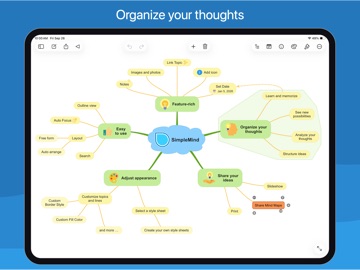
30 store screenshots



Pricing & paywalls
App Store
- Price: $10.99
Ratings & reviews
App Store
-
3/5So aggravatingly close to perfect but the frustrations hold it back.
I migrated here from iThoughts after it lost support, and the transition has been mostly smooth. But there are some features whose limited implementation drives me absolutely insane and makes the experience painful. First, In order to apply automatic numbering to the nodes, you have to deselect everything and tap the paint brush, which opens a menu that allows you to enable automatic numbering… but only on a map-wide scale. There is a perfect customization menu for each node that could allow you to apply automatic numbering on a node-by-node basis, but instead it’s relegated exclusively to the entire map and creates a very unpleasant, cluttered look. Second, there’s a nice roll-up feature for progress, but not one for time / resource tracking. iThoughts had this perfect feature where I could put a time estimate on a bubble/task, showing how many minutes or hours I think something would take, and they roll up to the parent comment so I can quickly and accurately assess the scope of a project. Better still, they calculate the relationship between progress and estimated time. So I put 2 hours on a project, complete 50 percent of it, and it shows that I have 1 hour left. And it all rolls up so I can track my progress into the larger context. I’ve appreciated the features added with each update so I’m sincerely hoping these get addressed in the next one. I’d give a higher score for all the other great features, but the ability to track scope and progress are my #1 reason for using mind maps, so this is a big problem for me.
Big Dirt · 6 Aug 2026
-
4/5Almost great
I love Mind Maps! I’m an Aspie, and details are very important to me. The mobile version of this app is incredible. It’s also the first Mind Mapper I’ve tried so far. There are just a few details to work out. First, it’d be nice if the app would remember my spot whenever I switch back to it. Just the X and Y coords, so it’s orientation independent. Next, it would be nice if, when selecting and moving a branch, it would still snap to the grid. I have to select the branch, move it somewhere imprecise, select the top branch node again by itself, position it perfectly, and then move all the other nodes to match. A couple of the menus up top don’t let me switch to another menu without first closing the menu I originally opened. This is probably only going to be an annoyance while still learning the menus. The last thing, and this is actually kinda big for me, is that the Windows desktop version doesn’t always position the nodes the same way as the iPad version does. So I have to continually tweak it. Images also aren’t rotated, and the grid setting don’t automatically sync (snap to grid, etc.) Anyway, it’s a great tool and I’d much rather have it than not! I consider it indispensable at this time. I only wish I could return the clunky desktop version (should have downloaded the trial first). I’ll be mapping out my thoughts on this and composing a much cleaner review for my blog. Thank you!
MichaelGabe · 6 Aug 2026
-
5/5Incredibly good mind mapping
I’ve been using mind maps as a way to research things for work for years. The problem has always been the flexibility of the tool. The software I’ve used in the past has been essentially graphical outlining. It worked, and allowed for some rearranging a grouping of content. But it was overall pretty difficult to move branches around. SimpleMind gets it right! Long press on any node, and it highlights all of its subordinate nodes so you can drag and drop the whole thing on another branch. Easily drag out handles to create new nodes or connections between nodes. Wrap nodes in an expandable border. The software has so many excellent, well designed features l can’t list them all here. (No, I have no relationship with the developers. I’m just really this happy to have found this app.) Even better, the software is availble for both iPad and Mac, and they work seamlessly together. Bravo, highly recommended.
JD8459 · 6 Aug 2026
-
2/5Lost my work
I like the layout and capability of SimpleMind Pro +. It's easy to use and easy to export. The low star rating is for the lost work and multiple issues found. I opened the app today to find my work erased, which is fine because I copied it as an image into other apps. But, for a Pro app, it shouldn't do that. Second issue I have is that for some reason, I can't create a mind map from scratch. I have to open an existing mind map, i.e. Welcome file, then create a new mind map. Without an existing mind map, the square edit sign opens a menu that is grayed out. I'm hoping that deleting the app and reinstalling will fix this. Usually, the edit sign has a menu for a new mind map. Third issue is that moving a mind map file to Apple iCloud forces it to open as a file rather than as an internal mind map. I'm not sure what that means and what the difference is, but limitations occur once that happens. The mind map links no longer work even if I try to map it to other files within the same Apple iCloud folder.
Matt_nickname_giveup · 6 Aug 2026
-
4/5Excellent
I use this app as an accompaniment to the desktop version and it has most of what I need for mobile use. Modifying templates and structures can be frustrating but it’s probably because I don’t do it often. There’s some additions/enhancements I’d like to see, however: —Add OneDrive as a storage location since many of us are on O365 home and enterprise. —Can we get a simple sort when viewing the map content in hierarchy view? I have a large map and manually alphabetizing the fields can be a real PITA. —Ability to rename custom templates (current it’s stuck at Copy of Pastel) —Enhance in-line documentation to clarify what options modify what, and at what level? Seeing a physical map as a legend with the option name (that I can print) would make it easier to know what I need to change to get my desired results.
LAX20531 · 6 Aug 2026
Privacy & accessibility
App Store
Privacy
- Data Not Collected Developer declared
Accessibility
No accessibility labels collected yet.
Versions
App Store
-
1.29.2
Fixed issue that only occurs on iPads running iOS 12
-
1.30.0
• Add Apple pencil drawings as images. • Use the new Full Screen Button to easily switch to full screen. • The icon inspector shows recently used icons and all icons used in this mind map. • Reorder stocks icons and stylesheets. • Google Drive now includes “Shared with me”. • Word wrap improved for far east languages. • Maximum thumbnail size increased to 640 pixels. • Thumbnails can be locked to a fixed position via the lock icon. • Swipe from the side to open the list with mind maps. Swipe from other side to open the inspector.
-
1.30.2
• Bugs reported on v1.30.0 fixed • Add Apple pencil drawings as images. • Use the new Full Screen Button to easily switch to full screen. • The icon inspector shows recently used icons and all icons used in this mind map. • Reorder stocks icons and stylesheets. • Google Drive now includes “Shared with me”. • Word wrap improved for far east languages. • Maximum thumbnail size increased to 640 pixels. • Thumbnails can be locked to a fixed position via the lock icon. • Swipe from the side to open the list with mind maps. Swipe from other side to open the inspector.
-
1.30.3
• Edit (embedded) Apple Pencil drawings • Support for screenshots to capture the entire mind map as a Full Page PDF. • Bugs reported on v1.30.2 fixed
-
1.31.0
• The style sheets have been updated with a fresh new look. • The built-in style sheets support dark mode, meaning if you switch to dark mode the style sheet will as well. • Making your own custom style sheets has been made easier with the new stylesheet editor. • Advanced Search options added - search for icon, checkbox or date. • General improvements and minor bug fixes.
-
1.32.0
• “Add Image in Topic” or “Add Image” adds the image directly to the mind map. No need to select thumbnail size or the linked image size. • The image now maintains the same quality when resizing. Enlarging the image increases the number of pixels ensuring the image still looks good. • An “Image in Topic” can be as large as 640*640. • “Add Linked Image” adds an image as in previous versions: a thumbnail in the mind map opens a full-size image. • Use Preferences to set the default size and density for new images. • On iPad, view and edit Notes in a Note panel on the right side of the screen. Use “Note” in the menu to open or close the panel. • Linking to documents is now available in the Local and the Files tab. Add links to documents on your device or iCloud etc., links can be opened on that device only. • Linking to mind maps is now available in the Files tab as well. Links can be opened on that device only. • Improved look of Labels. • SimpleMind supports Quick Look thumbnails and previews. When using the Files app (or other apps that support Quick Look) you’ll see a thumbnail or preview for .smmx Mind Map files. • General improvements and minor bug fixes.
-
1.32.1
• “Add Image in Topic” or “Add Image” adds the image directly to the mind map. No need to select thumbnail size or the linked image size. • The image now maintains the same quality when resizing. Enlarging the image increases the number of pixels ensuring the image still looks good. • An “Image in Topic” can be as large as 640*640. • “Add Linked Image” adds an image as in previous versions: a thumbnail in the mind map opens a full-size image. • Use Preferences to set the default size and density for new images. • On iPad, view and edit Notes in a Note panel on the right side of the screen. Use “Note” in the menu to open or close the panel. • Linking to documents is now available in the Local and the Files tab. Add links to documents on your device or iCloud etc., links can be opened on that device only. • Linking to mind maps is now available in the Files tab as well. Links can be opened on that device only. • Improved look of Labels. • SimpleMind supports Quick Look thumbnails and previews. When using the Files app (or other apps that support Quick Look) you’ll see a thumbnail or preview for .smmx Mind Map files. • General improvements and minor bug fixes. • iOS 11/12 related crash bug fixed.
-
2.0.0
• Native iCloud support • Link to mind maps and documents in iCloud • iOS 16 supported • General improvements and minor bug fixes.
-
2.1.0
• Images can be cropped to a shape: circle, rounded etc. • Add multiple cross-links between any two topics. • Creating a new Mind Map on iCloud Drive lets you input the file name. • Full text search on iCloud Drive supported. • Minor bug fixes and improvements
-
2.1.1
• Images can be cropped to a shape: circle, rounded etc. • Add multiple cross-links between any two topics. • Exchange with ChatGPT using Copy & Paste • Creating a new Mind Map on iCloud Drive lets you input the file name. • Full text search on iCloud Drive supported. • Minor bug fixes and improvements
-
2.2.0
• New Matrix auto layout, great for displaying information compact. • Add Labels in Topics to add additional information • Automatic Left/Right Text Alignment in auto-layouts. Optionally disable this via Preferences | General. • Create a New Mind Map from what’s copied to your Clipboard. • Use your downloaded custom fonts in Preferences – Fonts. • Turkish Language supported.
-
2.3.0
• Switch to another layout scheme inside an auto layout. For example start in horizontal layout and switch to a linear layout. • On iPad: customize toolbar commands. • On iPhone: full screen command available on toolbar. • Labels are included in outline exports and when copying as text. • General improvements and minor bug fixes.
-
2.3.1
• Switch to another layout scheme inside an auto layout. For example start in horizontal layout and switch to a linear layout. • On iPad: improved layout options picker. • On iPad: customize toolbar commands. • On iPhone: full screen command available on toolbar. • Labels are included in outline exports and when copying as text. • General improvements and bug fixes.
-
2.3.2
• Switch to another layout scheme inside an auto layout. For example start in horizontal layout and switch to a linear layout. • On iPad: improved layout options picker. • On iPad: customize toolbar commands. • On iPhone: full screen command available on toolbar. • Labels are included in outline exports and when copying as text. • General improvements and bug fixes.
-
2.3.3
• New Layout Mode picker on iPad. • Improved contrast in Auto Focus and Search modes. • Updated built-in Dropbox integration ensuring continued support. • Service update, many minor improvements and bugs fixed.
-
2.3.4
Service Update: many minor improvements and bug fixes.
-
2.4.0
• Spotlight Search support – use Spotlight to search for text in mind maps – including notes. • Sort Children: sorts child topics alphabetically. • Importing the basics of iThoughts files (*.itmz): hierarchy, text, notes, navigation links, icons and images in topics. • Customize Topic Toolbar – show only the commands relevant to you on the topic toolbar.
-
2.5.0
• Due to recent changes in Google’s security policies, built-in support for Google Drive is no longer available. We would have loved to continue supporting Google Drive, but it’s no longer possible. Check our web site for details. • Add a linked image inside a topic. • Move images inside/ outside a topic by using the Topic and Image toolbars. • New Images are cropped to a rounded shape by default.
-
2.6.0
• Share mind maps via the “Share” button, making it easier to share to mail and messages apps. • “Delete Single Topic” added in the Topic Toolbar. Delete a single topic only, without deleting the whole branch. • Tinted Note Indicators, the note indicator adjusts to the color of the topic. • Command “Editor Mode” can be added on the iPad toolbar. • Improved Importing non-native files. • Pasting .opml improved. • Open non-native files (.opml, .mm, .txt, .itmz) from SimpleMind Files explorer. • General improvements and minor bug fixes.
-
2.7.0
• Horizontal layout direction added: “Automatic Clockwise”. • When sharing (as .pdf and .png) and printing SimpleMind exports with high resolution images when available. • Updated Dropbox support to assure continuing integration with Dropbox. • General improvements and bug fixes.
-
2.8.0
Full compatibility and optimization for iOS 26, modernized UI Smart Roll-Up Detection. The parent topic changes to a Roll-Up Progress Bar if all child topics have checkboxes. Enhanced OPML import. Import .opml with checkboxes (checked or unchecked). Improved Sibling Tool. Long-press the sibling tool to choose between Add Sibling (below topic) or Insert Sibling (above topic). Floating Window Support. Supports the free adjustment and resizing of windows. If available SimpleMind now uses high resolution images in the Editor. Controlled via Preferences – Image Options.
-
2.8.1
Service update: Minor bug fixes and improvements
-
2.8.2
Service update: Minor bug fixes and improvements
-
2.9.0
• Background Patterns enhance visual appearance of your mind maps. • Automatically add a Progress Bar when two or more child topics have a checkbox. • Faster Checklists: Checking or unchecking a topic no longer auto-selects it • Split topic text into a new sibling topic. • Set default layout for Central Theme and Imports in Preferences. • Add web links with web page descriptions.
-
2.9.2
· 6 May 2026
• Background Patterns enhance visual appearance of your mind maps. • Automatically add a Progress Bar when two or more child topics have a checkbox. • Faster Checklists: Checking or unchecking a topic no longer auto-selects it • Split topic text into a new sibling topic. • Set default layout for Central Theme and Imports in Preferences. • Add web links with web page descriptions. • Compatibility update
Alternatives
- iA Writer — Same category + similar ratings
- Escape - Mind Map & Outline — Same category + similar ratings
- AYOA - Mind Mapping — Same category + similar ratings
- MindNode: Mind Map & Outline — Same category + similar ratings
- Story Planner for Writers — Same category + similar ratings
- Due - Reminders & Timers — Same category + similar ratings
Availability by market
- US
Data quality & evidence
- Page completeness
- Live store listing
- Last verified
- 6 Aug 2026
- Sources
- App Store
- Independent summary has not been published yet.