
Quick verdict
- What it is
- iReal Pro is a music app that provides a realistic backing band and a huge library of chord charts. It allows users to practice with a full rhythm section, transpose songs, and create custom sets.
- Best for
-
- musicians who want to practice with a backing band
- music teachers who need to create custom sets
- At a glance
-
- $21.99
- In-app purchases
Categories and search queries
Official categories
- Music
- Education
AppCorpus categories
Key functions
| Function | Availability | Access | Scope | Evidence |
|---|---|---|---|---|
| Family Sharing | Yes | Unknown | App Store | Store published |
| In-app purchases | Yes | Limited free | — | Store published |
Screens
App Store
18 store screenshots


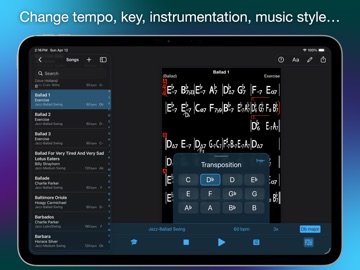
Pricing & paywalls
App Store
- Price: $21.99
- Blues style backing tracks — $6.99
- Brazilian backing tracks — $6.99
- Salsa style backing tracks — $6.99
Ratings & reviews
App Store
-
5/5Essential app for all singers and musicians
IMO, IReal Pro is essential for all singers/musicians. As a singer, we tend to learn music differently (playing by ear) than musicians with an instrument. Because of this, there tends to be gaps in the learning music process. When I bought the iReal Pro app, I quickly realized those music gaps were filled- for example, charting. Full disclosure-I did take a recent irp class. Alot of the class was focused on the edit mode/charting. After I got used to the edit mode and creating my own charts (in a small amount of time), I found this process very easy and fun. The irp cons would be to put more detail in the step-by-step instruction videos per device and slow down each step please. I found even stopping the video/s and rewinding each step ended up taking longer. I say all this because this was the reason I took the class-to get a better irp understanding. Also, a longer template would be helpful. Is it possible to create/add as many bars as the tune calls for? 😃 Maybe in the future, irp could expand to a window desktop version other than a 3rd party version ? Recently I had a few irp troubleshooting issues and Warren, one of the support team members worked with me throughout the day via email to get them resolved. He was very e-mail responsive which I appreciated. I was relieved that it was the same person I was dealing with too. Warren was very helpful ! Cost of app is reasonably priced which is very much appreciated too. All in all, I’ve had a great experience with the iReal Pro app and the support team . Highly recommend! Thank you so much for creating this wonderful app! 👍🙏👍
jazzkat-us · 2 Sep 2026
-
5/5The versatility of iReal Pro
There’s no question that there are similar products on the market but the versatility of iReal Pro allows the practitioner of music or the producer the ability to not only create but continue to grow as a technician. I personally have found the app useful in production not being a keyboardist by training. Additionally, it is a great and useful tool to practice new material or theory by soloing over changes or melody as well as having a set list available to distribute to musicians in a band. and of all of the things listed what has not been mentioned is having this in your back pocket when impromptu performing when you don’t know a song you have a roadmap at your fingertips which is incredibly useful and I’ve used dozens of times whether it’s on a professional gig or just sitting in when I did not know the tune. The only drawback to this wonderful app is that it only allows rhythms on the one on the downbeat and nothing on the upbeat. There would be so much more possibility if you could have portal rhythmic phrasing on eighth notes or 16th notes instead of just on quarter notes. This is something that I as well as others perhaps have suggested however for whatever reason it is still not available. Other than that one area it’s an amazing product for the price and I find it highly useful.
Optime LLC · 2 Sep 2026
-
5/5Essential for aspiring and professional jazz musician
Solid Playback, compositional accompaniment and practice tool with multiple applications. But doesn’t come with any music but there’s a great form or you could download the court changes to thousands of popular tunes and experiment by changing the styles. It’s like band in a box, and someways more versatile, but with less tweak ability in regards to the accompaniment. If you want to gig and you don’t know key changes, this is the app to have. I’ve seen so many professionals with them. You can also export midi, and whatever style you want. It’s help me to compose new songs. The interface is a little tricky, but there’s plenty of tutorials and helpful for him literature, as well as templates and options. This is probably the most comprehensive tool of its kind, and although there’s no real audio, if you’re not happy with the sounds of styles, export the midi, or if you like what you hear you can export the audio. For example, I found a tune template with some key changes I liked. Tweaked and changed some of the form and chords with ones I was hearing. Changed up the style. Wrote the developers and ask them if they could add an option to record. Not only did they respond, they did. Unbelievable. That was five years ago. There are still regular updates... it and it is absolutely a go to app that is One killer practicing, especiallyif you are a student of jazz, Bluegrass, blues, this will help you gain levels. I even use it on gigs if someone has a song request that is too obscure to find a backing track. It’s all about just getting from Milyer with the controls. Being tasteful and thinking creatively. It also is a plus, having the technology on hand to stream Bluetooth audio.
Woody Gatt · 2 Sep 2026
-
5/5Performance tracks too!
I’ve used this app since the early versions and it always surprises me. First off it let’s me create simple, readable chord charts and share them effortlessly. The backing instruments give you flexibility to easily practice and rehearse. While most of my use of this app is as a practice or teaching tool - I also use it to create basic backing tracks for live performance. I play lap steel - so all I really need is a bass line, and a simple rhythm instrument to back me up as I play the melodies. Once I get a chart working live - if I want better quality for a show etc. I’ll do a more pro track in my DAW with real instruments. But for many songs, doing simple gigs - this app works fine. The endings are not great, and the bass lines get a bit boring - but overall it works ok. If you construct a good chart with proper repeats, and pick a good style for the song etc. - the tracks work really well. I like the Rhodes piano, vibes and bass along with the Jazz styles. Love being able to export .pdf to share charts with the band.
Nick-neighm · 2 Sep 2026
-
5/5The most useful app I've ever had
I've had this app since it was available. It's amazing that it only cost what it does. I not only use it for having jazz charts on gigs, I can create the whole night's set list for my band and text it to all the players minutes, before the show so everyone has all the charts in the right order and in the right keys. There are too many amazing features to discuss here, but what I will discuss is the phenomenal customer service. I usually get a petsonal reeply back within an hour or two with answers, suggestions, and links providing additional material. This has proved to be invaluable in being able to unlock some nifty features. Just make sure you email yourself your stuff to back it up because apple's iCloud back up system can be unreliable with any software. The file storage system that they use is great. It helps to understand fully how it works. Once you master the more subtle features of this software you will be amazed by how powerful it is.
NashvilleBill · 2 Sep 2026
Privacy & accessibility
App Store
Privacy
- Data Not Linked to You — Analytics — Identifiers — Device ID Developer declared
- Data Not Linked to You — Analytics — Usage Data — Product Interaction Developer declared
- Data Not Linked to You — Identifiers Developer declared
- Data Not Linked to You — Usage Data Developer declared
Accessibility
- Dark Interface — SUPPORTED Store published
- Differentiate Without Color Alone — SUPPORTED Store published
- Larger Text — SUPPORTED Store published
- Reduced Motion — SUPPORTED Store published
- Sufficient Contrast — SUPPORTED Store published
- Voice Control — SUPPORTED Store published
- VoiceOver — SUPPORTED Store published
Versions
App Store
-
2025.1
- Added option to play any song in any style in Double time
-
2025.10
- Faster playback startup times - Fall back to MIDI drums when tempo is below where real drums sound good when time stretched - When changing tempo during playback the real drums now switch to midi drums instead of click track until track is regenerated - When a Jazz Swing style is selected at a tempo far from its default, the app now automatically switches to a more suitable Swing style for that tempo
-
2025.10.1
Fixed issue with sometimes wrong sound patch used in Swing styles when changing tempo
-
2025.11
- Fixed issue with missing Fermata and wrong Segno symbols when exporting to MusicXML - Fixed bug where changing the style during playback wouldn’t update to the default tempo - Adjusted piano volume so that it’s even across all Swing styles
-
2025.12
Minor bug fixes
-
2025.12.1
Minor bug fixes
-
2025.2
- New count-in click option to sound the root of the key of the song (useful to singers) - Player controls now only occupy the needed space. This improves reachability for small controls and on iPad you get to see the whole mixer and more of the styles. - Fix loop underline showing even is position marker was disabled - You can now change practice settings during loop playback and restart without re-selecting the loop
-
2025.4
Minor bug fixes
-
2025.6
- Tweaks to the editor keyboard to make better use of space and allow more room for the chord chart - Fixed capitalization issue with custom song style correcting 50’s to 50’S - Fixed AirTurn settings window size on iPad - Fixed issues with text layout in player controls with very large system text - Added instrument names to wind instrument transposition menu
-
2025.7
Added the option to play any song in Half Time in addition to Double Time
-
2025.8
Minor fixes to chord scales
-
2025.9
- New: REAL DRUMS! All Jazz styles now include the option to play with real drum audio recordings for a more realistic sound - Rename Double Time / Half Time feature to Double Bar Length / Half Bar Length - Tweaks to the Jazz Afro 12/8 piano part - Tweaks to the Jazz Latin piano part
-
2026.2
New Features - iPadOS 26 menu bar with Player, File, Edit, and View menus - New keyboard shortcuts: Find Song (⌘F), New Song (⌘N), Duplicate Song (⌘D), Edit Song (⌘E), Save (⌘S), Next/Previous Song (→/←), and more - ⌘E now toggles the editor open and close - Guitar and ukulele left/right hand preference moved to App Settings Design - Updated for iOS 26 Liquid Glass - Modernized library view — iPad uses sidebar style, iPhone uses grouped style - Modernized playlist view with integrated search bar - Improved editor keyboard styling and layout - Increased library cell height for better readability Improvements - Default instruments and click sounds are now highlighted in the mixer - Edit and Share buttons are disabled when no song is selected - Renamed 'Info' to 'Song Info' and 'Edit' to 'Edit Song' for clarity - Improved reorder mode on iPad - Simplified 3/4 piano part in Jazz Bossa Bug Fixes - Fixed a crash on iOS 18 related to the navigation bar layout - Fixed Forums web view content appearing under the navigation bar - Fixed song view and song list getting out of sync - Fixed space bar not restarting playback when regeneration is needed - Fixed changing swing style resetting instrument selections in the mixer
-
2026.3
# New Features - VoiceOver now announces bar numbers when reading chord charts - VoiceOver users can select bars for loop playback or start playback from any bar - Redesigned in-app style packs store with richer genre cells and lock/unlock indicators - Style packs store is now integrated directly into Settings # Bug Fixes - Fixed a rare launch crash on iOS 26 - Fixed Data not saving when user force quit the app
-
2026.3.1
Fix crash when connecting to external displays or Screen Mirroring
-
2026.3.2
Fix rare startup crash
-
2026.3.3
- Fixed looped selection getting mistakenly changed when scrolling the song - Fixed selection dismissed after dragging to adjust looped section - Fixed back gestures conflicting with looped bars selection - Improve handling of floating keyboard on iPad - Rewritten MusicXML export with support for MusicXML v3.1 (v4 has no improvements that are relevant to our type of chord chart) - Added date, app version, and OS metadata to playlist and backup exports
-
2026.3.4
- Any harmony instrument can now be selected for the harmony part in the mixer - Renamed "Default Instruments" to "Reset Instruments" in the mixer - Resetting instruments no longer resets embellish chords - Mixer instrument selector now shows "(Default)" text label instead of color highlight - Faster startup by skipping unnecessary file I/O when building drum sample library
-
2026.4
- Show a "Swipe up to set" hint when touching the tempo/repeats button - Improved audio export progress bar — now shows progress across all export phases - Smarter auto playlists — no more duplicates in Last Viewed - Auto playlists now support up to 100 songs (previously 50) - Last Viewed songs now show their source playlist name - Fixed player settings not persisting in Last Viewed playlist - Fixed Spotlight search and single-song imports not showing the song on iPhone - Fixed tapping selecting the wrong measure on long compressed charts - Fixed a crash that could occur with a badly formatted song - MusicXML export now uses rests instead of slash or diamond notes for more accurate notation
-
2026.4.1
Minor bugfixes and improvements
-
2026.5
- Confirm before moving songs or playlists to the Trash — the dialog lists every playlist the selected song (or songs) will be removed from - Confirm before emptying the Trash or permanently deleting a song from it - Restore-from-Trash dialog now shows a chord-chart preview of the song - Improved Bluetooth speaker wake-up — count-in beats are no longer clipped when playing through a sleeping Bluetooth speaker; added an adjustable Bluetooth Wake Delay setting - Smarter tap tempo — responds from the second tap, averages over a wider 8-tap window, and resets after 2.5 s
-
2026.6
- New: Global library search — search across your entire library and see which playlists each song belongs to - New: Add songs to a playlist from another playlist to merge them - Rename or delete a playlist from within the playlist - "Add from Library" now shows the destination playlist name and a live count as you add songs - Move songs to the Trash directly from automatic playlists - Renamed "Bluetooth Wake Delay" to "Wireless Wake Delay" and restored the AirPlay wake-up pre-roll - Fixed an invisible song preview in dark mode on iOS 18 and earlier - Restore button in the Trash preview is no longer clipped - Fixed a launch crash caused by a duplicate song in the Last Viewed playlist
-
2026.6.1
- New: Global library search — search across your entire library and see which playlists each song belongs to - New: Add songs to a playlist from another playlist to merge them - Rename or delete a playlist from within the playlist - "Add from Library" now shows the destination playlist name and a live count as you add songs - Move songs to the Trash directly from automatic playlists - Renamed "Bluetooth Wake Delay" to "Wireless Wake Delay" and restored the AirPlay wake-up pre-roll - Fixed an invisible song preview in dark mode on iOS 18 and earlier - Restore button in the Trash preview is no longer clipped - Fixed a launch crash caused by a duplicate song in the Last Viewed playlist
-
2026.6.2
- Control Center pause now acts as stop, and the Now Playing controls stay in sync - Key Signature Set buttons in the editor now show descriptive subtitles - Global search pills are now tinted with the accent color and give press feedback - Playlist delete button no longer appears tinted red on iOS 18 and earlier - Fixed a crash in the library list caused by an invalid scroll position - Fixed a crash from rapidly tapping songs while the app was lagging - Fixed a crash that could occur when removing songs while iCloud sync updated a playlist
-
2026.6.3
· 30 Jun 2026
- New: Export screen-reader-accessible (tagged) PDFs of song charts, so titles, sections, chords, and lyrics are readable by VoiceOver and other assistive tech - MIDI exports now include time-signature changes in the conductor track - Added a Version History link in Settings - Fixed a crash caused by cancelling during audio export and then restarting
-
2026.7
· 11 Aug 2026
- Playback and audio export use far less memory - Fixed Real Drums drifting out of time with the other instruments during very long songs
Alternatives
- Drumgenius — Same category + similar ratings
- forScore — Same category + similar ratings
- TonalEnergy Tuner & Metronome — Same category + similar ratings
- Earpeggio — Same category + similar ratings
- Tenuto — Same category + similar ratings
- Sibelius — Same category + similar ratings
Availability by market
- US
Data quality & evidence
- Page completeness
- Independent summary published
- Last verified
- 30 Aug 2026
- Sources
- App Store