
TonalEnergy Tuner & Metronome
Music practice app with tuner and metronome
iPhone · iPad · Android
Quick verdict
- What it is
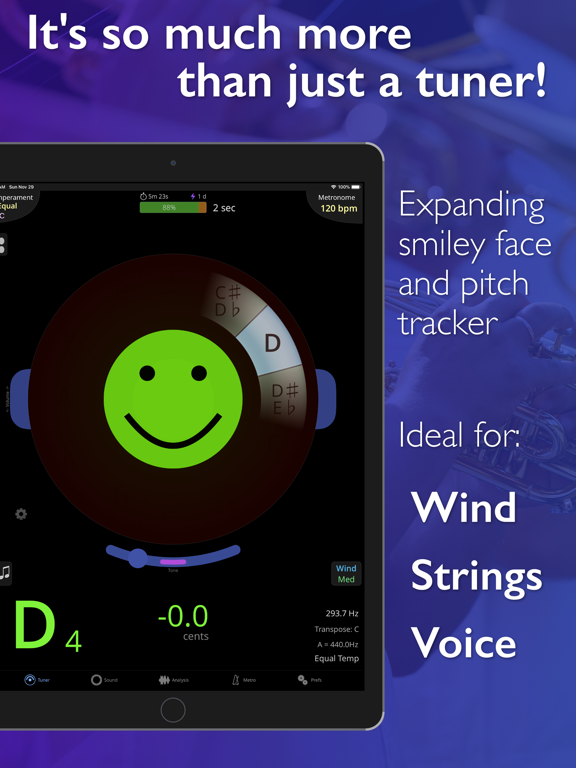
- TonalEnergy is a music practice app that provides a set of feature-rich tools for musicians, including a state-of-the-art tuner, an advanced metronome, and audio recording capabilities.
- Best for
-
- musicians
- music students
- At a glance
-
- $6.99 (App Store) · $5.99 (Google Play)
Categories and search queries
Official categories
- Music
- Music & Audio
- Education
AppCorpus categories
Key functions
| Function | Availability | Access | Scope | Evidence |
|---|---|---|---|---|
| Family Sharing | Yes | Unknown | App Store | Store published |
Screens
19 store screenshots



7 store screenshots


Pricing & paywalls
- Price: $6.99
- Price: $5.99
Ratings & reviews
-
5/510/10 I love this app!!
TE tuner is a one stop shop for all practicing needs. It’s got a great and versatile metronome, with a wide selection of metronome sounds, and can provide drones for tuning in any number of timbres and even helps you tune in different temperaments and pitch standards. The tuner is very customizable. It allows you to select how picky the tuner’s range of what it accepts as “in tune” is. I can set it to ultra fine (which only allows one hundredth of a half step on either side of the note as wiggle room) for tuning my strings, then switch to just “fine” if I need to cut myself some slack while practicing scales and intervals. The tuner also has different modes for strings, winds and voice. I don’t know exactly how the modes differ on a technical level, but I’ve found them to work as intended. The user interface is elegantly designed and lays all of this app’s many features out in an intuitively navigable way. This app has become a really helpful resource in my daily practice, and I can’t recommend it enough to musicians at any level.
Check out Oldtable · 30 Aug 2026
-
4/5Good app but don’t like the sound choices
I have just started using this app and it seems to have the main functions I was looking to consolidate from multiple other apps I use - mainly a metronome and a piano keyboard to give me notes to work through vocal practices / figure out harmonies. Also was looking for an app to buy, rather than a free app, because the ads in the free apps get annoying (and seem to be getting worse, e.g. making you watch 5 seconds of a commercial before it allows you to close it). And this one has a tuner to boot. I do have 2 suggestions: 1) Call me crazy, but if I’m just giving myself a note to sing from, I’d love it if the piano keyboard display had the option to sound like a piano. You can make it sound like a whole bunch of different instruments, many with kind of cheesy tones, but piano is not one of them. 2) Would like a mute button on the metronome, such that when in the metronome page, you can see the box (or the screen) flashing the time but without the click. I can accomplish this by turning down the volume on the side of my phone, but it takes a lot of pushes to do that so it can’t be done quickly. Otherwise I do like this app.
cea68 · 30 Aug 2026
-
3/5It's OK, to me the tuner is not great
This app was highly recommended by a friend, he had used it in our vocal rehearsals to give us pitches and tempos. I bought it to try and consolidate all the functions I need in to one app. Initially I found the tuner very jumpy, and I don't like the smiley face with concentric half circles tuning model at all, so I wrote a pretty harsh review. The developer contacted me and pointed out the string tuning mode, which I initially couldn't find because it's not in the tuning section; it's under the sound tab. It makes it much easier to tune my guitar (and it has setting for many stringed instruments from viola to banjo) but if I try to sing long tones or play them on my trumpet, I'm back in the happy face tuner. In theory it should work but to me, the slightest pitch change in a long tone causes the rings to jump erratically. I think that the string mode rescued the app from deletion, and added one star to my rating, but I will still sing and play long tones into the free "pano tuner" rather than deal with the unhappy happy faces. Kudos to the developer for helping me find my way around the app. One more quick gripe, if I'm singing with the metronome playing, the app hears the click and reacts to it, so you essentially can't tune with the metronome on.
Kkeyz · 30 Aug 2026
-
5/5Great Gadget!
I use this app every day. I especially like the metronome features. I program in the meters and measures of my Brass Band music at tempo then I can play through each piece without stopping to check my tempo through the changes. The app allows you to put in rits. and every other variation of tempo needed in performance. I also use the drones for long tone practices. If during a rehearsal there is a questionable interval, I just write down what pitch the other guys got and when I get home I work with the tuner/drone just to make sure that my parts where it needs to be.I haven’t started to dive into the practice log yet. So except for the practice log I use every other feature that I know this app is capable of every day. I personally find it to be a very robust and flexible program. The updates are always current. I’ve never had any response problems with it. I couldn’t even imagine not having this app. As an older person it is a tool I really wish I could’ve had when I was starting out.
Talkenhorn · 30 Aug 2026
-
5/5Insane value for any musician
Absolutely fantastic tuner but also practice tool with incredibly powerful metronome and practice options. It’s crazy how much is packed in here. I speak from vocalist, guitarist and keyboard player experience but this can be used in any of these contexts and I imagine would also be extremely useful for musicians of woodwind instruments. You can greatly customize metronome tempo, meter in a „song mode” so to speak so inserting blank measures for practicing consistency is a breeze. You can program tone generator (which also has samples of common instruments as well if you dont want to practice with a sine wave all the time) to do scale runs which is super helpful as a singing warmup but you can also combine it with metronome for use in some speed exercises for your instrument. It also lets you record yourself easily in app (with video as well) so it truly is do it all. There is some slight learning curve to its interface but really, compared to its feature set, its still incredible user experience. Everything works so smoothly and I never had the app crash. Alternative tunings for guitar, different temperaments, metronome where you can also program to have voiced count alongside metronome sounds. The only small suggestion id have is if we could have guitar view alongside the pitch wheel, pitch grid and keyboard views for the tone generator (i think it could be useful for ear training for people whose main instrument is a guitar) but lack of that view does not detract from this app and the magnitude of well organized features it offers.
LazyLester · 30 Aug 2026
No store reviews collected for Google Play · US
Privacy & accessibility
Privacy
- Data Not Linked to You — Analytics — Diagnostics — Crash Data Developer declared
- Data Not Linked to You — Analytics — Usage Data — Product Interaction Developer declared
- Data Not Linked to You — App Functionality — Diagnostics — Crash Data Developer declared
- Data Not Linked to You — Diagnostics Developer declared
- Data Not Linked to You — Usage Data Developer declared
Accessibility
No accessibility labels collected yet.
Privacy
- Data collected — Analytics — App activity — App interactions Developer declared
- Data collected — Analytics — App info and performance — Crash logs Developer declared
- Data collected — Analytics — Device or other IDs Developer declared
- Security practices — The developer doesn’t provide a way for you to request that your data be deleted — Data can’t be deleted Developer declared
- Security practices — Your data is transferred over a secure connection — Data is encrypted in transit Developer declared
Accessibility
No accessibility labels collected yet.
Versions
-
2.0.6
Recently from 2.0.5 and 2.0.6: New Features - Added current note tuning indicator on piano keyboard - Added settings on Sound Keyboard page - Added piano instrument sound (please note that the tuner will not recognize its pitch accurately when listening to itself through built-in speakers) - When you leave the app with a sustained drone active it will keep playing in the background (option to disable this behavior in Prefs->Audio Options) Fixes: - Fix for streak calculation, if you think the reported current or best streak is incorrect, go to Prefs->Analysis Options and select Recalculate Streaks. - Fixed Ableton Link support (synced metronomes) on latest iOS version - Fixed metronome preset adding crash issue - Fixed metronome preset drone issue - Fixed some Auto-exercise assistant issues - Fix for orientation change crashes occurring on some devices - Fixed issue opening transpose options in Auto-Exercise creator - Fixed issue with touch in background of full-screen racetrack analysis view
-
2.0.7
Recent changes from 2.0.5 to 2.0.7: New Features - Added current note tuning indicator on piano keyboard - Added settings on Sound Keyboard page - Added piano instrument sound (please note that the tuner will not recognize its pitch accurately when listening to itself through built-in speakers) - When you leave the app with a sustained drone active it will keep playing in the background (option to disable this behavior in Prefs->Audio Options) Fixes: - Fix for streak calculation, if you think the reported current or best streak is incorrect, go to Prefs->Analysis Options and select Recalculate Streaks. - Fixed Ableton Link support (synced metronomes) on latest iOS version - Fixed metronome preset adding crash issue - Fixed metronome preset drone issue - Fixed some Auto-exercise assistant issues - Fix for orientation change crashes occurring on some devices - Fixed issue opening transpose options in Auto-Exercise creator - Fixed issue with touch in background of full-screen racetrack analysis view - Fixed issue with keyboard touch when using keyboard tuner option
-
2.0.8
- Added numeric decibel indicator to go with the volume meter - Some new Target Tuner surprises
-
2.0.9
- Additional metronome sounds added - Fixed issue with pitch % tracker not updating key properly when just temperament is used - Fixed issue with the metronome change tempo from end with count-style presets - Fixed issue with temperament info buttons not working - Fixed issues with metronome voice counting - Fixed issue with record sidebar disappearing when leaving the app - Other bugfixes
-
2.1.0
Introducing the SIMPLE METRONOME! There is now a NEW Simple Metronome mode: - For the times you don’t need a meter or presets - For younger or new music students who are learning to use a metronome. To access the Simple Met, simply touch the new button in the top left of the Met page. This will allow you to toggle between Simple and Advanced (as our current metronome will be known from this point forward). Or simply tap the Met tab at the bottom. For your convenience, when using the Advanced Met in sequence mode, you can temporarily switch to the Simple Met without interfering with the Advanced Met setup. Other Metronome updates: - The Met voice can now be customized for your needs on a per-beat basis, with any chosen number or a selection of NEW key words. (English only) - Hold the “Tap Tempo” button on the Metronome page and select choices to allow MrSmileyFace to assist you in maintaining a steady pulse so that “You’ve got the beat!” - Nine NEW animated beat visualizations, many using MrSmileyFace, have been added to the metronome page so you feel the beat and sense tempo differently! Simply swipe the Met visualization to make your choice. Tapping on the visualization will toggle special features. Note: Some visualization special features respond to two-finger taps as well. - In addition, if you wish, add some funk to your practice using our NEW randomized Metronome sounds. You can change every bar or beat, among a chosen range of sounds. The sound choices are found in the Met Sound pop-up. Play along with exercises created by you on the improved Auto-Exercise Creator (AEC), found on all Sound pages NEW features in AEC: - Customizations for note durations include options for rests and repeats within the exercise. - Customizations for single note lengths are now available. - Lip Slur (Harmonic series) mode is available to generate exercises especially for brass players! - Exercises can now be saved/loaded and exported/shared with others! - Drones can be added to any exercise. - The met sound can now be added to any exercise. MORE IMPROVEMENTS NEW: The Auto-Tone Tracking feature can now be set to sustain the initially heard note (Hold First), rather than tracking every note change. Hands-free practice when playing a scale or exercise with a root drone underneath opens new possibilities for you to explore tonality. NEW: Our large volume dB option, in the center of the Target Tuner, can increase understanding of individual and group dynamics. NEW: Now you can import and export your Custom Temperaments. - Various bugfixes
-
2.1.1
- Fixed touch issue with metronome beat toggle buttons - Fixed pitch wheel size issue on iPads - Portuguese translation updates From 2.1.0 - Introducing the SIMPLE METRONOME! There is now a NEW Simple Metronome mode: - For the times you don’t need a meter or presets - For younger or new music students who are learning to use a metronome. To access the Simple Met, simply touch the new button in the top left of the Met page. This will allow you to toggle between Simple and Advanced (as our current metronome will be known from this point forward). Or simply tap the Met tab at the bottom. For your convenience, when using the Advanced Met in sequence mode, you can temporarily switch to the Simple Met without interfering with the Advanced Met setup. Other Metronome updates: - The Met voice can now be customized for your needs on a per-beat basis, with any chosen number or a selection of NEW key words. (English only) - Hold the “Tap Tempo” button on the Metronome page and select choices to allow MrSmileyFace to assist you in maintaining a steady pulse so that “You’ve got the beat!” - Nine NEW animated beat visualizations, many using MrSmileyFace, have been added to the metronome page so you feel the beat and sense tempo differently! Simply swipe the Met visualization to make your choice. Tapping on the visualization will toggle special features. Note: Some visualization special features respond to two-finger taps as well. - In addition, if you wish, add some funk to your practice using our NEW randomized Metronome sounds. You can change every bar or beat, among a chosen range of sounds. The sound choices are found in the Met Sound pop-up. Play along with exercises created by you on the improved Auto-Exercise Creator (AEC), found on all Sound pages NEW features in AEC: - Customizations for note durations include options for rests and repeats within the exercise. - Customizations for single note lengths are now available. - Lip Slur (Harmonic series) mode is available to generate exercises especially for brass players! - Exercises can now be saved/loaded and exported/shared with others! - Drones can be added to any exercise. - The met sound can now be added to any exercise. MORE IMPROVEMENTS NEW: The Auto-Tone Tracking feature can now be set to sustain the initially heard note (Hold First), rather than tracking every note change. Hands-free practice when playing a scale or exercise with a root drone underneath opens new possibilities for you to explore tonality. NEW: Our large volume dB option, in the center of the Target Tuner, can increase understanding of individual and group dynamics. NEW: Now you can import and export your Custom Temperaments. - Various bugfixes
-
2.2.0
- Added auto-retrigger for sustained sounds for plucked/hit instruments - Added Alto Clarinet to list of transposing instruments (Eb -9) - Added video stabilization option - Added improved piano instrument - Added new remote control commands for auto-exercise start/stop, and shifting sustained notes - Long-pressing sustain button will play the most recently sustained notes - Fixed bug where selected instrument sound not restored Metronome - Added Polyrhythm feature, press the beat button next to the meter to show new options to define polyrhythms. Different met sounds and volume balance can be used for each rhythm. Both meter and subdivision polyrhythms are possible. - Can now specify the Beat Unit used for tempo for any meter - Improved meter picker with multiple columns, and additional top/bottom # mode - Added some missing subdivisions - Always play downbeat option added to the Random Beat silencing feature - Bugfixes
-
2.2.1
- Fixed issue selecting meter from swipe-down metronome - Fixed issue with tempo when switching meters using 8th=8th - Other bugfixes From 2.2.0: - Added auto-retrigger for sustained sounds for plucked/hit instruments - Added Alto Clarinet to list of transposing instruments (Eb -9) - Added video stabilization option - Added improved piano instrument - Added new remote control commands for auto-exercise start/stop, and shifting sustained notes - Long-pressing sustain button will play the most recently sustained notes - Fixed bug where selected instrument sound not restored Metronome - Added Polyrhythm feature, press the beat button next to the meter to show new options to define polyrhythms. Different met sounds and volume balance can be used for each rhythm. Both meter and subdivision polyrhythms are possible. - Can now specify the Beat Unit used for tempo for any meter - Improved meter picker with multiple columns, and additional top/bottom # mode - Added X/16 meters - Added some missing subdivisions - Always play downbeat option added to the Random Beat silencing feature - Bugfixes
-
2.2.2
- Added Sleigh Bells metronome sound, use an 8th subdivision for the most realistic results! - Actually included the improved Piano instrument - Added option to enable/disable the note double-tap key change feature - Fixed issues with Met Assistant * the displayed running bar count is now correct * you can now change meter and subdivision properly while the assistant is running. * the metronome timer visual border updates correctly with bar limit enabled - Fixed issue in the Auto Exercise Creator, when using the "Remain in key - shift start degrees every repeat" feature with P4 or P5 range
-
2.3.0
- Added Horizontal Bar Tuner option for the main Tuner and Analysis pages. Access options via the small gear button near the tuner displays to pick between the Target and Bar tuner modes. - New shortcut added to change preset groups in the metronome. Swipe up/down from the metronome preset menu button to switch to previous/next preset group. - Added the Horizontal Bar Tuner as one of the display modes in the metronome page, so you can now use a tuner while focusing primarily on the metronome features. - Added new Drone Play Mode on the metronome page, if you long-press the drone toggle button (button with note staff). This allows you to quickly sustain any drones that you have programmed into your preset groups, opening up a whole new set of possibilities for daily use. Because you can program single notes or chords into a preset, you can set up a variety of drones that you can instantly switch between by tapping on each preset. - The target and horizontal bar tuners now use visually distinct colors for sharp vs flat, like the Analysis Waveform/Pitch plot already did. - To change between display modes on the advanced metronome page, you now need to swipe on the selector "dots" area below the display area, this prevents accidental changes away from the normal beat buttons mode. Note that you can swipe, tap, or press and drag on the dots to switch between display modes. - The metronome preset group editing page on iPad can now be adjusted to show/hide the preset groups and the preset editor columns, which can be helpful when you want more dedicated space for the group and to prevent accidental editing. - Added early capability to show PDFs or images overlaid on the app (with transparency), can be used for displaying sheet music, etc while still having direct access to all the features of the app. Try it out by enabling the Show PDF/Image Overlay Button in the Prefs, which will then turn on the new document overlay button on the main pages of the app. Let us know what you think, and what could be improved! - Added Solo Double Bass and Mariachi string tunings - Added new remote control commands: Previous/Next Preset Group, Previous/Next Overlay Page - Save/restore pitch adjustment options for file playback - Fixed other metronome and general issues
-
2.3.1
- Chord auto-key-change detection improvements, now recognizes more inversions of major and minor chords, and added 7th and 9th chord detection. - Added Pitch Stats Bar options (by long pressing on the bar) including a setting for how fast the pitch stats and duration resets when idle - Added long press on metronome preset menu button to open the current preset group directly (to skip the popup menu choice) - Fixed issue with Remote Control command binding UI - Fixed support for remote control bindings with Bluetooth keyboards (for typing) - Fixed a few metronome issues From 2.3.0: - Added Horizontal Bar Tuner option for the main Tuner and Analysis pages. Access options via the small gear button near the tuner displays to pick between the Target and Bar tuner modes. - New shortcut added to change preset groups in the metronome. Swipe up/down from the metronome preset menu button to switch to previous/next preset group. - Added the Horizontal Bar Tuner as one of the display modes in the metronome page, so you can now use a tuner while focusing primarily on the metronome features. - Added new Drone Play Mode on the metronome page, if you long-press the drone toggle button (button with note staff). This allows you to quickly sustain any drones that you have programmed into your preset groups, opening up a whole new set of possibilities for daily use. Because you can program single notes or chords into a preset, you can set up a variety of drones that you can instantly switch between by tapping on each preset. - The target and horizontal bar tuners now use visually distinct colors for sharp vs flat, like the Analysis Waveform/Pitch plot already did. - To change between display modes on the advanced metronome page, you now need to swipe on the selector "dots" area below the display area, this prevents accidental changes away from the normal beat buttons mode. Note that you can swipe, tap, or press and drag on the dots to switch between display modes. - The metronome preset group editing page on iPad can now be adjusted to show/hide the preset groups and the preset editor columns, which can be helpful when you want more dedicated space for the group and to prevent accidental editing. - Added early capability to show PDFs or images overlaid on the app (with transparency), can be used for displaying sheet music, etc while still having direct access to all the features of the app. Try it out by enabling the Show PDF/Image Overlay Button in the Prefs, which will then turn on the new document overlay button on the main pages of the app. Let us know what you think, and what could be improved! - Added Solo Double Bass and Mariachi string tunings - Added new remote control commands: Previous/Next Preset Group, Previous/Next Overlay Page - Save/restore pitch adjustment options for file playback - Fixed other metronome and general issues
-
2.3.10
- New quick-transpose buttons added to transposition picker and on main pages for iPad. In the popup these buttons can be set to different favorite transpose values by long-pressing. - New in-between face, Dr. Dubious, shows when moderately out of tune, and wiggles a bit after a short time. As always you can configure your target options by pressing the small gear near the target tuner itself, to disable any of the target features. - Added metronome audio/video sync control for when your video or audio setup has extra latency, and you'd like to the visual metronome to be in sync with the audio. Find it in the metronome options popup (gear button on metronome page near bottom left). - Layout bug fixes
-
2.3.11
- Refinements to defaults, and tuner options button information indicator From 2.3.10 - New quick-transpose buttons added to transposition picker and on main pages for iPad. In the popup these buttons can be set to different favorite transpose values by long-pressing. - New in-between face, "Dr. Dubious", shows when moderately out of tune, and wiggles a bit after a short time. As always you can configure your target options by pressing the small gear near the target tuner itself, to disable any of the target features. - Added metronome audio/video sync control for when your video or audio setup has extra latency, and you'd like to the visual metronome to be in sync with the audio. Find it in the metronome options popup (gear button on metronome page near bottom left). - Layout bug fixes
-
2.3.2
- Fixed alternate temperament display issue From 2.3.1: - Chord auto-key-change detection improvements, now recognizes more inversions of major and minor chords, and added 7th and 9th chord detection. - Added Pitch Stats Bar options (by long pressing on the bar) including a setting for how fast the pitch stats and duration resets when idle - Added long press on metronome preset menu button to open the current preset group directly (to skip the popup menu choice) - Fixed issue with Remote Control command binding UI - Fixed support for remote control bindings with Bluetooth keyboards (for typing) - Fixed a few metronome issues From 2.3.0: - Added Horizontal Bar Tuner option for the main Tuner and Analysis pages. Access options via the small gear button near the tuner displays to pick between the Target and Bar tuner modes. - New shortcut added to change preset groups in the metronome. Swipe up/down from the metronome preset menu button to switch to previous/next preset group. - Added the Horizontal Bar Tuner as one of the display modes in the metronome page, so you can now use a tuner while focusing primarily on the metronome features. - Added new Drone Play Mode on the metronome page, if you long-press the drone toggle button (button with note staff). This allows you to quickly sustain any drones that you have programmed into your preset groups, opening up a whole new set of possibilities for daily use. Because you can program single notes or chords into a preset, you can set up a variety of drones that you can instantly switch between by tapping on each preset. - The target and horizontal bar tuners now use visually distinct colors for sharp vs flat, like the Analysis Waveform/Pitch plot already did. - To change between display modes on the advanced metronome page, you now need to swipe on the selector "dots" area below the display area, this prevents accidental changes away from the normal beat buttons mode. Note that you can swipe, tap, or press and drag on the dots to switch between display modes. - The metronome preset group editing page on iPad can now be adjusted to show/hide the preset groups and the preset editor columns, which can be helpful when you want more dedicated space for the group and to prevent accidental editing. - Added early capability to show PDFs or images overlaid on the app (with transparency), can be used for displaying sheet music, etc while still having direct access to all the features of the app. Try it out by enabling the Show PDF/Image Overlay Button in the Prefs, which will then turn on the new document overlay button on the main pages of the app. Let us know what you think, and what could be improved! - Added Solo Double Bass and Mariachi string tunings - Added new remote control commands: Previous/Next Preset Group, Previous/Next Overlay Page - Save/restore pitch adjustment options for file playback - Fixed other metronome and general issues
-
2.3.3
- Restore last metronome beat accents with when starting app - Add Auto Exercise Creator manual up/down to remote control command list - Fixed metronome voice count bug with /8 meters - Fixed bug in metronome if count-in was interrupted - Fixed layout bug when Auto Exercise Creator is active on landscape phone
-
2.3.4
- Can now import from all files on the device from the import button in the built-in media file browser, including metronome presets, etc. - Fixed voice counting issue introduced in 2.3.3 From 2.3.3: - Restore last metronome beat accents with when starting app - Add Auto Exercise Creator manual up/down to remote control command list - Fixed metronome voice count bug with /8 meters - Fixed bug in metronome if count-in was interrupted - Fixed layout bug when Auto Exercise Creator is active on landscape phone
-
2.3.5
- Fixed various metronome issues From 2.3.4: - Can now import from all files on the device from the import button in the built-in media file browser, including metronome presets, etc. - Fixed voice counting issue introduced in 2.3.3 From 2.3.3: - Restore last metronome beat accents with when starting app - Add Auto Exercise Creator manual up/down to remote control command list - Fixed metronome voice count bug with /8 meters - Fixed bug in metronome if count-in was interrupted - Fixed layout bug when Auto Exercise Creator is active on landscape phone
-
2.3.6
- Tap-Tempo options are now more visible, and accuracy numbers are now visible while tapping - Fixed issue with analysis waveform pitch indicator line when using non A-440 Reference pitch - Added option necessary to get some Bluetooth speakers to work. If you can’t get sound from your particular speaker, try turning off the “Mix with others” option in Prefs->Audio Options. - Accent toggle button state is now more visible, and the accented beat color changes to prevent confusion when accents are disabled.
-
2.3.7
- Added some additional remote control commands to adjust metronome tempo by +/- 1,2,5,10 BPM increments, and a restart metronome command. - Fixed mic input issue on iOS 18 that was conflicting with the iOS Accessibility->Sound Recognition feature. We would still recommend that you turn off that feature because there are still some general audio issues when it is enabled. - Fixed metronome issues with preset editing with /16 meters - Fixed metronome assistant tempo change over time with non /4 meters - Fixed string tuning page to ignore global transpose - Fixed some layout issues
-
2.3.8
- Fixed compatibility issue on iOS 12 From 2.3.7: - Added some additional remote control commands to adjust metronome tempo by +/- 1,2,5,10 BPM increments, and a restart metronome command. - Fixed mic input issue on iOS 18 that was conflicting with the iOS Accessibility->Sound Recognition feature. We would still recommend that you turn off that feature because there are still some general audio issues when it is enabled. - Fixed metronome issues with preset editing with /16 meters - Fixed metronome assistant tempo change over time with non /4 meters - Fixed issue importing audio from Files - Fixed string tuning page to ignore global transpose - Fixed some layout issues
-
2.3.9
- Fixed metronome layout issue occurring on some devices From 2.3.8: - Fixed compatibility issue on iOS 12 From 2.3.7: - Added some additional remote control commands to adjust metronome tempo by +/- 1,2,5,10 BPM increments, and a restart metronome command. - Fixed mic input issue on iOS 18 that was conflicting with the iOS Accessibility->Sound Recognition feature. We would still recommend that you turn off that feature because there are still some general audio issues when it is enabled. - Fixed metronome issues with preset editing with /16 meters - Fixed metronome assistant tempo change over time with non /4 meters - Fixed issue importing audio from Files - Fixed string tuning page to ignore global transpose - Fixed some layout issues
-
2.4.0
- Updated for iOS/iPadOS 26, including support for iPad window resizing - Added Temperament Toggle to remote control commands - Updated the user guide, now including images - Removed limit on counts in metronome preset - Add cents for the note in the interval trainer on the Analysis page - Fixed long-standing issue with lost Streaks due to change in time zone or travel. Please go to Prefs->Analysis Options and select Recalculate Streaks to apply the new system to your streak history. - Fixed issue selecting Carnatic transposition value - Fixed issue in the Auto-Exercise-Creator, when count-in is enabled and Just intonation is on, the selected temperament key was not respected - Other bug-fixes
-
2.4.1
- Fixed several potential hang/crash issues introduced in 2.4.0 From 2.4.0: - Updated for iOS/iPadOS 26, including support for iPad window resizing - Added Temperament Toggle to remote control commands - Updated the user guide, now including images - Removed limit on counts in metronome preset - Add cents for the note in the interval trainer on the Analysis page - Fixed long-standing issue with lost Streaks due to change in time zone or travel. Please go to Prefs->Analysis Options and select Recalculate Streaks to apply the new system to your streak history. - Fixed issue selecting Carnatic transposition value - Fixed issue in the Auto-Exercise-Creator, when count-in is enabled and Just intonation is on, the selected temperament key was not respected - Other bug-fixes
-
2.4.2
- Fixed file export issue - Fixed long-press to change auto-tone-tracker intervals From 2.4.0-2.4.1 - Updated for iOS/iPadOS 26, including support for iPad window resizing - Added Temperament Toggle to remote control commands - Updated the user guide, now including images - Removed limit on counts in metronome preset - Add cents for the note in the interval trainer on the Analysis page - Fixed long-standing issue with lost Streaks due to change in time zone or travel. Please go to Prefs->Analysis Options and select Recalculate Streaks to apply the new system to your streak history. - Fixed issue selecting Carnatic transposition value - Fixed issue in the Auto-Exercise-Creator, when count-in is enabled and Just intonation is on, the selected temperament key was not respected - Other bug-fixes
-
2.4.3
· 27 Mar 2026
- Added new MaestroMet character to the metronome visualizations. It also appears when using the Tap Tempo to make pulse matching more interesting! Long press on the tap tempo button to see more options and enable PulseMatch to make a rhythm accuracy game out of the tap-tempo. (There is also a new option in the prefs to enable/disable showing MaestroMet popups) - Added various new user-requested string tunings, including new tenor guitar tunings, some more banjo tunings, and cavaquinho - Added option to metronome preferences to define the increment/decrement number in BPM when pressing the plus/minus buttons, so you can have that be more than 1 if you'd like - Added option to disable octave changes when dragging around a pitch wheel - Fixed visual flash issue with 1/4 meters - Preset group name changes work without pressing return now - Fixed preset group combine and trash operations - Fixed issue with beat unit when switching to Simple met
-
2.4.4
New Features: • Added Drone After Delay option to Auto-Tone Tracker. Enable it from new options by long-pressing the auto-tone-tracker button (mic with 8th notes button). This allows you to hear your own sound before hearing the automatic drone(s) which is a valuable practice technique. Some of the options also allow for continuing the drone during legato play, and only causing it to change notes when you sustain a pitch long enough. • Added many new remote control commands, including ones that can make use of sliders/knobs • Have internal sound recording button in sidebar on all pages • Added MIDI pitch bend allowed option and bend range control Fixes: • Fixed count-in issue when polyrhythm is enabled, now only use primary rhythm for count-in • Fixed slide out mixer system volume adjustability issue • Fixed remote control temperament toggle screen update • Fixed layout issues with slide-down met tempo wheel
-
2.4.5
· 29 Aug 2026
New Features: • Added Drone After Delay option to Auto-Tone Tracker. Enable it from new options by long-pressing the auto-tone-tracker button (mic with 8th notes button). This allows you to hear your own sound before hearing the automatic drone(s) which is a valuable practice technique. Some of the options also allow for continuing the drone during legato play, and only causing it to change notes when you sustain a pitch long enough. • Added many new remote control commands, including ones that can make use of sliders/knobs • Have internal sound recording button in sidebar on all pages • Added MIDI pitch bend allowed option and bend range control Fixes: • Fixed issue with Sustain toggle remote control command from the last update • Fixed count-in issue when polyrhythm is enabled, now only use primary rhythm for count-in • Fixed slide out mixer system volume adjustability issue • Fixed remote control temperament toggle screen update • Fixed layout issues with slide-down met tempo wheel
- 2.0.3 · 19 Jul 2026
Availability by market
- US
Data quality & evidence
- Page completeness
- Independent summary published
- Last verified
- 30 Aug 2026
- Sources
- App Store, Google Play