AppCorpus MCP gives your agent current app data, prices, screens, features and sources.
View JSON
GET /api/v3/apps/519524685
{
  "app_id": 519524685,
  "canonical_url": "https://appcorpus.com/apps/inkflow-visual-notebook-519524685",
  "identity": {
    "name": "Inkflow Visual Notebook",
    "slug": "inkflow-visual-notebook",
    "developer": {
      "name": "Qrayon, LLC",
      "url": "https://appcorpus.com/developers/qrayon-llc-developer_f4bffba5025cc92e5f9ee3f34e9a2bee"
    },
    "icon_url": "https://is1-ssl.mzstatic.com/image/thumb/Purple221/v4/d0/1c/27/d01c27e2-77c7-85fe-1743-e7797d1a0a37/AppIcon-0-0-1x_U007emarketing-0-5-0-85-220.jpeg/512x512bb.jpg",
    "stores": [
      "apple"
    ],
    "platforms": [
      "iphone",
      "ipad"
    ],
    "status": {
      "state": "active",
      "label": "Active",
      "last_checked": "2026-08-07",
      "last_checked_label": "7 Aug 2026",
      "banner": null,
      "region_note": null
    }
  },
  "listings": [
    {
      "store": "apple",
      "status": "ACTIVE",
      "url": "https://apps.apple.com/us/app/inkflow-visual-notebook/id519524685?uo=4",
      "rating": 4.6,
      "rating_count": 1865,
      "formatted_price": "Free",
      "is_free": true,
      "has_iap": true,
      "has_subscription": false,
      "version": "7.4",
      "updated": "2026-06-03",
      "currency": "USD"
    }
  ],
  "summary": {
    "one_liner": null,
    "summary": null,
    "best_for": [],
    "not_for": [],
    "status": "fallback",
    "at_a_glance": [
      "Free to download",
      "In-app purchases"
    ]
  },
  "categories": {
    "official": [
      "Productivity",
      "Photo & Video"
    ],
    "appcorpus": [
      {
        "category_id": "productivity",
        "label": "Productivity",
        "url": "https://appcorpus.com/categories/productivity"
      },
      {
        "category_id": "photo-video",
        "label": "Photo & video",
        "url": "https://appcorpus.com/categories/photo-video"
      }
    ]
  },
  "use_cases": [],
  "features": [
    {
      "capability_id": "free_app",
      "label": "Free app",
      "availability": "yes",
      "access_level": "free",
      "scope": null,
      "evidence": "Store published"
    },
    {
      "capability_id": "in_app_purchases",
      "label": "In-app purchases",
      "availability": "yes",
      "access_level": "free_limited",
      "scope": null,
      "evidence": "Store published"
    }
  ],
  "pricing": [
    {
      "store": "apple",
      "formatted_price": "Free",
      "is_free": true,
      "has_iap": true,
      "has_subscription": false,
      "currency": "USD",
      "market": "us",
      "last_verified": "2026-08-07",
      "rows": [
        "Inkflow Plus — $5.99"
      ]
    }
  ],
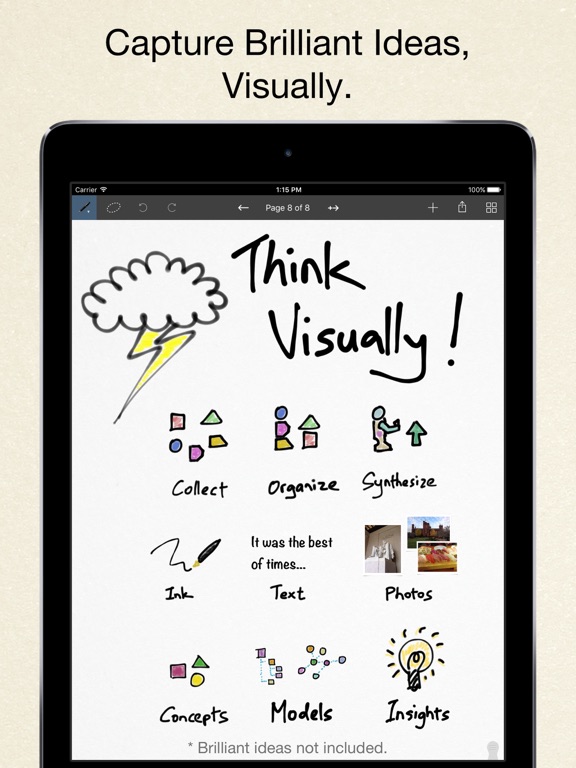
  "screens": [
    {
      "url": "https://is1-ssl.mzstatic.com/image/thumb/Purple221/v4/57/50/21/57502166-45d2-b3b3-58bb-f72a16e44f72/pr_source.jpg/1600x1600bb.jpg",
      "store": "apple",
      "platform": "ipad",
      "alt": "Inkflow Visual Notebook ipad screenshot 1"
    },
    {
      "url": "https://is1-ssl.mzstatic.com/image/thumb/Purple211/v4/7c/2d/9f/7c2d9ffd-ec14-59ce-3715-11b71d4883c6/mzl.fwtgastt.jpg/576x768bb.jpg",
      "store": "apple",
      "platform": "ipad",
      "alt": "Inkflow Visual Notebook ipad screenshot 2"
    },
    {
      "url": "https://is1-ssl.mzstatic.com/image/thumb/Purple211/v4/17/20/f4/1720f4a7-9bcf-32a3-1cfe-a1db12fe5bd1/pr_source.jpg/1600x1600bb.jpg",
      "store": "apple",
      "platform": "ipad",
      "alt": "Inkflow Visual Notebook ipad screenshot 3"
    },
    {
      "url": "https://is1-ssl.mzstatic.com/image/thumb/Purple221/v4/f9/a5/d3/f9a5d35c-2cf7-3cac-7909-6dac15eeb1db/mzl.sjglvusm.jpg/576x768bb.jpg",
      "store": "apple",
      "platform": "ipad",
      "alt": "Inkflow Visual Notebook ipad screenshot 4"
    },
    {
      "url": "https://is1-ssl.mzstatic.com/image/thumb/Purple221/v4/56/4f/56/564f56a5-9224-ce33-c1c7-75ed802d76e3/pr_source.jpg/1600x1600bb.jpg",
      "store": "apple",
      "platform": "ipad",
      "alt": "Inkflow Visual Notebook ipad screenshot 5"
    },
    {
      "url": "https://is1-ssl.mzstatic.com/image/thumb/Purple221/v4/3f/94/c0/3f94c0ff-0103-0bec-812a-98a6eb4cd564/mzl.qsukbfad.jpg/576x768bb.jpg",
      "store": "apple",
      "platform": "ipad",
      "alt": "Inkflow Visual Notebook ipad screenshot 6"
    },
    {
      "url": "https://is1-ssl.mzstatic.com/image/thumb/Purple211/v4/cb/18/42/cb1842da-d8da-9340-1995-c477c017ac9d/pr_source.jpg/1600x1600bb.jpg",
      "store": "apple",
      "platform": "ipad",
      "alt": "Inkflow Visual Notebook ipad screenshot 7"
    },
    {
      "url": "https://is1-ssl.mzstatic.com/image/thumb/Purple211/v4/f4/cc/8e/f4cc8e63-1d0c-a061-0a6f-27e41aff3ddc/mzl.vhqakcbu.jpg/576x768bb.jpg",
      "store": "apple",
      "platform": "ipad",
      "alt": "Inkflow Visual Notebook ipad screenshot 8"
    },
    {
      "url": "https://is1-ssl.mzstatic.com/image/thumb/Purple221/v4/59/63/e0/5963e0f8-02a5-6891-b72f-b772f064829b/pr_source.jpg/1600x1600bb.jpg",
      "store": "apple",
      "platform": "ipad",
      "alt": "Inkflow Visual Notebook ipad screenshot 9"
    },
    {
      "url": "https://is1-ssl.mzstatic.com/image/thumb/Purple221/v4/3c/54/10/3c541057-e867-38a8-78f5-d36da189133e/mzl.yqelppqe.jpg/576x768bb.jpg",
      "store": "apple",
      "platform": "ipad",
      "alt": "Inkflow Visual Notebook ipad screenshot 10"
    },
    {
      "url": "https://is1-ssl.mzstatic.com/image/thumb/Purple211/v4/6b/28/85/6b2885ca-1e2f-31ad-c2cf-1bf0d1be41d3/pr_source.jpg/1242x1600bb.jpg",
      "store": "apple",
      "platform": "iphone",
      "alt": "Inkflow Visual Notebook iphone screenshot 11"
    },
    {
      "url": "https://is1-ssl.mzstatic.com/image/thumb/Purple211/v4/4a/4b/6e/4a4b6e66-e42a-0188-7f09-ee6b49dfbfdd/pr_source.jpg/1242x1600bb.jpg",
      "store": "apple",
      "platform": "iphone",
      "alt": "Inkflow Visual Notebook iphone screenshot 12"
    },
    {
      "url": "https://is1-ssl.mzstatic.com/image/thumb/Purple221/v4/36/28/e3/3628e368-6225-1017-6754-f56a3c9322ff/pr_source.jpg/1242x1600bb.jpg",
      "store": "apple",
      "platform": "iphone",
      "alt": "Inkflow Visual Notebook iphone screenshot 13"
    },
    {
      "url": "https://is1-ssl.mzstatic.com/image/thumb/Purple211/v4/7a/12/2d/7a122d38-26e8-a8fd-ce69-3087f752a744/pr_source.jpg/1242x1600bb.jpg",
      "store": "apple",
      "platform": "iphone",
      "alt": "Inkflow Visual Notebook iphone screenshot 14"
    },
    {
      "url": "https://is1-ssl.mzstatic.com/image/thumb/Purple221/v4/ff/b4/00/ffb4009e-387a-9ce6-a9c6-bbd28b00d95e/pr_source.jpg/1242x1600bb.jpg",
      "store": "apple",
      "platform": "iphone",
      "alt": "Inkflow Visual Notebook iphone screenshot 15"
    }
  ],
  "ratings": [
    {
      "store": "apple",
      "average": 4.6,
      "count": 1865,
      "market": "us",
      "observed_at": "2026-08-07",
      "reviews": [
        {
          "rating": 4,
          "title": "Great app!!!",
          "body": "I’ve been looking for a writing app that lets me handwrite my notes. Presenting, Inkflow! You can write with a fountain pen, a regular pen or a highlighter. The highlighter actually paints behind the other ink. You have infinite colors and opacity. The only thing it needed was PDF import, but they just came up with a new app (Noteflow+) that has that feature. I got that app and loved it even more (*****). And, by the way, their support was prompt and when I contacted them, they answered all my questions.",
          "author": "RE.Sonera",
          "date": "7 Aug 2026"
        },
        {
          "rating": 4,
          "title": "Good, not great...",
          "body": "Here’s why... I tried the free version, and within minutes decided to download the plus version. I feel like the tools handle better than on other apps and I like the simplicity of it all. I really think this is a good app with potential for being great. Really, ONE thing would make this better: make data sync over the cloud so it’s available across devices. I’m using this app for lots of things (including grad school) and it would be great to add a note or quick appointment to my established books on my phone rather than having to lug out my ipad or remember to write it down later. Please?",
          "author": "Timo505",
          "date": "7 Aug 2026"
        },
        {
          "rating": 5,
          "title": "Absolutely Amazing",
          "body": "I have been searching for a very long time for a journaling app that has all of the features I want and this has them all! Inkflow lets you type, draw, write (like you would with a regular pencil), insert photos and more. It is very easy to use and lets you place the text, drawing/writing, and photos where ever you want and resize them. The free features are great for being free, but as a writer who uses this everyday, I didn’t mind doing a one time payment of 9.99. I’m glad this app doesn’t make you do a subscription because I personally hate those. I HIGHLY recommend this app. It’s perfect!!!",
          "author": "desacat",
          "date": "7 Aug 2026"
        },
        {
          "rating": 2,
          "title": "It could be better",
          "body": "I used to use this app often when I had my iPad Air 2 which at the time recently came out so the palm rejection was fantastic and I loved the simplicity of it because it was just like writing on regular paper which I was starting to move on from that to using my iPad from writing and drawing. However as time passed I used this app less and less and have since then moved on with using the paper app from the company fifty-three. I use my iPad mini 5 most with my Apple Pencil and the features on paper are a lot more than what we have here on Inkflow to use for mind mapping, drawing, note taking..... I would say I wasted my money buying the pro but at the same time no because at the time it served its purpose and I was enjoying it. To those that want more features go find another app other than inkflow like paper. If you don’t mind the simplicity then go for inkflow. For note taking and drawing I regularly use paper, procreate and notes plus for anyone looking for recommendations.",
          "author": "jines38",
          "date": "7 Aug 2026"
        },
        {
          "rating": 2,
          "title": "Great except lost my purchased upgrade!",
          "body": "I had been using this app for quite a few years, but recently, after not having it on my newer phone for awhile, I reinstalled it. Previously, I had purchased the upgrade to the full version via in-app-purchase. But now, it will not restore that upgrade. I submitted to their feedback a request to fix this, but have not heard from them. I think in the future I’ll avoid doing upgrades from within apps, and only get full version apps if they’re sold as such. Very disappointing, to be honest.",
          "author": "iDan iKnight",
          "date": "7 Aug 2026"
        }
      ]
    }
  ],
  "privacy": [
    {
      "store": "apple",
      "declarations": [
        {
          "title": "Data Not Linked to You",
          "detail": "Analytics — Diagnostics — Crash Data",
          "source": "Developer declared"
        },
        {
          "title": "Data Not Linked to You",
          "detail": "Analytics — Diagnostics — Other Diagnostic Data",
          "source": "Developer declared"
        },
        {
          "title": "Data Not Linked to You",
          "detail": "Analytics — Diagnostics — Performance Data",
          "source": "Developer declared"
        },
        {
          "title": "Data Not Linked to You",
          "detail": "Analytics — Identifiers — Device ID",
          "source": "Developer declared"
        },
        {
          "title": "Data Not Linked to You",
          "detail": "Analytics — Usage Data — Product Interaction",
          "source": "Developer declared"
        },
        {
          "title": "Data Not Linked to You",
          "detail": "Diagnostics",
          "source": "Developer declared"
        },
        {
          "title": "Data Not Linked to You",
          "detail": "Identifiers",
          "source": "Developer declared"
        },
        {
          "title": "Data Not Linked to You",
          "detail": "Usage Data",
          "source": "Developer declared"
        }
      ],
      "accessibility": []
    }
  ],
  "changes": [
    {
      "store": "apple",
      "version": "4.2",
      "released_at": null,
      "notes": "More color slots on iPhone 6 and iPhone 6 Plus. Improved Export PDF and Image dialog. Inkflow now uses the standard image picker, with a new setting to toggle adjusting inserted images."
    },
    {
      "store": "apple",
      "version": "4.3",
      "released_at": null,
      "notes": "Compatibility with iPhone 6S and 6S Plus."
    },
    {
      "store": "apple",
      "version": "4.4",
      "released_at": null,
      "notes": "Support for iPad Pro and Apple Pencil. Separate color setting for each tool. Improved palm rejection. Searchable file names in Spotlight."
    },
    {
      "store": "apple",
      "version": "4.6",
      "released_at": null,
      "notes": "Higher resolution edited images. Improved palm rejection. Fix sliding toolbar on 3D Touch devices."
    },
    {
      "store": "apple",
      "version": "5.3",
      "released_at": null,
      "notes": "+ Split-screen multitasking on iPad: Work side-by-side with your documents, web pages, videos, or books. + Replaced the sliding toolbar with an adaptive toolbar on iPhone: Fewer taps to get to the most common tools. + Improved Pencil palm rejection and Pencil-only drawing mode: Turn it on and rest your palm with impunity. + iOS 10 support."
    },
    {
      "store": "apple",
      "version": "5.4",
      "released_at": null,
      "notes": "+ Swipe pages on iPhone: Swipe from the edges of the screen to switch pages (can be disabled in App Settings)."
    },
    {
      "store": "apple",
      "version": "5.5",
      "released_at": null,
      "notes": "fixed some text layout issues."
    },
    {
      "store": "apple",
      "version": "5.6",
      "released_at": null,
      "notes": "Performance improvements."
    },
    {
      "store": "apple",
      "version": "5.7",
      "released_at": null,
      "notes": "+ Added a Try Inkflow Plus file."
    },
    {
      "store": "apple",
      "version": "5.8",
      "released_at": null,
      "notes": "+ Support for iOS 11"
    },
    {
      "store": "apple",
      "version": "5.9",
      "released_at": null,
      "notes": "+ Fixed an issue with popups on iPhone Plus."
    },
    {
      "store": "apple",
      "version": "6.0",
      "released_at": null,
      "notes": "+ Display page numbers above 100 correctly"
    },
    {
      "store": "apple",
      "version": "6.1",
      "released_at": null,
      "notes": "+ Fixed zoom limits on iPad Pro 10\""
    },
    {
      "store": "apple",
      "version": "6.2",
      "released_at": null,
      "notes": "+ Support for iOS 12"
    },
    {
      "store": "apple",
      "version": "6.3",
      "released_at": null,
      "notes": "+ Improved support for new devices."
    },
    {
      "store": "apple",
      "version": "6.4",
      "released_at": null,
      "notes": "+ Minor bug fixes"
    },
    {
      "store": "apple",
      "version": "6.5",
      "released_at": null,
      "notes": "+ UI layout fixes"
    },
    {
      "store": "apple",
      "version": "6.6",
      "released_at": null,
      "notes": "+ Minor UI fixes"
    },
    {
      "store": "apple",
      "version": "6.7",
      "released_at": null,
      "notes": "+ Updated for the latest OS and devices"
    },
    {
      "store": "apple",
      "version": "6.8",
      "released_at": null,
      "notes": "+ Minor improvements"
    }
  ],
  "alternatives": [
    {
      "app_id": 1476107990,
      "name": "Meeting Notes & Work Planner",
      "url": "https://appcorpus.com/apps/meeting-notes-work-planner-1476107990",
      "reason": "Same category + similar ratings"
    },
    {
      "app_id": 1021085778,
      "name": "QuickNotes X: Notes, AI & PDF",
      "url": "https://appcorpus.com/apps/quicknotes-x-notes-ai-pdf-1021085778",
      "reason": "Same category + similar ratings"
    },
    {
      "app_id": 1670365742,
      "name": "Notes - Notebook & List Maker",
      "url": "https://appcorpus.com/apps/notes-notebook-list-maker-1670365742",
      "reason": "Same category + similar ratings"
    }
  ],
  "evidence_summary": {
    "index_state": "S1",
    "evidence_level": 1,
    "level_label": "Live store listing",
    "indexable": true,
    "last_verified_at": "2026-08-07",
    "unknown_fields": [
      "Independent summary has not been published yet."
    ],
    "sources": [
      "App Store"
    ]
  },
  "availability_markets": {
    "live": [
      "us"
    ],
    "selected": "us",
    "note": null
  },
  "feature_events": {
    "events": []
  },
  "features_slice": {
    "plans": [
      {
        "code": "plus",
        "label": "Inkflow Plus",
        "kind": "unknown",
        "status": "store_listed",
        "prices": [
          {
            "storefront": "us",
            "formatted": "$5.99",
            "billing_period": null
          }
        ],
        "trial": null
      }
    ],
    "features": [],
    "unknown_features": [],
    "data_cutoff": "7 Aug 2026"
  }
}