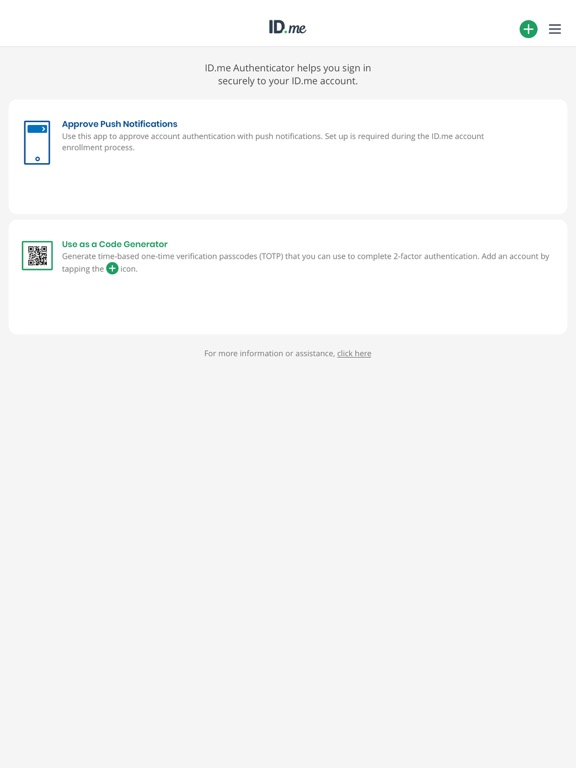
Apoku MCP provides app discovery, detailed cards, evidence, sources and screenshots where available. Unknown or conflicting prices stay explicit.
View JSON
GET /api/v3/apps/1446335066
{
  "app_id": 1446335066,
  "canonical_url": "https://appcorpus.com/apps/id-me-authenticator-1446335066",
  "identity": {
    "name": "ID.me Authenticator",
    "slug": "id-me-authenticator",
    "developer": {
      "name": "ID.me",
      "url": "https://appcorpus.com/developers/id-me-developer_fcb61f49a91b808156b6783904dfc424"
    },
    "icon_url": "https://is1-ssl.mzstatic.com/image/thumb/Purple211/v4/f6/95/b9/f695b988-bb7d-2a9b-8d44-03221eb876f5/AppIcon-0-0-1x_U007epad-0-0-0-1-0-0-85-220.png/512x512bb.jpg",
    "stores": [
      "apple"
    ],
    "platforms": [
      "iphone",
      "ipad"
    ],
    "status": {
      "state": "active",
      "label": "Active",
      "last_checked": "2026-09-29",
      "last_checked_label": "29 Sep 2026",
      "banner": null,
      "region_note": null,
      "data_state": "stale",
      "data_state_label": "Some store data may be out of date"
    }
  },
  "listings": [
    {
      "store": "apple",
      "status": "ACTIVE",
      "url": "https://apps.apple.com/us/app/id-me-authenticator/id1446335066?uo=4",
      "rating": 4.3,
      "rating_count": 99557,
      "formatted_price": "Free",
      "is_free": true,
      "has_iap": false,
      "has_subscription": null,
      "version": "2.0.0",
      "updated": "2026-09-29",
      "currency": "USD"
    }
  ],
  "summary": {
    "one_liner": null,
    "summary": null,
    "best_for": [],
    "not_for": [],
    "status": "fallback",
    "at_a_glance": [
      "Free to download"
    ]
  },
  "categories": {
    "official": [
      "Productivity",
      "Business"
    ],
    "appcorpus": [
      {
        "category_id": "productivity",
        "label": "Productivity",
        "url": "https://appcorpus.com/categories/productivity"
      },
      {
        "category_id": "business",
        "label": "Business",
        "url": "https://appcorpus.com/categories/business"
      }
    ]
  },
  "use_cases": [],
  "features": [
    {
      "capability_id": "free_app",
      "label": "Free app",
      "availability": "yes",
      "access_level": "free",
      "scope": null,
      "evidence": "Store published"
    }
  ],
  "pricing": [
    {
      "store": "apple",
      "formatted_price": "Free",
      "is_free": true,
      "has_iap": false,
      "has_subscription": null,
      "currency": "USD",
      "market": "us",
      "last_verified": "2026-09-29",
      "rows": [
        "Free to download"
      ],
      "state": "current"
    }
  ],
  "screens": [
    {
      "url": "https://is1-ssl.mzstatic.com/image/thumb/Purple123/v4/0b/fe/c1/0bfec128-4578-54d4-815a-2a903f1de8e7/pr_source.png/1600x1600bb.jpg",
      "store": "apple",
      "platform": "ipad",
      "alt": "ID.me Authenticator ipad screenshot 1"
    },
    {
      "url": "https://is1-ssl.mzstatic.com/image/thumb/Purple221/v4/fe/68/15/fe68157f-1d92-bcab-8187-d0eb29a2032e/pr_source.png/1600x1600bb.jpg",
      "store": "apple",
      "platform": "ipad",
      "alt": "ID.me Authenticator ipad screenshot 2"
    },
    {
      "url": "https://is1-ssl.mzstatic.com/image/thumb/Purple123/v4/48/23/cb/4823cbbe-0c78-8040-7238-0de08a6ecfce/pr_source.jpg/576x768bb.jpg",
      "store": "apple",
      "platform": "ipad",
      "alt": "ID.me Authenticator ipad screenshot 3"
    },
    {
      "url": "https://is1-ssl.mzstatic.com/image/thumb/Purple124/v4/ef/44/74/ef44741e-492f-9931-bee2-a5a278c54e53/pr_source.png/1600x1600bb.jpg",
      "store": "apple",
      "platform": "ipad",
      "alt": "ID.me Authenticator ipad screenshot 4"
    },
    {
      "url": "https://is1-ssl.mzstatic.com/image/thumb/Purple221/v4/5e/4f/cd/5e4fcdb5-f645-c5dc-0890-f00db67e44cc/pr_source.jpg/576x768bb.jpg",
      "store": "apple",
      "platform": "ipad",
      "alt": "ID.me Authenticator ipad screenshot 5"
    },
    {
      "url": "https://is1-ssl.mzstatic.com/image/thumb/Purple221/v4/e6/ab/91/e6ab9156-b879-9da0-7e7b-6b233a79b935/pr_source.png/1600x1600bb.jpg",
      "store": "apple",
      "platform": "ipad",
      "alt": "ID.me Authenticator ipad screenshot 6"
    },
    {
      "url": "https://is1-ssl.mzstatic.com/image/thumb/Purple114/v4/3c/e6/66/3ce66647-97fd-6eb4-f546-c5d203af8acd/pr_source.jpg/576x768bb.jpg",
      "store": "apple",
      "platform": "ipad",
      "alt": "ID.me Authenticator ipad screenshot 7"
    },
    {
      "url": "https://is1-ssl.mzstatic.com/image/thumb/Purple123/v4/be/9c/05/be9c05a6-2db9-e689-c2d2-22d4220d4ebf/pr_source.png/1600x1600bb.jpg",
      "store": "apple",
      "platform": "ipad",
      "alt": "ID.me Authenticator ipad screenshot 8"
    },
    {
      "url": "https://is1-ssl.mzstatic.com/image/thumb/Purple211/v4/ba/56/75/ba567531-0955-595d-9414-5025109bca41/pr_source.jpg/576x768bb.jpg",
      "store": "apple",
      "platform": "ipad",
      "alt": "ID.me Authenticator ipad screenshot 9"
    },
    {
      "url": "https://is1-ssl.mzstatic.com/image/thumb/Purple221/v4/7f/ca/10/7fca10a2-2292-74e0-938a-425b5a32cdf0/pr_source.png/1600x1600bb.jpg",
      "store": "apple",
      "platform": "ipad",
      "alt": "ID.me Authenticator ipad screenshot 10"
    },
    {
      "url": "https://is1-ssl.mzstatic.com/image/thumb/Purple124/v4/e5/c1/eb/e5c1ebe6-8879-3390-666d-47da4f17ee69/pr_source.jpg/576x768bb.jpg",
      "store": "apple",
      "platform": "ipad",
      "alt": "ID.me Authenticator ipad screenshot 11"
    },
    {
      "url": "https://is1-ssl.mzstatic.com/image/thumb/Purple221/v4/4f/67/40/4f674059-e00d-e8b0-c9ef-dc6189d3dc39/pr_source.jpg/576x768bb.jpg",
      "store": "apple",
      "platform": "ipad",
      "alt": "ID.me Authenticator ipad screenshot 12"
    },
    {
      "url": "https://is1-ssl.mzstatic.com/image/thumb/Purple124/v4/f8/3a/95/f83a951d-4980-ccb0-1795-5dc8ef443185/pr_source.jpg/576x768bb.jpg",
      "store": "apple",
      "platform": "ipad",
      "alt": "ID.me Authenticator ipad screenshot 13"
    },
    {
      "url": "https://is1-ssl.mzstatic.com/image/thumb/Purple221/v4/55/be/01/55be019d-66ae-7184-2aa6-23cefbce2c73/pr_source.jpg/576x768bb.jpg",
      "store": "apple",
      "platform": "ipad",
      "alt": "ID.me Authenticator ipad screenshot 14"
    },
    {
      "url": "https://is1-ssl.mzstatic.com/image/thumb/Purple123/v4/bf/4d/b4/bf4db459-1a69-deec-1f9e-6cee7ba2d47f/mzl.bdfqfggf.jpg/1242x1600bb.jpg",
      "store": "apple",
      "platform": "iphone",
      "alt": "ID.me Authenticator iphone screenshot 15"
    },
    {
      "url": "https://is1-ssl.mzstatic.com/image/thumb/PurpleSource211/v4/5d/ef/d3/5defd355-31e4-e893-8b37-bf25c9a7cdbe/iphone_01.jpg/1260x1600bb.jpg",
      "store": "apple",
      "platform": "iphone",
      "alt": "ID.me Authenticator iphone screenshot 16"
    },
    {
      "url": "https://is1-ssl.mzstatic.com/image/thumb/Purple123/v4/7e/36/d9/7e36d918-f09f-3d31-5158-b7c276e77544/mzl.vxbroxbj.jpg/1242x1600bb.jpg",
      "store": "apple",
      "platform": "iphone",
      "alt": "ID.me Authenticator iphone screenshot 17"
    },
    {
      "url": "https://is1-ssl.mzstatic.com/image/thumb/PurpleSource211/v4/9b/52/48/9b5248e7-e3bb-2238-c3b7-4b671bf4909c/iphone_02.jpg/1260x1600bb.jpg",
      "store": "apple",
      "platform": "iphone",
      "alt": "ID.me Authenticator iphone screenshot 18"
    },
    {
      "url": "https://is1-ssl.mzstatic.com/image/thumb/Purple124/v4/b6/b7/83/b6b783ec-93b5-5630-2675-6fc2e920ddea/mzl.oiedjlyl.jpg/1242x1600bb.jpg",
      "store": "apple",
      "platform": "iphone",
      "alt": "ID.me Authenticator iphone screenshot 19"
    },
    {
      "url": "https://is1-ssl.mzstatic.com/image/thumb/PurpleSource221/v4/f1/34/30/f134300c-be6a-6482-bb7e-664a567b4d4d/iphone_03.jpg/1260x1600bb.jpg",
      "store": "apple",
      "platform": "iphone",
      "alt": "ID.me Authenticator iphone screenshot 20"
    },
    {
      "url": "https://is1-ssl.mzstatic.com/image/thumb/Purple124/v4/4f/38/31/4f383167-ad32-359f-1d71-4316ad5f5df4/mzl.wmmuctsx.jpg/1242x1600bb.jpg",
      "store": "apple",
      "platform": "iphone",
      "alt": "ID.me Authenticator iphone screenshot 21"
    },
    {
      "url": "https://is1-ssl.mzstatic.com/image/thumb/PurpleSource211/v4/56/8f/f9/568ff91d-bcaf-b4ac-c49c-3cec577c44e2/iphone_04.jpg/1260x1600bb.jpg",
      "store": "apple",
      "platform": "iphone",
      "alt": "ID.me Authenticator iphone screenshot 22"
    },
    {
      "url": "https://is1-ssl.mzstatic.com/image/thumb/PurpleSource221/v4/ef/33/33/ef3333bd-4002-4358-e7ac-9b73af23cfa6/iphone_05.jpg/1260x1600bb.jpg",
      "store": "apple",
      "platform": "iphone",
      "alt": "ID.me Authenticator iphone screenshot 23"
    },
    {
      "url": "https://is1-ssl.mzstatic.com/image/thumb/Purple124/v4/13/d4/d7/13d4d748-6724-2216-126d-7afd520189d5/pr_source.png/368x448bb.jpg",
      "store": "apple",
      "platform": "watch",
      "alt": "ID.me Authenticator watch screenshot 24"
    },
    {
      "url": "https://is1-ssl.mzstatic.com/image/thumb/Purple221/v4/99/5a/ab/995aabf8-e92d-cedf-697a-148ae14c3db4/pr_source.png/368x448bb.jpg",
      "store": "apple",
      "platform": "watch",
      "alt": "ID.me Authenticator watch screenshot 25"
    },
    {
      "url": "https://is1-ssl.mzstatic.com/image/thumb/Purple123/v4/1d/aa/25/1daa2555-f65d-1fe9-24b5-009b543a1be5/pr_source.png/368x448bb.jpg",
      "store": "apple",
      "platform": "watch",
      "alt": "ID.me Authenticator watch screenshot 26"
    },
    {
      "url": "https://is1-ssl.mzstatic.com/image/thumb/Purple221/v4/8d/d2/12/8dd212f6-dc15-6a71-d56d-e3c4d2915aaa/pr_source.png/368x448bb.jpg",
      "store": "apple",
      "platform": "watch",
      "alt": "ID.me Authenticator watch screenshot 27"
    }
  ],
  "data_states": {
    "screens": "current"
  },
  "ratings": [
    {
      "store": "apple",
      "average": 4.3,
      "count": 99557,
      "market": "us",
      "observed_at": "2026-09-29",
      "state": "current",
      "reviews": [
        {
          "rating": 1,
          "title": "Piece of $#!+",
          "body": "This app is not helpful and simply isn’t working. The freaking id. Me site tells me to follow the guidance and instructions contained in the email. When I do, I’m brought to a screen that repeatedly asks for me to complete the authentication to reset my password. This is to be completed using this horrendous app. Wouldn’t you know it, following along to the “t” yields nothing! I have an existing account that I cannot get access to since the app, mobile number, and mailing address associated with the original account email address are no longer available/valid. Since there isn’t a single human being available to help this law-abiding tax payer, I decided to create another account. Wouldn’t you know it, the system recognized that another account existed. Okay, cool! Let’s reset that account password and move forward. NEGATIVE! You need to merge the two accounts or delete one of the addresses by following the steps on-screen. Cool! Only problem is that the account I just created, doesn’t have access to merge with the other address, nor does it even link them by way of my name. So, I’m stuck in a perpetual loop with the only options being, chat with the stupid AI bottom, or wait for Methuselah to reincarnate so I can get assistance from a human. Boy I love American systems.",
          "author": "Honest_Delivery",
          "date": "29 Sep 2026"
        },
        {
          "rating": 1,
          "title": "Video call document review is broken",
          "body": "The app is a half baked potato. It is a shame that US taxpayers are actually paying hundreds of millions for such a low quality service. For some reason, queuing for video call document review part of the identification workflow is done via web browser. The estimated wait time indicator is showing values between 1 and 10 minutes (increasing and decreasing), and even after 3 hours of waiting the video call still does not start. You end up waiting for hours watching the estimated time showing minutes. There are no error messages or any indication that submitted documents did not pass automated validation. This is a simple queuing problem and I as an IT professional with 35 years of experience, personally don’t understand what was done to make the program behave this way.",
          "author": "Zanzibar13",
          "date": "29 Sep 2026"
        },
        {
          "rating": 1,
          "title": "Useless! Unable to talk to a real human being.",
          "body": "I could not understand how to get through the authentication part of the non instructions. Sent an hour going over and over and over the extra security non instructions! Then I went to the “virtual” fake person site where the fake person ask me 40 questions as to what I didn’t understand. And because I didn’t understand what I didn’t understand. I answered every time and the virtual hum kept asking me questions that I couldn’t answer. I ask at least ten times to speak to a real human. Finally they put a real person on to type more of the same questions that I couldn’t answer and there was no way for me to type from my end, anyway! I am a grad school graduate. But am 73 years old and don’t understand the lingo on this site! All I wanted to do was to use the SSI government site. Not going to happen because I also idiotically, have to be verified by this stupid site! They will not call you at all. Even if I already have filled out the complete SSI information and that was accepted!",
          "author": "Dog a lot",
          "date": "29 Sep 2026"
        },
        {
          "rating": 1,
          "title": "I just am trying to verify who I am for unemployment",
          "body": "I don’t know yet how this is going to turn out but so far I have been nothing but confused with the site how it works and really what the government or state room unemployment office gets from it . I’veProcrastinated doing this for three days now and finally today have to get it done at first the main website had me stuck on shop I’ll think of a website that helps somebody know that you were you wouldn’t have a random weird shop. And now I spent the last hour trying to figure out where I go to get started and what I actually need to upload her deals to that I can verify who I am and upload a document saying exactly that to unemployment so I may get my benefits. I have yet to figure out where to actually go and be prompted what it is that I exactly need :( I’m gonna explore the site more and hopefully find where it is I’m supposed to be or just write the support an hopefully can be helped in a timely matter! Good luck to anyone eles who is also struggling!",
          "author": "guy424",
          "date": "29 Sep 2026"
        },
        {
          "rating": 5,
          "title": "Hooray it’s not Google!",
          "body": "App works smooth, probably the number one factor and best factor of all is it is not a google product! Website is quick for uploading documentation for verification are use for the VA in the military purposes but I also use it as a regular second factor authentication app. I’ve had the app for sometime now I have never had any issues whatsoever, never received an email making me feel like my PII is not safe or been breached, I feel safe with my information being where it’s at for verification purposes. Even Apple uses their verification for security purposes as well as the government. I wish they would implement a password generator and storing within the app would be amazing too!",
          "author": "3rd.GEN_CO_Native",
          "date": "29 Sep 2026"
        }
      ]
    }
  ],
  "privacy": [
    {
      "store": "apple",
      "declarations": [
        {
          "title": "Data Linked to You",
          "detail": "Analytics — Diagnostics — Crash Data",
          "source": "Developer declared"
        },
        {
          "title": "Data Linked to You",
          "detail": "Analytics — Diagnostics — Other Diagnostic Data",
          "source": "Developer declared"
        },
        {
          "title": "Data Linked to You",
          "detail": "Analytics — Diagnostics — Performance Data",
          "source": "Developer declared"
        },
        {
          "title": "Data Linked to You",
          "detail": "Analytics — Identifiers — Device ID",
          "source": "Developer declared"
        },
        {
          "title": "Data Linked to You",
          "detail": "Analytics — Identifiers — User ID",
          "source": "Developer declared"
        },
        {
          "title": "Data Linked to You",
          "detail": "App Functionality — Identifiers — Device ID",
          "source": "Developer declared"
        },
        {
          "title": "Data Linked to You",
          "detail": "App Functionality — Identifiers — User ID",
          "source": "Developer declared"
        },
        {
          "title": "Data Linked to You",
          "detail": "Diagnostics",
          "source": "Developer declared"
        },
        {
          "title": "Data Linked to You",
          "detail": "Identifiers",
          "source": "Developer declared"
        }
      ],
      "accessibility": []
    }
  ],
  "changes": [
    {
      "store": "apple",
      "version": "1.2.10",
      "released_at": null,
      "notes": "* Furthering Security has always been our mission, and with this current release we are please to announce *insert drum roll here*: The addition of YubiKey via Authenticator App is now ready to secure and easily access your account * We also cleared out some cobwebs and bugs that made the app feel a little creepy and haunted"
    },
    {
      "store": "apple",
      "version": "1.2.2",
      "released_at": null,
      "notes": "Called the exterminator, squashed a few more bugs Called a handyman, got some maintenance done"
    },
    {
      "store": "apple",
      "version": "1.2.3",
      "released_at": null,
      "notes": "- Bugs fixes and Maintenance."
    },
    {
      "store": "apple",
      "version": "1.2.4",
      "released_at": null,
      "notes": "Thanks for the feedback from all of our users, we are vigilantly going after all the issues and continue to address them. - Bug fixes - Maintenance tuning - UI Updates"
    },
    {
      "store": "apple",
      "version": "1.2.5",
      "released_at": null,
      "notes": "Continued thanks to our users and the feedback that we continue to receive. We have tuned the app to be more user friendly and a little more responsive, to include: - Wider areas to touch buttons - More clear dashboards - Helpful links to assist with setting up the app - Adjusting the TouchID/FaceID/Pincodes locking ..and who would we be if we didn't include a little razzle dazzle :D"
    },
    {
      "store": "apple",
      "version": "1.2.6",
      "released_at": null,
      "notes": "- *NEW* Light and Dark theme modes found in the settings - Banner drop downs just got in our way with more clicks than needed... ripped those out for easier Authentications - Camera QR capture screen fills more of the device - Updated Authentication Approval Screen with clear buttons - 16 bugs...squashed - 2 maintenance tickets fulfilled"
    },
    {
      "store": "apple",
      "version": "1.2.7",
      "released_at": null,
      "notes": "- *NEW* Light and Dark theme modes found in the settings - Banner drop downs just got in our way with more clicks than needed... ripped those out for easier Authentications - Camera QR capture screen fills more of the device - Updated Authentication Approval Screen with clear buttons - 17 bugs...squashed - 2 maintenance tickets fulfilled"
    },
    {
      "store": "apple",
      "version": "1.2.8",
      "released_at": null,
      "notes": "- Now get your TOTP & HOTP codes from your phone to your Apple Watch - Bug & Maintenance Fixes"
    },
    {
      "store": "apple",
      "version": "1.2.9",
      "released_at": null,
      "notes": "Bug Fixes and Maintenance"
    },
    {
      "store": "apple",
      "version": "1.4.0",
      "released_at": null,
      "notes": "* We want to help you reach out to us easier, so we now have a built in form that will help us reach you with more efficiency * Updates for iOS 13 * As always, some bug and maintenance fixes"
    },
    {
      "store": "apple",
      "version": "1.5.10",
      "released_at": null,
      "notes": "Defect resolved for code generation"
    },
    {
      "store": "apple",
      "version": "1.5.11",
      "released_at": null,
      "notes": "Bug fixes"
    },
    {
      "store": "apple",
      "version": "1.5.12",
      "released_at": null,
      "notes": "Bug fixes"
    },
    {
      "store": "apple",
      "version": "1.5.13",
      "released_at": null,
      "notes": "Bug fixes"
    },
    {
      "store": "apple",
      "version": "1.5.14",
      "released_at": null,
      "notes": "Bug fixes"
    },
    {
      "store": "apple",
      "version": "1.5.15",
      "released_at": null,
      "notes": "Bug fixes"
    },
    {
      "store": "apple",
      "version": "1.5.16",
      "released_at": null,
      "notes": "Bug fixes"
    },
    {
      "store": "apple",
      "version": "1.5.17",
      "released_at": "2026-04-28",
      "notes": "Bug fixes"
    },
    {
      "store": "apple",
      "version": "1.5.3",
      "released_at": null,
      "notes": "* An alternative, seamless way to link your TOTP Code Generator * Bug fixes"
    },
    {
      "store": "apple",
      "version": "1.5.4",
      "released_at": null,
      "notes": "* An alternative, seamless way to link your TOTP Code Generator * Bug fixes"
    }
  ],
  "alternatives": [
    {
      "app_id": 1538761576,
      "name": "Authenticator App",
      "url": "https://appcorpus.com/apps/authenticator-app-1538761576",
      "reason": "Same category + similar ratings"
    },
    {
      "app_id": 6480253221,
      "name": "Authenticator ® App",
      "url": "https://appcorpus.com/apps/authenticator-app-6480253221",
      "reason": "Same category + similar ratings"
    },
    {
      "app_id": 1644414970,
      "name": "My Optimum",
      "url": "https://appcorpus.com/apps/my-optimum-1644414970",
      "reason": "Same category + similar ratings"
    }
  ],
  "evidence_summary": {
    "index_state": "S1",
    "evidence_level": 1,
    "level_label": "Live store listing",
    "indexable": true,
    "last_verified_at": "2026-09-29",
    "unknown_fields": [
      "Apoku editorial summary has not been published yet."
    ],
    "sources": [
      "App Store"
    ]
  },
  "availability_markets": {
    "live": [
      "us"
    ],
    "selected": "us",
    "note": null
  },
  "feature_events": {
    "events": [
      {
        "type": "major_update",
        "occurred_at": "2026-09-29 17:50:40.856609+00:00",
        "plan_code": null,
        "capability_id": null,
        "previous": {},
        "current": {},
        "scope": {
          "store_id": "apple",
          "change_id": "change_21f811a7ddcbe719b97d6c34bd223eae",
          "storefront_id": "us"
        },
        "source": "store_diff"
      }
    ]
  },
  "features_slice": {
    "plans": [],
    "features": [],
    "unknown_features": [],
    "data_cutoff": "29 Sep 2026"
  }
}