
Quick verdict
- What it is
- Store information collected; independent summary not yet available.
- At a glance
-
- Free to download
- In-app purchases
Categories and search queries
Official categories
- Music
- Utilities
AppCorpus categories
Key functions
| Function | Availability | Access | Scope | Evidence |
|---|---|---|---|---|
| Free app | Yes | Free | — | Store published |
| In-app purchases | Yes | Limited free | — | Store published |
Screens
App Store
8 store screenshots

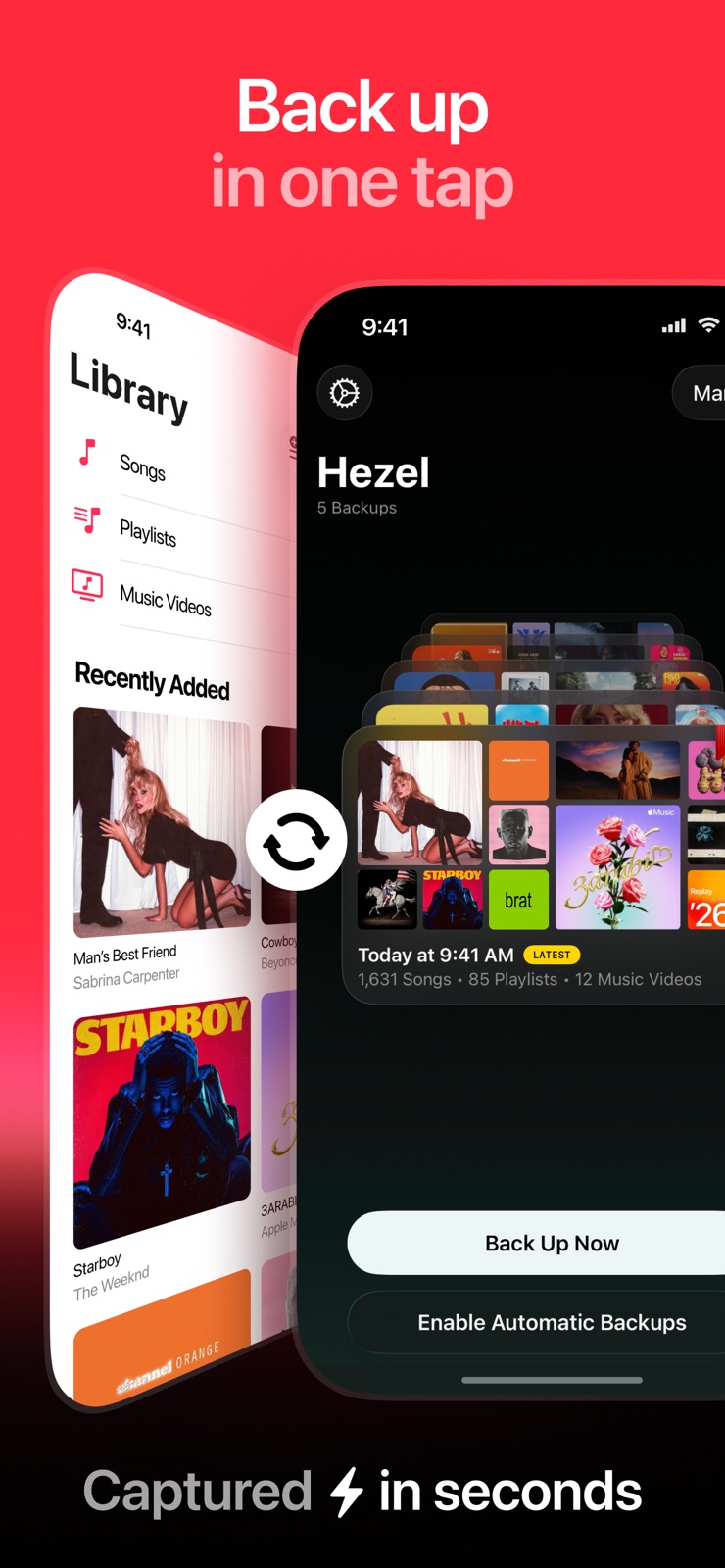


Pricing & paywalls
App Store
- Free to download
- In-app purchases
Ratings & reviews
App Store
-
5/5The Time Machine for Apple Music
Hezel is a game changer for Apple Music Subscribers. It provides you with the simple ease of mind of always having access to your playlists and songs. If you ever delete a song, a playlist, or even an album from your Library, Hezel is there to come and rescue your Library from despair. You can save a lot of backups with Hezel, so if you want to restore your Apple Music Library from a time where your choice of music is completely different to the types of music that you listen to today, than you can do that. And the best part: you can see what your Apple Music Library looked like at a given point in time, before choosing to restore from that particular backup, so you can kind of visualize how your taste in music has changed over time. Also, if you have any feedback or run into an issue while using Hezel, you can reach out to the developer, as he is very responsive, and quickly addressed a critical bug that I reported within a few days of my bug report. On top of all that, Hezel also respects your privacy and collects the minimal data needed to operate, all of which is stored both on-device and synced via iCloud.
AertoneFX · 31 Jul 2026
-
3/5Works well…when it works…which doesn’t seem to be very often
The auto-backup functionality seems to be pretty inconsistent. I have the app running in the background on my phone at all times, and it seems like more often than not, it just doesn’t do anything despite having it set to auto-backup one or two times a week. Additionally, I have it set to only use 1 GB of space for backups, yet my system storage often says it’s using more than that, forcing me to manually delete older backups, instead of automatically deleting them like it’s supposed to. Additionally, if I go into the app settings and try to clear the memory, It often leaves a fair amount of data still just hanging around. I’ve had to tell the app to clear the memory multiple times in a row before it actually fully clears up the space being used. I don’t know what exactly it’s doing, but overall, the app seems to reach and exceed the data limit I’ve assigned in the app settings much sooner than I would expect it to. It’s definitely not a “set it and forget it” type of situation. I frequently have to check if it’s even done it’s scheduled backup in the first place, and then I have to spend extra time manually erasing older backups because it doesn’t want clear them out automatically like I assume it’s supposed to do. If I could rate it 2.5 stars, I probably would. Frankly, between the excessive storage space it uses and the fact that it just kind of seems to back things up at random intervals, I’m starting to wonder if I should just uninstall it and and cancel my subscription.
betamax999 · 31 Jul 2026
-
5/5Amazing app that shouldn't be needed in the first place!
This app is amazing and I love the guy that made it so much, there super transparent and user forward. The app looks and feels great to use, i especially love how focused it is, no random other 20 things it can do. I got it to back up my library Incase i need to end my apple subscription, and it does it amazingly, and doesn't faff about with other nonsense. There's a subscription that mainly enables automatic back ups, and it's not that expensive, but for those who hate the amount of subscriptions that are pushed on us there's also a 20$ one time payment option. To the creator thank you for making a good, focused app to solve a genuine problem, and being so user focused with it too, your a real one!
MaxwellParkerS · 31 Jul 2026
-
5/5Best App for Apple Music Users
This app solves one of the most frustrating things in Apple Music. Especially for people who have used it for a long time and have songs that came from their personal library or songs that have been changed and modified overtime or from different albums overtime. My library was pretty messy with different versions of songs from different places and with all the changes that Apple has made over the years. I always want to clean up, but if you from your library, it deletes it from any playlist that you’ve made. This solves that you make it back up and then anytime you missing songs and then you just go in and recover and the app super easy.
YouEatPig · 31 Jul 2026
-
5/5Keep your Apple Music library safe!
If you’re like me, you may spend A LOT of time building your music library — playlists, albums — it can take a lot of work. Unfortunately, it is well known that Apple Music can (will) delete your library if you let payment lapse. Maybe your card expired, between jobs, whatever. I wasn’t fully sold on Apple Music until I found Hezel (formerly Rewind). It is a totally free app that you can use to manually back up your entire Apple Music library. Or pay a one time fee of $4.99 to set automatic backups. The app is easy to use, functions well, and is the only way I have found peace of mind that my sizable library is kept safe from Apple’s delete happy grip.
sbrockharris · 31 Jul 2026
Privacy & accessibility
App Store
Privacy
- Data Not Collected Developer declared
Accessibility
- Dark Interface — SUPPORTED Store published
- Larger Text — SUPPORTED Store published
Versions
App Store
-
1.10
This version includes major changes under the hood to make Auto-Backup more reliable.
-
1.10.1
Fixed an issue on iOS 18 where the backup artworks would not appear.
-
1.10.2
· 12 Jun 2026
This version further improves Auto-backup reliability.
-
1.2.4
This version includes bug fixes and minor improvements. Fixes an issue where Auto-Backup might not be rescheduled for a small number of a users.
-
1.2.5
Nothing to see here. Just minor bug fixes and improvements.
-
1.3
Fixes a critical bug that prevented Auto-Backup from working reliably for users on iOS 17.4.
-
1.4
Hezel 1.4 brings awesome improvements and important bug fixes to the app: • The new timeline scroller is awesome for rapidly browsing all your backups. • Improved performance when browsing your backup timeline. • You can now search the Playlists, Music Videos, and Songs screens when browsing a backup. • Overall improvements to performance when scrolling your timeline. • Fixes a crash when navigating to a playlist with recoverable tracks. • You can now receive alerts when big updates drop; make sure to turn on the app notifications. • Fixes a bug where the storage limit would not work on devices in some regions. • Fixes a crash on pre-release software for iPhone.
-
1.4.1
Hezel 1.4 brings awesome improvements and important bug fixes to the app: • The new timeline scroller is awesome for rapidly browsing all your backups. • Improved performance when browsing your backup timeline. • You can now search the Playlists, Music Videos, and Songs screens when browsing a backup. • Overall improvements to performance when scrolling your timeline. • Fixes a crash when navigating to a playlist with recoverable tracks. • You can now receive alerts when big updates drop; make sure to turn on the app notifications. • Fixes a bug where the storage limit would not work on devices in some regions. • Fixes a crash on pre-release software for iPhone.
-
1.4.2
Hezel 1.4 brings awesome improvements and important bug fixes to the app: • The new timeline scroller is awesome for rapidly browsing all your backups. • Improved performance when browsing your backup timeline. • You can now search the Playlists, Music Videos, and Songs screens when browsing a backup. • Overall improvements to performance when scrolling your timeline. • Fixes a crash when navigating to a playlist with recoverable tracks. • You can now receive alerts when big updates drop; make sure to turn on the app notifications. • Fixes a bug where the storage limit would not work on devices in some regions. • Fixes a crash on pre-release software for iPhone.
-
1.5
• This version allows you to set a custom name for recovered playlists in Apple Music • The Settings screen has been reorganized, including a new General section.
-
1.6
Hezel is ready for iOS 18! Here's what's new: Meet the all-new Hezel app icon, it's vibrant & looks gorgeous on your Home Screen, especially in dark and tinted modes. • Added support for controls in the iOS 18 Lock Screen & Control Center, so you can now start a new back up with just a tap from either of the two! • If you have an iPhone with the Action Button, you can now configure it with a the Back Up control to start a new back up with a long press. This version introduces a significant update to Hezel Ultra, now offering an affordable yearly subscription option in addition to the updated one-time purchase price. If you're an existing Ultra user, these changes will not affect you. To learn more about our decision to introduce a new subscription option here: https://www.notion.so/Why-is-Hezel-Ultra-a-Subscription-d2c4a573c2764e6599c7fb01f3c4ff27
-
1.6.1
This version improves the performance of the backup animation & fixes an issue where the timestamp on the latest backup would not be updated.
-
1.7
Hezel 1.7 is packed with big improvements! Here’s what’s new • Auto-backup now works reliably on all iOS versions. • A fresh new look when browsing your backed-up playlists. • Smarter storage management—no more duplicate backups taking up space. • Tons of bug fixes for a smoother experience. • Quickly start a backup from the Home Screen with a long press on the app icon.
-
1.7.1
• Hezel 1.7.1 fixes an issue where users with large music libraries might get stuck on the launch screen. • Added a upgrading backup screen when you first launch Hezel 1.7 to help you smoothly migrate to the new version.
-
1.7.2
This version includes minor bug fixes
-
1.7.3
This version includes minor cosmetic changes and bug fixes.
-
1.7.4
This version includes bug fixes and minor improvements.
-
1.7.5
This version includes improvements for our Black Friday sale! You can now tap the button in the top right corner of the app to claim the deal.
-
1.7.6
This version includes major bug fixes and improvements for power users with large libraries: • Fixed an issue where recovering a large number of playlist tracks fails with Error 4864. • Fixed an issue where recovering large playlists (300+ tracks) fails. • Fixed an issue on iOS 26 where recovering deleted tracks to playlists would falsely appear as recovered even when they weren’t. • Albums under Recently Added now show any music videos from the album. • Tapping Recover All will now restore any missing tracks in playlists and albums much faster. However, there might be a short delay before the tracks appear in your library.
-
1.7.7
This version includes even more bug fixes and introduces an affordable new monthly plan for Hezel Ultra.
-
1.8
Hezel 1.8 is a massive update with full iOS 26 / Liquid Glass support and major new features. Here's everything new: iOS 26 Support • The entire app has been redesigned with a new Liquid Glass aesthetic. • The app icon has been refreshed with support for clear and tint modes. Major Improvements • Tapping a backup now opens it in full screen, with tabs at the top for easy switching between Browse, Info, and Recovery. • Tap any song in your backup to play it directly in Apple Music. • In Browse mode, select multiple songs to recover at once (where available). • In Browse mode, filter songs to show only those that are restorable. • Improved track recovery, including better matching against the Apple Music catalog. • Clearer, more helpful error messages when something doesn't go as expected. • Improved support for Collaborative Playlists. Auto-Backup Improvements • More reliable background operation compared to Hezel 1.7. • Alerts when an auto-backup has failed. • Reminders when your library hasn't been backed up in a while. Backup Export & Import • Export backups as a single .hezel file for easy transfer to another device. • CSV export for convenient viewing and analysis of your music library. Backup Management • A new Manage Backups screen lets you organise and view all your backups in one place. • Bookmark, delete, and export your backups from a single screen. Minor Improvements & Bug Fixes • Fixed an issue where scrolling through large playlists would lag. • Playlists now appear under Recently Added, matching how they appear in Apple Music. • Improved support for chart playlists such as Replay 2025.
-
1.8.1
This version includes minor bug fixes to our big iOS 26 update, featuring an all-new Liquid Glass design.
-
1.9
Hezel is now available in Japanese, German, French and Simplified Chinese — with more languages on the way. If you spot a translation that feels off, tap Settings → Feedback and help us get it right.
-
1.9.1
Olá, hola, 你好, 안녕, hallo! Hezel now speaks seven new languages: Portuguese (Brazil & Portugal), Spanish (Latin America & Spain), Traditional Chinese, Korean, and Dutch.
-
1.9.2
This version includes localization improvements to the feedback page.
Alternatives
- MusicHarbor - Track New Music — Same category + similar ratings
Availability by market
- US
Data quality & evidence
- Page completeness
- Live store listing
- Last verified
- 31 Jul 2026
- Sources
- App Store
- Independent summary has not been published yet.