
Quick verdict
- What it is
- Store information collected; independent summary not yet available.
- At a glance
-
- Free download · core features require a paid plan
- In-app purchases
- From $2.49/mo
Categories and search queries
Official categories
- Productivity
- Health & Fitness
AppCorpus categories
Key functions
| Function | Availability | Access | Scope | Evidence |
|---|---|---|---|---|
| Family Sharing | Yes | Unknown | App Store | Store published |
| Free app | Yes | Free | — | Store published |
| In-app purchases | Yes | Limited free | — | Store published |
| Subscription | Yes | Paid | — | Store published |
Screens
App Store
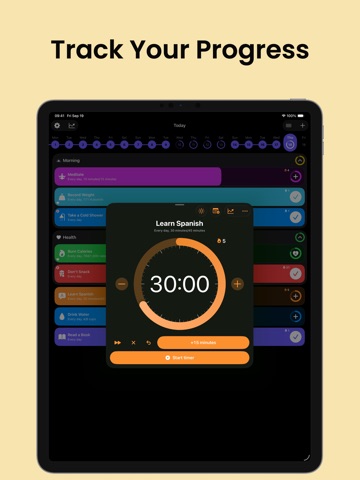
39 store screenshots


Pricing & paywalls
App Store
- Grit Premium ( ) — $29.99/year ($2.49/mo) (derived from the IAP title)
Ratings & reviews
App Store
-
5/5Almost perfect! Minor fix needed
This is the perfect app to keep an adhd individual on track. I love that I can set goals for different parts of the day and categorize them as well as location based goals. The color coding that can be personalized is extremely helpful, as well. The habit tracker with graph charts are helpful to see trends, I like this feature even as someone I would not consider “math minded.” I’ve tried many habit tracking apps and while each has its perks, this is the one I’ve returned to and actually deemed worth the year investment, and then some. This app is easily worth more than they ask for! My one and only complaint is that it lacks the ability to set goals for specific days, and not others. Other reviews have mentioned this con, and I agree. I wish to set specific days for things such as the gym or a specific household chore, work task etc. If this ability is added in future updates I shall amend my review to state that this is absolute perfection. Edit: yes you can set a weekly habit but you’re unable to select the specific day, it stays in your list of tasks to do until you “check” it off and that’s defeating the purpose of trying to check off everything in one day. Having the ability to mark a specific task to show up on the list only on Mondays or Tuesdays would be absolutely helpful!
Imcheapashell · 5 Sep 2026
-
5/5Best Habit Tracker I’ve Used, and I’ve Tried Many
This app allows you to set timers, counts, integrates with Apple Watch, uses advanced statistics for reviewing all habits or specific ones, and allows you to control everything from your Apple Watch. I’ve never been more satisfied with a habit tracker before. You can set what metric a habit is measured, like minutes, count, or other units. You can start timers from your watch, complete habits, and see all your data on your computer or iPhone. This is by far the best habit tracker application I’ve tried, and I’ve almost tried them all over the years. It’s a low cost, definitely worth the money. This does everything you could possibly want. Beats the other habit trackers that have far more ratings and reviews. Give it a try, you won’t be disappointed.
EllisJames22 · 5 Sep 2026
-
4/5Almost perfect but may be better
I like this app but there is one problem. I would like it to be possible to mark habits as not completed. For example, if I have a morning routine and I haven’t done some habit, and the morning has already passed, then it’s clear that I can no longer complete it, so I would like to mark the habits as not completed. Also, due to this, you can implement the ability to repeat habits, for example, every 3 days, BUT if you marked a habit as not completed, or skipped it, then it will remain in the list of habits until you complete it. For example, if I want to have the habit of throwing out garbage every 5 days, then let's say I accidentally missed one day or I had another important reason, I mark it as not completed, or skip it and then it remains on my list until I I won’t mark it as done, because the garbage has not yet been thrown out. I wrote this through a translator, so there may be an error)
Harrveey · 5 Sep 2026
-
5/5Simply the best!
I have stuck with Grit the longest due to the perfect balance of simplicity and customization. I am a very anal person when it comes to colors, UI design, and I dislike emojis. This is everything I wanted and the support is so consistent. Genuinely, I am excited every update knowing it’s always good changes. This dev seems to actually really care about their work. The stats are easy to read, the UI is intuitive and feels like an Apple product. There’s no useful feature it doesn’t have that I can think of. I finally wrote this review when I realized that after merely a week the developer added my suggestions to the update. I wanted an option to match the dark mode with the system dark color of the native Apple widgets (reminders and calendar). I try to stick to stock apps unless there’s a real problem I feel they can’t solve. But the true black was a little harsh next to my other apps. Such a minor thing but they did it and it made me happy! I genuinely feel excited to use this app and love how my home screen looks perfect now. To the dev, thank you so much!
wolfsyn · 5 Sep 2026
-
4/5Nearly Perfect…
I’ve been using Grit for a short time, and it has quickly become one of my favorite productivity tools. The app’s design is sleek, intuitive, and highly customizable, making it easy to track habits and stay on top of my goals. I especially love the ability to set specific goals and track progress over time—it’s a game-changer for habit-building. However, the one area where Grit falls just short of perfection is the lack of support for non-repeatable, one-time tasks. While the app excels at habit tracking, it would be incredibly useful to have the ability to add one-off tasks that don’t factor into the overall habit metrics. This functionality would consolidate all my to-do items into one app and eliminate the need for other tools like Apple’s Notes. This minor shortcoming is the only thing keeping Grit from being a perfect five-star, daily-use application for me. With the addition of non-repeatable tasks, this app would truly be unbeatable. Despite this, I can’t recommend Grit enough—it’s a fantastic tool for anyone looking to take control of their habits and achieve their goals. Here’s hoping this already great app continues to get even better! Rating: ★★★★☆
chandler_frakes · 5 Sep 2026
Privacy & accessibility
App Store
Privacy
- Data Not Linked to You — Analytics — Diagnostics — Crash Data Developer declared
- Data Not Linked to You — Analytics — Identifiers — Device ID Developer declared
- Data Not Linked to You — Analytics — Location — Coarse Location Developer declared
- Data Not Linked to You — Analytics — Purchases — Purchase History Developer declared
- Data Not Linked to You — Analytics — Usage Data — Product Interaction Developer declared
- Data Not Linked to You — Diagnostics Developer declared
- Data Not Linked to You — Identifiers Developer declared
- Data Not Linked to You — Location Developer declared
- Data Not Linked to You — Purchases Developer declared
- Data Not Linked to You — Usage Data Developer declared
- Data Used to Track You — Identifiers — Device ID Developer declared
- Data Used to Track You — Identifiers Developer declared
- Data Used to Track You — Location — Coarse Location Developer declared
- Data Used to Track You — Location Developer declared
- Data Used to Track You — Usage Data — Product Interaction Developer declared
- Data Used to Track You — Usage Data Developer declared
Accessibility
- Dark Interface — SUPPORTED Store published
- Larger Text — SUPPORTED Store published
- Reduced Motion — SUPPORTED Store published
- VoiceOver — SUPPORTED Store published
Versions
App Store
-
4.3.6
What’s New in Grit: – Customize sort settings for your widgets – Select habits in Calendar, Yearly, and Daily progress widgets – Override calendar integration type per habit – Start fresh: clear all habit history with one tap – Set start/stop timer as default habit action – Add custom reminders to groups Update now and keep building better habits with Grit!
-
4.3.7
What’s New in Grit: – Customize sort settings for your widgets – Select habits in Calendar, Yearly, and Daily progress widgets – Override calendar integration type per habit – Start fresh: clear all habit history with one tap – Set start/stop timer as default habit action – Add custom reminders to groups Update now and keep building better habits with Grit!
-
5.0.0
What’s New in Grit: – Fresh Liquid Glass design – Mark habits as failed – New Repeat Plan: adjust schedules without losing past progress – Track calories and distance for workouts – Timer alerts for better tracking – Drag over habits to change progress quickly – All-new detailed habit widget – Option to keep screen on while using timer – Interactive charts with selection – Habit progress & add new habit shortcuts – Configurable Apple Watch widgets – Control Center widgets on Apple Watch – More icons to personalize your habits Update now and keep building better habits with Grit!
-
5.0.1
What’s New in Grit: – Fresh Liquid Glass design – Mark habits as failed – New Repeat Plan: adjust schedules without losing past progress – Track calories and distance for workouts – Timer alerts for better tracking – Drag over habits to change progress quickly – All-new detailed habit widget – Option to keep screen on while using timer – Interactive charts with selection – Habit progress & add new habit shortcuts – Configurable Apple Watch widgets – Control Center widgets on Apple Watch – More icons to personalize your habits Update now and keep building better habits with Grit!
-
5.0.2
What’s New in Grit: – Fresh Liquid Glass design – Mark habits as failed – New Repeat Plan: adjust schedules without losing past progress – Track calories and distance for workouts – Timer alerts for better tracking – Drag over habits to change progress quickly – All-new detailed habit widget – Option to keep screen on while using timer – Interactive charts with selection – Habit progress & add new habit shortcuts – Configurable Apple Watch widgets – Control Center widgets on Apple Watch – More icons to personalize your habits Update now and keep building better habits with Grit!
-
5.0.3
What’s New in Grit: – Fresh Liquid Glass design – Mark habits as failed – New Repeat Plan: adjust schedules without losing past progress – Track calories and distance for workouts – Timer alerts for better tracking – Drag over habits to change progress quickly – All-new detailed habit widget – Option to keep screen on while using timer – Interactive charts with selection – Habit progress & add new habit shortcuts – Configurable Apple Watch widgets – Control Center widgets on Apple Watch – More icons to personalize your habits Update now and keep building better habits with Grit!
-
5.0.4
What’s New in Grit: – Fresh Liquid Glass design – Mark habits as failed – New Repeat Plan: adjust schedules without losing past progress – Track calories and distance for workouts – Timer alerts for better tracking – Drag over habits to change progress quickly – All-new detailed habit widget – Option to keep screen on while using timer – Interactive charts with selection – Habit progress & add new habit shortcuts – Configurable Apple Watch widgets – Control Center widgets on Apple Watch – More icons to personalize your habits Update now and keep building better habits with Grit!
-
5.0.5
What’s New in Grit: – Fresh Liquid Glass design – Mark habits as failed – New Repeat Plan: adjust schedules without losing past progress – Track calories and distance for workouts – Timer alerts for better tracking – Drag over habits to change progress quickly – All-new detailed habit widget – Option to keep screen on while using timer – Interactive charts with selection – Habit progress & add new habit shortcuts – Configurable Apple Watch widgets – Control Center widgets on Apple Watch – More icons to personalize your habits Update now and keep building better habits with Grit!
-
5.0.6
What’s New in Grit: – Fresh Liquid Glass design – Mark habits as failed – New Repeat Plan: adjust schedules without losing past progress – Track calories and distance for workouts – Timer alerts for better tracking – Drag over habits to change progress quickly – All-new detailed habit widget – Option to keep screen on while using timer – Interactive charts with selection – Habit progress & add new habit shortcuts – Configurable Apple Watch widgets – Control Center widgets on Apple Watch – More icons to personalize your habits Update now and keep building better habits with Grit!
-
5.1.0
What’s New in Grit: – Fresh Liquid Glass design – Mark habits as failed – New Repeat Plan: adjust schedules without losing past progress – Track calories and distance for workouts – Timer alerts for better tracking – Drag over habits to change progress quickly – All-new detailed habit widget – Option to keep screen on while using timer – Interactive charts with selection – Habit progress & add new habit shortcuts – Configurable Apple Watch widgets – Control Center widgets on Apple Watch – More icons to personalize your habits Update now and keep building better habits with Grit!
-
5.1.1
What’s New in Grit: – Fresh Liquid Glass design – Mark habits as failed – New Repeat Plan: adjust schedules without losing past progress – Track calories and distance for workouts – Timer alerts for better tracking – Drag over habits to change progress quickly – All-new detailed habit widget – Option to keep screen on while using timer – Interactive charts with selection – Habit progress & add new habit shortcuts – Configurable Apple Watch widgets – Control Center widgets on Apple Watch – More icons to personalize your habits Update now and keep building better habits with Grit!
-
5.2.0
What’s New in Grit: – Fresh Liquid Glass design – Mark habits as failed – New Repeat Plan: adjust schedules without losing past progress – Track calories and distance for workouts – Timer alerts for better tracking – Drag over habits to change progress quickly – All-new detailed habit widget – Option to keep screen on while using timer – Interactive charts with selection – Habit progress & add new habit shortcuts – Configurable Apple Watch widgets – Control Center widgets on Apple Watch – More icons to personalize your habits Update now and keep building better habits with Grit!
-
5.3.0
What’s New in Grit: – Fresh Liquid Glass design – Mark habits as failed – New Repeat Plan: adjust schedules without losing past progress – Track calories and distance for workouts – Timer alerts for better tracking – Drag over habits to change progress quickly – All-new detailed habit widget – Option to keep screen on while using timer – Interactive charts with selection – Habit progress & add new habit shortcuts – Configurable Apple Watch widgets – Control Center widgets on Apple Watch – More icons to personalize your habits Update now and keep building better habits with Grit!
-
5.4.0
What’s New in Grit: – Share habits with friends: stay motivated together by inviting others to follow and support your progress – Bug fixes & performance improvements: smoother experience and enhanced stability Update now and keep building better habits with Grit!
-
5.5.0
What’s New - Choose specific days of the week for weekly habits - Choose specific days of the month for monthly habits - Weekly widget now supports interactivity - New streak widget - Option to disable streaks - Disabling notifications in group settings now disables habit notifications - Performance improvements and bug fixes
-
5.5.2
What’s New - Choose specific days of the week for weekly habits - Choose specific days of the month for monthly habits - Weekly widget now supports interactivity - New streak widget - Option to disable streaks - Disabling notifications in group settings now disables habit notifications - Performance improvements and bug fixes
-
5.5.3
What’s New - Choose specific days of the week for weekly habits - Choose specific days of the month for monthly habits - Weekly widget now supports interactivity - New streak widget - Option to disable streaks - Disabling notifications in group settings now disables habit notifications - Performance improvements and bug fixes
-
5.5.4
What’s New - Choose specific days of the week for weekly habits - Choose specific days of the month for monthly habits - Weekly widget now supports interactivity - New streak widget - Option to disable streaks - Disabling notifications in group settings now disables habit notifications - Performance improvements and bug fixes
-
5.5.5
What’s New - Choose specific days of the week for weekly habits - Choose specific days of the month for monthly habits - Weekly widget now supports interactivity - New streak widget - Option to disable streaks - Disabling notifications in group settings now disables habit notifications - Performance improvements and bug fixes
-
5.6.0
What’s New - Search your habits from the main screen - Quickly filter your habits from the main screen - Use full-screen alarms for custom reminders - Choose specific days of the week for weekly habits - Choose specific days of the month for monthly habits - Performance improvements and bug fixes
-
5.6.1
What’s New - Search your habits from the main screen - Quickly filter your habits from the main screen - Use full-screen alarms for custom reminders - Choose specific days of the week for weekly habits - Choose specific days of the month for monthly habits - Performance improvements and bug fixes
-
5.6.2
What’s New - Search your habits from the main screen - Quickly filter your habits from the main screen - Use full-screen alarms for custom reminders - Choose specific days of the week for weekly habits - Choose specific days of the month for monthly habits - Performance improvements and bug fixes
-
5.6.3
What’s New - Search your habits from the main screen - Quickly filter your habits from the main screen - Use full-screen alarms for custom reminders - Choose specific days of the week for weekly habits - Choose specific days of the month for monthly habits - Performance improvements and bug fixes
-
5.8.0
• Block selected apps until a habit is done • Weekly Recap: see how your week went at a glance • Progress charts right in your habits list — bars, grid, or line • New Bars and Lines widgets • Timer upgrades: interval alerts, plus auto-stop when a habit hits its goal • Exclude specific habits from daily progress • Apple Health: added Stand or Roll Hours and State of Mind • 9 new languages: Japanese, Korean, Simplified and Traditional Chinese, Arabic, Indonesian, Thai, Vietnamese, and Turkish. Spot a translation that’s off? Let us know! • Performance improvements and bug fixes
-
5.8.1
· 3 Aug 2026
• Block selected apps until a habit is done • Weekly Recap: see how your week went at a glance • Progress charts right in your habits list — bars, grid, or line • New Bars and Lines widgets • Timer upgrades: interval alerts, plus auto-stop when a habit hits its goal • Exclude specific habits from daily progress • Apple Health: added Stand or Roll Hours and State of Mind • 9 new languages: Japanese, Korean, Simplified and Traditional Chinese, Arabic, Indonesian, Thai, Vietnamese, and Turkish. Spot a translation that’s off? Let us know! • Performance improvements and bug fixes
Alternatives
- Productive - Habit Tracker — Same category + similar ratings
- Onrise: Habit Tracker & Focus — Same category + similar ratings
- Routine Planner, Habit Tracker — Same category + similar ratings
- HelloHabit - Daily Planner — Same category + similar ratings
- Habit Tracker - HabitKit — Same category + similar ratings
- Habitica: Gamified Taskmanager — Same category + similar ratings
Availability by market
- US
Data quality & evidence
- Page completeness
- Live store listing
- Last verified
- 5 Sep 2026
- Sources
- App Store
- Independent summary has not been published yet.