
Quick verdict
- What it is
- Store information collected; independent summary not yet available.
- At a glance
-
- $12.99
Categories and search queries
Official categories
- Education
- Utilities
AppCorpus categories
Key functions
| Function | Availability | Access | Scope | Evidence |
|---|---|---|---|---|
| Family Sharing | Yes | Unknown | App Store | Store published |
Screens
App Store
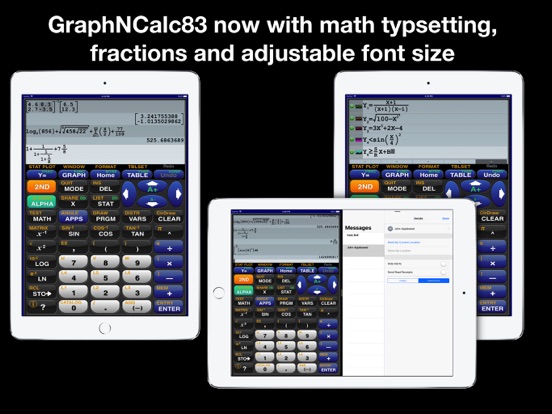
27 store screenshots



Pricing & paywalls
App Store
- Price: $12.99
Ratings & reviews
App Store
-
5/5Great calculator!
I love this calculator! I’m a math teacher and have been using it for years. It looks and works just like the old TI-83 so there is no learning curve if you are used to the original. Because of the touch screen to make zooming and tracing easy the graphing is much better than the original and, obviously, much faster. The last update changed the display so that the lines of entries alternate colors, which I don’t happen to care for, but that is just a personal preference. The developer did (does) a fantastic job with this app. I don’t know how long ago I wrote the above paragraph, but it’s been several years at least. Since they asked, I’ll just say for the record that I’m still using it and I still think it is a great app. They asked again, and I will echo what I said previously. However many years later it is—and I’ve lost track—I’m still in love with this calculator. I use it almost daily, even though I’m no longer teaching. I still do some programming (project Euler mostly) and it’s hard to say how handy this calculator is.
Ktscopes · 6 Aug 2026
-
4/5Awesome++
I have been looking for a truly powerful calculator for a long time. I've tried variations of the HP top of the line and several were very nice but as I said in one of the other reviews that calculator emulators are great for what they are but the idea is to serve your needs. If a calculator still retains all of the disadvantages of the original then it is not an advancement. This calculator not only provides all the capabilities of the HP that inspired it but also eliminates many of the physical calculator's cons. Ever had a calculator that did everything you needed and more but required a book and a lot of memory work to do any of the sophisticated things? This one does not have that drawback. There is context based help available at the touch of a button. Now you can actually use the full power of the calculator without it becoming a research project. To me, that essentially made the more advanced the calculator the less useful it became. Not so here. I applaud the developer. We don't need exact replicas of calculators, we need something to do a job with the least effort on our part. This is a giant step in that direction. On top of that, the developer continues to add additional enhancements without resorting to “forever pay”. This is truly a rare gem. Calculators are not sacred but my time is. Get this. You won't regret it. Now I can get on with my work!
owndao · 6 Aug 2026
-
5/5It just keeps getting better AND .......Most likely It’s all you need and want😃
I have said this before and I am saying it again be because this calculator just keeps getting better. Most likely it’s all you need! Ohh yess....did I mention the chemistry and Environmental engineering utility! From personal experience this is an ample scientific calculator that can get you through graphing, and bio-statistics,and physics. You will never misplace it, as it is on your tablet and smart phone in a pinch. The programmers care about your user experience, readily offering tips and promptly answering troubleshooting/ how to use the functions. The built help menus are unparalleled. This is one app I won’t be deleting to free up space! Also I think the user interface is extremely intuitive and rich with extras that you simply don’t get with all the handheld calculators that it replaces. Lastly it actually works natively smooth as if it belongs in iOS on your device screen.
hungryspider · 6 Aug 2026
-
5/5Updated review
I have a new device and an updated calculator. I left a review before but now want to update. I enjoy the developer took the time to fix all the bugs and improved the calculator. Math classes get more complicated and it is always great to know with the growing costs of books, school supplies, travel expenses and all things expensive, I am grateful to know there is an awesome developer that takes the time to improve this wonderful application and send all the loyal product users updates at no additional cost. Other developers and book writers would just add pages to a book, or improvements and label it new edition and charge for a new improvement…or more money for fixing the bugs. Thank you for being such an amazing and devoted developer. I will always look forward to purchasing new items in the future. It is also great to be able to review and refresh my math skills on the newly improved Graphing Calculator. Stay awesome!
BrainyWords · 6 Aug 2026
-
5/5Affordable for $truggling $tudents
This is such a great app to use instead of a super expensive graphing calculator. I recommend it every year to my students. It’s fabulous for those on-the-spot study sessions at the coffee shop when you have forgotten your calculator. Many of my students have switched to it as their primary calculator. The functions are the same and the control over graph zooming is a simple pinch method. To identify mínima and máxima you just slide your finger over the graph until the color changes. no left and right bounding required. As an instructor, I use it with my iPad and OneNote during lecture. My lecture notes are projected to the overhead screen as I write them in OneNotes. When I need to demonstrate a concept on the calculator I slip it out by swiping left and a small version of the calculator is overlaid on my notes. When I am done, a swipe right allows me to return to only the notes screen. Students are able to watch my key strokes in real time.
Hatsemtup · 6 Aug 2026
Privacy & accessibility
App Store
Privacy
- Data Not Collected Developer declared
Accessibility
No accessibility labels collected yet.
Versions
App Store
- 1.0
-
1.1
•Updated for iOS8 •Added larger graphics for iPhone6, iPhone6 Plus •Improved bubble help •Improved CONV to use Ans •Improved various computations
-
1.2
• Updated for iOS 8.1 • Corrected fraction display of values < -1 • Added automatic transition from Stat list editor to HOME • Fixed bug in histogram plots
-
1.3
•Fixed iPad crash with ZOOM and CALC •Fixed arrow keys bug in CALC panel •Added MEM menu •Moved CONV to DEL key •Expanded ? help for trig, log and other functions •Extended range of ^ function •Fixed DMS with seconds calculation •Added .8xx file import for BASIC and data files •List names can now start with θ •INPUT now accepts named lists •Fixed bug in randM(
-
1.4
• Update for iOS9 • Relaxed domain checking for binomialcdf( • Expanded range of nPr and nCr • Fixed various iPad crashes • Fixed spurious error report in χ²-Test • Expanded info pages for stat functions • Changed dayOfWk( to return 7 instead of 0 for Saturday
-
1.5
• Update for iOS9.2 • Added iPad slide over and split views • Added π x-axis labels for trig zoom view • Corrected negate / exponentiation precedence • Corrected negate of imaginary values • Graph of T-Test for negative values fixed • Recall of scientific notation values from history fixed
-
1.6
•Added inequality function graphing •Added dot mode for seq graphing •Corrected auto entry •Improved help screen formatting •Keyboard sound preference is now saved •regEqu generation for small coefficients improved •Improved rref( •Fixed labels in triangle app
-
2.0
• Added math typesetting- enter problems just like your textbook • Change display size with A+, A- on arrow keys • Added fraction display controls to MODE view • iOS 11 and iPhoneX updates • Various bug fixes
-
2.1
•Added n/d to key next to ALPHA key •Added formatting for nCr and nPr •Added optional base parameter to log(
-
2.2
•Fixed copying fractions from history error •Touch ? key then the MODE key to learn about new display options
-
2.3
• Improved nCr and nPr display • Corrected input of tvm_ functions • Corrected MODE:Answer settings
-
2.4
•Fixed u nd fraction editing bug •Fixed getKey function •Fixed copying of a previous entry with a negative exponent
-
2.5
• Added f(XY) graphing mode • Added SI Prefix conversions • Added Yt column in PAR table view • Added custom colors for background, axes, grid • Added cut/copy/paste in BASIC editor • Added BASIC programs for statistics, algebra, calculus • Improved BASIC program importing • Fixed blurry help pages
-
2.6
•Added significant figures calculation •Added polynomial root solver •Added ODE solver •Added BASIC programs: Fibonacci, NextPrime, PolynomialZeros, SignificantFigures, ODEsolver, SlopeFieldGraph •Added sort by topic for BASIC programs menu •Added iOS13 dark mode
-
2.7
For duration of the Coronavirus pandemic, GraphNCalc83 is being offered for free to support students learning from home. All features enabled, no ads, no personal tracking. FREE! • Fixed dark mode issues • Fixed display of imaginary numbers • Added PlySmlt to APPS • Added PRGM sorting options • Added Testing Mode (touch ? MODE and scroll to section \"---Test Taking---\" to learn more)
-
2.8
• Updates for iOS 15 • Updated periodic table • Fixed log of negative number • Fixed negative n/d • Improved chi squared test accuracy
-
2.9
• Updated test mode • Updates for iOS 15.2 • Fixed User program list
-
3.0
• Update for iOS15.3 • Updated test mode • Fixed stat freq list error • Table now displays imaginary as NAN
-
3.1
• Update for iOS17 • Added statistics wizards • Fixed issue with degree mark • Fixed bug in matrix ref • Fixed use of VARS:COLOR in DRAW functions
-
3.2
• Fixed problem with Table view display
-
3.3
• Improved accuracy of RREF function • Updated for iOS changes
-
3.4
· 22 Nov 2025
•Update for iOS26 •Fixed bugs in BASIC debugger •Long tap history to copy to paste buffer
Alternatives
- Graphing Calculator Plus AI — Same category + similar ratings
- Graphing Calculator X84 — Same category + similar ratings
- Ncalc - Graphing Calculator 84 — Same category + similar ratings
- Taculator 84 Graphing Calc — Same category + similar ratings
Availability by market
- US
Data quality & evidence
- Page completeness
- Live store listing
- Last verified
- 6 Aug 2026
- Sources
- App Store
- Independent summary has not been published yet.