
Quick verdict
- What it is
- Store information collected; an Apoku editorial summary is not yet published.
- At a glance
-
- Free to download
Categories and search queries
Official categories
- Books & Reference
- Reference
- Books
Apoku categories
Key functions
| Function | Availability | Access | Scope | Evidence |
|---|---|---|---|---|
| Free app | Yes | Free | Context-specific | Store published |
Screens
27 store screenshots


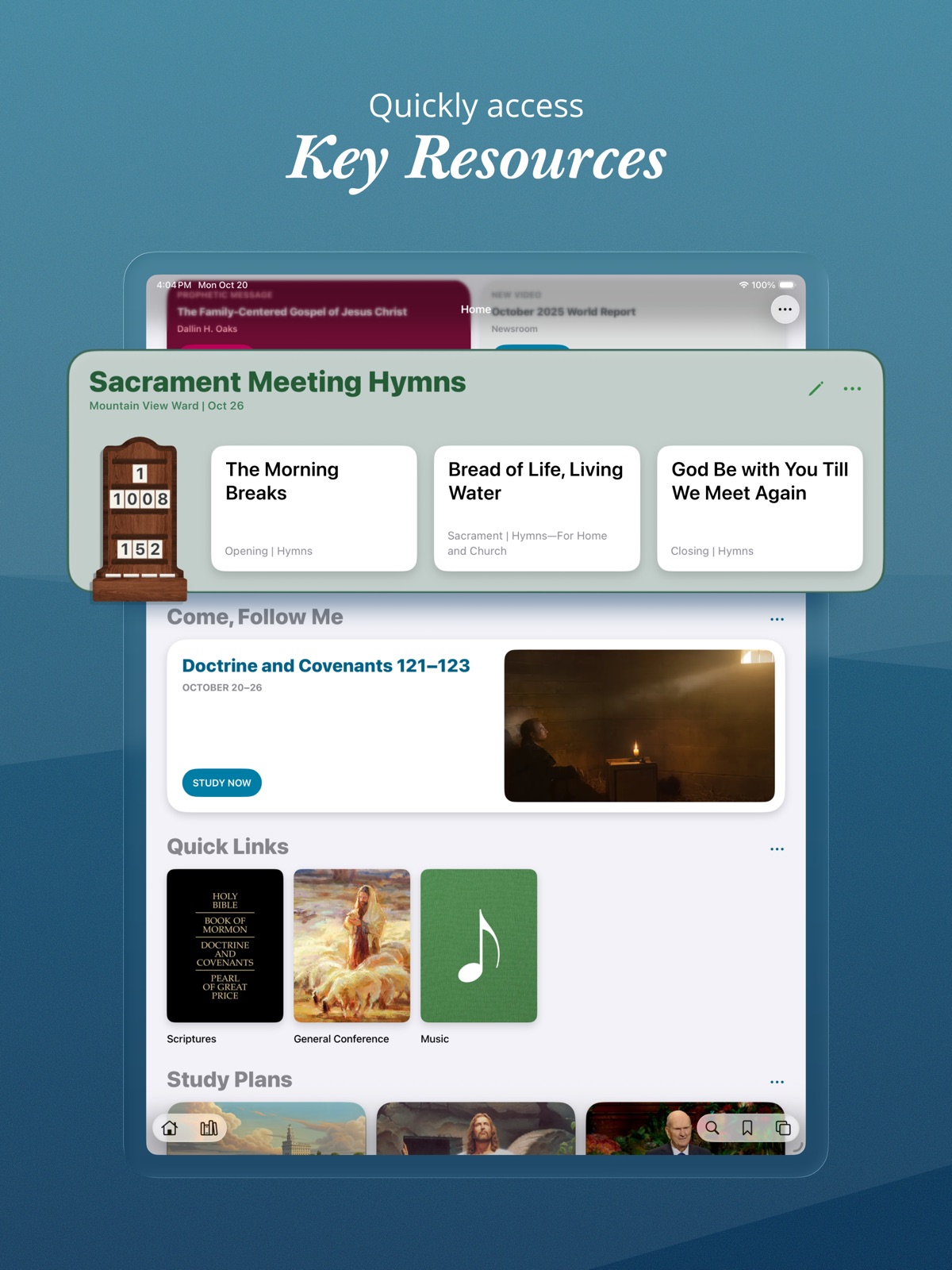
7 store screenshots


Pricing & paywalls
- Free to download
- Free to download
Ratings & reviews
-
4/5Serious glitches in the scriptures…UPDATE
I have revised my rating as I recently found and downloaded the UPDATED app which has fixed the bugs which had made my scripture study so miserable. I know I was a pest in sending constant feedback reports complaining of the problems I was experiencing. You listened and the new UPDATED app has “turned my frown upside down and I am smiling all the while.” Thank you!! RTwine I’ve been using the Gospel Library for years without problems. But mine has now developed glitches. I no longer am able to have the scriptures read out loud. I notice the problem I am having is the similar to another review that appeared on Oct. 5th. I sent my concerns to “feedback” so I would not have to write a negative review but have received no reply for over 10 days. When the “reader”begins, the line at the bottom of the page that indicates how far you’ve read, no longer works. Instead, as the reader begins the start of a chapter the line at the bottom of the page flys to the very end as if you’ve finished the chapter. The line cannot be moved. You can’t move to a scripture in the chapter. If you start at the beginning then pause the reader to make a note or link, etc. and then press the arrow to resume reading, the reader starts back at the beginning of the chapter. I can’t use the scripture part of the Gospel Library as it now exists. I feel absolutely lost without it. I have done a hard reset, deleted the app and then added it back the next day. The problem is still there. I use a new year-old iPad that is up to date and I don’t know what to do.
RTwine · 29 Sep 2026
-
4/5App is great but i don’t like the new home screen and it constantly crashes.
I wanted to adjust my review so I don’t discourage people from trying it. Issues aside, the app itself and all the content it gives you access to are amazing. You can cross-reference scriptures, conference talks, church magazines, hymns, and any other church published content. You can also create links and notes. I highly recommend giving it a try. Hopefully they are able to fix the sync \ crashing issues. Current Issues: The tiles on the new home screen are too big pushing most of the content down the screen and when I try to scroll below it, the app crashes. I’ve restarted, deleted and reinstalled and nothing fixes it. It still crashes when scrolling below the tiles. Tiles were the worst thing Microsoft ever did. please don’t follow their lead. Please give me the option for the old home screen. I use this every day for my scripture study but it is unusable right now. I’m on ipadOS 17.6.1 on a 12.9” 5th gen ipad.
Se7ventySix · 29 Sep 2026
-
2/5Disappointed
I used another scripture app for about the last 10 years. I can’t even recall it’s name. It was not as flashy as this app, but it had a lot of nice tools like notes that actually showed up with the scripture. The cross references were show right next to the scripture, I didn’t have to click on another icon to pull them up. I could select the entire scripture by just clicking in the number. Whoever wrote that application did a wonderful job. However, I’m sure that they didn’t have the resources to compete with the Church when it came to continuing to support that application. So, when I had to get a new iPhone that app was no longer available. I’ve been using this one for the past few weeks. Though the features took some getting used to, I was starting to make it work for me (though I really wish it could do those things I mentioned above). It took me several days to get things transferred from my old application. Then, for no reason the application stopped working. I’d click the icon and the splash screen would show up for a few seconds and then go away and the app was shut down. I finally had to delete the app and reload it. I hope my notes and favorites are still there. Keep trying to make this app better. Since there is no more competition it is your responsibility to the world and generation to come to make this application fantastic. You don’t have to worry about the material, God has already taken care of that for you. I have faith that your team will make this great. God bless.
pasops · 29 Sep 2026
-
2/5Why did you make the new font so ugly?
The thing I liked best about using this app to study over my hard copy of the scriptures was the experience I had when scrolling through the text. The last font, spacing and layout was very well done from an aesthetic point of view. It was pleasing to the eyes and made for not only a great tool but also a pleasing experience. Now the text is small and harsh and goes to the far extreme of both sides of the screen (where are the margins?). Yes it provides more content on one page but that content is too small and difficult to use. Yes you can manually change the size of the text in tools but that only works for that one chapter. You have to repeat the process every time you advance a chapter. The irony is when you pull up the footnotes they are in the old font and size while the main text is in the new aesthetically challenged font. It makes me want to read only the footnotes. Why can’t we have the best of all worlds, more info, pleasing aesthetics, pleasing font and for heavens sake some margins. All I know is that my study was more rewarding and spiritually focused in the last version. Isn’t that what we are striving for? I look forward to an improvement in the next version. That or let those who want revert back to the old way or at least have that option.
Moroniman · 29 Sep 2026
-
5/5Thank you for such a marvelous tool and the constant improvement
I am so grateful for those people who had the vision to create this app, for those who originally created it and those who are working on improving the app. This app has improved my gospel study, conversion to Christ and improvement of my relationship to Heavenly Father. The tab and note functions have allowed me to easily do things which would have taken years to do with paper scriptures. An example is first searching The Book of Mormon for each occurrence of “Repent” and it’s variants, tagging each occurrence, being able to make notes at each occurrence of the word to identify and categorize the major usage of the word and then making an index in the Notebook identifying which verses can be classified under each major usage category. Using the split screen function on a tablet allows me to have one side open to the tags and the other screen open to the Notebook allowing easy classification of verses into categories. This has been a most enlightening exercise in the mercy and love available from our God.
BNiedens · 29 Sep 2026
No store reviews collected for Google Play · US
Privacy & accessibility
Privacy
- Data Linked to You — App Functionality — User Content — Other User Content Developer declared
- Data Linked to You — User Content Developer declared
- Data Not Linked to You — Analytics — Diagnostics — Crash Data Developer declared
- Data Not Linked to You — Analytics — Diagnostics — Other Diagnostic Data Developer declared
- Data Not Linked to You — Analytics — Location — Coarse Location Developer declared
- Data Not Linked to You — Analytics — Usage Data — Other Usage Data Developer declared
- Data Not Linked to You — Analytics — Usage Data — Product Interaction Developer declared
- Data Not Linked to You — App Functionality — Location — Precise Location Developer declared
- Data Not Linked to You — Diagnostics Developer declared
- Data Not Linked to You — Location Developer declared
- Data Not Linked to You — Usage Data Developer declared
Accessibility
No accessibility labels collected yet.
Privacy
- Data collected — Analytics — App activity — App interactions Developer declared
- Data collected — Analytics — App activity — In-app search history Developer declared
- Data collected — Analytics — App info and performance — Crash logs Developer declared
- Data collected — Analytics — App info and performance — Diagnostics Developer declared
- Data collected — Analytics — App info and performance — Other app performance data Developer declared
- Data collected — App functionality — App activity — Other user-generated content Developer declared
- Data collected — App functionality, Developer communications — Device or other IDs Developer declared
- Data collected — App functionality, Personalization, Account management — Personal info — User IDs Developer declared
- Data collected — Developer communications — Personal info — Email address Developer declared
- Data collected — Developer communications — Personal info — Name Developer declared
- Data collected — Developer communications — Photos and videos — Photos Developer declared
- Security practices — The developer doesn’t provide a way for you to request that your data be deleted — Data can’t be deleted Developer declared
- Security practices — Your data is transferred over a secure connection — Data is encrypted in transit Developer declared
Accessibility
No accessibility labels collected yet.
Versions
-
6.8.2
• Fixed an issue that prevented selecting sacrament meeting hymns for some users. • Fixed an issue where images were missing when creating a study plan. • Fixed an issue that could prevent accessing role-based content.
-
6.9.0
• Added new content to the Help section, including overview videos and tips for using Gospel Library. • Added the ability for music coordinators to choose sacrament meeting hymns from either the hymnbook or Children’s Songbook. • Added the ability for music coordinators in multilingual wards to choose sacrament meeting hymns in any installed content language. • Added a quick edit button to the Sacrament Meeting Hymns, Elders Quorum Lesson, and Relief Society Lesson cards for users with edit rights. • Renamed the Hymns quick link to Music, and changed it to link to the Music section. • Fixed an issue that could prevent sacrament meeting hymns and elders quorum or Relief Society lessons from showing.
-
6.9.1
• Added improvements to support Topics and Questions content. • Fixed an issue where tapping an item in Home sometimes opened a new screen. • Increased stability by refactoring code in various sections of the app.
-
7.0.0
Redesigned Home section • Updated Home to a more modern and delightful look and feel. • Improved how Home adjusts for landscape and large screens. • Added the ability to long-press and drag to rearrange sections in Home. Other improvements • Updated the study plans section of Home to accommodate more featured plans. • Updated Verse and Quote of the Day widgets to match the changes in Home. • Added Church Account profile image in Settings. • Changed media streaming and download to respect the “Limit Cellular Data Use” setting. • Improved stability in navigation, study plans, and other areas.
-
7.0.1
Redesigned Home section • Updated Home to a more modern and delightful look and feel. • Improved how Home adjusts for landscape and large screens. • Added the ability to long-press and drag to rearrange sections in Home. Other improvements • Updated the study plans section of Home to accommodate more featured plans. • Updated Verse and Quote of the Day widgets to match the changes in Home. • Added Church Account profile image in Settings. • Changed media streaming and download to respect the “Limit Cellular Data Use” setting. • Improved stability in navigation, study plans, and other areas.
-
7.0.2
• Updated app icon to work better with color tints in iOS 18. • Fixed an issue that prevented the History panel from loading on iOS 16. • Fixed an issue that could cause the back button to skip back too far. • Improved reliability when opening links to Gospel Library content. • Improved light/dark theming in the Help section.
-
7.0.3
• Fixed a crash when scrolling Home on large screens. • Fixed theme colors in Home when running Gospel Library on macOS. • Fixed issues where ward and branch features on Home didn't always reload correctly. • Fixed an issue that could cause a blank screen to show when opening an invalid link. • Fixed an issue that could prevent going to Home after using search go-to suggestions. • Fixed an issue where the default iOS selection menu could overlap Gospel Library’s annotation menu. • Fixed an issue where the General Conference quick link on Home was sometimes unresponsive.
-
7.1.0
• Added “Tip of the Week” card in Home. • Added a notification setting for Tip of the Week. • Fixed an issue where the note editor sometimes closed automatically after opening. • Fixed an issue where the search results list wasn’t preserved when going back.
-
7.1.1
Fixed an issue that could prevent ward and branch information from syncing after moving to a different unit.
-
7.2.0
Improvements • Added a search assistant feature to the General Handbook. • Added filters in the sidebar to adjust visibility of related content. • Added the ability to edit the selection range for an existing highlight. • Improved experience for creating highlights with Apple Pencil. • Improved responsiveness when loading or scrolling through a chapter with a lot of highlights. • Added common terms and recent searches as search suggestions. • Added an up arrow next to each search suggestion row, to copy text into the search bar. • Added publication artwork in the sidebar when linking to related resources (such as scripture stories for children). • Added the ability to choose a sacrament meeting hymn by topic. • Improved calculation of Daily Study streaks. Bug fixes • Fixed a crash when tapping Define on the annotation menu on macOS. • Fixed an issue that could cause videos to play in the wrong language. • Fixed an issue where screen titles were difficult to see in dark mode. • Fixed an issue that could cause the app to check for new content more frequently than expected. • Fixed an issue where the Account card didn’t show again on Home after signing out. • Fixed an issue that could cause margin indicators to get duplicated when resizing the sidebar. • Fixed an issue where some images weren’t tappable after navigating back. • Fixed an issue where highlights could jump to words that weren’t selected. • Fixed an issue where highlights could get misaligned with the text. • Behind-the-scenes refactoring related to navigation, highlighting, and content management.
-
7.2.1
• Fixed an issue where the reading view jumped to the bottom of the page in iOS 16. • Fixed an issue that prevented highlighting or tapping links in iOS 16.3 and earlier. • Fixed an issue where text selection didn’t work as expected after using Find on Page. • Fixed an issue where the Add Tag and Add to Notebook panels weren’t themed correctly. • Fixed an issue where the sidebar didn’t consistently scroll with the main content. • Fixed an issue where Japanese furigana (ruby) characters weren’t handled well when copy/pasting.
-
7.2.2
Fixed an issue that caused some highlights to display incorrectly.
-
7.2.3
• Fixed an issue that caused some highlights to display incorrectly. • Fixed an issue that could cause a blank screen when opening a book.
-
7.3.0
Accompanist Mode Accompanist Mode provides a tailored sheet music experience for pianists and organists, especially on large screens. When viewing sheet music, you can enter Accompanist Mode by tapping the piano keys button in the bottom right. • In Accompanist Mode, sheet music is arranged horizontally instead of vertically. • Turn pages by swiping, tapping on the left or right side of the screen, or using a bluetooth page turner. • See two pages at a time in landscape. • Buttons at the bottom allow you to move to the previous or next song. • Fixed (PDF) sheet music is the default, or you can switch to responsive sheet music for more control over the font size and style. • Screen lock is disabled while in Accompanist Mode. Additional Music Improvements • Added the ability to switch sheet music types (in content where multiple types are available). • Added additional verses, credits, and context information below responsive sheet music. • Added album artwork and Play and Shuffle buttons when viewing a list of songs. • Improved logic for downloading sheet music. General Conference Improvements • Added paragraph numbers in general conference talks for easier reference in class and quorum meetings. • Updated the general conference quick link to switch based on conference availability in the current language. • Added the ability for elders quorum and Relief Society presidencies to choose talks from the past two conferences for lessons in April and October, and to choose talks from any installed content language. Other Improvements • Improved how links to related resources display in the sidebar. • Improved quick scroll index to show the current letter or number in a bubble when scrubbing. • Improved alphabetic sorting in non-English languages. • Improved reliability and speed when syncing data for signed-in users. • Fixed an issue where the app didn’t always remember its location when opening or switching screens. • Fixed an issue where the Display Options panel didn’t close when interacting with content above it. • Fixed an issue where the sort menu in search didn’t reset when starting a new search, which could lead to less-relevant search results. • Fixed an issue where the draggable bookmark indicator didn’t draw correctly. • Fixed an issue where the sidebar didn’t consistently scroll with the main content. • Fixed a potential crash when watching a video in the sidebar. • Various accessibility improvements.
-
7.3.1
Fixed an issue that could cause a crash on launch.
-
7.4.0
• Added a Patriarchal Blessing card on Home for signed-in users (staged rollout starting in Mexico and Brazil). • Added a translation feedback option and banner for content where translation is in progress. • Updated the Download Audio menu option to show the download size. • Updated highlight colors in dark mode for higher contrast. • Fixed a potential crash when rotating between portrait and landscape in Accompanist Mode. • Fixed an issue that could cause the reading view to enter full screen mode when selecting text on macOS. • Fixed an issue where Find on Page didn’t work as expected when accessed from Search. • Fixed an issue where highlights didn’t load if one of the referenced paragraphs was missing. • Fixed an issue where overlapping icons sometimes showed in the bottom bar. • Fixed an issue that could cause the bottom bar to disappear unexpectedly. • Fixed an issue where the keyboard would appear then disappear when editing a note on iPad in split screen. • Fixed an issue that prevented creating a study plan for a publication that wasn’t installed. • Fixed an issue where content in the sidebar sometimes showed in the wrong language.
-
7.5.0
Playlists • Added the ability to create audio playlists. • Added the ability to share playlists with other Gospel Library users. • Added a Playlists section on Home. • Added menu options throughout the app for adding content to a playlist. • Added support for syncing playlists from the Sacred Music app, for signed-in users. • Added playlists to CarPlay. iOS 26 Updates • Updated Gospel Library to support the visual changes in iOS 26 (Liquid Glass). • Modernized the look and feel of the audio player. • Moved buttons for Accompanist Mode (in music) and Search Assistant (in the General Handbook) to the top of the screen. Other Improvements • Added support for opening Sacred Music app URLs. • Added a new full-screen experience in the reading view (top and bottom bars will go away when scrolling down, and reappear when scrolling up). • Improved the full-screen experience in sheet music. • Improved support for writing with Apple Pencil in the note editor. • Fixed an issue that prevented accessing related content with VoiceOver. • Fixed an issue where footnote numbers were hard to tap in general conference talks. • Fixed an issue that made it difficult to scroll in large tables of contents, such as the Topical Guide. • Fixed an issue where downloading audio in bulk could time out early, resulting in a partial download. Gospel Library 7.5.0 requires iOS 17 or newer.
-
7.5.1
Playlists • Added the ability to create audio playlists. • Added the ability to share playlists with other Gospel Library users. • Added a Playlists section on Home. • Added menu options throughout the app for adding content to a playlist. • Added support for syncing playlists from the Sacred Music app, for signed-in users. • Added playlists to CarPlay. iOS 26 Updates • Updated Gospel Library to support the visual changes in iOS 26 (Liquid Glass). • Modernized the look and feel of the audio player. • Moved buttons for Accompanist Mode (in music) and Search Assistant (in the General Handbook) to the top of the screen. Other Improvements • Added support for opening Sacred Music app URLs. • Added a new full-screen experience in the reading view (top and bottom bars will go away when scrolling down, and reappear when scrolling up). • Improved the full-screen experience in sheet music. • Improved support for writing with Apple Pencil in the note editor. • Fixed an issue that prevented accessing related content with VoiceOver. • Fixed an issue where footnote numbers were hard to tap in general conference talks. • Fixed an issue that made it difficult to scroll in large tables of contents, such as the Topical Guide. • Fixed an issue where downloading audio in bulk could time out early, resulting in a partial download. Gospel Library 7.5.1 requires iOS 17 or newer.
-
7.5.2
• Added an indicator on role-based content in the library. • Fixed an issue where related content wasn’t accessible when using VoiceOver. • Fixed an issue where the screens panel didn’t always scroll to the current screen. • Fixed an issue where content flickered after switching screens. • Fixed an issue where new content notifications opened to a blank screen. • Fixed an issue where the reading view didn’t always load completely after downloading content. • Fixed an issue where scrolling could be buggy after swiping between chapters. • Fixed an issue where the formatting bar in the note editor was inaccessible on macOS. • Fixed an issue where the Choose Highlight panel was blank on macOS. • Improved error handling when playing a playlist while offline. • Improved full screen experience on iOS 17.
-
7.5.3
• Added the ability to switch languages in the book picker when creating a custom study plan. • Added suggestions, recent content, and search as options when creating a custom study plan. • Updated sign-in screens to support additional multi-factor authentication options. • Fixed an issue where content snippets didn’t show consistently in related content and annotations. • Fixed an issue where the audio player sometimes showed incorrect forward and back buttons. • Fixed an issue where the top bar flickered when scrolling short chapters in the reading view. • Fixed an issue where the translation feedback banner was difficult to use in iOS 26.
-
7.5.4
• Added the ability to go to the previous or next track by swiping in the audio player. • Fixed an issue that could cause sign-in to expire more often than expected.
-
7.6.0
Image of the Week • Added an Image of the Week card on Home with artwork depicting the life and mission of Jesus Christ. • Added an Image of the Week widget that can be added on your iOS home screen. • Added a setting to receive notifications for Image of the Week. Ward and Branch Features • Added the ability to view sacrament meeting hymns when visiting other wards. • Added the ability to view Relief Society and elders quorum lessons when visiting other wards. • Added an option to choose which lessons you want to see (elders quorum or Relief Society). • Added a Sunday Lessons card that shows when there are no classes selected. • Updated the Callings card to show correctly for users with callings in multiple wards. Other Improvements • Restored previous full screen behavior (double-tap to enter and exit full screen). • Added a scroll to full screen setting in Display Options. • Updated app to automatically show the keyboard when starting a search. • Added the ability to add a schedule to featured study plans. • Added the ability to share a link to a featured study plan. • Improved the flow for creating and editing study plans. Bug fixes • Fixed an issue where search results could reset unexpectedly. • Fixed an issue where the Home button didn’t respond after opening a search result. • Fixed an issue that could prevent highlights from showing on macOS. • Fixed an issue where spaces were sometimes missing when copying and pasting. • Fixed an issue where the supertitle for Chapter 3 was missing in Preach My Gospel. • Fixed an issue where patriarchal blessing PDFs didn’t display correctly in dark mode. • Fixed an issue where featured message notifications could send multiple times. • Fixed an issue where daily study streaks could show incorrect data temporarily after switching time zones. • Fixed an issue that prevented creating an annotation link to content that wasn’t previously installed. • Fixed a couple of issues when editing a custom collection. • Fixed an issue where Japanese ruby text didn’t appear correctly in the sidebar. • Fixed a few issues in right-to-left languages.
-
7.7.0
Signing In • Added Church Account profile image to the top right of Home. • Added a Sign In option in the overflow menu, when not signed in. • Improved visibility of the Patriarchal Blessings feature for users who aren’t signed in. • Improved visibility of the General Handbook Search Assistant for users who aren’t signed in. • Users are encouraged to sign in to to preserve their highlights, notes, study plans, and playlists, access calling-based content and tools, see local ward or branch information, and access personal features like patriarchal blessings. FSY Sunday Lessons • Added an FSY Sunday Lessons card on Home to support the new youth curriculum that starts in September. • Added a summary page with links to the FSY guide chapter and supporting magazine articles for each month. • Starting in July, the card is visible by default to signed-in youth, parents of youth, and youth leaders. It can also be enabled in Edit Home. More Improvements • Updated the Come, Follow Me and Sunday lesson cards on Home to show future weeks. • Updated the Select Ward panel to keep track of up to 10 recently-visited wards. • Improved support for Sunday lessons in wards with multiple elders quorums or Relief Societies. • Updated the video player for general conference talks to automatically enter full screen. • Added icons in the Choose Highlight panel (when tapping overlapped highlights) to distinguish between highlights with notes, tags, notebooks, or links. • Added a “Hymns for Home and Church” filter in Search (after filtering to Music). • Added the ability to share a link to featured study plans. • Added the ability to edit or remove hyperlinks in a note. Bug Fixes • Fixed an issue where note titles didn’t wrap in the note editor. • Fixed an issue where scrolling was jittery in PDF sheet music. • Fixed an issue where Hymns for Home and Church song titles didn’t display correctly in Japanese. • Fixed an issue where the audio speed setting didn’t work reliably for text-to-speech audio. • Fixed an issue where general conference videos weren’t accessible with VoiceOver. • Fixed an issue where Tip of the Week didn’t show consistently on Home. • Fixed an issue where Download All in the library didn’t download everything. • Fixed a few cases where highlight rectangles didn’t align correctly with underlying text. • Fixed a few theming issues in dark mode with light display options. • Fixed an issue that could cause toolbar buttons to get misaligned and unresponsive.
-
7.7.1
• Improved layout of Sunday lesson cards on Home when multiple talks are selected for a given week. • Fixed an issue where the app could become unresponsive if a large number of screens were open. • Fixed responsiveness when tapping footnote links or toolbar buttons. • Fixed lag when navigating, scrolling sheet music, opening the sidebar, or switching screens. • Fixed an issue where an error could appear when adding to a playlist or updating a bookmark. • Fixed an issue where the iOS text selection menu could overlap the annotation menu. • Fixed an issue where annotation margin indicators overlapped text in right-to-left languages. • Fixed an issue that prevented highlighting text in certain General Handbook chapters. • Fixed a crash when tapping a highlighted footnote on iOS 17, iOS 18, and macOS. • Fixed a crash when creating an annotation link. • Fixed an issue that prevented some general conference links from navigating. • Fixed an issue where certain links unexpectedly opened to the Help section.
-
7.7.2
· 21 Jul 2026
• Fixed an issue where the Come, Follow Me card could be empty. • Fixed an issue that could cause annotations to sync too frequently. • Fixed an issue where live event notifications could show at the wrong time. • Fixed an issue where fallback content could load without a confirmation message when switching languages. • Fixed inconsistent accessibility labels when navigating the app. • Fixed a few crashes.
-
7.7.3
Fixed an issue that prevented navigating to some FSY Sunday Lessons content.
-
7.7.4
· 28 Aug 2026
• Updated the sign-in card on Home. • Fixed an issue where Come, Follow Me navigated to the wrong week in certain time zones. • Fixed an issue where ASL videos didn’t display correctly in Come, Follow Me content. • Fixed an issue where screens could change order or load incorrect content. • Fixed a few issues in FSY Sunday Lessons. • Improved stability on iOS 27.
-
7.7.5
Fixed an issue that could prevent scrolling in the reading view.
-
7.8.0
· 15 Sep 2026
Music improvements • Updated the sacrament meeting hymns feature to support stake conference. • Added the ability for stake music coordinators to select stake conference hymns. • Improved audio type visibility when playing music from a publication or individual song. • Added the ability to browse all music by topic without needing to drill into a specific book. • Added a display option to show or hide guitar chord labels in responsive sheet music. • Added a metronome in accompanist mode. Other improvements • Added featured playlists in the Playlists section of Home. • Added the ability to add general conference talks to a playlist by speaker or topic. • Added paragraph numbers in the margin for all general conference talks, not just the latest. • Added an indicator on folders in the library that only contain role-based publications. • Updated the note editor to not show the keyboard until the user taps a specific place to edit. Bug fixes • Fixed an issue where the FSY Sunday Lessons card could reappear after removing it from Home. • Fixed an issue where users with an expired sign-in could edit ward hymns and lessons, but changes didn’t sync. • Fixed an issue where some links in the General Handbook didn’t respond when tapped. • Fixed an issue where right alignment and indentation didn’t work as expected in notes. • Fixed an issue where a duplicate Add button could show in the link panel. • Fixed an issue where topic lists weren’t sorted correctly in certain languages. • Fixed an issue where Home didn’t adjust correctly when changing the device language. • Fixed an issue where headphone buttons didn’t work correctly at certain audio speeds.
- 7.7.3-(773000.3169648) · 27 Jul 2026
Alternatives
- FamilySearch Get Involved — Same category + similar ratings
- We Believe — Same category + similar ratings
- FamilySearch Tree — Same category + similar ratings
- FamilySearch Memories — Same category + similar ratings
- ScripturePlus — Same category + similar ratings
- Scripture Citation Index — Same category + similar ratings
Availability by market
- US
Data quality & evidence
- Page completeness
- Live store listing
- Last verified
- 29 Sep 2026
- Sources
- App Store, Google Play
- Apoku editorial summary has not been published yet.