
GoSkyWatch Planetarium
Explore the night sky and learn about astronomy with this planetarium app.
by GoSoftWorks
iPhone · iPad
Quick verdict
- What it is
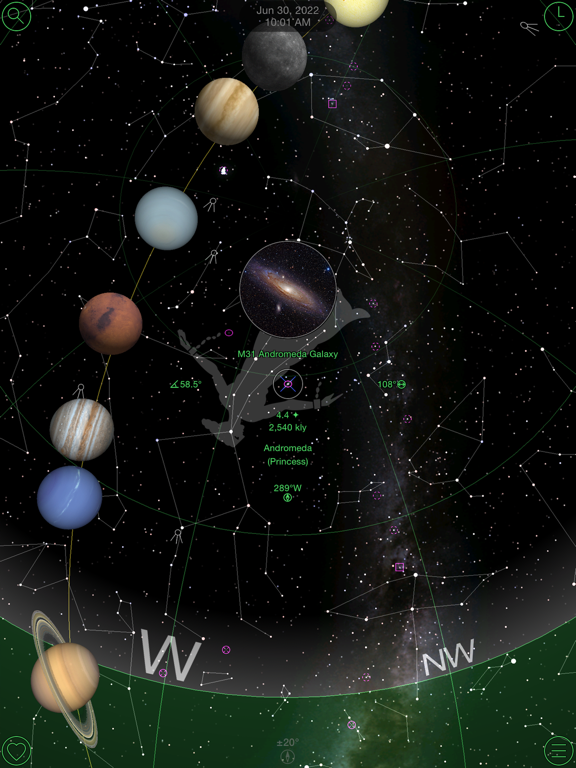
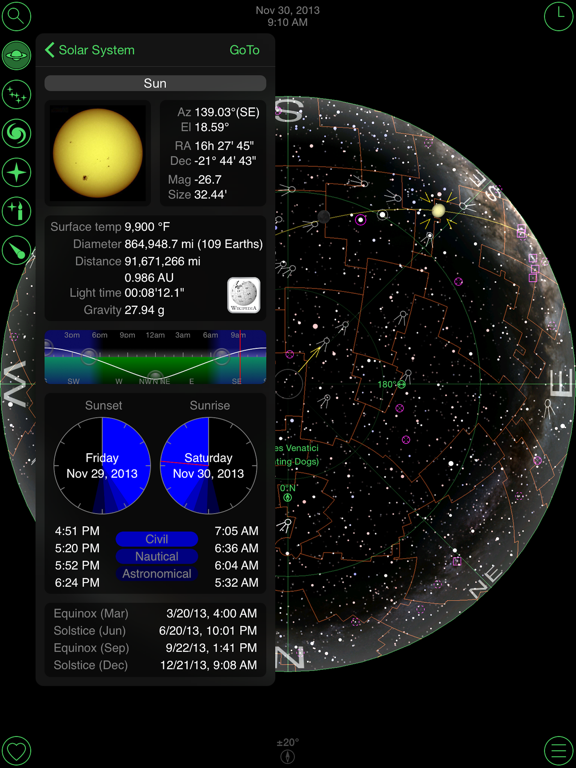
- This app allows users to easily and quickly identify and locate stars, planets, comets, constellations, galaxies and more by simply pointing to the sky. It provides a range of features including touchless navigation, popup images, and a full 180 degree display.
- Best for
-
- someone who wants to learn about astronomy
- stargazers
- outdoor enthusiasts
- At a glance
-
- $3.99
Categories and search queries
Official categories
- Navigation
- Education
AppCorpus categories
Key functions
| Function | Availability | Access | Scope | Evidence |
|---|---|---|---|---|
| Family Sharing | Yes | Unknown | App Store | Store published |
Screens
App Store
15 store screenshots


Pricing & paywalls
App Store
- Price: $3.99
Ratings & reviews
App Store
-
5/5GoSkyWatch (I apparently rated this sometime ago)
Fantastic!!! Best program of its kind that I have found. The more I use it the more I discover things that it is capable of doing. (Like tracing out the sun Analemma as a function of time.) I input my own location with a high degree of accuracy and find extremely good accuracy in everything else that it calculates. I find the accuracy of the program to be Impressive. The display is very realistic as to the relative brightness of the stars and constellations, just the way you see them. I feel you are to be congratulated for creating such a versatile program. Being able to choose between ordinary time, the mean solar day or sidereal days is very useful. In fact, that is what allows you to see the Analemma traced out over the course of a year with a time function of your choosing with a simple flick of your finger.
Marymeek · 30 Aug 2026
-
5/5I simply love this app.
This app is a joy to learn. It’s intuitive enough that I figured much of it out just by trying, and it did not seem like I had to struggle much. It’s well designed, very responsive, and has all kinds of useful information. On cloudy nights when the telescope isn’t an option I simply “virtually stargaze” with this app. For someone just starting out this is a perfect way to begin to learn about astronomy. I downloaded this app to help my family point a telescope at the night sky for the first time. After about an hour I was able to discover when and where the stars (and planets) rise and set, and I used this information to successfully point the telescope using a compass heading and degrees of inclination. Both the compass and the level (for degrees of inclination) are available on a smartphone. If you are at all curious about the cosmos, download this app!
Curious Patrick · 30 Aug 2026
-
5/5This App really turned me on to astronomy.
I love it. I play with the controls all the time, spin it through time, watch the constellations circle with the seasons and time of day, follow the Milky Way, learn a lot about the motions of the sky and Earth. And of course all that info about celestial bodies. Amazing filtering and modes. It's just fascinating and well worth the upgrade to track comets. Has a red light mode, but kinda impractical unless the whole device is in night mode using Apple accessibility dimming. Not practical in a Dark Sky park where only red lights are allowed after dark. I hold this up to the sky outside at home, and I'm fine. I wish the center ID hotspot was MOVEABLE -- that would be a huge UX improvement. I strain to rotate an ipad with screen rotation on trying to train things into the center for the audio and visual identification. I wish the user view was more configurable so I can rest this on a table as if I were looking up at the sky. And better saved settings. Love it.
spinyriptide · 30 Aug 2026
-
5/5A perfectly good reason to get a smartphone
My original reason for my wife to upgrade to a smartphone was so she could get this app- she loves it, I enjoy it. One can instantly easily adjust a slider to change how many stars are displayed to match your weather or city light pollution conditions. This app is further perfected by the ability to pull up a star's info on wikipedia.
Überūser · 30 Aug 2026
-
3/5Your own “pocket stellarium”
This app really is elegant and easy to use. The only thing that keeps it from 5 out of 5 is the slippery clunkyness of the time and location interface. Fix that and PERHAPS icing on the cake add a geo specific horizon (solar parallax and proper motion drift? I don’t know) - THeN you have something to build another Stonehenge with! All the same - you want to be able to “see” the path of the sun under the earth at night? The realm of Osiris made “real”? There’s this app for that. Totally enjoyable and useful ecliptic positions.
dgetzin · 30 Aug 2026
Privacy & accessibility
App Store
Privacy
- No Details Provided Developer declared
Accessibility
No accessibility labels collected yet.
Versions
App Store
-
3.3
- iPhone 3GS compass support - Improved accelerometer navigation
-
3.4
- Night vision improvements - German language corrections - Preferences fix - Settings fix
-
4.0.1
*** Requires iPhone OS 3.1.3 or iPad OS 3.2 to install - Universal update for iPad, iPhone and iPod touch - Birthday star finder - All new streamlined controls - Ability to search stars and DSOs by name, distance and magnitude - Automatic location find on app startup - More cities added to built in cities list - Milky Way dims with star magnitude control - Single accelerometer/compass disable preference - Option to make text larger - More WikiPedia links - In app WikiPedia web browser (iPad only) - Night mode improvements - Improved graphics - German language correction - Touchless navigation starts below horizon
-
4.1
* Requires at least iPhone OS version 3.1.2 or iPad OS version 3.2 - Improved finder graphics - Improved performance - Star light date finder automatically advances to birthdate - Fix for low memory warning on iPad - Fix for object finder - Fix for location changes - Fix for iPad popovers
-
4.2
* iPhone 4 gyroscope control * iPhone 4 retina display updates * Motion navigation improvements: - Below horizon motion navigation - More accurate screen positioning with touch drag - Touch to freeze display in overhead mode - Double tap to exit motion control * Improved memory usage * Compass calibration message not shown when compass disabled * Bug fix for time control ephemeris data * Bug fix for location latitude/longitude changes
-
4.3
• Additional iPhone 4 retina display updates • Improved preferences night vision
-
4.4
- Moon phase calendar - Sun rise/set times - Interactive graphical ephemeris - Fix for Wikipedia links - Fix for date and time selection - Fix for time zone selection - Fix for compass calibration
-
4.5
*** Problems have been reported with this update on devices using iOS 3.2.2 or earlier. An update to address this problem will be available shortly. - French language improvements - German language improvements - Fix for crash when location cannot be found
-
4.6
- Spanish language - Italian language - Wikipedia local language links for stars and deep sky objects - Bug fix for devices using iOS 3.2.2 or earlier - Bug fix for motion control
-
5.0
- New iPad retina display support - Time lapse object tracking - Japanese language added - Chinese language added - Improved iPad Wikipedia browser - Local language Wikipedia links - Local language star names - Selectable background images - Magellanic clouds added - Improved location selection - Night mode improvements (iOS 5) - iOS 5 updates - Graphics updates - Bug fixes
-
5.1
Version 5.1 - Graphics updates - Bug fixes Version 5.0 - New iPad retina display support - Time lapse object tracking - Japanese language added - Chinese language added - Improved iPad Wikipedia browser - Local language Wikipedia links - Local language star names - Selectable background images - Magellanic clouds added - Improved location selection - Night mode improvements (iOS 5) - iOS 5 updates - Graphics updates - Bug fixes
-
5.2
Version 5.2 - Information button moved to center of screen. Touch center of screen or popup images to view object information. - Improved object targeting - Bug fixes Version 5.1 - Graphics updates - Bug fixes Version 5.0 - New iPad retina display support - Time lapse object tracking - Japanese language added - Chinese language added - Improved iPad Wikipedia browser - Local language Wikipedia links - Local language star names - Selectable background images - Magellanic clouds added - Improved location selection - Night mode improvements (iOS 5) - iOS 5 updates - Graphics updates - Bug fixes
-
6.0
- iPhone 5 widescreen display. - iOS 6 updates. - Requires iOS 4.3 or later.
-
6.1
- Comets including PANSTARRS and ISON - Danish language Note that some people have reported problems when editing the location list. If you do experience the problem the work around is to delete the app and re-download it. You will not be charged twice to re-download. Our apologies for not detecting this earlier. We will release an update to fix this as soon as possible.
-
6.1.1
- Comets including PanSTARRS and ISON - Danish language - Constellation boundary corrections - Location editing bug fix - Star data update - Online User's Guide - Wikipedia links for popular comets - Halley's comet added by popular request
-
6.2
- iOS 7 compatible - Comet data updates - Night mode improvements - Bug fixes See and track the International Space Station with our new companion app GoISSWatch. FREE download available now on the App Store.
-
7.0
- Native iOS 7 support - New iOS 7 look - Option to turn off screen text - Improved responsiveness for iOS 7 on older devices. - Automatic comet data updates - Revised comet magnitude estimates - Night mode improvements
-
7.1
Currently the motion control is not working properly with the new iPhone 6s and 6s plus. An update to address this has been submitted to Apple for review so hopefully it will be approved and available within the week. In the mean time motion control can be turned off in the preferences for manual control. - iOS 8 compatible - Popup 3D interactive planets - 3D planets added to sky view - Minor bug fix when returning from background. - iOS 7.1 motion updates.
-
8.0
- Compass alignment fix for iPhone 6s / 6s Plus - iOS 9 updates - Native iPhone 6 and iPhone 6 Plus support - Updated images A recent review incorrectly states that the location is always tracked the background. Location is only used when the app is first started to correctly set the sky view and is then turned off to save power. Due to recent iOS security changes any app not updated for iOS 8 or later will default to showing location "Always" even if it is not always used. This version has been updated for "While Using the App" location access.
-
8.1
- iPad Pro support - iOS 9.1 updates - Time lapse control bug fix - Comet updates
-
9.0
- Faster motion tracking - Pluto 3D image updated - iOS updates - Bug fixes
-
9.1
- Screenshot updates
-
9.2
- iOS updates
-
9.3
iOS Updates
-
9.4
· 9 Aug 2020
- Added tap to expend telescope view - Added tap compass button to toggle motion control - Updated icons - Fade out home bar - Fix to manual location coordinate entry - iOS Updates
Alternatives
- Light Pollution Map — Same category + similar ratings
- Star Tracker - Night Sky Map — Same category + similar ratings
- FAAwait — Same category + similar ratings
- Sun Seeker - Sunlight Tracker — Same category + similar ratings
- Theodolite — Same category + similar ratings
- PeakFinder — Same category + similar ratings
Availability by market
- US
Data quality & evidence
- Page completeness
- Independent summary published
- Last verified
- 30 Aug 2026
- Sources
- App Store