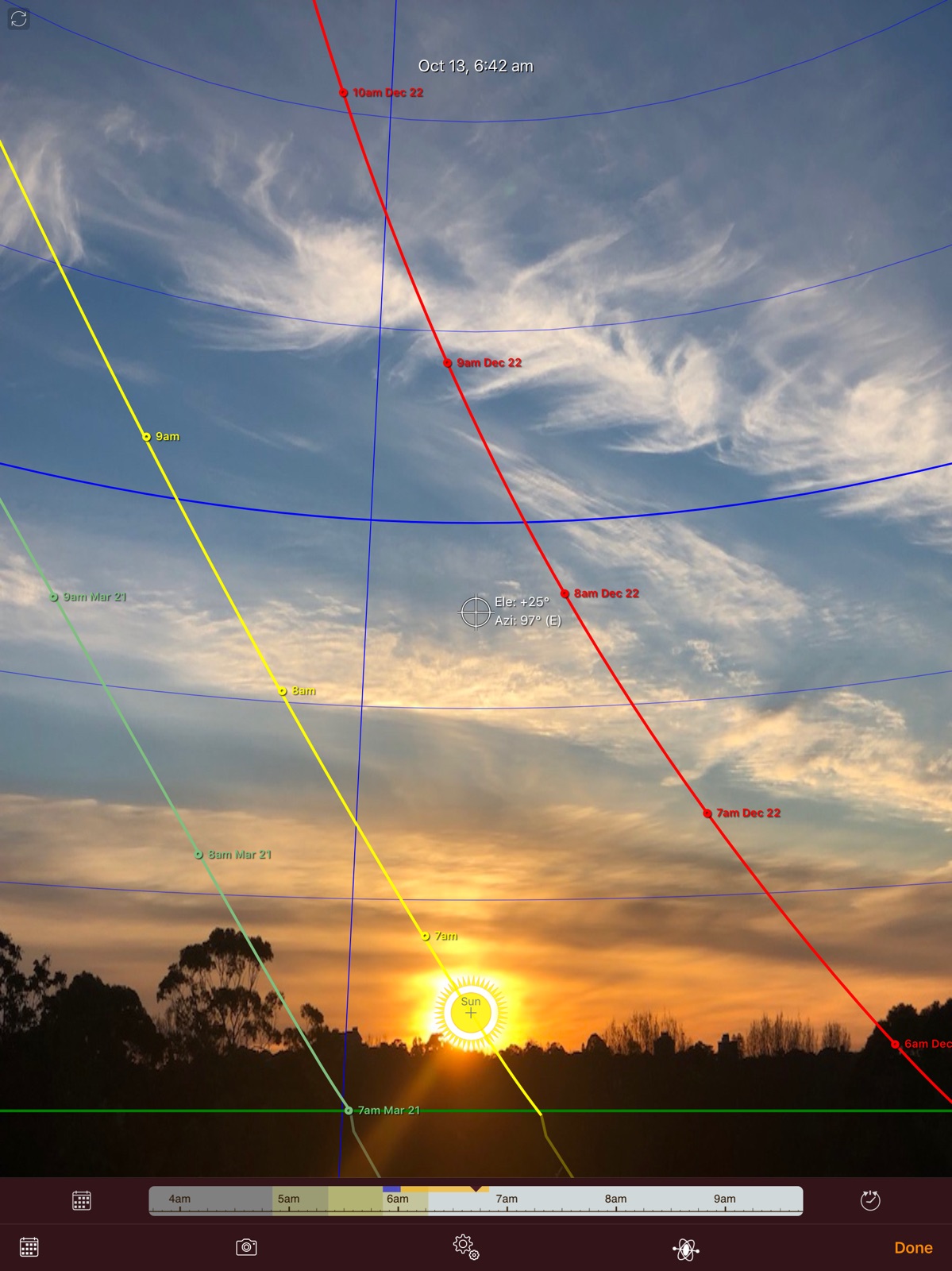
Apoku MCP provides app discovery, detailed cards, evidence, sources and screenshots where available. Unknown or conflicting prices stay explicit.
View JSON
GET /api/v3/apps/330247123
{
  "app_id": 330247123,
  "canonical_url": "https://appcorpus.com/apps/sun-seeker-sunlight-tracker-330247123",
  "identity": {
    "name": "Sun Seeker - Sunlight Tracker",
    "slug": "sun-seeker-sunlight-tracker",
    "developer": {
      "name": "ozPDA",
      "url": "https://appcorpus.com/developers/ozpda-developer_58853c8746bc4c0853e8ce235d864522"
    },
    "icon_url": "https://is1-ssl.mzstatic.com/image/thumb/Purple221/v4/03/c5/e5/03c5e581-da4a-03cd-c572-9a6711556501/AppIcon-0-0-1x_U007epad-0-1-0-85-220.png/512x512bb.jpg",
    "stores": [
      "apple"
    ],
    "platforms": [
      "iphone",
      "ipad"
    ],
    "status": {
      "state": "active",
      "label": "Active",
      "last_checked": "2026-09-29",
      "last_checked_label": "29 Sep 2026",
      "banner": null,
      "region_note": null,
      "data_state": "stale",
      "data_state_label": "Some store data may be out of date"
    }
  },
  "listings": [
    {
      "store": "apple",
      "status": "ACTIVE",
      "url": "https://apps.apple.com/us/app/sun-seeker-sunlight-tracker/id330247123?uo=4",
      "rating": 4.8,
      "rating_count": 12922,
      "formatted_price": "$11.99",
      "is_free": false,
      "has_iap": false,
      "has_subscription": null,
      "version": "8.1.2",
      "updated": "2026-09-29",
      "currency": "USD"
    }
  ],
  "summary": {
    "one_liner": "Track the sun's position and path for various activities",
    "summary": "Sun Seeker is a solar tracking app that provides hourly direction intervals, sunrise and sunset times, and golden hour information. It is useful for planning photography shoots, finding optimal planting locations, and tracking the sun's path for camping and other outdoor activities.",
    "best_for": [
      "photographers",
      "campers",
      "gardeners"
    ],
    "not_for": [],
    "status": "published",
    "at_a_glance": [
      "$11.99"
    ]
  },
  "categories": {
    "official": [
      "Navigation",
      "Photo & Video"
    ],
    "appcorpus": [
      {
        "category_id": "navigation",
        "label": "Navigation",
        "url": "https://appcorpus.com/categories/navigation"
      },
      {
        "category_id": "photo-video",
        "label": "Photo & video",
        "url": "https://appcorpus.com/categories/photo-video"
      }
    ]
  },
  "use_cases": [],
  "features": [
    {
      "capability_id": "family_sharing",
      "label": "Family Sharing",
      "availability": "unknown",
      "access_level": "unknown",
      "scope": null,
      "evidence": "Store published"
    }
  ],
  "pricing": [
    {
      "store": "apple",
      "formatted_price": "$11.99",
      "is_free": false,
      "has_iap": false,
      "has_subscription": null,
      "currency": "USD",
      "market": "us",
      "last_verified": "2026-09-29",
      "rows": [
        "Price: $11.99"
      ],
      "state": "current"
    }
  ],
  "screens": [
    {
      "url": "https://is1-ssl.mzstatic.com/image/thumb/Purple221/v4/e4/0a/a8/e40aa88e-e894-dc8d-a9f4-98dae41ea970/pr_source.png/1600x1600bb.jpg",
      "store": "apple",
      "platform": "ipad",
      "alt": "Sun Seeker - Sunlight Tracker ipad screenshot 1"
    },
    {
      "url": "https://is1-ssl.mzstatic.com/image/thumb/Purple211/v4/47/15/b9/4715b975-c2f2-b8c5-5b52-e9ba07eae875/mzl.prtijkng.png/576x768bb.png",
      "store": "apple",
      "platform": "ipad",
      "alt": "Sun Seeker - Sunlight Tracker ipad screenshot 2"
    },
    {
      "url": "https://is1-ssl.mzstatic.com/image/thumb/Purple221/v4/78/6b/7f/786b7f67-95ff-9e7b-3d80-96b060893292/pr_source.png/1600x1600bb.jpg",
      "store": "apple",
      "platform": "ipad",
      "alt": "Sun Seeker - Sunlight Tracker ipad screenshot 3"
    },
    {
      "url": "https://is1-ssl.mzstatic.com/image/thumb/Purple211/v4/2b/07/ac/2b07ac6c-3061-d8ca-3ecb-cf3586a74f89/mzl.yclsqzqz.png/576x768bb.png",
      "store": "apple",
      "platform": "ipad",
      "alt": "Sun Seeker - Sunlight Tracker ipad screenshot 4"
    },
    {
      "url": "https://is1-ssl.mzstatic.com/image/thumb/Purple221/v4/2b/aa/0e/2baa0ef3-5bee-401c-4df8-1dba86c7cbd6/pr_source.png/1600x1600bb.jpg",
      "store": "apple",
      "platform": "ipad",
      "alt": "Sun Seeker - Sunlight Tracker ipad screenshot 5"
    },
    {
      "url": "https://is1-ssl.mzstatic.com/image/thumb/Purple221/v4/49/6a/e8/496ae822-3db2-a9df-3264-a7c6b5b6082a/mzl.xmgeyudh.png/552x414bb.png",
      "store": "apple",
      "platform": "ipad",
      "alt": "Sun Seeker - Sunlight Tracker ipad screenshot 6"
    },
    {
      "url": "https://is1-ssl.mzstatic.com/image/thumb/Purple221/v4/80/3d/67/803d67a9-9986-c511-0e63-dabf2d3391ae/pr_source.png/1600x1600bb.jpg",
      "store": "apple",
      "platform": "ipad",
      "alt": "Sun Seeker - Sunlight Tracker ipad screenshot 7"
    },
    {
      "url": "https://is1-ssl.mzstatic.com/image/thumb/Purple211/v4/aa/5b/10/aa5b10b0-d548-60ba-d954-8fed5c9b0542/mzl.oyugjdml.png/552x414bb.png",
      "store": "apple",
      "platform": "ipad",
      "alt": "Sun Seeker - Sunlight Tracker ipad screenshot 8"
    },
    {
      "url": "https://is1-ssl.mzstatic.com/image/thumb/Purple211/v4/fc/68/bf/fc68bffe-971c-09fc-e31a-fd72f69febdb/pr_source.png/1600x1600bb.jpg",
      "store": "apple",
      "platform": "ipad",
      "alt": "Sun Seeker - Sunlight Tracker ipad screenshot 9"
    },
    {
      "url": "https://is1-ssl.mzstatic.com/image/thumb/Purple211/v4/3c/af/3d/3caf3df4-4533-7e6e-7c37-7f5b2d5e32c8/mzl.whmisxuh.png/552x414bb.png",
      "store": "apple",
      "platform": "ipad",
      "alt": "Sun Seeker - Sunlight Tracker ipad screenshot 10"
    },
    {
      "url": "https://is1-ssl.mzstatic.com/image/thumb/Purple211/v4/3b/8d/b1/3b8db15b-b2ed-7315-507e-da0335409ed8/pr_source.png/1600x1600bb.jpg",
      "store": "apple",
      "platform": "ipad",
      "alt": "Sun Seeker - Sunlight Tracker ipad screenshot 11"
    },
    {
      "url": "https://is1-ssl.mzstatic.com/image/thumb/Purple211/v4/ca/1d/d7/ca1dd7d8-76c3-3126-67fe-7fcca4e18376/mzl.nvaifsif.png/552x414bb.png",
      "store": "apple",
      "platform": "ipad",
      "alt": "Sun Seeker - Sunlight Tracker ipad screenshot 12"
    },
    {
      "url": "https://is1-ssl.mzstatic.com/image/thumb/Purple211/v4/69/5f/4e/695f4e4e-e594-eb48-9dc6-33bfe7de0e34/pr_source.png/1600x1600bb.jpg",
      "store": "apple",
      "platform": "ipad",
      "alt": "Sun Seeker - Sunlight Tracker ipad screenshot 13"
    },
    {
      "url": "https://is1-ssl.mzstatic.com/image/thumb/Purple221/v4/7a/01/ac/7a01ac12-c17e-b6fa-6a4e-6dacaa7a8d08/mzl.akftqcgp.png/552x414bb.png",
      "store": "apple",
      "platform": "ipad",
      "alt": "Sun Seeker - Sunlight Tracker ipad screenshot 14"
    },
    {
      "url": "https://is1-ssl.mzstatic.com/image/thumb/Purple221/v4/8f/35/3c/8f353cbb-6d07-c02e-0845-053d95c7b76c/pr_source.png/1600x1600bb.jpg",
      "store": "apple",
      "platform": "ipad",
      "alt": "Sun Seeker - Sunlight Tracker ipad screenshot 15"
    },
    {
      "url": "https://is1-ssl.mzstatic.com/image/thumb/Purple221/v4/fb/65/1c/fb651cb2-8c32-c595-8819-ea7ce42c2e56/mzl.rsanyfpo.png/552x414bb.png",
      "store": "apple",
      "platform": "ipad",
      "alt": "Sun Seeker - Sunlight Tracker ipad screenshot 16"
    },
    {
      "url": "https://is1-ssl.mzstatic.com/image/thumb/Purple211/v4/06/b8/72/06b872bf-2995-2a7a-7a3c-a536b4691a27/pr_source.png/1600x1600bb.jpg",
      "store": "apple",
      "platform": "ipad",
      "alt": "Sun Seeker - Sunlight Tracker ipad screenshot 17"
    },
    {
      "url": "https://is1-ssl.mzstatic.com/image/thumb/Purple221/v4/60/a9/a5/60a9a54a-4597-506d-9690-dd2a1582bc27/mzl.onkviree.png/552x414bb.png",
      "store": "apple",
      "platform": "ipad",
      "alt": "Sun Seeker - Sunlight Tracker ipad screenshot 18"
    },
    {
      "url": "https://is1-ssl.mzstatic.com/image/thumb/Purple221/v4/9f/a2/67/9fa26716-cdb9-aeb9-e6a9-704c34b04f7a/pr_source.jpg/1125x1600bb.jpg",
      "store": "apple",
      "platform": "iphone",
      "alt": "Sun Seeker - Sunlight Tracker iphone screenshot 19"
    },
    {
      "url": "https://is1-ssl.mzstatic.com/image/thumb/Purple221/v4/0d/f6/db/0df6db3a-9097-4c62-7796-0efb0b11291f/pr_source.jpg/1125x1600bb.jpg",
      "store": "apple",
      "platform": "iphone",
      "alt": "Sun Seeker - Sunlight Tracker iphone screenshot 20"
    },
    {
      "url": "https://is1-ssl.mzstatic.com/image/thumb/Purple211/v4/c4/f7/59/c4f75997-8f18-9693-43bc-04c683266391/pr_source.jpg/1125x1600bb.jpg",
      "store": "apple",
      "platform": "iphone",
      "alt": "Sun Seeker - Sunlight Tracker iphone screenshot 21"
    },
    {
      "url": "https://is1-ssl.mzstatic.com/image/thumb/PurpleSource211/v4/bf/47/fa/bf47faaa-fa4d-4c3f-88c2-a3432580a6f8/9946d50f-96ea-4f0b-b92b-8ff67574a8f2_SunSeeker4.png/1125x1600bb.jpg",
      "store": "apple",
      "platform": "iphone",
      "alt": "Sun Seeker - Sunlight Tracker iphone screenshot 22"
    },
    {
      "url": "https://is1-ssl.mzstatic.com/image/thumb/Purple221/v4/63/4d/f2/634df2d2-9fa3-1e99-9280-d5a7f263edb5/pr_source.jpg/1125x1600bb.jpg",
      "store": "apple",
      "platform": "iphone",
      "alt": "Sun Seeker - Sunlight Tracker iphone screenshot 23"
    },
    {
      "url": "https://is1-ssl.mzstatic.com/image/thumb/Purple221/v4/12/ad/c8/12adc86c-42f9-546d-4865-6eddf11677bb/pr_source.jpg/1125x1600bb.jpg",
      "store": "apple",
      "platform": "iphone",
      "alt": "Sun Seeker - Sunlight Tracker iphone screenshot 24"
    },
    {
      "url": "https://is1-ssl.mzstatic.com/image/thumb/Purple211/v4/7c/3e/25/7c3e257d-6cc6-87c4-42dc-b61ae5457547/pr_source.jpg/1125x1600bb.jpg",
      "store": "apple",
      "platform": "iphone",
      "alt": "Sun Seeker - Sunlight Tracker iphone screenshot 25"
    },
    {
      "url": "https://is1-ssl.mzstatic.com/image/thumb/PurpleSource211/v4/c0/38/39/c038396f-9f33-2f91-54e7-adc9be160cc3/55a8d6d1-d6f5-4339-b00e-796d4f5a79f9_incoming-2A2CABC9-46F5-4406-A8B7-3C59A6607E28.PNG/396x484bb.jpg",
      "store": "apple",
      "platform": "watch",
      "alt": "Sun Seeker - Sunlight Tracker watch screenshot 26"
    },
    {
      "url": "https://is1-ssl.mzstatic.com/image/thumb/PurpleSource221/v4/78/3c/10/783c10dd-e62d-8a10-3d01-73e92ef90910/7791c1d3-59ee-45f8-9555-e0e138cb8595_incoming-403EA066-B728-4AC5-AF38-A42B2949276A.PNG/396x484bb.jpg",
      "store": "apple",
      "platform": "watch",
      "alt": "Sun Seeker - Sunlight Tracker watch screenshot 27"
    },
    {
      "url": "https://is1-ssl.mzstatic.com/image/thumb/PurpleSource211/v4/c0/2e/ee/c02eee78-3673-7b99-3e4d-8b01aa042bd2/9c5e7c13-33f6-4fd1-bd98-ea351cdfb70e_incoming-D4FB4B84-49B5-4903-BD7B-86B13124C61A.PNG/396x484bb.jpg",
      "store": "apple",
      "platform": "watch",
      "alt": "Sun Seeker - Sunlight Tracker watch screenshot 28"
    },
    {
      "url": "https://is1-ssl.mzstatic.com/image/thumb/PurpleSource221/v4/5f/97/47/5f97478d-9534-d6ff-274e-1b5e3399713e/0f52ec0f-e8d8-4306-864e-7189304ba55f_incoming-78E96AD2-F7F3-44A1-8EDE-AB457DBC9E3D.PNG/396x484bb.jpg",
      "store": "apple",
      "platform": "watch",
      "alt": "Sun Seeker - Sunlight Tracker watch screenshot 29"
    },
    {
      "url": "https://is1-ssl.mzstatic.com/image/thumb/PurpleSource211/v4/c1/96/1d/c1961dec-e2e9-5919-38fa-1ed387429608/699faa45-2c43-4723-a651-99fbb8a9538c_incoming-884B565B-ED9E-4DB6-996F-E5FFD21AD40D.PNG/396x484bb.jpg",
      "store": "apple",
      "platform": "watch",
      "alt": "Sun Seeker - Sunlight Tracker watch screenshot 30"
    }
  ],
  "data_states": {
    "screens": "current"
  },
  "ratings": [
    {
      "store": "apple",
      "average": 4.8,
      "count": 12922,
      "market": "us",
      "observed_at": "2026-09-29",
      "state": "current",
      "reviews": [
        {
          "rating": 5,
          "title": "Photographer’s/Real Estate must have",
          "body": "You would not think this powerful tool inside your pocket/cell phone could be so useful, but it truly is. As a professional photographer/videographer, I use it all the time to find The lighting I want for my shop. Especially on low budget shoots where they do not want to pay for my time to scout the location in advance, I can still know when to show up for the best lighting. As a REALTOR®,Many of my clients are seeking homes that face a particular direction. Sun Seeker absolutely helps with that. From inside a location I can tell clients where to look for the sun from any point in the house at any time of the year. Want to know if your rear deck will be too hot to eat at the height of summer?, I can tell you that. Want to know the best place to plant your garden? No problem. Want to know if a building is going to block the sun from you next December when the sun is lower on the horizon? No problem. Sunseeker is my go to application for this and so much more. I highly recommend it.",
          "author": "Ivan Machiz",
          "date": "29 Sep 2026"
        },
        {
          "rating": 5,
          "title": "Answer to a photographer’s prayers",
          "body": "I was looking for something which would tel me where the sun rises at any given place on any given day and I almost couldn’t believe that I found it in this app I first though it was a simple time of sunrise and sunset app like so many others but when I dove into it I realized that it would tell me sunrise locations and angle from your location and a lot of other stuff from any place on the globe The technology alone is fascinating but the ability to know where the sun rises on any day from any location is like gold to a photographer Thanks for the answer to my needs I will be putting this app to full use and saving a lot of time searching out locations by trial and error This app puts an end to that",
          "author": "jose glynn",
          "date": "29 Sep 2026"
        },
        {
          "rating": 5,
          "title": "If your a photographer just get it!",
          "body": "I have been using this app for years. It has save me days worth of work, trying to figure out when and where the sun will be.. the real world of you along with the sun charts allows you to know what time and where to be to put the sun behind a tree a building whatever your environment. Specifically for things like sunrise that you can’t see the trajectory of the sun until it’s already up, knowing the precise place where it will be coming from is an invaluable tool. I have recommended this app to anybody who is an environmental photographer even if it is not your main thing having access to this information, will save you an immense amount of time, just get it, seriously.",
          "author": "6_POTTS",
          "date": "29 Sep 2026"
        },
        {
          "rating": 5,
          "title": "Much improved app",
          "body": "I originally rated this app one star because it bombarded me with pop ups to rate it. So I did, one star. Because it was unusable. Thankfully an update fixed the developers over zealous need for ratings and the app is useful again. I recently used the app in Thailand where I’m searching for a piece of land with a view of the sunset over the mountains. It was indispensable as the realtor always told me the land met my requirements. Often times it did not and I showed them the proof. Even better, this app gives you sunset and sunrise paths for not only the current day but for other days and months throughout the year. This allowed me to see where the sunset would be for the time period I will be here, most of the winter. Excellent app well worth the cost.",
          "author": "Scooter 82",
          "date": "29 Sep 2026"
        },
        {
          "rating": 5,
          "title": "I love this app",
          "body": "I’ve always been fascinated by weather, stars and sky phenomena and when I discovered this app I was just delighted. Especially because of the 3-D feature where you can lift the phone and find out where the sun is even on a cloudy day. But I actually found it useful when my daughter was looking for a house to buy and we were able to charge which direction it was facing and where the sun would be in any given season. Providing great insight into how the house would handle the various seasons, as sunlight and where it falls can make your house too hot or too cold.",
          "author": "timkenney",
          "date": "29 Sep 2026"
        }
      ]
    }
  ],
  "privacy": [
    {
      "store": "apple",
      "declarations": [
        {
          "title": "Data Linked to You",
          "detail": "Third-Party Advertising — Location — Coarse Location",
          "source": "Developer declared"
        },
        {
          "title": "Data Linked to You",
          "detail": "Location",
          "source": "Developer declared"
        },
        {
          "title": "Data Not Linked to You",
          "detail": "App Functionality — Diagnostics — Crash Data",
          "source": "Developer declared"
        },
        {
          "title": "Data Not Linked to You",
          "detail": "Diagnostics",
          "source": "Developer declared"
        }
      ],
      "accessibility": []
    }
  ],
  "changes": [
    {
      "store": "apple",
      "version": "6.4.4",
      "released_at": null,
      "notes": "v6.4.4 * Minor fixes"
    },
    {
      "store": "apple",
      "version": "6.4.5",
      "released_at": null,
      "notes": "v6.4.5 * Minor enhancements"
    },
    {
      "store": "apple",
      "version": "6.4.6",
      "released_at": null,
      "notes": "v6.4.6 * Updated and optimised for latest iOS release * Added Spanish user interface translation"
    },
    {
      "store": "apple",
      "version": "6.4.7",
      "released_at": null,
      "notes": "v6.4.7 * IMPROVED - Tapping on share button Maps now shows a menu with option to share either a screenshot of the map or else the map location. * FIXED - Solstice path data may sometimes have kept showing data for the device's previous location after a major change of location."
    },
    {
      "store": "apple",
      "version": "6.4.8",
      "released_at": null,
      "notes": "v6.4.8 * IMPROVED - Tapping on share button Maps now shows a menu with option to share either a screenshot of the map or else the map location. * FIXED - Solstice path data may sometimes have kept showing data for the device's previous location after a major change of location. * FIXED - Possible crash when trying to share location on iPadOS"
    },
    {
      "store": "apple",
      "version": "6.4.9",
      "released_at": null,
      "notes": "v6.4.9 * Minor fixes"
    },
    {
      "store": "apple",
      "version": "6.5",
      "released_at": null,
      "notes": "v6.5 * Minor fixes and updates"
    },
    {
      "store": "apple",
      "version": "6.6",
      "released_at": null,
      "notes": "v6.6 * NEW - Added a new Data Table to Details view - Azimuths at Rise/Set, giving the direction of the sun at time of rise and set for each day of the year."
    },
    {
      "store": "apple",
      "version": "6.7",
      "released_at": null,
      "notes": "v6.7 * NEW - Now includes a watch app with choice of several views, including a compass dial view which transitions to 3D view when holding the wrist up. Also includes text and circular complications showing solar elevation and data, as well as for iOS lock screen."
    },
    {
      "store": "apple",
      "version": "6.8",
      "released_at": null,
      "notes": "v6.8 * Optimisations and minor fixes for iOS17"
    },
    {
      "store": "apple",
      "version": "6.8.2",
      "released_at": null,
      "notes": "v6.8.2 * Minor fixes and translation updates"
    },
    {
      "store": "apple",
      "version": "7.0",
      "released_at": null,
      "notes": "v7.0 * NEW - The flat compass view can now be locked/unlocked with North to top by tapping on heading label at top of compass. * IMPROVED - Watch app has been optimised for recent watch models and iOS versions * FIXED - Solar clock widget could sometimes fail to display day/night and twilight phases when local solar noon was far from clock noon. * Several other minor fixes and enhancements"
    },
    {
      "store": "apple",
      "version": "7.1",
      "released_at": null,
      "notes": "v7.1 * NEW - Clear Sky UV and Solar Irradiance now shown on main screen (can be toggled with path length and shadow length by tapping on them) * NEW - Tabulation “Max UV and Insolation” - gives Climatological Max Clear Sky UV Index and Daily Incidental Insolation (kWh/m2) by day, for the year. * NEW - Added a new lock screen widget with solar progress on outer clock ring with UV index in center (similar to existing clock showing solar elevation) * NEW - Added current UV and Irradiance to large clock widget * NEW - Added current UV and Irradiance to watch app’s clock view * IMPROVED - In-app list of cities (available offline) has been refreshed and expanded to include 66,000+ locations, and now includes city altitude. * IMPROVED - Location altitudes are looked up online whenever user adds a new location from the Map. This is especially useful for improving UV index calculations where the location has a significant altitude above sea level. * IMPROVED - Now allow tap on “Rose/Sets” titles to toggle display in same way as tapping on the values fields on their right. * IMPROVED - App icon now has a light, dark and tinted version for iOS 18+."
    },
    {
      "store": "apple",
      "version": "7.1.1",
      "released_at": null,
      "notes": "v7.1.1 * Metadata changes"
    },
    {
      "store": "apple",
      "version": "7.1.2",
      "released_at": null,
      "notes": "v7.1.2 * Metadata changes"
    },
    {
      "store": "apple",
      "version": "7.1.3",
      "released_at": null,
      "notes": "v7.1.3 * Minor fixes and enhancements"
    },
    {
      "store": "apple",
      "version": "7.1.4",
      "released_at": null,
      "notes": "v7.1.4 * Several minor fixes"
    },
    {
      "store": "apple",
      "version": "7.2",
      "released_at": null,
      "notes": "v7.2 * Minor fixes and enhancements"
    },
    {
      "store": "apple",
      "version": "7.2.1",
      "released_at": null,
      "notes": "v7.2.1 * Improved map search * Minor enhancements We continue to refine and enhance Sun Seeker. Thanks for your support and enthusiasm!"
    },
    {
      "store": "apple",
      "version": "8.0",
      "released_at": null,
      "notes": "v8.0 NEW - Details / Data Tables now includes Solar and Lunar Eclipses, listing recent and forthcoming eclipses and for each one providing exact timing details, including whether or not visible from the current (or selected) location."
    }
  ],
  "alternatives": [
    {
      "app_id": 761295311,
      "name": "SunCalc.net",
      "url": "https://appcorpus.com/apps/suncalc-net-761295311",
      "reason": "Same category + similar ratings"
    },
    {
      "app_id": 1474484447,
      "name": "Locationscout - Photo Spots",
      "url": "https://appcorpus.com/apps/locationscout-photo-spots-1474484447",
      "reason": "Same category + similar ratings"
    },
    {
      "app_id": 339393884,
      "name": "Theodolite",
      "url": "https://appcorpus.com/apps/theodolite-339393884",
      "reason": "Same category + similar ratings"
    },
    {
      "app_id": 357421934,
      "name": "PeakFinder",
      "url": "https://appcorpus.com/apps/peakfinder-357421934",
      "reason": "Same category + similar ratings"
    },
    {
      "app_id": 1450827787,
      "name": "AmiGo Travel: Tips & Guides",
      "url": "https://appcorpus.com/apps/amigo-travel-tips-guides-1450827787",
      "reason": "Same category + similar ratings"
    },
    {
      "app_id": 1530464858,
      "name": "Light Pollution Map",
      "url": "https://appcorpus.com/apps/light-pollution-map-1530464858",
      "reason": "Same category + similar ratings"
    }
  ],
  "evidence_summary": {
    "index_state": "S2",
    "evidence_level": 2,
    "level_label": "Apoku summary published",
    "indexable": true,
    "last_verified_at": "2026-09-29",
    "unknown_fields": [],
    "sources": [
      "App Store"
    ]
  },
  "availability_markets": {
    "live": [
      "us"
    ],
    "selected": "us",
    "note": null
  },
  "feature_events": {
    "events": []
  },
  "features_slice": {
    "plans": [],
    "features": [],
    "unknown_features": [],
    "data_cutoff": "29 Sep 2026"
  }
}