
Quick verdict
- What it is
- Store information collected; an Apoku editorial summary is not yet published.
- At a glance
-
- Free to download
Categories and search queries
Official categories
- Productivity
- Business
Apoku categories
Key functions
| Function | Availability | Access | Scope | Evidence |
|---|---|---|---|---|
| Free app | Yes | Free | Context-specific | Store published |
Screens
13 store screenshots

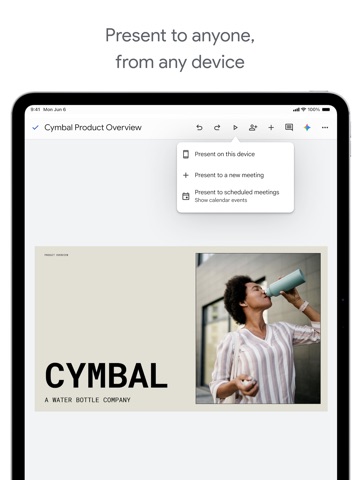

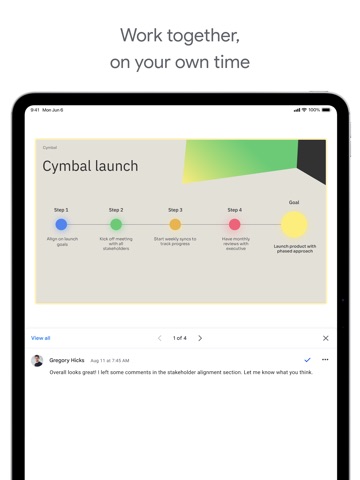
7 store screenshots


Pricing & paywalls
- Free to download
- Free to download
Ratings & reviews
-
5/5Multiple photo uploads at a time would make it better.
I use google slides for all of my classroom presentations. I also have my students use google slides to keep track of the artwork like a ongoing portfolio. The app makes it easy to drop single photos into the slide show without having to download photos or email them to yourself first. My only complaint about the app is that you cannot upload more than one photo at a time from your camera roll. I take a lot of photos of artwork for my students and shuffling through hundreds of photos to get to things I took months ago can take a long time-it would be so helpful to be able to click on several photos at a time. I do the majority of my editing of my slides on a computer, I could edit from my phone but it is easier to fine tune things on a full computer. I primarily use the app to transfer the photos to my slides.
cardinalart · 29 Sep 2026
-
3/5Too many bugs on iPad & iPhone
I make a lot of things on google slides, so I thought the iPhone version would help me out… WRONG! This version of the software is very very buggy and limited! You can’t search the web to find photos, you have to screenshot them yourself! So many good features on the desktop version are thrown away for the App Store version!!! I would think that this was a rip-off made my different people if I didn’t know better!! Don’t get me started on the bugs, because they are horrible. Sometimes your work doesn’t save, which means you need to do everything AGAIN, which isn’t even that bad compared to clicking on things. If you click on something, for example, a shape, it’ll click on something far below or higher then where your finger actually was!! The worst part of all of this is the fact that they don’t even read any of these reviews! None of these problems have been fixed!!! So, to the person reading this I’d like to say, DON’T WASTE YOUR STORAGE ON THIS APP!!!! Update: So for the first time ever, a few things were fixed. Luckily enough, I actually did get a response, and they have fixed a few bugs and added a few new features. HOWEVER they still need to fix a lot of things and add more features
₵ØØⱠ ӾⱠ · 29 Sep 2026
-
2/5Accessibility with VoiceOver
Great program as far as features are concerned. However, as a VoiceOver user, I have some concerns. When I create a presentation, and try to type in the center title area, or anywhere else, I cannot seem to type anything. There is no real text field to type in, and the cut and copy actions are not very useable. VoiceOver will anounce what the cursor is on, for example, slide 1 center title, but if you double tap it, which is the VoiceOver command for clicking it, it does not activate for me to type in. I can select and unselect it. I have tried using a bluetooth keyboard, an onscreen keyboard, and a braille display, with no success. I cannot seem to be able to swipe or arrow through the areas to type in correctly, or type or add anything with VoiceOver. I also do not see any accessibility settings that I can use, so I am wondering if some can be added, or a separate app can be created, as Drive, Docs, and Classroom are all accessible, but nothing else seems to be. I do not have the answers to everything, but there are other sources. At the moment, the only slide show program accessible is Powerpoint on Windows XP. Me, and many others would really benefit from being able to create presentations, especially in education, and work. If this becomes more accessible, I will be more than willing to promote it on accessibility forems, or discuss it with people looking for accessibility in different software. Also, I really appreciated the HTML view option for slides, you can kind of read a slide show with a screen reader, but the kinks have not really been ironed out, and the text view is much more helpful. Thank you.
Dryatofa · 29 Sep 2026
-
2/5Not optimized for the iPad.
You cant change the background color, only the theme, you have limited color options for text and gradient. No, you can't create your own colors. You can't animate text and its hard to put pictures and text on different layers(ie. send to back/send to front). This feels like something to be used alongside the computer version instead of standalone. I only have my iPad for school work and i haven't been supplied technology so im just stuck. I have to ask other people who have computers to borrow theirs just to change the colors on my background and create custom colors and add them to my theme. THIS IS AN ACCESORY NOT A FULL ITEM. The thing is, this could be easily fixed. This worst laptops can run google sliders so Performance issues isn't the issue. A phone or an iPad, especially the big and chunky ones, can totally handle a fully optimized google slides. Proof? Canva and powerdirector. They have so much stuff and great functionality, but most importantly, they have a fully optimized service that's the same on the ipad and computer(except for the fact that some of the functions are different). This is just pure laziness, and im sick of it.
technically.galaxy · 29 Sep 2026
-
3/5Good, Could be Better.
Well I’ve always enjoyed writing little books and things like that, but you see the problem with google slides is, well this is kind of hard to say but it doesn't represent something you would use as to write or draw due to bugs and things like that, im sure with all these little new updates etc. they will be fixed, but it just doesn't seem that way really, all the updates say bugs fixed and improvements and it really just seems like a throw off, I keep getting suggestions and auto correct from slides that are wrong and are up to me to fix, my pictures really don't seem to feel like uploading themselves and these problems have really been bugging me and i’m sure many other people can agree with this claim. anyways this rating was mostly complains but the app isn’t all that bad, of course like everything, it has it’s ups and downs, but it really is a great way to write and do things like homework and etc, with online school right around the corner im sure it will be useful. Thank you for reading my little rating, I hope it helps you.
luca7232 · 29 Sep 2026
-
5/5
helpful
Ayush Sharda (Fantoos) · 1 Aug 2026
-
2/5
I wanted to like this app, I used to use it a lot back then on a school iPad for assignments and other things, and eventually came up with a personal project to use this for, so I downloaded it onto my phone thinking the ui would be the same as the iPad, and at first it was until I realized it was missing features, the most prominent missing is the ability to change ethe default color/master editor or whatever it is, it's kind of silly to strip features from a mobile version that are on others.
Nevaeh Lynch (Jax) · 1 Aug 2026
-
4/5
not more features in mobile app
Modicare's Magnate · 1 Aug 2026
-
5/5
I like it
bosbos 303 · 1 Aug 2026
-
5/5
خبز ولا
F O B Y A · 1 Aug 2026
Privacy & accessibility
Privacy
- Data Linked to You — Analytics — Contact Info — Email Address Developer declared
- Data Linked to You — Analytics — Contacts Developer declared
- Data Linked to You — Analytics — Diagnostics — Crash Data Developer declared
- Data Linked to You — Analytics — Diagnostics — Other Diagnostic Data Developer declared
- Data Linked to You — Analytics — Diagnostics — Performance Data Developer declared
- Data Linked to You — Analytics — Identifiers — Device ID Developer declared
- Data Linked to You — Analytics — Identifiers — User ID Developer declared
- Data Linked to You — Analytics — Location — Coarse Location Developer declared
- Data Linked to You — Analytics — Other Data — Other Data Types Developer declared
- Data Linked to You — Analytics — Search History Developer declared
- Data Linked to You — Analytics — Usage Data — Product Interaction Developer declared
- Data Linked to You — Analytics — User Content — Customer Support Developer declared
- Data Linked to You — Analytics — User Content — Other User Content Developer declared
- Data Linked to You — Analytics — User Content — Photos or Videos Developer declared
- Data Linked to You — App Functionality — Contact Info — Email Address Developer declared
- Data Linked to You — App Functionality — Contact Info — Name Developer declared
- Data Linked to You — App Functionality — Contact Info — Phone Number Developer declared
- Data Linked to You — App Functionality — Contact Info — Physical Address Developer declared
- Data Linked to You — App Functionality — Contacts Developer declared
- Data Linked to You — App Functionality — Diagnostics — Crash Data Developer declared
- Data Linked to You — App Functionality — Diagnostics — Other Diagnostic Data Developer declared
- Data Linked to You — App Functionality — Diagnostics — Performance Data Developer declared
- Data Linked to You — App Functionality — Identifiers — Device ID Developer declared
- Data Linked to You — App Functionality — Identifiers — User ID Developer declared
- Data Linked to You — App Functionality — Location — Coarse Location Developer declared
- Data Linked to You — App Functionality — Other Data — Other Data Types Developer declared
- Data Linked to You — App Functionality — Search History Developer declared
- Data Linked to You — App Functionality — Usage Data — Product Interaction Developer declared
- Data Linked to You — App Functionality — User Content — Customer Support Developer declared
- Data Linked to You — App Functionality — User Content — Other User Content Developer declared
- Data Linked to You — App Functionality — User Content — Photos or Videos Developer declared
- Data Linked to You — Product Personalization — Contacts Developer declared
- Data Linked to You — Product Personalization — Identifiers — Device ID Developer declared
- Data Linked to You — Product Personalization — Identifiers — User ID Developer declared
- Data Linked to You — Product Personalization — Search History Developer declared
- Data Linked to You — Product Personalization — Usage Data — Product Interaction Developer declared
- Data Linked to You — Product Personalization — User Content — Other User Content Developer declared
- Data Linked to You — Contact Info Developer declared
- Data Linked to You — Contacts Developer declared
- Data Linked to You — Diagnostics Developer declared
- Data Linked to You — Identifiers Developer declared
- Data Linked to You — Location Developer declared
- Data Linked to You — Other Data Developer declared
- Data Linked to You — Search History Developer declared
- Data Linked to You — Usage Data Developer declared
- Data Linked to You — User Content Developer declared
Accessibility
No accessibility labels collected yet.
Privacy
- Data collected — Account management — Audio — Voice or sound recordings Developer declared
- Data collected — Account management — Personal info — Address Developer declared
- Data collected — Account management — Personal info — Other info Developer declared
- Data collected — Account management — Personal info — Phone number Developer declared
- Data collected — Analytics — App info and performance — Crash logs Developer declared
- Data collected — Analytics — App info and performance — Diagnostics Developer declared
- Data collected — Analytics — App info and performance — Other app performance data Developer declared
- Data collected — Analytics, Fraud prevention, security, and compliance — App activity — Installed apps Developer declared
- Data collected — App functionality — Messages — Other in-app messages Developer declared
- Data collected — App functionality, Analytics — Files and docs Developer declared
- Data collected — App functionality, Analytics — Location — Approximate location Developer declared
- Data collected — App functionality, Analytics, Account management — Photos and videos — Photos Developer declared
- Data collected — App functionality, Analytics, Developer communications, Account management — Personal info — Email address Developer declared
- Data collected — App functionality, Analytics, Developer communications, Fraud prevention, security, and compliance, Personalization — App activity — App interactions Developer declared
- Data collected — App functionality, Analytics, Developer communications, Fraud prevention, security, and compliance, Personalization, Account management — Personal info — User IDs Developer declared
- Data collected — App functionality, Analytics, Fraud prevention, security, and compliance, Account management — Device or other IDs Developer declared
- Data collected — App functionality, Analytics, Personalization — App activity — In-app search history Developer declared
- Data collected — App functionality, Analytics, Personalization — App activity — Other user-generated content Developer declared
- Data collected — App functionality, Analytics, Personalization, Account management — Contacts Developer declared
- Data collected — App functionality, Developer communications, Account management — Personal info — Name Developer declared
- Data collected — App functionality, Fraud prevention, security, and compliance — App activity — Other actions Developer declared
- Security practices — Your data is transferred over a secure connection — Data is encrypted in transit Developer declared
- Security practices — This app has been independently validated against a global security standard. See details — Independent security review Developer declared
- Security practices — The developer provides a way for you to request that your data be deleted — You can request that data be deleted Developer declared
Accessibility
No accessibility labels collected yet.
Versions
App Store
-
1.2026.06100
* Security improvements, bug fixes, and performance improvements.
-
1.2026.06102
* Security improvements, bug fixes, and performance improvements.
-
1.2026.07103
* Security improvements, bug fixes, and performance improvements.
-
1.2026.07501
* Security improvements, bug fixes, and performance improvements.
-
1.2026.09100
* Security improvements, bug fixes, and performance improvements.
-
1.2026.10102
* Security improvements, bug fixes, and performance improvements.
-
1.2026.11102
* Security improvements, bug fixes, and performance improvements.
-
1.2026.12102
* Security improvements, bug fixes, and performance improvements.
-
1.2026.13104
* Security improvements, bug fixes, and performance improvements.
-
1.2026.14100
* Security improvements, bug fixes, and performance improvements.
-
1.2026.15101
* Security improvements, bug fixes, and performance improvements.
-
1.2026.16101
* Security improvements, bug fixes, and performance improvements.
-
1.2026.18100
* Security improvements, bug fixes, and performance improvements.
-
1.2026.19100
* Security improvements, bug fixes, and performance improvements.
-
1.2026.20100
* Security improvements, bug fixes, and performance improvements.
-
1.2026.21100
* Security improvements, bug fixes, and performance improvements.
-
1.2026.22200
* Security improvements, bug fixes, and performance improvements.
-
1.2026.23101
* Security improvements, bug fixes, and performance improvements.
-
1.2026.24100
* Security improvements, bug fixes, and performance improvements.
-
1.2026.25101
* Security improvements, bug fixes, and performance improvements.
-
1.2026.26101
* Security improvements, bug fixes, and performance improvements.
-
1.2026.27101
* Security improvements, bug fixes, and performance improvements.
-
1.2026.28100
* Security improvements, bug fixes, and performance improvements.
-
1.2026.29101
* Security improvements, bug fixes, and performance improvements.
-
1.2026.30100
· 27 Jul 2026
* Security improvements, bug fixes, and performance improvements.
-
1.2026.31101
* Security improvements, bug fixes, and performance improvements.
-
1.2026.32101
* Security improvements, bug fixes, and performance improvements.
-
1.2026.33100
* Security improvements, bug fixes, and performance improvements.
-
1.2026.34101
· 24 Aug 2026
* Security improvements, bug fixes, and performance improvements.
-
1.2026.35101
* Security improvements, bug fixes, and performance improvements.
-
1.2026.36101
* Security improvements, bug fixes, and performance improvements.
-
1.2026.36500
* Security improvements, bug fixes, and performance improvements.
-
1.2026.38102
· 21 Sep 2026
* Security improvements, bug fixes, and performance improvements.
-
1.2026.39100
· 28 Sep 2026
* Security improvements, bug fixes, and performance improvements.
Alternatives
- Forms for Google Docs — Same category + similar ratings
- Microsoft PowerPoint — Same category + similar ratings
- Saturn Calendar — Same category + similar ratings
- Miro: your visual workspace — Same category + similar ratings
- MyScript Notes: AI Handwriting — Same category + similar ratings
- Notability: AI Notes & Planner — Same category + similar ratings
Availability by market
- US
Data quality & evidence
- Page completeness
- Live store listing
- Last verified
- 30 Sep 2026
- Sources
- App Store, Google Play
- Apoku editorial summary has not been published yet.