
Quick verdict
- What it is
- Store information collected; independent summary not yet available.
- At a glance
-
- Free to download
- In-app purchases
Categories and search queries
Official categories
- Productivity
AppCorpus categories
Key functions
| Function | Availability | Access | Scope | Evidence |
|---|---|---|---|---|
| Free app | Yes | Free | — | Store published |
| In-app purchases | Yes | Limited free | — | Store published |
Screens
App Store
21 store screenshots


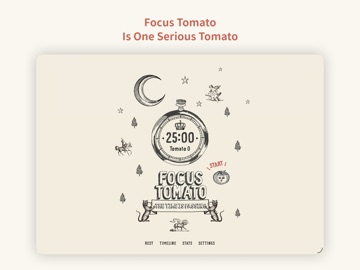
Pricing & paywalls
App Store
- Tomato King — $2.99
Ratings & reviews
App Store
-
5/5I can’t emphasize this enough YOU SHOULD GET THIS APP!!
This app + the “tomato master” in-app purchase has worked amazing wonders on me that no other app or thing has ever had. I’m currently in high school and I’ve always struggled with homework, have tried many different things to try to help myself with both focusing and to help me stay focused, but stuff never really worked. This app however, not only has worked for me, but works so well that it took me from someone who would spend an hour to finish 1 thing of double sided homework, to now 25 minutes to finish double sided homework. That is less then half the time! With the timer plus the purchaseable white noise feature I can now get a lot of work done at a better more reasonable time, all while staying sane too! The app is humorous and old timey in design, it encourages while you work which is very touching, and the white noise options really help the mind focus along with the timer. If you have read this until the end 1. Thank you and 2. Download this app and make the 1.99 in-app purchase! If my work/school life can change for the better simply from the use of this app, so can yours today!!!
Autumnus22 · 6 Aug 2026
-
5/5🌟Best Pomodoro Timer🌟
I rarely write reviews for apps. But, I’ll make an exception for this one. To put things in short, this timer is different from others visually, has simple interface, and it’s ads-free! For the visual, I find it very pleasing as it’s not minimalistic and plain boring. The art is very aesthetically pleasing and I can tell efforts were put into this. For the interface, beginners can instantly pick up where they need to start. The timer allows you to set however long you want your work session to be. You can also set your rest time to however you want. Compare to Focus Keeper, I think it’s overrated because you have to pay just to change the intervals of timers. In addition, while you are working, the app gives you a variety of options to play ambient sounds in the background; Works even if you exit the app! There are also no ads in for this background noise! Which brings me to my last point, that this is all free and has no ads in them! I believe that putting ads would ruins the whole atmosphere this app is intended to created. Bonus: You have an option to upgrade to Tomato King permanently for $2! Just $2. Even though I may not use the data feature a lot, I’ll buy it to support the creator of this app for their creativity and the vast utility this app has to offer. 🌞
Me291537911 · 6 Aug 2026
-
5/5Rustic pomodoro app
Simple and charming, visually appealing. No ads, no extravagant purchases or subscriptions nor ads. The one purchase is statistics, which let's you view total focus time over days to years. You can set the pomodoro for focusing time and rest at any time with ease. I love it! It really does help me. The only thing I would suggest is a tagging system for categorizing focus times and breaks quickly. From there, maybe more advanced statistics showing you a pie chart or bar breakdown of how you spent your recorded time that day. Statistics as they are are OK. Still bought the upgrade anyway, because you guys deserve it. Thank you so much!
atabearo · 6 Aug 2026
-
5/5Keeps me on track! A MUST HAVE for a writer!
If you’re doing NaNoWriMo, or you’re a writer who uses the Pomodoro method/writing Sprints to get your words on the page; this is the app you must have on your phone! It’s totally worth the $1.99 one-time fee to have the “upgraded” version that has a couple of images and more sounds . I use this anytime I want to knock out some writing time. Personally I go between the “rain” and the “coffeehouse” sounds. The ease of use for a 25 minute sprint and a quick 5 minute break is worth it. This is a great app. I’ve used it for years and am just not writing the review. Would give 6 stars if I could!
Mama2Nana · 6 Aug 2026
-
5/5Simple, Fun and Cool Pomodoro!!
I’ve tried a few focus apps but they were too complicated (like you ended up spending much more time on the app than actually working)..those apps defied the purposes of “focus” app a little bit. Tomato is different. I became so productive right away. I think mainly because the app has a super easy interface, no fuss, no hidden route or complicated tables/stats/sync function. I really appreciated this. Extra points for all these cool vintage/Western visuals and sound. Just amazing! After this review, I’ll pay for the one-time permanent upgrade (super cheap too!). Thanks, team, and keep going!
yvestree · 6 Aug 2026
Privacy & accessibility
App Store
Privacy
- Data Not Collected Developer declared
Accessibility
No accessibility labels collected yet.
Versions
App Store
-
3.2.1
"Time display format" is added in Settings; users can choose either “hour and minute” or “minute” on Today and when clicking the bar on Stats.
-
5.0
+ Support iPad (iPhone, iPad data is not synced) + "Timeline" added week
-
5.2
Important Updates + White noises (ambient sounds) will turn on automatically based on the previous option. + More white noises (ambient sounds) are added to the “King of tomato”: forest, train, hairdryer, grandfather clock, rain in the city, and keyboard. Others + Re-editing and fine-tuning all the white noises (ambient sounds). + Some folks say they are freaked out because the sound effect of successful focus is too loud. Volume is turned down currently and fine-tuning that of other sound effects. + Try to reduce the volume gap between white noises (ambient sounds) and the tomato’s cough when time is up; prevent freaking out when the tomato coughs. + Fix the bug that if the “display Zoom” of certain sizes of iPhone are set as “Zoomed”, the button is in the wrong position. + Add fade in and fade out to white noises (ambient sounds).
-
5.2.1
+ Re-editing the ambient sound of "Bonfire”. + Added ambient sound of "Classroom”.
-
5.2.2
+ iPad supports landscape mode.
-
5.2.3
+ Reorganize Settings page. + Add the Quick Start.
-
5.2.4
+ Update frequent questions. + Add Focus Tomato official website link.
-
5.2.5
+ Add compatible images for iPhone 14 Pro and Pro Max sizes. + Add rest image.
-
5.2.6
Partial texts and images retouching.
-
5.2.7
bug fix.
-
5.2.8
Optimize Timeline Performance and Revise Copy.
-
5.2.9
Corrected copywriting errors.
-
5.3
* Homepage Refresh:We've spruced up the homepage a bit. Now, you'll see "Today's Focused Tomato Count" instead of just time. The Pomodoro technique just got more intuitive, right? * TimeLine Page Bonus:We've added total focus time and tomato count to the end of each day's record. It's crystal clear, giving you a full sense of achievement every day. * New Perspective in Stats Page:We're showing not just the total focus time, but also the accumulated number of tomatoes. Because every tomato is proof of your effort. * New Choices in Settings: * Added "Statistics Preference" option, allowing you to choose between focusing on tomato count or focus duration. After all, customization is always good. * We've also simplified the settings options, standardizing time display to hours and minutes to simplify things. * Interface Tweaks:We've optimized some icons to make them more friendly and easier to use. Hope you like these little changes!
-
5.3.1
Fixed a significant bug affecting user experience. Users encountered inaccurate tomatoes count issues when starting the focus mode immediately after a rest period. This update addresses this issue, ensuring accurate statistics for focus time and the number of Pomodoros, making your time management more reliable.
-
5.3.2
•Fixed image issues on iPhone 16 Pro and iPhone 16 Pro Max. •Temporarily added an ad banner for Focus Tomato 2.
-
6.0
• Added Live Activity — view focus progress on the Dynamic Island and Lock Screen • Added Widgets — show today’s tomato count and total focus time • Removed flicker animation when returning to the home screen • Fixed App Icon display issue • Optimized for iPhone Air
-
6.0.1
This update fixes the following issues: • Fixed an issue where the time picker on the Timeline edit page was cut off • Fixed an issue where the Timeline edit page frame was too short and hidden by the scroll bar • Fixed the discomfort caused by rapid image switching on the home page • Widget and Live Activity text display optimization Fixed an issue where text in Widgets and Live Activity could exceed the display area when using larger system fonts. Now all content displays properly even with accessibility large text settings enabled.
-
6.0.2
This update introduces the following new features: • Focus Record Export Added the “Export Focus Records” feature, allowing you to export all your focus sessions in CSV format for data analysis or backup purposes.
-
6.0.3
What’s New + You can now export your focus records and import them into Focus Tomato 2 + General performance and stability improvements
-
6.0.5
Fixed statistics chart display issues during DST transitions
-
6.0.6
[Tomato King Exclusive] Added a friendly upgrade path for Tomato Kings to unlock Focus Tomato 2 at a discounted price.
-
6.0.7
A small polish update: • Refined some wording in Settings for a softer tone • Improved underlying compatibility for smoother performance on the latest iOS
-
6.0.8
• Fixed an issue on iOS 26 where the "Stop" button in the timer's background-sound menu liked to hide — it now stays put at the top, easy to find. • Closing the menu by tapping outside no longer stops your playing sound by accident. • Tuned the timer layout for newer iPads (including iPad Pro M4/M5) so buttons line up properly. • The app version in Settings now shows the build number too. • Plus a few small, behind-the-scenes tweaks to keep things running smoothly.
-
6.1
This update brings the original Focus Tomato closer to the way people use the app today: • The Stats page has been rebuilt with Day, Week, Month, and Year views for a clearer look at your focus progress. • The timer now supports landscape mode on iPhone, making it easier to view the countdown while charging. • Settings have been reorganized with new options such as Week Starts On, Ignore Silent Mode, and App Icon. • FAQ and the full Focus Tomato guide are now available inside the app, so you can read them even without opening the website. • Alert sound settings are clearer, with a new simple ding option for timer reminders. • The Tomato King upgrade page and restore purchase flow have been refined for more reliable purchase handling. • Localization and older app structure have been cleaned up for more consistent Traditional Chinese, Simplified Chinese, and English display.
-
6.1.1
· 30 Jul 2026
• Fixed an issue where the default app icon might not display correctly after some users selected “Default Icon.” • If your app icon was previously displayed incorrectly, update the app, then go to “Settings > App Icon” and select “Default Icon” again to restore it.
Alternatives
- ChickFocus: Pomodoro Timer — Same category + similar ratings
- Focus Traveller - Flow Timer — Same category + similar ratings
- FocusPomo · Pomodoro Timer — Same category + similar ratings
- Emphasis: Flow & Focus Timer — Same category + similar ratings
- Flow: Focus & Pomodoro Timer — Same category + similar ratings
- Focus & Pomodoro Timer - Foca — Same category + similar ratings
Availability by market
- US
Data quality & evidence
- Page completeness
- Live store listing
- Last verified
- 6 Aug 2026
- Sources
- App Store
- Independent summary has not been published yet.