
Quick verdict
- What it is
- Store information collected; independent summary not yet available.
- At a glance
-
- Free to download
- In-app purchases
Categories and search queries
Official categories
- Productivity
AppCorpus categories
Key functions
| Function | Availability | Access | Scope | Evidence |
|---|---|---|---|---|
| Free app | Yes | Free | — | Store published |
| In-app purchases | Yes | Limited free | — | Store published |
Screens
App Store
24 store screenshots


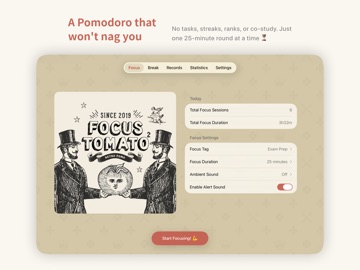
Pricing & paywalls
App Store
- Tomato King — $5.99
Ratings & reviews
App Store
-
5/5It’ll only get better and better!
The pause button has been added, so really I have no more notes. I like the tag feature quite a bit, being able to know what I’m spending my time in hindsight. I appreciate the team’s work on this project, even bothering to start this kind of app from scratch to do it all over again with a bigger vision in mind. I respect that! Well wishes, keep focusing. ⭐️
prizedfox · 6 Aug 2026
-
5/5Awesome
I really liked the widget and the tags and chart feature. In the first app, there were more variety in the post tomato screen and various quotes. I think with this one, it’s the same one each time. It’s a shame, I looked forward to the random quote each time. Still, highly recommend this app, it’s the best!
Raga2300 · 6 Aug 2026
-
5/5Same app as 1st version disappoint
I love the first version, but they advertise iCloud sync which it's a lie because I don't see any sync times between devices. Each device my iPhone and iPad stills shows their own data. And the iPad version sucks it doesn't go full screen as the 1st version instead it's a small screen looks like iPhone screen.
cindyhe99 · 6 Aug 2026
Privacy & accessibility
App Store
Privacy
- Data Not Collected Developer declared
Accessibility
No accessibility labels collected yet.
Versions
App Store
- 1.0
-
1.1
• Added animation to break timer • Completion reminder sound now with 2 additional options • Interaction sounds fully refined • New still animation added to the home screen
-
2.0
・Added Live Activity — view your focus progress on the Dynamic Island and Lock Screen ・Added widgets — see today’s tomato count and total focus time ・Fixed rest animation ・Fixed home animation
-
2.0.1
This update fixes the following issues: Background alert sound Previously, when the app was running in the background, the completion alert always played the default tomato sound. It has now been fixed to play the sound you selected in Settings (Tomato, Ding, or Birds). More accurate statistics Fixed an issue where focus time shorter than 1 hour was displayed as 0 on the chart. Now even a single 25-minute session will correctly appear as 0.4 hours.
-
2.0.2
This update includes the following fixes: • Widget and Live Activity Text Display Optimization Fixed an issue where text might overflow in Widgets and Live Activities when using large system fonts. The layout now adapts correctly even with Accessibility large-text settings enabled. • Interface Style Improvements Adjusted several UI elements to ensure the best visual experience on the latest iOS versions. • Fixed incorrect translation of break duration options Break duration options (5 minutes, 10 minutes, etc.) now display correctly in the corresponding language.
-
2.1
This update introduces the following new features: • Focus Record Export Added the “Export Focus Records” feature, allowing you to export all your focus sessions in CSV format for data analysis or backup purposes. • Notes Feature Added a notes field so you can jot down thoughts or task details during a focus session or when editing a record, making your focus log more complete. • Record Page Optimization The “Records” page now displays daily totals next to each date, giving you a clear view of how long you focused and how many pomodoros you completed each day.
-
2.1.1
What’s New + Added support for importing data from Focus Tomato 1
-
2.2
What’s New • Fixed an issue where the background timer stopped counting (e.g., the timer not running or showing 0 seconds when reopening the app) • Resolved an issue where the focus page’s animated banner occasionally disappeared • Added more focus and break duration options Thank you for your support!
-
2.3
This update brings the most-requested feature ever: Pause! What's New - Pause / Resume: Pause focus or break sessions anytime, then pick up right where you left off - Stats overhaul: Brand new Apple Health-style charts. Tap any bar to see detailed time - One-tap "Focus Again" after a break - jump straight into the next pomodoro Polish - Smoother fade-in / fade-out for ambient sounds - Music now fades out gracefully when the timer ends, no more hard cut - Accidental short sessions (under 30 seconds) are no longer saved - Tweaks to UI text and buttons Fixes - Fixed occasional Live Activity crash - Fixed text display issues on some screens
-
2.4
First, an apology The "iCloud Sync" status display in earlier versions had a serious bug — it wasn't actually reading the system's CloudKit state, so even when sync had failed, the UI could still appear normal. This caused some users to lose data silently without ever knowing, and we're truly sorry for the trust this broke. This update is a complete rebuild of iCloud sync: Real sync status - Reads CloudKit events directly from the system — what you see is what's actually happening - Shows Uploading / Downloading / Success / Failed, plus last sync time - On failure, the system's actual error message is shown Better self-diagnosis - New "Data not syncing?" help page based on Apple's official guidance, with common causes and check steps - One tap to jump to iOS iCloud settings when sync fails - Sync status is automatically included when you email support, so we can help faster Now visible to everyone - The sync status was previously visible only to Tomato King users — it's now visible to all. Sync itself was always working for everyone; hiding the status didn't make sense. Also fixed the alert sound The "Enable Alert Sound" default was inconsistent across views — some screens had it off, leading new users to think the timer had no sound. The default is now always on (existing users' preferences are unchanged). - New "No sound when timer ends?" help page (Settings → Sound Settings) - Explains how the alert behaves differently in foreground vs. background - Lists common causes of "no sound" (device volume, Do Not Disturb, notification permissions, etc.) Thanks to everyone who patiently reported this
-
3.0
The biggest visual update yet — FocusTomato 2 has been fully redesigned for iOS 26. Brand-new Look ・Adopts iOS 26's native Liquid Glass throughout — buttons, cards, and scroll edges all refreshed ・Typography and visual hierarchy reworked for cleaner reading and navigation ・Dark mode contrast tuned, follows your system setting Smoother Experience ・The break tab is now one tap — short break and long break each have their own button, no extra step to switch ・Records list now visually separates focus from rest, making the timeline easier to scan ・Statistics chart now adopts an Apple Health style — tap a bar to see exact values ・"Add Tag" updated to the native iOS button pattern ・The tutorial flow now walks you through one screen at a time, dismissible at any step Copy & Polish ・CTAs across the app got a more playful, vintage tone, paired with small expressive marks ・Success screen redesigned — finishing a tomato feels a little more rewarding ・Fixed a few localization slips (especially the break buttons) ・Layout, spacing, and close-button placement aligned with Apple's HIG across all screens Thanks for growing with us. Enjoy FocusTomato 2 on iOS 26!
-
3.1
Focus Tomato 2 now runs natively on iPad! Everything has been re-laid-out for the bigger screen, so you can focus comfortably on iPad too. Native iPad support ・True full-screen layout — no more stretched iPhone view ・Redesigned for both orientations: landscape uses a two-column "image + content" layout, portrait is a centered single column — it just fits, however you hold it ・Larger timer digits on iPad for a more immersive focus and break screen More useful stats ・New "Daily Average": your average focus time per day over the period (including days with no focus) ・New "Per Active Day": average focus time counting only the days you actually focused ・Each figure shows its day count, so the difference is clear at a glance Experience improvements ・When paused, the timer now gently pulses, so it's clearly paused, not frozen Fixes ・Fixed an issue where the sound / note / tag sheets opened from the timer could get stuck in dark mode while the system was in light mode ・Polished padding, spacing, and centering across all pages on iPad to match Apple's design guidelines Thanks for growing alongside our little tomato. Now you can focus on iPad too!
-
3.1.1
3.1.1 This update brings a few small but useful improvements to make timers and stats feel smoother. New ・Landscape countdown display is now supported on iPhone timer screens ・Added a landscape countdown guide, available again from Settings ・Added Focus Tomato 2 website and About Us links in Settings Improvements ・After a break ends, Focus Again now shows the next session time and tag ・Improved iPhone landscape timer backgrounds and button layout ・Clarified the Ignore Silent Mode description Fixes ・Fixed small categories and time display rounding issues in stats charts ・Fixed daily averages that could be inaccurate around some date boundaries ・Fixed an issue where the break timer screen could narrow after closing ・Fixed an issue where the notification permission reminder could appear repeatedly in some cases Thanks for continuing to share the little details. We'll keep making the tomato smoother to use.
-
3.2
3.2 This update makes completed focus sessions feel more shareable, while improving stats and personalization settings. Sharing and personalization ・Added Focus Certificates, so you can generate, preview, save, or share an image after completing a focus session ・Added Stats Focus Certificates for daily, weekly, monthly, and yearly focus results ・Added App Icon selection, with several tomato icon styles available in Settings ・Updated many illustrations across focus, success, and break screens Stats improvements ・Added a weekly focus-day view so you can quickly see which days you focused ・Added a monthly focus calendar with clearer day markers ・Added a yearly summary for focus days, best focus hour, and your strongest month ・Weekly, monthly, and yearly stats now use a clearer Overview + Summary structure Detail improvements ・Added focus days, best focus hour, and best day or month ・Daily Average and Per Active Day now sit together for easier comparison ・Focus duration now uses a clearer hours / minutes format ・Home, success, records, and stats screens now share the same duration format ・Added a Week Starts On setting, with system default, Sunday, and Monday options ・Empty states now use friendlier wording when there are no records Thanks for continuing to use Focus Tomato 2. We hope this tomato feels better to look at, and better to share.
-
3.2.1
3.2.1 This update refines reminders and help content, making end-of-session alerts easier to notice and answers easier to find. Reminder settings ・Added a time-up sound count setting, so you can choose how many times the alert sound plays ・Added a time-up vibration count setting for repeated vibration alerts while the app is open Help and support ・Added an in-app FAQ covering alert sounds, data sync, timing, stats, and language settings Fixes and polish ・Fixed localized app names on Chinese devices ・Adjusted several Settings descriptions and feedback entry labels Thanks for the continued reports. We will keep making reminders and settings clearer.
-
3.2.2
· 30 Jul 2026
This update fixes an app icon display issue. ・Fixed an issue where the default app icon might not display correctly after some users selected “Default Icon” ・If your app icon was previously displayed incorrectly, update the app, then go to “Settings > App Icon,” select “Default Icon” again, and tap the confirmation button in the top-right corner
Alternatives
- Pomodoro Timer: Pixeldoro ADHD — Same category + similar ratings
- Exocus: Gamified Focus Timer — Same category + similar ratings
- FocusFishing - pomodoro timer — Same category + similar ratings
- Dorocat - Cute Focus Timer — Same category + similar ratings
- Cat On Chair: ADHD Focus — Same category + similar ratings
Availability by market
- US
Data quality & evidence
- Page completeness
- Live store listing
- Last verified
- 6 Aug 2026
- Sources
- App Store
- Independent summary has not been published yet.