
Quick verdict
- What it is
- Store information collected; an Apoku editorial summary is not yet published.
- At a glance
-
- Free to download
Categories and search queries
Official categories
- Entertainment
- Productivity
Apoku categories
Key functions
| Function | Availability | Access | Scope | Evidence |
|---|---|---|---|---|
| Free app | Yes | Free | Context-specific | Store published |
Screens
App Store
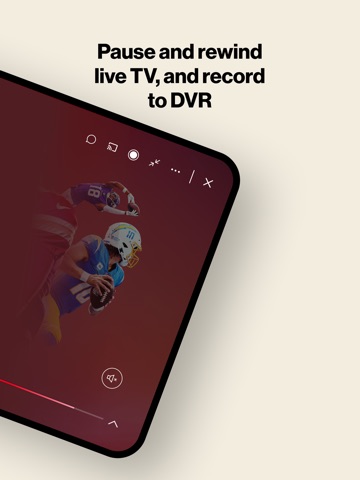
18 store screenshots



Pricing & paywalls
App Store
Shown for US
- Free to download
Ratings & reviews
App Store
Shown for US
-
4/5Not so horrible upgrade.
Am upgrading my rating of this app. I'd previously complained out of frustration because the app simply didn't work properly, and I read several other reviews here complaining about the same problem I was experiencing. My biggest gripe was my feeling Verizon wasn't responding, and therefore didn't care. The problem now seems to have been fixed, and I am grateful. However, the customer experience disappointment is that my support replies were vague rather than that they recognized there was a technical problem ON THEIR END that they would be fixing. So, it's just a customer communication thing which was very frustrating for about three weeks. Anyway, the app is working well at the moment and as such deserves a higher rating than my previous near zero one. Following is my original frustrated but now obsolete review: "Actually, should be a zero star rating! Previous Fios TV app worked fine on my iPhone 8 Plus. This so-called “upgrade” is sad. I cannot view many channels live on the phone. It won’t acknowledge that I am signed on to my home Fios wi-fi Network (even though I am), and indicates at all times that I am “out-of-home” (which I am not). I’ve contacted support via different ways including by phone and by the support path within the apps own Help section, and have had absolutely no resolution (or rhyme or reason) for this. I've had good results when needing help from Verizon support for past issues, but on this one they have been completely silent. So unprofessional." Yayyy, it's fixed!
Streamer Charlie · 6 Oct 2026
-
4/5Verizon should be ashamed
This app was advertised to me (by the installer, when we ordered FIOS) as “allowing us to access our FIOS media ANYwhere!” Nothing could be further from the truth. Occasionally, it works brilliantly! Especially, when I’m HOME… and could be viewing things on our online TV and FIOS box, if I wanted to. But when you NEED it… when we were at our son’s house for the weekend, and I wanted to watch the F1 race… I find that there is “in house” content, and “out of house” content! Guess which one Formula 1 is… and virtually ALL of the stations I wanted to watch? Further, when I was on my son’s 500Mbps (FIOS also, by the way) network, it would frequently give me the message that I was “not on a network”… when I was, and am, very MUCH on a network! ONLY the Verizon Mobile app didn’t know it! The final straw was that when I finally DID get onto FIOS mobile, once… and was able to access RECORDED (ONLY) F1 footage, for some reason this poorly written app would not recognize that the iPad Pro I was using had AIRPODS set up as the audio output feed. I could watch, or listen to ANY other media, and the AirPods worked fine. But with FIOS Mobile, the audio ONLY would come out of the iPad Pro speakers… to the annoyance of all around me. Verizon, spend some time with this app! It is not worthy of your name!
David G32 · 6 Oct 2026
-
4/5No way to run a business
When you have a package that includes NFL RedZone and you have watched it on a remote device the last three weeks and this Sunday it is not available. You exhaust everything you can do on your device and even try a second device. So you go online to My Verizon and the site makes you chase your tail for a second half hour with no results. Then you try an online chat until you realize 15 min. In that you will never reach a live technician to fix the problem. Then you call wait for 9 minutes get a technician who doesn’t speak English as a first language. Then after following his directions for half an hour being put on hold 5 times, he tells me the RedZone sometimes football can’t be streamed. So I explain to him what RedZone is which shoots down his thought. Then he tells me it’s not part of my tv package and texts me a bill that is now $30. Higher than what I expected. When I explain he is wrong because it is included in my package he suggested that he can’t help me with the billing. I checked my billing and it was paid. I asked when I would get the RedZone he said to try again in a half hour. So I asked him to transfer me to billing to see why the new bill was so high and why my tv package no longer included RedZone. Before he transferred me he asked if I was satisfied with his service. I asked him how could I be? The problem I have is not fixed and now I have an incorrect bill to deal with. He then apologized and transferred me to billing. I received a voice mail telling me they are closed and to call back Monday during business hours. So now I am mad calling about a problem wasting my time and ending up with two problems and missing football. When I tried the RedZone later I still didn’t have access.
Angry times two · 6 Oct 2026
-
5/5New Interface is Awful !
The newest interface is awful… It forces you to watch just one sided landscape when download it on an iPad. You have lost the ability to go back and rewind a currently streaming show by either 10 seconds or manually buy the red slide bar at the bottom that we used to use. It is the worst thing Verizon has ever done, and if I weren’t ready to cancel Verizon before this app downgrade, I am about ready now! This Darlin’ on the go option was the last potential benefit of having a cable subscription and they just change things, for the sake of change functionality is less than it was before not more. No volume or mute control; must watch only counterclockwise landscape; visibility to shows, descriptions, content, my guide all basically destroyed. Why would you continue to stick with this failure considering all of the massive amount of negative feedback. Why on earth won’t you go back to the old app and give us all of the functionality that we used to have?? The costs surely cannot be worth the loss is subscribers and the salaries to replicate functions that’s we already had previously?
Sandralp · 6 Oct 2026
-
5/5Customer Support? Customer Contempt!
My ability to create favorite channels on my iPhone and iPad devices does not work. I have been trying to get ‘Support’ to solve this problem since... September. Yes, you read that correctly: . To no avail. I have been given instructions on how to solve the problem that are ineffective. I have been assured that the problem has been ‘elevated’ to a higher management level. No change. I have been assured over and over again by customer service personnel that have assured by the developers that they have been working on the problem, and it should be corrected by a certain date. No change. I was most recently told that there is an upcoming update that will solve problem. The update came and went. No change. On top of all the above what has really gotten to me is the indifference. After awhile, trying to get a response from the support function within the app is met with complete and utter silence. They. Just. Stop. Responding. I used to regard customer service as one of Verizon’s strengths. No more. I am now actively looking for alternatives. This long-time, loyal customer is fed up.
Lighthorse Harry · 6 Oct 2026
Privacy & accessibility
App Store
Privacy
- Data Linked to You — Analytics — Identifiers — Device ID Developer declared
- Data Linked to You — Analytics — Usage Data — Advertising Data Developer declared
- Data Linked to You — Analytics — Usage Data — Other Usage Data Developer declared
- Data Linked to You — Analytics — Usage Data — Product Interaction Developer declared
- Data Linked to You — App Functionality — Identifiers — User ID Developer declared
- Data Linked to You — App Functionality — Location — Precise Location Developer declared
- Data Linked to You — App Functionality — Purchases — Purchase History Developer declared
- Data Linked to You — App Functionality — Search History Developer declared
- Data Linked to You — App Functionality — Usage Data — Other Usage Data Developer declared
- Data Linked to You — App Functionality — Usage Data — Product Interaction Developer declared
- Data Linked to You — App Functionality — User Content — Customer Support Developer declared
- Data Linked to You — App Functionality — User Content — Other User Content Developer declared
- Data Linked to You — Other Purposes — Diagnostics — Crash Data Developer declared
- Data Linked to You — Other Purposes — Diagnostics — Other Diagnostic Data Developer declared
- Data Linked to You — Other Purposes — Location — Precise Location Developer declared
- Data Linked to You — Product Personalization — Identifiers — User ID Developer declared
- Data Linked to You — Product Personalization — Purchases — Purchase History Developer declared
- Data Linked to You — Product Personalization — Usage Data — Other Usage Data Developer declared
- Data Linked to You — Diagnostics Developer declared
- Data Linked to You — Identifiers Developer declared
- Data Linked to You — Location Developer declared
- Data Linked to You — Purchases Developer declared
- Data Linked to You — Search History Developer declared
- Data Linked to You — Usage Data Developer declared
- Data Linked to You — User Content Developer declared
- Data Used to Track You — Usage Data — Advertising Data Developer declared
- Data Used to Track You — Usage Data — Other Usage Data Developer declared
- Data Used to Track You — Usage Data — Product Interaction Developer declared
- Data Used to Track You — Usage Data Developer declared
Accessibility
No accessibility labels collected yet.
Versions
App Store
-
5.2
Improvements & Bug Fixing.
-
6.0
Sleek new user interface. Enhanced navigation and functionality. On Now features in-guide mini-player to watch tv while you scroll. Tap to set favorite channels in the guide. Stream from your DVR and manage DVR recordings. DVR accessible via My Recordings rail on Home or in Settings. Download movies and shows. View storage capacity in Downloads.
-
6.0.1
Sleek new user interface. Enhanced navigation and functionality. On Now features in-guide mini-player to watch tv while you scroll. Tap to set favorite channels in the guide. Stream from your DVR and manage DVR recordings. DVR accessible via My Recordings rail on Home or in Settings. Download movies and shows. View storage capacity in Downloads. Bug fixes and improvement.
-
6.0.3
Sleek new user interface. Enhanced navigation and functionality. On Now features in-guide mini-player to watch tv while you scroll. Tap to set favorite channels in the guide. Stream from your DVR and manage DVR recordings. DVR accessible via My Recordings rail on Home or in Settings. Download movies and shows. View storage capacity in Downloads. Bug fixes and improvement.
-
6.0.4
Sleek new user interface. Enhanced navigation and functionality. On Now features in-guide mini-player to watch tv while you scroll. Tap to set favorite channels in the guide. Stream from your DVR and manage DVR recordings. DVR accessible via My Recordings rail on Home or in Settings. Download movies and shows. View storage capacity in Downloads. Bug fixes and improvement.
-
6.1
Improved Guide navigation and control. Ability to turn on/off the Guide mini-player. Introducing the My Stuff section to browse recordings, purchases, rentals, watchlist and downloads all in one place. Bug Fixes and Improvement.
-
6.1.1
Bug fixes and improvement.
-
6.1.3
Bug fixes and improvement.
-
6.1.4
Bug fixes and improvements.
-
6.1.5
Bug fixes and improvements.
-
6.2
Bug fixes and improvement.
-
6.3
Guide channel landing improvements. New “last” button on player screen allows user to quickly switch between channels. Playback error message now includes a report button. Additional streams can support pause, rewind, and fast forward of live channels. DVR support enhancements. Bug Fixes and Improvements.
-
7.0
Try a 48-hour ‘Free Preview’ of premium channels like HBO, Showtime, and Starz Personalized ‘Because you watched’ recommendations Improved Channel Guide filtering. All playback screens now include a ‘Mute’ button. Enhanced troubleshooting flows. Now add Fios TV Mobile as a widget on your device. Bug fixes and improvements.
-
7.0.1
We're constantly making improvements to help ensure you have the best viewing experience. In this release we focused on bug fixes.
-
7.2
We're constantly updating our app to help ensure you have the best viewing experience. In this release, we focused on improvements and bug fixes.
-
7.2.1
Bug fixes and improvement.
-
7.2.2
Bug fixes and improvement.
-
7.4
We're constantly updating our app to help ensure you have the best viewing experience. In this release, we added a few new features, made improvements, and implemented bug fixes. You can now continue watching using Picture in Picture (PIP) mode Check out the new Sports page for all your favorite sports and game-defining moments Explore the new Kids page, a friendly experience for young viewers Rate your movie to help us make better recommendations for you Bug fixes and improvements
-
7.4.1
Big fixing and improvements.
-
8.0
We're constantly updating our app to help ensure you have the best viewing experience. In this release, we added a few new features, made improvements, and implemented bug fixes. Set a reminder so that you don’t forget when to tune in to your program We added more ways for you to manage how kids view content Take a tour and learn about your Fios TV features Improvements and bug fixes
-
8.0.1
We're constantly updating our app to help ensure you have the best viewing experience. In this release, we added a few new features, made improvements, and implemented bug fixes. Set a reminder so that you don’t forget when to tune in to your program We added more ways for you to manage how kids view content Take a tour and learn about your Fios TV features Improvements and bug fixes
-
8.2
We're constantly updating our app to help ensure you have the best viewing experience. In this release, we added new Top 10 rails, made improvements, and implemented bug fixes.
-
8.2.1
Bug fixes and improvement.
-
8.4
We're constantly updating our app to help ensure you have the best viewing experience. In this release, we have added a new 'Help Me Decide' feature, made performance improvements, and implemented bug fixes.
-
8.4.1
· 8 Apr 2026
We're constantly updating our app to help ensure you have the best viewing experience. In this release, we focused on improvements and bug fixes.
Alternatives
- Watch TNT — Same category + similar ratings
- Watch TBS — Same category + similar ratings
- USA Network — Same category + similar ratings
- Bravo - Live Stream TV Shows — Same category + similar ratings
- truTV — Same category + similar ratings
- CBS — Same category + similar ratings
Availability by market
- US
Data quality & evidence
- Page completeness
- Live store listing
- Last verified
- 6 Oct 2026
- Sources
- App Store
- Apoku editorial summary has not been published yet.