
Quick verdict
- What it is
- Store information collected; independent summary not yet available.
- At a glance
-
- Free to download
- In-app purchases
Categories and search queries
Official categories
- Finance
- Productivity
AppCorpus categories
Key functions
| Function | Availability | Access | Scope | Evidence |
|---|---|---|---|---|
| Free app | Yes | Free | — | Store published |
| In-app purchases | Yes | Limited free | — | Store published |
Screens
App Store
18 store screenshots


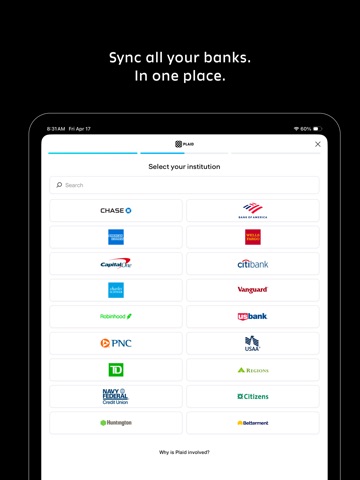
Pricing & paywalls
App Store
- Unlimited — $7.99
- Unlimited — $79.99
Ratings & reviews
App Store
No store reviews collected for App Store · US
Privacy & accessibility
App Store
Privacy
- Data Not Linked to You — Analytics — Usage Data — Product Interaction Developer declared
- Data Not Linked to You — Other Purposes — Diagnostics — Crash Data Developer declared
- Data Not Linked to You — Other Purposes — Diagnostics — Other Diagnostic Data Developer declared
- Data Not Linked to You — Other Purposes — Diagnostics — Performance Data Developer declared
- Data Not Linked to You — Diagnostics Developer declared
- Data Not Linked to You — Usage Data Developer declared
Accessibility
- Dark Interface — SUPPORTED Store published
- Differentiate Without Color Alone — SUPPORTED Store published
- Larger Text — SUPPORTED Store published
- Sufficient Contrast — SUPPORTED Store published
Versions
App Store
-
1.4.10
- The Category Spending card now shows up on your dashboard right away, because hiding your most useful insights behind a settings menu was a bold design choice we're no longer standing behind. - Scrolling to the bottom of your transaction list will now actually show you the last transaction instead of hiding it behind a button. Groundbreaking, we know. - Buttons now respond when you tap anywhere on them, not just the exact pixels of the text label. Our QA team (also me) described the previous behavior as "technically functional." - Various buttons have been given consistent padding and modern styling, which you probably won't notice, but we'll sleep better tonight.
-
1.4.19
- Transactions within a day are now sorted alphabetically, so your daily list has a predictable order instead of whatever mood the database was in. - The envelope tracker now refreshes after you create your first envelope, instead of pretending nothing happened. - The month picker now remembers which month you actually selected instead of gaslighting you back to the current month. Trust issues resolved. - Dashboard data loads atomically now, so you'll no longer catch glimpses of half-updated numbers mid-refresh. We call this "not showing you wrong data." - Clearing all your search filters now also dismisses the keyboard, because apparently we thought you'd want to keep typing into nothing.
-
1.4.27
- After connecting your bank, we now show you the transactions we just pulled and let you bulk-categorize them grouped by merchant. Apparently reviewing 200 transactions one at a time was "tedious." - We will no longer let you connect the same bank twice and then act surprised when things look weird. - The lock screen now actually covers the whole screen on iPad in landscape. Previously it covered most of the screen, which is not the same thing. - The confirmation checkmark now animates in with a fancy SF Symbols drawOn effect. Worth the entire release on its own.
- 1.4.8
-
1.5.18
- New Spending Breakdown card on the dashboard, with a shiny donut chart so you can see exactly where your money went at a glance. - Institution-account labels show up in more places, so you can finally tell your three checking accounts apart. - Background sync now jitters across the 3–5 AM window instead of stampeding our servers at 3:00:00.000 sharp. - Saturday chip in Reminders no longer gets sliced off on smaller iPhones. Saturdays are whole again. - Tiny separator above the first transaction in a section: gone. You probably never noticed. We noticed. - A pinch more padding under the Category Spending card. Pixels matter.
-
1.5.5
- Reminders! Now Wellspent can join the long list of apps sending you notifications you'll swipe away. - Bank logos now appear next to your accounts and in the transactions list, because staring at gray rectangles was getting depressing. - Institutions can be renamed from the details screen. "Chase Sapphire Sad Boy Hours Account" — go for it. - Envelopes support swipe-to-delete. Previously you had to gently ask them to leave.
-
1.6.3
- The Dashboard got a full makeover with grouped cards that actually match the designs we paid for. It now also remembers what date range you were looking at instead of cheerfully forgetting every time. - Envelope Trackers are now self-sufficient grown-ups: each bar windows to its own time horizon and pulls its own data. No more weird prorated math that spreads your yearly budget across some arbitrary fraction of a month and means absolutely nothing. - Turns out very few people want to spend their evening reviewing transactions one by one. So we made it automatic so you don't have to. You now won't open the app to find 319 transactions demanding your attention. - A handful of polish: transaction section headers now have backgrounds and colors so you can tell where one group ends and another begins, settings rows are in a more sensible order, and selected product cards have text that's actually legible against their background.
-
1.6.8
- The "Remaining Budget" card is now called "Safe to Spend." Same card, but now it answers the only question you actually had: can I afford this or not. - Speaking of which, that card is now wired up to real Total Tracker data, so the number it shows is, you know, correct. Worth the wait. - The Total Tracker is now a single, normalized bar instead of whatever it was before. One bar. You're welcome. - New Transactions settings screen with a review toggle, for the three of you who like to personally approve every transaction.
-
1.7.14
- You can now subscribe to Wellspent annually. The paywall has a shiny monthly/yearly toggle so you can commit to a full year of financial self-awareness in one heroic tap. - Wellspent now recognizes subscriptions that bill every four weeks, because apparently "monthly" was too mainstream for some companies. - Credit card payments are now automatically ignored instead of silently vanishing into the ether. Your dashboard math will thank us.
-
1.7.2
- Expected Transactions have arrived. Wellspent now tracks your recurring bills and subscriptions, reserves them in your safe-to-spend math, and even auto-detects the ones you forgot about. Your future self is welcome. - The Envelope and Total Trackers now hatch out your expected bills so you can tell "money I still have" apart from "money that's already spoken for." Little diagonal lines never worked so hard. - The clear button in transaction search now has a tap area bigger than a single atom. Groundbreaking accessibility research went into this.
-
1.7.20
- The empty transactions screen now greets you with a warm welcome and our logo, instead of staring back at you like an unfinished spreadsheet. - Our tagline is now "no homework." Two words. We spent a suspicious amount of time getting there. - Fresh App Store screenshots that actually make the app look as good as it is, now featuring recurring bills instead of the same three sad transactions. - We taught our release robot to stop dropping the version number on the floor when it's feeling messy. It now ships on time, every time.
-
1.7.25
- You can now redeem promo codes right inside the subscription screen. No more staring longingly at a discount code with nowhere to type it. - Network errors that used to vanish into the void now actually tell you when something went wrong. Silence is no longer our error-handling strategy. - Various behind-the-scenes hardening so your data keeps syncing without drama.
-
1.7.28
VoiceOver now describes your dashboard, spending breakdown and reminder buttons like a functioning app instead of a pile of unlabeled rectangles. Long overdue.
-
1.8.2
· 3 Aug 2026
- The donut chart has ascended. Tap the center, swipe between months, bask in its glory. It is, without exaggeration, the finest circle ever rendered on a screen. - We now automatically ignore income and account transfers, so your "spending" insights are no longer thrown off by the thrilling act of moving your own money between your own accounts. - Tab bar icons are now unfilled when their tab isn't selected. You can tell now even more obviously which tab you're on.
Alternatives
- AI Budget & Finance - FinSavr — Same category + similar ratings
- Pebble — Paycheck Budget — Same category + similar ratings
- Basis Budget: Money Tracker — Same category + similar ratings
- Smartr: No More Overspending — Same category + similar ratings
- Expense, Budget Tracker Kirum — Same category + similar ratings
Availability by market
- US
Data quality & evidence
- Page completeness
- Live store listing
- Last verified
- 6 Aug 2026
- Sources
- App Store
- Independent summary has not been published yet.