
Quick verdict
- What it is
- Store information collected; independent summary not yet available.
- At a glance
-
- Free to download
- In-app purchases
Categories and search queries
Official categories
- Finance
- Productivity
AppCorpus categories
Key functions
| Function | Availability | Access | Scope | Evidence |
|---|---|---|---|---|
| Family Sharing | Yes | Unknown | App Store | Store published |
| Free app | Yes | Free | — | Store published |
| In-app purchases | Yes | Limited free | — | Store published |
Screens
App Store
13 store screenshots



Pricing & paywalls
App Store
- Free to download
- In-app purchases
Ratings & reviews
App Store
-
5/5Life Changing!
Pebble has completely changed the way I manage my money. The app makes budgeting by paycheck simple and easy to understand, which is perfect for anyone who gets paid weekly, biweekly, or irregularly. I love being able to see exactly how much money is available after bills and expenses are accounted for. The interface is clean, intuitive, and not overwhelming like some other budgeting apps. Setting up categories, tracking spending, and planning ahead for upcoming paychecks is quick and straightforward. Pebble helps me stay organized, avoid overspending, and feel more in control of my finances. If you’re looking for a budgeting app that focuses on real-life paycheck planning instead of complicated spreadsheets, Pebble is absolutely worth trying.
WowdinowoW · 31 Jul 2026
-
5/5Highly Recommend
I’ve tried a lot of budgeting apps, but Pebble is the first one that actually matches how I get paid. Budgeting by paycheck instead of by month makes it so much easier to see what’s truly available to spend and what bills are coming up. The interface is clean, intuitive, and packed with useful features without feeling overwhelming. I especially appreciate the privacy-first approach, iCloud sync, recurring bill tracking, and the way credit cards and split expenses are handled. The one-time Pro purchase is also a refreshing alternative to endless subscriptions.
King022 · 31 Jul 2026
-
5/5Budgeting was never so easy
I don't have use my spreadsheets and manually track anything anymore. Highly recommend for anyone that wants to track everything in one place
Kishan Segu · 31 Jul 2026
-
5/5Goodbye, Spreadsheet!
Love love love! The best part about this app is the consolidation. I love that I don't have to go through each individual credit card account anymore to track my spending. It pulls everything into one view effortlessly.
Mlc0903 · 31 Jul 2026
-
5/5Easiest way to budget
Pebble made it much easier to track my purchases with each paycheck. Never found an app much better with budgeting than this!
Iownall2003 · 31 Jul 2026
Privacy & accessibility
App Store
Privacy
- Data Not Collected Developer declared
Accessibility
No accessibility labels collected yet.
Versions
App Store
-
1.1.2
v1.1.2 • Back-date an expense and Pebble routes it to the right month — no more orphaned rows. • Plan ahead: navigate up to two months into the future on free, unlimited with Pro. • Card details now show what's carrying over from last month and what's deferring to next, so the Cards tab and Dashboard numbers reconcile. • Tap any received split on the dashboard to edit the amount, date, or unwind the share — no more digging into the expense. • Cross-month split repayments now attribute to the month you got paid back, not the month of the original expense. • Smaller polish: cleaner paycheck-pin picker on card-assigned expenses.
-
1.1.3
v1.1.3 — Splits and Cards polish - Outstanding splits show the request method (Venmo/Zelle/Cash App/Cash/Other) on each row, support long-press un-request, and gain an Active/Received/All scope toggle so settled shares stay manageable. - New default request method preference in Settings → Splits. - Cards tab and Card detail surface carry-in / carry-out indicators on individual rows so it's clear which charges affect which cycle. Card detail header now shows the payment day directly. - Restored the per-paycheck override picker for cards without a fixed payment day. Several biweekly-cadence math fixes for cycle attribution.
-
1.2.0
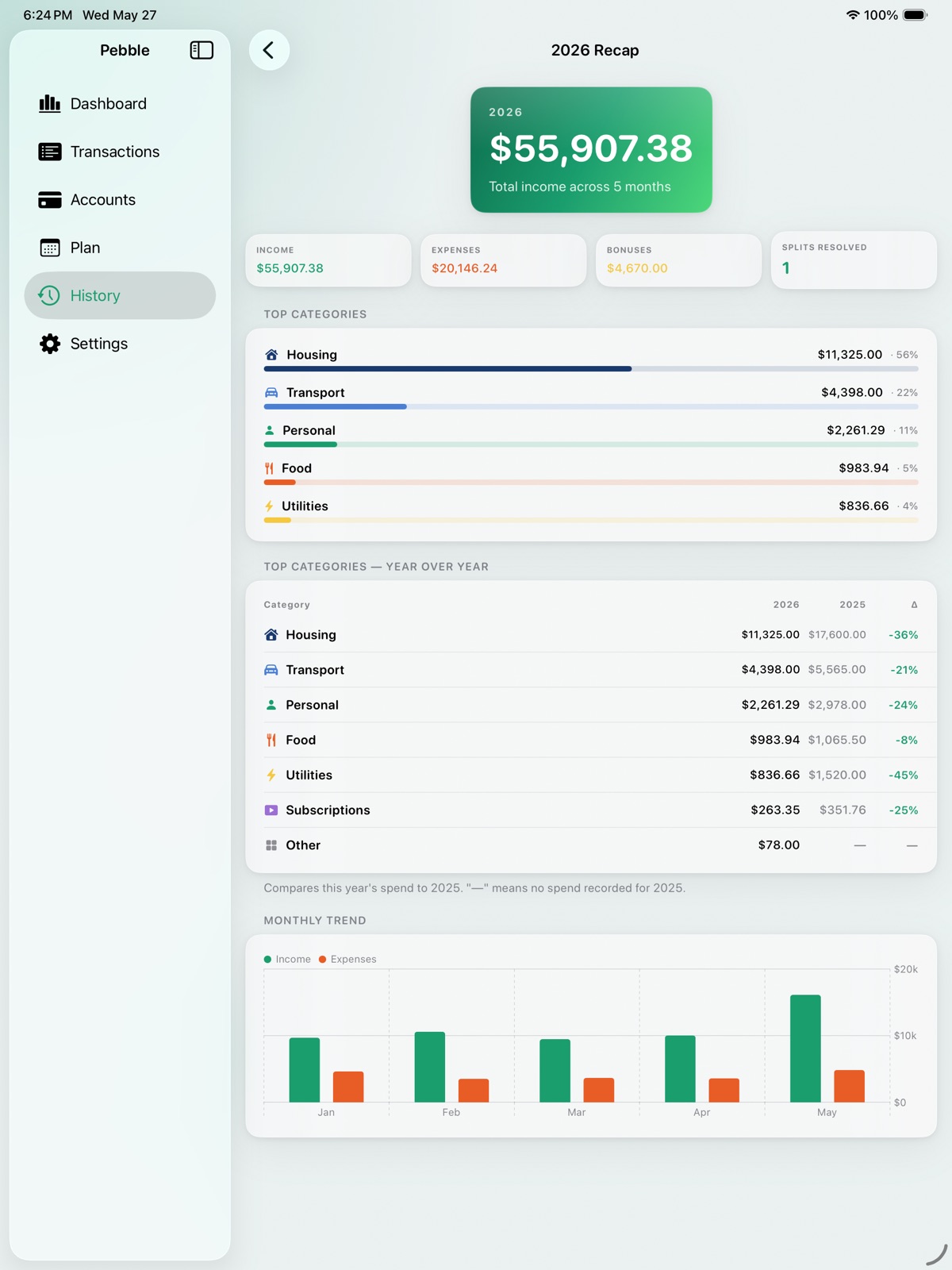
Pebble 1.2 — broader recurring options, sharper splits, more paycheck-level context. NEW • Weekly and bi-weekly recurring expenses — your dog walker, gym, or anything that doesn't fit a monthly cadence now repeats on its own. • Recurring income templates — set a side gig, rental, or any predictable extra income once and Pebble drops it in each cycle. • Three new expense categories: Medical, Entertainment, and Groceries (so Food can stay your "eating out" bucket). • Optional bank-account labels per paycheck — see "Paycheck 2 · Checking" on the hero when you direct different paychecks to different accounts. • Coming Up section on the History tab so pre-planned future months are reachable directly from there, not just via the dashboard. • Year-over-year top-categories table on the Year Recap (Pro) — this year's spend per category vs. last year's with a signed % delta. SPLITS • Per-method received totals on the dashboard's Split Income card (e.g., "via Venmo $80 · Zelle $40"). • Method filter chips (Venmo, Zelle, Cash App, Cash, Other) on Outstanding Splits — batch-process one channel at a time. • Cash shortcut on the request flow — one-tap "Mark Received" when cash already changed hands. POLISH • Re-anchor Legacy Entries (Settings → Data) repairs older expenses anchored to the wrong month. • Smoother cadence switching on recurring templates. • Cleaner expense-row layout in narrow contexts. • Several stability and consistency fixes surfaced during testing.
-
1.3.0
v1.3 — iPad support + multi-device sync hardening • Pebble now runs as a true iPad app with a sidebar layout — same data syncs across iPhone and iPad via your private iCloud • New: iCloud Drive autobackup. Pebble writes a daily snapshot of your data to iCloud Drive and keeps the last 3, restorable from Settings → Data → Backups • Live iCloud sync status in Settings: account state, last-synced timestamp, and a customizable per-device label • Per-record edit tracking with a version-skew banner that warns when newer-version data lands on an older app • Refreshed onboarding for the multi-device story • Stronger Reset Pebble dialog clarifying CloudKit propagation
-
1.4.0
v1.4 brings Pebble to your wrist. Native Apple Watch companion: see what's left in this paycheck at a glance, scan upcoming bills, and quick-add an expense without pulling out your iPhone. Four watch-face complications and a Smart Stack widget keep your remaining number visible. Tap a bill-reminder notification on Watch to open Pebble straight to that bill. Also new on iPhone: • Drag any dashboard card — including the Upcoming Bills pill — into the order you want, from Settings → Display → Reorder Dashboard Cards. • Already-paid bills no longer disappear from the Upcoming Bills list. They show dimmed in a collapsible Past section so you can see the full picture of what's hit this paycheck. • Recurring expense and income templates can now carry an end date. Once it passes, the template archives — past entries stay intact, no new occurrences materialize, reminders cancel. • Reorderable credit cards in Settings → Manage Cards. The order syncs across every device on your iCloud account. Under the hood: data-integrity hardening eliminates a long-standing edge case where multi-device users could end up with duplicate month entries on cold launches. If your account ever had a duplicate, Pebble cleans it up automatically on first launch.
-
1.4.1
Bug fix: Outstanding splits for credit-card expenses now appear on the correct paycheck. A split charged to a card with a payment date was sometimes showing on the current paycheck even though the card payment wasn't due until the next billing cycle. Splits now follow the card's billing cycle, matching how the charge appears everywhere else in the app.
-
1.5.0
What's new in 1.5 Pebble's iCloud sync surface got a big reliability + transparency pass: • A new Sync Now button in Settings → iCloud Sync lets you nudge sync on demand. • A new Sync Diagnostics screen shows recent CloudKit activity and lets you copy a snapshot for support. • If sync hasn't completed in over a day, a banner now appears so the issue is visible instead of silent. • The first-run "Looking for your data" screen no longer drops you into onboarding while iCloud is still importing — eliminating duplicate-budget edge cases on new devices. • If your devices show different totals despite sync looking current, you can now "Re-export Everything" from Sync Diagnostics to force iCloud to re-upload all records.
-
1.6.0
Pebble 1.6 — Expenses, organized by paycheck. • Bulk edit — Select several expenses at once to move them to another paycheck, reassign their card, or delete them together. • See the paycheck at a glance — Every expense row now shows which paycheck it lands on, and a new "This Paycheck" view narrows the list to what you're budgeting right now. • Smarter new expenses — A new expense starts on the paycheck you're already looking at, instead of guessing from the date. • More room for your list — The search and filter bar slides out of the way as you scroll, so your expenses fill the screen. Plus a fix so the dashboard opens on your upcoming paycheck.
-
1.6.1
• Apple Watch: fixed a sync issue that could leave the watch showing the wrong paycheck or an out-of-date balance. Your watch now reliably shows the current paycheck, what's remaining, and the days until your next payday. • Stability and reliability improvements.
-
2.0.0
Pebble 2.0 is a big one — a fresh look and a whole new way to see your money. ACCOUNTS & NET WORTH (Pebble Pro) The new Accounts tab brings your balances together. Add manual accounts across assets and liabilities — checking, savings, cash, crypto, retirement, investments, loans, mortgages, and more — and watch them roll up into a live net-worth overview. Choose exactly which accounts and cards count toward it. Every balance is yours to enter; Pebble never links to your bank. A FRESH, LAYERED DESIGN The entire app has been redesigned — deeper, more tactile cards and a refined type system that scales with your preferred text size for a cleaner feel throughout. REORGANIZED AROUND YOUR BUDGET Five focused tabs — Dashboard, Transactions, Accounts, Plan, and Settings. The new Plan tab gathers your recurring bills and income alongside a look at the months ahead, and History is now just a tap from the dashboard. WIDGETS & APPLE WATCH Home and Lock Screen widgets now shift color as you move through each paycheck cycle. On Apple Watch, new Next Bill and Splits Owed complications join a refreshed glance — and you can mark a split paid back right from your wrist. Plus smoother iCloud sync, more accurate paycheck and split math, and dozens of refinements across the app. Thanks for using Pebble!
-
2.1.0
Thanks for using Pebble! This update adds a faster way to move around your transactions, plus accuracy and stability fixes. • Month switcher on Transactions — use the chevron arrows above the ledger to jump to any month and review past or upcoming charges in place. Tap + while viewing another month and the new transaction files there automatically. • More accurate credit-card timing — month-end statements now attribute to the right paycheck, and editing a paycheck's date no longer drops card charges from your totals. • Reliability — hardened month and bulk-expense deletes, plus fixes under the hood. Questions or feedback? Reach us at clmsstudio.com/apps/pebble/support.
-
2.1.1
Thanks for using Pebble! This is a stability update centered on a month-rollover issue some of you ran into. • Fixed a rare case where starting a new month — especially one you'd set up ahead of time in Coming Up, while using Pebble on more than one device — could duplicate that month's recurring transactions or reset its starting balance to $0. If a month was affected, Pebble now repairs it automatically the first time you open this update. • New: Settings → Data → "Repair Data" — a one-tap maintenance tool that checks for and cleans up duplicate months and transactions (it replaces the three separate cleanup rows). • Fixed your starting balance and paycheck amounts being dropped when you finished setting up a month you'd planned ahead. • Outstanding-split reminders in the new-month summary and History now line up with the dashboard's credit-card payment timing. Questions or feedback? Reach us at clmsstudio.com/apps/pebble/support.
-
2.2.0
Pebble v2.2 adds two of the most-requested features — refunds and loan payoff tracking — plus faster ways to manage splits and browse your cards. • Refunds & credits. Tag any expense as a refund to record money coming back. It nets out of your month and category totals, and a refund on a card reduces that card's balance (a card can even show a credit). Refunds read green with a "Refund" badge. • Track a loan's payoff (Pro). Turn on Track Payoff for a loan, student loan, auto loan, mortgage, or line of credit: enter the original amount, start date, and interest rate, then link or create its monthly payment. Pebble derives the remaining balance as you pay it down — it shrinks on its own each month and updates your net worth, no manual editing. Tap a tracked loan for a full amortization schedule (principal/interest split, payoff date, payments left). Mortgages can break the payment into principal & interest plus escrow, PMI, taxes, and more — only the P&I pays down the balance. When a loan hits $0, Pebble archives it and ends its payment automatically. • Bulk actions on Outstanding Splits. Multi-select splits and Request, Mark Received, or Un-request them all at once — Bulk Request rolls everyone you're owed into a single shareable message. • Browse past months on a card. Step back through a card's previous months from Accounts, and tap any month label across the app to jump straight to it. • Easier number entry. Amount fields now add thousands separators as you type and accept much larger amounts. Questions or feedback? Reach us at clmsstudio.com/apps/pebble/support.
-
2.3.0
Thanks for using Pebble! This update adds a clearer picture of your cash. • New: a "Current Balance" card on the Dashboard. It shows what's actually in your checking account right now — your starting balance for the month, plus the paychecks, bonuses, and split repayments you've already received, minus the cash and debit-card spending you've already made and any credit-card payments you've recorded. It reconciles with your bank app. • It only counts money that's actually moved: your next paycheck doesn't show until payday, and a credit-card charge doesn't reduce it until you pay the card. (Your paycheck "Remaining" still shows the forward-looking picture, as always.) • Tap the card for a full breakdown and a plain-English explanation. Prefer not to see it? Hide it from the breakdown or in Settings → Display. • Apply Payment now lets you set the date you paid a credit card, so your Current Balance reflects the day the money actually left checking. Questions or feedback? Reach us at clmsstudio.com/apps/pebble/support.
-
2.4.0
Thanks for using Pebble! This update lets you fine-tune your Current Balance so it matches your bank. • New: reconcile your bills. Tap the Current Balance card and you can now mark each cash or debit bill as paid (and set the exact day it cleared) or as not paid yet. So a bill you paid early is deducted right away, and a bill you haven't paid yet stays in your balance until you do — instead of disappearing on its due date. • New: a manual adjustment (+/-) on the Current Balance breakdown, for anything the app can't see on its own — a bank fee, ATM cash, or interest. • Mark a recurring bill paid and Pebble silences that bill's reminder for the month — no "due soon" nudge for something you've already paid. Change your mind and the reminder comes back. • Fixed: your Current Balance now counts today's paycheck all day on payday, instead of waiting until midday. Everything here only affects Current Balance — never your budget, your paycheck "Remaining," or your history. Bills you don't touch keep working exactly as before. Questions or feedback? Reach us at clmsstudio.com/apps/pebble/support.
-
2.5.0
Thanks for using Pebble! This update extends Current Balance reconciliation to split bills. • New: reconcile your split bills. Tap the Current Balance card and any split expense now appears in your Reconcile bills list with three choices — not paid, just your share, or paid in full. Pick "your share" (the default) and only your portion counts; pick "paid in full" for a bill you fronted the whole of. Either way, money your friends pay you back still comes in as income, so your balance settles to what you're actually out. Works for one-off and recurring splits. • At a glance: a split counted as your share shows a gold half-circle; a bill paid in full keeps the green check. Like the rest of reconciliation, this only affects Current Balance — never your budget, your paycheck "Remaining," or your history. Splits you don't touch keep working exactly as before. Questions or feedback? Reach us at clmsstudio.com/apps/pebble/support.
-
2.5.1
Thanks for using Pebble! This is a small fix to the split-bill view added in the last update. • Fixed: when you reconcile a split bill as "Your share" in the Current Balance breakdown, that row now always shows your actual share — even after the people you split with pay you back. Before, the amount could climb toward the full bill as repayments came in. Your Current Balance total was always correct; this just makes the row match its "Your share" label. Questions or feedback? Reach us at clmsstudio.com/apps/pebble/support.
-
2.5.2
Thanks for using Pebble! This update fixes a few things and adds to CSV export. • Fixed: exporting to PDF (and on some setups CSV) could open a blank share screen, so there was no way to save or send the file. The share sheet now opens properly, with the document preview and the usual Save to Files / Copy / Print actions. • Fixed: sharing a split payment request ("Send Request") opened the same blank share screen — it now opens with your message ready to send. • Fixed: restoring from a backup could quietly drop details you'd entered — a loan's payoff tracking, your Current Balance reconciliation and manual adjustment, and end dates on ended recurring bills. Backups now keep all of these. • Added: CSV export now includes a second file listing your accounts and loans (with loan principal, APR, payment, and projected payoff), and the transaction CSV gained the reconciliation and split request/received columns it was missing. Questions or feedback? Reach us at clmsstudio.com/apps/pebble/support.
-
2.5.3
Thanks for using Pebble! This update includes stability improvements and bug fixes Questions or feedback? Reach us at clmsstudio.com/apps/pebble/support.
-
2.5.4
Thanks for using Pebble! This update makes iCloud sync calmer and easier to troubleshoot. • The "iCloud sync" notice no longer cries wolf. It used to appear whenever a day passed without a sync — even when your device had simply been idle, or a brief iCloud hiccup had already sorted itself out. It now shows only when sync has actually, recently failed, reads more plainly ("iCloud sync is behind"), and points you to what usually helps: reopening Pebble, or restarting your device. • Sync Diagnostics is more helpful. Settings > iCloud Sync > Sync Diagnostics now explains an iCloud "partial failure" in plain terms instead of a cryptic code, and adds a "Scan for un-syncable records" check that finds and names any record iCloud is rejecting. Questions or feedback? Reach us at clmsstudio.com/apps/pebble/support.
-
2.5.5
Thanks for using Pebble! This update adds recovery tools that make iCloud sync problems fixable instead of mysterious. • Notes on expenses now sync via iCloud. A missing server-side field meant that adding a note could quietly stall that device's sync — that's fixed (no action needed on your part), and notes travel across your devices like everything else. • Restore gains a "Merge" option. Alongside the full restore, you can now merge a backup into your current data: anything missing on the device is added, and everything already there is left exactly as it is — nothing is ever deleted. Ideal for recovering records on one device without touching the rest. • Sync Diagnostics tells you the real reason a sync failed. When iCloud rejects a change, Pebble now reads the underlying error from the device's own system log — down to which record and field the server refused — and shows it right under the failed event, plus a new "Capture sync error details" action. Troubleshooting that used to require a computer now happens on the phone. Questions or feedback? Reach us at clmsstudio.com/apps/pebble/support.
-
2.5.6
Thanks for using Pebble! This update makes paying off a card from the Dashboard more precise. • Paying a card now starts from the amount you tapped. The Dashboard shows what each card owes for the paycheck you're viewing — and for cards with a statement cycle, that can include charges from late last month. The payment sheet used to open with the calendar month's balance instead, a subtly different number. It now opens with the same amount the Dashboard showed you. • Choose which balance to pay with one tap. When the paycheck amount and the month's balance differ, two new quick-fill options — This Paycheck and This Month — appear right in the payment sheet so either figure is one tap away. Typing your own amount still works exactly as before, and cards where the two figures agree look just as they always did. • The Paid / Partial badge now tracks the same number. Paying off a card's smaller monthly balance no longer marks the Dashboard row "Paid" while part of its paycheck amount is still owed — it reads "Partial" until the amount shown on the row is fully covered. Questions or feedback? Reach us at clmsstudio.com/apps/pebble/support.
-
2.5.7
Thanks for using Pebble! This update makes the card figures on your Dashboard more precise. • Paying off one paycheck no longer marks the next one "Paid." If you paid off a card's balance for one paycheck, a charge belonging to a later paycheck in the same month used to show "Paid" — with $0.00 to pay — before you'd actually paid anything toward it. Your payments now count toward each paycheck in order: earlier paychecks are covered first, and only what's left over counts toward the paycheck you're viewing. • The payment sheet's This Paycheck amount follows the same rule, so the quick-fill option always reflects what that paycheck still owes. The Cards tab and card detail screens are unchanged — they describe the calendar month, which is what you pay there. Questions or feedback? Reach us at clmsstudio.com/apps/pebble/support.
-
2.6.0
Thanks for using Pebble! This update lets you clean up accounts you added by mistake. • Accounts can now be deleted, not just archived. Long-press an account for a new Delete option beside Archive, and archived accounts get a delete button next to Unarchive — so a duplicate or accidental entry can be removed for good instead of sitting in your Archived list forever. • Deleting always asks first. It's permanent, and for a tracked loan whose monthly payment Pebble created for you, that payment and the expenses it generated are cleaned up too. A payment you linked yourself is never touched. Archive is still there for accounts you've closed but might want back. • Fixed: removing a recurring entry no longer leaves behind orphaned split records. If a recurring expense had been split with someone, those split details could be left dangling instead of removed — so split totals and iCloud now stay consistent. Questions or feedback? Reach us at clmsstudio.com/apps/pebble/support.
-
2.7.0
· 26 Jul 2026
Pebble now works without opening Pebble. • Ask Siri. Four new Siri and Shortcuts actions: "Log an expense in Pebble," "What's left in Pebble," "What's in my account in Pebble," and "Mark a bill paid in Pebble." They work the moment you install — no setup in the Shortcuts app — and show up in Siri, Spotlight, the Shortcuts gallery, and the Action button. All free. • Two money questions, two different answers. "What's left" is what remains to spend on the paycheck you're budgeting toward. "What's in my account" is bank-statement style — money already in, minus money already out, not counting the paycheck you haven't been paid yet. Siri says which is which. • Mark a bill paid by voice. It records that the money actually left checking, the same as the Current Balance reconcile list — and cancels that bill's reminder for the month, so you're not nudged about something you've already paid. • A Log button on the medium Home Screen widget, and a Pebble control for Control Center, the Lock Screen, and the Action button. Either one drops you straight into a new expense, already set to today and the right paycheck. • The app lock now re-engages when you come back. Face ID or your passcode used to be required only on a full app launch, so switching away and back left Pebble open. It now re-locks after about a minute away — long enough that checking a notification won't make you authenticate again, short enough that a phone you set down is protected. • The lock screen also names the unlock method you actually have, instead of always saying Face ID. Fixed: on your very first launch, the Dashboard now opens on the paycheck you're budgeting toward instead of one you'd already lived through. And the Paycheck picker's help text now matches what Pebble actually does — it had been describing the old attribution rule since 2.5.3. Note: Pebble now requires iOS 18. Every iPhone that could run iOS 17 can also run iOS 18, so no device is left behind. Questions or feedback? Reach us at clmsstudio.com/apps/pebble/support.
Alternatives
- WalletHub: Credit & Budgeting — Same category + similar ratings
Availability by market
- US
Data quality & evidence
- Page completeness
- Live store listing
- Last verified
- 31 Jul 2026
- Sources
- App Store
- Independent summary has not been published yet.