
Quick verdict
- What it is
- Store information collected; independent summary not yet available.
- At a glance
-
- From $249.99/mo
- Free to download
- In-app purchases
Categories and search queries
Official categories
- Medical
- Health & Fitness
AppCorpus categories
Key functions
| Function | Availability | Access | Scope | Evidence |
|---|---|---|---|---|
| Free app | Yes | Free | — | Store published |
| In-app purchases | Yes | Limited free | — | Store published |
Screens
App Store
15 store screenshots

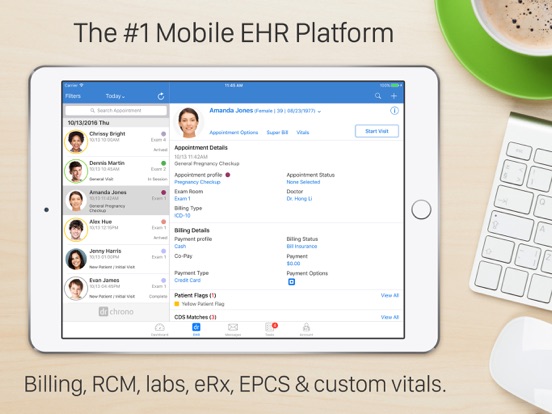

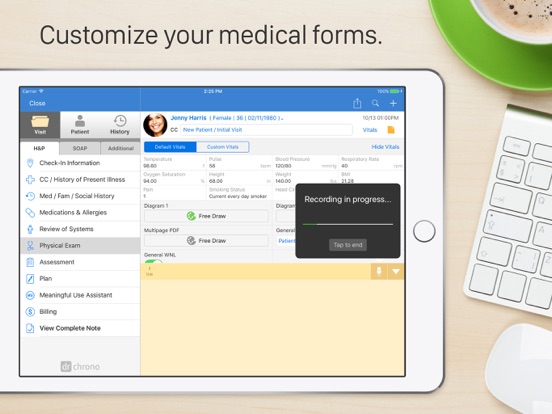
Pricing & paywalls
App Store
Shown for US
- Month of Prometheus — $249.99/month
- Month of Hippocrates — $349.99/month
- Month of Apollo - Billing — $599.99/month
Ratings & reviews
App Store
Shown for US
-
5/5Physiatrist who converted from Aprima EHR
We have been with DrChrono for six months, and I have to totally sing the praises of this cloud-based program. I am a longtime PC user but most of the time I’m simply on my iPhone getting my work done. It’s an extremely intuitive interface and once you set up the templates for your clinical work, things can really sing along. Some things I would love to have, but it might be my ignorance at this time that I don’t have them: #1 Straightforward way of tracking procedures we have performed by date and by procedure type. This type of mini-database would be helpful as we do various procedures in our clinic focused on physiatry. #2 More powerful editing tool for putting in photographic or imaging data. This is light years ahead of what we had with Aprima, which was a disaster, but I am getting greedy and now I want more features! #3 The medical voice recognition program built into the app is a bit primitive. One is not able to save vocabulary, train, etc. It does repeatedly annoying things, but I can get over this. I use transcription for the heavy lifting in any event, such as new patients. ————— All in all, it’s been a very good transition. I barely have looked at a user manual or online video. One more thing, I can count on two hands a number of times I’ve ever put in an online review for anything, so this means something for me. I want to share my good experience. Richard in Seattle
Richard Seroussi · 7 Aug 2026
-
1/5Dishonest billing, almost non-existent support. RUN! Please read!
I was a VERY early adopter of this EHR system, and in the beginning they were lovely to work with. EHRs can be very difficult to adapt to and adopt- so the personal one-on-one assistance was terrific. I believe they are under different ownership/management at this point, and they’ve become an absolute nightmare. Word to the wise: DO NOT SUBSCRIBE- you will regret it. They employ dishonest billing practices- forcing you to pay unexplained invoices in order to unlock the system. We were provided with a $1600 invoice at the beginning of May- they told us it was a past due balance. They send a warning when you are 30 days past due-so there is literally no way to accumulate a balance that high. We paid the balance because we had to in order to have access to our system. I was told this brought our balance to $0. Lo and behold- I get an additional invoice for over $600 during the SAME MONTH. I then also find out that we are being billed for a second user which we cancelled months ago, who has NEVER logged in NOT ONCE, and they even better- they won’t delete him until OCTOBER. This was once a terrific service- now it’s just an awful joke. STAY AWAY AT ALL COSTS!
Ilovekylieminogue · 7 Aug 2026
-
3/5Ups & Downs
I’ve been using drchrono since 2013. I was looking for something easy to use, portable and mobile. drchrono was a perfect fit and allowed me the breakaway from hospital systems and start my own practice. I have relied on drchrono since & had been very happy with it. UNTIL the last 4 years where we’ve experienced slow if any response from the Zen Desk when a ticket was opened. Frequent bugs in new releases to data being entered but just never saved, or scripts being sent that never arrived. I was seriously looking at EPIC as an alternative. RECENTLY drchrono seems to be investing a lot of time in updating its whole platform and making it internally more cohesive and an overall smoother user experience. drchrono seems to have gotten its second wind. I’m hopeful, but our transition to EPIC is still slated for Feb 2027 with one eye still on drchrono. If the new momentum continues & drchrono lives up to its potential I’ll stay because there’s so much Iike about the platform but if it drops the ball again I’ll have to say good bye to a longtime friend.
frontier_psychiatrist · 7 Aug 2026
-
1/5Inconsistency
This is one of the most frustrating programs I used in my 9 years as a provider. 1. There is no consistency between the website/desk top version and the iPad. 2. All the updates are only done to the iPad of iPhone version 3. Tech support is useless, unless your want to know how to clear your cache, and then they are great. 4. System slowness almost daily for the past year, despite “upgrades” 5. ICD 10 library is pathetic, I have better luck goggling them. 6. The only program that I’ve used that’s more frustrating is eClinical Works 7. Has a lot of potential, but lacks internal support. The “new” VP of information or whatever they call themself said there goal was to improve the program. Well 6 months later and well were still waiting for the improvements. 8. Lately we’ve been having lost prescriptions 9. They want to outsource to a bunch of apps like health gorilla, which all come at a cost, and have the potential to be helpful but DrChrono system is so dysfunctional that it’s hard to use them. 10. Lab interfaces are down often. I think I’ll stop at 10, you get the drift.
choose another program · 7 Aug 2026
-
1/5Clinical interface now failing.
I have been with Dr Chrono for over seven years. When I first started working with them they were a startup and they had a lot of energy and they were willing to work hard for my business. We had a good relationship for a lot of years whenever there was a problem with the interface they were quick to fix and upgrade the system. The last two years have been quite a bit of frustration. Both on the clinical interface and the backend business interface, we have had tickets go neglected for a month at a time. Support is nonexistent. We have called numerous times only to be told they are “working on it.” as an alternative to EPIC we initially felt that the hiccups associated with Dr. Chrono were tolerable. Now that EPIC has made significant strides in the outpatient arena, these problems can no longer be overlooked. The value proposition of integration associated with an EPIC transition is now making more sense. I am sorry to be another practice that has to integrate into the monolith that is EPIC but these little guys have dropped the ball.
NicholasMast · 7 Aug 2026
Privacy & accessibility
App Store
Privacy
- Data Linked to You — Analytics — Identifiers — Device ID Developer declared
- Data Linked to You — App Functionality — Identifiers — Device ID Developer declared
- Data Linked to You — Identifiers Developer declared
- Data Not Linked to You — Analytics — Diagnostics — Crash Data Developer declared
- Data Not Linked to You — Analytics — Diagnostics — Other Diagnostic Data Developer declared
- Data Not Linked to You — Analytics — Diagnostics — Performance Data Developer declared
- Data Not Linked to You — Analytics — Usage Data — Product Interaction Developer declared
- Data Not Linked to You — App Functionality — Usage Data — Product Interaction Developer declared
- Data Not Linked to You — Diagnostics Developer declared
- Data Not Linked to You — Usage Data Developer declared
Accessibility
No accessibility labels collected yet.
Versions
App Store
-
11.0.114
This release includes app performance improvements and resolved bugs. Enhancements: - To improve navigation and user experience, the app and account settings are consistent on iPhone and iPad apps. - Event logging performance improvements. - Improved error handling for Stripe DrChrono payments. Fixes: - Fixed a behavior where using draft did not set auto-focus to added draft tab. - Fixed a behavior where the patient visit button did not show View Note when clinical notes were locked on the iPhone. - Fixed a behavior where the Billing screen showed the wrong modifier code. - Fixed a behavior where the wrong appointment showed on a clinical note when the app was reopened.
-
11.0.115
This release includes both performance and interface improvements. · Optimized Clinical Note Interface · Enhanced data-saving capabilities for greater reliability. · Streamlined user experience, focusing on improved usability and overall functionality. · Updated Worldpay SDK · Incorporates the latest security measures for enhanced protection. · Features performance enhancements for a more efficient transaction experience.
-
11.0.116
This release includes both performance and interface improvements. • Optimized the appointment screen for faster loading times by caching key data, including offices, exam rooms, and other appointment and billing-related information. • Updated the Square Reader SDK to ensure compatibility with iOS 18, providing a smoother and more reliable payment experience.
-
11.0.117
This release includes new features, functionality improvements, and bug fixes. See the details below: • Resolved an issue where patient names appeared incorrectly in clinical notes. • Fixed an issue where appointments would not automatically reload when the clinical note status changed. • Fixed an issue where the selected appointment could unexpectedly change when creating a new one. • Added provider location selection for PDMP requests: • If a user has only one Prescriber DEA, it is auto-selected, and the PDMP report runs automatically. • If multiple Prescriber DEAs exist, users can now choose the desired location, after which the PDMP report will run for the selected location. • Integrated LifePoint into the DrChrono EHR third-party app directory, expanding the available tools for improved practice management.
-
11.0.118
This release includes new features, functionality improvements, and bug fixes. See the details below: • New Features • Screen Sharing for macOS: You can now share your screen during video visits on macOS, enabling enhanced collaboration and communication. • Search Functionality for Office/Exam Room Selection: A search bar to the office/exam room selection screen has been added, making it easier and faster to locate specific rooms. • Patient Flags Count in Patient Menu: The patient menu now displays the count of patient flags. • Improvements • Enhanced Appointment Refresh Mechanics: • The appointment list refresh mechanism has been improved for smoother and more accurate updates. • The refresh delay in appointment details for specific scenarios has been reduced, ensuring faster access to updated information. • Office/Exam Room Selection Performance: The performance of the office/exam room selection screen has been optimized for a smoother user experience. • Bug Fixes • Consent Form Loading Indicator: The issue has been resolved where the consent form loading indicator on the appointment screen would load indefinitely.
-
11.0.119
This release includes new features, functionality improvements, and bug fixes. See the details below. New Feature • ONC HTI-1 Certification Updates: We have implemented the latest ONC Certification Criterion updates, including transitioning from Clinical Decision Support §170.315(a)(9) to the new Decision Support Interventions §170.315(b)(11). This ensures our platform meets evolving healthcare standards and continues delivering top-tier clinical decision support. Improvements • Improved Appointment Management: You can now swipe to delete appointments directly from the appointment list for faster and easier scheduling. • Streamlined Clinical Screens: We have removed the Meaningful Use section from the clinical screen. Bug Fixes • An issue has been resolved where the message count was not updating correctly on the iPhone. • The consent forms fetch limit to 120 forms has been increased, addressing user requests for better accessibility.
-
11.0.120
We’ve made several important fixes and improvements to enhance your experience. Here's what's been updated: Fixes: • Indication field now correctly retained when re-sending an eRx. • Fixed issue preventing dismissal of the appointment options pop-up on macOS. • App crashes no longer occur when entering the foreground. • Selection popovers on iPad now stay correctly aligned when changing orientation. • New appointment slots for canceled or no-show appointments now show as available instead of grayed out. • Gender Identity DSI rule no longer triggers incorrect DSI match in the patient chart. • Message Center notification count now updates properly once a message is read. • App crashes when accessing locked notes are resolved. Improvements: • Converted "Add" button on the Appointment screen to a menu for easier navigation. • Support for Modified Clinical Decision Permission added. • Upgraded Speech-to-Text SDK to the latest version for better performance and accuracy. • Location tracking requirement added for DrChrono Payments. • Improved user experience and design for the DrChrono Payments interface.
-
11.0.121
This release includes a fix to address a key issue affecting app functionality. Please update to ensure continued smooth performance. Previous Version Updates: We’ve made several important fixes and improvements to enhance your experience. Here's what's been updated: Fixes: • Indication field now correctly retained when re-sending an eRx. • Fixed issue preventing dismissal of the appointment options pop-up on macOS. • App crashes no longer occur when entering the foreground. • Selection popovers on iPad now stay correctly aligned when changing orientation. • New appointment slots for canceled or no-show appointments now show as available instead of grayed out. • Gender Identity DSI rule no longer triggers incorrect DSI match in the patient chart. • Message Center notification count now updates properly once a message is read. • App crashes when accessing locked notes are resolved. Improvements: • Converted "Add" button on the Appointment screen to a menu for easier navigation. • Support for Modified Clinical Decision Permission added. • Upgraded Speech-to-Text SDK to the latest version for better performance and accuracy. • Location tracking requirement added for DrChrono Payments. • Improved user experience and design for the DrChrono Payments interface.
-
11.1.0
This release includes new features, improvements and bug fixes. Please update to ensure continued smooth performance. New Features: • Added support for Single Sign-On (SSO). • Moved practice chat under account settings for better compatibility with the new iOS 18 tab bar controller. Improvements: • We’ve made several maintenance updates, including dropping support for iOS 15, updating libraries, and adopting the new iOS 18 tab bar controller. • When logging in with 2FA, the app now suggests the code on the keyboard for a smoother experience. • Consent forms are no longer limited to 50; all consent forms should now display, regardless of the number. Bug Fixes: • Fixed an intermittent bug where history document images were not loading. • Fixed a bug where Macros displayed the pattern string rather than the actual values. • Fixed a rare crash issue occurring after logging in. • Fixed a bug where document edits were not saving for documents received in the message center. • Fixed an issue where messages without attachments showed a blank screen without the error message “Failed to load attachment.” Additionally, we now display an alert if attachments are zipped files and need to be downloaded and viewed on the web. • Fixed an app crash when signing documents in the message center. • Fixed an issue where customers couldn’t process Square payments on iPhone. • Fixed a bug where customers couldn’t switch off the DSI Matches under account settings. • Fixed an issue with the presentation of the new version pop-up alert. • Fixed an issue where insurance photos were not always loading. • Fixed an issue with the loading indicator when uploading photos or documents. • Fixed various UI bugs related to iOS 18. Other Updates: • Removed the outdated carousel on the login page. • Removed the drug category filter from the medication list.
-
11.1.1
This release includes new features and bug fixes. Please update to ensure continued smooth performance. New Features: - When the message count exceeds 99, the app now shows 99+ on the Messages and Tasks icons. - Users can now see the app version on the login screen, making it easier to identify which version they're using. Bug Fixes: - Fixed an issue where the Message Center badge count was not synchronizing across devices. - Fixed an issue where disabling the Medications and Allergies toggle switch in Doctor Options resulted in an error message. - Fixed an issue where OnPatient access switch not working as expected on Patient Information screen - Fixed an issue where users were unable to attach documents from EHR app to email apps - Fixed an issue where users were unable to share documents from other apps to EHR app
-
11.1.2
This release includes new features and enhancements. Please update to ensure continued smooth performance. New Feature: - Optional Clinical Note: The appointments list now clearly differentiates between regular and optional clinical notes. Appointments with an optional clinical note will show the label "Optional Note" instead of "View Note". Enhancements: - An update has been made to ensure that CPT and HCPCS editing functions are now consistent on both the iPhone and iPad. - Frozen Transactions Reporting: Charges, insurance payments, patient payments, adjustments, and denials are now frozen based on their posted (created) date. - A new workflow is now available for future-dated charges where charges are entered for a future appointment date, they are classified as temporary charges and will not appear in any reports.
-
11.1.3
In this release, we have brought to you some enhancements and squashed various bugs. Details below. Enhancements: - We've improved the user experience within the diagnoses and code editor, making it more intuitive and efficient for accurate coding. - Warning icons in the billing code editor now synchronize consistently, providing clearer and more reliable alerts. Bug Fixes: - Resolved an issue causing inconsistent task notification counts. - Fixed a bug affecting insurance card photo uploads. - Addressed an issue where task badge counts were not synchronizing across devices. - Corrected a problem preventing pre-filled macros from appearing on iPad after updates. - Eliminated crashes related to fetch provider’s information. - Resolved an issue causing crashes related to vitals. - Prevented crashes that occurred after inactivity lock.
-
11.1.4
This release includes key enhancements and several important bug fixes to improve performance, usability, and reliability across iOS devices. Enhancements: - Unified Tab Bar Across iOS Devices: The tab bar experience is now consistent across all iOS platforms, ensuring smoother navigation and reducing the risk of platform-specific issues. Bug Fixes: - Battery Drain Resolved: Addressed a battery consumption issue reported in version 11.1.0 of the DrChrono EHR app. - Visit Reason Reset Fixed: Fixed an issue where the visit reason was incorrectly reset to the default appointment profile reason. - PIN Screen Display: Corrected an issue where the PIN screen failed to display automatically on iPhones.
-
11.1.5
Enhancements: - Upgraded Square Payments Integration Updates have been made for a secure and stable payment experience with our improved Square integration, to help make transactions smoother and more reliable. Bug Fixes: - Fixed an issue where an error message would appear even after a successful Square payment. - Resolved loading problems that occurred after a failed Square payment attempt. - Addressed a visual glitch causing uneven UI display on certain screens. - Fixed an app crash specifically related to Square functionality on certain devices. - Resolved an issue where tapping “Connect a Card Reader” displayed an error alert. It now correctly opens the Square device connection screen. - Resolved an issue where tapping the “Swipe Card” button would immediately throw an error. It now correctly opens the Square device connection screen as expected.
-
11.1.6
This release consists of resolutions to ensure better iOS 26 performance, improvements to Health Gorilla users, and various other bug fixes. Health Gorilla Improvements We have resolved an issue and improved the workflow for printing lab orders via Health Gorilla. Resolutions - Resolved an issue that prevented uploading email attachments to the app when the device unlock setting is set to immediately. - Fixed an issue with part-time plan types being unable to send prescriptions. - Addressed an issue for iOS 26 that impacted the appointment screen loading indefinitely - Fixed a problem that was causing the app to crash when resizing the app from iPhone view to iPad view, related to iOS 26.
-
11.2.7
This release consists of improvements to Health Gorilla users and various bug fixes. Health Gorilla improvements - Streamlined the order management process by removing irrelevant order types and ensuring accurate display of all relevant Health Gorilla order types. - Ensured the Health Gorilla order list screen automatically refreshes after creating a new lab order with a print or download action Resolutions - Resolved an issue where tasks could not be opened from patient chart. - Fixed an app crash that occurred when tapping the patient name on an iPhone. - Fixed a crash related to the Freedraw function when the device was in horizontal layout. - Addressed a document display discrepancy between the web and mobile versions to ensure a consistent experience. - Fixed an intermittent issue that prevented Clinical notes from saving correctly. - Resolved an issue in which the speech-to-text dictation tool got stuck on “Please wait…” when used in a linked account. - Addressed a problem that was causing occupied appointment time slots to appear available in the EHR app, leading to an error message when attempting to book them.
-
11.2.71
This release consists of improvements to Health Gorilla users and various bug fixes. Health Gorilla improvements - Streamlined the order management process by removing irrelevant order types and ensuring accurate display of all relevant Health Gorilla order types. - Ensured the Health Gorilla order list screen automatically refreshes after creating a new lab order with a print or download action Resolutions - Resolved an issue where tasks could not be opened from patient chart. - Fixed an app crash that occurred when tapping the patient name on an iPhone. - Fixed a crash related to the Freedraw function when the device was in horizontal layout. - Addressed a document display discrepancy between the web and mobile versions to ensure a consistent experience. - Resolved an issue in which the speech-to-text dictation tool got stuck on “Please wait…” when used in a linked account. - Addressed a problem that was causing occupied appointment time slots to appear available in the EHR app, leading to an error message when attempting to book them.
-
11.2.80
Bug Fix Billing Codes Now Stay Visible After Diagnosis Selection An issue was identified in the mobile app where billing codes could disappear from the billing section after selecting a diagnosis. This affected users on iPhone, iPad, and Mac. This issue has been corrected so billing codes now remain visible, ensuring a consistent and reliable billing experience.
-
2026.01.0
New features Patient allergies and problems lists We're excited to announce significant enhancements that improve how you capture and share patient information—while keeping you compliant with the latest healthcare standards. What's new: Enhanced allergy documentation Your allergy records just got smarter. We've added new verification status options and standardized coding to ensure critical allergy information transfers seamlessly when you share records with other providers. Better documentation means better patient safety. Improved Problem List management Document patient problems with greater precision using new status options (like "recurrence," "remission," and "relapse") and verification statuses. Plus, the system now automatically identifies Social Determinants of Health (SDOH) diagnoses, helping you paint a more complete picture of your patients' health needs. Why it matters: Seamless data sharing with hospitals, specialists, and health systems Regulatory compliance built right in More complete patient records that support better clinical decisions Feature rollout will begin on January 30, with full availability by February 10. Related articles ONC Update 2025: Patient Allergy List ONC Update 2025: Patient Problem List Enhancements: Simplified New Patient Registration New patient registration has been simplified by removing inline red warnings for additional fields. Only First Name and Last Name are now required, aligning the experience with web behavior and reducing unnecessary interruptions during patient setup. Resolutions: “Use iPad EHR” Permission We fixed an issue where changes to the Use iPad EHR permission were not consistently applied. What’s fixed: The app now checks for permission changes every 15 minutes. If the Use iPad EHR permission is disabled, the user will be automatically logged out of the iPad EHR. Depending on timing, this may happen immediately or within up to 15 minutes after the change.
-
2026.2.0
New Features: USCDI v3 demographic updates USCDI vs allergies and problems lists USCDI v3 health assessment scoring on iOS USCDI v3 health assessment available in iOS form library AI-powered support chat Resolutions: Communication history message viewing We’ve fixed an issue that prevented messages from opening in the Communication History section. What’s fixed: Messages in Communication History > Messages now open and display correctly when selected. This fix restores expected access to patient communications in the app. Message Center issue An issue affecting the EHR App (Version 11.1.6) on iOS devices has been resolved. Some users were unable to open the Message Center and received a “Response status code was unacceptable: 502” error on iPhone and iPad devices, even though their apps and iOS versions were up to date. This issue has been fixed. The Message Center should now load normally. If you continue to experience issues, please restart the app or contact support.
-
2026.3.0
INTRODUCING EVERHEALTH SCRIBE We are excited to launch EverHealth Scribe, our new AI-powered documentation tool designed to significantly reduce your clinical note burden. Ambient Documentation: Capture patient conversations in real-time and automatically generate structured clinical notes. Provider Control: Review and edit AI-generated notes before they are finalized in the EHR. Quick Launch: Use the new "Open in Scribe" button located next to "Start Visit" on mobile to begin an AI-assisted session immediately. Smart Coding (Beta): Get ICD-10 code recommendations based on visit transcripts to help streamline your billing. IMPROVEMENTS & BUG FIXES This update also includes several key stability and performance enhancements across iPhone and iPad: Clinical Notes: Improved saving reliability to prevent the app from becoming unresponsive or losing data during updates. Billing: Resolved an iPad issue where CPT and HCPCS codes would not populate on the first entry. Patient Charts: Fixed a display issue where NKDA (No Known Drug Allergies) status would not save or appear correctly. Problem Lists: Older entries now correctly display in the Active/Inactive sections on the web interface. Medication Lists: Fixed a bug on iPhone where the medication list would show data from a previous patient when switching between tasks. OB Calculator: Fixed an iPhone responsiveness issue when entering past dates. Task Management: Archiving a task now correctly archives the associated message simultaneously. Hardware: Enhanced connection reliability for the Stripe M2 card reader on iPad. App Stability: Resolved a crash occurring when opening patient appointments on iPhone. Navigation: Fixed a filtering issue where exam rooms were missing for certain offices.
-
2026.5.0
Key Enhancements Unified Problems View: We’ve overhauled how patient Problems are managed in Clinical Notes. The mobile experience now mirrors the web platform, allowing you to filter and sort problems by name or diagnosis date. The interface is simplified with a new "+" button for adding entries and a "swipe to delete" gesture for easier management. iOS 26 Compatibility: This update prepares the app for Apple’s upcoming iOS 26 release, ensuring stability and performance across iOS 17, 18, and the new version 26. (Note: This release is optimized for non-Liquid Glass configurations). Recent Patients (iPhone): To match the iPad experience, the iPhone search screen now displays your last five recently viewed patients for faster chart access. Important Resolutions eRx Patient Info: Added a "Country" field to patient demographics and improved validation to ensure required address and phone details are complete before sending prescriptions. Growth Chart Fix: Resolved an issue where opening Growth Charts could result in a "404 page not found" error; charts now open directly within the app. On-Demand Eligibility: Fixed a bug where insurance eligibility updates would show a loading spinner without refreshing data. Results now update in real-time. Video Visit Requirements: Aligned mobile behavior with web rules; a patient email address is now strictly required to schedule video visit appointments. Battery Optimization: Implemented power-usage improvements for devices running iOS 26 to reduce background battery drain. Macro Search Stability (macOS): Improved the stability of the Macro Search popup on macOS, ensuring the window stays open while typing and processes input reliably across different keyboards.
-
2026.5.1
Resolved issues impacting camera functionality, including clinical photo capture and file uploads to patient charts. Fixed a patient data display issue when switching between charts to ensure the correct patient information is shown consistently.
-
2026.6.0
What’s New in DrChrono EHR v2026.06.0 We are constantly improving your mobile EHR workflow. This update brings highly requested web-based clinical fields directly to your mobile device, standardizes e-prescribing safeguards, and addresses key performance fixes. New Features & Clinical Form Management We’ve expanded our mobile clinical forms to include several structured fields previously only available on the web, ensuring better data consistency and seamless CCDA reporting: Clinical Test/Result Pregnancy Intent Planned Procedure Smoking Status Pregnancy Status Education Level EverHealth Scribe Interest: Non-enrolled users can now easily tap an informational banner to request more information about EverHealth Scribe. Banners can be dismissed for 90 days. E-Prescribing & App Enhancements Standardized eRx Banners: Clearer guidance on restricted actions for staff and emulating users. Staff users will see "Provider Signature Required" banners when creating draft prescriptions. Pediatric Vital Sign Verification: Added a warning prompt during the eRx workflow if required pediatric vital signs (height/weight) are missing. Improved Patient Directions (SIG) Validation: New validation checks prevent prescription submission errors by ensuring valid SIG and dispense quantities are entered before sending. Allergy Filter Menu Cleanup: Streamlined the interface by removing the unsupported "Drug Ingredients" filter across all mobile experiences. Enhanced Update Notifications: In-app update prompts now show the latest version number, release date, and release notes, with a "Remind Me Later" option. Bug Fixes & Stability Improvements App Stability: Resolved an issue that could cause the app to close unexpectedly when opening certain task messages. iPad Multitasking: Fixed a display issue where visit dates and vitals would occasionally fail to load while using Windowed Apps or Stage Manager on iPad. Billing Code Visibility: Resolved an issue on iPad where CPT codes disappeared from the billing section after assigning a Diagnosis (Dx) pointer. Problem List Dates: Fixed a bug where problems without an onset date defaulted to "01/01/2000." The field will now correctly remain blank. Infant Age Display: Patients under one year old will now correctly show their age in months rather than defaulting to "0" on iPhone. Document Fixes: Filled and uploaded documents will no longer appear blank in the Patient History menu. PDFs will also now properly respect their original portrait/landscape orientation. Mac EHR App Visuals: Fixed a bug on MacBook where the functional "Sign and Lock Note" button incorrectly appeared greyed out.
-
2026.7.0
· 30 Jul 2026
Platform & Reliability Updates Fewer Crashes & Improved Square Payments: Updated Square payment integration across mobile EHR and Check-In apps to reduce unexpected crashes and improve connectivity during card processing at check-in. Availability: Available now (iPhone, iPad). Installs automatically with no workflow changes required. Clinical Features Pending Tasks Status Indicators on Schedule: Appointment cells now feature visual status indicators showing pending draft clinical notes and eRx drafts, allowing providers to see incomplete tasks at a glance. Includes a tappable shortcut directly to eRx Drafts and the Sign Note page. Availability: Available now for all DrChrono mobile providers (iPhone, iPad, Mac). EverHealth Scribe Billing-Compliant CPT Code Suggestions: EverHealth Scribe now automatically suggests CPT and diagnosis codes that comply with payer-specific ordering rules to reduce manual rework and minimize denial risks. Availability: Available now to practices using EverHealth Scribe with billing code suggestions. Automatic Billing Code Caching: Billing code searches are now cached automatically in the app to make recently used codes instantly available. The manual toggle setting for search caching has been removed. Availability: Available now (iPhone, iPad). Early Access Features Rich Text Formatting in EverHealth Scribe Notes: Clinical notes generated by Scribe preserve bolding, line breaks, and structural formatting when synced to mobile and web EHR apps, reducing manual editing. Availability: Open beta (Full availability September 2026). Message Center Threading on Mobile: Patient communications in the Patient Messages folder are now grouped into continuous threads by subject for easier context and quicker replies. Availability: Early access beta for web and mobile (Full availability August 2026). iOS 27 Compatibility Notice: This app is not yet compatible with iOS 27. To avoid potential crashes or unexpected issues, please do not update to iOS 27 until we release a compatible version. We're actively working on support and will notify you once it's available.
Alternatives
- Freed - AI Scribe & Assistant — Same category + similar ratings
- iPrescribe — Same category + similar ratings
- DocUpdate — Same category + similar ratings
- Doximity — Same category + similar ratings
- DeepScribe — Same category + similar ratings
- ICD10 Consult — Same category + similar ratings
Availability by market
- US
Data quality & evidence
- Page completeness
- Live store listing
- Last verified
- 7 Aug 2026
- Sources
- App Store
- Independent summary has not been published yet.