
Quick verdict
- What it is
- Store information collected; independent summary not yet available.
- At a glance
-
- Free to download
- In-app purchases
Categories and search queries
Official categories
- Photo & Video
- Graphics & Design
AppCorpus categories
Key functions
| Function | Availability | Access | Scope | Evidence |
|---|---|---|---|---|
| Free app | Yes | Free | — | Store published |
| In-app purchases | Yes | Limited free | — | Store published |
Screens
App Store
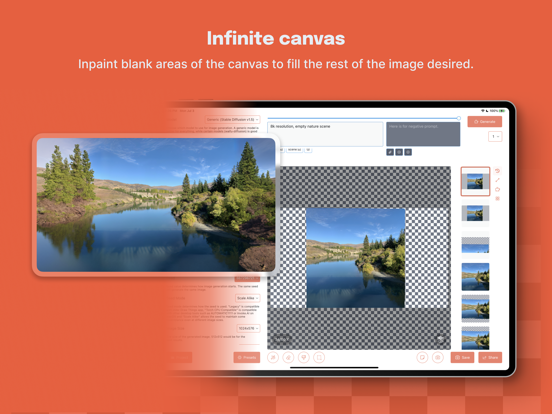
20 store screenshots


Pricing & paywalls
App Store
- Boost Bundle L — $19.99
- Boost Bundle M — $4.99
- Boost Bundle S — $0.99
- Draw Things+ — $8.99
Ratings & reviews
App Store
-
4/5Needs UI Improvements
Specifically, on a 4K screen, the right sidebar showing the history shows images at low res scaled up so they appear pixelated compared to previewing the image you click on in the main middle column. Also, on such large screens it would be PERFECT if the grid based layout just shows up in the right sidebar where the history is instead of popping up in a tiny modal screen. I have a magic mouse and for some reason it doesn't scroll with inertia most of the time in this app. It could be the mouse, just that's part of the frustration of the current UI. Another is the inability to move through the history using the arrow quickly. The inability to right click on a history image and do more than just delete it. Would love to see updates to the UI to address these concerns and make it much much much easier to browse thousands of generated images quickly and more easily. There should be a way to end the current sequence of generations, not just skip 1 out of 100. If there's already a way, it's not obvious or intuitive. Also, can we please have an option to generate more than 100? Sometimes I like to leave it running all night. Also, can we please view and manage generated photos even while the app is generating new photos? That'd be great. I'll probably continue to edit this review as I think of new things, so check back often haha. Thanks so much for considering how you will update the UI soon!
corefusion · 7 Aug 2026
-
5/56/5 Stars
Anyone new to GAN art might not realize how big a deal this app is. The vast majority of art generators offload the calculations to their own curated model on their own server, which you have little to no control over. And computers previously needed some kind of Linux setup and a big stack of processing power to make anything, following a steep learning curve. Then this app comes along and freakin’ SOMEHOW takes full advantage of the recent iOS neural network architecture to keep generation totally local using models of your own choosing. On your -iPhone- no less. Including optimizers like LoRA, upscaling, inversion embedding, and a bunch of stuff you likely didn’t even know existed before. You can even train your own modules ala DreamBooth to personalize it for whatever you’re making! As further proof of miracles, it generates crazy fast for having it done on a calculator-sized smartphone, and has an interface that is tightly designed and responsive. Not to mention in-app quick downloads of a staggering number of models/modules alongside an easy option to upload your own. You won’t be able to make Van Goghs with 4 keywords and 0 AI experience, but having full control means you'll actually bother to learn and take advantage of a capability that was until very recently limited to GPU-stacked server farms. If you’re someone who dipped enough of a toe into AI art that you want to take the training wheels off and see just how much can be tinkered with, this app is peerless.
BillOb90 · 7 Aug 2026
-
4/5WARNING
This app is great for offline ai generation, I loved using it but unfortunately I have an older phone so it isn’t very fast, the app has to be kept open the entire time an image is generating but it isn’t really that bad. HOWEVER, because my iPhone is so old it heats up a lot and using this app seems to have severely affected my battery health, my phone can’t even last the whole day now. Please understand that I am using an older phone with a processor that isn’t the best, I know this app would be much better on a newer device. if you are using a newer device then please disregard the above message. The app is great, I love the concept, but if you have an older phone it’s probably better to download AUTOMATIC1111 on a pc if you do have a good GPU, If neither of these are good options for you it’s probably best to use an online image generator like civitai, account are free and you get lots of images per day (around 200), but if you don’t want to deal with an image limit and you have a good phone or PC then this app is the way to go.
Mr Yippee · 7 Aug 2026
-
5/5Compatibility is a problem
Update: Well , it’s happened. Liuliu has found a way to make this work on my phone! And it works well! My first attempt led to a hard crash and restart, but everything since has been smooth. And, surprisingly, I don’t seem to have any resolution limitations. I can generate 512x512 images just fine, though they take about five minutes at 30 steps. And one image will guzzle about 7% of my somewhat degraded battery life. But I can run Stable Diffusion 2.1 with negative prompts on my phone for free! It’s such a powerful tool for visualization. Thanks to the developer for all the hard work! I can’t find a way to generate at 768x768 with the native 768v model — I know I’m being greedy, but if it’s possible, please try to find a way! Original review: I absolutely support what the developer is doing here, as Stable Diffusion is a revolution in digital art tools and it is amazing that it can work on a mobile device. Unfortunately, I have not been able to get the app to work. Ever. The listing says my phone, an SE 2, is compatible, but the app crashes about 1/3 to 1/2 of the way through generation on even the smallest resolution image (384x384). I’m sure it’s running out of memory, but even quitting all other apps and setting the number of steps to the minimum doesn’t help. I don’t know what else to do. If there is a way to get lower-memory devices to work, the app should suggest the appropriate settings. And if not, the compatibility section of the app listing should be adjusted to better reflect what is actually possible. Dev, please help!
Adreitz · 7 Aug 2026
-
5/5The number one Stable Diffusion program for Silicon. Full stop.
I want to preface this by saying that this is ADVANCED AI generation software. I've seen a lot of 1 star reviews of this app by people who don't know what they're doing and are expecting to just type a prompt and get exactly what they want with no/minimal additional tweaking/setup. If that's what you want, use something like Midjourney. However, this software is virtually unparalleled in ease-of-setup and quality for using Stable Diffusion, you just have to do a little bit of learning and then it works virtually flawlessly. The app has support for LoRAs, textual inversion, and additive models. There are also plenty of quality-of-life features (like giving the option to delete models from your downloads folder once you upload to Draw Things.) There is also a wealth of settings to tweak as well as the option to clear the temporary cache to free up space. Underneath every setting is a well-writen and easy-to-read explanation detailing exactly what it does and what you might prefer to use. Massive respect and many thanks to Liu Liu for providing this software completely for free without any in-app purchases or subscriptions, you're brilliant. It's clear a lot of effort and care went into the user experience.
tri repetae · 7 Aug 2026
Privacy & accessibility
App Store
Privacy
- Data Not Linked to You — App Functionality — Identifiers — User ID Developer declared
- Data Not Linked to You — App Functionality — Purchases — Purchase History Developer declared
- Data Not Linked to You — App Functionality — User Content — Other User Content Developer declared
- Data Not Linked to You — Identifiers Developer declared
- Data Not Linked to You — Purchases Developer declared
- Data Not Linked to You — User Content Developer declared
Accessibility
No accessibility labels collected yet.
Versions
App Store
-
1.20251107.1
* Metal FlashAttention v2.5 w/ Neural Accelerators (preview) with breakthrough performance on M5 iPad / A19 Pro iPhones; * Support import AuraFlow models; * More compatibility improvement on importing Qwen Image LoRAs; * Some minor UI adjustments.
-
1.20251117.1
* Fix performance regressions on OS 26 for pre-A19 Pro era devices; * Use Neural Accelerators for BF16 on A19 Pro / M5 devices; * Fix cold start slowness for Neural Accelerators; * LoRA import now respects your version selection more.
-
1.20251124.0
* Support converting to 8-bit or quantized bit for models from the app. * More error message on when Cloud Compute failed. * Some minor UI fixes.
-
1.20251201.0
Hotfix a bug in 1.20251124.0 that stopping a remote generation would trigger a local generation.
-
1.20251207.0
* Add support for Z Image Turbo, including model importing and LoRA support. * Turn off automatic fallback to local rendering if remote rendering failed.
-
1.20251212.0
* Improve compatibility with Z Image Turbo LoRAs and finetunes. * Fix OS 26.2 specific issue with neural accelerators.
-
1.20251219.0
* Add support for FLUX.2, including model import and import LoRAs for FLUX.2 models.
-
1.20251223.0
* Added support for Qwen Image Edit 2511; * Added support for Qwen Image Layered.
-
1.20260105.0
* Support Qwen Image 2512 in FP16 and inside Official Models. * Improve realism on Qwen Image models by fixing a precision problem.
-
1.20260120.0
* Support FLUX.2 [klein] series of models (4B, 9B, 4B Base, 9B Base); * Support both import LoRAs and import models for FLUX.2 [klein] series.
-
1.20260207.0
* Support Z Image Base series models; * Support high quality preview on selected devices for Z Image, FLUX.1, HiDream, Qwen Image, FLUX.2; * Fix importing some Z Image LoRAs.
-
1.20260228.0
* Support LTX-2 models for video generation with audio builtin, support both I2V and T2V mode, as well as importing their LoRAs; * Fixed FLUX.2 issues related to loading LoRAs as side-path; * Fixed FLUX.2 issues with tiled diffusion.
-
1.20260303.0
* Fixed a crash when generate LTX-2 video and enabled "Save Generated Media to"; * New Compute Units formulation that encourages video generation with Cloud Compute; * New audio playback UI for video with audio.
-
1.20260304.0
* Fix metadata for LTX-2 models. * Fix Z-Image LoRA trained by OneTrainer import issues. * Revert to index to the last frame for generated videos to facilitate some existing scripts workflow. * Fix Compute Units calculation issues for FLUX.1.
-
1.20260314.0
* Support LTX-2.3 for crisp clean audio and video generation; * Support FLUX.2 [klein] 9B KV for up to 2x speed-up during image editing; * Speed up video model's decoding performance.
-
1.20260320.1
* Fix FLUX.2 [klein] 9B KV cannot use batch size or text guidance != 1 correctly. * Better Hires Fix logic specifically for LTX-2.3 so it will be more automatic to find x2 or x1.5 resolutions. * New history view on iPad with more log-like behavior.
-
1.20260322.0
* Fix FLUX.2 [klein] 9B KV cannot use batch size or text guidance != 1 correctly. * Better Hires Fix logic specifically for LTX-2.3 so it will be more automatic to find x2 or x1.5 resolutions. * New history view on iPad with more log-like behavior.
-
1.20260323.0
* Support export video as HEVC; * Fix new History item menu issue.
-
1.20260330.0
* Added a new quantization variant: 8-bit S, which on A19 Pro / M5 is about 1.5x to 2x faster than Exact or 8-bit variant. * Fixed issue when importing models, it was no longer respecting External Folder selection. * Support Bridge Mode to Cloud Compute with Bring Your Own LoRAs. * Some language updates to our tiers, now it is Local Only, Free, Draw Things+.
-
1.20260410.1
* Add 8-bit S support for M4 / A18 Pro devices, reaching up to 2x speed-up for these device. * Support LoRA training for FLUX.2 [klein] 4B / 9B / Z Image / Qwen Image as base model. * Fix audio sync issue during in-app playback. * Fix some 8-bit S model generation issues on M5 / A19 Pro.
-
1.20260418.1
* Added support for ERNIE Image, including LoRA import, training and model import. * Added support for Anima Preview 3, including LoRA import, training and model import. * Updated LTX-2.3 [distilled] to LITX-2.3 [distilled] 1.1. * Fixed crash related to Z-Image LoRA training. * For M5 / A19 Pro, now defaults to ANE+NAX hybrid inference mode.
-
1.20260430.0
* Support SeedVR2 as one of the diffusion model for 1-step upscale / restoration work. * Fix Anima LLM adapter related issues. * Switch to better newer causal / mask attention kernels. * Support export LoRAs for Qwen, Z Image, FLUX.2 and ERNIE Image models. * Imported Z Image models now runs at BF16 precision.
-
1.20260501.0
* Hotfix for new segmented downloader issue.
-
1.20260518.2
* Add interrogator model "Qwen 3.5 4B". * Add dedicated mode selector "Auto" / "Generation" / "Edit". * Support "Sign in with Google". * Some other small visual updates.
-
1.20260716.0
· 17 Jul 2026
* Add support for Ideogram 4; * Add support for Krea 2 Turbo / Raw; * Add Color Calibration option, useful for SeedVR2 upscale.
Alternatives
- RealityScan Mobile — Same category + similar ratings
- Affinity Photo 2 for iPad — Same category + similar ratings
- Spellai - AI Art Maker — Same category + similar ratings
- Luma Dream Machine — Same category + similar ratings
- Runway: AI Image & Video — Same category + similar ratings
- Procreate Dreams — Same category + similar ratings
Availability by market
- US
Data quality & evidence
- Page completeness
- Live store listing
- Last verified
- 7 Aug 2026
- Sources
- App Store
- Independent summary has not been published yet.