
Quick verdict
- What it is
- Store information collected; independent summary not yet available.
- At a glance
-
- From $4.99/mo
- Free to download
- In-app purchases
Categories and search queries
Official categories
- Graphics & Design
- Productivity
AppCorpus categories
Key functions
| Function | Availability | Access | Scope | Evidence |
|---|---|---|---|---|
| Free app | Yes | Free | — | Store published |
| In-app purchases | Yes | Limited free | — | Store published |
Screens
App Store
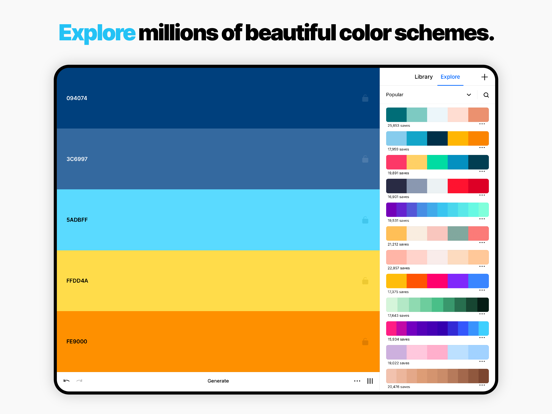
29 store screenshots


Pricing & paywalls
App Store
- Coolors Pro - Monthly — $4.99/month
- Coolors Pro - Monthly — $35.99/year ($2.99/mo)
Ratings & reviews
App Store
-
5/5Best Creativity Booster!!
Hey I’m an artist who was scared to death of color. So many things can go wrong when making your piece and color theory is hard in general! But, that all changed when I got this app. It’s so easy when you already have a palette to choose from, and honestly they have limitless combinations. Sometimes I’ll go on here and just keep generating pallets over and over until I’m inspired (Much better then the hour long Pinterest trap I often find myself in ;)). All in all 10/10 app, totally recommend for artists!
o0kiddotonin0o · 5 Sep 2026
-
1/5Subscription to access existing features I paid for already.
I originally paid for this app to support the great work that the developer did, but now converting it to a subscription without providing any new features is extortion. I paid to unlock unlimited palettes, now I’m limited back to the size and number of palettes. Looser developer. This app should return to being a one time purchase, there’s nothing in this that requires a subscription, certainly not $5/month. I’m happy to pay for an upgrade like $10 to $20/year, however this isn’t a $60/yr subscription worthy application which is effectively a way to browse, bookmark, and generate color swatch combinations, which Adobe provides for FREE in Capture.
Nsomnac · 5 Sep 2026
-
3/5Pretty good, but…
I really love this app. It has a ton of value even though it’s very simple. I’ve used it reliably for a year. Today I went to see if there was a paid version of the app, because I need more pallets than are allowed with the free version, and because I wanted to support the Developer. However, I found that I can’t just pay a flat fee. It is baffling to me that an app which hasn’t been updated in 3 years (at the time of this writing) and which is created in a very minimalistic way, would require a subscription to unlock its features. Also, reading other comments leads me to believe that people who bought this app in the past (when it was available as a one-time purchase) were not grandfathered in. That is absolutely ridiculous imo. To the developer, please either maintain the app or let us have Pro with a one-time purchase. As it stands, the “Pro” version is pretty insulting.
musically6 · 5 Sep 2026
-
2/5Price gouging at its finest
This is a great tool, don't get me wrong! I love it so much and do use it fairly often. But this subscription model is absolutely ridiculous and exploitative. I've used the app for a long time; "pro" features were a one time purchase back then; not super cheap upfront but worth it over time. A subscription is maybe understandable for an indispensable, widely featured, and always evolving app. But this isn't that. It's a color picker, with comparable free options, and nothing has changed except minor interface tweaks and optimization for over 5 years. One well paid dev can clock in for like 5 hours a year and do more than this company has. The free version is basically useless; there are better places to find existing palettes, which is all it offers. I only use the app at all because they still honor the one time purchase I made, but I would strongly recommend against it unless you're one of the few designers who don't mind paying a ransom for basic tools. If you're a big corporation's design lead, this is great. But it's a terrible use of money for students, hobbyists, nonprofit designers, rural companies, independent businesses, etc etc etc. (there are no discounts or exceptions currently) I have books with extensive details on color theory, huge pallette collections, and helpful tailored advice; none of which cost more than 2 months of this app.
I wrote this: · 5 Sep 2026
-
1/5AVOID THIS APP. Broken, flawed, and no local storage
Sign-in doesn’t work; have tried to log into the service multiple times. No errors, even—it just never signs me in. And that’s a problem, because crucial things like saving a palette—something that most other apps allow you to do locally—require being logged in. If you have no internet access, you can’t save any palettes, or browse any of your saved palettes. The app is useless without a data connection. That should never be the case for an app that allows you to create content. Imagine if losing internet access meant you couldn’t save any of the photos you took. Even if they somehow get sign-in to work, that’s a major design flaw in the app itself. There is NO reason to be charging $2.99 for what’s basically just a front end to their website. One major reason to even offering an app would be working locally when you can’t access the website. I really feel cheated here. It’s a shame—the actual site is very useful, which is why I trusted Coolors enough to purchase the app. Wish I hadn’t.
wr18r02 · 5 Sep 2026
Privacy & accessibility
App Store
Privacy
- Data Linked to You — App Functionality — Contact Info — Email Address Developer declared
- Data Linked to You — App Functionality — Identifiers — User ID Developer declared
- Data Linked to You — Contact Info Developer declared
- Data Linked to You — Identifiers Developer declared
- Data Not Linked to You — App Functionality — Diagnostics — Crash Data Developer declared
- Data Not Linked to You — App Functionality — Diagnostics — Other Diagnostic Data Developer declared
- Data Not Linked to You — App Functionality — Diagnostics — Performance Data Developer declared
- Data Not Linked to You — Diagnostics Developer declared
Accessibility
No accessibility labels collected yet.
Versions
App Store
- 1.0.0
-
2.0.0
Now you can adjust your colors components and save your palettes right in your phone!! More features are coming! Why is it not free? Hello I'm Fabrizio and I'm a freelance web designer! During several months I've spent lot of time and energy in creating and improving Coolors.co. I've done it with joy because of my huge passion for design. I'll definitely go on this way with new cool features. So in honor of design I don't wanted to put those ugly ads in the app so I've decided to make it paid, without any hateful In App Purchase. These money will help me to maintain Coolors alive! Thanks friend!
-
2.0.1
Now you can adjust your colors components and save your palettes right in your phone!! More features are coming! -- iPhone 6 Plus bug fix. -- Why is it no longer free? Hello I'm Fabrizio and I'm a freelance web designer! During several months I've spent lot of time and energy in creating and improving Coolors.co. I've done it with joy because of my huge passion for design. I'll definitely go on this way with new cool features. So in honor of design I don't wanted to put those ugly ads in the app so I've decided to make it paid, without any hateful In App Purchase. These money will help me to maintain Coolors alive! Thanks friend!
-
3.0.0
Now you can sync the app with your account. You can browse thousands of popular palettes. Drag to reorder colors. Name and tag your favorite color schemes. IMPORTANT: From this version you'll need to login into your Coolors account in order to collect new color schemes. Your old palettes will be automatically uploaded to the account.
-
3.0.1
Sync bug fix.
-
4.0.0
The new Coolors is here! The most popular colors palettes app gets even better with a fully redesigned UI and a lot of new features! Here’s what’s new: • Redesigned UI with support of modern devices and dark mode • You can now work with more than 5 colors • Is now possible to organize your palettes in projects and collections • You can create gradient palettes from 2 or more starting colors • You can save the colors you like to the favorites • You can export a palette in PDF with several customizations • You can now pick colors from a photo • You can create end export wonderful collages with photos and palettes • You can now adjust the hue, saturation, temperature and brightness of your palettes • You can now use the Color Blindness tool right in the app • You can now browse for ready-made palettes even faster and smoother We also rebuilt from scratch our website and everything that’s under the hood. So from now view, edit and save your palettes will be faster than ever.
-
4.0.1
The new Coolors is here! The most popular colors palettes app gets even better with a fully redesigned UI and a lot of new features! Here’s what’s new: • Redesigned UI with support of modern devices and dark mode • You can now work with more than 5 colors • Is now possible to organize your palettes in projects and collections • You can create gradient palettes from 2 or more starting colors • You can save the colors you like to the favorites • You can export a palette in PDF with several customizations • You can now pick colors from a photo • You can create end export wonderful collages with photos and palettes • You can now adjust the hue, saturation, temperature and brightness of your palettes • You can now use the Color Blindness tool right in the app • You can now browse for ready-made palettes even faster and smoother We also rebuilt from scratch our website and everything that’s under the hood. So from now view, edit and save your palettes will be faster than ever. Enjoy!
-
4.0.2
The new Coolors is here! The most popular colors palettes app gets even better with a fully redesigned UI and a lot of new features! Here’s what’s new: • Redesigned UI with support of modern devices and dark mode • You can now work with more than 5 colors • Is now possible to organize your palettes in projects and collections • You can create gradient palettes from 2 or more starting colors • You can save the colors you like to the favorites • You can export a palette in PDF with several customizations • You can now pick colors from a photo • You can create end export wonderful collages with photos and palettes • You can now adjust the hue, saturation, temperature and brightness of your palettes • You can now use the Color Blindness tool right in the app • You can now browse for ready-made palettes even faster and smoother We also rebuilt from scratch our website and everything that’s under the hood. So from now view, edit and save your palettes will be faster than ever. Enjoy!
-
4.0.3
The new Coolors is here! The most popular colors palettes app gets even better with a fully redesigned UI and a lot of new features! Here’s what’s new: • Redesigned UI with support of modern devices and dark mode • You can now work with more than 5 colors • Is now possible to organize your palettes in projects and collections • You can create gradient palettes from 2 or more starting colors • You can save the colors you like to the favorites • You can export a palette in PDF with several customizations • You can now pick colors from a photo • You can create end export wonderful collages with photos and palettes • You can now adjust the hue, saturation, temperature and brightness of your palettes • You can now use the Color Blindness tool right in the app • You can now browse for ready-made palettes even faster and smoother We also rebuilt from scratch our website and everything that’s under the hood. So from now view, edit and save your palettes will be faster than ever. Enjoy!
-
4.0.4
The new Coolors is here! The most popular colors palettes app gets even better with a fully redesigned UI and a lot of new features! Here’s what’s new: • Redesigned UI with support of modern devices and dark mode • You can now work with more than 5 colors • Is now possible to organize your palettes in projects and collections • You can create gradient palettes from 2 or more starting colors • You can save the colors you like to the favorites • You can export a palette in PDF with several customizations • You can now pick colors from a photo • You can create end export wonderful collages with photos and palettes • You can now adjust the hue, saturation, temperature and brightness of your palettes • You can now use the Color Blindness tool right in the app • You can now browse for ready-made palettes even faster and smoother We also rebuilt from scratch our website and everything that’s under the hood. So from now view, edit and save your palettes will be faster than ever. Enjoy!
-
4.1.0
The new Coolors is here! The most popular colors palettes app gets even better with a fully redesigned UI and a lot of new features! Here’s what’s new: • Redesigned UI with support of modern devices and dark mode • You can now work with more than 5 colors • Is now possible to organize your palettes in projects and collections • You can create gradient palettes from 2 or more starting colors • You can save the colors you like to the favorites • You can export a palette in PDF with several customizations • You can now pick colors from a photo • You can create end export wonderful collages with photos and palettes • You can now adjust the hue, saturation, temperature and brightness of your palettes • You can now use the Color Blindness tool right in the app • You can now browse for ready-made palettes even faster and smoother We also rebuilt from scratch our website and everything that’s under the hood. So from now view, edit and save your palettes will be faster than ever. Enjoy!
-
4.1.1
The new Coolors is here! The most popular colors palettes app gets even better with a fully redesigned UI and a lot of new features! Here’s what’s new: • Redesigned UI with support of modern devices and dark mode • You can now work with more than 5 colors • Is now possible to organize your palettes in projects and collections • You can create gradient palettes from 2 or more starting colors • You can save the colors you like to the favorites • You can export a palette in PDF with several customizations • You can now pick colors from a photo • You can create end export wonderful collages with photos and palettes • You can now adjust the hue, saturation, temperature and brightness of your palettes • You can now use the Color Blindness tool right in the app • You can now browse for ready-made palettes even faster and smoother We also rebuilt from scratch our website and everything that’s under the hood. So from now view, edit and save your palettes will be faster than ever. Enjoy! -- New in this version -- • Solved iOS 12 connectivity issues
-
4.2.0
The new Coolors is here! The most popular colors palettes app gets even better with a fully redesigned UI and a lot of new features! Here’s what’s new: • Redesigned UI with support of modern devices and dark mode • You can now work with more than 5 colors • Is now possible to organize your palettes in projects and collections • You can create gradient palettes from 2 or more starting colors • You can save the colors you like to the favorites • You can export a palette in PDF with several customizations • You can now pick colors from a photo • You can create end export wonderful collages with photos and palettes • You can now adjust the hue, saturation, temperature and brightness of your palettes • You can now use the Color Blindness tool right in the app • You can now browse for ready-made palettes even faster and smoother We also rebuilt from scratch our website and everything that’s under the hood. So from now view, edit and save your palettes will be faster than ever. Enjoy! -- New in this version -- • Export to Procreate, SVG and ASE • Generate palettes according to color theory (monochromatic, analogous, complementary, etc.)
-
4.2.1
The new Coolors is here! The most popular colors palettes app gets even better with a fully redesigned UI and a lot of new features! Here’s what’s new: • Redesigned UI with support of modern devices and dark mode • You can now work with more than 5 colors • Is now possible to organize your palettes in projects and collections • You can create gradient palettes from 2 or more starting colors • You can save the colors you like to the favorites • You can export a palette in PDF with several customizations • You can now pick colors from a photo • You can create end export wonderful collages with photos and palettes • You can now adjust the hue, saturation, temperature and brightness of your palettes • You can now use the Color Blindness tool right in the app • You can now browse for ready-made palettes even faster and smoother We also rebuilt from scratch our website and everything that’s under the hood. So from now view, edit and save your palettes will be faster than ever. Enjoy! -- New in this version -- • Minor bug fix
-
4.5.3
Updated UI
-
4.5.5
Fixed some bugs.
-
4.5.6
Added support to sign-in with Apple and Google.
-
4.5.7
Added support to sign-in with Apple and Google.
-
4.5.8
Bugs fix.
-
4.6.1
Solved minor bugs :)
-
4.6.2
• Fixed minor bugs • You can now show HEX codes on collages
-
4.6.5
You can now easily upgrade to Pro via Apple App Store.
-
4.6.6
You can now easily upgrade to Pro via Apple App Store.
-
4.6.9
· 2 Sep 2022
You can now easily upgrade to Pro via Apple App Store.
Alternatives
- Pocket Palette — Same category + similar ratings
- Adobe Capture: Illustrator, Ps — Same category + similar ratings
- Linearity Curve Graphic Design — Same category + similar ratings
- Brushes for Procreate — Same category + similar ratings
- Color Wheel Palette: ColorGear — Same category + similar ratings
- Color Picker:Palette Generator — Same category + similar ratings
Availability by market
- US
Data quality & evidence
- Page completeness
- Live store listing
- Last verified
- 5 Sep 2026
- Sources
- App Store
- Independent summary has not been published yet.