
Quick verdict
- What it is
- Store information collected; an Apoku editorial summary is not yet published.
- At a glance
-
- Free to download
- In-app purchases
Categories and search queries
Official categories
- Graphics & Design
- Photo & Video
Apoku categories
Key functions
| Function | Availability | Access | Scope | Evidence |
|---|---|---|---|---|
| Free app | Yes | Free | Context-specific | Store published |
| In-app purchases | Yes | Limited free | Context-specific | Store published |
Screens
App Store
27 store screenshots


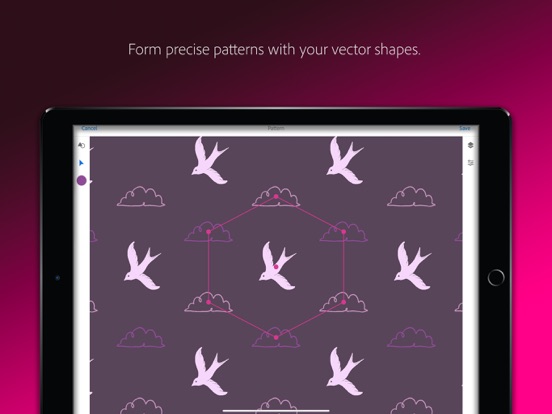

Pricing & paywalls
App Store
- CC Storage (20 GB) — $1.99
Ratings & reviews
App Store
-
5/5Great update!
Update April 2018: Finally the tools I’ve been waiting for in Shapes! Makes all the difference! Some helpful tweaks in the other modules as well, especially Patterns. The app has officially graduated from a sometimes useful toy to an invaluable part of the toolkit! Update: The app keeps improving. In particular the Shapes module is coming close to a valuable aid. The window for refining the image finally offers some flexibility in removing unwanted bits. Desperately needs an Undo button and size control for the eraser. It still produces weirdly angular results that require much adjusting in AI, almost to the point of negating the benefits of being mobile. The pattern module is a nice addition to the repertoire, if rather primitive thus far. Original Review: Fail to see how the Looks redesign is a move forward; the old arrangement gave more information at a glance. Might be useful to toggle between the two, since preferences differ. On the plus side, it's nice to be able to use one's own photos for the test picture. Would be even better if you could export a photo of the filtered image. I love the idea of these apps and appreciate the reduced clutter of having them combined in one place, but they remain more promise than performance. Their application is too narrow. It's frustrating to keep track of which feature is supported by which app(s), to create something then find out it's not supported in the app you need it for.
P.mousse Esq. · 30 Sep 2026
-
5/5Really Purposeful
This app does exactly what it says it does and what I needed it to do, which was to transfer my drawn sketches into Photoshop and being able to efficiently and quickly clean it up, get all my necessary lines and shapes clear, erase anything I didn't want, name them, and automatically load to Photoshop library for me to place. It's been fantastic and has saved me a lot of work and time. Every page was done three weeks ago and am in my next phase of production. Looks like I will be meeting my goals/timeframe. Only thing is this efficiency can only be done with Photoshop CC and not older versions of Photoshop, which is what I have. So it forced me to subscribe to the Adobe photographer package, which is $9.99 a month. But it's been worth it for me. Thanks for coming up with this app. I didn't have crash problems like the other reviewers. Fantastic and very efficient and effective app--oh, you smart people over at Adobe! Thank you!
Papfabs · 30 Sep 2026
-
5/5Awesome! Love the Features!
I absolutely love this app. It is great for using your camera to take pictures and use the different tools to highlight a font, for example, and then it will search for the most similar one available in the Fonts store and everytime I have used it, it finds an identical or nearly identical one. Another great feature allows you to export patterns from a photograph and this has been a really neat tool. Used it to take photos of some fabrics that had some awesome patterns and colors, but the only downside was the color didn’t always come out accurately, but that falls on the cell phone camera for not processing it properly. Lots of other great features too, but it is an awesome app to accompany the suite of programs in Adobe’s creative cloud.
Herouana · 30 Sep 2026
-
2/5Slow & clumsy; not sure why this exists
The UI isn’t exactly clumsy in terms of design (edit: well, yeah, it is), but it’s clumsy in terms of speed: there’s tons of lag and little indication that it’s processing anything. Maybe there’s just too much processing being demanded for a mobile device CPU. Maybe it’s just that there’s zero user control over how much processing it does for things like “shape” creation from images (smoothing feature, especially). With the obsolescence of Adobe CS6, I’m exiting the Adobe product platform. I will NEVER subscribe to software. Software subscriptions are an utterly abusive market paradigm. It’s all about grabbing ALL the money, rather than a reasonable amount of money for a perpetual license to a specific version of a tool. Therefore, I have no idea how well this app integrates into Adobe’s suite of applications and tools. I really don’t care either, because I have no interest in that suite any more. I just want a few tools to do specific things very well, at a reasonable price, (and not be a PITA). This product does not fit that requirement. I’m not exactly sure what usage this product is really meant to fit. Adobe themselves do not fit my requirements as a developer of tools. I’m moving on. Their market dominance is fading, thankfully. EDIT: The UI for refining shape captures is abysmal. There is tons of lag, and the switching between erase and draw is WAY too clumsy. There’s no clear distinction between draw and fill gestures.
dysamoria · 30 Sep 2026
-
1/5So disappointed
TLDR: another trash app from Adobe that doesn’t work as described is basically just bloat ware to trick consumers into thinking there’s a benefit to over inflated subscription fees. The full review: Literally have an error for the most basic feature; remove background. Adobe says “Service error: Background removal tool is currently unavailable. Try again later.” Why am I paying for a subscription based app that doesn’t work on my phone, iPad or desktop (Windows or Mac) when they never work. I cancelled my subscription for a long time, and started using free apps, or open source apps that offer more features, better features, and more responsive easier to use images compared to this extremely expensive software that doesn’t do much of anything. All honesty, Adobe sponsored the graphic design degree at my local community college and I have also completed additional training. Adobe is all about those subscriptions not taking care of, or interested in the end user. They expect you to pay for it and struggle with it and challenge you to use their tools that don’t work. It’s the same as any game app you play without the ad wall. Don’t believe me, how many of you pay for Acrobat Pro to sign a document, or make edits. It’s a scam. Acrobat Pro is designed literally for the legal, finance, engineering and operations individuals that need to hold you accountable and hide a bunch of language from you. Trust me look for freeware, or open source. You deserve to work without paying for errors or add-ons.
jEEts82 · 30 Sep 2026
Privacy & accessibility
App Store
Privacy
- Data Linked to You — Analytics — Diagnostics — Crash Data Developer declared
- Data Linked to You — Analytics — Identifiers — User ID Developer declared
- Data Linked to You — Analytics — Usage Data — Product Interaction Developer declared
- Data Linked to You — App Functionality — Contact Info — Email Address Developer declared
- Data Linked to You — App Functionality — Contact Info — Name Developer declared
- Data Linked to You — App Functionality — Contact Info — Phone Number Developer declared
- Data Linked to You — App Functionality — Location — Coarse Location Developer declared
- Data Linked to You — App Functionality — User Content — Customer Support Developer declared
- Data Linked to You — App Functionality — User Content — Other User Content Developer declared
- Data Linked to You — App Functionality — User Content — Photos or Videos Developer declared
- Data Linked to You — Other Purposes — Identifiers — Device ID Developer declared
- Data Linked to You — Other Purposes — Other Data — Other Data Types Developer declared
- Data Linked to You — Product Personalization — Contact Info — Email Address Developer declared
- Data Linked to You — Product Personalization — Contact Info — Name Developer declared
- Data Linked to You — Product Personalization — Contact Info — Phone Number Developer declared
- Data Linked to You — Product Personalization — Location — Coarse Location Developer declared
- Data Linked to You — Contact Info Developer declared
- Data Linked to You — Diagnostics Developer declared
- Data Linked to You — Identifiers Developer declared
- Data Linked to You — Location Developer declared
- Data Linked to You — Other Data Developer declared
- Data Linked to You — Usage Data Developer declared
- Data Linked to You — User Content Developer declared
Accessibility
No accessibility labels collected yet.
Versions
App Store
-
7.1
What’s new in version 7.1 Brush Enhancements Photoshop brushes preview more accurately when rendering brushes Bug Fixes As with every release, we’ve improved performance. If you enjoy using Adobe Capture, please share a nice review. It really helps!
-
7.1.1
What’s new in version 7.1.1 Brush Enhancements Photoshop brushes preview more accurately when rendering brushes Bug Fixes As with every release, we’ve improved performance. If you enjoy using Adobe Capture, please share a nice review. It really helps!
-
7.2
What’s new in version 7.2 Create Patterns with Fresco Artwork (Only on iPad) Export your artwork directly from Adobe Fresco and design with layers and layer groups in Pattern Builder Bug Fixes Performance and stability improvements If you enjoy using Adobe Capture, please share a nice review. It really helps!
-
7.2.1
What’s new in version 7.2.1 Create Patterns with Fresco Artwork (Only on iPad) Export your artwork directly from Adobe Fresco and design with layers and layer groups in Pattern Builder Bug Fixes Performance and stability improvements If you enjoy using Adobe Capture, please share a nice review. It really helps!
-
7.2.2
What’s new in version 7.2.2 Create Patterns with Fresco Artwork (Only on iPad) Export your artwork directly from Adobe Fresco and design with layers and layer groups in Pattern Builder Bug Fixes Performance and stability improvements If you enjoy using Adobe Capture, please share a nice review. It really helps!
-
7.3
What’s new in version 7.3 Freeform Patterns Place shapes anywhere on the canvas in Pattern Builder to create complex designs Bug Fixes Performance and stability improvements If you enjoy using Adobe Capture, please share a nice review. It really helps!
-
7.3.1
What’s new in version 7.3.1 Freeform Patterns Place shapes anywhere on the canvas in Pattern Builder to create complex designs Bug Fixes Performance and stability improvements If you enjoy using Adobe Capture, please share a nice review. It really helps!
-
8.0
What’s new in version 8.0 NEW TOOL: AUDIO CAPTURE Record voice and foley sounds with Capture's new audio recording tool · Tap on the Audio Enhancement button to remove background noise from voice recordings · Preview voice recordings with transcriptions in edit mode · Audio clips save to Libraries and can be opened in your favorite CC Apps CONTENT AWARE CAPTURE Take your inspiration to the next level with automated element suggestions generated from the content of your images (This feature is disabled for iPhone 7+ and below, iPad: iPad mini 4 and below) BUG FIXES Performance and stability improvements ELEMENT LIMIT INCREASE Save up to 10,000 Capture elements to a selected Library COMMUNICATING WITH US Post feature requests to Adobe Forums, or send feedback directly to the team under Settings If you enjoy using Adobe Capture, please share a nice review. It really helps!
-
8.0.1
What’s new in version 8.0.1 NEW TOOL: AUDIO CAPTURE Record voice and foley sounds with Capture's new audio recording tool • Tap on the Audio Enhancement button to remove background noise from voice recordings • Preview voice recordings with transcriptions in edit mode • Audio clips save to Libraries and can be opened in your favorite CC Apps CONTENT AWARE CAPTURE Take your inspiration to the next level with automated element suggestions generated from the content of your images (This feature is disabled for iPhone 7+ and below, iPad: iPad mini 4 and below) BUG FIXES Performance and stability improvements ELEMENT LIMIT INCREASE Save up to 10,000 Capture elements to a selected Library COMMUNICATING WITH US Post feature requests to Adobe Forums, or send feedback directly to the team under Settings If you enjoy using Adobe Capture, please share a nice review. It really helps!
-
8.0.2
What’s new in version 8.0.2 NEW TOOL: AUDIO CAPTURE Record voice and foley sounds with Capture's new audio recording tool • Tap on the Audio Enhancement button to remove background noise from voice recordings • Preview voice recordings with transcriptions in edit mode • Audio clips save to Libraries and can be opened in your favorite CC Apps CONTENT AWARE CAPTURE Take your inspiration to the next level with automated element suggestions generated from the content of your images (This feature is disabled for iPhone 7+ and below, iPad: iPad mini 4 and below) BUG FIXES Performance and stability improvements ELEMENT LIMIT INCREASE Save up to 10,000 Capture elements to a selected Library COMMUNICATING WITH US Post feature requests to Adobe Forums, or send feedback directly to the team under Settings If you enjoy using Adobe Capture, please share a nice review. It really helps!
-
8.0.3
What’s new in version 8.0.3 NEW TOOL: AUDIO CAPTURE Record voice and foley sounds with Capture's new audio recording tool • Tap on the Audio Enhancement button to remove background noise from voice recordings • Preview voice recordings with transcriptions (English only) in edit mode • Audio clips save to Libraries and can be opened in your favorite CC Apps CONTENT AWARE CAPTURE Take your inspiration to the next level with automated element suggestions generated from the content of your images (This feature is disabled for iPhone 7+ and below, iPad: iPad mini 4 and below) BUG FIXES Performance and stability improvements ELEMENT LIMIT INCREASE Save up to 10,000 Capture elements to a selected Library COMMUNICATING WITH US Post feature requests to Adobe Forums, or send feedback directly to the team under Settings If you enjoy using Adobe Capture, please share a nice review. It really helps!
-
8.1
What’s new in version 8.1 NEW SECTION: CREATE Check-out the new CREATE section and turn your inspiration into creative assets AUDIO CAPTURE ENHANCEMENTS • Record and import audio files while editing the audio • Replace and Add text in your speech directly by editing the transcript • Use drag drop gesture to change the order of your transcript LIBRARIES IMPROVEMENTS Now manage your Libraries more efficiently with better previews and operations BUG FIXES Performance and stability improvements COMMUNICATING WITH US Post feature requests to Adobe Forums or send feedback directly to the team under Settings. If you enjoy using Adobe Capture, please share a nice review. It really helps!
-
8.1.1
What’s new in version 8.1.1 NEW SECTION: CREATE Check-out the new CREATE section and turn your inspiration into creative assets AUDIO CAPTURE ENHANCEMENTS • Record and import audio files while editing the audio • Replace and Add text in your speech directly by editing the transcript • Use drag drop gesture to change the order of your transcript LIBRARIES IMPROVEMENTS Now manage your Libraries more efficiently with better previews and operations BUG FIXES Performance and stability improvements COMMUNICATING WITH US Post feature requests to Adobe Forums or send feedback directly to the team under Settings. If you enjoy using Adobe Capture, please share a nice review. It really helps!
-
8.1.3
What’s new in version 8.1.1 NEW SECTION: CREATE Check-out the new CREATE section and turn your inspiration into creative assets AUDIO CAPTURE ENHANCEMENTS • Record and import audio files while editing the audio • Replace and Add text in your speech directly by editing the transcript • Use drag drop gesture to change the order of your transcript LIBRARIES IMPROVEMENTS Now manage your Libraries more efficiently with better previews and operations BUG FIXES Performance and stability improvements COMMUNICATING WITH US Post feature requests to Adobe Forums or send feedback directly to the team under Settings. If you enjoy using Adobe Capture, please share a nice review. It really helps!
-
8.1.5
What’s new in version 8.1.5 NEW SECTION: CREATE Check-out the new CREATE section and turn your inspiration into creative assets AUDIO CAPTURE ENHANCEMENTS • Record and import audio files while editing the audio • Replace and Add text in your speech directly by editing the transcript • Use drag drop gesture to change the order of your transcript LIBRARIES IMPROVEMENTS Now manage your Libraries more efficiently with better previews and operations BUG FIXES Performance and stability improvements COMMUNICATING WITH US Post feature requests to Adobe Forums or send feedback directly to the team under Settings. If you enjoy using Adobe Capture, please share a nice review. It really helps!
-
8.2
What’s new in version 8.2 NEW SECTION: CREATE Check-out the new CREATE section and turn your inspiration into creative assets AUDIO CAPTURE ENHANCEMENTS • Record and import audio files while editing the audio • Replace and Add text in your speech directly by editing the transcript • Use drag drop gesture to change the order of your transcript LIBRARIES IMPROVEMENTS Now manage your Libraries more efficiently with better previews and operations BUG FIXES Performance and stability improvements COMMUNICATING WITH US Post feature requests to Adobe Forums or send feedback directly to the team under Settings. If you enjoy using Adobe Capture, please share a nice review. It really helps!
-
8.3
What’s new in version 8.3 NEW SECTION: CREATE Check-out the new CREATE section and turn your inspiration into creative assets AUDIO CAPTURE ENHANCEMENTS • Record and import audio files while editing the audio • Replace and Add text in your speech directly by editing the transcript • Use drag drop gesture to change the order of your transcript LIBRARIES IMPROVEMENTS Now manage your Libraries more efficiently with better previews and operations BUG FIXES Performance and stability improvements COMMUNICATING WITH US Post feature requests to Adobe Forums or send feedback directly to the team under Settings. If you enjoy using Adobe Capture, please share a nice review. It really helps!
-
8.3.1
What’s new in version 8.3.1 NEW SECTION: CREATE Check-out the new CREATE section and turn your inspiration into creative assets AUDIO CAPTURE ENHANCEMENTS • Record and import audio files while editing the audio • Replace and Add text in your speech directly by editing the transcript • Use drag drop gesture to change the order of your transcript LIBRARIES IMPROVEMENTS Now manage your Libraries more efficiently with better previews and operations BUG FIXES Performance and stability improvements COMMUNICATING WITH US Post feature requests to Adobe Forums or send feedback directly to the team under Settings. If you enjoy using Adobe Capture, please share a nice review. It really helps!
-
9.0
New Module: Graphics Take your photo inspiration and transform the background to use in your projects. You can remove background, blur, or add a solid color to your masked image. Graphics can be used across Creative Cloud in apps like Photoshop, Illustrator, InDesign, After Effects, and Adobe Express through Libraries. BUG FIXES Stability improvements. COMMUNICATING WITH US Post feature requests to Adobe Forums, or send feedback directly to the team under Settings. If you enjoy using Adobe Capture, please share a nice review. It really helps!
-
9.0.1
New Module: Graphics Take your photo inspiration and transform the background to use in your projects. You can remove background, blur, or add a solid color to your masked image. Graphics can be used across Creative Cloud in apps like Photoshop, Illustrator, InDesign, After Effects, and Adobe Express through Libraries. BUG FIXES Stability improvements. COMMUNICATING WITH US Post feature requests to Adobe Forums, or send feedback directly to the team under Settings. If you enjoy using Adobe Capture, please share a nice review. It really helps!
-
9.0.2
New Module: Graphics Take your photo inspiration and transform the background to use in your projects. You can remove background, blur, or add a solid color to your masked image. Graphics can be used across Creative Cloud in apps like Photoshop, Illustrator, InDesign, After Effects, and Adobe Express through Libraries. BUG FIXES Stability improvements. COMMUNICATING WITH US Post feature requests to Adobe Forums, or send feedback directly to the team under Settings. If you enjoy using Adobe Capture, please share a nice review. It really helps!
-
9.1
New Module: Graphics Take your photo inspiration and transform the background to use in your projects. You can remove background, blur, or add a solid color to your masked image. Graphics can be used across Creative Cloud in apps like Photoshop, Illustrator, InDesign, After Effects, and Adobe Express through Libraries. BUG FIXES Stability improvements. COMMUNICATING WITH US Post feature requests to Adobe Forums, or send feedback directly to the team under Settings. If you enjoy using Adobe Capture, please share a nice review. It really helps!
-
9.1.1
What's New in version 9.1.1 New Module: Graphics Take your photo inspiration and transform the background to use in your projects. You can remove background, blur, or add a solid color to your masked image. Graphics can be used across Creative Cloud in apps like Photoshop, Illustrator, InDesign, After Effects, and Adobe Express through Libraries. Bug Fixes Stability improvements If you enjoy using Adobe Capture, please share a nice review. It really helps!
-
9.1.2
What's New in version 9.1.2 New Module: Graphics Take your photo inspiration and transform the background to use in your projects. You can remove background, blur, or add a solid color to your masked image. Graphics can be used across Creative Cloud in apps like Photoshop, Illustrator, InDesign, After Effects, and Adobe Express through Libraries. Bug Fixes Stability improvements If you enjoy using Adobe Capture, please share a nice review. It really helps!
-
9.1.3
· 28 Nov 2023
What's New in version 9.1.3 New Module: Graphics Take your photo inspiration and transform the background to use in your projects. You can remove background, blur, or add a solid color to your masked image. Graphics can be used across Creative Cloud in apps like Photoshop, Illustrator, InDesign, After Effects, and Adobe Express through Libraries. Bug Fixes Stability improvements If you enjoy using Adobe Capture, please share a nice review. It really helps!
Alternatives
- Vector & SVG Maker - Assembly — Same category + similar ratings
- MediBang Paint for iPhone — Same category + similar ratings
- UNUM — Layout & Feed Preview — Same category + similar ratings
- uMake: 3D CAD Modeling, Design — Same category + similar ratings
- Linearity Curve Graphic Design — Same category + similar ratings
- Affinity Designer 2 for iPad — Same category + similar ratings
Availability by market
- US
Data quality & evidence
- Page completeness
- Live store listing
- Last verified
- 30 Sep 2026
- Sources
- App Store
- Apoku editorial summary has not been published yet.