
Quick verdict
- What it is
- Store information collected; an Apoku editorial summary is not yet published.
- At a glance
-
- Free to download
- In-app purchases
Categories and search queries
Official categories
- Books
- Entertainment
Apoku categories
Key functions
| Function | Availability | Access | Scope | Evidence |
|---|---|---|---|---|
| Free app | Yes | Free | Context-specific | Store published |
| In-app purchases | Yes | Limited free | Context-specific | Store published |
| Family Sharing | Unknown | Unknown | Scope unknown | Store published |
| Siri Shortcuts | Unknown | Unknown | Scope unknown | Store published |
Screens
App Store
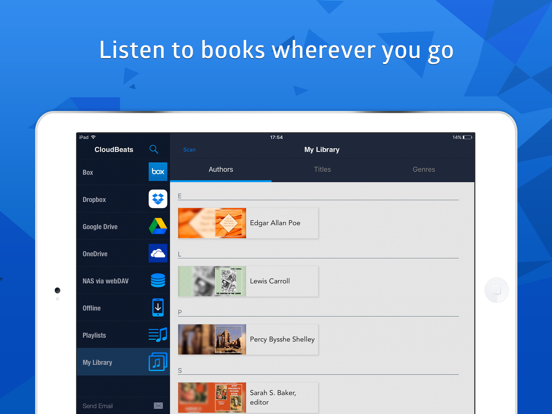
13 store screenshots



Pricing & paywalls
App Store
Shown for US
- CloudBeats Premium
- Synchronize between Devices
Ratings & reviews
App Store
Shown for US
-
4/5Simple, easy to use but annoying too
I found this app did exactly what I needed it to do. Play audio files from my google drive. And while I think the app does its job well for the most part it is extremely annoying in just one area that ruins the whole experience - After listening for some time especially if it’s a long audio series, the app just stops working around the start of a new chapter or at the 2 minute mark. You then have to close the app, reopen it and then navigate the playback to the exact place you left off. It can get very annoying, like when I’m taking a walk or when I’m washing dishes or even more annoying when I’m taking a shower and I have to come out with soap all over just to replay my audio file. I hope this issue gets fixed soon because it’s starting to get old really fast
Trakdee · 6 Aug 2026
-
5/5Great app and customer service
I just purchased the audiobook version of CloudBeats the other day and so far I’m really happy and impressed with the app. I was looking for something to avoid having to use iTunes to synch my audiobooks. iTunes has “glitched out” on me more than once and deleted all of the music and books from my phone. I have all of my media stored on a Synology NAS so my ideal situation was to find a way to at least be able to pull the media down from within an app. CloudBeats does that but takes it further and lets me stream from my Synology - and also several other cloud services. So far, the app is doing everything I want it to do. If you’re looking for a way to either stream or download your remote media, I definitely recommend CloudBeats. The support from the developer is excellent, too. I posted a question on the app’s Web site and within minutes I had a response from Roman. I thought it was a typical automated “thanks for your question, we’ll get back to you in 24 hours” response but no, it was the answer to my question. He also immediately responded to my follow-up question. Kudos for great customer support! My only request is the ability to edit a cloud connection after it’s been created. Right now, if you need to make a change, you have to sign out which removes any files that you’ve downloaded. This probably isn’t a huge deal but I was having some issues getting my Synology visible to webDAV apps (not CloudBeat’s fault) and had to change my connection info a few times. Each time I had to log out and delete anything I had downloaded. Again, this is probably a limited case and now that I have it working, I probably won’t ever have to look at that setting again.
Ozzman07 · 6 Aug 2026
-
5/5Whoohoo!!
I purchased this app last year, and man was I frustrated with it? I had my google drive hooked to the app, but whenever I played an audiobook through this app, it kept randomly stopping and I had to delete whatever I was listening to from my google drive and reupload. It was so frustrating I immediately regretted buying this app. I wrote to them and they were pretty responsive and helped me out. But it didn’t fix the issue and it had stayed on like that for months. But lo and behold, this last version has finally fixed it and thus my review! I love this app so much. I have a zbigz account and I download lots of audio books, which it lets me send to my drive in seconds! And with this app I don’t have to download anything myself, I just stream it! So yes, this app is a gold mine!! I hope it stays the same.
FranticListener · 6 Aug 2026
-
5/5The Best Cloud Audio Player
I use this app every single day and I love it. I have all my audiobooks uploaded to my cloud accounts (Dropbox, box, etc) and I can pull them down for offline listening so I don’t eat up my data on-the-go. The app does a great job of keeping track where I am in the audiobook so I can pick right up where I left off. I can easily skip back or forward in customizable seconds of increments if I get distracted and missed hearing something. Just overall a great listening and usability experience. I highly recommend this app!
One Intention · 6 Aug 2026
-
5/5So far so good.
I was looking for a good service that could not only play audiobooks that I already have. But could also sync them between iPhone and iPad. I’ve looked at some other apps and synchronization is like $60 a year with other apps. Along with some other feature I don’t really care about. $8 a year for syncing between devices is definitely doable. And the one time payment for the rest of the features is a great touch. Instead of also baking that into the yearly price. Keep it up!
Ddmiget · 6 Aug 2026
Privacy & accessibility
App Store
Privacy
- Data Linked to You — Analytics — Purchases — Purchase History Developer declared
- Data Linked to You — App Functionality — Identifiers — User ID Developer declared
- Data Linked to You — App Functionality — Purchases — Purchase History Developer declared
- Data Linked to You — App Functionality — User Content — Other User Content Developer declared
- Data Linked to You — Identifiers Developer declared
- Data Linked to You — Purchases Developer declared
- Data Linked to You — User Content Developer declared
- Data Not Linked to You — Analytics — Usage Data — Product Interaction Developer declared
- Data Not Linked to You — App Functionality — Diagnostics — Crash Data Developer declared
- Data Not Linked to You — Diagnostics Developer declared
- Data Not Linked to You — Usage Data Developer declared
Accessibility
No accessibility labels collected yet.
Versions
App Store
-
2.39.1
This update brings multitasking to iPad, including Slide Over and Split View
-
2.39.2
Fixed crash while adjusting volume This update brings multitasking to iPad, including Slide Over and Split View
-
2.40.3
In this update we are bringing several new features and number of bug fixes. · Improved display of listening progress for a title or folder. Titles were redesigned to accommodate more useful information, such number of files, total duration and listening progress. · Progress slider now displays the remaining listening time instead of total duration, but you can switch it back to the old way simply by tapping on it. · Added 5min sleep timer. · Fixed bug when folders were added to scanning but files were not scanned. · Fixed VoiceOver. If you like this update, please rate it 5 stars!
-
2.40.4
In this update we added capability to change lyrics text font size, view all downloaded files at once and fixed several bugs: - Scanning now picks up changes in folders on subsequent run - Fixed bug when login screen will be displayed on every app start if there is no cloud connected - Fixed progress bar Voiceover behaviour - Fixed crash in CarPlay If you like this update, please rate it 5 stars!
-
2.40.6
Improved navigation in Offline..Folders to allow browsing through hierarchy of downloaded folders. Individually downloaded files can be found under "Files" in the Offline section. Fixed missing listening progress in playlists.
-
2.40.7
Now available for Apple Silicon Macs Bug fixes and improvements If you like CloudBeats, please rate it 5 stars!
-
2.40.8
Fixed playback issue when track was continuously restarting on poor connection Added possibility to connect cloud directly from the side menu Moved auxiliary menu items like Help, Email to the settings screen Now available for Apple M1 Silicon Macs
-
2.41.1
New functions to sort titles by release date Based on your feedback fixed couple of issues. Thank you for reporting them! - Fixed CarPlay under iOS 15 - Fixed display of images under Authors - Fixed performance issue while playing very large folder with thousands files
-
2.42.1
This update brings pure black theme in dark mode included in the Premium package. You may also choose to keep the light or dark theme independent of the system setting. Improved performance when adding thousands of files into playlist Improved import speed of large m3u files Added image extraction when scanning files on Onedrive If you like this update, please leave a positive review!
-
2.43.0
Added mini-player on iPad to match iPhone version
-
2.50.2
This update brings new Home section with the latest changes that happened to your library. Access Recently played albums and playlists to resume listening, find the latest additions to the library and downloaded albums. Recent uploads will be showing files and folders that were uploaded to your cloud storage from now on (supports Google Drive, Onedrive, Dropbox and Box). Available on devices running iOS 14 and higher.
-
2.50.3
Fix crash on bookmarks
-
2.50.4
Fixed bug when track would not play sometimes to an end and rewind a second back.
-
2.52.2
New Carplay app. The size of the text in file browser and now playing queue now adjusts to the phone settings and better supports longer names. Fixed listening progress syncing for offline files and improved playback of long files. If you enjoy this update, please rate CloudBeats 5 stars!
-
2.52.3
Fixed crashes. New Carplay app. The size of the text in file browser and now playing queue now adjusts to the phone settings and better supports longer names. Fixed listening progress syncing for offline files and improved playback of long files. If you enjoy this update, please rate CloudBeats 5 stars!
-
2.52.4
Improved performance of import of the local folders stored on the device. Fixed several bugs and crashes Kindly remind you to update CloudBeats rating for this version too ! Every review and rating counts and is very much appreciated.
-
2.53.3
This update includes several UI improvements bug fixes. Kindly remind you to update CloudBeats rating for this version ! Every review and rating counts and is very much appreciated.
-
2.53.4
Marking track as finished in the Now Playing queue is now possible with simple swipe gesture. Few other UI improvements and bug fixes. Kindly remind you to update CloudBeats rating for this version ! Every review and rating counts and is very much appreciated.
-
2.54.1
Added Clear Library Metadata function to remove all scanned tracks. Added capability to download folders directly from Offline section.
-
2.55.1
Support for Siri and Shortcuts to play author, title or playlist with voice command and a shortcut to play your playlist.
-
2.55.10
Minor fixes and maintenance updates
-
2.55.11
· 28 Mar 2025
Maintenance update
-
2.55.3
Fixed crash when enabling Library sync Support for Siri and Shortcuts to play author, title or playlist with voice command and a shortcut to play your playlist.
-
2.55.7
Bug fixes and improvements
-
2.55.8
Minor bug fixes and improvements
Alternatives
- BookPlayer: MP3/M4B/M4A/MP4 — Same category + similar ratings
- MP3 Audiobook Player — Same category + similar ratings
- Bound - Audiobook Player — Same category + similar ratings
- AudioBooks - MP3 & M4B player — Same category + similar ratings
- Every Word: Audiobook Player — Same category + similar ratings
- Anyplay Audiobooks & Podcasts — Same category + similar ratings
Availability by market
- US
Data quality & evidence
- Page completeness
- Live store listing
- Last verified
- 6 Aug 2026
- Sources
- App Store
- Apoku editorial summary has not been published yet.