
Quick verdict
- What it is
- Store information collected; independent summary not yet available.
- At a glance
-
- Free to download
- In-app purchases
Categories and search queries
Official categories
- Education
- Productivity
AppCorpus categories
Key functions
| Function | Availability | Access | Scope | Evidence |
|---|---|---|---|---|
| Family Sharing | Yes | Unknown | App Store | Store published |
| Free app | Yes | Free | — | Store published |
| In-app purchases | Yes | Limited free | — | Store published |
Screens
App Store
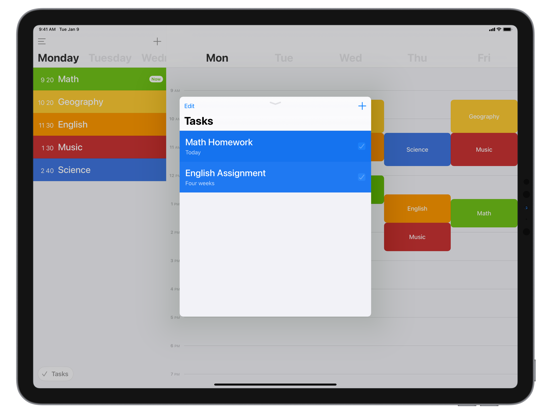
24 store screenshots


Pricing & paywalls
App Store
- Pastel Color Pack — $0.99
- Pro Upgrade — $1.99
Ratings & reviews
App Store
-
5/5Design and interface is great but could improve
This is one of the easiest and nicest schedule/calendar apps I’ve ever dealt with. The price is good (people gotta make money somehow) and for me, personally, notifications isn’t a must. I was mainly focused on the “improved widget” feature, but it didn’t seem to have changed much at all. I was hoping to be able to click on the class and see the info I had added beneath the block as it does in the app. If you guys could add that it’d be perfect. Tasks can stay in the app though! I’d like the convenience of just tapping on my lock screen when I’m running to class late (because we all know it’s gonna happen). This would make the first two weeks of classes a breeze if I could just tap in the widget to see the class room number/instructor.
gottarescuenickname · 6 Aug 2026
-
5/5Functional, aesthetically pleasing, and convenient
This app is incredible, it allows you to simply put together detailed timetables which can be colour coded and displayed by day or week. The time table is easy to put together, and allows you to easily check your next class or other scheduled event. The notification feature is quite handy, but the best feature is the widget. Without even unlocking my phone I can look to see what classes I have for the rest of the day, what classes I have tomorrow, and what homework assignments I have. Even so the app doesn’t look or feel cluttered at all, it has a nice aesthetic which fits with the layout and the look of iOS. I would definitely recommend this app to anyone looking for a way to digitise their class timetable or anything similar.
lucamich4el · 6 Aug 2026
-
5/5This app HELPS!!!
I love it, the colors, the simplicity, the structure. I also love the ability to have it sync with my iPad. I normally write Down my task in an agenda, and if I lose that little book... I would be in trouble. I use this app for everything from chores, to scouts, shopping list, event planning, I love the Apple Watch format, and how it only focus on the week you are currently in. I would like to see the introduction of a task list to the Apple Watch, similarly planned for the widget. Some high schools are more strict about phones. Adding the task to the watch would allow for a better utilization of a Apple Watch. Thank you for making this app, it really helps me. If you have doubts about buying the upgrade, use it for a day, and see how you feel. Trust me when I say that by seeing how much time something is planned for and what you have to do in order and on what days, truly helps you organize yourself and your life.
ESC2018 · 6 Aug 2026
-
5/5Mental health savior
Let me start off by saying I have a lot of mental health issues, so I constantly am trying to improve myself and work through everything that’s on my mind, so keeping track of other things is hard, especially schedules, which is bad because a lot of people with mental illnesses benefit from routine. This app is a mental health savior. It helps keep me on track with whatever I’m doing, and put my routine in a visually pleasing format. Along with that, when things change it’s easy for me to edit my schedule. And it’s better than a paper list cause it’s always on my phone, and I take my phone everywhere so I always have my schedule handy. I highly recommend this app for anyone who has a hard time keeping schedules and routines straight in their head.
Mo_Shmo · 6 Aug 2026
-
4/5This app is ALMOST perfect... needs an optional for links
I have a son in kindergarten and while we are home during the coronavirus quarantine, I’m looking for an app to put on his ipad to organize all of the NTI assignments his teacher sends to us in an email. The email program our school uses is not extremely mobile device friendly so I have to print everything out. Then I have to manually type links in. This app would be perfect if I could put the links to his assignments in the “info” section of the task on this app. He can read and he very independent and a good student. So this would be prefect because I could tell him every morning to check his homework schedule and complete the assignments he doesn’t need help with, like reading online books and playing online games he’s used before and knows how to get to.
NTI Mom · 6 Aug 2026
Privacy & accessibility
App Store
Privacy
- Data Not Collected Developer declared
Accessibility
No accessibility labels collected yet.
Versions
App Store
-
10.0.0
New in Class Timetable 10.0 - we've made significant improvements to both the event and task editor: - Add and edit multiple events at once! - Specifying an exact time for tasks is now optional - Task reminders are easier to set, with several quick add options - Bug fixes and other improvements If you enjoy using Class Timetable, please take a moment to leave a review - it really helps.
-
10.0.2
New in Class Timetable 10.0 - we've made significant improvements to both the event and task editor: - Add and edit multiple events at once! - Specifying an exact time for tasks is now optional - Task reminders are easier to set, with several quick add options - Bug fixes and other improvements If you enjoy using Class Timetable, please take a moment to leave a review - it really helps.
-
10.0.3
New in Class Timetable 10.0 - we've made significant improvements to both the event and task editor: - Add and edit multiple events at once! - Specifying an exact time for tasks is now optional - Task reminders are easier to set, with several quick add options - Bug fixes and other improvements If you enjoy using Class Timetable, please take a moment to leave a review - it really helps.
-
10.0.4
New in Class Timetable 10.0 - we've made significant improvements to both the event and task editor: - Add and edit multiple events at once! - Specifying an exact time for tasks is now optional - Task reminders are easier to set, with several quick add options - Bug fixes and other improvements If you enjoy using Class Timetable, please take a moment to leave a review - it really helps.
-
11.0.0
New in Class Timetable 11.0: - Color Packs! There are more than 100 new colors to choose from. - We've improved how Widgets work - they should now update more reliably. - Bug fixes and other app wide improvements. If you enjoy using Class Timetable, please take a moment to leave a review - it really helps.
-
11.0.1
New in Class Timetable 11.0: - Color Packs! There are more than 100 new colors to choose from. - We've improved how Widgets work - they should now update more reliably. - Bug fixes and other app wide improvements. If you enjoy using Class Timetable, please take a moment to leave a review - it really helps.
-
12.0.0
New in Class Timetable 12.0: - A new, easier to use settings menu - The ability to pause your timetable - helpful for holidays and term breaks! - Bug fixes and other app wide improvements If you enjoy using Class Timetable, please take a moment to leave a review - it really helps.
-
12.0.1
This update from Apple will improve the functionality of this app. No new features are included. New in Class Timetable 12.0: - A new, easier to use settings menu - The ability to pause your timetable - helpful for holidays and term breaks! - Bug fixes and other app wide improvements If you enjoy using Class Timetable, please take a moment to leave a review - it really helps.
-
13.0
New in Class Timetable 13.0: - Attachments! You can now add photos and documents to your timetable. This feature is only available after upgrading to Pro. - Bug fixes and other improvements. If you enjoy using Class Timetable, please take a moment to leave a review - it really helps.
-
13.0.1
New in Class Timetable 13.0: - Attachments! You can now add photos and documents to your timetable. This feature is only available after upgrading to Pro. - Bug fixes and other improvements. If you enjoy using Class Timetable, please take a moment to leave a review - it really helps.
-
13.1.0
New in Class Timetable 13.1: - We've improved our watchOS interface. It's now much easier to access tasks, task categories, and alternate weeks (watchOS 7+ required) - This release also contains a number of bug fixes If you enjoy using Class Timetable, please take a moment to leave a review - it really helps.
-
13.2.0
New in Class Timetable 13.2: - A new extra-large home screen widget for iPad users - Better display of concurrent events in calendar/week view - Exporting a timetable file now offers the option to include or exclude each component (timetable, tasks, and attachments) - Support for large-format watchOS complications - Bug fixes and other improvements If you enjoy using Class Timetable, please take a moment to leave a review - it really helps.
-
13.3.0
New in Class Timetable 13.3: - Support for iOS 16, including several lock screen widgets - Bug fixes and stability improvements
-
13.3.1
New in Class Timetable 13.3: - Support for iOS 16, including several lock screen widgets - Bug fixes and stability improvements
-
13.3.2
This update contains bug fixes, performance improvements, and other minor changes. If you enjoy using Class Timetable, please take a moment to leave a review - it really helps.
-
13.3.3
This update contains bug fixes, performance improvements, and other minor changes. If you enjoy using Class Timetable, please take a moment to leave a review - it really helps.
-
13.4.0
This update contains bug fixes, performance improvements, and other minor changes. If you enjoy using Class Timetable, please take a moment to leave a review - it really helps.
-
13.4.1
· 23 Sep 2024
This update contains bug fixes, performance improvements, and other minor changes. If you enjoy using Class Timetable, please take a moment to leave a review - it really helps.
-
9.0.6
Class Timetable 9.0 contains the following new features: - Support for iOS 14 widgets! View your timetable directly from your home screen. Three different widget types are available, in a number of sizes and configurations - URL links: any links present in the 'info' section of an event are now tappable. Link directly to your course notes or online class - We've fixed a few notable bugs, including one preventing deep-links and quick actions from working correctly in some situations - Other minor app wide improvements If you like using Class Timetable, please take a moment to leave a review - it really helps.
-
9.0.7
Class Timetable 9.0 contains the following new features: - Support for iOS 14 widgets! View your timetable directly from your home screen. Three different widget types are available, in a number of sizes and configurations - URL links: any links present in the 'info' section of an event are now tappable. Link directly to your course notes or online class - We've fixed a few notable bugs, including one preventing deep-links and quick actions from working correctly in some situations - Other minor app wide improvements If you like using Class Timetable, please take a moment to leave a review - it really helps.
-
9.1.0
New in Class Timetable 9.1: - We've added more iOS 14 home screen widgets! There are two new widget types to choose from - The 'Today' iOS 14 widget can now be configured to display today, tomorrow, or automatically switch between the two (default). Pro tip: you can use this setting in combination with a Smart Stack widget to achieve a swipe-able today + tomorrow widget display - Long pressing a notification will now allow you to directly open URLs entered into event info. You can use this to join online classes, open course notes, and more - iCloud sync reliability improvements - Bug fixes and minor improvements If you enjoy using Class Timetable, please take a moment to leave a review - it really helps.
-
9.1.1
New in Class Timetable 9.1: - We've added more iOS 14 home screen widgets! There are two new widget types to choose from - The 'Today' iOS 14 widget can now be configured to display today, tomorrow, or automatically switch between the two (default). Pro tip: you can use this setting in combination with a Smart Stack widget to achieve a swipe-able today + tomorrow widget display - Long pressing a notification will now allow you to directly open URLs entered into event info. You can use this to join online classes, open course notes, and more - iCloud sync reliability improvements - Bug fixes and minor improvements If you enjoy using Class Timetable, please take a moment to leave a review - it really helps.
-
9.1.2
This update contains bug fixes, performance improvements, and other minor changes. If you enjoy using Class Timetable, please take a moment to leave a review - it really helps.
-
9.1.3
This update contains bug fixes, performance improvements, and other minor changes. If you enjoy using Class Timetable, please take a moment to leave a review - it really helps.
-
9.1.4
This update contains bug fixes, performance improvements, and other minor changes. If you enjoy using Class Timetable, please take a moment to leave a review - it really helps.
Alternatives
- Smart Timetable: Study Planner — Same category + similar ratings
- Schooly: School Planner & Todo — Same category + similar ratings
- My Timetable: Class Schedule — Same category + similar ratings
- My Study Life - School Planner — Same category + similar ratings
- School Assistant – Planner — Same category + similar ratings
- myHomework Student Planner — Same category + similar ratings
Availability by market
- US
Data quality & evidence
- Page completeness
- Live store listing
- Last verified
- 6 Aug 2026
- Sources
- App Store
- Independent summary has not been published yet.