
Quick verdict
- What it is
- Store information collected; an Apoku editorial summary is not yet published.
- At a glance
-
- From $3.33/mo
- Free to download
- In-app purchases
Categories and search queries
Official categories
- Productivity
- Utilities
Apoku categories
Key functions
| Function | Availability | Access | Scope | Evidence |
|---|---|---|---|---|
| Free app | Yes | Free | Context-specific | Store published |
| In-app purchases | Yes | Limited free | Context-specific | Store published |
Screens
App Store
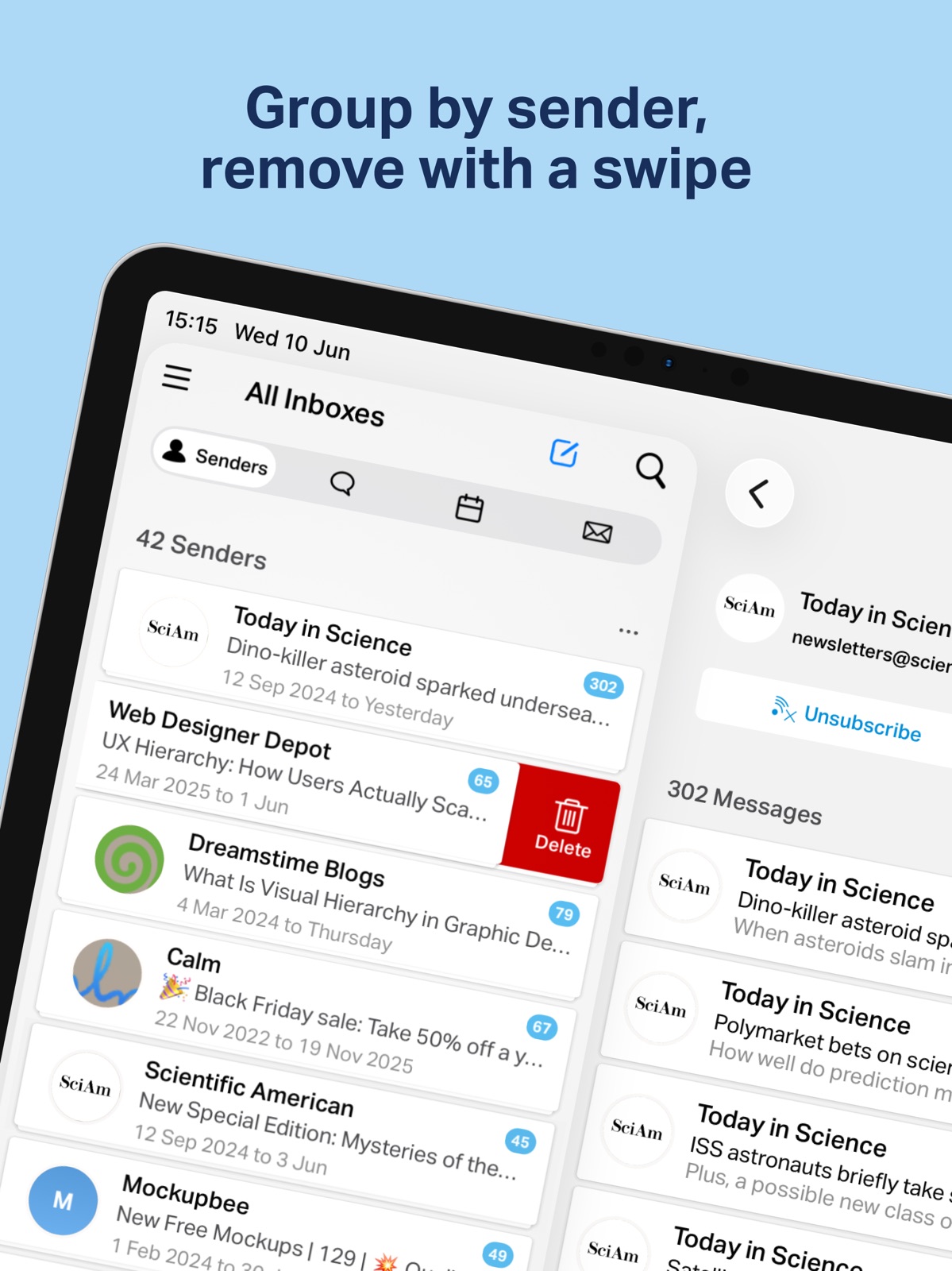
36 store screenshots


Pricing & paywalls
App Store
- Chuck Pro (Monthly) — $3.99/month
- Chuck Pro (Monthly) — $4.99/month
- Chuck Pro (Monthly) — $5.99/month
- Chuck Pro (Monthly) — $6.99/month
- Chuck Pro (Monthly) — $8.99/month
- Chuck Pro (Monthly) — $39.99/year ($3.33/mo)
- Chuck Pro (Monthly) — $49.99/year ($4.16/mo)
- Chuck Pro (Monthly) — $59.99/year ($4.99/mo)
- Chuck Pro (Monthly) — $69.99/year ($5.83/mo)
- Chuck Pro (Monthly) — $89.99/year ($7.49/mo)
Ratings & reviews
App Store
-
5/5My favorite, prettiest, and best way to get rid of too many emails fast
I had thousands of emails before trying this app and now I am down to a couple hundred. It is so easy to choose categories-like sender-and all the same sender emails group together and you can just swipe all of them away with one swipe. If you choose subject they all group together. Or you can choose time and search all the emails for that day or time you choose. I wish I could comment on the advanced features but have not yet been able to enjoy them. This app is by far my favorite format for emails, but because of that it is such a disappointment when it doesn’t work. I use the free version but have subscribed twice to the pay version and it doesn’t consistently load my emails (from gmail). Sometimes I will go to see my emails and it says I have a lot of emails but the screen is blank. Admittedly I haven’t taken the time to resolve this with the company. I emailed them about it and they asked me to send them a screen shot to see what is going on. I just haven’t taken the time yet to do it. So that is the other good news about this app. The developer and company are very responsive to emails. So I’m sure they can figure out what is going wrong with my subscribed version. Both versions work great and the colors and simplicity and smoothness of this email format are prettier and better than any of the others I’ve tried. And I’ve tried most of them. It doesn’t cost anything to try this app and you won’t get a bunch of ads so you have nothing to lose.
ydoihavetopickanickname? · 5 Oct 2026
-
5/5Even the free version is totally worth it!
My inbox had reached a critical mass, and which became even more apparent when the pandemic hit and brought with it an email from any company who’s ever had my email address for any reason to notify me about their plans during this “unprecedented time.” I went from an already ridiculous 100+ emails a day to over 300. I used the free version of Chuck on both my email addresses, one by one, and was able to easily find and save older important messages, and then delete over 75,000 irrelevant emails collected over 10 years. The entire process, with even just the free version, took about 2 hours. The best part was the unsubscribe feature- I have tried multiple ways to unsubscribe from some lists and still receive daily emails. No longer! 1-2 companies managed to slip through the cracks, and those are easy addressed at that manageable number, but that’s nothing compared to the hundreds of lists I was successfully unsubscribe from literally the same day I used the app. Like flipping a switch. As more and more of our lives are relying on digital methods of communication, I’m so grateful to have been able to hit the reset button on my email account and get a clean slate!
KatieeHaile · 5 Oct 2026
-
3/5Extremely slow
3 stars for the simple fact that regardless of how slow the app is working, it’s still deleting emails faster than I ever could. But, that doesn’t mean there isn’t work to be done. I’m in the process of clearing out my inbox of about 70,000 emails accumulated over the past 10+ years. I’m having trouble figuring out that the heck the app is doing most of the time, because it’s come and go when it comes to syncing. In settings, the “pending actions” only knocks about 1 off the queue every 12 hours. Meanwhile if there’s anything in that queue, no more emails are being loaded for me to delete. It also seems like it doesn’t work in the background, because I’ll put my phone down for an hour or two and come back to check on the progress and the pending actions and synced emails are exactly where they were before. That being said, I’ve also tried turning off my screen shut off so that the app is open and showing during a nap or something, and that hasn’t made a difference either. I’ll add that I have had the same experience regardless of network connection, have tried 3 different WiFi networks and regular cell service, no diff. I can’t find a rhyme or reason. Every now and then I open it and I’m surprised to see the pending queue was taken care of and emails are syncing again. But that has been just a couple times a day.
breannep · 5 Oct 2026
-
5/5Great App!
This app is amazing! I finally have a way to get through the insane amount of emails I have in my inbox. I would definitely rate it 5 stars, if it weren't for the fact that the "Chill" function is suddenly buggy. While it worked flawlessly in the past, it appears that the app no longer has the ability to create the sub-labels needed in Gmail to chill emails for a specific amount of time. When I "chill" an email, it will disappear from the app screen for a while & then reappear a few minutes later in the inbox. Upon checking my account, I found that they are never actually leaving the inbox. I have uninstalled the app, removed the account, etc, but nothing has worked. However, if I create the necessary sub-folders myself, Chuck will move the emails to those folders. Please fix this issue, & I will update my review to 5-stars! Also, please add the ability to go through emails in specific labels. I have thousands of emails stashed in labels, taking up space. *Update* - The issue I was having with the Chill function was fixed. Thank you so much for this amazing app!
lxhford · 5 Oct 2026
-
2/5Slow to load emails
I’m always open to trying new email apps as I’m constantly looking for new ways to organize emails, get rid of subscriptions, and other organizational benefits we’re all trying to achieve. As a baseline, I compare my experience with a new app to the things I like or dislike from previous experiences using apps that fall in the same category. I consistently ran into issues with this email client where the emails were very slow to load. By comparison, those emails immediately show up on my other applications using the same internet connection (wifi and/or cellular). I’m also the type of person to engage the developers to ensure they have the best feedback. In this instance the customer care rep indicated they’ve received no other feedback like mine since this version launched and suggested I reboot my phone. Again, my baseline is a phone that may or may not need a reboot — but other email apps work fine under the same conditions. But to satisfy the team, reboot completed and I’m still having problems loading emails. So, I’m not looking to argue or debate the issue and I’m definitely not going to keep using this app as I believe it needs more work. I would have given the app three stars but my interaction with the care team pulled it down to two stars.
FranklyFranklin · 5 Oct 2026
Privacy & accessibility
App Store
Privacy
- Data Linked to You — Analytics — Purchases — Purchase History Developer declared
- Data Linked to You — Analytics — Usage Data — Product Interaction Developer declared
- Data Linked to You — App Functionality — Contact Info — Email Address Developer declared
- Data Linked to You — App Functionality — Identifiers — User ID Developer declared
- Data Linked to You — App Functionality — User Content — Customer Support Developer declared
- Data Linked to You — Developer’s Advertising or Marketing — Contact Info — Email Address Developer declared
- Data Linked to You — Product Personalization — Contact Info — Email Address Developer declared
- Data Linked to You — Product Personalization — Usage Data — Product Interaction Developer declared
- Data Linked to You — Third-Party Advertising — Identifiers — Device ID Developer declared
- Data Linked to You — Third-Party Advertising — Purchases — Purchase History Developer declared
- Data Linked to You — Third-Party Advertising — Usage Data — Advertising Data Developer declared
- Data Linked to You — Third-Party Advertising — Usage Data — Product Interaction Developer declared
- Data Linked to You — Contact Info Developer declared
- Data Linked to You — Identifiers Developer declared
- Data Linked to You — Purchases Developer declared
- Data Linked to You — Usage Data Developer declared
- Data Linked to You — User Content Developer declared
- Data Not Linked to You — App Functionality — Diagnostics — Crash Data Developer declared
- Data Not Linked to You — Diagnostics Developer declared
- Data Used to Track You — Identifiers — Device ID Developer declared
- Data Used to Track You — Identifiers Developer declared
- Data Used to Track You — Purchases — Purchase History Developer declared
- Data Used to Track You — Purchases Developer declared
- Data Used to Track You — Usage Data — Advertising Data Developer declared
- Data Used to Track You — Usage Data — Product Interaction Developer declared
- Data Used to Track You — Usage Data Developer declared
Accessibility
No accessibility labels collected yet.
Versions
App Store
-
1.15.1
• Introducing two new AI Filters (PRO): For You and Low Priority. Go through your inbox even faster, knowing what you should concentrate on first and what can wait. All based on your preferences and interactions within Chuck. • Senders gained a more pronounced header to manage options, including AI Filters. • Small fixes around the UI Please use the Report a Bug option in Settings if you notice any issues. You can also contact us directly at [email protected]
-
1.15.2
• Introducing two new local AI Filters (PRO): For You and Low Priority. Go through your inbox even faster, knowing what you should concentrate on first and what can wait. All based on your preferences and interactions within Chuck. • Senders gained a more pronounced header to manage options, including AI Filters. • Small fixes around the UI Please use the Report a Bug option in Settings if you notice any issues. You can also contact us directly at [email protected]
-
1.16
• Tweaked the UI around the unread messages to make them clear but not overwhelming. • Better error handling around certain server errors and email provider configurations. • Introduced two new local AI Filters (PRO): For You and Low Priority. Go through your inbox even faster, knowing what you should concentrate on first and what can wait. All based on your preferences and interactions within Chuck. • Small fixes around the UI Please use the Report a Bug option in Settings if you notice any issues. You can also contact us directly at [email protected]
-
1.17
• Tweaked the UI around the unread messages to make them clear but not overwhelming. • Better error handling around certain server errors and email provider configurations. • Introduced two new local AI Filters (PRO): For You and Low Priority. Go through your inbox even faster, knowing what you should concentrate on first and what can wait. All based on your preferences and interactions within Chuck. • Small fixes around the UI Please use the Report a Bug option in Settings if you notice any issues. You can also contact us directly at [email protected]
-
1.18
• Tweaked the UI around the unread messages to make them clear but not overwhelming. • Better error handling around certain server errors and email provider configurations. • Introduced two new local AI Filters (PRO): For You and Low Priority. Go through your inbox even faster, knowing what you should concentrate on first and what can wait. All based on your preferences and interactions within Chuck. • Small fixes around the UI Please use the Report a Bug option in Settings if you notice any issues. You can also contact us directly at [email protected]
-
1.19
• Tweaked the UI around the unread messages to make them clear but not overwhelming. • Better error handling around certain server errors and email provider configurations. • Introduced two new local AI Filters (PRO): For You and Low Priority. Go through your inbox even faster, knowing what you should concentrate on first and what can wait. All based on your preferences and interactions within Chuck. • Small fixes around the UI Please use the Report a Bug option in Settings if you notice any issues. You can also contact us directly at [email protected]
-
1.24
• Redesigned onboarding: sign in with Google, Yahoo, or Microsoft in one tap • Faster first experience — your inbox loads immediately after sign-in • Improved trust and security indicators on the sign-in screen • Bug fixes and performance improvements
-
1.25
Bug fixes and improvements: • Fixed analytics event tracking • Improved error messages when emails can't load — now shows what went wrong and how to fix it • Enhanced subscription event tracking • Better app version reporting for diagnostics
-
1.25.1
• Tweaked the UI around the unread messages to make them clear but not overwhelming. • Better error handling around certain server errors and email provider configurations. • Introduced two new local AI Filters (PRO): For You and Low Priority. Go through your inbox even faster, knowing what you should concentrate on first and what can wait. All based on your preferences and interactions within Chuck. • Small fixes around the UI Please use the Report a Bug option in Settings if you notice any issues. You can also contact us directly at [email protected]
-
1.26
• Tweaked the UI around the unread messages to make them clear but not overwhelming. • Better error handling around certain server errors and email provider configurations. • Introduced two new local AI Filters (PRO): For You and Low Priority. Go through your inbox even faster, knowing what you should concentrate on first and what can wait. All based on your preferences and interactions within Chuck. • Small fixes around the UI Please use the Report a Bug option in Settings if you notice any issues. You can also contact us directly at [email protected]
-
1.26.1
• New: Free tier with generous daily email cleanup quota for all users • Personalized usage limits via remote config • Improved sign-in error handling for OAuth accounts • Performance and stability improvements Questions? Email [email protected]
-
1.26.2
• New: Free tier with generous daily email cleanup quota for all users • Personalized usage limits via remote config • Improved sign-in error handling for OAuth accounts • Performance and stability improvements Questions? Email [email protected]
-
1.26.3
• New: Free tier with generous daily email cleanup quota for all users • Personalized usage limits via remote config • Improved sign-in error handling for OAuth accounts • Performance and stability improvements Questions? Email [email protected]
-
1.31.0
• New: Free tier with generous daily email cleanup quota for all users • Personalized usage limits via remote config • Improved sign-in error handling for OAuth accounts • Performance and stability improvements Questions? Email [email protected]
-
1.31.1
• New: Free tier with generous daily email cleanup quota for all users • Personalized usage limits via remote config • Improved sign-in error handling for OAuth accounts • Performance and stability improvements Questions? Email [email protected]
-
1.31.10
• New: a quick hands-on welcome — learn Chuck's swipe cleanup in seconds on your first run • Tip: press & hold any card to discover more actions • Squashed the most common crashes for a smoother, more reliable Chuck • Performance and stability improvements Questions? Email [email protected]
-
1.31.2
• New: Free tier with generous daily email cleanup quota for all users • Personalized usage limits via remote config • Improved sign-in error handling for OAuth accounts • Performance and stability improvements Questions? Email [email protected]
-
1.31.3
• Fixed a rare crash when opening messages on iOS 26 • Polished iOS 26 Liquid Glass appearance across message list and detail views • Improved Restore Purchase reliability • Performance and stability improvements Questions? Email [email protected]
-
1.31.5
• New: Free tier with generous daily email cleanup quota for all users • Personalized usage limits via remote config • Improved sign-in error handling for OAuth accounts • Performance and stability improvements Questions? Email [email protected]
-
1.31.6
• New: Free tier with generous daily email cleanup quota for all users • Personalized usage limits via remote config • Improved sign-in error handling for OAuth accounts • Performance and stability improvements Questions? Email [email protected]
-
1.31.7
• New: Free tier with generous daily email cleanup quota for all users • Personalized usage limits via remote config • Improved sign-in error handling for OAuth accounts • Performance and stability improvements Questions? Email [email protected]
-
1.31.8
• New: Free tier with generous daily email cleanup quota for all users • Personalized usage limits via remote config • Improved sign-in error handling for OAuth accounts • Performance and stability improvements Questions? Email [email protected]
-
1.31.9
• New: Free tier with generous daily email cleanup quota for all users • Personalized usage limits via remote config • Improved sign-in error handling for OAuth accounts • Performance and stability improvements Questions? Email [email protected]
-
1.32.0
This update makes Chuck noticeably faster and more reliable. • Messages open and load even faster — especially when you tap a notification • Quicker, smoother inbox syncing across all your accounts • Steadier connections that recover better on unreliable networks • Performance and stability improvements throughout Questions? Email [email protected]
-
1.32.1
· 4 Aug 2026
Improved background message fetching. Questions? Email [email protected]
-
1.32.2
· 19 Aug 2026
Chuck now speaks your language. The whole app — inbox, filters, unsubscribe, settings and more — is now available in Spanish, German, French, Polish, Portuguese and Italian. Questions? Email [email protected]
-
1.32.3
Chuck now speaks your language. The whole app — inbox, filters, unsubscribe, settings and more — is now available in Spanish, German, French, Polish, Portuguese and Italian. Also in this update: - Sending works again for accounts that could receive mail but not send it. - Everything looks right again on the newest version of iOS, on iPhone and iPad. - Stray English words no longer show up on translated screens. - Chuck stays responsive while it tidies up in the background. - Fixed a rare crash. Questions? Email [email protected]
-
1.32.4
· 3 Oct 2026
Chuck is ready for iOS 27. Also in this update: - The Unsubscribe button is no longer hidden behind the title bar. - Fixed a crash that could happen when sharing a message as a PDF. Questions? Email [email protected]
Alternatives
- Clean Email – Inbox Cleaner — Same category + similar ratings
- Airmail for Gmail Outlook Mail — Same category + similar ratings
- Canary Mail – AI Email — Same category + similar ratings
- HEY Email — Same category + similar ratings
- Spark Mail: AI Email Assistant — Same category + similar ratings
- Unroll.Me - Email Cleanup — Same category + similar ratings
Availability by market
- US
Data quality & evidence
- Page completeness
- Live store listing
- Last verified
- 5 Oct 2026
- Sources
- App Store
- Apoku editorial summary has not been published yet.