
Quick verdict
- What it is
- Store information collected; an Apoku editorial summary is not yet published.
- At a glance
-
- Free to download
- In-app purchases
Categories and search queries
Official categories
- Photo & Video
- Productivity
Apoku categories
Key functions
| Function | Availability | Access | Scope | Evidence |
|---|---|---|---|---|
| Free app | Yes | Free | Context-specific | Store published |
| In-app purchases | Yes | Limited free | Context-specific | Store published |
| Family Sharing | Unknown | Unknown | Scope unknown | Store published |
Screens
App Store
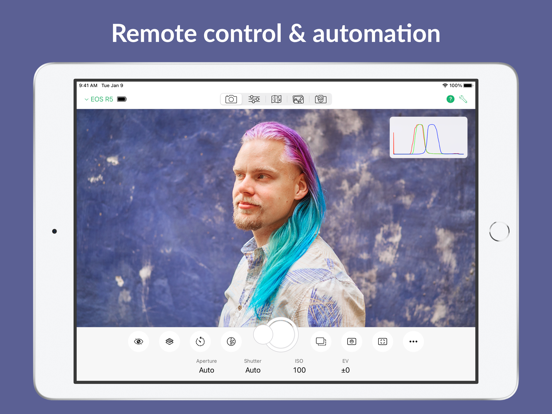
27 store screenshots



Pricing & paywalls
App Store
Shown for US
- Cascable 7 Pro Upgrade
- Cascable Pro (Legacy)
- Cascable Pro (No Subscription)
- Cascable Pro (Quarterly)
Ratings & reviews
App Store
Shown for US
-
4/5After months of searching, I’ve found the app I wanted
This app is a game-changer for me. And any complaint I have on it is made moot by the fact that it’s the only app I’ve found (after months of searching) that gives me usable tether-like review of my images on the ipad, even using an old 5D Mark II. It’s a little clunky to figure out, and I find myself having to reset my connection more than I’d like, and the zoom in to check sharpness isn’t pixel-perfect. But those are small potatoes compared to the *nothing* option, which is all I had before. If I didn’t need to often unplug and plug back in the usb for the camera connection to reset, this would be a 5 star review. I mainly need the ability to go over my composition on a larger screen than the camera LCD provides, and occasionally remote trigger. This app does all that and more. The camera settings and focus controls are great, the live view function is a super nice option. I’m so happy to have finally found this app. EDIT: Almost forgot… thank you to the developers for including a one-time buy option. Subscription only software is the worst.
Gorbulas Grubb · 7 Aug 2026
-
4/5Problems with Intervalometer Interval SOLVED
Update: The developers quickly responded to me and explained that the bulb timer mode is what works for what I was going for. Awesome customer service and great app, now that it works for astro I’m stoked! Original: Awesome app, way better than other camera control apps. However, I bought the pro version so that I could use the intervalometer for astrophotography, and it doesn’t work how it should. After going to the robot mode and selecting intervalometer, it lets you set a time interval to wait between the set number of exposures (or time, depending on your settings) that you’re taking them. I have found that the only thing that this interval does is wait that amount of time before taking the first picture, and the the other pictures all take back-to-back with no pause to let the sensor cool. Fix this and it would be about perfect!
sethvbeckett · 7 Aug 2026
-
5/5Still using it 1 year later
Using Cascable for real estate photography and occasional portrait shoot. Works smoothly with workflow. Wish I knew what WiFi extender could help speed up transfers (currently 4-8 seconds on Nikon D5300. Also I wish there was bracketing feature. Sometimes the image fails to show in preview. Sometimes focus doesn’t work and have to reset. This could be unrelated, could be a power issue with camera. UPDATE: I just went through the recipes tutorial. This type of complex repetitive programming is just what I was hoping for. Could be a game changer. It seems bracketing IS available and much more I just never knew it! Only thing I would fix is the scrolling, I often scroll up/down 2 or 3 stops quickly and go way past the setting I want. Reminds me of Wheel of Fortune. I think they used to have a way to quick scroll by keeping finger on the screen.
JRcameraguy · 7 Aug 2026
-
3/5Nice concept, not so good execution
I love the concept of this app, but it has several main flaws. 1. It freezes a lot. When connecting to my Fujifilm X-E2. It sometimes works in the beginning, after a while, it freezes, and I have to shut down the app and my camera and reconnect. 2. Shutter and aperture adjustment in the app has a major problem, almost every time I adjust shutter and aperture in Cascable, it first works ok, EV on live view changes, then it just stop working, in my case no matter how I adjust shutter value in Cascable, it jumps back to 25sec, similar situation when I adjust aperture value, and EV won’t change anymore. I’ve tried to set aperture value to ‘auto’, shutter value to ‘auto’ or ‘bulb’ on my Fujifilm X-E2, but still all the same. 3. Geotagging in China might have a problem. Chinese government asks map providers to “shift” locations on every map in China for a certain distance (because of national security reason blah blah blah), after geotagging with Cascable, locations where I actually take pictures is a distance away from those on the map in Cascable. I believe the location info is correctly geotagged onto the photos, it’s just shown incorrectly on the map in Cascable due to that Chinese government problem. There’s an app ‘Fog of World’ and it had the same problem before, then the developer solved it, maybe Cascable developer can write FoG a letter.
lionlies · 7 Aug 2026
-
3/5App crashing upon connection to my camera
Update 2: 3.8.2 update fixes the error. As reported by others, bulb mode doesn’t work, and it cannot copy over raw files. This is a limitation of Fuji and not the app. It may be of some use to people using their camera in a studio and having an iPad as a large screen to help view/frame their image. But I prefer using my camera outside and this app doesn’t help me there. Update: just saw the newer 3.8.2 update, will give it a try tomorrow and see if that fixes the issue. Original review below: iPad Pro 12.9” (1st generation) iOS 12.1.1 App version 3.8.1 Fuji X100F firmware version 2.11 Upon setting up the wifi and clicking ok to connect via the app, the app crashes back to the iOS home screen. Restarted the iPad (holding down power and home button until the Apple logo appears) and tried again. But app still crashes. Camera connects to the standard Fuji app ok, so it’s not the camera or the iPad, but an issue with your app. A previous version of this app worked in the past, but not sure what version it was, and not sure if my Fuji camera was on firmware 2.11 or 2.10. Hope this helps to replicate the problem and provide a fix. Thanks
Sengoku_us · 7 Aug 2026
Privacy & accessibility
App Store
Privacy
- Data Not Linked to You — Analytics — Diagnostics — Performance Data Developer declared
- Data Not Linked to You — Analytics — Usage Data — Product Interaction Developer declared
- Data Not Linked to You — App Functionality — Diagnostics — Crash Data Developer declared
- Data Not Linked to You — App Functionality — Diagnostics — Performance Data Developer declared
- Data Not Linked to You — App Functionality — Usage Data — Product Interaction Developer declared
- Data Not Linked to You — App Functionality — User Content — Customer Support Developer declared
- Data Not Linked to You — Diagnostics Developer declared
- Data Not Linked to You — Usage Data Developer declared
- Data Not Linked to You — User Content Developer declared
Accessibility
No accessibility labels collected yet.
Versions
App Store
-
6.5.1
Thank you for using Cascable! Version 6.5 improves compatibility with Canon and Nikon cameras. - Added support for the Canon EOS R6 Mark II, EOS R100, EOS R8, and EOS R50. - Added support for the Nikon Z8 and Z30. - Fixed a bug that could cause some Canon cameras to get "stuck" when shooting stills if they'd recently been used with other software (such as EOS Utility, Capture One, etc). - Cascable 6.5.1 added integration with a future Cascable product.
-
6.5.2
Thank you for using Cascable! This update improves compatibility with iOS/iPadOS 17 and more! - Improved compatibility with iOS and iPadOS 17. - Added support for the newest iPhone 15 and iPhone 15 Pro models. - Fixed an issue that could cause camera discovery to fail to find cameras connected via Ethernet.
-
6.6
Thank you for using Cascable! This update improves compatibility with newer Sony and Nikon cameras, improves the live view zoom experience, and more! - Added support for newer Sony (α7R V, α7C II, α7C R, and α6700) and Nikon (Z f) cameras. - Added touch autofocus for Sony cameras that support it. - Live view can now be panned while zoomed in on Canon and Sony cameras.
-
6.6.1
Thank you for using Cascable! This update improves compatibility with newer Sony and Nikon cameras, improves the live view zoom experience, and more! - Added support for newer Sony (α7R V, α7C II, α7C R, and α6700) and Nikon (Z f) cameras. - Added touch autofocus for Sony cameras that support it. - Live view can now be panned while zoomed in on Canon and Sony cameras. In addition, Cascable 6.6.1 makes the following improvements: - Fixed a crash that could occur when resizing the Cascable window or rotating your device while using the Photos section of the app. - When scanning QR codes to connect to a camera, the camera viewfinder is zoomed in to make scanning easier.
-
6.6.2
Thank you for using Cascable! This update improves compatibility with Nikon cameras and fixes a crash related to the a7S III. - Fixed a bug that'd cause "extended" Nikon shutter speeds (longer than 90 seconds) to be incorrectly handled. - Added support for the Nikon U60 and U120 drive modes. - Fixed a crash that would occur when connecting to the Sony a7S III.
-
6.6.3
Thank you for using Cascable! This update adds support for the OM-1 Mark II and improves compatibility with the Canon EOS 1300D.
-
6.7
Thank you for using Cascable! We're working hard on a huge update with oodles of new features — stay tuned! Until then, here's a smaller update for you. === New Features === - Added supported for newer PowerShot models (G7X II and newer, SX70 HS and newer, SX730 HS and newer, and the V10) when connected via USB. === Fixes & Improvements === - Fixed a bug that'd cause thumbnails for JPEG images to load incorrectly from Canon and Nikon cameras. - Fixed a bug that could cause camera discovery to take several minutes in certain circumstances. - Fixed the currently chosen focus peaking colour not be displayed correctly in the configuration menu. - Improved the behaviour of rating displays when a rating is unable to be modified. - The download button no longer permanently disappears after instructing Cascable to save an image when previewing them from a camera. - Fixed a couple of crashes.
-
6.7.1
Thank you for using Cascable! We're working hard on a huge update with oodles of new features — stay tuned! Until then, this update fixes an issue around activation for Phase One cameras.
-
6.7.2
Thank you for using Cascable! We're working hard on a huge update with oodles of new features — stay tuned! This update adds initial support for the Canon EOS R5 Mark II (with some caveats — see the compatibility table in-app or on our website), and contains some other minor improvements and fixes.
-
6.7.3
Thank you for using Cascable! We're working hard on a huge update with oodles of new features — stay tuned! This update adds initial support for the Canon EOS R5 Mark II (with some caveats — see the compatibility table in-app or on our website), and contains some other minor improvements and fixes.
-
6.7.4
Thank you for using Cascable! We're working hard on a huge update with oodles of new features — stay tuned! In the meantime, we have a few bug fixes for you: - Fixed a bug that could cause cameras connected via USB to not be detected if the iOS device had no network connection at all. - Fixed a bug that could cause duplicate images to be displayed in the image grid on some Canon cameras. - Worked around a bug, introduced in iOS/iPadOS 18.1, that could cause thumbnails of JPEG images on Canon cameras to be rendered incorrectly. - Fixed a bug that could cause the Phase One app icon to show for users without Phase One cameras.
-
7.0
Welcome to Cascable 7.0! This is our biggest and most ambitious update to date, and we're excited to have it in your hands! We have new features and improvements all over the app, including: - Video recording for Canon, Nikon, and Sony cameras - Lots of creative new features and improvements to remote control - A more powerful and flexible tethering workflow - Improvements to photo and video management features - New and improved blocks in Recipes …and much, much more!
-
7.0.1
Welcome to Cascable 7.0! This is our biggest and most ambitious update to date, and we're excited to have it in your hands! We have new features and improvements all over the app, including: - Video recording for Canon, Nikon, and Sony cameras - Lots of creative new features and improvements to remote control - A more powerful and flexible tethering workflow - Improvements to photo and video management features - New and improved blocks in Recipes …and much, much more!
-
7.0.3
Welcome to Cascable 7.0! This is our biggest and most ambitious update to date, and we're excited to have it in your hands! We have new features and improvements all over the app, including: - Video recording for Canon, Nikon, and Sony cameras - Lots of creative new features and improvements to remote control - A more powerful and flexible tethering workflow - Improvements to photo and video management features - New and improved blocks in Recipes …and much, much more!
-
7.0.4
Thank you for using Cascable! This update fixes previews not being shown from Phase One cameras when shooting in camera storage mode.
-
7.0.5
Thank you for using Cascable! This update includes a couple of important bug fixes. - Fixed a bug that could cause photos in the in-app photo storage to become "disconnected" from the image files themselves, causing blank thumbnails and crashes. - Cascable Studio will now inform you if the camera failed to start recording video due to a card error or being in the wrong mode.
-
7.1
This update is all about control and automation with support for Stream Deck on iPad, Shortcuts, Siri, and more! - Cascable Studio can now be used with the Elgato Stream Deck on iPad - add useful actions to your Stream Deck's keys and change settings with your Stream Deck's dials. - Added a number of actions to the Shortcuts app, enabling powerful automation and scripting. Want to email today's five-star shots straight from your camera with one button press? Now you can! - Onion skinning has been improved with better camera orientation matching, and a manual rotation override if needed. - The "Lines" grid from Cascable 6 returns! - Fixed a bug that'd cause the "Fine Adjust" slider in Geotagging to not be interact-able.
-
7.1.1
This update is all about control and automation with support for Stream Deck on iPad, Shortcuts, Siri, and more! - Cascable Studio can now be used with the Elgato Stream Deck on iPad - add useful actions to your Stream Deck's keys and change settings with your Stream Deck's dials. - Added a number of actions to the Shortcuts app, enabling powerful automation and scripting. Want to email today's five-star shots straight from your camera with one button press? Now you can! - Onion skinning has been improved with better camera orientation matching, and a manual rotation override if needed. - The "Lines" grid from Cascable 6 returns! - Fixed a bug that'd cause the "Fine Adjust" slider in Geotagging to not be interact-able.
-
7.1.2
Fixes an issue that could cause the app to hang on launch.
-
7.1.3
Thank you for using Cascable Studio! This is a quick buxfix update that fixes an issue that'd cause some Recipes to not run on some Sony cameras.
-
7.1.4
Thank you for using Cascable Studio! This update adds compatibility with iOS and iPadOS 26.
-
7.2
This update welcomes GoPro to the family, adding support for the HERO 9 Black and newer via USB and Bluetooth/WiFi! Additionally, the following improvements have been made: - Remote Control’s grid overlay settings have been improved to make it clearer which grids are active. - The copy queue has been moved to a more prominent location so it’s easier to see when media is in the process of being copied around. - The media list’s “file type” filter now includes video. - The app’s settings panels are no longer needlessly narrow on iPad. - Fixed a bug that’d cause new videos to not appear in the media list for a connected camera. - Fixed a number of UI niggles introduced by iOS and iPadOS 26.
-
7.2.1
This update welcomes GoPro to the family, adding support for the HERO 9 Black and newer via USB and Bluetooth/WiFi! Additionally, the following improvements have been made: - Remote Control’s grid overlay settings have been improved to make it clearer which grids are active. - The copy queue has been moved to a more prominent location so it’s easier to see when media is in the process of being copied around. - The media list’s “file type” filter now includes video. - The app’s settings panels are no longer needlessly narrow on iPad. - Fixed a bug that’d cause new videos to not appear in the media list for a connected camera. - Fixed a number of UI niggles introduced by iOS and iPadOS 26. The 7.2.1 update makes a number of improvements to the GoPro connection process.
-
7.2.2
Thank you for using Cascable Studio! This minor update adds a keyboard shortcut to disconnect from a connected camera.
-
7.3
· 16 Mar 2026
This update is a big one for Sony users — support for accessing camera storage for compatible models, and support for new cameras including the FX series! Full release notes below. === Camera Compatibility === - Added support for a number of Sony cameras, including FX models for the first time! New this update are the Sony FX2, FX3(A), FX30, α1 II, α9 III, α7 V, ILX-LR1, and ZV-E10 II. - Added support for accessing the storage slots of certain Sony camera models. This may require a firmware update for your camera — Cascable Studio will let you know if that's the case. The supported camera models for storage access are the Sony α1, α1 II, α9 III, α7R V, α7 IV, α7 V, α7S III, α7C II, αC R, α6700, ILX-LR1, FX3(A), FX30, FX2, and ZV-E1. === New Features === - Added support for the Flash Exposure Compensation and Flash Mode settings for compatible Canon, Nikon, and Sony cameras. === Bug Fixes === - Cascable Studio will no longer prompt for the Bluetooth permission immediately when launched.
Alternatives
- Capture One — Same category + similar ratings
- CamRanger 2 - Camera Control — Same category + similar ratings
- Monitor+ — Same category + similar ratings
- ShutterSnitch — Same category + similar ratings
- CamRanger Wireless DSLR Camera — Same category + similar ratings
- Sony | Monitor & Control — Same category + similar ratings
Availability by market
- US
Data quality & evidence
- Page completeness
- Live store listing
- Last verified
- 7 Aug 2026
- Sources
- App Store
- Apoku editorial summary has not been published yet.