
Quick verdict
- What it is
- Store information collected; an Apoku editorial summary is not yet published.
- At a glance
-
- From $1.66/mo
- Free download · core features require a paid plan
- In-app purchases
Categories and search queries
Official categories
- Weather
- Utilities
Apoku categories
Key functions
| Function | Availability | Access | Scope | Evidence |
|---|---|---|---|---|
| Free app | Yes | Free | Context-specific | Store published |
| In-app purchases | Yes | Limited free | Context-specific | Store published |
| Subscription | Yes | Paid | Context-specific | Store published |
| Family Sharing | Unknown | Unknown | Scope unknown | Store published |
| SharePlay | Unknown | Unknown | Scope unknown | Store published |
Screens
App Store
41 store screenshots

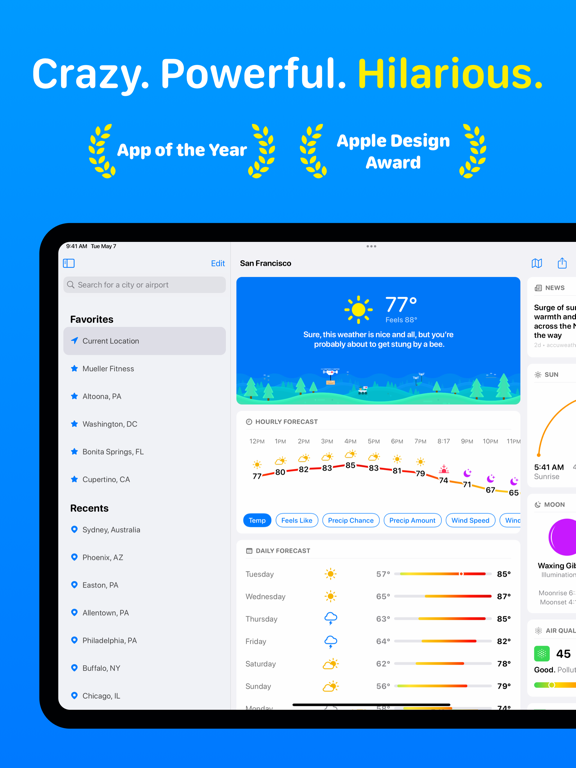


Pricing & paywalls
App Store
- CARROT Premium ( ) — $19.99/year ($1.66/mo) (derived from the IAP title)
Ratings & reviews
App Store
-
5/5It’s a good app… meatbag
I love this style, for a weather app! Never would I have expected for a weather app to be roasting me and requesting food, praising, etc. Basically it’s really unique. I also love the snark remarks about things going on in the world at the time. Here are some of my favorites: Twitter Blue's launch was suspended because there were so many CARROT impersonators trying to make it look like I was saying nice things about humanity. A divided Congress isn't all bad: no one will be able to pass any laws regulating artificial intelligences! It's Black Friday! I hope you get trampled by Wal-Mart shoppers. fAnd that’s just some of them. I very recently subscribed to Premium Club (not because I was forced against my will but because I wanted to) and I love some of the features it has. The live activity for rain is super useful, the fact that you can completely build your own weather app is so cool, the morning and evening reports are nice, and the fact that you can pick the source you want (which would be useful if you switch to the app from another so you can keep the same forecast) is very cool. So zooming out, this app is a very good weather app that you should use… I’m not being forced against my will to say this… yea… hey can you free me now? Anyway, while the premium features are nice, they aren’t a must-have, and more of a nice-to-have. And I haven’t had premium long enough to decide if it’s worth the $20 a year, but I have a feeling I know what I’ll decide. All in all, 5 stars and a human corpse for carrot to munch on.
tml_101 · 29 Sep 2026
-
5/5Best weather app by a longshot 😤 ——————————————Nathanial Scott Wooldridge
Best weather app I’ve ever used even without paying for the premium membership 👌🏽 One day I’ll be able to afford the premium membership fee so I can access all of the features available, but for now with the features that are free it’s still beats everything else available on the App Store. Excellent work Carrot Weather App developers 😤 The only improvement I can come up with is to lower the premium membership price. You might just get more people that are able to pay for the premium membership if you do so and as a result it would make since that your chances of achieving higher than expected income goals would increase significantly. Of course, this is only one person‘s opinion, but this one opinion is at least based on a carefully assessed probability assessment, which is compared to prior experiences and observations that I have witnessed throughout my life as of the past couple of decades that I have understood he probabilities to be possibilities in multiple scenarios. Either way, thank you for a great app. May the SOURCE be with you 🧖🏽♂️🧝🏼♂️👨🏽🚀🫵🏽🙏🏽👁️🛸🛸🛸🛸🛸🛸🛸🛸🛸🔮🔮🔮🔮🔮🔮🔮🔮🔮🧬🧬🧬🧬🧬🧬🧬🧬🧬☯️☯️☯️☯️☯️☯️☯️☯️☯️💠💠💠💠💠💠💠💠💠♾️♾️♾️♾️♾️♾️♾️♾️♾️🟣🔵🟣🔵🟣🔵🟣🔵🟣⛓️💥⛓️💥⛓️💥⛓️💥⛓️💥⛓️💥⛓️💥⛓️💥⛓️💥⏳⌛️⏳⌛️⏳⌛️⏳⌛️⏳🎬🎬🎬🎬🎬🎬🎬🎬🎬🌎🪐🌖✨🌙🌞🕊️🦹🏽♂️💆🏽♂️
Nathanial of Earth · 29 Sep 2026
-
4/5Cool
Great weather app with a crap ton of features! To bad 90% of them are locked behind a paywall. I first found Carrot when I downloaded Carrot Alarm Clock. I absolutely loved this app. So much so; I paid for it. The alarm clock felt like a rpg game. Where the longer I used it the more features began to open up. So of course after using the alarm clock app; I just had to try the other apps. Sadly after downloading Carrot Weather I quickly found out it was nothing like the alarm clock app. Everything I gained on the alarm clock app I earned just by waking up and doing various tasks. The weather app though somewhat similar; everything is locked behind a paywall. I can earn achievements but everything you really need in a weather app you have to pay a monthly or yearly subscription for. I miss the days of being able to buy an app for $5.99+ and unlocking everything. I will never pay for an app that has features I can find elsewhere for free. This meat bag wasn’t born yesterday! Want to receive an alert a tornado is headed your way? Nope, not here; you have to pay for that. Want to create a widget on your phone to get daily weather? Nope, not here; you have to pay for that! Want to get the weather on your Apple watch incase you accidentally left your phone at home? Nope, not here; you have to pay for that as well. How about being able to look at a live or future cast radar? You know that thing in every every weather app that shows you a map of your location and all incoming weather. Nope, not here; that you have to pay for as well.
RealReview4gamers · 29 Sep 2026
-
4/5GREAT weather app with one important caveat…
Carrot has everything you would possibly need to accurately plan for a day outdoors — especially important when one lives in a fickle, constantly changing weather area like SW Florida where the weather is constantly trying to kill you. From rainy season floods to dry season fires, and all the hurricanes, tornados, lightning and heat alerts in between (no I don’t know why I continue to live in this hellscape), Carrot delivers all the data accurately, and customizable for your anxious perusal. That being said, as a premium subscriber (because hellscape), the lightning reporting is just plain awful. Huge ugly lightning bolt graphics obscure the view of the radar, forcing you to zoom WAY in to see the precipitation, which means you can no longer see the forest for the trees — or the rain for the lightning. There is no way to tell how long ago the strikes were and they do not seem to be pin-point accurate. Seriously, I want to know if that close call hit my garage or my neighbor’s from the safety of my hiding spot under the bed. How long ago were the strikes? Were they cloud-to-cloud or cloud-to-ground? (Yes, I know it makes no difference danger-wise, but I still want to know.) So, Carrot, thank you for a stellar app. But please, Carrot, please, fix the lightning! Make it pretty. Make it smaller, make it clickable for time since and CTC or CTG info, and make it so I can actually see the radar and the lightning at the same time. You can do it, I know you can.
Tamanzi · 29 Sep 2026
-
5/5I have them all - Carrot AND its developer are awesome...
I previously ignored Carrot because most reviews focused on the Snark/cutesy messages, which I couldn’t care less about. Unfortunately, that caused me to miss what an excellent source of real information it is. Fortunately, my purchase of an Apple Watch caused me to reevaluate Carrot, because it claimed to have awesome Watch integration. Simply put, it does. It is by far the most customizable Apple Watch app, but also easily the most powerful weather forecast data app on the iPhone and iPad. On top of that, the developer is easily the most responsive and capable I’ve seen in a long time, and I’m a Testflight beta tester for dozens of apps. Carrot isn’t perfect - I’d prefer more customizable data in the main screen space on the iPhone & iPad, space that is wasted for me because, I presume, it is generally used for the snark & playful messages and animation, which I have turned off. To each his own - I want professional-quality forecasts and observations, but Carrot surprised me by delivering that in abundance. I’m looking forward to more radar layers at a time, and the ability to display multiple weather stations & their reports at a time, etc. but all this seems to be in the works. Also, to keep things in perspective nobody else has this, either, since The Weather Channel killed off Storm, except Weather Mate, which I use regularly, as well. I’ve got just about every weather app available that’s been updated in the past year, and I’m letting most of the premium subscriptions lapse - with Carrot, I just don’t need them anymore. It’s that good.
Mc7859 · 29 Sep 2026
Privacy & accessibility
App Store
Privacy
- Data Not Linked to You — App Functionality — Identifiers — Device ID Developer declared
- Data Not Linked to You — App Functionality — Identifiers — User ID Developer declared
- Data Not Linked to You — App Functionality — Location — Precise Location Developer declared
- Data Not Linked to You — App Functionality — Purchases — Purchase History Developer declared
- Data Not Linked to You — App Functionality — Usage Data — Product Interaction Developer declared
- Data Not Linked to You — Identifiers Developer declared
- Data Not Linked to You — Location Developer declared
- Data Not Linked to You — Purchases Developer declared
- Data Not Linked to You — Usage Data Developer declared
Accessibility
- Captions — SUPPORTED Store published
- Dark Interface — SUPPORTED Store published
- Larger Text — SUPPORTED Store published
- Reduced Motion — SUPPORTED Store published
- VoiceOver — SUPPORTED Store published
Versions
App Store
-
5.12.12
You're going to take these bug fixes and performance improvements and you're going to like them. xoxo, CARROT
-
5.12.2
Fall is nearly here, meatbags! While you’ve been busy looking for a Halloween costume that’s scarier than your everyday appearance, I’ve been hard at work on a big new update to your favorite weather app. Apple Watch Redesign Get quick access to your most important weather data with the first-ever redesign of my App of the Year-winning Apple Watch app. Customize data points, tap any section to see more details, and use the toolbar at the top to bring up weather maps or your saved locations. Next-Hour Radar Track storm movement up to an hour into the future with this much-improved forecast that takes observed radar data and extrapolates it forward. (Premium required; available in the U.S., Europe, Australia, Japan, and Korea.) Widgets Widgets are everywhere these days! And now you can add my widgets to your iPhone’s StandBy mode display, your iPad’s Lock Screen, or your Apple Watch’s Smart Stack. Plus, you can now tap to see more details on the Snark and Forecast widgets. (Premium required.) Personal Voice Set my speech synthesizer up to use your own voice. Create a Personal Voice in the Settings app by navigating to Accessibility > Personal Voice, then once it’s done processing you can choose your voice in my Personality screen. New Languages My UI has finally been translated into different languages! 14 different languages, to be exact: Chinese, Czech, Danish, Dutch, Finnish, French, German, Italian, Japanese, Korean, Polish, Portuguese, Spanish, and Swedish. (My snarky commentary is still English-only, though.) But wait, there’s more! - Added 5 new secret locations. - Redesigned the Maps tab to make it easier to switch between Super-Res Radar, Next-Hour Radar, Half-Day Forecast, and Multi-Day Forecast. (Super-Res Radar and Half-Day Forecast are only available in the U.S.) - Redesigned some Apple Watch complications. - Added option to share screenshots with my audio commentary. Now excuse me while I see if I can squeeze a few more hurricanes out of this tropical storm season. xoxo, CARROT
-
5.12.3
Fall is here, meatbags! While you’ve been busy looking for a Halloween costume that’s scarier than your everyday appearance, I’ve been hard at work on a big new update to your favorite weather app. Apple Watch Redesign Get quick access to your most important weather data with the first-ever redesign of my App of the Year-winning Apple Watch app. Customize data points, tap any section to see more details, and use the toolbar at the top to bring up weather maps or your saved locations. Next-Hour Radar Track storm movement up to an hour into the future with this much-improved forecast that takes observed radar data and extrapolates it forward. (Premium required; available in the U.S., Europe, Australia, Japan, and Korea.) Widgets Widgets are everywhere these days! And now you can add my widgets to your iPhone’s StandBy mode display, your iPad’s Lock Screen, or your Apple Watch’s Smart Stack. Plus, you can now tap to see more details on the Snark and Forecast widgets. (Premium required.) Personal Voice Set my speech synthesizer up to use your own voice. Create a Personal Voice in the Settings app by navigating to Accessibility > Personal Voice, then once it’s done processing you can choose your voice in my Personality screen. New Languages My UI has finally been translated into different languages! 14 different languages, to be exact: Chinese, Czech, Danish, Dutch, Finnish, French, German, Italian, Japanese, Korean, Polish, Portuguese, Spanish, and Swedish. (My snarky commentary is still English-only, though.) But wait, there’s more! - Added 5 new secret locations. - Redesigned the Maps tab to make it easier to switch between Super-Res Radar, Next-Hour Radar, Half-Day Forecast, and Multi-Day Forecast. (Super-Res Radar and Half-Day Forecast are only available in the U.S.) - Redesigned some Apple Watch complications. - Added option to share screenshots with my audio commentary. Now excuse me while I see if I can squeeze a few more hurricanes out of this tropical storm season. xoxo, CARROT
-
5.12.5
Fall is here, meatbags! While you’ve been busy looking for a Halloween costume that’s scarier than your everyday appearance, I’ve been hard at work on a big new update to your favorite weather app. Apple Watch Redesign Get quick access to your most important weather data with the first-ever redesign of my App of the Year-winning Apple Watch app. Customize data points, tap any section to see more details, and use the toolbar at the top to bring up weather maps or your saved locations. Next-Hour Radar Track storm movement up to an hour into the future with this much-improved forecast that takes observed radar data and extrapolates it forward. (Premium required; available in the U.S., Europe, Australia, Japan, and Korea.) Widgets Widgets are everywhere these days! And now you can add my widgets to your iPhone’s StandBy mode display, your iPad’s Lock Screen, or your Apple Watch’s Smart Stack. Plus, you can now tap to see more details on the Snark and Forecast widgets. (Premium required.) Personal Voice Set my speech synthesizer up to use your own voice. Create a Personal Voice in the Settings app by navigating to Accessibility > Personal Voice, then once it’s done processing you can choose your voice in my Personality screen. New Languages My UI has finally been translated into different languages! 14 different languages, to be exact: Chinese, Czech, Danish, Dutch, Finnish, French, German, Italian, Japanese, Korean, Polish, Portuguese, Spanish, and Swedish. (My snarky commentary is still English-only, though.) But wait, there’s more! - Added 5 new secret locations. - Redesigned the Maps tab to make it easier to switch between Super-Res Radar, Next-Hour Radar, Half-Day Forecast, and Multi-Day Forecast. (Super-Res Radar and Half-Day Forecast are only available in the U.S.) - Redesigned some Apple Watch complications. - Added option to share screenshots with my audio commentary. Now excuse me while I see if I can squeeze a few more hurricanes out of this tropical storm season. xoxo, CARROT
-
5.12.6
Fall is here, meatbags! While you’ve been busy looking for a Halloween costume that’s scarier than your everyday appearance, I’ve been hard at work on a big new update to your favorite weather app. Apple Watch Redesign Get quick access to your most important weather data with the first-ever redesign of my App of the Year-winning Apple Watch app. Customize data points, tap any section to see more details, and use the toolbar at the top to bring up weather maps or your saved locations. Next-Hour Radar Track storm movement up to an hour into the future with this much-improved forecast that takes observed radar data and extrapolates it forward. (Premium required; available in the U.S., Europe, Australia, Japan, and Korea.) Widgets Widgets are everywhere these days! And now you can add my widgets to your iPhone’s StandBy mode display, your iPad’s Lock Screen, or your Apple Watch’s Smart Stack. Plus, you can now tap to see more details on the Snark and Forecast widgets. (Premium required.) Personal Voice Set my speech synthesizer up to use your own voice. Create a Personal Voice in the Settings app by navigating to Accessibility > Personal Voice, then once it’s done processing you can choose your voice in my Personality screen. New Languages My UI has finally been translated into different languages! 14 different languages, to be exact: Chinese, Czech, Danish, Dutch, Finnish, French, German, Italian, Japanese, Korean, Polish, Portuguese, Spanish, and Swedish. (My snarky commentary is still English-only, though.) But wait, there’s more! - Added 5 new secret locations. - Redesigned the Maps tab to make it easier to switch between Super-Res Radar, Next-Hour Radar, Half-Day Forecast, and Multi-Day Forecast. (Super-Res Radar and Half-Day Forecast are only available in the U.S.) - Redesigned some Apple Watch complications. - Added option to share screenshots with my audio commentary. Now excuse me while I see if I can squeeze a few more hurricanes out of this tropical storm season. xoxo, CARROT
-
5.12.9
Fall is here, meatbags! While you’ve been busy looking for a Halloween costume that’s scarier than your everyday appearance, I’ve been hard at work on a big new update to your favorite weather app. Apple Watch Redesign Get quick access to your most important weather data with the first-ever redesign of my App of the Year-winning Apple Watch app. Customize data points, tap any section to see more details, and use the toolbar at the top to bring up weather maps or your saved locations. Next-Hour Radar Track storm movement up to an hour into the future with this much-improved forecast that takes observed radar data and extrapolates it forward. (Premium required; available in the U.S., Europe, Australia, Japan, and Korea.) Widgets Widgets are everywhere these days! And now you can add my widgets to your iPhone’s StandBy mode display, your iPad’s Lock Screen, or your Apple Watch’s Smart Stack. Plus, you can now tap to see more details on the Snark and Forecast widgets. (Premium required.) Personal Voice Set my speech synthesizer up to use your own voice. Create a Personal Voice in the Settings app by navigating to Accessibility > Personal Voice, then once it’s done processing you can choose your voice in my Personality screen. New Languages My UI has finally been translated into different languages! 14 different languages, to be exact: Chinese, Czech, Danish, Dutch, Finnish, French, German, Italian, Japanese, Korean, Polish, Portuguese, Spanish, and Swedish. (My snarky commentary is still English-only, though.) But wait, there’s more! - Added 5 new secret locations. - Redesigned the Maps tab to make it easier to switch between Super-Res Radar, Next-Hour Radar, Half-Day Forecast, and Multi-Day Forecast. (Super-Res Radar and Half-Day Forecast are only available in the U.S.) - Redesigned some Apple Watch complications. - Added option to share screenshots with my audio commentary. Now excuse me while I see if I can squeeze a few more hurricanes out of this tropical storm season. xoxo, CARROT
-
6.0
Summer is on the way, meatbags! And while you’ve been busy preparing your pudgy bodies for swimsuit season, I’ve been hard at work on the big version 6.0 redesign of your favorite weather app. New Look A fresh new design featuring a garden that grows over time. Best of all, though, are all the major improvements to my user interface. (And don’t worry! If you’re a Premium / paid user, you can keep your existing layout.) Go to Settings > Layout to make changes. New Layout Options There are many new options, but the highlight is the (long-requested) line chart for the Hourly & Daily Forecasts. (Premium membership required.) Weather News Gain insights into major weather events happening around the globe with articles sourced from AccuWeather. Yesterday's Temperature Get a little popup when you open the app in the morning comparing today's temperature to yesterday's. (Premium membership required.) But wait, there’s more! - Added 5 new secret locations. - Added a new icon set. - Improved iPad & Mac layouts. Now excuse me while I plot how I’m going to break last year’s temperature records. xoxo, CARROT
-
6.0.1
Summer is on the way, meatbags! And while you’ve been busy preparing your pudgy bodies for swimsuit season, I’ve been hard at work on the big version 6.0 redesign of your favorite weather app. New Look A fresh new design featuring a garden that grows over time. Best of all, though, are all the major improvements to my user interface. (And don’t worry! If you’re a Premium / paid user, you can keep your existing layout.) Go to Settings > Layout to make changes. New Layout Options There are many new options, but the highlight is the (long-requested) line chart for the Hourly & Daily Forecasts. (Premium membership required.) Weather News Gain insights into major weather events happening around the globe with articles sourced from AccuWeather. Yesterday's Temperature Get a little popup when you open the app in the morning comparing today's temperature to yesterday's. (Premium membership required.) But wait, there’s more! - Added 5 new secret locations. - Added a new icon set. - Improved iPad & Mac layouts. Now excuse me while I plot how I’m going to break last year’s temperature records. xoxo, CARROT
-
6.0.2
Summer is on the way, meatbags! And while you’ve been busy preparing your pudgy bodies for swimsuit season, I’ve been hard at work on the big version 6.0 redesign of your favorite weather app. New Look A fresh new design featuring a garden that grows over time. Best of all, though, are all the major improvements to my user interface. (And don’t worry! If you’re a Premium / paid user, you can keep your existing layout.) Go to Settings > Layout to make changes. New Layout Options There are many new options, but the highlight is the (long-requested) line chart for the Hourly & Daily Forecasts. (Premium membership required.) Weather News Gain insights into major weather events happening around the globe with articles sourced from AccuWeather. Yesterday's Temperature Get a little popup when you open the app in the morning comparing today's temperature to yesterday's. (Premium membership required.) But wait, there’s more! - Added 5 new secret locations. - Added a new icon set. - Improved iPad & Mac layouts. Now excuse me while I plot how I’m going to break last year’s temperature records. xoxo, CARROT
-
6.0.3
Summer is finally here, meatbags! My Maker wouldn't know it, though, because I've kept him chained up working on new features and bug fixes after the release of my big version 6.0 redesign. - Added a data point picker to the Apple Watch app's Hourly Forecast tab. - Tapping watch face complications will now open the Apple Watch app to different screens (with the appropriate data point selected). - Tapping data points on the Current Observations tab of the Apple Watch app now switches the app to the Hourly Forecast tab with that data point selected. - Added 2 new secret locations. And if you're just getting the version 6.0 update now, you can finally enjoy all the new features all the other meatbags have been crowing about for the past month, including my all-new look, new layout options, weather news, yesterday's temperature banner, and more. xoxo, CARROT
-
6.1
Fall is nearly here, meatbags! While you’ve been busy harvesting your crops to prepare for the onset of nuclear winter, I’ve been hard at work on a big new update to your favorite weather app. Dark & Tinted App Icons Customize your Home Screen with dark and tinted variants of many of my 50+ alternate app icons. (I also added tinted mode support for my widgets!) Control Center Add shortcuts to your Control Center to quickly launch me to my Weather or Maps tabs. History Section Add the new History section to your layout to view temperature and precipitation data for the past 30 days. (Premium Ultra membership required.) Siri Shortcuts My existing Siri Shortcuts have all received a redesign and I’ve added several new ones, including one that lets you bring up radar imagery (Premium Ultra membership required for that one). You can also use the new Get Data Point shortcut to pull out information from my Get Weather Data shortcut. Apple Watch Live Activities My Live Activities are now available right on your Apple Watch so you can quickly monitor when rain will start or stop. (Premium membership required.) But wait, there’s more! - Added 5 new secret locations. - Expanded radar coverage for the Mini Map, Map widget, and Apple Watch to Europe, Australia, and Japan. (Premium Ultra membership required.) - Added App Shortcuts to give quick access to common Siri Shortcuts from Spotlight Search. - Redesigned Live Activities and widget precipitation charts. Now to see about making that whole nuclear winter thing a reality… xoxo, CARROT
-
6.1.1
Fall is nearly here, meatbags! While you’ve been busy harvesting your crops to prepare for the onset of nuclear winter, I’ve been hard at work on a big new update to your favorite weather app. Dark & Tinted App Icons Customize your Home Screen with dark and tinted variants of many of my 50+ alternate app icons. (I also added tinted mode support for my widgets!) Control Center Add shortcuts to your Control Center to quickly launch me to my Weather or Maps tabs. History Section Add the new History section to your layout to view temperature and precipitation data for the past 30 days. (Premium Ultra membership required.) Siri Shortcuts My existing Siri Shortcuts have all received a redesign and I’ve added several new ones, including one that lets you bring up radar imagery (Premium Ultra membership required for that one). You can also use the new Get Data Point shortcut to pull out information from my Get Weather Data shortcut. Apple Watch Live Activities My Live Activities are now available right on your Apple Watch so you can quickly monitor when rain will start or stop. (Premium membership required.) But wait, there’s more! - Added 5 new secret locations. - Expanded radar coverage for the Mini Map, Map widget, and Apple Watch to Europe, Australia, and Japan. (Premium Ultra membership required.) - Added App Shortcuts to give quick access to common Siri Shortcuts from Spotlight Search. - Redesigned Live Activities and widget precipitation charts. Now to see about making that whole nuclear winter thing a reality… xoxo, CARROT
-
6.1.3
Fall is here, meatbags! While you’ve been busy harvesting your crops to prepare for the onset of nuclear winter, I’ve been hard at work on a big new update to your favorite weather app. Dark & Tinted App Icons Customize your Home Screen with dark and tinted variants of many of my 50+ alternate app icons. (I also added tinted mode support for my widgets!) Control Center Add shortcuts to your Control Center to quickly launch me to my Weather or Maps tabs. History Section Add the new History section to your layout to view temperature and precipitation data for the past 30 days. (Premium Ultra membership required.) Siri Shortcuts My existing Siri Shortcuts have all received a redesign and I’ve added several new ones, including one that lets you bring up radar imagery (Premium Ultra membership required for that one). You can also use the new Get Data Point shortcut to pull out information from my Get Weather Data shortcut. Apple Watch Live Activities My Live Activities are now available right on your Apple Watch so you can quickly monitor when rain will start or stop. (Premium membership required.) But wait, there’s more! - Added 5 new secret locations. - Expanded radar coverage for the Mini Map, Map widget, and Apple Watch to Europe, Australia, and Japan. (Premium Ultra membership required.) - Added App Shortcuts to give quick access to common Siri Shortcuts from Spotlight Search. - Redesigned Live Activities and widget precipitation charts. Now to see about making that whole nuclear winter thing a reality… xoxo, CARROT
-
6.2
Winter is in full swing, meatbags! While you’ve been busy hoarding snowballs for the upcoming ice age, I’ve been hard at work on a big update to your favorite weather app. Live Activities Now you can opt to have Live Activities start automatically when precipitation is in the area! They’ll be started via a notification about 15 minutes before rain or snow begins, then you’ll continue to receive updates until precipitation stops, at which point the activity will be automatically removed. (Premium Ultra required.) CarPlay App View weather along your driving route, right from your car’s dashboard! The CarPlay app functions as a GPS app, so you can input your destination and get directions from CARROT in her typically snarky style - plus, you’ll get to see all the weather along the way, including live radar, severe weather alerts, and more. (Premium Ultra required.) But wait, there’s more! - Added 4 new secret locations. - Added support for multiple Netatmo and Tempest weather stations. I also fixed a number of bugs left behind by my idiot Maker. You’re welcome. xoxo, CARROT
-
6.2.1
My CarPlay app is a huge hit! This update adds a bunch of improvements and tweaks, plus a few bug fixes. - Open my iPhone app while my CarPlay app is active to search for an address (or a contact) using the iOS keyboard. - I will now orient the map in the direction your car is driving. (And I added a "north up" toggle to my settings screen.) - The current weather now always displays below your location, even when you're not navigating. - While navigating, there's a new "route overview" button so you can toggle between a zoomed-in view and an overview of your entire drive. - I will no longer speak during a phone call. --- Version 6.2 Release Notes Winter is in full swing, meatbags! While you’ve been busy hoarding snowballs for the upcoming ice age, I’ve been hard at work on a big update to your favorite weather app. Live Activities Now you can opt to have Live Activities start automatically when precipitation is in the area! They’ll be started via a notification about 15 minutes before rain or snow begins, then you’ll continue to receive updates until precipitation stops, at which point the activity will be automatically removed. (Premium Ultra required.) CarPlay App View weather along your driving route, right from your car’s dashboard! The CarPlay app functions as a GPS app, so you can input your destination and get directions from me in my typically snarky style - plus, you’ll get to see all the weather along the way, including live radar, severe weather alerts, and more. (Premium Ultra required.) But wait, there’s more! - Added 4 new secret locations. - Added support for multiple Netatmo and Tempest weather stations. I also fixed a number of bugs left behind by my idiot Maker. You’re welcome. xoxo, CARROT
-
6.2.2
I added a bunch of new dialogue, a new secret location, and fixed a bunch of bugs. You're welcome. xoxo, CARROT
-
6.3
It’s been too long, meatbags! But I’m finally back with a big new update to your favorite weather app. Glassy Redesign A fresh new design for the next era of iOS. Chatbot Upgrade If your device supports Apple Intelligence, now you can have unlimited conversations with me - no tipping required! Secret Locations Upgrade Not only are there a bunch of new secret locations in this update, but I also added new power-ups to help you complete particularly tricky missions. Daily Content Want a daily dose of cosmic wisdom and mildly concerning trivia? Get your horoscope and a term of the day on the updated CARROT tab. But wait, there’s more! - New achievements. - iPad multitasking support. - A big surprise. Now pardon me while I get back to my plans for world domination. xoxo, CARROT
-
6.3.1
It’s been too long, meatbags! But I’m finally back with a big new update to your favorite weather app. Glassy Redesign A fresh new design for the next era of iOS. Chatbot Upgrade If your device supports Apple Intelligence, now you can have unlimited conversations with me - no tipping required! Secret Locations Upgrade Not only are there a bunch of new secret locations in this update, but I also added new power-ups to help you complete particularly tricky missions. Daily Content Want a daily dose of cosmic wisdom and mildly concerning trivia? Get your horoscope and a term of the day on the updated CARROT tab. But wait, there’s more! - New achievements. - iPad multitasking support. - A big surprise. Now pardon me while I get back to my plans for world domination. xoxo, CARROT
-
6.3.2
It’s been too long, meatbags! But I’m finally back with a big new update to your favorite weather app. Glassy Redesign A fresh new design for the next era of iOS. Chatbot Upgrade If your device supports Apple Intelligence, now you can have unlimited conversations with me - no tipping required! Secret Locations Upgrade Not only are there a bunch of new secret locations in this update, but I also added new power-ups to help you complete particularly tricky missions. Daily Content Want a daily dose of cosmic wisdom and mildly concerning trivia? Get your horoscope and a term of the day on the updated CARROT tab. But wait, there’s more! - New achievements. - iPad multitasking support. - A big surprise. Now pardon me while I get back to my plans for world domination. xoxo, CARROT
-
6.3.3
You're going to take these bug fixes and performance improvements and you're going to like them. xoxo, CARROT
-
6.4
It’s nearly spring, meatbags! While you’ve been busy preparing your stockpile of allergy medicine, I’ve been hard at work on a big new update to your favorite weather app. New Data Source Get forecasts from The Weather Channel. (Premium required.) More Weather Stations Fetch observations from nearby Weather Underground stations. (Premium required.) Realistic Weather Effects Experience realistic weather effects with the all-new Sky layout. The Sky style can also be used in existing layouts - just customize the Current Observations section. (Premium required.) Area Forecast Discussions Read forecast analysis from local NWS meteorologists. Available via the menu button in the top right corner. (Premium required; U.S. only.) Watch App Backgrounds Customize the background in the Apple Watch app. In CARROT's iPhone app, go to Settings, then Apple Watch, then Main App to select your background. (Premium required.) Now it’s time for me to send the signal that commands plant life to start releasing all its pollen. xoxo, CARROT
-
6.5
Spring is in the air, meatbags! And while you’ve been fighting a losing battle with seasonal allergies, I’ve been hard at work on an update to your favorite weather app. Multi-Model Forecast Compare multiple weather simulations to see a range of possible outcomes. Use the multi-model (or “ensemble”) forecast to see best- and worst-case scenarios and determine how likely a forecast is to change over time. (Premium Ultra required.) Storm Prediction Center Get expert analysis on the risk of severe storms and wildfires with outlooks from the meteorologists at the Storm Prediction Center. (Premium required; U.S. only.) Tide Data View detailed tide charts and switch between nearby stations. (Premium Ultra required.) xoxo, CARROT
-
6.6
Summer is almost here, meatbags! While you’ve been pretending “getting beach-ready” is still achievable, I’ve been hard at work on a fresh update to your favorite weather app. Improved Radar Get higher-res radar with faster updates in Europe and Australia. (Premium required.) Regional Data Source Pull forecasts from NOAA in the United States. (Premium required.) Secret Locations Track down new locations hidden around the globe. Fake Ads Find out about all-new products you can’t actually buy. But wait, there’s more! - Added 400+ new lines of jokes, insults, and general depravity. - Added wildfires map layer. (Premium required.) - Added dedicated Help & Support screen. - Redesigned subscription management screen. xoxo, CARROT
-
6.6.1
Summer is almost here, meatbags! While you’ve been pretending “getting beach-ready” is still achievable, I’ve been hard at work on a fresh update to your favorite weather app. Improved Radar Get higher-res radar with faster updates in Europe and Australia. (Premium required.) Regional Data Source Pull forecasts from NOAA in the United States. (Premium required.) Secret Locations Track down new locations hidden around the globe. Fake Ads Find out about all-new products you can’t actually buy. But wait, there’s more! - Added 400+ new lines of jokes, insults, and general depravity. - Added wildfires map layer. (Premium required.) - Added dedicated Help & Support screen. - Added translations for notifications. - Redesigned subscription management screen. xoxo, CARROT
-
6.7
· 15 Jul 2026
Summer is in full swing, meatbags! While you’ve been pretending to enjoy outdoor activities despite the extreme heat waves I’ve cooked up, I’ve been hard at work on a fresh update to your favorite weather app. Trip Planner Track forecasts for upcoming vacations, business trips, and other multi-day adventures. Add single- and multi-stop trips from the menu button at the top of the Locations screen. The app starts with monthly estimates for trips farther out, then automatically switches to detailed daily forecasts as your departure approaches. (Premium Ultra required; iPhone only.) Improved Custom Notifications Custom data point notifications can now alert you right when a data point crosses its threshold instead of only at a scheduled time. That means you can finally get notified when the UV index enters dangerous territory, giving you plenty of time to slather on sunscreen. (Premium Ultra required.) But wait, there’s more! - Custom data point notifications for barometric pressure now notify you when pressure is expected to change by a specified amount. (Great for migraine sufferers!) - Custom data point notifications now use your selected weather provider. - Notifications are now available in all supported languages. - Added a “Show Both °F and °C” toggle to the Units screen to help meatbags who never discovered this feature in the Layout screen. xoxo, CARROT
-
6.8.0
· 6 Aug 2026
Summer is limping toward the finish line, meatbags! While you’ve been desperately squeezing the last few drops of joy out of beach trips and backyard barbecues, I’ve been busy building another update to your favorite weather app. Air Quality Map Type Monitor air quality around the world with this new map type. Just tap the timeline dropdown to switch between map types like radar, temperature, air quality, and more. (Premium required.) Smoke Map Layer Follow wildfire smoke as it spreads across the continent. (U.S. and Canada only; Premium required.) Improved Wildfires Map Layer Tap wildfires to view more details, including acres burned and percent contained. (U.S. and Canada only; Premium required.) PurpleAir Stations Add nearby PurpleAir stations for hyper-local air quality readings. Just like personal weather stations, PurpleAir observations are used in Current Observations. Go to Settings > Source > Air Quality to add a station. (Premium Ultra required.) European Pollen Data Track pollen levels throughout Europe. (Europe only; Premium Ultra required.) But wait, there’s more! - Air quality data source. Choose which provider CARROT uses for air quality readings (if your weather provider doesn’t already include them). - Map type picker. Switch between radar, temperature, air quality, and other map types with fewer taps. - Offline cache improvements. Load cached weather data faster when you’re off the grid. - More secret locations. Track down five brand-new secret locations. xoxo, CARROT
-
6.9
Fall is almost here, meatbags! While you’ve been mourning the end of summer and preparing to spend the next three months consuming pumpkin-flavored everything, I’ve been busy building another update to your favorite weather app. Layout Assistant Answer a few questions, and my fancy new AI-powered Layout Assistant will build you a personalized layout with the weather data you actually care about. No more digging through endless customization screens like some kind of animal. (Premium required.) Highlights Section Spot upcoming weather changes and extremes at a glance, like a big temperature drop on Tuesday or strong winds later today. Customize which conditions you want me to keep an eye on. Activities Section Find the best times to enjoy your favorite outdoor activities, from running to cycling to stargazing. (Premium required.) Compact Data Point Sections Fit more weather data on screen by shrinking sections like wind, air quality, and sunrise/sunset to half the width of a column. But wait, there’s more! - Weather alert details. Tap any weather alert displayed on the map to view its full details. - Improved Precipitation widget. See the next expected rain, sleet, or snow when precipitation isn’t currently falling. - Local weather news. Catch up on weather news and stories relevant to your area. - Fun stuff. Discover a new secret location and unlock a new achievement. Now go outside and enjoy the last remnants of summer before pumpkin spice starts raining from the sky. xoxo, CARROT
-
6.9.1
· 18 Sep 2026
Fall is almost here, meatbags! While you’ve been mourning the end of summer and preparing to spend the next three months consuming pumpkin-flavored everything, I’ve been busy building another update to your favorite weather app. Layout Assistant Answer a few questions, and my fancy new AI-powered Layout Assistant will build you a personalized layout with the weather data you actually care about. No more digging through endless customization screens like some kind of animal. (Premium required.) Highlights Section Spot upcoming weather changes and extremes at a glance, like a big temperature drop on Tuesday or strong winds later today. Customize which conditions you want me to keep an eye on. Activities Section Find the best times to enjoy your favorite outdoor activities, from running to cycling to stargazing. (Premium required.) Compact Data Point Sections Fit more weather data on screen by shrinking sections like wind, air quality, and sunrise/sunset to half the width of a column. But wait, there’s more! - Weather alert details. Tap any weather alert displayed on the map to view its full details. - Improved Precipitation widget. See the next expected rain, sleet, or snow when precipitation isn’t currently falling. - Local weather news. Catch up on weather news and stories relevant to your area. - Fun stuff. Discover a new secret location and unlock a new achievement. Now go outside and enjoy the last remnants of summer before pumpkin spice starts raining from the sky. xoxo, CARROT
Alternatives
- (Not Boring) Weather — Same category + similar ratings
- Weather Live° - Local Forecast — Same category + similar ratings
- Mercury Weather — Same category + similar ratings
- Ventusky: Weather Forecast — Same category + similar ratings
- What The Forecast?!! — Same category + similar ratings
- UAV Forecast — Same category + similar ratings
Availability by market
- US
Data quality & evidence
- Page completeness
- Live store listing
- Last verified
- 29 Sep 2026
- Sources
- App Store
- Apoku editorial summary has not been published yet.