
Quick verdict
- What it is
- BeFunky is a photo editing and graphic design app that allows users to edit photos, create collages, and design graphics.
- Best for
-
- someone who edits photos
- someone who creates graphics
- At a glance
-
- From $14.99/mo
- Free to download
- In-app purchases
Categories and search queries
Official categories
- Photo & Video
- Entertainment
AppCorpus categories
People use this app to
Relevant searches
- crop and colour a photo
- export RAW edit
- photo editor no watermark
Key functions
| Function | Availability | Access | Scope | Evidence |
|---|---|---|---|---|
| Free app | Yes | Free | — | Store published |
| In-app purchases | Yes | Limited free | — | Store published |
| Photo editing | Yes | Unknown | — |
From listing
|
Screens
App Store
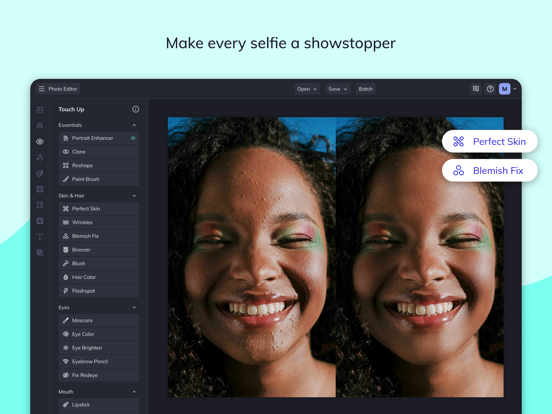
29 store screenshots



Pricing & paywalls
App Store
- BeFunky Plus - Monthly — $14.99/month
- BeFunky Plus - Monthly — $83.90/year ($6.99/mo)
Ratings & reviews
App Store
-
5/5BeFunky is awesome!
I think BeFunky is beyond amazing, it has all the features you need. Templates, adjusting, backgrounds, stickers, and texts. It’s the app you need for making collages with up to nine photos and it allows you to choose what your template will look like/be. I am speechless when it comes to how many times I’ve used BeFunky, I probably used it about 1,000 times already! Almost every single one of my family members have BeFunky, that’s how amazing it is. There is probably about 100,000,000 people who has and uses BeFunky. It’s just the BEST! I would recommend BeFunky if you need to make a collage or some sort of edit for your photos. I also love how as soon as you open the app, it lets you decide either to edit a photo, or make a collage. In my opinion, it’s just amazing! EVERYONE SHOULD TRY IT OUT!!!!
:) try befunky (: · 30 Aug 2026
-
3/5Good editor, needs tweaks for IOS small screens
Works good for generally making memes and captions on photos. It’s a good editor but could be better. Two pet peeves I have about this app are: cropping photos, the top is directly in the place of Apple’s irritating pull down menu, you have to crop the bottom of a photo and move the crop space down, and then place the top of crop lines on the photo where you want them. It’s just an irritating extra step that does not need to be. It’s impossible to do the top without pulling down this iOS menu. And text alignment, this could be fixed if you could move the top crop edges without actually touching the dots. And two; This app is absolutely impossible to get text to align horizontally again if you touch or resize it. You need a feature that snaps text to horizontal alignment when its moved close to horizontal. Other editor apps have this feature. But the ease of BeFunky makes it my go-to app if I need to make a caption on a picture in a real quick in the middle of a conversation. It works well, but I think these two things could help it be a lot better.
FUBARinfidel · 30 Aug 2026
-
3/5Simple to use tool
This product has many simple to use features and works very well. I only gave it three stars as it is lacking some important needs. For example add a text overlay, make adjustments that effect size, scale to the perfect size and then position. Make a copy,,, this is where it goes wrong as it makes a copy of original format so you are forced to repeat the resize and scaling to make the second layer shadow effect you were going for. Very tedious process and tricky as the slightest move when a scaling change is made will throw it off. Suggestion for fix: 1)copy should be an exact copy of the source you are copying not the original unchanged version. 2) you could add font effects like shadow with options for color and transparency features. 3) when scaling changes are needed perhaps an ability to lock on vertical or horizontal changes. Or an ability to jump to or match a layer, could be getting complex but would certainly give an edge to your competitors. 4) An ability to create and save or store custom stamps such as customized signatures. 5) a way to import your own PNG (no background) images or watermarks. Big plus on this one as it would help curb the blatant theft of images posted on social media. Those are just some of the many enhancements that could help this product excel and certainly earn a few more stars. Besides some of this basic needs missing this product is still a very simple and easy tool to use and I would certainly recommend it to friends.
Shadow1man · 30 Aug 2026
-
4/5Easy and Fun
I’m a professional photographer, so even when it comes to using my phone for taking pictures as opposed to my DSLR, I still like an editor that packs a punch and allows me to stick to my aesthetic. I have numerous apps for the “heavy lifting” so to speak, and use Adobe for the majority of that. But I also enjoy having editors that allow me to take pictures less seriously, to make silly things for friends and family, and to just play. Most of my apps that I have for this only have a couple main features. Like ones that pretty much just do collages, or just allow you to play with makeup. While I actually enjoyed this app enough to buy the pro edition for extra options, there’s MORE than enough here to do all kinds of entertaining and cool things. I like that it’s current trend wise, from the stickers to the frames and effects. And each have the ability for you to customize to really get your creative thoughts from mind to screen. The stickers are fun, and you can flip them any which way and choose the order in which they’re layered. To sum it up, this app takes no photographic skills, or technical knowledge to be able to open it up, choose a picture from your camera roll, and just play. The only thing missing is the marker and pens you don’t get on your hands, or the glue that somehow has managed to get everything around you sticky!
Phreephorm · 30 Aug 2026
-
5/5Great for text boxes
Update: I originally used for the text boxes and gave five stars for that feature alone. Now I use the photo editing features and it’s now one of my favorite photo editing apps. Original review: I wanted an app for simple speech boxes for my comics. I’ve tried several apps and this is the best for a simple text box. It allows you to use your own fonts, and you have great control over size. You can choose background color or no background, and opacity. It’s not perfect (I wish box could have an outline), but it’s the best I can find. There are other features I don’t use. I only wish the text box didn’t tilt so easily when I resize, and for more choice in color (I can’t get the light yellow color I want). Thanks for the great app!
Edenwild · 30 Aug 2026
Privacy & accessibility
App Store
Privacy
- Data Linked to You — Analytics — Contact Info — Email Address Developer declared
- Data Linked to You — Analytics — Identifiers — User ID Developer declared
- Data Linked to You — Analytics — Location — Coarse Location Developer declared
- Data Linked to You — Analytics — Usage Data — Product Interaction Developer declared
- Data Linked to You — App Functionality — Contact Info — Email Address Developer declared
- Data Linked to You — App Functionality — Diagnostics — Other Diagnostic Data Developer declared
- Data Linked to You — App Functionality — Identifiers — User ID Developer declared
- Data Linked to You — App Functionality — Location — Coarse Location Developer declared
- Data Linked to You — App Functionality — Usage Data — Product Interaction Developer declared
- Data Linked to You — Developer’s Advertising or Marketing — Contact Info — Email Address Developer declared
- Data Linked to You — Developer’s Advertising or Marketing — Identifiers — User ID Developer declared
- Data Linked to You — Developer’s Advertising or Marketing — Location — Coarse Location Developer declared
- Data Linked to You — Developer’s Advertising or Marketing — Usage Data — Product Interaction Developer declared
- Data Linked to You — Product Personalization — Contact Info — Email Address Developer declared
- Data Linked to You — Product Personalization — Identifiers — User ID Developer declared
- Data Linked to You — Product Personalization — Location — Coarse Location Developer declared
- Data Linked to You — Product Personalization — Usage Data — Product Interaction Developer declared
- Data Linked to You — Contact Info Developer declared
- Data Linked to You — Diagnostics Developer declared
- Data Linked to You — Identifiers Developer declared
- Data Linked to You — Location Developer declared
- Data Linked to You — Usage Data Developer declared
Accessibility
No accessibility labels collected yet.
Versions
App Store
-
10.0
Thanks for using BeFunky! You can now favorite tools in the Edit section to get to your go-tos faster. We’ve added smart design templates that automatically enhance your photos, plus fixed bugs and improved overall performance.
-
10.1
This update includes bug fixes and performance improvements to make the app run more smoothly.
-
10.2
Meet GFX+ A new standard in photo-to-art effects. Our new GFX+ effects turn your photos into striking works of art with richer detail, deeper textures, and more refined results than ever. From bold cartoon styles to lifelike oil painting finishes, just pick a look and watch your image transform in seconds.
-
10.3
· 1 May 2026
We've added even more styles to our popular GFX+ collection of photo-to-art effects!
-
7.0
This is a big one! Today, BeFunky has a whole NEW mobile experience! We’ve essentially taken our desktop app and shrunk it down so you can take it with you wherever you go. Some things to love about this update: • Easily start a project on one device and finish on another • Plus subscriptions work across your devices • A supercharged Photo Editor with access to our A.I. tools, Background Remover, Artsy effects, and more! • A completely overhauled, Collage Maker experience • Thousands of Designer templates for easily creating design graphics Thanks for choosing BeFunky!
-
7.1
This is a big one! Today, BeFunky has a whole NEW mobile experience! We’ve essentially taken our desktop app and shrunk it down so you can take it with you wherever you go. Some things to love about this update: • Easily start a project on one device and finish on another • Plus subscriptions work across your devices • A supercharged Photo Editor with access to our A.I. tools, Background Remover, Artsy effects, and more! • A completely overhauled, Collage Maker experience • Thousands of Designer templates for easily creating design graphics Thanks for choosing BeFunky!
-
7.2
In this release, we made some performance improvements and fixed some issues with the Collage Maker.
-
7.3
In this release, we fixed a few bugs and made several performance improvements
-
7.4
In this release, we made performance improvements to several of our effects that increase speed and quality. We also fixed a few pesky bugs.
-
7.5
Thanks for choosing BeFunky! In this release, we've added a new Pixelate effect that allows you to pixelate an image. Use Erase mode in the Pixelate tool to pixelate specific areas of your image. We also added a new 4:5 aspect ratio preset to our Crop, Smart Resize, and Collage Resize menus. We've also made several effect optimizations and bug fixes to keep the app running smoothly.
-
7.6
Thanks for choosing BeFunky! In this release, we've added custom color options to our AI Artsy effects, updated our Facebook Cover Photo collage templates, added new Orton effects, and made several performance optimizations to keep the app running smoothly.
-
7.7
NEW FEATURE: Easily remove and replace the sky in your image with our AI Sky Replacer; find it in the Edits section of the app. In this release, we also improved our Collage Wizard interface, added support for Google Drive, and improved Apple Pencil support.
-
7.8
In this release, we've added new AI tools for upscaling images, deblurring, removing unwanted objects, and a denoiser! We also improved our Background Remover, so now it's even easier to remove or swap out the background of an image. We also made some performance improvements and fixed some bugs.
-
7.9
In this release we added a new AI tool that restores old photos. You can clean up scratches and dust, add clarity, and even colorize old photos. We also made several performance improvements and fixed some bugs.
-
8.0
Thanks for choosing BeFunky! This release includes some new AI tools! Our Expand tool extends your image borders, and we improved the AI in our Object Eraser. We also improved the way you open photos from Google Drive.
-
8.1
Thanks for choosing BeFunky! This update introduces the Artsy GFX Series, our most advanced photo-to-art technology. We've also added Portrait Relight, offering a wide range of studio-quality lighting for your portraits with a single tap.
-
8.2
Check out our newest Artsy effects - Fantasy Portraits for Halloween! Also added Dodge & Burn, a Straighten tool that doesn’t crop and Detach Subject for easy repositioning.
-
8.3
Check out our newest Artsy effects - Fantasy Portraits for Halloween! Also added Dodge & Burn, a Straighten tool that doesn’t crop and Detach Subject for easy repositioning.
-
8.4
Greatly improved Color Mixer and Levels tools, more incredible Artsy FX, and some bug fixes.
-
8.5
This version fixes some bugs and introduces a new Vintage Comic Artsy effect.
-
8.6
This version adds analog photo development effects in Darkroom, Interlace - a new Glitch Art effect, a Crayon Artsy effect, and the Perspective editing tool. We also fixed several bug and improved overall performance.
-
8.7
This update adds Pixel Art & Pop Comics Artsy effects, a retro VHS Effect, improves the Google Photos experience, and fixes a couple bugs.
-
8.8
This update adds Pixel Art & Pop Comics Artsy effects, a retro VHS Effect, improves the Google Photos experience, and fixes a couple bugs.
-
8.9
This release adds new Artsy effects, improves usability, and fixes some bugs.
-
9.0
This update adds custom Collage Maker grid layouts, improves Image Library organization, and fixes several bugs.
Alternatives
- Prisma: Photo Editor, Filters — Same category + similar ratings
- BeCasso: Photo to Painting App — Same category + similar ratings
- Fotor AI Photo Editor & Video — Same category + similar ratings
- Turn Photo to Sketch: Graphite — Same category + similar ratings
- Toon Photo Editor: Clip2Comic — Same category + similar ratings
- Brushstroke — Same category + similar ratings
Availability by market
- US
Data quality & evidence
- Page completeness
- Independent summary published
- Last verified
- 30 Aug 2026
- Sources
- App Store