
Quick verdict
- What it is
- Store information collected; an Apoku editorial summary is not yet published.
- At a glance
-
- From $1.66/mo
- Free download · core features require a paid plan
- In-app purchases
Categories and search queries
Official categories
- Photo & Video
- Graphics & Design
Apoku categories
Key functions
| Function | Availability | Access | Scope | Evidence |
|---|---|---|---|---|
| Free app | Yes | Free | Context-specific | Store published |
| In-app purchases | Yes | Limited free | Context-specific | Store published |
| Subscription | Yes | Paid | Context-specific | Store published |
| Family Sharing | Unknown | Unknown | Scope unknown | Store published |
Screens
App Store
40 store screenshots


Pricing & paywalls
App Store
- Clip2Comic Premium — $3.99/month (derived from the IAP title)
- Clip2Comic Premium — $19.99/year ($1.66/mo) (derived from the IAP title)
Ratings & reviews
App Store
-
5/5Best App Plus Outstanding Customer Service
I am not computer or iPhone savvy. Recently I saw where a picture was turned into comic book form. I searched for the apps and had to read the reviews because of what I said about my lack of knowledge with this stuff. I chose this app based on reviews and feel they’re so helpful. After I downloaded the app and used it, I found it was very simple to use and the photos turned out awesome! I had a question and contacted their customer service department by email. I received a quick response to my question. But this is where the outstanding service comes in. Julia Schmidt was the representative that answered not only my question but gave me so much more information to help me. She went above and beyond to help me. She could easily have answered my question in two sentences. Instead she explained everything and gave me a blueprint to follow. I have not had better customer service in my life!!! I wish I could give them more than the 5 star ratings. Julia was truly exceptional, and I can’t thank her enough!
Luv2bassfish · 29 Sep 2026
-
5/5Outstanding job
OK so I’ve been wanting a profile picture and I was trying to find something I could relate to cartoon so I tried this app didn’t exactly give me the Cartoon type I wanted but I just took pictures anyway and then after that I haven’t really played the app in a long time we’re not exactly a long time just maybe like a few weeks or something then with a few masks I had that were pretty cool are used the last filter picture and then once I started adding all the stuff towards it it looks really good taking down the black point the saturation everything and I made six amazing pictures even though I don’t have the stuff you have to buy you could still do a good job with the stuff you have so that is why I give this a five star you have done a great job with this app 👍🏻👌🏻
Dreddy_krucial · 29 Sep 2026
-
4/5Ok for causal use; missing minimal features
As a graphics tool, the app provides some fun and creative ways to turn photos into comic book themed images. However, the app is limited and designed for a causal user, and lacks features that could drive longer subscription purchases by social media pro’s and other graphic designers that use these types of image editing tools. My first pain point is the user interface. The UI to load, edit and create comic themed images does not seem to follow Apples UI guidelines or use iOS native controls. With a little trial and error, I was able to experiment with the filters and conf options to create an image I needed. This leads us to the major issue or missing feature that is holding back this app. The app does not have any features to save image configurations. This also means, the app lacks the construct of a project or template. If this tool was meant for anything beyond casual usage, the user should be able to save an image and all configuration, with the ability to re-open the file later for continued work. It would also be a productivity feature to save only the image configurations, so they could be applied to multiple images, keeping a continuity of editing between images. My last pain point with this app, is the choice the developer has made to create cloned sister apps, just with different filter profiles. The apps BeCasso, WaterBrush, OilBrush, Graphite and ArtCard, are identical applications, with the only difference being their configuration filters. I suppose this approach is similar to allowing or selling "filter packs". But the overall value of a single theme is minimal, and prevents a user for mixing and matching the filters from the other sister apps. I think the developer would do better to promote a single application, that allows the user to mix and match these many filters. And then add features to save editable files and to create templates for mass image updates. I would see the value in those features and purchase a long subscription.
A father 007 · 29 Sep 2026
-
5/5Pretty good
If you are looking for a cartoon editor app, this is a really good one. When I got it I didn’t see ‘ Free for three day trail’ or anything like that. I can immediately edit my own photos. Then if I want to fix the messes or watermarks, that’s where you get to pay for the app. However you get the choice to pay for it or not. If you want to pay for it you have a little more advances but you can 100% still use the app the same way if you still use it for free ( which I personally love a lot about it. There’s not a lot of apps like that out there). When you use it for free you can hardly tell the difference anyways. When you don’t pay for the app you can still use it and still have fun. The app is really great and it’s really cool to see things at a new prospective.
the rando im the back · 29 Sep 2026
-
5/5Very solid for comic looks
This app has come in very handy when I want a graphic style for an image. It has a surprising amount of flexibility though there are some things I wish it had. It would be great to have the ability to mask areas when making global adjustments with sliders. Sometimes I have one area where I want it but other areas need work. While the retouch panel helps, it doesn’t quite do everything the other panels can do, so masking would add so much to the value to this app. The only other thing is simply more effects, like halftones and being able to export as a layered photoshop file with black information on one layer and color info on another.
kylekane · 29 Sep 2026
Privacy & accessibility
App Store
Privacy
- Data Not Linked to You — Analytics — Identifiers — Device ID Developer declared
- Data Not Linked to You — Analytics — Purchases — Purchase History Developer declared
- Data Not Linked to You — Analytics — Usage Data — Product Interaction Developer declared
- Data Not Linked to You — Identifiers Developer declared
- Data Not Linked to You — Purchases Developer declared
- Data Not Linked to You — Usage Data Developer declared
Accessibility
No accessibility labels collected yet.
Versions
App Store
-
7.0.2
Embark on your artistic journey as you discover the best and most stunning filters with Clip2Comic! Custom Signatures You can now add your own logo, watermark, or signature to your artwork. Simply load you’re your own signature signature from Files or Photos. Unleash Your Creativity! Discover our exciting new tools designed to give you enhanced creative control over your Color filters. Plus, you now have the power to retouch every tool, old and new, for even more precision and personalization. Streamline Your Edits! We’ve organized your favorite photo adjustment tools —like contrast and saturation— into a single, easy-to-access menu for a smoother editing experience. Plus, every photo adjustment tool is now fully retouchable, giving you ultimate control over your edits. UX Improvements We've made significant improvements across all platforms to enhance your experience. The user interface is now more intuitive, with features like hover support for iPad and improved Retouch Tools with a clear visual indicator of the retouch area. macOS Support Our app is now a native macOS app, offering enhanced performance and features. We've expanded device compatibility to include Intel Macs, ensuring a wider range of users can enjoy the app. To streamline your workflow, we've optimized the user experience with keyboard shortcuts, intuitive navigation, and a sleek, native macOS design. Plus, seamless Finder and file-system integration makes loading and saving images a breeze. Image Playground** Produce fun, original images in seconds with Image Playground directly on your device. Create entirely new images based on descriptions, with suggested concepts and styles such as illustration and animation. Use our app to turn your creations into high-quality art effortlessly. Improved Auto Retouch We have improved the Auto Retouch feature for you. Besides usability and cosmetic tweaks, we improved its speed as well as detection accuracy. Magic Eraser* With the new Magic Eraser feature, you decide what stays and what goes in your artwork. Remove imperfections or objects from your photos before they are turned into art. Create truly beautiful masterpieces that reflects your vision. Make It Your Own with Custom Styles With Custom Styles you can personalize and save your very own styles with ease. Use our curated styles as a starting point, fine-tune them to your likings and save them as your new, personalized, very own Custom Style. Custom Styles are synchronized among all your devices, so that you can apply them on any device, everywhere, any time. The latest version contains bug fixes and performance improvements. If you have any questions or feedback for us, please feel free to send us an email at [email protected]. Our team is on hand 24 hours a day, so we’ll get right on it. * Device support starts at iPhone 12 (or newer), iPad mini (6th gen), iPad Air (4th gen), iPad (10th gen), iPad Pro 11 inch (3rd gen), iPad Pro 12.9 (5th gen) ** Image playground is available on devices that support Apple Intelligence, only.
-
7.0.3
Embark on your artistic journey as you discover the best and most stunning filters with Clip2Comic! Custom Signatures You can now add your own logo, watermark, or signature to your artwork. Simply load you’re your own signature signature from Files or Photos. Unleash Your Creativity! Discover our exciting new tools designed to give you enhanced creative control over your Color filters. Plus, you now have the power to retouch every tool, old and new, for even more precision and personalization. Streamline Your Edits! We’ve organized your favorite photo adjustment tools —like contrast and saturation— into a single, easy-to-access menu for a smoother editing experience. Plus, every photo adjustment tool is now fully retouchable, giving you ultimate control over your edits. UX Improvements We've made significant improvements across all platforms to enhance your experience. The user interface is now more intuitive, with features like hover support for iPad and improved Retouch Tools with a clear visual indicator of the retouch area. macOS Support Our app is now a native macOS app, offering enhanced performance and features. We've expanded device compatibility to include Intel Macs, ensuring a wider range of users can enjoy the app. To streamline your workflow, we've optimized the user experience with keyboard shortcuts, intuitive navigation, and a sleek, native macOS design. Plus, seamless Finder and file-system integration makes loading and saving images a breeze. Image Playground** Produce fun, original images in seconds with Image Playground directly on your device. Create entirely new images based on descriptions, with suggested concepts and styles such as illustration and animation. Use our app to turn your creations into high-quality art effortlessly. Improved Auto Retouch We have improved the Auto Retouch feature for you. Besides usability and cosmetic tweaks, we improved its speed as well as detection accuracy. Magic Eraser* With the new Magic Eraser feature, you decide what stays and what goes in your artwork. Remove imperfections or objects from your photos before they are turned into art. Create truly beautiful masterpieces that reflects your vision. Make It Your Own with Custom Styles With Custom Styles you can personalize and save your very own styles with ease. Use our curated styles as a starting point, fine-tune them to your likings and save them as your new, personalized, very own Custom Style. Custom Styles are synchronized among all your devices, so that you can apply them on any device, everywhere, any time. The latest version contains bug fixes and performance improvements. If you have any questions or feedback for us, please feel free to send us an email at [email protected]. Our team is on hand 24 hours a day, so we’ll get right on it. * Device support starts at iPhone 12 (or newer), iPad mini (6th gen), iPad Air (4th gen), iPad (10th gen), iPad Pro 11 inch (3rd gen), iPad Pro 12.9 (5th gen) ** Image playground is available on devices that support Apple Intelligence, only.
-
7.1.0
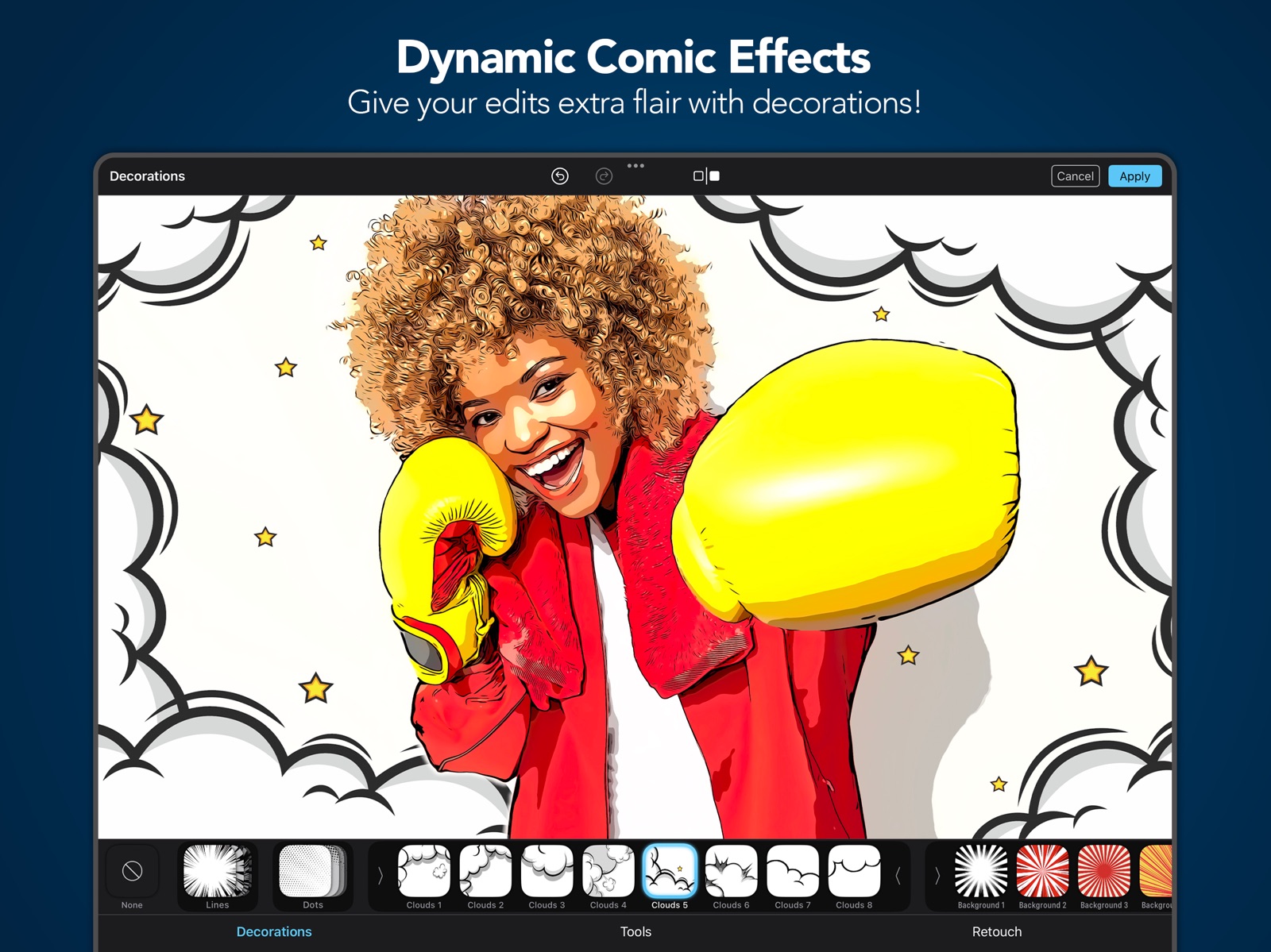
Embark on your artistic journey as you discover the best and most stunning filters with Clip2Comic! Dynamic Comic Effects Give your edits extra flair with new decorations! Add authentic comic speed lines or playful cartoon clouds, then customize their style to match your vision. Custom Signatures You can now add your own logo, watermark, or signature to your artwork. Simply load you’re your own signature signature from Files or Photos. Unleash Your Creativity! Discover our exciting new tools designed to give you enhanced creative control over your Color filters. Plus, you now have the power to retouch every tool, old and new, for even more precision and personalization. Streamline Your Edits! We’ve organized your favorite photo adjustment tools —like contrast and saturation— into a single, easy-to-access menu for a smoother editing experience. Plus, every photo adjustment tool is now fully retouchable, giving you ultimate control over your edits. UX Improvements We've made significant improvements across all platforms to enhance your experience. The user interface is now more intuitive, with features like hover support for iPad and improved Retouch Tools with a clear visual indicator of the retouch area. macOS Support Our app is now a native macOS app, offering enhanced performance and features. We've expanded device compatibility to include Intel Macs, ensuring a wider range of users can enjoy the app. To streamline your workflow, we've optimized the user experience with keyboard shortcuts, intuitive navigation, and a sleek, native macOS design. Plus, seamless Finder and file-system integration makes loading and saving images a breeze. Image Playground** Produce fun, original images in seconds with Image Playground directly on your device. Create entirely new images based on descriptions, with suggested concepts and styles such as illustration and animation. Use our app to turn your creations into high-quality art effortlessly. Improved Auto Retouch We have improved the Auto Retouch feature for you. Besides usability and cosmetic tweaks, we improved its speed as well as detection accuracy. Magic Eraser* With the new Magic Eraser feature, you decide what stays and what goes in your artwork. Remove imperfections or objects from your photos before they are turned into art. Create truly beautiful masterpieces that reflects your vision. Make It Your Own with Custom Styles With Custom Styles you can personalize and save your very own styles with ease. Use our curated styles as a starting point, fine-tune them to your likings and save them as your new, personalized, very own Custom Style. Custom Styles are synchronized among all your devices, so that you can apply them on any device, everywhere, any time. The latest version contains bug fixes and performance improvements. If you have any questions or feedback for us, please feel free to send us an email at [email protected]. Our team is on hand 24 hours a day, so we’ll get right on it. * Device support starts at iPhone 12 (or newer), iPad mini (6th gen), iPad Air (4th gen), iPad (10th gen), iPad Pro 11 inch (3rd gen), iPad Pro 12.9 (5th gen) ** Image playground is available on devices that support Apple Intelligence, only.
-
7.1.1
Embark on your artistic journey as you discover the best and most stunning filters with Clip2Comic! Dynamic Comic Effects Give your edits extra flair with new decorations! Add authentic comic speed lines or playful cartoon clouds, then customize their style to match your vision. Custom Signatures You can now add your own logo, watermark, or signature to your artwork. Simply load you’re your own signature signature from Files or Photos. Unleash Your Creativity! Discover our exciting new tools designed to give you enhanced creative control over your Color filters. Plus, you now have the power to retouch every tool, old and new, for even more precision and personalization. Streamline Your Edits! We’ve organized your favorite photo adjustment tools —like contrast and saturation— into a single, easy-to-access menu for a smoother editing experience. Plus, every photo adjustment tool is now fully retouchable, giving you ultimate control over your edits. UX Improvements We've made significant improvements across all platforms to enhance your experience. The user interface is now more intuitive, with features like hover support for iPad and improved Retouch Tools with a clear visual indicator of the retouch area. macOS Support Our app is now a native macOS app, offering enhanced performance and features. We've expanded device compatibility to include Intel Macs, ensuring a wider range of users can enjoy the app. To streamline your workflow, we've optimized the user experience with keyboard shortcuts, intuitive navigation, and a sleek, native macOS design. Plus, seamless Finder and file-system integration makes loading and saving images a breeze. Image Playground** Produce fun, original images in seconds with Image Playground directly on your device. Create entirely new images based on descriptions, with suggested concepts and styles such as illustration and animation. Use our app to turn your creations into high-quality art effortlessly. Improved Auto Retouch We have improved the Auto Retouch feature for you. Besides usability and cosmetic tweaks, we improved its speed as well as detection accuracy. Magic Eraser* With the new Magic Eraser feature, you decide what stays and what goes in your artwork. Remove imperfections or objects from your photos before they are turned into art. Create truly beautiful masterpieces that reflects your vision. Make It Your Own with Custom Styles With Custom Styles you can personalize and save your very own styles with ease. Use our curated styles as a starting point, fine-tune them to your likings and save them as your new, personalized, very own Custom Style. Custom Styles are synchronized among all your devices, so that you can apply them on any device, everywhere, any time. The latest version contains bug fixes and performance improvements. If you have any questions or feedback for us, please feel free to send us an email at [email protected]. Our team is on hand 24 hours a day, so we’ll get right on it. * Device support starts at iPhone 12 (or newer), iPad mini (6th gen), iPad Air (4th gen), iPad (10th gen), iPad Pro 11 inch (3rd gen), iPad Pro 12.9 (5th gen) ** Image playground is available on devices that support Apple Intelligence, only.
-
7.2.0
Embark on your artistic journey as you discover the best and most stunning filters with Clip2Comic! Comic Panels Elevate your artwork with professionally curated digital panel styles, perfect for showcasing your creations in a virtual gallery, capturing attention on social media, or adding the final touch to your masterpiece. Explore a handpicked collection designed for perfect comic panel aesthetics. More Precision and Control We've refined all sliders for better control and understandability. You can now see exact values and reset them easily—just double-tap the slider or tap the default value. The signature tool has also been improved, allowing you to move, rotate, and scale your signature freely with touch gestures. Dynamic Comic Effects Give your edits extra flair with new decorations! Add authentic comic speed lines or playful cartoon clouds, then customize their style to match your vision. Custom Signatures You can now add your own logo, watermark, or signature to your artwork. Simply load you’re your own signature from Files or Photos. Unleash Your Creativity! Discover our exciting new tools designed to give you enhanced creative control over your Color filters. Plus, you now have the power to retouch every tool, old and new, for even more precision and personalization. Streamline Your Edits! We’ve organized your favorite photo adjustment tools —like contrast and saturation— into a single, easy-to-access menu for a smoother editing experience. Plus, every photo adjustment tool is now fully retouchable, giving you ultimate control over your edits. UX Improvements We've made significant improvements across all platforms to enhance your experience. The user interface is now more intuitive, with features like hover support for iPad and improved Retouch Tools with a clear visual indicator of the retouch area. macOS Support Our app is now a native macOS app, offering enhanced performance and features. We've expanded device compatibility to include Intel Macs, ensuring a wider range of users can enjoy the app. To streamline your workflow, we've optimized the user experience with keyboard shortcuts, intuitive navigation, and a sleek, native macOS design. Plus, seamless Finder and file-system integration makes loading and saving images a breeze. Image Playground** Produce fun, original images in seconds with Image Playground directly on your device. Create entirely new images based on descriptions, with suggested concepts and styles such as illustration and animation. Use our app to turn your creations into high-quality art effortlessly. Improved Auto Retouch We have improved the Auto Retouch feature for you. Besides usability and cosmetic tweaks, we improved its speed as well as detection accuracy. Make It Your Own with Custom Styles With Custom Styles you can personalize and save your very own styles with ease. Use our curated styles as a starting point, fine-tune them to your likings and save them as your new, personalized, very own Custom Style. Custom Styles are synchronized among all your devices, so that you can apply them on any device, everywhere, any time. The latest version contains bug fixes and performance improvements. If you have any questions or feedback for us, please feel free to send us an email at [email protected]. Our team is on hand 24 hours a day, so we’ll get right on it. ** Image playground is available on devices that support Apple Intelligence, only.
-
7.2.1
In this version, we had to revert to a previous version of the app due to technical issues. As a result, some features are temporarily unavailable: – New slider design – Freely movable and rotatable signatures – Frame feature: Frames are currently not displayed, which also temporarily hides custom styles that include frames. These styles will reappear once the feature returns. We’re working to bring these features back as soon as possible. Thanks for your understanding!
-
7.2.2
Embark on your artistic journey as you discover the best and most stunning filters with Clip2Comic! Comic Panels Elevate your artwork with professionally curated digital panel styles, perfect for showcasing your creations in a virtual gallery, capturing attention on social media, or adding the final touch to your masterpiece. Explore a handpicked collection designed for perfect comic panel aesthetics. More Precision and Control We've refined all sliders for better control and understandability. You can now see exact values and reset them easily—just double-tap the slider or tap the default value. The signature tool has also been improved, allowing you to move, rotate, and scale your signature freely with touch gestures. Dynamic Comic Effects Give your edits extra flair with new decorations! Add authentic comic speed lines or playful cartoon clouds, then customize their style to match your vision. Custom Signatures You can now add your own logo, watermark, or signature to your artwork. Simply load you’re your own signature from Files or Photos. Unleash Your Creativity! Discover our exciting new tools designed to give you enhanced creative control over your Color filters. Plus, you now have the power to retouch every tool, old and new, for even more precision and personalization. Streamline Your Edits! We’ve organized your favorite photo adjustment tools —like contrast and saturation— into a single, easy-to-access menu for a smoother editing experience. Plus, every photo adjustment tool is now fully retouchable, giving you ultimate control over your edits. UX Improvements We've made significant improvements across all platforms to enhance your experience. The user interface is now more intuitive, with features like hover support for iPad and improved Retouch Tools with a clear visual indicator of the retouch area. macOS Support Our app is now a native macOS app, offering enhanced performance and features. We've expanded device compatibility to include Intel Macs, ensuring a wider range of users can enjoy the app. To streamline your workflow, we've optimized the user experience with keyboard shortcuts, intuitive navigation, and a sleek, native macOS design. Plus, seamless Finder and file-system integration makes loading and saving images a breeze. Image Playground** Produce fun, original images in seconds with Image Playground directly on your device. Create entirely new images based on descriptions, with suggested concepts and styles such as illustration and animation. Use our app to turn your creations into high-quality art effortlessly. Improved Auto Retouch We have improved the Auto Retouch feature for you. Besides usability and cosmetic tweaks, we improved its speed as well as detection accuracy. Make It Your Own with Custom Styles With Custom Styles you can personalize and save your very own styles with ease. Use our curated styles as a starting point, fine-tune them to your likings and save them as your new, personalized, very own Custom Style. Custom Styles are synchronized among all your devices, so that you can apply them on any device, everywhere, any time. The latest version contains bug fixes and performance improvements. If you have any questions or feedback for us, please feel free to send us an email at [email protected]. Our team is on hand 24 hours a day, so we’ll get right on it. ** Image playground is available on devices that support Apple Intelligence, only.
-
7.2.3
Embark on your artistic journey as you discover the best and most stunning filters with Clip2Comic! Comic Panels Elevate your artwork with professionally curated digital panel styles, perfect for showcasing your creations in a virtual gallery, capturing attention on social media, or adding the final touch to your masterpiece. Explore a handpicked collection designed for perfect comic panel aesthetics. More Precision and Control We've refined all sliders for better control and understandability. You can now see exact values and reset them easily—just double-tap the slider or tap the default value. The signature tool has also been improved, allowing you to move, rotate, and scale your signature freely with touch gestures. Dynamic Comic Effects Give your edits extra flair with new decorations! Add authentic comic speed lines or playful cartoon clouds, then customize their style to match your vision. Custom Signatures You can now add your own logo, watermark, or signature to your artwork. Simply load you’re your own signature from Files or Photos. Unleash Your Creativity! Discover our exciting new tools designed to give you enhanced creative control over your Color filters. Plus, you now have the power to retouch every tool, old and new, for even more precision and personalization. Streamline Your Edits! We’ve organized your favorite photo adjustment tools —like contrast and saturation— into a single, easy-to-access menu for a smoother editing experience. Plus, every photo adjustment tool is now fully retouchable, giving you ultimate control over your edits. UX Improvements We've made significant improvements across all platforms to enhance your experience. The user interface is now more intuitive, with features like hover support for iPad and improved Retouch Tools with a clear visual indicator of the retouch area. macOS Support Our app is now a native macOS app, offering enhanced performance and features. We've expanded device compatibility to include Intel Macs, ensuring a wider range of users can enjoy the app. To streamline your workflow, we've optimized the user experience with keyboard shortcuts, intuitive navigation, and a sleek, native macOS design. Plus, seamless Finder and file-system integration makes loading and saving images a breeze. Image Playground** Produce fun, original images in seconds with Image Playground directly on your device. Create entirely new images based on descriptions, with suggested concepts and styles such as illustration and animation. Use our app to turn your creations into high-quality art effortlessly. Improved Auto Retouch We have improved the Auto Retouch feature for you. Besides usability and cosmetic tweaks, we improved its speed as well as detection accuracy. Make It Your Own with Custom Styles With Custom Styles you can personalize and save your very own styles with ease. Use our curated styles as a starting point, fine-tune them to your likings and save them as your new, personalized, very own Custom Style. Custom Styles are synchronized among all your devices, so that you can apply them on any device, everywhere, any time. The latest version contains bug fixes and performance improvements. If you have any questions or feedback for us, please feel free to send us an email at [email protected]. Our team is on hand 24 hours a day, so we’ll get right on it. ** Image playground is available on devices that support Apple Intelligence, only.
-
7.3.0
Embark on your artistic journey as you discover the best and most stunning filters with Clip2Comic! OS 26 and UI improvements We’ve updated the app to run smoothly on the latest operating systems. You’ll notice better performance and improved stability. We also introduce a new fresh look with Liquid Glass. Several screens now feature the new Liquid Glass UI, giving your artwork more space and a cleaner editing experience. Improved Zoom & Canvas Placement We’ve redesigned the zoom view, so your canvas is easier to position — no more sliders getting in the way of your edits! Comic Panels Elevate your artwork with professionally curated digital panel styles, perfect for showcasing your creations in a virtual gallery, capturing attention on social media, or adding the final touch to your masterpiece. Explore a handpicked collection designed for perfect comic panel aesthetics. More Precision and Control We've refined all sliders for better control and understandability. You can now see exact values and reset them easily—just double-tap the slider or tap the default value. The signature tool has also been improved, allowing you to move, rotate, and scale your signature freely with touch gestures. Dynamic Comic Effects Give your edits extra flair with new decorations! Add authentic comic speed lines or playful cartoon clouds, then customize their style to match your vision. Custom Signatures You can now add your own logo, watermark, or signature to your artwork. Simply load you’re your own signature from Files or Photos. Unleash Your Creativity! Discover our exciting new tools designed to give you enhanced creative control over your Color filters. Plus, you now have the power to retouch every tool, old and new, for even more precision and personalization. Streamline Your Edits! We’ve organized your favorite photo adjustment tools —like contrast and saturation— into a single, easy-to-access menu for a smoother editing experience. Plus, every photo adjustment tool is now fully retouchable, giving you ultimate control over your edits. UX Improvements We've made significant improvements across all platforms to enhance your experience. The user interface is now more intuitive, with features like hover support for iPad and improved Retouch Tools with a clear visual indicator of the retouch area. macOS Support Our app is now a native macOS app, offering enhanced performance and features. We've expanded device compatibility to include Intel Macs, ensuring a wider range of users can enjoy the app. To streamline your workflow, we've optimized the user experience with keyboard shortcuts, intuitive navigation, and a sleek, native macOS design. Plus, seamless Finder and file-system integration makes loading and saving images a breeze. Image Playground** Produce fun, original images in seconds with Image Playground directly on your device. Create entirely new images based on descriptions, with suggested concepts and styles such as illustration and animation. Use our app to turn your creations into high-quality art effortlessly. The latest version contains bug fixes and performance improvements. If you have any questions or feedback for us, please feel free to send us an email at [email protected]. Our team is on hand 24 hours a day, so we’ll get right on it. ** Image playground is available on devices that support Apple Intelligence, only.
-
7.3.1
Embark on your artistic journey as you discover the best and most stunning filters with Clip2Comic! OS 26 and UI improvements We’ve updated the app to run smoothly on the latest operating systems. You’ll notice better performance and improved stability. We also introduce a new fresh look with Liquid Glass. Several screens now feature the new Liquid Glass UI, giving your artwork more space and a cleaner editing experience. Improved Zoom & Canvas Placement We’ve redesigned the zoom view, so your canvas is easier to position — no more sliders getting in the way of your edits! Comic Panels Elevate your artwork with professionally curated digital panel styles, perfect for showcasing your creations in a virtual gallery, capturing attention on social media, or adding the final touch to your masterpiece. Explore a handpicked collection designed for perfect comic panel aesthetics. More Precision and Control We've refined all sliders for better control and understandability. You can now see exact values and reset them easily—just double-tap the slider or tap the default value. The signature tool has also been improved, allowing you to move, rotate, and scale your signature freely with touch gestures. Dynamic Comic Effects Give your edits extra flair with new decorations! Add authentic comic speed lines or playful cartoon clouds, then customize their style to match your vision. Custom Signatures You can now add your own logo, watermark, or signature to your artwork. Simply load you’re your own signature from Files or Photos. Unleash Your Creativity! Discover our exciting new tools designed to give you enhanced creative control over your Color filters. Plus, you now have the power to retouch every tool, old and new, for even more precision and personalization. Streamline Your Edits! We’ve organized your favorite photo adjustment tools —like contrast and saturation— into a single, easy-to-access menu for a smoother editing experience. Plus, every photo adjustment tool is now fully retouchable, giving you ultimate control over your edits. UX Improvements We've made significant improvements across all platforms to enhance your experience. The user interface is now more intuitive, with features like hover support for iPad and improved Retouch Tools with a clear visual indicator of the retouch area. macOS Support Our app is now a native macOS app, offering enhanced performance and features. We've expanded device compatibility to include Intel Macs, ensuring a wider range of users can enjoy the app. To streamline your workflow, we've optimized the user experience with keyboard shortcuts, intuitive navigation, and a sleek, native macOS design. Plus, seamless Finder and file-system integration makes loading and saving images a breeze. Image Playground** Produce fun, original images in seconds with Image Playground directly on your device. Create entirely new images based on descriptions, with suggested concepts and styles such as illustration and animation. Use our app to turn your creations into high-quality art effortlessly. The latest version contains bug fixes and performance improvements. If you have any questions or feedback for us, please feel free to send us an email at [email protected]. Our team is on hand 24 hours a day, so we’ll get right on it. ** Image playground is available on devices that support Apple Intelligence, only.
-
7.3.2
Embark on your artistic journey as you discover the best and most stunning filters with Clip2Comic! OS 26 and UI improvements We’ve updated the app to run smoothly on the latest operating systems. You’ll notice better performance and improved stability. We also introduce a new fresh look with Liquid Glass. Several screens now feature the new Liquid Glass UI, giving your artwork more space and a cleaner editing experience. Improved Zoom & Canvas Placement We’ve redesigned the zoom view, so your canvas is easier to position — no more sliders getting in the way of your edits! Comic Panels Elevate your artwork with professionally curated digital panel styles, perfect for showcasing your creations in a virtual gallery, capturing attention on social media, or adding the final touch to your masterpiece. Explore a handpicked collection designed for perfect comic panel aesthetics. More Precision and Control We've refined all sliders for better control and understandability. You can now see exact values and reset them easily—just double-tap the slider or tap the default value. The signature tool has also been improved, allowing you to move, rotate, and scale your signature freely with touch gestures. Dynamic Comic Effects Give your edits extra flair with new decorations! Add authentic comic speed lines or playful cartoon clouds, then customize their style to match your vision. Custom Signatures You can now add your own logo, watermark, or signature to your artwork. Simply load you’re your own signature from Files or Photos. Unleash Your Creativity! Discover our exciting new tools designed to give you enhanced creative control over your Color filters. Plus, you now have the power to retouch every tool, old and new, for even more precision and personalization. Streamline Your Edits! We’ve organized your favorite photo adjustment tools —like contrast and saturation— into a single, easy-to-access menu for a smoother editing experience. Plus, every photo adjustment tool is now fully retouchable, giving you ultimate control over your edits. UX Improvements We've made significant improvements across all platforms to enhance your experience. The user interface is now more intuitive, with features like hover support for iPad and improved Retouch Tools with a clear visual indicator of the retouch area. macOS Support Our app is now a native macOS app, offering enhanced performance and features. We've expanded device compatibility to include Intel Macs, ensuring a wider range of users can enjoy the app. To streamline your workflow, we've optimized the user experience with keyboard shortcuts, intuitive navigation, and a sleek, native macOS design. Plus, seamless Finder and file-system integration makes loading and saving images a breeze. Image Playground** Produce fun, original images in seconds with Image Playground directly on your device. Create entirely new images based on descriptions, with suggested concepts and styles such as illustration and animation. Use our app to turn your creations into high-quality art effortlessly. The latest version contains bug fixes and performance improvements. If you have any questions or feedback for us, please feel free to send us an email at [email protected]. Our team is on hand 24 hours a day, so we’ll get right on it. ** Image playground is available on devices that support Apple Intelligence, only.
-
7.3.3
Embark on your artistic journey as you discover the best and most stunning filters with Clip2Comic! OS 26 and UI improvements We’ve updated the app to run smoothly on the latest operating systems. You’ll notice better performance and improved stability. We also introduce a new fresh look with Liquid Glass. Several screens now feature the new Liquid Glass UI, giving your artwork more space and a cleaner editing experience. Improved Zoom & Canvas Placement We’ve redesigned the zoom view, so your canvas is easier to position — no more sliders getting in the way of your edits! Comic Panels Elevate your artwork with professionally curated digital panel styles, perfect for showcasing your creations in a virtual gallery, capturing attention on social media, or adding the final touch to your masterpiece. Explore a handpicked collection designed for perfect comic panel aesthetics. More Precision and Control We've refined all sliders for better control and understandability. You can now see exact values and reset them easily—just double-tap the slider or tap the default value. The signature tool has also been improved, allowing you to move, rotate, and scale your signature freely with touch gestures. Dynamic Comic Effects Give your edits extra flair with new decorations! Add authentic comic speed lines or playful cartoon clouds, then customize their style to match your vision. Custom Signatures You can now add your own logo, watermark, or signature to your artwork. Simply load you’re your own signature from Files or Photos. Unleash Your Creativity! Discover our exciting new tools designed to give you enhanced creative control over your Color filters. Plus, you now have the power to retouch every tool, old and new, for even more precision and personalization. Streamline Your Edits! We’ve organized your favorite photo adjustment tools —like contrast and saturation— into a single, easy-to-access menu for a smoother editing experience. Plus, every photo adjustment tool is now fully retouchable, giving you ultimate control over your edits. UX Improvements We've made significant improvements across all platforms to enhance your experience. The user interface is now more intuitive, with features like hover support for iPad and improved Retouch Tools with a clear visual indicator of the retouch area. macOS Support Our app is now a native macOS app, offering enhanced performance and features. We've expanded device compatibility to include Intel Macs, ensuring a wider range of users can enjoy the app. To streamline your workflow, we've optimized the user experience with keyboard shortcuts, intuitive navigation, and a sleek, native macOS design. Plus, seamless Finder and file-system integration makes loading and saving images a breeze. Image Playground** Produce fun, original images in seconds with Image Playground directly on your device. Create entirely new images based on descriptions, with suggested concepts and styles such as illustration and animation. Use our app to turn your creations into high-quality art effortlessly. The latest version contains bug fixes and performance improvements. If you have any questions or feedback for us, please feel free to send us an email at [email protected]. Our team is on hand 24 hours a day, so we’ll get right on it. ** Image playground is available on devices that support Apple Intelligence, only.
-
7.3.4
Embark on your artistic journey as you discover the best and most stunning filters with Clip2Comic! OS 26 and UI improvements We’ve updated the app to run smoothly on the latest operating systems. You’ll notice better performance and improved stability. We also introduce a new fresh look with Liquid Glass. Several screens now feature the new Liquid Glass UI, giving your artwork more space and a cleaner editing experience. Improved Zoom & Canvas Placement We’ve redesigned the zoom view, so your canvas is easier to position — no more sliders getting in the way of your edits! Comic Panels Elevate your artwork with professionally curated digital panel styles, perfect for showcasing your creations in a virtual gallery, capturing attention on social media, or adding the final touch to your masterpiece. Explore a handpicked collection designed for perfect comic panel aesthetics. More Precision and Control We've refined all sliders for better control and understandability. You can now see exact values and reset them easily—just double-tap the slider or tap the default value. The signature tool has also been improved, allowing you to move, rotate, and scale your signature freely with touch gestures. Dynamic Comic Effects Give your edits extra flair with new decorations! Add authentic comic speed lines or playful cartoon clouds, then customize their style to match your vision. Custom Signatures You can now add your own logo, watermark, or signature to your artwork. Simply load you’re your own signature from Files or Photos. Unleash Your Creativity! Discover our exciting new tools designed to give you enhanced creative control over your Color filters. Plus, you now have the power to retouch every tool, old and new, for even more precision and personalization. Streamline Your Edits! We’ve organized your favorite photo adjustment tools —like contrast and saturation— into a single, easy-to-access menu for a smoother editing experience. Plus, every photo adjustment tool is now fully retouchable, giving you ultimate control over your edits. UX Improvements We've made significant improvements across all platforms to enhance your experience. The user interface is now more intuitive, with features like hover support for iPad and improved Retouch Tools with a clear visual indicator of the retouch area. macOS Support Our app is now a native macOS app, offering enhanced performance and features. We've expanded device compatibility to include Intel Macs, ensuring a wider range of users can enjoy the app. To streamline your workflow, we've optimized the user experience with keyboard shortcuts, intuitive navigation, and a sleek, native macOS design. Plus, seamless Finder and file-system integration makes loading and saving images a breeze. Image Playground** Produce fun, original images in seconds with Image Playground directly on your device. Create entirely new images based on descriptions, with suggested concepts and styles such as illustration and animation. Use our app to turn your creations into high-quality art effortlessly. The latest version contains bug fixes and performance improvements. If you have any questions or feedback for us, please feel free to send us an email at [email protected]. Our team is on hand 24 hours a day, so we’ll get right on it. ** Image playground is available on devices that support Apple Intelligence, only.
-
7.3.5
Embark on your artistic journey as you discover the best and most stunning filters with Clip2Comic! OS 26 and UI improvements We’ve updated the app to run smoothly on the latest operating systems. You’ll notice better performance and improved stability. We also introduce a new fresh look with Liquid Glass. Several screens now feature the new Liquid Glass UI, giving your artwork more space and a cleaner editing experience. Improved Zoom & Canvas Placement We’ve redesigned the zoom view, so your canvas is easier to position — no more sliders getting in the way of your edits! Comic Panels Elevate your artwork with professionally curated digital panel styles, perfect for showcasing your creations in a virtual gallery, capturing attention on social media, or adding the final touch to your masterpiece. Explore a handpicked collection designed for perfect comic panel aesthetics. More Precision and Control We've refined all sliders for better control and understandability. You can now see exact values and reset them easily—just double-tap the slider or tap the default value. The signature tool has also been improved, allowing you to move, rotate, and scale your signature freely with touch gestures. Dynamic Comic Effects Give your edits extra flair with new decorations! Add authentic comic speed lines or playful cartoon clouds, then customize their style to match your vision. Custom Signatures You can now add your own logo, watermark, or signature to your artwork. Simply load you’re your own signature from Files or Photos. Unleash Your Creativity! Discover our exciting new tools designed to give you enhanced creative control over your Color filters. Plus, you now have the power to retouch every tool, old and new, for even more precision and personalization. Streamline Your Edits! We’ve organized your favorite photo adjustment tools —like contrast and saturation— into a single, easy-to-access menu for a smoother editing experience. Plus, every photo adjustment tool is now fully retouchable, giving you ultimate control over your edits. UX Improvements We've made significant improvements across all platforms to enhance your experience. The user interface is now more intuitive, with features like hover support for iPad and improved Retouch Tools with a clear visual indicator of the retouch area. macOS Support Our app is now a native macOS app, offering enhanced performance and features. We've expanded device compatibility to include Intel Macs, ensuring a wider range of users can enjoy the app. To streamline your workflow, we've optimized the user experience with keyboard shortcuts, intuitive navigation, and a sleek, native macOS design. Plus, seamless Finder and file-system integration makes loading and saving images a breeze. Image Playground** Produce fun, original images in seconds with Image Playground directly on your device. Create entirely new images based on descriptions, with suggested concepts and styles such as illustration and animation. Use our app to turn your creations into high-quality art effortlessly. The latest version contains bug fixes and performance improvements. If you have any questions or feedback for us, please feel free to send us an email at [email protected]. Our team is on hand 24 hours a day, so we’ll get right on it. ** Image playground is available on devices that support Apple Intelligence, only.
-
7.4.0
Embark on your artistic journey as you discover the best and most stunning filters with Clip2Comic! Resume Your Last Editing Session With this update, you can now pick up right where you left off. Our app remembers your unfinished edits, so even if you close it, you can return and continue your work seamlessly. This is the first step toward our upcoming Projects feature. OS 26 and UI improvements We’ve updated the app to run smoothly on the latest operating systems. You’ll notice better performance and improved stability. We also introduce a new fresh look with Liquid Glass. Several screens now feature the new Liquid Glass UI, giving your artwork more space and a cleaner editing experience. Improved Zoom & Canvas Placement We’ve redesigned the zoom view, so your canvas is easier to position — no more sliders getting in the way of your edits! Comic Panels Elevate your artwork with professionally curated digital panel styles, perfect for showcasing your creations in a virtual gallery, capturing attention on social media, or adding the final touch to your masterpiece. Explore a handpicked collection designed for perfect comic panel aesthetics. More Precision and Control We've refined all sliders for better control and understandability. You can now see exact values and reset them easily—just double-tap the slider or tap the default value. The signature tool has also been improved, allowing you to move, rotate, and scale your signature freely with touch gestures. Dynamic Comic Effects Give your edits extra flair with new decorations! Add authentic comic speed lines or playful cartoon clouds, then customize their style to match your vision. Custom Signatures You can now add your own logo, watermark, or signature to your artwork. Simply load you’re your own signature from Files or Photos. Unleash Your Creativity! Discover our exciting new tools designed to give you enhanced creative control over your Color filters. Plus, you now have the power to retouch every tool, old and new, for even more precision and personalization. Streamline Your Edits! We’ve organized your favorite photo adjustment tools —like contrast and saturation— into a single, easy-to-access menu for a smoother editing experience. Plus, every photo adjustment tool is now fully retouchable, giving you ultimate control over your edits. UX Improvements We've made significant improvements across all platforms to enhance your experience. The user interface is now more intuitive, with features like hover support for iPad and improved Retouch Tools with a clear visual indicator of the retouch area. macOS Support Our app is now a native macOS app, offering enhanced performance and features. We've expanded device compatibility to include Intel Macs, ensuring a wider range of users can enjoy the app. To streamline your workflow, we've optimized the user experience with keyboard shortcuts, intuitive navigation, and a sleek, native macOS design. Plus, seamless Finder and file-system integration makes loading and saving images a breeze. Image Playground** Produce fun, original images in seconds with Image Playground directly on your device. Create entirely new images based on descriptions, with suggested concepts and styles such as illustration and animation. Use our app to turn your creations into high-quality art effortlessly. The latest version contains bug fixes and performance improvements. If you have any questions or feedback for us, please feel free to send us an email at [email protected]. Our team is on hand 24 hours a day, so we’ll get right on it. ** Image playground is available on devices that support Apple Intelligence, only.
-
7.4.1
Embark on your artistic journey as you discover the best and most stunning filters with Clip2Comic! Resume Your Last Editing Session With this update, you can now pick up right where you left off. Our app remembers your unfinished edits, so even if you close it, you can return and continue your work seamlessly. This is the first step toward our upcoming Projects feature. OS 26 and UI improvements We’ve updated the app to run smoothly on the latest operating systems. You’ll notice better performance and improved stability. We also introduce a new fresh look with Liquid Glass. Several screens now feature the new Liquid Glass UI, giving your artwork more space and a cleaner editing experience. Improved Zoom & Canvas Placement We’ve redesigned the zoom view, so your canvas is easier to position — no more sliders getting in the way of your edits! Comic Panels Elevate your artwork with professionally curated digital panel styles, perfect for showcasing your creations in a virtual gallery, capturing attention on social media, or adding the final touch to your masterpiece. Explore a handpicked collection designed for perfect comic panel aesthetics. More Precision and Control We've refined all sliders for better control and understandability. You can now see exact values and reset them easily—just double-tap the slider or tap the default value. The signature tool has also been improved, allowing you to move, rotate, and scale your signature freely with touch gestures. Dynamic Comic Effects Give your edits extra flair with new decorations! Add authentic comic speed lines or playful cartoon clouds, then customize their style to match your vision. Custom Signatures You can now add your own logo, watermark, or signature to your artwork. Simply load you’re your own signature from Files or Photos. Unleash Your Creativity! Discover our exciting new tools designed to give you enhanced creative control over your Color filters. Plus, you now have the power to retouch every tool, old and new, for even more precision and personalization. Streamline Your Edits! We’ve organized your favorite photo adjustment tools —like contrast and saturation— into a single, easy-to-access menu for a smoother editing experience. Plus, every photo adjustment tool is now fully retouchable, giving you ultimate control over your edits. UX Improvements We've made significant improvements across all platforms to enhance your experience. The user interface is now more intuitive, with features like hover support for iPad and improved Retouch Tools with a clear visual indicator of the retouch area. macOS Support Our app is now a native macOS app, offering enhanced performance and features. We've expanded device compatibility to include Intel Macs, ensuring a wider range of users can enjoy the app. To streamline your workflow, we've optimized the user experience with keyboard shortcuts, intuitive navigation, and a sleek, native macOS design. Plus, seamless Finder and file-system integration makes loading and saving images a breeze. Image Playground** Produce fun, original images in seconds with Image Playground directly on your device. Create entirely new images based on descriptions, with suggested concepts and styles such as illustration and animation. Use our app to turn your creations into high-quality art effortlessly. The latest version contains bug fixes and performance improvements. If you have any questions or feedback for us, please feel free to send us an email at [email protected]. Our team is on hand 24 hours a day, so we’ll get right on it. ** Image playground is available on devices that support Apple Intelligence, only.
-
7.4.2
Embark on your artistic journey as you discover the best and most stunning filters with Clip2Comic! Resume Your Last Editing Session With this update, you can now pick up right where you left off. Our app remembers your unfinished edits, so even if you close it, you can return and continue your work seamlessly. This is the first step toward our upcoming Projects feature. OS 26 and UI improvements We’ve updated the app to run smoothly on the latest operating systems. You’ll notice better performance and improved stability. We also introduce a new fresh look with Liquid Glass. Several screens now feature the new Liquid Glass UI, giving your artwork more space and a cleaner editing experience. Improved Zoom & Canvas Placement We’ve redesigned the zoom view, so your canvas is easier to position — no more sliders getting in the way of your edits! Comic Panels Elevate your artwork with professionally curated digital panel styles, perfect for showcasing your creations in a virtual gallery, capturing attention on social media, or adding the final touch to your masterpiece. Explore a handpicked collection designed for perfect comic panel aesthetics. More Precision and Control We've refined all sliders for better control and understandability. You can now see exact values and reset them easily—just double-tap the slider or tap the default value. The signature tool has also been improved, allowing you to move, rotate, and scale your signature freely with touch gestures. Dynamic Comic Effects Give your edits extra flair with new decorations! Add authentic comic speed lines or playful cartoon clouds, then customize their style to match your vision. Custom Signatures You can now add your own logo, watermark, or signature to your artwork. Simply load you’re your own signature from Files or Photos. Unleash Your Creativity! Discover our exciting new tools designed to give you enhanced creative control over your Color filters. Plus, you now have the power to retouch every tool, old and new, for even more precision and personalization. Streamline Your Edits! We’ve organized your favorite photo adjustment tools —like contrast and saturation— into a single, easy-to-access menu for a smoother editing experience. Plus, every photo adjustment tool is now fully retouchable, giving you ultimate control over your edits. UX Improvements We've made significant improvements across all platforms to enhance your experience. The user interface is now more intuitive, with features like hover support for iPad and improved Retouch Tools with a clear visual indicator of the retouch area. macOS Support Our app is now a native macOS app, offering enhanced performance and features. We've expanded device compatibility to include Intel Macs, ensuring a wider range of users can enjoy the app. To streamline your workflow, we've optimized the user experience with keyboard shortcuts, intuitive navigation, and a sleek, native macOS design. Plus, seamless Finder and file-system integration makes loading and saving images a breeze. Image Playground** Produce fun, original images in seconds with Image Playground directly on your device. Create entirely new images based on descriptions, with suggested concepts and styles such as illustration and animation. Use our app to turn your creations into high-quality art effortlessly. The latest version contains bug fixes and performance improvements. If you have any questions or feedback for us, please feel free to send us an email at [email protected]. Our team is on hand 24 hours a day, so we’ll get right on it. ** Image playground is available on devices that support Apple Intelligence, only.
-
7.4.3
Embark on your artistic journey as you discover the best and most stunning filters with Clip2Comic! Resume Your Last Editing Session With this update, you can now pick up right where you left off. Our app remembers your unfinished edits, so even if you close it, you can return and continue your work seamlessly. This is the first step toward our upcoming Projects feature. OS 26 and UI improvements We’ve updated the app to run smoothly on the latest operating systems. You’ll notice better performance and improved stability. We also introduce a new fresh look with Liquid Glass. Several screens now feature the new Liquid Glass UI, giving your artwork more space and a cleaner editing experience. Improved Zoom & Canvas Placement We’ve redesigned the zoom view, so your canvas is easier to position — no more sliders getting in the way of your edits! Comic Panels Elevate your artwork with professionally curated digital panel styles, perfect for showcasing your creations in a virtual gallery, capturing attention on social media, or adding the final touch to your masterpiece. Explore a handpicked collection designed for perfect comic panel aesthetics. More Precision and Control We've refined all sliders for better control and understandability. You can now see exact values and reset them easily—just double-tap the slider or tap the default value. The signature tool has also been improved, allowing you to move, rotate, and scale your signature freely with touch gestures. Dynamic Comic Effects Give your edits extra flair with new decorations! Add authentic comic speed lines or playful cartoon clouds, then customize their style to match your vision. Custom Signatures You can now add your own logo, watermark, or signature to your artwork. Simply load you’re your own signature from Files or Photos. Unleash Your Creativity! Discover our exciting new tools designed to give you enhanced creative control over your Color filters. Plus, you now have the power to retouch every tool, old and new, for even more precision and personalization. Streamline Your Edits! We’ve organized your favorite photo adjustment tools —like contrast and saturation— into a single, easy-to-access menu for a smoother editing experience. Plus, every photo adjustment tool is now fully retouchable, giving you ultimate control over your edits. UX Improvements We've made significant improvements across all platforms to enhance your experience. The user interface is now more intuitive, with features like hover support for iPad and improved Retouch Tools with a clear visual indicator of the retouch area. macOS Support Our app is now a native macOS app, offering enhanced performance and features. We've expanded device compatibility to include Intel Macs, ensuring a wider range of users can enjoy the app. To streamline your workflow, we've optimized the user experience with keyboard shortcuts, intuitive navigation, and a sleek, native macOS design. Plus, seamless Finder and file-system integration makes loading and saving images a breeze. Image Playground** Produce fun, original images in seconds with Image Playground directly on your device. Create entirely new images based on descriptions, with suggested concepts and styles such as illustration and animation. Use our app to turn your creations into high-quality art effortlessly. The latest version contains bug fixes and performance improvements. If you have any questions or feedback for us, please feel free to send us an email at [email protected]. Our team is on hand 24 hours a day, so we’ll get right on it. ** Image playground is available on devices that support Apple Intelligence, only.
-
7.4.4
Embark on your artistic journey as you discover the best and most stunning filters with Clip2Comic! Resume Your Last Editing Session With this update, you can now pick up right where you left off. Our app remembers your unfinished edits, so even if you close it, you can return and continue your work seamlessly. This is the first step toward our upcoming Projects feature. OS 26 and UI improvements We’ve updated the app to run smoothly on the latest operating systems. You’ll notice better performance and improved stability. We also introduce a new fresh look with Liquid Glass. Several screens now feature the new Liquid Glass UI, giving your artwork more space and a cleaner editing experience. Improved Zoom & Canvas Placement We’ve redesigned the zoom view, so your canvas is easier to position — no more sliders getting in the way of your edits! Comic Panels Elevate your artwork with professionally curated digital panel styles, perfect for showcasing your creations in a virtual gallery, capturing attention on social media, or adding the final touch to your masterpiece. Explore a handpicked collection designed for perfect comic panel aesthetics. More Precision and Control We've refined all sliders for better control and understandability. You can now see exact values and reset them easily—just double-tap the slider or tap the default value. The signature tool has also been improved, allowing you to move, rotate, and scale your signature freely with touch gestures. Dynamic Comic Effects Give your edits extra flair with new decorations! Add authentic comic speed lines or playful cartoon clouds, then customize their style to match your vision. Custom Signatures You can now add your own logo, watermark, or signature to your artwork. Simply load you’re your own signature from Files or Photos. Unleash Your Creativity! Discover our exciting new tools designed to give you enhanced creative control over your Color filters. Plus, you now have the power to retouch every tool, old and new, for even more precision and personalization. Streamline Your Edits! We’ve organized your favorite photo adjustment tools —like contrast and saturation— into a single, easy-to-access menu for a smoother editing experience. Plus, every photo adjustment tool is now fully retouchable, giving you ultimate control over your edits. UX Improvements We've made significant improvements across all platforms to enhance your experience. The user interface is now more intuitive, with features like hover support for iPad and improved Retouch Tools with a clear visual indicator of the retouch area. macOS Support Our app is now a native macOS app, offering enhanced performance and features. We've expanded device compatibility to include Intel Macs, ensuring a wider range of users can enjoy the app. To streamline your workflow, we've optimized the user experience with keyboard shortcuts, intuitive navigation, and a sleek, native macOS design. Plus, seamless Finder and file-system integration makes loading and saving images a breeze. Image Playground** Produce fun, original images in seconds with Image Playground directly on your device. Create entirely new images based on descriptions, with suggested concepts and styles such as illustration and animation. Use our app to turn your creations into high-quality art effortlessly. The latest version contains bug fixes and performance improvements. If you have any questions or feedback for us, please feel free to send us an email at [email protected]. Our team is on hand 24 hours a day, so we’ll get right on it. ** Image playground is available on devices that support Apple Intelligence, only.
-
7.4.5
Embark on your artistic journey as you discover the best and most stunning filters with Clip2Comic! Resume Your Last Editing Session With this update, you can now pick up right where you left off. Our app remembers your unfinished edits, so even if you close it, you can return and continue your work seamlessly. This is the first step toward our upcoming Projects feature. OS 26 and UI improvements We’ve updated the app to run smoothly on the latest operating systems. You’ll notice better performance and improved stability. We also introduce a new fresh look with Liquid Glass. Several screens now feature the new Liquid Glass UI, giving your artwork more space and a cleaner editing experience. Improved Zoom & Canvas Placement We’ve redesigned the zoom view, so your canvas is easier to position — no more sliders getting in the way of your edits! Comic Panels Elevate your artwork with professionally curated digital panel styles, perfect for showcasing your creations in a virtual gallery, capturing attention on social media, or adding the final touch to your masterpiece. Explore a handpicked collection designed for perfect comic panel aesthetics. More Precision and Control We've refined all sliders for better control and understandability. You can now see exact values and reset them easily—just double-tap the slider or tap the default value. The signature tool has also been improved, allowing you to move, rotate, and scale your signature freely with touch gestures. Dynamic Comic Effects Give your edits extra flair with new decorations! Add authentic comic speed lines or playful cartoon clouds, then customize their style to match your vision. Custom Signatures You can now add your own logo, watermark, or signature to your artwork. Simply load you’re your own signature from Files or Photos. Unleash Your Creativity! Discover our exciting new tools designed to give you enhanced creative control over your Color filters. Plus, you now have the power to retouch every tool, old and new, for even more precision and personalization. Streamline Your Edits! We’ve organized your favorite photo adjustment tools —like contrast and saturation— into a single, easy-to-access menu for a smoother editing experience. Plus, every photo adjustment tool is now fully retouchable, giving you ultimate control over your edits. UX Improvements We've made significant improvements across all platforms to enhance your experience. The user interface is now more intuitive, with features like hover support for iPad and improved Retouch Tools with a clear visual indicator of the retouch area. macOS Support Our app is now a native macOS app, offering enhanced performance and features. We've expanded device compatibility to include Intel Macs, ensuring a wider range of users can enjoy the app. To streamline your workflow, we've optimized the user experience with keyboard shortcuts, intuitive navigation, and a sleek, native macOS design. Plus, seamless Finder and file-system integration makes loading and saving images a breeze. Image Playground** Produce fun, original images in seconds with Image Playground directly on your device. Create entirely new images based on descriptions, with suggested concepts and styles such as illustration and animation. Use our app to turn your creations into high-quality art effortlessly. The latest version contains bug fixes and performance improvements. If you have any questions or feedback for us, please feel free to send us an email at [email protected]. Our team is on hand 24 hours a day, so we’ll get right on it. ** Image playground is available on devices that support Apple Intelligence, only.
-
8.0.0
Introducing Projects This update introduces the new Projects feature. You can now save your edits as projects, allowing you to return and continue your creative work at any time. To enhance usability, we have redesigned the start and finish screens for improved project management and clarity. Projects are automatically synchronized across your devices via iCloud, ensuring seamless access wherever you work. Resume Your Last Editing Session With this update, you can now pick up right where you left off. Our app remembers your unfinished edits, so even if you close it, you can return and continue your work seamlessly. This is the first step toward our upcoming Projects feature. OS 26 and UI improvements We’ve updated the app to run smoothly on the latest operating systems. You’ll notice better performance and improved stability. We also introduce a new fresh look with Liquid Glass. Several screens now feature the new Liquid Glass UI, giving your artwork more space and a cleaner editing experience. Improved Zoom & Canvas Placement We’ve redesigned the zoom view, so your canvas is easier to position — no more sliders getting in the way of your edits! Comic Panels Elevate your artwork with professionally curated digital panel styles, perfect for showcasing your creations in a virtual gallery, capturing attention on social media, or adding the final touch to your masterpiece. Explore a handpicked collection designed for perfect comic panel aesthetics. More Precision and Control We've refined all sliders for better control and understandability. You can now see exact values and reset them easily—just double-tap the slider or tap the default value. The signature tool has also been improved, allowing you to move, rotate, and scale your signature freely with touch gestures. Dynamic Comic Effects Give your edits extra flair with new decorations! Add authentic comic speed lines or playful cartoon clouds, then customize their style to match your vision. Custom Signatures You can now add your own logo, watermark, or signature to your artwork. Simply load your own signature from Files or Photos. Unleash Your Creativity! Discover our exciting new tools designed to give you enhanced creative control over your Color filters. Plus, you now have the power to retouch every tool, old and new, for even more precision and personalization. Streamline Your Edits! We’ve organized your favorite photo adjustment tools —like contrast and saturation— into a single, easy-to-access menu for a smoother editing experience. Plus, every photo adjustment tool is now fully retouchable, giving you ultimate control over your edits. UX Improvements We've made significant improvements across all platforms to enhance your experience. The user interface is now more intuitive, with features like hover support for iPad and improved Retouch Tools with a clear visual indicator of the retouch area. macOS Support Our app is now a native macOS app, offering enhanced performance and features. We've expanded device compatibility to include Intel Macs, ensuring a wider range of users can enjoy the app. To streamline your workflow, we've optimized the user experience with keyboard shortcuts, intuitive navigation, and a sleek, native macOS design. Plus, seamless Finder and file-system integration makes loading and saving images a breeze. Image Playground** Produce fun, original images in seconds with Image Playground directly on your device. Create entirely new images based on descriptions, with suggested concepts and styles such as illustration and animation. Use our app to turn your creations into high-quality art effortlessly. The latest version contains bug fixes and performance improvements. If you have any questions or feedback for us, please feel free to send us an email at [email protected]. Our team is on hand 24 hours a day, so we’ll get right on it. ** Image playground is available on devices that support Apple Intelligence, only.
-
8.0.1
Introducing Projects This update introduces the new Projects feature. You can now save your edits as projects, allowing you to return and continue your creative work at any time. To enhance usability, we have redesigned the start and finish screens for improved project management and clarity. Projects are automatically synchronized across your devices via iCloud, ensuring seamless access wherever you work. Resume Your Last Editing Session With this update, you can now pick up right where you left off. Our app remembers your unfinished edits, so even if you close it, you can return and continue your work seamlessly. This is the first step toward our upcoming Projects feature. OS 26 and UI improvements We’ve updated the app to run smoothly on the latest operating systems. You’ll notice better performance and improved stability. We also introduce a new fresh look with Liquid Glass. Several screens now feature the new Liquid Glass UI, giving your artwork more space and a cleaner editing experience. Improved Zoom & Canvas Placement We’ve redesigned the zoom view, so your canvas is easier to position — no more sliders getting in the way of your edits! Comic Panels Elevate your artwork with professionally curated digital panel styles, perfect for showcasing your creations in a virtual gallery, capturing attention on social media, or adding the final touch to your masterpiece. Explore a handpicked collection designed for perfect comic panel aesthetics. More Precision and Control We've refined all sliders for better control and understandability. You can now see exact values and reset them easily—just double-tap the slider or tap the default value. The signature tool has also been improved, allowing you to move, rotate, and scale your signature freely with touch gestures. Dynamic Comic Effects Give your edits extra flair with new decorations! Add authentic comic speed lines or playful cartoon clouds, then customize their style to match your vision. Custom Signatures You can now add your own logo, watermark, or signature to your artwork. Simply load your own signature from Files or Photos. Unleash Your Creativity! Discover our exciting new tools designed to give you enhanced creative control over your Color filters. Plus, you now have the power to retouch every tool, old and new, for even more precision and personalization. Streamline Your Edits! We’ve organized your favorite photo adjustment tools —like contrast and saturation— into a single, easy-to-access menu for a smoother editing experience. Plus, every photo adjustment tool is now fully retouchable, giving you ultimate control over your edits. UX Improvements We've made significant improvements across all platforms to enhance your experience. The user interface is now more intuitive, with features like hover support for iPad and improved Retouch Tools with a clear visual indicator of the retouch area. macOS Support Our app is now a native macOS app, offering enhanced performance and features. We've expanded device compatibility to include Intel Macs, ensuring a wider range of users can enjoy the app. To streamline your workflow, we've optimized the user experience with keyboard shortcuts, intuitive navigation, and a sleek, native macOS design. Plus, seamless Finder and file-system integration makes loading and saving images a breeze. Image Playground** Produce fun, original images in seconds with Image Playground directly on your device. Create entirely new images based on descriptions, with suggested concepts and styles such as illustration and animation. Use our app to turn your creations into high-quality art effortlessly. The latest version contains bug fixes and performance improvements. If you have any questions or feedback for us, please feel free to send us an email at [email protected]. Our team is on hand 24 hours a day, so we’ll get right on it. ** Image playground is available on devices that support Apple Intelligence, only.
-
8.0.2
Introducing Projects This update introduces the new Projects feature. You can now save your edits as projects, allowing you to return and continue your creative work at any time. To enhance usability, we have redesigned the start and finish screens for improved project management and clarity. Projects are automatically synchronized across your devices via iCloud, ensuring seamless access wherever you work. Resume Your Last Editing Session With this update, you can now pick up right where you left off. Our app remembers your unfinished edits, so even if you close it, you can return and continue your work seamlessly. This is the first step toward our upcoming Projects feature. OS 26 and UI improvements We’ve updated the app to run smoothly on the latest operating systems. You’ll notice better performance and improved stability. We also introduce a new fresh look with Liquid Glass. Several screens now feature the new Liquid Glass UI, giving your artwork more space and a cleaner editing experience. Improved Zoom & Canvas Placement We’ve redesigned the zoom view, so your canvas is easier to position — no more sliders getting in the way of your edits! Comic Panels Elevate your artwork with professionally curated digital panel styles, perfect for showcasing your creations in a virtual gallery, capturing attention on social media, or adding the final touch to your masterpiece. Explore a handpicked collection designed for perfect comic panel aesthetics. More Precision and Control We've refined all sliders for better control and understandability. You can now see exact values and reset them easily—just double-tap the slider or tap the default value. The signature tool has also been improved, allowing you to move, rotate, and scale your signature freely with touch gestures. Dynamic Comic Effects Give your edits extra flair with new decorations! Add authentic comic speed lines or playful cartoon clouds, then customize their style to match your vision. Custom Signatures You can now add your own logo, watermark, or signature to your artwork. Simply load your own signature from Files or Photos. Unleash Your Creativity! Discover our exciting new tools designed to give you enhanced creative control over your Color filters. Plus, you now have the power to retouch every tool, old and new, for even more precision and personalization. Streamline Your Edits! We’ve organized your favorite photo adjustment tools —like contrast and saturation— into a single, easy-to-access menu for a smoother editing experience. Plus, every photo adjustment tool is now fully retouchable, giving you ultimate control over your edits. UX Improvements We've made significant improvements across all platforms to enhance your experience. The user interface is now more intuitive, with features like hover support for iPad and improved Retouch Tools with a clear visual indicator of the retouch area. macOS Support Our app is now a native macOS app, offering enhanced performance and features. We've expanded device compatibility to include Intel Macs, ensuring a wider range of users can enjoy the app. To streamline your workflow, we've optimized the user experience with keyboard shortcuts, intuitive navigation, and a sleek, native macOS design. Plus, seamless Finder and file-system integration makes loading and saving images a breeze. Image Playground** Produce fun, original images in seconds with Image Playground directly on your device. Create entirely new images based on descriptions, with suggested concepts and styles such as illustration and animation. Use our app to turn your creations into high-quality art effortlessly. The latest version contains bug fixes and performance improvements. If you have any questions or feedback for us, please feel free to send us an email at [email protected]. Our team is on hand 24 hours a day, so we’ll get right on it. ** Image playground is available on devices that support Apple Intelligence, only.
-
8.0.3
Introducing Projects This update introduces the new Projects feature. You can now save your edits as projects, allowing you to return and continue your creative work at any time. To enhance usability, we have redesigned the start and finish screens for improved project management and clarity. Projects are automatically synchronized across your devices via iCloud, ensuring seamless access wherever you work. Resume Your Last Editing Session With this update, you can now pick up right where you left off. Our app remembers your unfinished edits, so even if you close it, you can return and continue your work seamlessly. This is the first step toward our upcoming Projects feature. OS 26 and UI improvements We’ve updated the app to run smoothly on the latest operating systems. You’ll notice better performance and improved stability. We also introduce a new fresh look with Liquid Glass. Several screens now feature the new Liquid Glass UI, giving your artwork more space and a cleaner editing experience. Improved Zoom & Canvas Placement We’ve redesigned the zoom view, so your canvas is easier to position — no more sliders getting in the way of your edits! Comic Panels Elevate your artwork with professionally curated digital panel styles, perfect for showcasing your creations in a virtual gallery, capturing attention on social media, or adding the final touch to your masterpiece. Explore a handpicked collection designed for perfect comic panel aesthetics. More Precision and Control We've refined all sliders for better control and understandability. You can now see exact values and reset them easily—just double-tap the slider or tap the default value. The signature tool has also been improved, allowing you to move, rotate, and scale your signature freely with touch gestures. Dynamic Comic Effects Give your edits extra flair with new decorations! Add authentic comic speed lines or playful cartoon clouds, then customize their style to match your vision. Custom Signatures You can now add your own logo, watermark, or signature to your artwork. Simply load your own signature from Files or Photos. Unleash Your Creativity! Discover our exciting new tools designed to give you enhanced creative control over your Color filters. Plus, you now have the power to retouch every tool, old and new, for even more precision and personalization. Streamline Your Edits! We’ve organized your favorite photo adjustment tools —like contrast and saturation— into a single, easy-to-access menu for a smoother editing experience. Plus, every photo adjustment tool is now fully retouchable, giving you ultimate control over your edits. UX Improvements We've made significant improvements across all platforms to enhance your experience. The user interface is now more intuitive, with features like hover support for iPad and improved Retouch Tools with a clear visual indicator of the retouch area. macOS Support Our app is now a native macOS app, offering enhanced performance and features. We've expanded device compatibility to include Intel Macs, ensuring a wider range of users can enjoy the app. To streamline your workflow, we've optimized the user experience with keyboard shortcuts, intuitive navigation, and a sleek, native macOS design. Plus, seamless Finder and file-system integration makes loading and saving images a breeze. Image Playground** Produce fun, original images in seconds with Image Playground directly on your device. Create entirely new images based on descriptions, with suggested concepts and styles such as illustration and animation. Use our app to turn your creations into high-quality art effortlessly. The latest version contains bug fixes and performance improvements. If you have any questions or feedback for us, please feel free to send us an email at [email protected]. Our team is on hand 24 hours a day, so we’ll get right on it. ** Image playground is available on devices that support Apple Intelligence, only.
-
8.0.4
· 6 Jul 2026
Introducing Projects This update introduces the new Projects feature. You can now save your edits as projects, allowing you to return and continue your creative work at any time. To enhance usability, we have redesigned the start and finish screens for improved project management and clarity. Projects are automatically synchronized across your devices via iCloud, ensuring seamless access wherever you work. Resume Your Last Editing Session With this update, you can now pick up right where you left off. Our app remembers your unfinished edits, so even if you close it, you can return and continue your work seamlessly. This is the first step toward our upcoming Projects feature. OS 26 and UI improvements We’ve updated the app to run smoothly on the latest operating systems. You’ll notice better performance and improved stability. We also introduce a new fresh look with Liquid Glass. Several screens now feature the new Liquid Glass UI, giving your artwork more space and a cleaner editing experience. Improved Zoom & Canvas Placement We’ve redesigned the zoom view, so your canvas is easier to position — no more sliders getting in the way of your edits! Comic Panels Elevate your artwork with professionally curated digital panel styles, perfect for showcasing your creations in a virtual gallery, capturing attention on social media, or adding the final touch to your masterpiece. Explore a handpicked collection designed for perfect comic panel aesthetics. More Precision and Control We've refined all sliders for better control and understandability. You can now see exact values and reset them easily—just double-tap the slider or tap the default value. The signature tool has also been improved, allowing you to move, rotate, and scale your signature freely with touch gestures. Dynamic Comic Effects Give your edits extra flair with new decorations! Add authentic comic speed lines or playful cartoon clouds, then customize their style to match your vision. Custom Signatures You can now add your own logo, watermark, or signature to your artwork. Simply load your own signature from Files or Photos. Unleash Your Creativity! Discover our exciting new tools designed to give you enhanced creative control over your Color filters. Plus, you now have the power to retouch every tool, old and new, for even more precision and personalization. Streamline Your Edits! We’ve organized your favorite photo adjustment tools —like contrast and saturation— into a single, easy-to-access menu for a smoother editing experience. Plus, every photo adjustment tool is now fully retouchable, giving you ultimate control over your edits. UX Improvements We've made significant improvements across all platforms to enhance your experience. The user interface is now more intuitive, with features like hover support for iPad and improved Retouch Tools with a clear visual indicator of the retouch area. macOS Support Our app is now a native macOS app, offering enhanced performance and features. We've expanded device compatibility to include Intel Macs, ensuring a wider range of users can enjoy the app. To streamline your workflow, we've optimized the user experience with keyboard shortcuts, intuitive navigation, and a sleek, native macOS design. Plus, seamless Finder and file-system integration makes loading and saving images a breeze. Image Playground** Produce fun, original images in seconds with Image Playground directly on your device. Create entirely new images based on descriptions, with suggested concepts and styles such as illustration and animation. Use our app to turn your creations into high-quality art effortlessly. The latest version contains bug fixes and performance improvements. If you have any questions or feedback for us, please feel free to send us an email at [email protected]. Our team is on hand 24 hours a day, so we’ll get right on it. ** Image playground is available on devices that support Apple Intelligence, only.
-
8.0.5
· 21 Sep 2026
Introducing Projects This update introduces the new Projects feature. You can now save your edits as projects, allowing you to return and continue your creative work at any time. To enhance usability, we have redesigned the start and finish screens for improved project management and clarity. Projects are automatically synchronized across your devices via iCloud, ensuring seamless access wherever you work. Resume Your Last Editing Session With this update, you can now pick up right where you left off. Our app remembers your unfinished edits, so even if you close it, you can return and continue your work seamlessly. This is the first step toward our upcoming Projects feature. OS 26 and UI improvements We’ve updated the app to run smoothly on the latest operating systems. You’ll notice better performance and improved stability. We also introduce a new fresh look with Liquid Glass. Several screens now feature the new Liquid Glass UI, giving your artwork more space and a cleaner editing experience. Improved Zoom & Canvas Placement We’ve redesigned the zoom view, so your canvas is easier to position — no more sliders getting in the way of your edits! Comic Panels Elevate your artwork with professionally curated digital panel styles, perfect for showcasing your creations in a virtual gallery, capturing attention on social media, or adding the final touch to your masterpiece. Explore a handpicked collection designed for perfect comic panel aesthetics. More Precision and Control We've refined all sliders for better control and understandability. You can now see exact values and reset them easily—just double-tap the slider or tap the default value. The signature tool has also been improved, allowing you to move, rotate, and scale your signature freely with touch gestures. Dynamic Comic Effects Give your edits extra flair with new decorations! Add authentic comic speed lines or playful cartoon clouds, then customize their style to match your vision. Custom Signatures You can now add your own logo, watermark, or signature to your artwork. Simply load your own signature from Files or Photos. Unleash Your Creativity! Discover our exciting new tools designed to give you enhanced creative control over your Color filters. Plus, you now have the power to retouch every tool, old and new, for even more precision and personalization. Streamline Your Edits! We’ve organized your favorite photo adjustment tools —like contrast and saturation— into a single, easy-to-access menu for a smoother editing experience. Plus, every photo adjustment tool is now fully retouchable, giving you ultimate control over your edits. UX Improvements We've made significant improvements across all platforms to enhance your experience. The user interface is now more intuitive, with features like hover support for iPad and improved Retouch Tools with a clear visual indicator of the retouch area. macOS Support Our app is now a native macOS app, offering enhanced performance and features. We've expanded device compatibility to include Intel Macs, ensuring a wider range of users can enjoy the app. To streamline your workflow, we've optimized the user experience with keyboard shortcuts, intuitive navigation, and a sleek, native macOS design. Plus, seamless Finder and file-system integration makes loading and saving images a breeze. Image Playground** Produce fun, original images in seconds with Image Playground directly on your device. Create entirely new images based on descriptions, with suggested concepts and styles such as illustration and animation. Use our app to turn your creations into high-quality art effortlessly. The latest version contains bug fixes and performance improvements. If you have any questions or feedback for us, please feel free to send us an email at [email protected]. Our team is on hand 24 hours a day, so we’ll get right on it. ** Image playground is available on devices that support Apple Intelligence, only.
Alternatives
- Instant Toon: Cartoon Art Cam — Same category + similar ratings
- Pencil Sketch Photo Editor + — Same category + similar ratings
- Cartoon yourself & caricature — Same category + similar ratings
- ToonMe: AI Cartoon Face Maker — Same category + similar ratings
- Voilà AI Artist Cartoon Filter — Same category + similar ratings
Availability by market
- US
Data quality & evidence
- Page completeness
- Live store listing
- Last verified
- 29 Sep 2026
- Sources
- App Store
- Apoku editorial summary has not been published yet.