
Barnes & Noble NOOK
Read and listen to digital content across devices.
iPhone · iPad · Android
Quick verdict
- What it is
- The Barnes & Noble NOOK App allows users to access a vast library of eBooks, audiobooks, and other digital content. It provides features like customizable reading and listening experiences, syncing across devices, and accessibility options for blind and low-vision users.
- Best for
-
- someone who reads ebooks
- someone who listens to audiobooks
- At a glance
-
- Free to download
Categories and search queries
Official categories
- Books
- Books & Reference
- News
Apoku categories
Key functions
| Function | Availability | Access | Scope | Evidence |
|---|---|---|---|---|
| Free app | Yes | Free | Context-specific | Store published |
| Apple Wallet | Unknown | Unknown | Scope unknown | Store published |
Screens
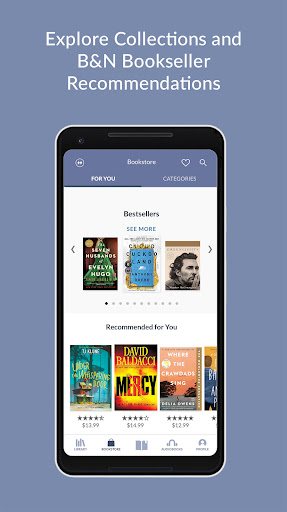
13 store screenshots


15 store screenshots



Pricing & paywalls
- Free to download
- Free to download
Ratings & reviews
-
5/5Search not working
Wont let me search for a book/author not sure if it’s a bug with the program or what but it just started. I was able to search not even an hour or two ago. Still great app love the convenience. Not working on iPad or mobile. I have been using this app for a while now and recently today I’ve had problems using the search bar on both my iPad and Mobile. I tried everything I could think of and thought the best thing to do was delete it off one device. I deleted it from my mobile device and re downloaded the app. Upon login I couldn’t view any of my books. When I tried going to the website it said I didn’t have any there either. Upon looking on my iPad I did have all the books still on that device Only. I’m unsure if this is a glitch or bug or anything but I like having the app on both devices because, obviously, I do not always carry my iPad with me. I would very much appreciate it if these issues could be looked at. It is also no longer appearing online when I log in there I have no idea what happened but nothing is on my devices and Ik I have purchased multiple books with barns and noble I can’t get any help fixing this problem I am over seas and can not call nor do I have access to get help from them. The only proof I have that I got these books are on my iPad.
Bated aggravate · 29 Sep 2026
-
5/5Not happy with the new update!
Before the update you could see the cover of all the books you had available to read in your library. Now you have to scroll through either by author or title and click on each to see them. Of course you can see recent ones that way, but I want to see all my books like it was before. Plus I have to do this with all my archived books also which takes forever if you can’t remember who wrote it or the exact title. I do not understand why they had to change that aspect of the app. Bring that option back, please!! Ok, they let me know I could view them that way by title or most recent, which is good, but why take away the choice by author? For those of us that read a lot this seems like a crazy change to make, this is a reading app after all, anything available in title should be available in author also(the same format). So, still no 5 stars because of that. Don’t understand why you changed that option:( Thank you for listening and adding back the choice to search by author or title with the book cover. I am very happy!! You get your 5 stars back:)
JAMarsh65 · 29 Sep 2026
-
1/5:(
I had to buy an E-Book through barnes and Nobel for school. WHICH can only be found through barnes and Nobel (I looked everywhere without pirating) which at first I did not mind. But. On top with only being able to find the book on barnes and Nobel. I was also forced to use this god forsaken app. The first thing I did was try to figure out how i can use the app. But the features are limited. It’s like they intentionally made it as difficult as possible to even enjoy the app. First of all. God forbid you try adjusting the text size because it’ll put your book in a blender and won’t be able to understand where anything is at. 2nd. Good luck finding a specific page. Bc both iPad and phone version won’t let you turn pages until at least 7 seconds passes between page turn. And the page finder is way to slow to even use that functionally. There are so many features missing compared standard industry practices like kindle or even just having a pdf version. Like being able to write and take notes on the page. Can’t do that. Or even highlighting properly. What I’m getting at. Is this entire app has ruined me so much so. That is just down right disrespectful. How a million dollar company like B&N would even agree to partner with nook or even call this passable platform to handle E-Books. I might as well pirates a PDF bc at least a PDF I can take proper notes on and it won’t completely hinder my ability to conduct my school work.
Thegamers4 · 29 Sep 2026
-
1/5Don't use it for large files
Although I have been able to read one volume books of average size in the Nook app without a problem, I made the mistake of buying a large "complete works" file of a favorite author from B&N. At first, it opened and paged quickly, but as I progressed through the file, it became slower and slower. I am not even one third of the way through the file, and it takes at least five minutes just to open, another five to seven minutes to finally stop loading, and I have to wait for at least another five minutes between swipes before I can turn a page. If, God forbid, the app times out before I get to it, the entire process starts all over again. This large file is virtually unreadable as a result. My purchase has turned into a waste of money and time. This happens on every platform I have tried. Yes, I have re-downloaded the app. I have also reported the problem multiple times with no response whatsoever. Update: in response to my earlier review, Nook asked me to try various methods to fix the issue, and gave me a help desk number. None of the fixes worked. The help desk person couldn't help. He did say that the problem probably lay with the large file I am trying to read, and that someone would get back to me on that. It's been over a week and I have heard nothing. I can only reiterate that, based on my dismal experience with this app, Nook is a lousy e-reader.
CLG9CU · 29 Sep 2026
-
1/5Frustrating, riddled with bugs, counterintuitive
I used to love my nook app - it was easy to use for all ages. There have been so many unnecessary changes rolled out so poorly that no one in the family wants to use their nooks because the app keeps changing, is counterintuitive, and frustrating - they’ve all downloaded kindle instead, and have asked me to simply buy paper books. Problems include: I can’t sort my archive - while it appears as an option in another family member’s profile, my profile does not have that option. With more than 400 books in my archive, it’s extremely difficult to find the books I want to read. Even if I know the author and exact title, the search function does not call up books we know are in the archive - they appear when I scroll through the archive, but not in search. Additionally, here’s the most ironic bug: the send feedback/report a bug feature doesn’t work - you can type, but the “send” button is grayed out and unavailable. Every time there’s an update I have to spend several hours scouring the FAQs to see if they took away functions or if we’re just seeing a bug, then analyze whose profile and account works correctly, then try it figure out why some family members have x function but others don’t. EVERY update at least one family member’s account or profile has a bug; and now, to even report the sorting bug, I had to go into one of my kids’ profiles since I couldn’t!
KA Jiang · 29 Sep 2026
No store reviews collected for Google Play · US
Privacy & accessibility
Privacy
- Data Linked to You — Analytics — Contact Info — Email Address Developer declared
- Data Linked to You — Analytics — Diagnostics — Crash Data Developer declared
- Data Linked to You — Analytics — Identifiers — Device ID Developer declared
- Data Linked to You — Analytics — Identifiers — User ID Developer declared
- Data Linked to You — Analytics — Location — Coarse Location Developer declared
- Data Linked to You — Analytics — Search History Developer declared
- Data Linked to You — Analytics — Usage Data — Other Usage Data Developer declared
- Data Linked to You — Analytics — Usage Data — Product Interaction Developer declared
- Data Linked to You — Analytics — User Content — Customer Support Developer declared
- Data Linked to You — App Functionality — Contact Info — Email Address Developer declared
- Data Linked to You — App Functionality — Diagnostics — Crash Data Developer declared
- Data Linked to You — App Functionality — Identifiers — Device ID Developer declared
- Data Linked to You — App Functionality — Identifiers — User ID Developer declared
- Data Linked to You — App Functionality — Location — Coarse Location Developer declared
- Data Linked to You — App Functionality — Search History Developer declared
- Data Linked to You — App Functionality — Usage Data — Other Usage Data Developer declared
- Data Linked to You — App Functionality — Usage Data — Product Interaction Developer declared
- Data Linked to You — App Functionality — User Content — Audio Data Developer declared
- Data Linked to You — App Functionality — User Content — Customer Support Developer declared
- Data Linked to You — App Functionality — User Content — Other User Content Developer declared
- Data Linked to You — Developer’s Advertising or Marketing — Contact Info — Email Address Developer declared
- Data Linked to You — Developer’s Advertising or Marketing — Identifiers — User ID Developer declared
- Data Linked to You — Developer’s Advertising or Marketing — Usage Data — Other Usage Data Developer declared
- Data Linked to You — Other Purposes — Usage Data — Other Usage Data Developer declared
- Data Linked to You — Other Purposes — Usage Data — Product Interaction Developer declared
- Data Linked to You — Product Personalization — Contact Info — Name Developer declared
- Data Linked to You — Product Personalization — Identifiers — Device ID Developer declared
- Data Linked to You — Product Personalization — Identifiers — User ID Developer declared
- Data Linked to You — Product Personalization — Search History Developer declared
- Data Linked to You — Product Personalization — Usage Data — Other Usage Data Developer declared
- Data Linked to You — Product Personalization — Usage Data — Product Interaction Developer declared
- Data Linked to You — Contact Info Developer declared
- Data Linked to You — Diagnostics Developer declared
- Data Linked to You — Identifiers Developer declared
- Data Linked to You — Location Developer declared
- Data Linked to You — Search History Developer declared
- Data Linked to You — Usage Data Developer declared
- Data Linked to You — User Content Developer declared
- Data Not Linked to You — Analytics — Diagnostics — Other Diagnostic Data Developer declared
- Data Not Linked to You — Analytics — Diagnostics — Performance Data Developer declared
- Data Not Linked to You — App Functionality — Diagnostics — Other Diagnostic Data Developer declared
- Data Not Linked to You — App Functionality — Diagnostics — Performance Data Developer declared
- Data Not Linked to You — Other Purposes — Diagnostics — Performance Data Developer declared
- Data Not Linked to You — Diagnostics Developer declared
Accessibility
No accessibility labels collected yet.
Privacy
- Data collected — Advertising or marketing, Account management — Personal info — Name Developer declared
- Data collected — Analytics — App info and performance — Crash logs Developer declared
- Data collected — Analytics — App info and performance — Diagnostics Developer declared
- Data collected — Analytics — App info and performance — Other app performance data Developer declared
- Data collected — Analytics, Account management — Device or other IDs Developer declared
- Data collected — Analytics, Advertising or marketing — App activity — App interactions Developer declared
- Data collected — App functionality, Advertising or marketing, Account management — Personal info — Email address Developer declared
- Data collected — App functionality, Advertising or marketing, Account management — Personal info — User IDs Developer declared
- Data collected — App functionality, Analytics — App activity — In-app search history Developer declared
- Data collected — App functionality, Analytics — Files and docs Developer declared
- Data collected — App functionality, Analytics, Personalization — Financial info — Purchase history Developer declared
- Data shared — Analytics — App activity — App interactions Developer declared
- Data shared — Analytics — App activity — In-app search history Developer declared
- Data shared — Analytics — App info and performance — Diagnostics Developer declared
- Data shared — Analytics — Device or other IDs Developer declared
- Security practices — Your data is transferred over a secure connection — Data is encrypted in transit Developer declared
- Security practices — The developer provides a way for you to request that your data be deleted — You can request that data be deleted Developer declared
Accessibility
No accessibility labels collected yet.
Versions
App Store
-
6.3.0
• Audiobook streaming has arrived! Listen to your audiobooks without needing to download. Start listening immediately with an active internet connection. (Streaming can be disabled in the B&N NOOK app settings.) • If you wish to download the book for offline listening, you can still do so by long pressing the book in your library. Or you can disable streaming from the B&N NOOK app settings. • When using CarPlay all purchased audiobooks are now available to stream or download. If streaming is disabled books played through CarPlay will begin downloading once selected. • Additional bug fixes and performance improvements.
-
6.3.1
• Bug fixes and performance improvements.
-
6.3.3
• Bug fixes and performance improvements.
-
6.4.0
• We've redesigned the shopping experience to put your favorites front and center! You can select your preferred categories in the shop for quick access to titles that match your interests. • Based on your feedback: Reading themes can now be ordered to your liking! Press and hold on a theme and select Change Order to arrange themes to your preference. • Additional fixes and improvements.
-
6.5.0
Got an Apple Watch and love listening to audiobooks while multitasking? Check out our new companion app for Apple Watch: • Quickly find audiobooks from your iPhone's library and start playing. • Select chapters, adjust speed, modify skip times, or set a sleep timer with a few taps on your wrist. • Track your listening progress by adding a B&N NOOK Audiobooks complication to your watch face. Additional bug fixes and performance improvements.
-
6.5.1
Got an Apple Watch and love listening to audiobooks while multitasking? Check out our new companion app for Apple Watch: • Quickly find audiobooks from your iPhone's library and start playing. • Select chapters, adjust speed, modify skip times, or set a sleep timer with a few taps on your wrist. • Track your listening progress by adding a B&N NOOK Audiobooks complication to your watch face. Additional bug fixes and performance improvements.
-
6.6.0
Improvements to the Account(Profile) and Library screens: • Redesigned Account Screen allows for quick access to Wishlist, Favorite Categories, Trends, and more! • The new Trends section lets you keep track of your reading and listening progress for the month. More trends coming in the future! • Multiple quality-of-life improvements to library management. Including collapsed menus, quick access “Only Show Downloaded Items” filter, and a new cloud icon for any file not already on your device. • Default Library view now starts in List View. Tap the Grid Icon in the top right to switch back from List View. • A new filter has been added to Library Settings called “Show Unsupported” Additional bug fixes and performance improvements.
-
6.6.1
Improvements to the Account(Profile) and Library screens: • Redesigned Account Screen allows for quick access to Wishlist, Favorite Categories, Trends, and more! • The new Trends section lets you keep track of your reading and listening progress for the month. More trends coming in the future! • Multiple quality-of-life improvements to library management. Including collapsed menus, quick access “Only Show Downloaded Items” filter, and a new cloud icon for any file not already on your device. • Default Library view now starts in List View. Tap the Grid Icon in the top right to switch back from List View. • A new filter has been added to Library Settings called “Show Unsupported” Additional bug fixes and performance improvements.
-
6.6.2
• Updated for compatibility with iOS 17 • Additional bug fixes and performance improvements
-
6.6.3
• Improved compatibility with iOS 17 • Additional bug fixes and performance improvements
-
6.6.4
• Bug fixes and performance improvements
-
6.6.5
• Bug fixes and performance improvements
-
6.6.6
• Bug fixes and performance improvements
-
6.6.7
• Bug fixes and performance improvements
-
6.6.8
• Bug fixes and performance improvements
-
6.7.0
Dark Mode: Enjoying books in the dark just got better! You may have changed your ebook reader theme, toggled the brightness of your screen, and some of us have even worn sunglasses at night. We've heard your feedback, and we're adding some help. Check out App Settings to enable Dark Mode. Choose from Always On, Always Off, or Use Device Settings. Additional bug fixes and performance improvements.
-
6.7.2
• Updated for compatibility with iOS 18 • Additional bug fixes and performance improvements
-
6.7.4
• Updated selection of reader fonts • Bug fixes and performance improvements
-
6.8.0
Bug fixes and performance improvements
-
6.8.1
Purchasing content just got easier! You can now link directly to the Barnes & Noble website by tapping any “Buy on BN.com” button. After purchasing online at the website, return to the B&N NOOK app to refresh your library to see new content. Additional bug fixes and performance improvements.
-
6.8.2
We're happy to announce that we're adding font weight options to your reading experience. In addition to choosing your new favorite fonts, you can now also enjoy enhancing them with one of three options: Thinner, Regular, Thicker. And.... many other helpful bug fixes
-
6.8.3
Bug fixes and performance improvements
-
6.8.4
Bug fixes and performance improvements
-
6.8.5
Bug fixes and performance improvements
-
6.8.6
· 2 Apr 2026
Bug fixes and performance improvements
Alternatives
- PangoBooks: Buy & Sell Books — Same category + similar ratings
- Chirp Audiobooks — Same category + similar ratings
- Bookly: Book Tracker — Same category + similar ratings
- Inkitt: Books, Novels, Stories — Same category + similar ratings
- NovelBar — Same category + similar ratings
- Kobo Books & Audiobooks — Same category + similar ratings
Availability by market
- US
Data quality & evidence
- Page completeness
- Apoku summary published
- Last verified
- 29 Sep 2026
- Sources
- App Store, Google Play