
Quick verdict
- What it is
- Store information collected; independent summary not yet available.
- At a glance
-
- Free to download
Categories and search queries
Official categories
- Books
- Entertainment
AppCorpus categories
Key functions
| Function | Availability | Access | Scope | Evidence |
|---|---|---|---|---|
| Free app | Yes | Free | — | Store published |
Screens
App Store
20 store screenshots

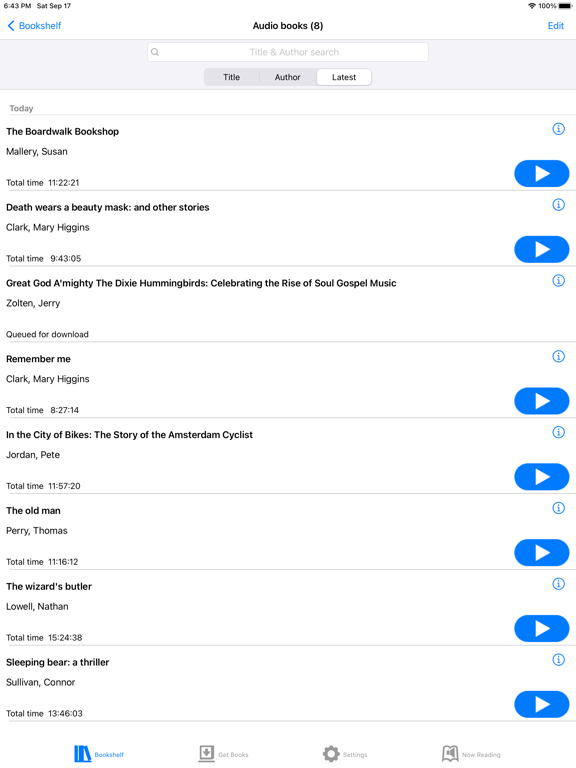

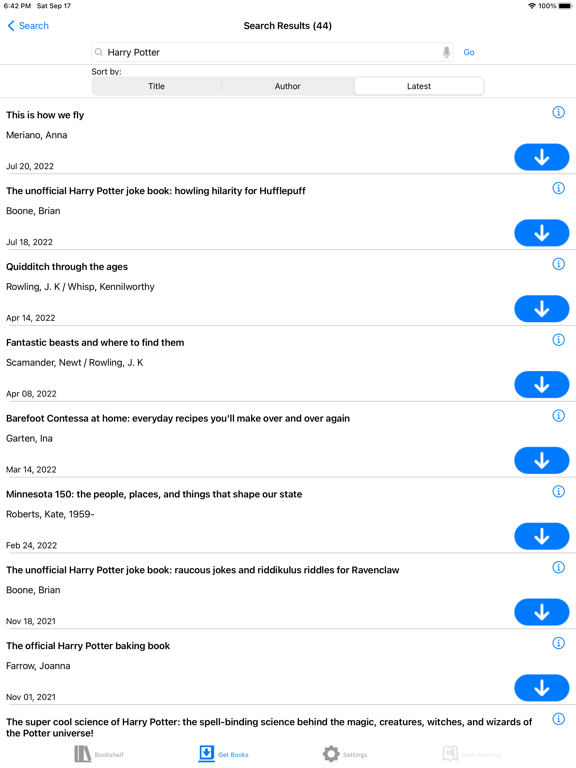
Pricing & paywalls
App Store
- Free
Ratings & reviews
App Store
-
4/5Great app, but needs better book organization
Hello all, I love how far this app has come. I remember it when it looked like a website but now it looks really cool and neatly laid out. I do have one problem with it, though; I wish you could organize your library into folders, and then I wish you could put the books one downloads into said folders. I also wish the books would stay in the order that they were downloaded in. For example, book one of the Harry Potter series, and then book 2 of the Harry Potter series; However, that does not happen. Once I download a book, it throws it in some random order so for example, the first Harry Potter book would be there, and then the first Lord of the rings book, and finally the second Harry Potter book. It is rather annoying to have to swipe through an unorganized library. That is why I request folders and for the ability for the books to stay in the order of the book series.
VulcanusCorvus · 6 Aug 2026
-
5/5BARD Mobile
I love the app, but an equalizer feature would be nice, as well as a pitch shifter to raise or lower the pitch as well as more speed options. what does tone mean when listening to a book? is it possible to update the app to be compatible with iOS 17? this app is so fun and neat and amazing and awesome and cool and super and phenomenal. please don’t ever get rid of the book Breakthrough by Joyce Smith because it is an inspiring and true story. thank you so much for finally adding this book because I’ve been waiting to download it for a long time. it would be even more cool if you could set the speed to 0%. Please don’t ever get rid of this app because I love it so much and it’s so nice and handy and convenient. Thanks. I love how the books are read by actual humans who are expressive instead of text-to-speech. Now I can’t even adjust the tone of the book I am listening to like I used to be able to do. thanks so much for updating the app so that I can adjust the tone of the books again like I used to. Please keep the updates coming if possible. is it possible to update the app to be compatible with iOS 26? There’s nothing wrong with the app, but I was just curious. It would be super awesome, cool, fun and funny if there was an option to slow down the playback speed to 0%. I have a Brailliant BI 40X Braille display that got an update where I can download audiobooks from the built-in bard app, but I can’t find the download button anywhere once I find a book? How do I find it? Do I have to turn something on or off? Thanks.
Lily Hjelle · 6 Aug 2026
-
5/5You might not ever purchase another book!
Keep in mind, a signature from a doctor or healthcare professional is required before you get approval from the NLS. Here in my state the whole process only took about one week. When initially installing the BARD app it would be beneficial to have someone fully cited by your side to help you sign in. Having said that, the app and service exceeded all expectations! I know some users have experienced issues, but that wasn't my experience. Maybe it was a software bug that has since been resolved? nevertheless, as a voiceover user I found the app and controls very easy to navigate. The layout is very straight forward and intuitive. Searching, adding books to your wishlist, downloading, and deleting are simple to perform. This goes for using the audio player as well. In voiceover mode, one flick of the finger gives you all kinds of secondary options like more titles by that particular author or subject. I was very impressed with the amount of titles in the library, with new ones being added regularly. They may not have brand new releases, but they are as recent as six months to a year. I did a comparison to Apple books and found that BARD had about 2/3 of the titles of the former, at least the ones I was looking for. Lastly, the narrators are all top-notch with great voices and diction.
Rick Rascati · 6 Aug 2026
-
3/5Login frustrating for existing patrons
I am 71 years old and have been a library patron since I was about age 7. I have used this app for many years. I have had to change my password unnecessarily a number of times. I am currently trying to reset my password from my iPhone. I don’t really want to do this, but the website will not let me login with different devices. I am repeatedly told that my ticket is incomplete even though I enter all the information and follow all the instructions. I have repeatedly requested instructions for resetting my password be sent and I have followed the instructions I’ve gotten only to hit a brick wall. For existing patrons, this is absolutely ridiculous. I know the website has to be secure and protected from people who are in eligible to use it, but I shouldn’t be experiencing this much difficulty when I have followed all the steps necessary. Otherwise, the app is OK although some other things need to be fixed as well. I should also be able to login without going to a website browser. I went to Safari, logged in there, and downloaded a book that I wanted but was unable to listen to it without re-downloading the app. When I re-downloaded the app, I thought maybe the problem would be fixed and I still can’t listen to the book that I downloaded from the web browser. totally ridiculous.
SuperStarEars · 6 Aug 2026
-
5/5The best app I have on my phone!
Hello, I have been using bard since I was 11. So for like four years now. As a fully blind individual, BARD Mobile has made it possible for me to read without buying books or spending an outrageous amount of money on a subscription. Although Audible still Has Its Pl., BARD Mobile is extremely helpful and life-changing for me. I spent almost all of my time reading, and I’m probably the biggest bookworm out of all my friends. And because BARD Mobile lets me have access to the audio versions and braille versions of books for free, I have been able to read pretty much every book I’ve wanted to. The selection on board is amazing, and the accessibility is phenomenal. I’ve seriously never ever found an accessibility issue on this app. One thing I especially love about Bard is that when there is about to be an update ran on it or when bar will be down for a few hours too a few days, they always send out a service message. Also, I love how often this app is updated with new books and just all out new features. There was only one suggestion I would make for this app. When I am looking through books and searching for titles, I can only search for specific titles. I wish there was a tab that let you discover books kind of like Audible, and you could pick young adult or whatever genre you want to look at. And then it would show you all the books categorized in that genre. It would make discovering books way easier, and it would just be really helpful in my opinion. I’ve tried just searching for young adult books, but it hasn’t worked since it thinks. I’m talking about a book with that specific title. Thank you for taking the time to read this, sorry if the typing is weird because I’m using dictate. And I hope that you take my feedback in consideration when making updates to this app. Thank you for providing an amazing app that lets blind people of all ages read and access literature!
Elise Ekland fan · 6 Aug 2026
Privacy & accessibility
App Store
Privacy
- Data Linked to You — Analytics — Contact Info — Email Address Developer declared
- Data Linked to You — Analytics — Diagnostics — Other Diagnostic Data Developer declared
- Data Linked to You — Analytics — Identifiers — User ID Developer declared
- Data Linked to You — Analytics — Location — Coarse Location Developer declared
- Data Linked to You — Analytics — Usage Data — Other Usage Data Developer declared
- Data Linked to You — Analytics — User Content — Customer Support Developer declared
- Data Linked to You — Analytics — User Content — Other User Content Developer declared
- Data Linked to You — App Functionality — Contact Info — Email Address Developer declared
- Data Linked to You — App Functionality — Diagnostics — Other Diagnostic Data Developer declared
- Data Linked to You — App Functionality — Identifiers — User ID Developer declared
- Data Linked to You — App Functionality — User Content — Customer Support Developer declared
- Data Linked to You — App Functionality — User Content — Other User Content Developer declared
- Data Linked to You — Product Personalization — Identifiers — User ID Developer declared
- Data Linked to You — Product Personalization — User Content — Other User Content Developer declared
- Data Linked to You — Contact Info Developer declared
- Data Linked to You — Diagnostics Developer declared
- Data Linked to You — Identifiers Developer declared
- Data Linked to You — Location Developer declared
- Data Linked to You — Usage Data Developer declared
- Data Linked to You — User Content Developer declared
- Data Not Linked to You — Analytics — Diagnostics — Crash Data Developer declared
- Data Not Linked to You — Analytics — Diagnostics — Performance Data Developer declared
- Data Not Linked to You — App Functionality — Diagnostics — Crash Data Developer declared
- Data Not Linked to You — Diagnostics Developer declared
Accessibility
- Dark Interface — SUPPORTED Store published
- Differentiate Without Color Alone — SUPPORTED Store published
- Larger Text — SUPPORTED Store published
- Reduced Motion — SUPPORTED Store published
- Sufficient Contrast — SUPPORTED Store published
- Voice Control — SUPPORTED Store published
- VoiceOver — SUPPORTED Store published
Versions
App Store
- 1.0
-
1.1
- Built-in sleep timer - New setting keeps device from sleeping while download is in progress - Add to wish list directly from details screen - Enhanced braille search function - Improved VoiceOver hints and labels - New braille shortcut key - Improved Magic Tap response - Works with iOS 9
-
1.1.1
Bug fixes and performance improvements.
-
1.2
- Adds “My previous downloads” and “Most popular books” to Get Books - Browse magazines by title - Braille autoreflow (lines of braille break to match your display length) - Beep-free mode - VoiceOver actions added to bookshelf items - Dynamic sleep timer (matches the jump-by level) - Adheres to system-wide type size setting (Dynamic Type) - Total reading time or number of braille volumes added to summary listings - Automatically reloads next 50 items as you scroll (no more tapping “Load more”) - Error message refinements - Double-tap gesture to reset speed/tone ...along with bug fixes, stability improvements, and performance enhancements.
-
1.2.1
Fixes a problem with braille reflow at some page boundaries and a bug that would cause the app to freeze when loading the bookshelf. v1.2: - Adds “My previous downloads” and “Most popular books” to Get Books - Browse magazines by title - Braille reflow (lines of braille break to match your display length) - Beep-free mode - VoiceOver actions added to bookshelf items - Dynamic sleep timer (matches the jump-by level) - Adheres to system-wide type size setting (Dynamic Type) - Total reading time or number of braille volumes added to summary listings - Automatically reloads next 50 items as you scroll (no more tapping “Load more”) - Error message refinements - Double-tap gesture to reset speed/tone ...along with bug fixes, stability improvements, and performance enhancements.
-
1.2.2
This version (1.2.2) fixes a bug related to audio decoding. Version 1.2 of BARD Mobile for iOS adds the following features: - Addition of “My previous downloads” and “Most popular books” to the top-level Get Books menu - Browse magazines by title - Braille reflow (lines of braille break to match your display length) - Beep-free mode - VoiceOver actions added to bookshelf items - Dynamic sleep timer (matches the jump-by level) - Autolayout of screens (for compatibility with a wider variety of iOS devices) - Adheres to system-wide type size setting (Dynamic Type) - Total reading time or number of braille volumes added to summary listings - Automatically reloads next 50 items as you scroll (no more tapping “Load more”) - Error message refinements - Double-tap gesture to reset speed/tone ...along with bug fixes, stability improvements, iOS compatibility, and performance enhancements. The user guide has been updated to reflect all feature changes.
-
1.3
Version 1.3 includes a number of new features, including: - Simultaneous downloads: You can now download up to three items simultaneously. - Braille autoscroll: When reading braille books, you can have your braille display scroll automatically. You have full control over the speed. - More actions button: The details screen for each book now includes an “ellipsis” button (labeled “More actions”) that offers a number of other things you can do with that book, including seeing a list of other books in the same series, by the same author(s), or in the same subject area(s). - Enhanced actions list on VoiceOver rotor: You can also get to those very same additional actions using the “Actions” item on the rotor while in a book list. - Quick switch between titles: No need to go back to the bookshelf to change books! Just swipe left with one finger (or three, if VoiceOver is on) while on the Now Reading screen to see a list of other books on your device that you’ve already opened. They’re in the order of most recently read. There’s also a “Recently read” button in the upper left if you don’t want to use the gesture. - Format hiding: Don’t ever read braille? Tell BARD Mobile not to show you any braille items (unless they’re on your wish list or previous downloads). Don’t ever read audio? It works that way, too. Find this by going to the Settings tab, selecting User Account Settings, and then selecting Show Me. - Book and magazine subscription support: You can now subscribe to magazines via the app just like you can on the BARD website. Book series, too! New magazine issues or books in subscribed series are automatically added to your Wish list. - AirPlay support: There’s now an AirPlay button right on the Now Reading screen. From there you can send your audio to any available AirPlay or connected Bluetooth device. - Braille/audio indicator: For lists with mixed formats (Wish List, Previous Downloads) there's a format indicator icon distinguishing format type so you know if it's audio and/or braille - Save “jump by” setting with each book: The app will now remember how you had your “jump by” button set when you close a book and will restore that setting the next time you open it. The release also includes internal updates and significant download reliability improvements. We’ve updated the user guide. It will also be found here: https://nlsbard.loc.gov/apidocs/BARDMobile.userguide.iOS.1.3.html
-
1.3.1
Fixed issue with the music collection search box selection when VoiceOver is enabled.
-
1.3.2
Assorted Bug Fixes
-
1.3.3
bug fix addressing issues with recently available foreign language title books
-
1.4
- Automatic Start Playback: when this new Audio Settings is enabled, it allows you to launch playback of titles w/out having to manually select the play button! Titles will immediately play when selected from your Bookshelf, Recently Read, or Get Books. You will no longer need to manually select the Play button after selecting the title. - Automatic 5 Second Rewind: when this new Audio Setting is enabled, BARD Mobile will rewind content to five seconds before restarting playing titles from your Bookshelf or Recently Read lists. Content paused and restarted from your Now Reading screen, however, will resume where you left off and it will not automatically rewind. - Bug fixes
-
1.4.1
-Bug fixes and additional Bluetooth support.
-
1.4.2
-bug fix that maintains access to the app's Get Books Bard Website pages without clicking past the login page.
-
1.4.3
- Supports IOS15 and iPadOS15 - Ability to sort and search Wish list and Previous downloads. - Additional ways to subscribe to content. - Ability to pinch and enlarge book Navigation panel text. - Improvements with error messaging. - Various bug fixes.
-
1.4.4
-bug fixes with search
-
2.0.0
Version 2.0 includes a number of new features, including in-app search capabilities: -Search inputs are more intuitive. Author search supports First Name, Last Name format; Last Name, First Name; and Last Name only. Quotation marks are no longer required. For example, input “Mary Clark” (without quotations) to find all the Mary Higgins Clark titles. -Keyword search supports searching all indexed metadata and can help users looking for multiple criteria. For example, to find a Terri Pratchett book narrated by Nick DePinto, a user can simply input “dePinto Terri“ (without quotations). -After a user inputs a search, they can amend the search type, the inputted term itself, or the format (audio or braille), and sort results alphabetically by author, title, or latest publication date. -In-app search now includes NLS Music collection holdings, allowing users to access the variety of musical appreciation and biography books, scores, and music instructional titles. -Users can switch between audio and braille searches. For example, input “learn guitar” (without quotation marks) with the search defaults to find audio instructional titles, then select the braille format and the search button again to find braille titles. Version 2.0 also includes enhancements to searching and sorting Bookshelf and Get Books listings. Bug fixes include: -Rewind controls skipping further than intended -Sideloading books -Downloading and reading non-ASCII foreign language book titles
-
2.1.0
-Search Music collections -Search Spanish and other language books -Change your BARD password in the app -Access to expand and read the full book annotation
-
2.2
-Search Music collections -Search Spanish and other language books -Access to expand and read the full book annotation -Bug fixes
-
2.2.1
-in-app password reset functionality
-
2.2.2
The app now supports iOS versions 14-17. Other updates include: 1. Siri Shortcuts (Voice User Interface) • The app can now be operated by voice commands for playback and navigation, including stopping and resuming a playback, fast-forwarding and rewinding by various intervals, and setting a sleep timer or a bookmark. Add Siri shortcuts in the App Settings. 2. International language search • Set up to four languages in the app's settings and then filter search results by selecting a preferred language. 3. Accessibility improvements for visually impaired users • We have boosted color contrast between selected and unselected search categories. This update enhances visibility with Smart Invert, Classic Invert, and Dark Mode on. 4. Multiword search for Search/Search music 5. Bug fixes, including: • Garbled Credentials Error • Switch from tone to speed on iOS 17 • “Get books” and “Bookshelf” return only titles matching the type selected in the “Show Me” setting, i.e. Audio Only/ Braille Only/ Both Audio and Braille
-
2.2.5
The newest version of BARD Mobile brings major improvements to performance, accessibility, and ease of use. 1. BARD Login Integration • Updated to the latest BARD Login system • A smoother, more accessible login experience • Improved password reset, EULA review, and Terms of Use acceptance 2. BARD 2.0 Integration • Updated to work seamlessly with the newest BARD system • Better overall reliability and performance 3. iOS 18 and iPadOS 18 Support • Fully compatible with iOS 18 and iPadOS 18 • Also supports the two previous OS versions 4. Updated User Guides • English and Spanish guides now reflect current functionality 5. Bug Fixes and Improvements • Bluetooth headsets (including Shokz) now pause/play reliably • Playback resumes correctly with a single Bluetooth button tap • Get Books search results no longer show duplicates • Music, Magazine, and Series searches now match the BARD 2 website • VoiceOver improvements, including smoother scrolling in long lists • Wishlist items remain accessible after deleting a book 6. Technical Enhancements • Improved monitoring, analytics, and data tracking
-
2.2.6
· 3 Jul 2026
What’s new in Version 2.2.6 (865): iOS 26 and iPadOS 26 support • Fully compatible with iOS 26 and iPadOS 26 • Also supports the two previous iOS versions Improved searching and sorting • Long lists (e.g., Recently Added, Most Popular) are now fully searchable • Improved VoiceOver experience when searching and sorting Bug fixes and improvements • Pausing and resuming downloads now works reliably • Wish List result count updates correctly after deleting an item • Deleted items no longer appear in the Wish List • Braille playback scrolling now works correctly on iOS 26 and iPadOS 26 VoiceOver improvements • VoiceOver focus now stays on Now Reading after selecting a book for playback • VoiceOver focus remains in place when selecting “Expand Annotation” Technical enhancements • Implemented Offline Tokens for improved reliability
Alternatives
- Dolphin EasyReader — Same category + similar ratings
- Audiobooks Now Audio Books — Same category + similar ratings
- The Palace Project — Same category + similar ratings
- Boundless — Same category + similar ratings
- Chirp Audiobooks — Same category + similar ratings
- CloudLibrary — Same category + similar ratings
Availability by market
- US
Data quality & evidence
- Page completeness
- Live store listing
- Last verified
- 6 Aug 2026
- Sources
- App Store
- Independent summary has not been published yet.