
Quick verdict
- What it is
- Store information collected; independent summary not yet available.
- At a glance
-
- Free to download
Categories and search queries
Official categories
- Utilities
AppCorpus categories
Key functions
| Function | Availability | Access | Scope | Evidence |
|---|---|---|---|---|
| Free app | Yes | Free | — | Store published |
Screens
App Store
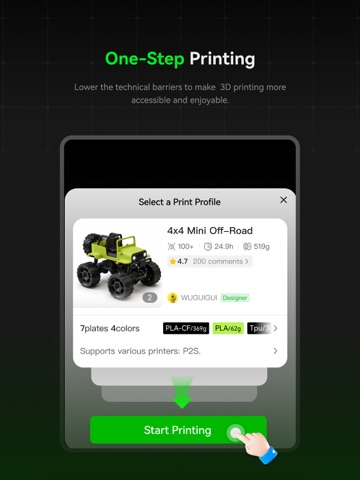
15 store screenshots


Pricing & paywalls
App Store
Shown for US
- Free
Ratings & reviews
App Store
Shown for US
-
5/5AWESOME
So I’m 12 years old and last year I saved up every penny I had and bought my bamboo lap. A1 kudos to the A1 awesome printer haven’t had any problems fantastic job same thing for the app. My favorite part is all the contest around summertime I’ll go to the beach with my familyand labs will have a little contest surrounding about beach objects so like little shovels and pale and stuff this is so awesome to see because a lot of professional qualified people wanting to win like money or something or a prize will make a bunch of stuff out there for free that I get to benefit from and now those models are just there forever the contests are so clever cause they encourages people to make stuff that they wouldn’t normally make with hopes of a reward you can find pretty much anything you want to print. I’m not very handy and don’t have a computer so I’m not able to use other websites so all I’m using is bamboo handy and it’s so awesome if you’re thinking about getting a 3-D printer or download this app for someone who does please you can find literally anything on here and if you can’t with a minimal effort, you can find it somewhere elsebut I haven’t need to bottom line. Awesome printer awesome map kudos to all the awesome people working at bamboo labs love ya.
Love Petfinder · 30 Aug 2026
-
5/5Great serious beginner tool.
If you are serious about printing and have the money to invest you are sure to get it back with your first ten prints. The product is very very easy to build and assembly is easiest when you use the manual off on a tablet and can watch a you tube video on the how to assemble. There are items not included in other similar models and steps you can forgive but overall the process is the same. Creating after feeding each tube is extremely easy. This is my second printer. The first was an experiment that led to an instant addiction. So far everyone seems to agree, your first one leads to a better one. I am about to check only overnight product. A toy for my daughters. During my wake hours I’m busy creating and need to work on my Cad skills to make what I want but so far the last 24hrs have exceeded my expectation. Bambu labs is exactly what I dreamt of when I considered a second printer, and Black Friday discounts are the best. Compact and quiet this is a work horse for me. I hope the review works. I think the extra parts are for creating stuff. It seems to be what everyone is doing with it. Best of luck, happy building!!
Captain Joseph Herrera · 30 Aug 2026
-
5/5Best software ever
Going from a Frankenstein hand me down ender 5 - that constantly needing to fix/adjust not to mention using multiple firmware/softwares for a single print just for it to fail. To a P1S with AMS. Best decision I’ve ever made. The software alone is worth every penny, in my opinion. The fact I can be anywhere and think of something I want to print, find a model, send print, all from the convenience of my phone is incredible. 10/10. Bambu is the one and only brand that I ever recommend to others regardless of experience level. When People say “bambu is a little on the expensive side” like yeah sure it is but it’s one of those things where you get what you paid for and it’s everything you could want in a printer, quiet, convenient, dependable, reliable, and so so easy to navigate even for beginners with zero experience. Thank you Bambu for making every single part of the process as simple and clear as possible for your products and us as users. Your product and services help getting into the hobby the best experience
VBest 623 · 30 Aug 2026
-
5/5A Must-Have App for Bambu X1 Carbon Owners!
I'm thrilled with the Bambu Handy app for iPhone! As an owner of the Bambu X1 Carbon, this app has become an indispensable tool for me. Not only does it allow me to seamlessly view the prints from my Bambu X1 Carbon, but the app's latest update has truly taken it to the next level. Previously, I had issues viewing the printer's built-in camera through the app, but the developers have gone above and beyond to address this problem. Thanks to the update, the camera viewing feature now works flawlessly! I can't express how grateful I am for this improvement—it's made my experience with the Bambu X1 Carbon even more enjoyable. The user interface is intuitive, and the app runs smoothly without any hiccups. The Bambu Handy team has done an outstanding job in creating an app that perfectly complements the Bambu X1 Carbon printer. Thank you so much to the Bambu Handy team for your dedication to excellence and for continuously working to enhance the app's features. I highly recommend this app to all Bambu X1 Carbon owners. You won't be disappointed!
JoshuaFuller · 30 Aug 2026
-
5/5The Best in the Industry
After trial and error, frustration and defeat, despiration and failure with several of the well known brands of 3D printers I was recommended to give Bambu a try. What the heck, my expectations by this time were very low. Upon completing the set up I started to print a football team logo that took about 3 hours. I turned it on, sent the file and just kinda forgot about it. When I finally looked at the completed print I was amazed, wow. None of the over lapping, voided spots, or stringy print. I started my second print and all perfect. This printer has been going on non stop and a week into this printer I am still in awe. Hands down Bambu is in my opinion the best of the best when it comes to 3D printers. Again, this is coming from someone who has tried almost a dozen different company name brands that are out on the market. I’m far from a being any expert, but this overall experience with Bambu has made it all very easy and very fun to learn and print. My hats off to Bambu!
ILuvBigNipplz · 30 Aug 2026
Privacy & accessibility
App Store
Privacy
- Data Linked to You — App Functionality — Contact Info — Email Address Developer declared
- Data Linked to You — App Functionality — Diagnostics — Performance Data Developer declared
- Data Linked to You — App Functionality — Identifiers — User ID Developer declared
- Data Linked to You — App Functionality — Usage Data — Other Usage Data Developer declared
- Data Linked to You — App Functionality — Usage Data — Product Interaction Developer declared
- Data Linked to You — App Functionality — User Content — Audio Data Developer declared
- Data Linked to You — App Functionality — User Content — Customer Support Developer declared
- Data Linked to You — App Functionality — User Content — Other User Content Developer declared
- Data Linked to You — App Functionality — User Content — Photos or Videos Developer declared
- Data Linked to You — Contact Info Developer declared
- Data Linked to You — Diagnostics Developer declared
- Data Linked to You — Identifiers Developer declared
- Data Linked to You — Usage Data Developer declared
- Data Linked to You — User Content Developer declared
- Data Not Linked to You — App Functionality — Diagnostics — Crash Data Developer declared
- Data Not Linked to You — App Functionality — Identifiers — Device ID Developer declared
- Data Not Linked to You — App Functionality — Location — Coarse Location Developer declared
- Data Not Linked to You — Diagnostics Developer declared
- Data Not Linked to You — Identifiers Developer declared
- Data Not Linked to You — Location Developer declared
Accessibility
No accessibility labels collected yet.
Versions
App Store
-
3.10.0
New Features 1. Added support for H2C Bug Fixes 1. Fixed some user experience issues
-
3.10.2
This is a hotfix version based on 3.10.0 that focuses on fixing several known print issues.
-
3.11.0
1. Optimized the sharing feature 2. [P2S] Added support for "Exhaust Fan" and"Purify Air at Print End" 3. Added support for "Clear Cache" 4. Added support for displaying nozzle infomation in Printing History 5. [H2C] Added support for reading certain hotend infomation
-
3.11.1
Fixing several known issues.
-
3.11.2
Fixing several known issues.
-
3.12.0
New Features 1. Added UI support for foldable screens and tablets 2. Added a crowdfunding entry to the sidebar of "Models" page 3. Improved HMS machine assistant reminders 4. Enabled free selection of nozzles and filament on multi-nozzle printers when using a single filament Bug Fixes 1. Fixed a potential app freeze issue on the iOS launch screen 2. Fixed inaccurate print time estimation on H2C printers
-
3.13.0
1. Optimized printer model preselection logic on the "Select a Print Profile" page and printer preselection logic on the "Device" page 2. Improved user experience for the "Next Plate" feature 3. Improved scrolling experience in the model list
-
3.14.0
New Features 1. [H2D] Firmware versions 01.03.00.00 and above are expected to support filament remote drying, printing while drying, and improvements to the TPU printing experience, among other enhancements. 2. Optimized the "Me > Learning" page Bug Fixes 1. Fixed an issue where LiveView frequently reported "Over N Studio/Handy are using remote access" error 2. Fixed an issue where filaments initiated from SD card printing were not correctly auto-mapped by color
-
3.15.0
New Features 1. Added a new type of in-app notification for print status. 2. Improved the wording of system error messages.
-
3.16.0
New Features 1. Filament Management now supports automatic AMS enrollment, features expanded data fields, and includes an improved list interface for smoother navigation. 2. Models generated by MakerLab support print preview, letting you see the color effects of different filaments. In just five minutes, you can create your own custom keychain model
-
3.16.1
Fixed known issues to improve overall stability.
-
3.17.0
New Features 1. Added a new binding method via Pin Code 2. Improved the tutorial experience for printers
-
3.18.0
1. Launched the Parametric Model Editor, allowing users to browse and select customizable parametric models. 2. Enabled direct customization of parametric models from the model detail page
-
3.19.0
New Features 1. Added supprot for the Filament Track Switch for X2D , enabling flexible nozzle mapping for seamless pairing between dual nozzles and dual AMS units. Starting a print in Filament-Saving Mode helps reduce filament waste and improve printing efficiency. 2. Improved the remote liveview feature.
-
3.20.0
New Features 1. Added support for viewing models stored in the printer's internal storage, including print models initiated directly from the device. 2. Updated the official filament color palette.
-
3.21.0
New Features 1. Added support for the A2L printer. 2. Added support for manual multi-color printing with external filaments on A2L, including mixed AMS and external filament workflows for multi-color models. 3. Refined slicing logic to improve overall performance. 4. Optimized the timelapse switching logic. 5. Added the ability to follow specific topics in the Community. Bug Fixes 1. Fixed an issue where some icons were not rendering correctly.
-
3.22.0
New Feature [X2D] Optimized the logic for filament selection.
-
3.23.0
1. Optimized the device sorting rules on the "Prepare to Print" page. 2. Added the App Feature Lab, where you can sign up for early access to new and unreleased features.
-
3.24.0
1. Optimized the printer model display logic on the "Select a Print Profile" page. 2. Fixed an issue where some device icons were not displayed correctly. 3. Fixed known crashes and enhanced stability. 4. Resolved a specific issue where printing could not be started.
-
3.25.0
· 25 Jul 2026
New Features 1. Optimized the filament selection logic for X2D when using the filament track switch. 2. Improved the status display for laser & cut tasks.
-
3.26.0
1. Improved printer selection interaction on the "Prepare to Print" page. 2. Fixed liveview interruption issues. 3. Enhanced the user experience for the "Skip Parts" feature.
-
3.27.0
UI improvements and bug fixes.
-
3.27.1
· 22 Aug 2026
Ul improvements and bug fixes.
-
3.5.0
- Added support for H2D Pro
-
3.6.0
New Features 1. Added support for H2S 2. Optimized Timelapse: Added support for viewing local files 3. Enhanced like animation 4. Added Dutch language Bug Fixes 1. Fixed Liveview display issue on some devices
-
3.7.0
New Features 1. Improved print mode switching experience in Prepare to Print 2. Added Filament & Maker's Supply type in tickets 3. Optimized Do-Not-Disturb feature for private messages 4. Optimized quick boost feature for models 5. Added Russian language support Bug Fixes 1. Fixed the issue where Sunlu filaments could not start printing 2. Fixed the issue where iOS devices could not display print progress notifications
-
3.8.0
New Features 1. Added support for P2S 2. Added Hungarian language Bug Fix 1. Fixed a crash issue when previewing certain models on some devices
-
3.9.0
New Features 1. Added Polish language 2. Optimized account login experience 3. Added support for uploading app logs in software tickets 4. Added support for skipping parts and displaying the model’s cover image in printing tasks initiated from the printer (The latest firmware version of some models supports this function) Bug Fixes 1. Fixed incorrect display of official filament color names 2. Fixed an issue where some users experienced a white screen on the Devices page
Alternatives
- Thingiverse MakerWorld | 3Drop — Same category + similar ratings
- Meshtastic — Same category + similar ratings
- Anker — Same category + similar ratings
Availability by market
- US
Data quality & evidence
- Page completeness
- Live store listing
- Last verified
- 30 Aug 2026
- Sources
- App Store, Google Play
- Independent summary has not been published yet.